

Microsoft’s Copilot has finally been moved out of the “nice demo” category and into something you can reasonably consider using day‑to‑day — a human‑centered assistant with memory, shared sessions, proactive help, a friendly avatar, and tighter browser and OS automation that together change the practical calculus for everyday users and IT teams.
Microsoft announced the Copilot Fall Release as a coordinated, multi‑product wave that stitches Copilot into Windows, Edge, Microsoft 365, mobile apps and new Samsung TV integrations. The company frames this update around a simple promise: build AI that returns time to users rather than demanding attention. The Fall Release bundles roughly a dozen headline features — Mico (a visual avatar), Copilot Groups for multi‑person collaboration, long‑term Memory & Personalization, Connectors to link cloud accounts, Learn Live (a Socratic tutoring mode), Copilot for Health, and expanded Edge capabilities (Actions and Journeys) — plus a set of in‑house models called the MAI family (MAI‑Voice‑1, MAI‑1‑Preview, MAI‑Vision‑1). The release is staged and feature‑gated. Many capabilities are available U.S.‑first and some require a Microsoft 365 Personal, Family, or Premium subscription or are currently in preview rings. Microsoft’s messaging emphasizes opt‑in consent, visible controls for memory and connectors, and explicit confirmations for agentic actions.
At the same time, memory increases the need for transparent defaults: it must be easy to see what Copilot remembers, how to delete it, and how to restrict which apps or accounts feed memory. Microsoft has exposed management controls and conversational commands to edit memory, which is a necessary minimum for trust.
But shared memories and cross‑account connectors in group sessions raise governance flags: who owns the session data, how long is it stored, can guests access linked accounts inadvertently, and how do tenant policies or parental controls interact with group sessions? Administrators and informed users must plan for those questions.
Operators should verify how Actions handle credentials, whether third‑party sites are whitelisted, and how logs are retained. These are operational details that matter for both consumer safety and enterprise compliance.
The update’s success will depend on execution in the months ahead: how transparently Microsoft implements consent and memory controls, how Actions handle credentials and audit trails, and how well the company documents the MAI models and their safety postures. In short, Copilot’s Fall Release makes the assistant worth trying — but try with eyes open: the features deliver real productivity gains, and they require proportionate governance.
Copilot’s Fall Release is not a single feature drop — it’s a product‑level pivot toward an assistant that remembers, collaborates, and acts with consent. That makes Copilot finally worth trying for anyone who wants a less brittle, more proactive AI partner — provided the organization or individual testing it pays attention to the governance details that matter most.
Source: Lifewire The Update That Finally Makes Copilot Worth Trying
 Background / Overview
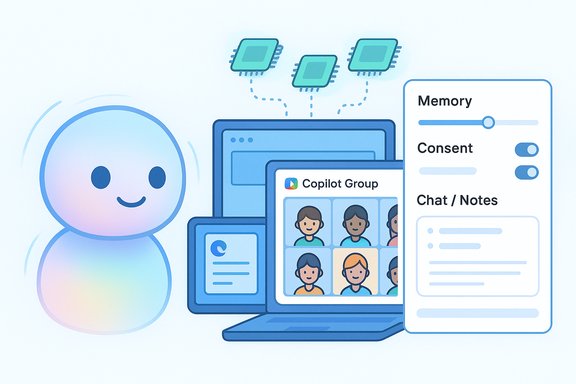
Microsoft announced the Copilot Fall Release as a coordinated, multi‑product wave that stitches Copilot into Windows, Edge, Microsoft 365, mobile apps and new Samsung TV integrations. The company frames this update around a simple promise: build AI that returns time to users rather than demanding attention. The Fall Release bundles roughly a dozen headline features — Mico (a visual avatar), Copilot Groups for multi‑person collaboration, long‑term Memory & Personalization, Connectors to link cloud accounts, Learn Live (a Socratic tutoring mode), Copilot for Health, and expanded Edge capabilities (Actions and Journeys) — plus a set of in‑house models called the MAI family (MAI‑Voice‑1, MAI‑1‑Preview, MAI‑Vision‑1). The release is staged and feature‑gated. Many capabilities are available U.S.‑first and some require a Microsoft 365 Personal, Family, or Premium subscription or are currently in preview rings. Microsoft’s messaging emphasizes opt‑in consent, visible controls for memory and connectors, and explicit confirmations for agentic actions. What changed: feature snapshot
Below is a concise, verifiable breakdown of the features that materially change Copilot’s usability day to day.- Mico (avatar): An animated, non‑photoreal visual persona that appears primarily in voice sessions and Learn Live. It reacts with color and motion to indicate listening, thinking, and emotional tone and is customizable and toggleable. The design is intentionally abstract to avoid the uncanny valley and emotional over‑attachment.
- Copilot Groups: A shared session model that lets a single Copilot instance participate in real‑time conversations with up to 32 participants, summarizing threads, tallying votes, splitting tasks, and co‑authoring content. Sessions are link‑based and aimed at small teams, study groups, and social collaboration.
- Memory & Personalization: Long‑term, user‑managed memory that stores preferences, ongoing projects, and facts you ask Copilot to remember. Users can view, edit, or delete memories; memory is opt‑in and surfaced in a management UI. This is the single biggest usability upgrade for anyone who found one‑off AI replies brittle.
- Connectors: Opt‑in links to cloud services (OneDrive, Outlook, Gmail, Google Drive, Google Calendar, etc. so Copilot can search and reason across your accounts after you explicitly grant permission. Connectors enable useful cross‑account queries but increase the surface area for governance and review.
- Edge: Actions & Journeys: Copilot Mode in Microsoft Edge can now reason across open tabs (with permission), summarize and compare sources, and perform permissioned, auditable multi‑step Actions (booking travel, filling forms). Journeys organize related browsing into resumable storylines for complex research tasks. These are powerful time‑savers — and they introduce new questions about logging, credentials, and audit trails.
- Learn Live: A voice‑first, Socratic tutoring mode that uses questions, visual cues, and interactive whiteboards to guide learning rather than simply providing answers. This is explicitly designed to improve retention and reduce overreliance on straight answers.
- Copilot for Health: Health answers grounded to vetted publishers and an assisted clinician‑finder flow that considers specialty, language, and location. Microsoft positions this as assistive and not a replacement for clinical advice; U.S. availability is emphasized.
- Pages & Imagine: Collaborative canvases where multiple files can be uploaded and interpreted by Copilot (Microsoft’s page describes multi‑file upload support for up to 10 files, though some early previews reported different caps — see verification notes below). Imagine is a community remix space for AI‑generated visuals.
- In‑house MAI models: Microsoft disclosed a family of proprietary models — MAI‑Voice‑1, MAI‑1‑Preview, and MAI‑Vision‑1 — that are being integrated alongside routed external models such as OpenAI’s GPT variants. These are intended to optimize latency, on‑device workloads, and handling of voice/vision tasks.
- Proactive Actions: For Microsoft 365 subscribers, Copilot can now surface proactive suggestions based on recent conversations and browsing, such as recommended next steps in research or follow‑ups. These are preview features requiring subscription and opt‑in.
How the changes matter in practice
From one‑off answers to ongoing context
The introduction of long‑term memory is the core usability shift. Previously, Copilot behaved like a stateless Q&A widget; now it can act as a continuity layer across weeks of work. For users who juggle recurring tasks — event planning, multistage research, multi‑session learning — Copilot’s memory reduces repetition and enables proactive nudges. That makes Copilot more of a productivity assistant and less of a novelty.At the same time, memory increases the need for transparent defaults: it must be easy to see what Copilot remembers, how to delete it, and how to restrict which apps or accounts feed memory. Microsoft has exposed management controls and conversational commands to edit memory, which is a necessary minimum for trust.
Real‑time group work, not just personal help
Copilot Groups changes the unit of value from single users to small groups. Making Copilot a link‑based participant that can summarize, create action lists, and tally votes compresses coordination work that otherwise requires manual synthesis. That’s useful for clubs, study groups, family planning, and small teams who want rapid, exportable outcomes.But shared memories and cross‑account connectors in group sessions raise governance flags: who owns the session data, how long is it stored, can guests access linked accounts inadvertently, and how do tenant policies or parental controls interact with group sessions? Administrators and informed users must plan for those questions.
Edge Actions: automation with audit trails
Turning Edge into an “AI browser” that can complete bookings or fill complex forms is a practical win for repetitive, error‑prone tasks. The critical design difference is Microsoft’s emphasis on permissioned Actions and visible confirmations. If implemented well, Actions can reduce friction; if implemented poorly, they could automate mistakes at scale.Operators should verify how Actions handle credentials, whether third‑party sites are whitelisted, and how logs are retained. These are operational details that matter for both consumer safety and enterprise compliance.
Technical verification and points of divergence
The most load‑bearing claims are cross‑checked against Microsoft’s official blog post and independent reporting:- Microsoft’s official Copilot Fall Release blog details the 12 headline features, including Mico, Groups (up to 32 participants), memory controls, connectors, Learn Live, Edge Actions and Journeys, and the MAI model family. This is the company’s authoritative product description.
- Independent outlets (Lifewire, THE Journal and other coverage) corroborate the same feature set and rollout posture — U.S.‑first staging, some subscription gating, and preview‑only functionality for certain items. These outlets add practical notes such as Podcasts, Samsung TV integrations, and Pages behavior.
- On some details there is variation between previews and Microsoft’s published copy. For example, Microsoft’s blog references Pages supporting multi‑file uploads (stated as up to 10 files in the official post), while some preview reports cited larger file counts (e.g., up to 20 files) in early builds. This is an example of preview variability; treat early numeric caps as provisional until Microsoft updates product documentation or admin guides.
- The exact default state of Mico (enabled in voice mode by default or off until opted in) varies slightly between hands‑on previews and official copy; Microsoft describes Mico as optional and toggleable while some previews noted it appears by default in voice builds. Users should confirm the setting in their local Copilot app.
- Some consumer features (Journeys, Actions, Copilot for Health) are explicitly U.S.‑only at launch; Microsoft lists the regional gating in the blog post and independent reporting matches that rollout plan.
Strengths: what Microsoft got right
- Practical feature mix. The Fall Release targets actual friction points: remembering context, coordinating groups, finishing work started in the browser, and scaffolding learning. This is a product‑first approach rather than a pure research demo.
- Opt‑in, visible controls. Microsoft emphasizes explicit consent flows for connectors and confirmations for agentic Actions. Memory management is surfaced conversationally. Those controls are necessary and welcome design choices.
- Platform‑wide consistency. Delivering the same Copilot concepts across Windows, Edge, mobile, and even Samsung TVs (where Copilot experiences can recap shows and answer queries) increases the everyday utility of the assistant.
- Model strategy balance. By coupling in‑house MAI models for voice/vision and routing heavier reasoning tasks to external models, Microsoft aims to optimize latency and reduce third‑party data exposure without forgoing model capability where it’s needed. This mixed approach is pragmatic for scale.
- Pedagogical intent for Learn Live. A voice‑first, Socratic mode that resists simple answer dumping aligns better with learning science than rote response generation — provided the tutoring content is accurate and moderated.
Risks, open questions, and recommended guardrails
Despite meaningful progress, the Fall Release introduces new governance complexity and potential hazards.Privacy & data flow risks
- Memory accumulation: Persistent memory is powerful but can create long‑living profiles. Verify default retention, audit trails, and how memories interact with enterprise data policies. Users and admins need tools to see and revoke memories quickly.
- Connectors + Groups = expanded surface area: Linking Gmail or Google Drive into Copilot and then inviting others into a Copilot Group session requires tight UI cues and explicit consent to avoid accidental data sharing. Administrators should test connector behavior under tenant policies.
- Agentic Actions & credentials: Actions that fill forms or book travel will need robust protections around stored credentials, cross‑site authorization, and replayable automation. Confirm where credentials are stored and whether Actions ever transmit secrets to third‑party sites.
Safety and content quality
- Health & legal scope limits: Even though Copilot for Health is grounded to reputable publishers, it’s an assistive tool — not a clinical decision system. Ensure clear disclaimers and human escalation paths for high‑stakes queries.
- Model transparency: Microsoft’s MAI models add performance benefits, but independent benchmarks and transparency about training data, data retention, and safety guardrails will be essential for enterprise trust. Treat model names as engineering progress markers, not proof of robustness until third‑party evaluations appear.
User experience pitfalls
- Persona design risks: Mico’s optional avatar reduces friction in voice sessions, but anthropomorphic interfaces can lead people to over‑attribute agency. Microsoft’s abstract design and opt‑out controls are sensible — still, user studies will matter.
- Feature fragmentation across regions/devices: U.S.‑first gating for actions, Journeys, and health features means inconsistent behavior for global teams. IT teams must map feature availability across user populations to avoid confusion.
Practical advice: how to evaluate Copilot Fall Release in your environment
- Start with a pilot group. Enable Copilot for a small set of power users and test Groups, Pages, and Edge Actions on non‑sensitive workflows to validate behavior and capture feedback.
- Audit connector flows. Test OAuth and connector consent screens with test accounts; document how Copilot surfaces that it is using cross‑service data.
- Define memory policies. Decide default memory settings for your user base and prepare a short training brief explaining how to view, edit, and delete memories.
- Test Edge Actions in a sandbox. Validate credential handling and logging for automated Actions on representative third‑party sites.
- Control rollout by region. Use staged availability to reconcile U.S.‑only features with global compliance and user expectations.
- Educate about Learn Live and Health. Emphasize role boundaries: Learn Live is an aid, not a grader; Copilot for Health is a signpost, not a diagnosis.
The bottom line
The Copilot Fall Release is the most consequential consumer‑facing update Microsoft has shipped for its assistant product to date. It moves Copilot from ephemeral answers to persistent help — shared sessions, remembered context, agentic browsing, and a calibrated persona that is both useful and intentionally contained. For everyday users, the change is tangible: fewer repeated prompts, easier group coordination, and time saved on multi‑step web tasks. For IT and compliance teams, the update is a call to action: design policies, test connectors and actions, and prepare governance around memory and shared sessions.The update’s success will depend on execution in the months ahead: how transparently Microsoft implements consent and memory controls, how Actions handle credentials and audit trails, and how well the company documents the MAI models and their safety postures. In short, Copilot’s Fall Release makes the assistant worth trying — but try with eyes open: the features deliver real productivity gains, and they require proportionate governance.
Quick reference: what to check immediately after updating
- Is Mico enabled by default in your build? Toggle it off in Copilot settings if you prefer no avatar.
- What is your organization’s policy for Connectors? Restrict or approve specific third‑party links.
- Where are Edge Actions logs stored and who can review them? Confirm with security teams.
- How are Memories shown to users and admins? Verify edit/delete flows work cleanly.
Copilot’s Fall Release is not a single feature drop — it’s a product‑level pivot toward an assistant that remembers, collaborates, and acts with consent. That makes Copilot finally worth trying for anyone who wants a less brittle, more proactive AI partner — provided the organization or individual testing it pays attention to the governance details that matter most.
Source: Lifewire The Update That Finally Makes Copilot Worth Trying
