

Ever pointed your phone at a plant, pair of shoes, or a strange gadget and wished your computer could just tell you what it is? Microsoft’s Copilot image search promises precisely that: use a photo instead of text and let AI do the heavy lifting. The result is faster identification, shopping matches, and quick context for landmarks or animals — but it also raises real questions about accuracy, data flows, and how on-device vs. cloud processing is handled. This feature-by-feature deep dive explains how Copilot’s image search works, what it can and cannot do, and how Windows users and IT teams should treat it in both everyday and enterprise environments.
Microsoft has pushed Copilot as a multipurpose, multimodal assistant across Windows, Edge, and mobile apps. One key capability is AI image search — a visual-search flow that accepts photos or screenshots and uses vision-language models (VLMs) to identify objects, find similar products, extract text, or verify image provenance. Microsoft’s consumer-facing documentation frames this as an evolution of traditional reverse image search: instead of merely matching pixels, Copilot aims to understand what’s in the picture and generate contextual information or follow-up searches.
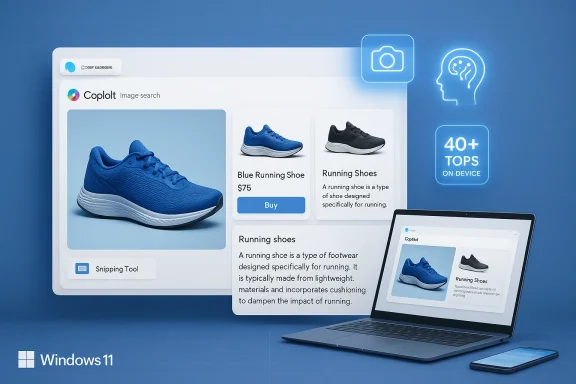
The company has layered several product and platform changes beneath that promise. Copilot appears as a web and native app, integrates with Snipping Tool and File Explorer AI actions, and offers enhanced on-device experiences on certified Copilot+ PCs that include a neural processing unit (NPU) rated at 40+ TOPS for accelerated local AI processing. Microsoft has also introduced a homegrown image model, MAI-Image-1, which the company says is now available inside Bing Image Creator and Copilot image workflows alongside other engines.
This story is part technical primer, part practical guide and part cautionary note: AI image search is powerful and useful today, but it’s not a magic wand. Below I explain how it works, real-world use cases, accuracy caveats, privacy and enterprise implications, and straightforward tips that get better results while protecting data.
But there are meaningful risks:
Avoid relying on it for high-stakes decisions: medical, legal, financial, or regulated contexts require authoritative verification. In enterprise settings, don’t enable cloud visual search without policy, administrative controls, and awareness training.
Copilot’s image search is a major productivity advance integrated into Windows and Microsoft’s Copilot ecosystem. The technology is mature enough for daily use, but the responsibility for privacy, accuracy, and governance rests with users and IT teams. With sensible policies and a cautious approach to sensitive data, AI image search can be a smart, safe, and time‑saving tool in your Windows toolkit.
Conclusion
AI image search is no longer a theoretical novelty — Copilot brings it into the everyday Windows experience, blending vision-language models, on-device acceleration on Copilot+ PCs, and multi-engine options for generation and identification. Use it to speed up routine workflows and curiosity-driven queries, but treat outputs as starting points, not final answers. Configure enterprise controls, educate users, and prefer on-device processing where privacy matters. In short: Copilot image search expands what you can ask your PC — just make sure you also control what your PC sends out.
Source: Microsoft Search by Image with AI | Microsoft Copilot
 Background / Overview
Microsoft has pushed Copilot as a multipurpose, multimodal assistant across Windows, Edge, and mobile apps. One key capability is AI image search — a visual-search flow that accepts photos or screenshots and uses vision-language models (VLMs) to identify objects, find similar products, extract text, or verify image provenance. Microsoft’s consumer-facing documentation frames this as an evolution of traditional reverse image search: instead of merely matching pixels, Copilot aims to understand what’s in the picture and generate contextual information or follow-up searches.The company has layered several product and platform changes beneath that promise. Copilot appears as a web and native app, integrates with Snipping Tool and File Explorer AI actions, and offers enhanced on-device experiences on certified Copilot+ PCs that include a neural processing unit (NPU) rated at 40+ TOPS for accelerated local AI processing. Microsoft has also introduced a homegrown image model, MAI-Image-1, which the company says is now available inside Bing Image Creator and Copilot image workflows alongside other engines.
This story is part technical primer, part practical guide and part cautionary note: AI image search is powerful and useful today, but it’s not a magic wand. Below I explain how it works, real-world use cases, accuracy caveats, privacy and enterprise implications, and straightforward tips that get better results while protecting data.
How Copilot’s AI image search works
1. From pixels to meaning: vision-language models
At the center of modern image search are vision-language models (VLMs). These models combine image encoders and language decoders so a system can convert pixels into embeddings (mathematical representations), then map those embeddings into natural-language outputs or retrieval queries.- Image encoder: extracts features (shapes, textures, colors, object outlines) and converts them into vectors.
- Multimodal layer: relates visual vectors to textual embeddings so the system can say, “this looks like a Labrador” or “this is a red running shoe.”
- Language module: formulates results, suggestions, and follow-up questions in readable form, and can trigger web searches for similar items.
2. Product flow: upload, augment, ask
Copilot’s consumer flow is intentionally simple:- Open Copilot (browser sidebar, Copilot app, or Snipping Tool integration).
- Upload a photo or snap a live shot.
- Optionally add a text prompt (for example: “identify this plant” or “find similar shoes”).
- Copilot returns identifications, shopping links, related knowledge, or suggested clarifying questions.
Practical uses and real-world examples
AI image search is more than a party trick. Here are the high-value scenarios where Copilot’s image abilities shine:- Shopping: take a photo of a jacket or pair of shoes and Copilot returns visually similar items, product pages, or shopping cards that speed up discovery.
- Nature and pets: identify plant species, bird types, or dog breeds from a photo — a good fit for casual hobbyists and students.
- Travel and local history: point Copilot at a landmark photo to get historical context, architectural details, or nearby attractions.
- Verification and fact-checking: detect signs of manipulation or find original sources for a shared photo (useful for social media verification).
- Productivity: extract text from images, convert screenshot tables into copy/pasteable spreadsheets, and redact sensitive information before sharing.
What Copilot does well
- Speed and accessibility. Upload a clear photo and Copilot often returns a useful result within seconds. For routine tasks like product matching and text extraction, it can save multiple manual steps.
- Integration with Windows. Tying visual queries into the Snipping Tool, Photos, Paint, and File Explorer reduces friction — you don’t need to open a separate app to do a visual lookup.
- Flexible outputs. Copilot can return identification plus related links, shopping suggestions, and follow-up questions. Adding a short text prompt improves precision.
- On-device capabilities on Copilot+ PCs. Systems equipped with a certified NPU (40+ TOPS) can handle more processing locally (for example, Recall snapshots and some vision tasks), reducing latency and offering improved privacy controls when used correctly.
- New model options. Microsoft has deployed an in-house image model, MAI-Image-1, into its image pipelines, giving Copilot an additional engine optimized for photorealism and real-world creative tasks.
Where Copilot can fail — accuracy, edge cases, and hallucination
- Low-quality images cause errors. Blurry, low‑light, occluded, or tiny objects commonly yield incorrect identifications.
- Obscure or new items. For niche hardware, rare plant species, or custom-made items, Copilot may propose the nearest guess but not match exactly.
- Visual ambiguity. Many objects look similar in photos (retro consoles, generic earbuds, or similar-looking car models), and models don’t have common-sense context to disambiguate without a user prompt.
- Model hallucination. When forced to spit out a label, models sometimes invent plausible-sounding but incorrect details. Always treat identification results as leads, not authoritative facts.
- Bias and dataset gaps. Training data influences what the model recognizes—this can produce uneven accuracy across regions, ethnicities, languages, or product catalogs.
Privacy, security, and enterprise implications
AI image search is not just a UX story — it’s a data‑flow and governance story. Copilot’s functionality mixes local and cloud processing depending on context, user settings, and device hardware.Cloud vs. on-device processing
- By default, many Copilot and Visual Search actions analyze images in the cloud — this enables large models and up-to-date search/indexing capabilities.
- Copilot+ PCs with NPUs are explicitly designed to perform certain tasks locally (for example, Windows Recall stores and indexes snapshots on-device), but cloud processing still occurs for many features unless settings or product tiers change that behavior.
- Users must assume images may leave the device when using generic Copilot or Visual Search flows, particularly when using browser-based Copilot in Edge or the web Copilot experience.
Data use, retention, and training
- Microsoft’s documentation and product settings offer controls around data sharing and model training: in some markets and configurations, user interactions may be used to improve models unless the user or admin opts out.
- Enterprise tenants and paid commercial plans often have stricter defaults and opt-out options; administrators can control whether Copilot data is shared for model evaluation and set retention rules.
- Sensitive screenshots — patient records, proprietary code, or regulated PII — should not be casually uploaded to cloud-based AI features. Use on-device capabilities, or disable visual AI flows in managed environments until governance is in place.
Administrative controls and compliance
- Organizations should inventory where Copilot and Visual Search are available (taskbar Copilot, Edge sidebar, Snipping Tool) and evaluate the telemetry that might be produced.
- For regulated environments, admins can restrict cloud AI features through group policies, endpoint management configurations, and by limiting Copilot to enterprise-only deployments that use corporate data boundaries.
- Conduct a pilot and network inspection before enabling Copilot image features widely — cloud handoffs show up in network telemetry and can be blocked or routed through inspection proxies if required.
Best practices for users (make searches better; stay safe)
- Use clear, well-lit photos. Cropping to the object of interest reduces false positives.
- Add a short text prompt with the image (for example, “identify this plant” or “find these sneakers”). That extra guidance dramatically improves results.
- Try multiple angles: three or four photos from different perspectives increase the chance of correct identification.
- For sensitive content, prefer on-device features (Copilot+ Recall) or avoid uploading images at all.
- Treat identifications as leads — use image results to find authoritative confirmation before making decisions.
- Use built-in redaction and text-extraction tools in Snipping Tool if you must share screenshots that include contact details or PII.
Best practices for IT and security teams
- Inventory Copilot deployment points: taskbar Copilot, Copilot in Edge, Snipping Tool, File Explorer AI actions, and mobile apps.
- Define acceptable use: create policies that explicitly state when it’s acceptable to use cloud image search and when it is forbidden.
- Configure administrative controls: use endpoint policies, privacy settings, and Copilot tenant controls to limit data sharing and cloud evaluation where necessary.
- Pilot with risk assessment: evaluate how images leave the network, whether they are logged, and how retention settings apply to different product tiers.
- Train employees: include a short module on AI image tools in security awareness training, emphasizing sensitive data handling and verification expectations.
Technical details IT readers will care about
- Supported image formats: common consumer flows accept JPG, JPEG and PNG (these are the most widely supported formats in Copilot image features).
- Copilot+ PC NPU: Microsoft classifies Copilot+ PCs as having 40+ TOPS NPUs designed to accelerate local inference, enabling hybrid AI experiences that split workloads across device and cloud.
- Model diversity: Copilot image features can use multiple back-end image engines. Microsoft has added its in-house model MAI-Image-1 as an option alongside other providers, offering trade-offs in speed, style, and safety processing.
- Local indexing: Windows Recall on Copilot+ PCs stores snapshots locally and requires explicit opt-in; access to Recall is gated by Windows Hello authentication and local encryption.
Troubleshooting common problems
- Poor matches: try re‑taking the photo at higher resolution or from a different angle; crop out background clutter.
- No shopping matches: product may be out of catalog or too generic; try focusing on unique details (logos, tags).
- Privacy concerns: check Copilot privacy settings and disable cloud evaluation if you cannot accept off‑device processing.
- Feature not appearing: confirm you have the latest Windows updates, Copilot app version, and that the feature is not gated behind Copilot+ hardware or Copilot subscription tiers.
Strengths, risks, and the ethical landscape
AI image search democratizes access to search and identification in a way that’s genuinely useful: quick product lookups, immediate context for curiosities, and faster data extraction from visuals. Integrated into Windows workflows, these features reduce friction and can raise productivity across consumer and business workflows.But there are meaningful risks:
- Privacy exposure. Images often contain sensitive context — location cues, faces, ID numbers — and cloud processing amplifies risk. Default settings and unclear retention policies create potential for inadvertent leaks.
- Misinformation and overconfidence. Users may treat AI identifications as fact. Mislabeling a medical plant or misidentifying an animal can have real-world consequences if decisions rely on the result.
- Intellectual property and copyright. Uploading others’ photos to generate content or search may implicate copyright rules; image-based prompts that recreate trademarked characters or logos can create legal headaches.
- Vendor lock-in and data governance. For enterprises, cloud handoffs complicate compliance. Even with opt-out options, metadata and derivative results can leave on-premises control.
Recommended rollout plan for organizations
- Start with discovery: identify the Copilot entry points employees use today (taskbar, Edge, Snipping Tool).
- Pilot with an opt-in group: enable visual AI features for a small team with explicit training and monitoring.
- Set policy guardrails: document permitted and forbidden use cases, including PII, regulated data, and proprietary code/images.
- Configure admin controls: set tenant-level policies for Copilot data sharing and model training; limit or disable cloud analysis where necessary.
- Expand or restrict: after a 30–60 day pilot, assess telemetry, helpdesk tickets, and compliance impact, then scale with controls in place.
Final verdict — when to use Copilot image search, and when not to
Use Copilot image search when you need quick, exploratory answers: shopping, casual plant or pet ID, quick text extraction, and travel curiosity. It’s an unbeatable convenience for these everyday tasks, especially when paired with clear, well-framed photos and a short instructional prompt.Avoid relying on it for high-stakes decisions: medical, legal, financial, or regulated contexts require authoritative verification. In enterprise settings, don’t enable cloud visual search without policy, administrative controls, and awareness training.
Copilot’s image search is a major productivity advance integrated into Windows and Microsoft’s Copilot ecosystem. The technology is mature enough for daily use, but the responsibility for privacy, accuracy, and governance rests with users and IT teams. With sensible policies and a cautious approach to sensitive data, AI image search can be a smart, safe, and time‑saving tool in your Windows toolkit.
Conclusion
AI image search is no longer a theoretical novelty — Copilot brings it into the everyday Windows experience, blending vision-language models, on-device acceleration on Copilot+ PCs, and multi-engine options for generation and identification. Use it to speed up routine workflows and curiosity-driven queries, but treat outputs as starting points, not final answers. Configure enterprise controls, educate users, and prefer on-device processing where privacy matters. In short: Copilot image search expands what you can ask your PC — just make sure you also control what your PC sends out.
Source: Microsoft Search by Image with AI | Microsoft Copilot
