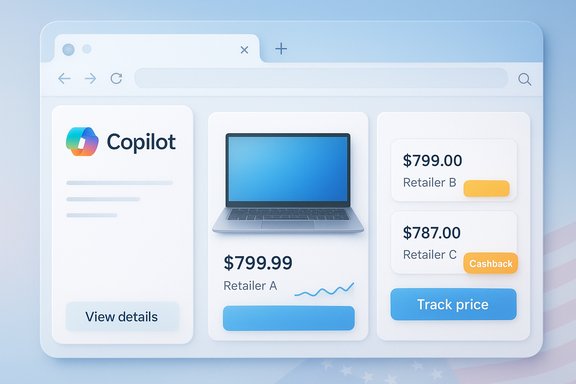
Microsoft’s Copilot in Edge is now an active shopping assistant for US users, folding price comparison, price history, price tracking, product insights and built‑in cashback into the Copilot sidebar and Copilot Mode so the browser itself can surface deals, notify you of lower prices elsewhere, and even prompt cashback opportunities as you browse.
Microsoft has been steadily shifting shopping features that previously lived as separate Edge UI elements into Copilot in Edge, creating a unified, conversational shopping surface inside the browser. The consolidation replaces the blue shopping tag and ad‑hoc flyouts with a persistent Copilot entry point where users can open a product insights card and see side‑by‑side price comparisons, a historical price chart, review summaries, and options to set price alerts or enable cashback. Microsoft frames the change as a holiday‑season push, with the initial rollout targeted at users in the United States. Why this matters: Copilot now stitches together multiple savings tools that used to require extensions, manual price trackers, or dedicated shopping tabs. The intent is to reduce friction — let Copilot find better prices, track changes, and surface merchant offers conversationally as you shop in Edge.
Conclusion: Copilot in Edge now bundles the core shopping utilities users ask for — price comparisons, history, tracking, product insights and cashback — into a single, conversational experience that aims to make holiday shopping faster and smarter for US users. The tools are useful, but they require user vigilance around payout reliability, provenance of AI judgments, and merchant feed compliance; take advantage of the new features, but verify the essentials before you hit Buy.
Source: Tech in Asia https://www.techinasia.com/news/microsoft-rolls-out-new-copilot-shopping-tools-in-us/
 Background / Overview
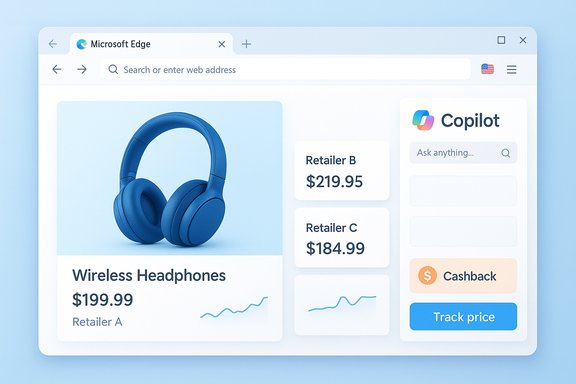
Microsoft has been steadily shifting shopping features that previously lived as separate Edge UI elements into Copilot in Edge, creating a unified, conversational shopping surface inside the browser. The consolidation replaces the blue shopping tag and ad‑hoc flyouts with a persistent Copilot entry point where users can open a product insights card and see side‑by‑side price comparisons, a historical price chart, review summaries, and options to set price alerts or enable cashback. Microsoft frames the change as a holiday‑season push, with the initial rollout targeted at users in the United States. Why this matters: Copilot now stitches together multiple savings tools that used to require extensions, manual price trackers, or dedicated shopping tabs. The intent is to reduce friction — let Copilot find better prices, track changes, and surface merchant offers conversationally as you shop in Edge.What Microsoft says is included
Microsoft’s official product messaging lists the following core shopping capabilities now available inside Copilot in Edge:- Price Comparison — pull prices from other retailers and present them inside Copilot’s sidebar.
- Price History — show historical price charts so users can judge whether they’re looking at a typical price or a short‑term spike.
- Price Tracking / Alerts — set a price goal and receive notifications when the item reaches that target.
- Product Insights — AI‑summarized review highlights, pros/cons and aggregated sentiment to shorten review reading.
- Microsoft Cashback — detect and surface retailer‑funded cashback offers and provide a path to claim the rebate (payouts occur via PayPal).
How it works in practice
Inline insights and the Copilot sidebar
When you visit a supported product page, the Copilot icon opens a product card with consolidated information: an image, price, retailer, ratings, a price‑history chart and “Compare” entries from other sellers. From there you can:- Click “View details” to see more retailer options and the price history.
- Select “Track price” to add the item to a watchlist.
- Follow Copilot prompts to activate cashback when available.
Proactive Copilot Mode
Copilot Mode in Edge — Microsoft’s more assertive assistant mode — can provide real‑time prompts, such as telling you a lower price exists elsewhere while you’re on a checkout page, or highlighting that an item is eligible for cashback before you complete purchase. Microsoft describes these notifications appearing in the address bar and Copilot pane.Technical and policy details verified
The rollout and features above are described in Microsoft’s Edge support and product blog posts; these are the authoritative product sources used to verify the feature set and availability. Independent reporting and technology press coverage confirm the move to fold shopping tools into Copilot and position this as part of Microsoft’s broader Copilot expansion. Some specific facts verified against Microsoft documentation and community reports:- Cashback payouts are processed via PayPal after purchase confirmation; this is the redemption path documented on Microsoft’s Cashback pages and in Microsoft community answers. Users have reported occasional payout and transfer problems in support threads.
- Domain verification and store creation for merchants to appear in Microsoft Shopping placements require a Microsoft Merchant Center store and domain verification via Bing Webmaster Tools or a validated UET (Universal Event Tracking) tag. Merchant store review can be automatic or manual and may take a few days for review/approval. These merchant onboarding steps are documented in Microsoft Advertising / Merchant Center guidance.
- Feature availability is region‑gated and staggered; Microsoft explicitly notes the US as the initial market for this Copilot shopping push and warns that not all users will see the features immediately. Edge version, Microsoft account sign‑in and settings may affect visibility.
Strengths: why this is useful for shoppers
- Convenience and time savings. Consolidating price comparisons, historical charts, review summaries and cashback prompts into one pane removes the tab‑hopping that slows online shoppers. Copilot’s conversational model allows quick follow‑up queries without rebuilding searches.
- Native integration. Because the features live inside Edge and Copilot, users don’t need third‑party extensions or separate price‑tracking services. Native integration also permits tighter ties to account history and potential native checkout flows in the future.
- Built‑in alerts and automation. Price tracking and goal‑based alerts let users be notified automatically when a desired price is reached, which is particularly useful during high‑traffic shopping events like Black Friday and Cyber Week.
- Potential merchant discovery advantage. Smaller retailers who participate in Microsoft Cashback or maintain good Merchant Center feeds can appear in Copilot’s comparison cards, offering an alternate distribution channel outside the major marketplaces.
Risks and limitations — what to watch for
- Opt‑in and transparency. The convenience of Copilot’s proactive prompts depends on users allowing Copilot Mode and privacy features. That raises questions about how much data (order history, browsing patterns) is used to make personalized recommendations, and how clearly Microsoft surfaces provenance for AI‑driven conclusions. Microsoft’s support material explains toggles and sign‑in requirements, but transparency over the data sources behind a given price judgment could be improved.
- Cashback reliability and payout friction. While Microsoft documents PayPal as the payout mechanism, community support threads and Q&A reports show real users experiencing failed transfers, delays, or account‑linking errors. Those edge cases can create friction for shoppers who expect guaranteed rebates after purchase. Users should keep receipts and monitor cashback status until funds appear in PayPal.
- Risk of AI over‑confidence and manipulation. Product insights and review summarization rely on AI models that may be misled by fake reviews, coordinated manipulation, or sparse data. Summaries that omit provenance or confidence levels could amplify low‑quality signals unless Microsoft enforces strong heuristics (e.g., weighting verified purchases, cross‑source checks). Independent reporting and industry commentary warn this is a general risk for automated review summarizers.
- Native checkout and merchant economics. If Microsoft extends native checkout inside Copilot, merchants and payment processors will need clear terms, fraud controls, dispute handling and fee structures. The complexity of merchant integrations — plus the risk of inconsistent user experience across stores — is a non‑trivial operational challenge. Early merchant onboarding reports suggest domain verification and feed compliance can be stumbling blocks.
- Fragmented rollout experience. Staged rollouts mean some users will see proactive notifications and full product cards while others will not; that fragmentation can create confusion and inconsistent expectations across devices or accounts. Microsoft support pages and community threads both document uneven visibility during early launches.
Guidance for consumers: practical tips to use Copilot Shopping safely
- Always toggle features you do not want. Copilot shopping features are optional — disable Copilot Mode or shopping features in Edge settings if you prefer to avoid proactive nudges.
- Verify price sources yourself before buying. Use Copilot’s comparison cards as a time‑saving starting point, but open the merchant pages to confirm shipping, returns, taxes and seller reputation before completing a purchase. Microsoft’s documentation also recommends verifying details on the retailer’s site.
- Track cashback claims and keep proof. If cashback is promised, keep order confirmations and watch the Microsoft cashback dashboard or PayPal for payout status; follow up with Microsoft support if funds don’t appear within the expected window. Community reports show some users have experienced delays or transfer issues.
- Use price alerts strategically. Instead of passively tracking dozens of items, set price goals only for purchases you intend to make; too many tracked items can produce alert fatigue and dilute value.
Guidance for merchants and advertisers
- Get your Microsoft Merchant Center in order. To appear in Microsoft’s shopping surfaces you need a Merchant Center store, a compliant product feed, and domain verification (via Bing Webmaster Tools or a validated UET tag). Expect automated or manual reviews and be prepared to respond to policy or verification requests.
- Participate in Microsoft Cashback cautiously. Being in the Cashback program can surface offers in Edge while customers browse, but program terms and retailer participation are subject to change; ensure you understand fee/referral economics and that your order confirmation flows permit tracking for cashback reconciliation. Microsoft publishes a participating‑retailer dashboard for merchants to confirm eligibility.
- Prepare for higher scrutiny on product feeds. Microsoft’s Shopping placements require correct product metadata, clear pricing, accurate shipping and returns pages, and valid SSL checkout flows — feeds that violate editorial rules are likely to be rejected. Merchant support channels can take days for review; plan ahead for holiday season traffic.
- Monitor for competitive placement. Copilot’s comparison cards may surface competitors’ offers side‑by‑side with yours; merchants should consider dynamic pricing, timely inventory data, and promotional offers to remain competitive in those cards.
Strategic context: where this fits in Microsoft’s AI play
This shopping push is consistent with Microsoft’s broader strategy of embedding Copilot across surfaces — browser, Windows, and apps — and turning Copilot into an action‑capable assistant that not only advises but can also act (booking, native checkout, reservations) on the user’s behalf. Features like Copilot Actions and Vision (screen‑aware assistance) signal Microsoft’s intent to make Copilot a central pivot for both productivity and consumer tasks, with commerce being an obvious early use case because of the measurable business outcomes and ad/partner economics. Independent reporting on Copilot’s expansion into actions and commerce confirms the company’s platform play.Open questions and unverifiable claims to watch
- Reported counts of cashback‑eligible countries vary by source. Some summaries in the marketplace mention a figure (for example, “36 countries”), but Microsoft’s public pages advise checking the Microsoft Cashback dashboard for the current list of participating retailers and markets — that list can change. Treat specific country counts as provisional and verify against Microsoft’s official dashboard for your market. This claim is flagged as variable.
- Third‑party claims about merchant onboarding speed. Vendor marketing (reported in secondary summaries) has suggested rapid Merchant Center approvals "in as little as five minutes" if using certain feed partners. That kind of claim depends heavily on account status, prior verification, feed correctness and Microsoft's review queue; Microsoft’s own documentation describes potential manual review windows that can take several days. The five‑minute claim could be true in specific automated import paths, but it is not a guaranteed baseline and could not be independently verified as universal. Treat such time claims with caution.
Final analysis — practical verdict for readers
Microsoft’s consolidation of shopping features into Copilot in Edge is a material usability upgrade for shoppers who want an integrated, conversational way to compare prices, track deals and collect cashback without installing extensions or juggling multiple sites. The move is technically well‑grounded — Microsoft controls the Edge distribution channel and a Merchant Center + Cashback ecosystem that can surface retailer offers directly in the browser — and it fits squarely into the company’s broader Copilot strategy of providing agentic AI across Windows and Edge. At the same time, early adopters should be pragmatic and cautious:- Use Copilot’s shopping cards as a time‑saving research tool, not as the single source of truth. Confirm prices, shipping and return policy on the retailer page before buying.
- Monitor cashback reimbursements and keep proof of purchase until payouts clear.
- Merchants should prioritize correct Merchant Center feeds and domain verification to avoid delays or rejections.
- Expect uneven rollout and be prepared to toggle off proactive features if privacy or noise becomes a concern.
Conclusion: Copilot in Edge now bundles the core shopping utilities users ask for — price comparisons, history, tracking, product insights and cashback — into a single, conversational experience that aims to make holiday shopping faster and smarter for US users. The tools are useful, but they require user vigilance around payout reliability, provenance of AI judgments, and merchant feed compliance; take advantage of the new features, but verify the essentials before you hit Buy.
Source: Tech in Asia https://www.techinasia.com/news/microsoft-rolls-out-new-copilot-shopping-tools-in-us/