

Microsoft is adding LSEG and Moody’s as trusted data providers for Copilot in Excel through Model Context Protocol integration, giving eligible Microsoft 365 users a way to request market, credit, risk, company, and research data from inside a workbook rather than switching to separate finance terminals or portals. The feature is not just another Copilot button in the ribbon. It is Microsoft’s clearest signal yet that Excel’s next act is not merely AI-assisted formulas, but AI-mediated access to the expensive, governed information that finance teams already buy. That raises the stakes for everyone who treats Excel as both calculator and system of record.
For decades, Excel has been the place financial data goes after the real work of finding it has already happened. Analysts pull numbers from terminals, PDFs, data rooms, ERP exports, research portals, credit reports, email attachments, and the occasional suspicious CSV, then hammer those fragments into a workbook that becomes the living version of the truth. Microsoft’s new Copilot integration tries to collapse that first, messy half of the job into the spreadsheet itself.
That is why the LSEG and Moody’s names matter. This is not Microsoft telling users that an AI model can browse the open web and summarize market chatter. It is a pitch that Copilot can reach into licensed, professional-grade sources and return information that finance departments, risk teams, and investment desks are already accustomed to treating as authoritative.
The distinction is important because spreadsheets are uniquely vulnerable to false confidence. A number in a cell looks precise even when its origin is fuzzy. By tying Copilot in Excel to named providers such as LSEG and Moody’s, Microsoft is trying to make provenance part of the product, not an afterthought buried in a prompt transcript.
There is also a business logic here that goes beyond convenience. Excel is already the most durable piece of software in finance, partly because it is flexible enough to absorb every new data source and workflow thrown at it. If Copilot can make Excel the place where users ask for, retrieve, transform, and analyze licensed data, Microsoft gets to defend the spreadsheet against both specialist terminals and newer AI-native research tools.
That matters because financial data is not the same as a public webpage. It is licensed, permissioned, frequently time-sensitive, and surrounded by compliance requirements. A useful AI integration cannot simply scrape a provider’s interface and paste the result into Excel; it needs identity, entitlements, auditability, and a reasonably deterministic path from request to result.
Microsoft’s use of MCP is therefore less about novelty than normalization. The company is betting that AI assistants in productivity software will need a standard connection layer, just as Office once needed file formats, add-ins, ODBC connections, and APIs. The old spreadsheet world was built on connectors; the Copilot world is being built on tool calls.
The risk is that MCP becomes a marketing term before users understand what it guarantees. A protocol can make integrations cleaner, but it does not automatically make results correct, complete, licensed for every downstream use, or suitable for regulated decision-making. The protocol gives Copilot a door into trusted systems; it does not absolve firms from deciding who should be allowed to open that door.
That makes LSEG and Moody’s logical early partners. LSEG brings market data, pricing, analytics, and financial content that sits close to capital markets workflows. Moody’s brings credit ratings, risk analytics, research, and decision intelligence that are embedded in credit analysis and risk management. These are exactly the kinds of inputs analysts already spend time retrieving, validating, and reconciling.
The productivity case is easy to understand. Instead of asking one system for a company profile, another for historical prices, another for sector data, and another for ratings commentary, a user can ask Copilot to bring relevant material into the workbook. The bigger claim is that Copilot can preserve enough context to help the user turn that material into a model, chart, scenario, or narrative.
But finance professionals will not judge the feature by demo smoothness. They will judge it by whether the returned data has the right timestamp, entitlement, field definition, currency, identifier mapping, and lineage. In financial modeling, “close enough” is often worse than obviously wrong, because it survives review longer.
Instead of menus, connectors, and formulas being the primary control surface, natural language becomes the first step. A user might ask Copilot to compare debt profiles across a peer group, pull recent market data into a table, retrieve ratings-related context, or build a chart from historical pricing. The request sounds conversational, but the output must still obey the harsh discipline of cells, formulas, and workbook logic.
This is where Excel gives Microsoft an advantage over standalone AI tools. The spreadsheet is not just a chat window; it is a computational canvas with visible state. Users can inspect formulas, edit assumptions, trace dependencies, and hand the workbook to a colleague who may never read the prompt that generated part of it.
That visible state also creates accountability. If Copilot pulls in a table, a finance team can compare it with known sources, lock ranges, add controls, and build review processes around it. The promise is not that AI replaces spreadsheet discipline, but that it reduces the friction of getting high-quality inputs into the place where spreadsheet discipline already lives.
Excel is the most consequential member of that suite for this strategy because it combines creativity, calculation, and operational risk. A Word document can misphrase a paragraph. An Excel workbook can misprice a transaction, distort a forecast, or quietly propagate an error into a board deck. The more Copilot can do inside Excel, the more Microsoft has to convince enterprises that it can be governed.
Recent Copilot in Excel improvements have already pushed beyond simple formula help. Microsoft has been emphasizing workbook editing, analysis, visualization, tables, charts, PivotTables, and natural-language interaction. Adding external data providers moves Copilot from helping users manipulate information they already have to helping them obtain information they may not yet possess.
That is a meaningful boundary. Once Copilot becomes a data retrieval interface, it competes with internal research portals, BI front ends, data catalogs, and specialist market platforms. Microsoft does not need to replace those systems outright; it only needs to make Excel the place where their value is consumed.
That is where Microsoft’s pitch will encounter the daily habits of regulated enterprises. A bank, asset manager, insurer, or corporate treasury team will want to know how Copilot’s retrieved content is logged, how access rights are enforced, how outputs are labeled, and what happens when a workbook is shared with someone who lacks the underlying data entitlement. These are not edge cases; they are the normal physics of financial information.
There is also the problem of model interpretation. If a user asks for “recent credit risk trends” or “comparable companies,” Copilot may need to translate a broad human request into provider-specific datasets, filters, metrics, and summaries. That translation layer is useful precisely because it hides complexity, but it is risky for the same reason.
The most successful version of this feature will be one that makes the hidden steps visible on demand. Analysts do not need every prompt response to read like a database query plan, but they do need to know what was fetched, from where, when, and under which assumptions. In finance, confidence without inspectability is not trust; it is exposure.
The most obvious issue is entitlement mapping. If a firm already licenses LSEG or Moody’s data for specific users, desks, geographies, or purposes, Copilot access must respect those boundaries. A conversational interface cannot become a side door around contracts or internal policy.
The second issue is workbook portability. Excel files move through Teams, SharePoint, email, file shares, data rooms, and archives. If a workbook contains AI-retrieved licensed content, admins will need clarity about what travels with the file, what remains dynamically linked, and what a recipient can see or refresh.
The third issue is supportability. When a user says Copilot returned the wrong value, the help desk cannot troubleshoot that like a broken mouse. The failure could sit in the prompt, identity token, provider entitlement, dataset definition, stale cache, workbook formula, tenant setting, or the model’s interpretation of the request. Agentic Office features are powerful, but they also turn support tickets into cross-system investigations.
Finance workflows are iterative because definitions matter. “Revenue growth” might mean reported, constant currency, organic, consensus-estimate, trailing, forward, segment-level, or adjusted revenue growth. “Peers” might be a GICS industry group, a banker’s hand-picked comparable set, a regional subset, or a list approved by an investment committee. “Risk” might refer to credit risk, market risk, liquidity risk, counterparty exposure, or reputational risk.
A good Copilot experience should ask clarifying questions when the prompt is underspecified. A bad one will fill the gaps with plausible defaults and return a beautiful table that hides those choices. The better the interface gets, the more dangerous silent assumptions become.
This is the paradox of AI in Excel. The product must be easy enough for ordinary users to adopt, but explicit enough for expert users to trust. Microsoft’s challenge is to keep Copilot from becoming the spreadsheet equivalent of an overconfident junior analyst with instant access to premium databases.
Excel is the obvious battlefield because it is where so many financial decisions still crystallize. Even when firms have modern data platforms, cloud warehouses, and polished BI dashboards, the final layer of analysis often ends up in a workbook. Being present at that layer means being closer to the moment of use.
For Microsoft, the partner names provide legitimacy. Copilot has sometimes suffered from the perception that it is a general-purpose AI layer bolted onto products that did not necessarily need one. By tying Copilot to premium financial intelligence, Microsoft can argue that it is not merely adding generative text to Office; it is building a controlled interface to enterprise knowledge.
There is a competitive angle as well. Google, Anthropic, OpenAI, Snowflake, Databricks, and specialist finance AI vendors are all pushing versions of the same idea: connect AI systems to governed enterprise data and let users ask more natural questions. Microsoft’s advantage is that it owns the productivity surface where the questions are already being turned into work.
There are also jurisdictional and regulatory sensitivities. Financial institutions operate under rules about recordkeeping, supervision, material nonpublic information, research distribution, and model risk management. Even corporate finance teams outside regulated industries may have internal controls around forecasts, acquisitions, debt, and investor communications.
Microsoft will likely lean on tenant controls, identity integration, enterprise data protection, and partner governance to answer these concerns. That may be enough for some organizations, especially those already deep in Microsoft 365. Others will require lengthy reviews before allowing Copilot to touch premium external financial sources in production workbooks.
The practical lesson is that adoption will not be uniform. A small advisory team may embrace the feature quickly because it saves time. A global bank may pilot it in a controlled environment for months, if not longer. In enterprise software, the demo shows capability; deployment reveals politics.
Copilot does not erase those weaknesses. In some cases, it may amplify them by making it easier to build more complex workbooks faster. A user who once had to understand a dataset well enough to import it manually may now ask for it in natural language and move straight to analysis.
That does not mean the integration is a mistake. It means organizations need to treat AI-assisted spreadsheets as part of their information architecture, not as personal productivity toys. Critical workbooks already deserve controls around ownership, versioning, access, review, and retention. Copilot makes that governance more urgent.
The hopeful version is that Copilot can also improve spreadsheet hygiene. It can document steps, explain formulas, surface anomalies, and help users structure data in tables rather than sprawling grids. But that outcome depends on product design and user discipline, not on the mere presence of an AI assistant.
That has consequences for admins who used to think in terms of installed applications. Excel is no longer simply an executable with files. It is a connected client for cloud services, AI models, enterprise graph context, add-ins, external providers, and policy-driven experiences that can change without a classic version upgrade.
This is why some users react negatively when Copilot appears in familiar tools. For power users who know exactly how they want Excel to behave, AI surfaces can feel like clutter or risk. For Microsoft, however, the integration of Copilot is not an optional garnish; it is the organizing principle for the next generation of Microsoft 365.
The LSEG and Moody’s update makes that strategy more concrete. It shows Copilot becoming a broker between user intent and external systems. Once that pattern works for financial data, it can extend to procurement data, legal research, engineering systems, HR analytics, security telemetry, and any other domain where licensed or internal information needs to become action inside Office.
The danger is equally plain. A spreadsheet that can summon premium data through natural language can also spread misunderstood data with unprecedented ease. The next phase of Excel will not be judged by whether Copilot can answer a prompt in a demo, but by whether enterprises can make those answers governed, inspectable, and boringly reliable in the hands of real users doing consequential work.
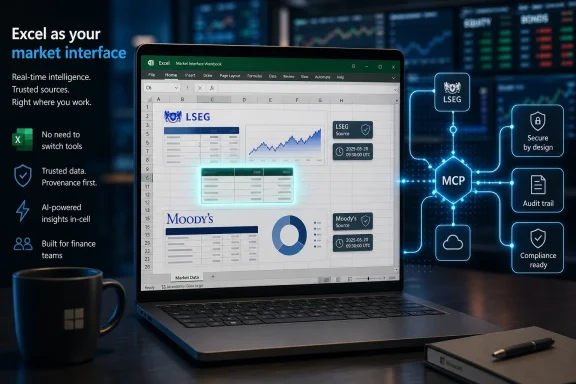 Excel Moves From Empty Grid to Market Interface
For decades, Excel has been the place financial data goes after the real work of finding it has already happened. Analysts pull numbers from terminals, PDFs, data rooms, ERP exports, research portals, credit reports, email attachments, and the occasional suspicious CSV, then hammer those fragments into a workbook that becomes the living version of the truth. Microsoft’s new Copilot integration tries to collapse that first, messy half of the job into the spreadsheet itself.That is why the LSEG and Moody’s names matter. This is not Microsoft telling users that an AI model can browse the open web and summarize market chatter. It is a pitch that Copilot can reach into licensed, professional-grade sources and return information that finance departments, risk teams, and investment desks are already accustomed to treating as authoritative.
The distinction is important because spreadsheets are uniquely vulnerable to false confidence. A number in a cell looks precise even when its origin is fuzzy. By tying Copilot in Excel to named providers such as LSEG and Moody’s, Microsoft is trying to make provenance part of the product, not an afterthought buried in a prompt transcript.
There is also a business logic here that goes beyond convenience. Excel is already the most durable piece of software in finance, partly because it is flexible enough to absorb every new data source and workflow thrown at it. If Copilot can make Excel the place where users ask for, retrieve, transform, and analyze licensed data, Microsoft gets to defend the spreadsheet against both specialist terminals and newer AI-native research tools.
MCP Is the Plumbing, Not the Product
Model Context Protocol, or MCP, is doing a lot of quiet work in this announcement. The protocol has become one of the favored ways for AI systems to connect to external tools, services, and data sources without every vendor inventing a one-off integration. In plain terms, it gives an AI assistant a structured way to ask another system for information or action.That matters because financial data is not the same as a public webpage. It is licensed, permissioned, frequently time-sensitive, and surrounded by compliance requirements. A useful AI integration cannot simply scrape a provider’s interface and paste the result into Excel; it needs identity, entitlements, auditability, and a reasonably deterministic path from request to result.
Microsoft’s use of MCP is therefore less about novelty than normalization. The company is betting that AI assistants in productivity software will need a standard connection layer, just as Office once needed file formats, add-ins, ODBC connections, and APIs. The old spreadsheet world was built on connectors; the Copilot world is being built on tool calls.
The risk is that MCP becomes a marketing term before users understand what it guarantees. A protocol can make integrations cleaner, but it does not automatically make results correct, complete, licensed for every downstream use, or suitable for regulated decision-making. The protocol gives Copilot a door into trusted systems; it does not absolve firms from deciding who should be allowed to open that door.
Finance Is the Right Test Case Because It Is So Unforgiving
Microsoft could have showcased MCP in Excel with weather data, sales leads, or generic web search. Finance is a sharper test because the work is both spreadsheet-native and brutally sensitive to bad inputs. A credit spread, rating outlook, revenue estimate, pricing history, or peer-company metric can change the meaning of a model if it lands in the wrong cell.That makes LSEG and Moody’s logical early partners. LSEG brings market data, pricing, analytics, and financial content that sits close to capital markets workflows. Moody’s brings credit ratings, risk analytics, research, and decision intelligence that are embedded in credit analysis and risk management. These are exactly the kinds of inputs analysts already spend time retrieving, validating, and reconciling.
The productivity case is easy to understand. Instead of asking one system for a company profile, another for historical prices, another for sector data, and another for ratings commentary, a user can ask Copilot to bring relevant material into the workbook. The bigger claim is that Copilot can preserve enough context to help the user turn that material into a model, chart, scenario, or narrative.
But finance professionals will not judge the feature by demo smoothness. They will judge it by whether the returned data has the right timestamp, entitlement, field definition, currency, identifier mapping, and lineage. In financial modeling, “close enough” is often worse than obviously wrong, because it survives review longer.
The Spreadsheet Becomes a Front End for Licensed Intelligence
Excel has always been a front end for something. Sometimes that something is a human analyst’s judgment. Sometimes it is a database, a Power Query connection, a Bloomberg export, an ERP report, or a macro that nobody wants to touch because it was written by a contractor who left in 2017. Copilot’s integration with LSEG and Moody’s changes the interface layer, not the underlying dependency.Instead of menus, connectors, and formulas being the primary control surface, natural language becomes the first step. A user might ask Copilot to compare debt profiles across a peer group, pull recent market data into a table, retrieve ratings-related context, or build a chart from historical pricing. The request sounds conversational, but the output must still obey the harsh discipline of cells, formulas, and workbook logic.
This is where Excel gives Microsoft an advantage over standalone AI tools. The spreadsheet is not just a chat window; it is a computational canvas with visible state. Users can inspect formulas, edit assumptions, trace dependencies, and hand the workbook to a colleague who may never read the prompt that generated part of it.
That visible state also creates accountability. If Copilot pulls in a table, a finance team can compare it with known sources, lock ranges, add controls, and build review processes around it. The promise is not that AI replaces spreadsheet discipline, but that it reduces the friction of getting high-quality inputs into the place where spreadsheet discipline already lives.
Microsoft’s AI Strategy Is Turning Office Into an Agent Host
The announcement fits a broader Microsoft pattern. Copilot is no longer being positioned merely as a writing assistant or meeting summarizer. Across Microsoft 365, the company is trying to make Office apps into agentic workspaces where AI can read context, call tools, modify files, and act inside the user’s existing workflow.Excel is the most consequential member of that suite for this strategy because it combines creativity, calculation, and operational risk. A Word document can misphrase a paragraph. An Excel workbook can misprice a transaction, distort a forecast, or quietly propagate an error into a board deck. The more Copilot can do inside Excel, the more Microsoft has to convince enterprises that it can be governed.
Recent Copilot in Excel improvements have already pushed beyond simple formula help. Microsoft has been emphasizing workbook editing, analysis, visualization, tables, charts, PivotTables, and natural-language interaction. Adding external data providers moves Copilot from helping users manipulate information they already have to helping them obtain information they may not yet possess.
That is a meaningful boundary. Once Copilot becomes a data retrieval interface, it competes with internal research portals, BI front ends, data catalogs, and specialist market platforms. Microsoft does not need to replace those systems outright; it only needs to make Excel the place where their value is consumed.
Trust Will Be Won in the Audit Trail
The phrase “trusted data” appears frequently in AI announcements because it sounds like a problem has been solved. In reality, trust in financial workflows is an operational property, not a brand attribute. It depends on entitlements, source records, timestamps, transformation history, review controls, and a shared understanding of which number was used for which decision.That is where Microsoft’s pitch will encounter the daily habits of regulated enterprises. A bank, asset manager, insurer, or corporate treasury team will want to know how Copilot’s retrieved content is logged, how access rights are enforced, how outputs are labeled, and what happens when a workbook is shared with someone who lacks the underlying data entitlement. These are not edge cases; they are the normal physics of financial information.
There is also the problem of model interpretation. If a user asks for “recent credit risk trends” or “comparable companies,” Copilot may need to translate a broad human request into provider-specific datasets, filters, metrics, and summaries. That translation layer is useful precisely because it hides complexity, but it is risky for the same reason.
The most successful version of this feature will be one that makes the hidden steps visible on demand. Analysts do not need every prompt response to read like a database query plan, but they do need to know what was fetched, from where, when, and under which assumptions. In finance, confidence without inspectability is not trust; it is exposure.
IT Departments Inherit the Real Implementation Problem
For WindowsForum’s core audience of administrators and IT pros, the immediate story is not whether Copilot can produce a clever financial model. It is how this integration changes the control surface of Microsoft 365. Every new external data connection inside Office creates questions about licensing, identity, governance, data leakage, and support.The most obvious issue is entitlement mapping. If a firm already licenses LSEG or Moody’s data for specific users, desks, geographies, or purposes, Copilot access must respect those boundaries. A conversational interface cannot become a side door around contracts or internal policy.
The second issue is workbook portability. Excel files move through Teams, SharePoint, email, file shares, data rooms, and archives. If a workbook contains AI-retrieved licensed content, admins will need clarity about what travels with the file, what remains dynamically linked, and what a recipient can see or refresh.
The third issue is supportability. When a user says Copilot returned the wrong value, the help desk cannot troubleshoot that like a broken mouse. The failure could sit in the prompt, identity token, provider entitlement, dataset definition, stale cache, workbook formula, tenant setting, or the model’s interpretation of the request. Agentic Office features are powerful, but they also turn support tickets into cross-system investigations.
The User Experience Must Avoid the Illusion of Effortlessness
Microsoft’s best demos often make work look like a single prompt. Ask a question, get a table, generate a chart, produce a polished summary, and move on. That is compelling, but the professional reality is that the first answer is rarely the final answer.Finance workflows are iterative because definitions matter. “Revenue growth” might mean reported, constant currency, organic, consensus-estimate, trailing, forward, segment-level, or adjusted revenue growth. “Peers” might be a GICS industry group, a banker’s hand-picked comparable set, a regional subset, or a list approved by an investment committee. “Risk” might refer to credit risk, market risk, liquidity risk, counterparty exposure, or reputational risk.
A good Copilot experience should ask clarifying questions when the prompt is underspecified. A bad one will fill the gaps with plausible defaults and return a beautiful table that hides those choices. The better the interface gets, the more dangerous silent assumptions become.
This is the paradox of AI in Excel. The product must be easy enough for ordinary users to adopt, but explicit enough for expert users to trust. Microsoft’s challenge is to keep Copilot from becoming the spreadsheet equivalent of an overconfident junior analyst with instant access to premium databases.
LSEG and Moody’s Get Distribution, Microsoft Gets Legitimacy
The partnership is not a one-way favor from data providers to Microsoft. LSEG and Moody’s have their own reasons to meet users inside Excel. Financial data vendors are under pressure to make their content usable in AI workflows without surrendering control over licensing, provenance, and customer relationships.Excel is the obvious battlefield because it is where so many financial decisions still crystallize. Even when firms have modern data platforms, cloud warehouses, and polished BI dashboards, the final layer of analysis often ends up in a workbook. Being present at that layer means being closer to the moment of use.
For Microsoft, the partner names provide legitimacy. Copilot has sometimes suffered from the perception that it is a general-purpose AI layer bolted onto products that did not necessarily need one. By tying Copilot to premium financial intelligence, Microsoft can argue that it is not merely adding generative text to Office; it is building a controlled interface to enterprise knowledge.
There is a competitive angle as well. Google, Anthropic, OpenAI, Snowflake, Databricks, and specialist finance AI vendors are all pushing versions of the same idea: connect AI systems to governed enterprise data and let users ask more natural questions. Microsoft’s advantage is that it owns the productivity surface where the questions are already being turned into work.
The Compliance Burden Does Not Disappear Into the Cloud
The presence of trusted providers does not eliminate compliance questions; it sharpens them. If Copilot can retrieve ratings context, market data, or financial research, firms need policies for what users can ask, what outputs can be stored, and how AI-generated summaries should be reviewed. Existing data subscriptions were not necessarily designed around conversational redistribution inside collaborative documents.There are also jurisdictional and regulatory sensitivities. Financial institutions operate under rules about recordkeeping, supervision, material nonpublic information, research distribution, and model risk management. Even corporate finance teams outside regulated industries may have internal controls around forecasts, acquisitions, debt, and investor communications.
Microsoft will likely lean on tenant controls, identity integration, enterprise data protection, and partner governance to answer these concerns. That may be enough for some organizations, especially those already deep in Microsoft 365. Others will require lengthy reviews before allowing Copilot to touch premium external financial sources in production workbooks.
The practical lesson is that adoption will not be uniform. A small advisory team may embrace the feature quickly because it saves time. A global bank may pilot it in a controlled environment for months, if not longer. In enterprise software, the demo shows capability; deployment reveals politics.
Excel’s Old Weaknesses Follow It Into the AI Era
Spreadsheets are powerful because they are flexible, and dangerous for the same reason. They let users build models faster than IT can build applications, which is why they are everywhere. They also let errors, undocumented assumptions, and version conflicts hide in plain sight.Copilot does not erase those weaknesses. In some cases, it may amplify them by making it easier to build more complex workbooks faster. A user who once had to understand a dataset well enough to import it manually may now ask for it in natural language and move straight to analysis.
That does not mean the integration is a mistake. It means organizations need to treat AI-assisted spreadsheets as part of their information architecture, not as personal productivity toys. Critical workbooks already deserve controls around ownership, versioning, access, review, and retention. Copilot makes that governance more urgent.
The hopeful version is that Copilot can also improve spreadsheet hygiene. It can document steps, explain formulas, surface anomalies, and help users structure data in tables rather than sprawling grids. But that outcome depends on product design and user discipline, not on the mere presence of an AI assistant.
The Windows Angle Is Microsoft 365 Becoming the Operating Environment
For Windows enthusiasts, it is tempting to see this as an Excel story and stop there. But the broader shift is that Microsoft increasingly treats Microsoft 365, not Windows alone, as the operating environment for professional work. The desktop, browser, Teams, SharePoint, OneDrive, Office apps, identity stack, and Copilot layer are merging into a single managed workspace.That has consequences for admins who used to think in terms of installed applications. Excel is no longer simply an executable with files. It is a connected client for cloud services, AI models, enterprise graph context, add-ins, external providers, and policy-driven experiences that can change without a classic version upgrade.
This is why some users react negatively when Copilot appears in familiar tools. For power users who know exactly how they want Excel to behave, AI surfaces can feel like clutter or risk. For Microsoft, however, the integration of Copilot is not an optional garnish; it is the organizing principle for the next generation of Microsoft 365.
The LSEG and Moody’s update makes that strategy more concrete. It shows Copilot becoming a broker between user intent and external systems. Once that pattern works for financial data, it can extend to procurement data, legal research, engineering systems, HR analytics, security telemetry, and any other domain where licensed or internal information needs to become action inside Office.
The Spreadsheet’s New Power Comes With New Obligations
The practical message for organizations is not to reject the feature, nor to roll it out blindly. The right response is to treat Copilot-connected financial data as a governed capability that deserves the same seriousness as any other enterprise data integration.- Firms should verify that Copilot access respects existing LSEG and Moody’s licensing terms, user entitlements, and internal data-use policies before enabling broad availability.
- Analysts should treat AI-retrieved figures as inputs that require validation, not as finished answers simply because they appear inside Excel.
- Administrators should test how retrieved content behaves when workbooks are shared, copied, archived, exported, or opened by users without the same provider access.
- Compliance teams should define when AI-generated summaries of ratings, research, or market data are acceptable and when users must rely on original provider materials.
- Power users should document prompts, assumptions, refresh timing, and transformations for any workbook that supports material financial decisions.
- Microsoft and its partners will need to make provenance, auditability, and user controls visible enough for skeptical enterprises to trust the workflow.
The danger is equally plain. A spreadsheet that can summon premium data through natural language can also spread misunderstood data with unprecedented ease. The next phase of Excel will not be judged by whether Copilot can answer a prompt in a demo, but by whether enterprises can make those answers governed, inspectable, and boringly reliable in the hands of real users doing consequential work.
References
- Primary source: thewincentral.com
Published: 2026-06-02T08:05:07.148712
Loading…
thewincentral.com - Official source: support.microsoft.com
Loading…
support.microsoft.com - Related coverage: lseg.com
Loading…
www.lseg.com - Official source: microsoft.com
Loading…
www.microsoft.com - Related coverage: labs.cloudsecurityalliance.org
Loading…
labs.cloudsecurityalliance.org
