

Microsoft is quietly turning Copilot into the shopping assistant many of us already wish we had: a conversational, context‑aware helper that can narrow options, summarize thousands of reviews, track price history, spot cashback, and even nudge you when a better offer appears — all from inside Microsoft Edge, the Copilot mobile and web apps, or the Copilot sidebar while you browse.
Microsoft has consolidated a long list of previously separate shopping tools into the Copilot surface, folding price comparison, price history, price tracking, cashback and AI‑driven product insights into a single conversational experience. The company positioned this work as an attempt to reduce the friction of modern online shopping: the tabs, the copied product links, the dozens of near‑identical models and the time lost chasing a small discount. Rather than leaving price monitoring and review triage to separate extensions and sites, Copilot places those signals inside the browsing experience and the chat that a user can carry on with the assistant.
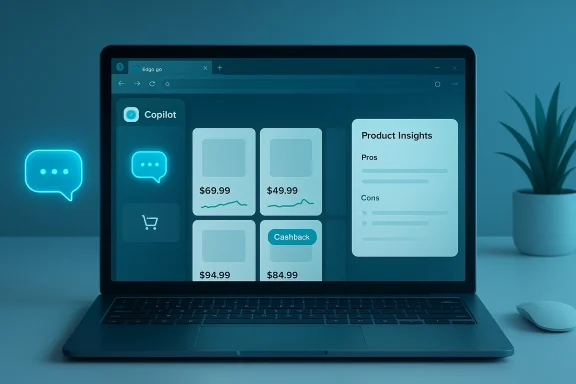
The rollout has been staged and region‑gated: many of the new shopping features arrived inside the Copilot in Edge sidebar first and have been rolled out progressively, with initial availability concentrated in the United States and select markets. Microsoft’s product messaging describes a unified experience that surfaces price history graphs, aggregated review highlights (called Product Insights), tracking/alert tools, and cashback opportunities directly inside the assistant. Independent coverage from multiple technology outlets and hands‑on reporting confirm these capabilities are live for many users and that the company is actively shifting Edge’s shopping capabilities to the Copilot layer.
At the same time, users should remain vigilant on high‑cost purchases. Don’t treat AI summaries as final verification. Double‑check seller details, confirm warranty and return policies on the merchant’s site, and monitor cashback processes until funds clear. Pay attention to privacy settings and consent dialogs if you prefer to reduce the amount of shopping metadata tied to your account.
AI can make shopping smarter, but it does not eliminate responsibility. Copilot should be a powerful assistant — not an unquestioned oracle. Use it to speed decisions, not to outsource final judgment.
For shoppers, the best approach is balanced: embrace Copilot’s ability to surface narrowed shortlists and monitor prices, but verify critical facts and keep control of your data. For Microsoft and other platform providers, the path forward must pair convenience with transparency: explicit provenance, clear privacy defaults, and mechanisms for users and merchants to understand how and why recommendations appear. If those guardrails are put in place, conversational shopping assistants like Copilot can genuinely make buying smarter — and fairer — for everyone.
Source: Microsoft Shop Smarter with an AI Shopping Assistant | Microsoft Copilot
 Background
Microsoft has consolidated a long list of previously separate shopping tools into the Copilot surface, folding price comparison, price history, price tracking, cashback and AI‑driven product insights into a single conversational experience. The company positioned this work as an attempt to reduce the friction of modern online shopping: the tabs, the copied product links, the dozens of near‑identical models and the time lost chasing a small discount. Rather than leaving price monitoring and review triage to separate extensions and sites, Copilot places those signals inside the browsing experience and the chat that a user can carry on with the assistant.The rollout has been staged and region‑gated: many of the new shopping features arrived inside the Copilot in Edge sidebar first and have been rolled out progressively, with initial availability concentrated in the United States and select markets. Microsoft’s product messaging describes a unified experience that surfaces price history graphs, aggregated review highlights (called Product Insights), tracking/alert tools, and cashback opportunities directly inside the assistant. Independent coverage from multiple technology outlets and hands‑on reporting confirm these capabilities are live for many users and that the company is actively shifting Edge’s shopping capabilities to the Copilot layer.
What Copilot does for shoppers — the everyday value
Narrowing the field into a usable shortlist
Choice overload is a real cognitive cost. Copilot’s most immediate value proposition is taking user constraints — budget, must‑have features and deal‑breakers — and returning a focused shortlist of sensible options. Instead of dozens of tabs, you get a curated set of 3–5 recommendations with concise reasoning about why each option fits your brief.- It accepts a natural‑language brief (for example, budget, physical constraints, primary use).
- It returns short, actionable lists rather than long, undifferentiated catalog dumps.
- It includes why each option was selected, and where one choice trades off against another.
Comparing like for like — meaningful differences, not spec soup
Traditional comparison tables can be dense and flat: they list specs without judgment. Copilot aims to supply judgment by translating spec differences into practical consequences: “quieter but less powerful on ice” or “better for phone calls but heavier on battery.” That kind of phrasing helps buyers connect technical differences to real world use.- Copilot synthesizes key tradeoffs: noise vs. power, durability vs. lightness, price vs. warranty.
- It surfaces who each option is best for (commuters, gamers, parents, apartment dwellers, etc.).
- It points out where you’d pay for features most buyers never use.
Turning thousands of reviews into a usable summary
A product with a 4.7 star average and thousands of reviews is still hard to evaluate. Copilot’s Product Insights feature aggregates reviewer sentiment and surface level patterns: what buyers love, recurring complaints, and whether quality issues tend to appear immediately or after months of use.- The assistant produces pros/cons and representative excerpts rather than full review dumps.
- It highlights recurring issues (e.g., zipper failure after long use) instead of prioritizing one‑off complaints.
- It can flag suspicious patterns like short‑burst review spikes (but this is where verification matters — more on that later).
Price tracking and timing your purchase
Prices move constantly and manually checking them is tedious. Copilot integrates price‑history charts and allows you to set price alerts, then notifies you when a tracked item hits your target. Built into Edge, it centralizes these signals so you don’t need separate price‑tracking extensions.- You can set a target price and have Copilot notify you when the item reaches it.
- Historical price charts help you judge whether current price is a typical low or a short‑term promotion.
- In some integrations Copilot can proactively tell you when a lower price exists elsewhere while you’re at checkout.
Helpful in the physical aisle, too
Copilot isn’t only for online shopping. Pull it up on your phone while standing between two boxed models and ask for a quick comparison. The assistant can evaluate sticker prices, tradeoffs, and whether the in‑store price is reasonable given recent online history.- Use your phone to ask Copilot to compare two real‑world SKUs.
- The assistant can flag features that matter for your use case rather than repeating manufacturer marketing.
- It functions as a knowledgeable friend you can consult in situ.
How Copilot’s shopping features actually work (high‑level mechanics)
Microsoft’s approach stitches together several data sources and product layers:- Search and retailer feeds supply live pricing and inventory signals.
- Merchant catalogs and verified merchant feeds allow product matching and metadata alignment.
- Copilot’s AI layer synthesizes price history, review sentiment and product metadata into conversational outputs.
- Edge integrates UI affordances (sidebar, proactive prompts) so the assistant can surface suggestions while you browse.
Availability, platform differences and rollout realities
Copilot shopping features appear across the Copilot product family — the Edge sidebar (Copilot in Edge), the Copilot mobile apps, and the web‑based Copilot experience. However, these tools have been rolled out in phases and are not universally identical across platforms or regions.- Edge acts as the primary shopping surface, with in‑page product cards, price history charts, tracking toggles, and reactive prompts in Copilot Mode.
- Mobile and web Copilot offer similar shopping workflows, but behavior and available merchant coverage will depend on local integrations and app updates.
- The rollout is region‑gated; some shopping features and cashback programs are initially limited to specific countries.
What Copilot does well — the strengths
- Reduces friction and research time. Copilot consolidates routine research tasks (compare, summarize, track) into a single conversational flow so users can make decisions faster.
- Makes review signals readable. Summarizing sentiment into pros, cons and representative comments turns thousands of reviews into a readable pulse check.
- Centralizes monitoring. Built‑in price history and tracking removes the need for multiple extensions or manual revisit checks.
- Acts as a helpful in‑aisle assistant. Having a quick, conversational comparison while physically shopping is a genuine convenience.
- Leverages distribution. Because Edge ships with Windows and Copilot is integrated across Microsoft properties, the assistant can reach a large audience and bring shopping features to users who would not install third‑party trackers.
Where to be cautious — the risks and limitations
Data provenance and transparency
AI summaries and price judgments are useful only if you can verify where the assistant got the information. Copilot’s recommendations sometimes lack explicit provenance at the individual claim level: when it says “this product’s zippers fail after six months,” users need to know which reviews, retailers or datasets produced that statement. Without clear provenance or confidence scores, automated assertions can feel authoritative even when they are based on sparse or noisy evidence.Coverage bias: participating merchants and feeds
Retailer participation matters. When price comparison depends on merchant‑provided feeds or verified listings, comparisons can skew toward participating retailers or those with better metadata. Smaller sellers, niche marketplaces or regional shops may be absent or undercounted, which can bias price and availability comparisons.Review manipulation risk
AI summarizers are vulnerable to the same review‑manipulation problems humans face. If a product experiences a burst of coordinated positive or negative reviews, or if reviews are farmed and curated, the assistant can amplify misleading sentiment. Users should be cautious on products with unusually small or recent review samples.Proactive prompts and consent boundaries
Copilot can be proactive — nudging you at checkout if a lower price exists elsewhere. The convenience here runs up against consent and privacy questions: proactive behavior may require Copilot to access browsing context, saved credentials or order history. Users must be able to opt out, and the UI must make the data‑usage tradeoffs obvious.Cashback and payout reliability
Some Copilot integrations surface cashback offers and even help claim rebates. However, cashback processing can add friction (account linking, payout delays, failed transfers). Buyers should verify cashback status and keep receipts until payouts arrive.“Hallucination” and overconfidence problems
Like any LLM‑driven assistant, Copilot can be overconfident, phrasing uncertain inferences as facts. Users must treat cost/recommendation outputs as guidance, not final verification — especially for higher‑value purchases.Privacy and data handling — what shoppers should check
Microsoft provides granular settings and opt‑ins for many Copilot behaviors, but the practical steps users should take are straightforward:- Verify what shopping data Copilot can access: browsing context, search history, saved payment methods, receipts and order history may be part of the personalization tradeoff.
- Check Copilot Mode and Edge privacy toggles. Proactive insights typically require explicit permission.
- Understand retention and feedback options. Some Copilot features may store interaction logs to improve models or detect fraud; locate the settings to pause or limit feedback collection if you prefer.
- Use disposable accounts or limit saved payment credentials if you want to reduce cross‑product personalization.
- Monitor cashback and linked payout accounts (like PayPal) closely after purchase.
How to use Copilot for shopping — a practical playbook
These are reproducible steps to get reliable outcomes when you use Copilot as an AI shopping assistant.- Start with a shopping brief. Give your budget range, must‑have features, deal‑breakers and the primary use case.
- Ask for a 3–5 option shortlist and request explicit tradeoffs for each pick.
- Request a side‑by‑side comparison that focuses on real‑world outcomes (battery life in hours, noise level in dB, warranty coverage).
- Sanity‑check with follow‑ups: “What are the common complaints?” and “Which users should avoid this product?”
- If not in a rush, set a price alert and let Copilot monitor the item.
- Before you hit buy, verify seller and price directly on the retailer site: confirm item numbers (SKU, UPC), warranty terms and return policy.
- Keep a screenshot or receipt until any cashback or rebate clears.
Ready‑to‑use prompts that work
- “I want to buy [product]. My budget is [$X–$Y], and I care most about [top 3 priorities]. Recommend 5 options and explain why.”
- “Compare [Product A] vs. [Product B]. What are the meaningful differences? Who is each one best for?”
- “Create a side‑by‑side comparison of these options:
. Include pros, cons, and a recommended pick.” - “What’s a reasonable target price for [product], and when does it typically go on sale?”
- “Based on my brief, which option would you choose and why? What’s the biggest risk and how do I reduce it?”
The merchant and industry angle — why retailers care (and should)
For retailers, Copilot represents both opportunity and disruption.- Opportunity: appearing in Copilot comparisons and cashback programs can drive conversion and reduce customer acquisition friction.
- Disruption: if Copilot favors merchants that provide clean, verified metadata or participate in Microsoft’s merchant programs, smaller retailers could be deprioritized.
- New funnel dynamics: if Copilot checkout capabilities mature, some purchases may occur inside the assistant’s flow rather than on merchant pages, shifting parts of the checkout funnel away from retailer‑managed experiences.
Regulatory and ethical considerations
Bringing an AI layer into commerce raises regulatory scrutiny and ethical questions:- Consumers need transparent provenance for price and review claims so they can make informed decisions.
- Regulators will want clarity on how platform assistants treat competing merchants, whether certain partners are preferentially displayed, and whether the assistant’s proactive nudges constitute undue steering.
- Privacy regulators will examine what shopping‑related signals are stored, how long they are retained, and whether the data are reused for personalization across unrelated products.
What Microsoft should do next — a short roadmap for responsible convenience
- Surface provenance and confidence. Every product insight should include an easily discoverable provenance trail and an uncertainty score or sample supporting comments.
- Publish merchant coverage maps. Show which regions and channels are covered and where merchant participation is required.
- Improve cashback transparency. Provide clear status tracking, expected payout windows and dispute processes.
- Strengthen privacy defaults. Default to less‑intrusive settings and require clear opt‑in for proactive, context‑aware behaviors.
- Commission independent audits. Invite third‑party reviews of recommendation behavior, bias, and privacy practices.
Final assessment — should you use Copilot for shopping?
Copilot is a substantial, pragmatic step toward making online shopping less time‑consuming and more confident. For routine purchases, it is an excellent decision accelerator: it narrows options, translates specs into real tradeoffs, synthesizes review noise, and automates price surveillance. Those are tangible, everyday benefits.At the same time, users should remain vigilant on high‑cost purchases. Don’t treat AI summaries as final verification. Double‑check seller details, confirm warranty and return policies on the merchant’s site, and monitor cashback processes until funds clear. Pay attention to privacy settings and consent dialogs if you prefer to reduce the amount of shopping metadata tied to your account.
AI can make shopping smarter, but it does not eliminate responsibility. Copilot should be a powerful assistant — not an unquestioned oracle. Use it to speed decisions, not to outsource final judgment.
Conclusion
Microsoft’s integration of shopping features into Copilot is a notable milestone in conversational commerce: a practical combination of price monitoring, review summarization and comparison logic, delivered where users already browse. The assistant reduces friction and makes many routine buying decisions faster and more confident. But the convenience comes with technical and ethical tradeoffs — uneven merchant coverage, provenance opacity, review manipulation risks, and privacy questions — that users and regulators will rightly scrutinize.For shoppers, the best approach is balanced: embrace Copilot’s ability to surface narrowed shortlists and monitor prices, but verify critical facts and keep control of your data. For Microsoft and other platform providers, the path forward must pair convenience with transparency: explicit provenance, clear privacy defaults, and mechanisms for users and merchants to understand how and why recommendations appear. If those guardrails are put in place, conversational shopping assistants like Copilot can genuinely make buying smarter — and fairer — for everyone.
Source: Microsoft Shop Smarter with an AI Shopping Assistant | Microsoft Copilot