

November’s Copilot Studio refresh — seeded with major reveals from Microsoft Ignite 2025 and a steady stream of feature rollouts — marks a clear inflection point: Copilot Studio is moving from experimental automation to an enterprise-grade platform for identity-bound, auditable AI agents that can act, pause for human judgment, and produce business-grade artifacts. The November updates include production-ready model choices, a human-in-the-loop request-for-information capability, new governance tooling (Agent 365 and Entra Agent ID), and practical maker-facing enhancements that shorten the path from idea to deployed agent. These changes expand what organizations can safely delegate to AI while forcing IT and security teams to think in terms of agent lifecycle, consumption, and risk management.
Microsoft has been deliberate in positioning Copilot Studio as the enterprise “agent factory” that ties together Microsoft 365 Copilot, Power Platform connectors, and Azure AI infrastructure into a governed surface for building and scaling AI agents. The product story leading into November emphasized three complementary goals: make agents easy to create (no-code and conversational authoring), make them powerful (model choice, code interpretation, UI automation), and make them governable (identity, analytics, and detection). The Ignite stage amplified that roadmap into tangible products: a redesigned conversational authoring experience, Agent 365 (a unified agent control plane), expanded model options including GPT-5 Chat, and features that bring human judgment into automated flows.
Microsoft’s public documentation and product pages show this is not a set of isolated features, but a coherent platform approach: agents as first-class directory objects, audited and constrained by policy, while makers get low-friction authoring and a wide connector ecosystem to operationalize outcomes. Independent reporting and product release notes corroborate the timing and focus of these changes.
That said, the platform’s success will depend less on feature lists and more on organizational discipline: clear identity and permissioning policies, consumption controls, knowledge hygiene, and staged validation of models and connectors. Copilot Studio lowers the barrier to creation; Agent 365 and Entra Agent ID make scaling possible — but the hardest work remains designing reliable, auditable workflows and embedding human judgment where it matters.
For IT leaders, the immediate checklist is simple:
Conclusion
November’s Copilot Studio releases — amplified at Ignite 2025 and delivered through staged rollouts — accelerate a profound shift: from point automation to agentic systems where AI acts, humans steer, and enterprises govern. The immediate wins are clear: faster prototyping, better grounding, and built-in human checks. The larger, ongoing work is organizational: establishing identity-bound controls, consumption governance, and knowledge plumbing that keeps agents both useful and safe. For organizations willing to invest in that operational muscle, Copilot Studio’s November wave brings the practical tools needed to move from experimentation to scaled, auditable agent-driven work.
Source: Microsoft What’s New in Copilot Studio: November 2025 Updates and Features
 Background / Overview
Microsoft has been deliberate in positioning Copilot Studio as the enterprise “agent factory” that ties together Microsoft 365 Copilot, Power Platform connectors, and Azure AI infrastructure into a governed surface for building and scaling AI agents. The product story leading into November emphasized three complementary goals: make agents easy to create (no-code and conversational authoring), make them powerful (model choice, code interpretation, UI automation), and make them governable (identity, analytics, and detection). The Ignite stage amplified that roadmap into tangible products: a redesigned conversational authoring experience, Agent 365 (a unified agent control plane), expanded model options including GPT-5 Chat, and features that bring human judgment into automated flows.Microsoft’s public documentation and product pages show this is not a set of isolated features, but a coherent platform approach: agents as first-class directory objects, audited and constrained by policy, while makers get low-friction authoring and a wide connector ecosystem to operationalize outcomes. Independent reporting and product release notes corroborate the timing and focus of these changes.
What shipped (and why it matters)
GPT-5 Chat in Copilot Studio — production-ready model choice
- What: GPT-5 Chat was rolled into Copilot Studio and is designated as production-ready in key regions (US and EU), giving makers a high-performance model for instruction-following, chat workloads, and enterprise scenarios. Admins and makers can select GPT-5 Chat from an agent’s overview and set it as the primary runtime model for high-volume support or stepwise guidance.
- Why it matters: Model choice is now a governance parameter. Teams can select the right model for the right job (speed vs. reasoning vs. cost), and Copilot Studio surfaces that choice directly in the authoring surface. This reduces the “one-size-fits-all” trap and lets organizations balance quality, latency, and expense without rearchitecting agents.
- Verified context: Microsoft’s release notes confirm GPT-5 Chat rollout dates in late November, and independent reporting shows OpenAI’s model cadence (including newer GPT-5.2 releases) is driving a fast-moving model availability landscape across platforms. Treat model availability windows as region- and tenant-dependent; check admin consoles for exact rollout status.
Agent 365 — the new control plane for fleets of agents
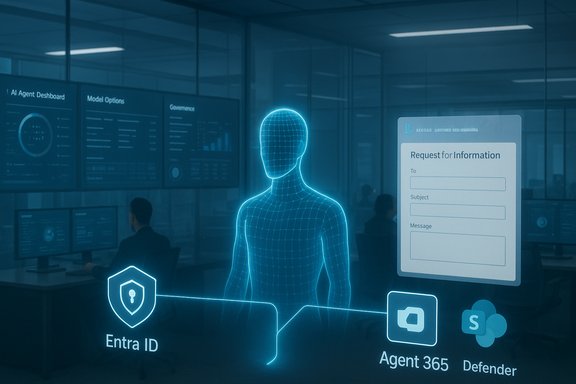
- What: Agent 365 is introduced as a centralized tenant-level registry and control plane to discover, authorize, monitor, and govern agents across an organization. It brings:
- a registry and inventory for agents;
- access control and least-privilege assignment;
- visualization and telemetry linking agents, people, and data flows;
- interoperability features for third‑party or open-source agents; and
- integrated security tooling (Defender-powered protections, audit trails).
- Why it matters: As organizations scale from a handful of proof-of-concept agents to thousands of agent instances, the risk surface changes from “single-bot misbehavior” to “fleet-level drift, runaway consumption, and compliance gaps.” Agent 365 is Microsoft’s answer to managing that operational complexity and it’s being offered through early-access / frontier programs as Microsoft collects telemetry and enterprise feedback.
- Cross-check: Reuters coverage and Microsoft’s Ignite blog both confirm Agent 365 and the intent to treat agents as manageable directory objects — a practical necessity for enterprise adoption.
Human-in-the-loop (HITL) — request-for-information (RFI) in preview
- What: A practical Human-in-the-loop (HITL) action, shipped as Request for information (RFI), allows agent flows to pause and send a structured request (delivered via Outlook forms) to reviewers. The agent resumes once input is submitted and uses those values as parameters to continue execution. The tool lives in agent flows and is configured via the Human-in-the-loop connector.
- Why it matters: This feature bridges the classic automation/human judgment divide. Instead of treating agents as “all or nothing,” teams can design flows that require human sign-off for sensitive decisions (procurements, legal reviews, financial approvals), dramatically expanding the set of tasks organizations will trust agents to attempt.
- Operational note: RFI currently sends requests via Outlook and requires assignees to be inside the tenant; the first response is used to resume the flow (subsequent responses ignored). These design decisions have clear governance implications — routing, ACLs, and SLA expectations must be configured deliberately.
Action Groups for Outlook and SharePoint (preview) — curated tool bundles for makers
- What: Copilot Studio now offers curated Action Groups for Outlook and SharePoint connectors so makers can add a set of related actions (for example, “manage emails” or “manage files”) with a single selection instead of wiring up discrete actions one-by-one. Shared inputs propagate across the group and AI can dynamically fill inputs from context. This aims to reduce setup time and increase consistency.
- Why it matters: For common business workflows (email triage, document lifecycle tasks) Action Groups shorten the authoring loop and reduce configuration errors. They’re an ergonomics + safety win for citizen makers.
- Caveat (verification): This functionality appears prominently in Microsoft’s product posts and the November roundup, but independent documentation of Action Groups in external coverage is limited at this time — treat the Microsoft description as authoritative while you validate availability in your tenant. Flagged as vendor-described; confirm in your admin console before planning large rollouts.
SharePoint grounding and metadata filters — better retrieval, less noise
- What: A revised tenant-graph grounding and SharePoint knowledge improvements were shipped to improve retrieval and ranking of content-heavy repositories. Makers can now filter SharePoint content by metadata such as filename, owner, and last modified date to narrow grounding sources for agents.
- Why it matters: SharePoint is often the largest and messiest knowledge store in enterprises. Better grounding + metadata scoping reduces hallucination risk and lets agents reference the right documents when answering questions or taking action, improving precision for knowledge-driven use cases.
- Verification: Microsoft’s Copilot Studio documentation and SharePoint Knowledge Agent previews describe tenant opt-ins and site-level controls for grounding. Third-party writeups corroborate the preview status and encourage admins to enable site scoping deliberately.
Agent Builder and Microsoft 365 Copilot updates — faster prototyping, smoother upgrades
- Copy to Copilot Studio: Agents built quickly in Agent Builder (inside Microsoft 365 Copilot) can now be copied into Copilot Studio via “Copy to Copilot Studio.” This preserves the prototype and gives makers a frictionless upgrade path to lifecycle and governance features available in the Studio. It’s generally available where Agent Builder is supported.
- GPT-5 Chat in Agent Builder: Agents authored in Agent Builder will now use GPT-5 Chat in supported regions for better speed and instruction-following without extra configuration.
- Employee Self-Service Agent (GA phased rollout): A prebuilt Employee Self-Service Agent for HR and IT scenarios started a phased general availability rollout in November 2025; it contains prebuilt connectors (Workday, ServiceNow, SAP SuccessFactors) and is extensible in Copilot Studio. TechCommunity and roadmap entries confirm the phased GA timing and the availability model (makers extend it in Copilot Studio after initial setup).
- Why it matters: The “edge-to-core” workflow — prototype fast in Copilot chat, then upgrade to governed Studio agents — accelerates innovation without forcing rework. The Employee Self-Service Agent is a pragmatic example where value is immediate: reduced ticket volume and faster resolution by keeping employees in natural conversational flows.
Living knowledge sources: People and OneNote support
- People as a knowledge source: Agents can now query live directory attributes (roles, reporting relationships, team memberships) so queries like “Who is X’s manager?” return accurate, current answers. This reduces stale contact lists and improves agent-driven routing and approvals.
- OneNote pages as knowledge (preview): Microsoft announced OneNote pages can be added as knowledge sources in Agent Builder so agents can ground responses in meeting notes, research pages, and personal notebooks. This was in preview and scheduled for broader rollout; makers can choose specific pages to include as living context for agents. Check your tenant for preview availability and the expected December rollout schedule in your region.
Security, compliance, and governance: the nonfunctional features that matter most
Entra Agent ID and identity-first governance
- Agents receive identity plumbing via Microsoft Entra Agent ID, enabling lifecycle controls, conditional access, least-privilege, and auditability similar to human directory objects. This makes agent credentialing and deprovisioning auditable and practical at scale. Agent 365 is the management plane that leverages these identities.
Defender integration and real-time protections
- Microsoft integrated real-time protections and monitoring (Microsoft Defender) into the agent stack so suspicious agent behavior, prompt-injection risk, or connector abuse can be surfaced and remediated. This does not make agents invulnerable — it provides enterprise tooling to detect, investigate, and quarantine problematic activity.
Consumption and billing controls
- Copilot Credits, pay-as-you-go, and Capacity Packs (prepaid message bundles) are now part of the metering story so organizations can manage financial exposure from agent-driven queries and autonomous runs. Usage dashboards and monthly caps are available in Copilot Studio and the Microsoft 365 admin center. These controls are critical because agent sprawl can quickly produce unexpected costs.
Practical recommendations for IT leaders and makers
1. Start small, govern early- Pilot a targeted set of agents (HR ESS Agent, invoice processor, supplier discovery) with Agent 365 governance turned on.
- Use Entra Agent ID and least‑privilege connectors to restrict agent privileges to the minimum necessary.
- Activate Capacity Packs or set monthly caps per-agent to prevent billing surprises.
- Use Copilot Studio analytics to track unanswered question themes and where agents rely on costly models for routine queries.
- Use SharePoint metadata filters, site scoping, and OneNote selection to keep grounding signals precise.
- Protect sensitive content with Purview sensitivity labels and ensure Work IQ / grounding layers respect DLP rules.
- When actions have financial, legal, or reputational risk, implement RFI (request for information) steps so agents pause for explicit human sign-off. Configure assignee lists, SLA expectations, and monitoring to prevent backlogs.
- Establish policies for when to switch models (e.g., GPT-5 Chat for routine support, GPT-5.2 Thinking for complex reasoning) and plan validation cycles when Microsoft marks experimental models as GA. Keep a fallback model for safety.
Risks and blind spots to watch
- Hallucination and overreach: Even with improved grounding, agents can surface incorrect assertions when prompts or retrieval contexts are noisy. Grounding plus human review remains essential for high-stakes outputs.
- Identity and privilege escalation: Treat Entra Agent IDs as first-class identities. Poorly scoped connector permissions or stale credentials can let an agent act beyond its intended remit.
- Consumption economics: Autonomous agents, especially those using high‑capacity models or running agent flows at scale, can produce significant cloud spend if not capped. Use Capacity Packs and per-agent limits.
- Third-party integrations and data residency: Some connectors and MCP servers may route work through external infrastructure or vary by geography; validate data residency and compliance for regulated workloads.
- Rapid model churn: Model vendors are releasing updates rapidly (for example, OpenAI’s GPT-5.2 cadence in December 2025). Early adoption of experimental models risks subtle behavior changes; validate before moving to production.
The maker experience: faster, but still requires craft
November’s updates lower the friction for non-developers to create valuable agents. Features like Action Groups, natural-language document generation (Word/Excel/PowerPoint), and OneNote/People grounding let citizen makers deliver concrete outcomes quickly. But good agent design still requires thoughtful knowledge curation, prompt engineering, and testing.- Benefits for makers:
- Rapid prototyping in Agent Builder, then a single-click copy to Copilot Studio.
- Prebuilt agent templates (Employee Self-Service) that include connector accelerators for common systems of record.
- Built-in code interpreter / Python execution for data transforms inside agents when no connector exists.
- Maker caution:
- Don’t rely on optimistic defaults for permissions — check connector scopes and whether an agent’s knowledge source should be tenant-wide.
- Test generative outputs in staging and record runs for auditability.
Cross-checks and verification notes
- GPT-5 Chat rollout into Copilot Studio on November 24, 2025, is reflected in Microsoft’s Copilot Studio release notes. Model availability is region- and tenant-dependent; check your tenant admin center for activation status.
- OpenAI’s GPT-5.2 public launch was widely reported around December 11, 2025; Microsoft confirmed experimental access in early-release Copilot Studio environments. Treat GPT-5.2 as experimental and validate before using in production agents.
- Agent 365, Entra Agent ID, and other Ignite governance announcements were covered both in Microsoft’s Ignite messaging and independent outlets (Reuters), confirming Microsoft’s commitment to identity-first agent governance.
- Human-in-the-loop RFI is documented in Microsoft Copilot Studio blog posts and Learn docs, including runtime behavior (Outlook-only delivery, first-response used) — these operational details matter when designing SLA and escalation flows.
- Some product details (for example, the exact behavior and availability of curated Action Groups) currently appear primarily in Microsoft product posts and may lack extensive third-party coverage; treat such vendor-provided details as authoritative but verify availability and behavior in your tenant. Flagged as vendor-described until independently validated.
Final assessment: opportunity and responsibility
November’s Copilot Studio wave is notable for its pragmatic focus: micro-improvements that collectively unlock new classes of work for agents — from document production to people-grounded routing and human-reviewed autonomous flows. The technical building blocks are in place: model choice, identity-bound agents, tenant-scoped grounding, and human-in-the-loop controls. Together they make it realistic for organizations to treat agents as operational workers that can be discovered, governed, billed, and retired.That said, the platform’s success will depend less on feature lists and more on organizational discipline: clear identity and permissioning policies, consumption controls, knowledge hygiene, and staged validation of models and connectors. Copilot Studio lowers the barrier to creation; Agent 365 and Entra Agent ID make scaling possible — but the hardest work remains designing reliable, auditable workflows and embedding human judgment where it matters.
For IT leaders, the immediate checklist is simple:
- pilot a narrow set of agents with strict consumption caps;
- enforce least-privilege and apply Entra lifecycle controls;
- include explicit RFI human checkpoints for sensitive decisions;
- monitor usage and ROI with the Studio analytics dashboards;
- treat model upgrades and experimental models as change control events.
Conclusion
November’s Copilot Studio releases — amplified at Ignite 2025 and delivered through staged rollouts — accelerate a profound shift: from point automation to agentic systems where AI acts, humans steer, and enterprises govern. The immediate wins are clear: faster prototyping, better grounding, and built-in human checks. The larger, ongoing work is organizational: establishing identity-bound controls, consumption governance, and knowledge plumbing that keeps agents both useful and safe. For organizations willing to invest in that operational muscle, Copilot Studio’s November wave brings the practical tools needed to move from experimentation to scaled, auditable agent-driven work.
Source: Microsoft What’s New in Copilot Studio: November 2025 Updates and Features
