

Microsoft’s internal Copilot builds now show a promising — and potentially disruptive — new feature: Copilot Tasks, a unified interface that appears to bundle scheduled automation with two reasoning-focused agents named Researcher and Analyst, plus an “Auto” mode that can chain browsing, data access, and local actions into end-to-end runs. Early hands-on reporting indicates Tasks supports both freeform one-off prompts and recurring scheduled executions, making Copilot not just an assistant for occasional queries but a workspace automation engine that can run on a cadence you set.
Microsoft introduced the Researcher and Analyst agents into Microsoft 365 Copilot in 2025 as purpose-built reasoning tools: Researcher orchestrates multi-step investigations across your work data and the web, while Analyst behaves like a data scientist — iterating on data, running visible Python code, and producing charts and structured outputs. Those agents have been positioned as enterprise-grade enhancements to Copilot’s chat and document features and were made generally available in Microsoft 365 Copilot last year.
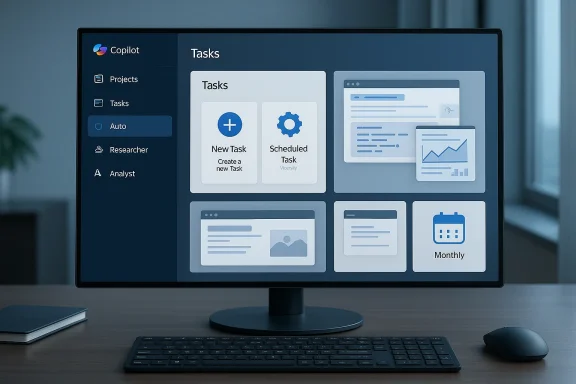
What’s new in the recent testing footage and build analysis is the consolidation of agentics, scheduling, and action automation into a single “Tasks” UX inside Copilot. TestingCatalog’s report — corroborated by forum-level summaries and internal build screenshots — shows a drop-down entry called Tasks beside Projects, with UI flows for “New Task” and “Scheduled Task” and a three-way mode selector: Auto, Researcher, Analyst. That selector implies Microsoft intends to let users pick the exact reasoning engine or let Copilot pick a blended approach automatically.
For businesses, the decision will often be pragmatic: do you accept the platform lock-in for workflow efficiency, or do you prefer a polyglot approach with third-party agents and orchestrators? Both choices entail trade-offs between capability, vendor risk, and governance.
That said, developers will still need to:
Microsoft’s public documentation confirms the capabilities and intended enterprise posture for Researcher and Analyst, while independent reporting and build analysis corroborate the existence of a Tasks UI in test builds. Until Microsoft releases formal documentation and licensing details for Tasks, IT and risk teams should treat these features as imminent but not yet finalized, and design pilots and controls accordingly.
Source: Windows Report https://windowsreport.com/microsoft...-with-built-in-researcher-and-analyst-agents/
 Background
Microsoft introduced the Researcher and Analyst agents into Microsoft 365 Copilot in 2025 as purpose-built reasoning tools: Researcher orchestrates multi-step investigations across your work data and the web, while Analyst behaves like a data scientist — iterating on data, running visible Python code, and producing charts and structured outputs. Those agents have been positioned as enterprise-grade enhancements to Copilot’s chat and document features and were made generally available in Microsoft 365 Copilot last year.What’s new in the recent testing footage and build analysis is the consolidation of agentics, scheduling, and action automation into a single “Tasks” UX inside Copilot. TestingCatalog’s report — corroborated by forum-level summaries and internal build screenshots — shows a drop-down entry called Tasks beside Projects, with UI flows for “New Task” and “Scheduled Task” and a three-way mode selector: Auto, Researcher, Analyst. That selector implies Microsoft intends to let users pick the exact reasoning engine or let Copilot pick a blended approach automatically.
What Copilot Tasks appears to offer
Short, scannable bullets for the core capabilities that have surfaced in testing:- One-off Tasks (New Task) — Freeform composer for ad-hoc prompts using hints and suggested prompts.
- Scheduled Tasks — Create tasks that run once or recur daily, weekly, or monthly, without manual re-triggering.
- Mode selector: Auto / Researcher / Analyst — Choose a specialized reasoning path or let Copilot select an appropriate mix of browsing, reasoning, and local actions.
- Deep research and web synthesis (Researcher) — Pull from work data and the web, cite sources, and assemble multi-source reports.
- Advanced data analysis and code execution (Analyst) — Run Python, iterate on spreadsheets, and surface reproducible analytical steps and charts.
- Auto mode — An end-to-end orchestrator that chains browsing (or “computer use”) with actions such as building slides, summarizing mailboxes, or interacting with web forms.
Why this matters: productivity, scale, and user impact
If Microsoft ships Copilot Tasks as described in these internal builds, the change is more than cosmetic. It represents a shift across three dimensions:- From interactive help to autonomous work — Copilot would move beyond single-turn assistance to scheduled, unattended workflows that produce deliverables (reports, slides, summaries) without manual prompting every time. That changes how work gets structured and offloads recurring production tasks to software.
- From human-only reasoning to hybrid human–AI pipelines — By exposing Researcher and Analyst as selectable engines and enabling scheduled runs, Copilot would let organizations bake AI outputs into recurring business processes (weekly dashboards, compliance summaries, market monitoring).
- From isolated assistants to integrated automation — With “Auto” chaining browsing and local actions (using capabilities similar to Copilot Studio’s “computer use”), Copilot Tasks could bridge APIs, web UIs, and local files — closing the gap between discovery, synthesis, and execution.
Technical verification: what we can say with confidence
Several points reported in early coverage and Microsoft’s documentation line up and can be verified against multiple sources.- Researcher and Analyst are official Microsoft 365 Copilot agents designed for deep research and analysis respectively; Microsoft announced their general availability on March 25, 2025.
- Analyst uses a reasoning-optimized model (reported as OpenAI’s o3-mini) and supports visible Python execution for data work. Independent tech coverage has reported these details and demonstrated sample flows.
- Copilot Studio’s “computer use” capability already allows agents to interact with websites and desktop applications programmatically, enabling automation where no API exists; the Tasks “Auto” mode is reported to reuse or extend similar functionality.
- Internal build analysis shows a Tasks UI with scheduling and a mode selector (Auto/Researcher/Analyst); TestingCatalog’s hands-on testing found usable slides and reports produced by tasks, but the feature is still unfinished and not announced by Microsoft.
What remains uncertain or unverified
Good journalism lists what is not yet confirmed. The early testing material leaves open several key questions:- Availability and licensing — Microsoft’s public messaging on Researcher/Analyst focused on Microsoft 365 Copilot users; whether Tasks will be included in existing Copilot SKUs, land in Windows-level Copilot features, or be reserved for higher-tier enterprise customers is unconfirmed. Microsoft has not announced Tasks publicly.
- Exact data handling and training commitments — While Microsoft documents compliance and tenant-grounding for Copilot agents, the precise handling rules for scheduled Tasks (especially those that access external web sources or third-party connectors) aren’t fully documented in public admin guides. Any new scheduled automation surface increases the attack surface for sensitive data unless controls are explicit.
- Governance horizons (audit trails, admin control granularity) — Microsoft has built a “Copilot Control System” and admin controls for agents, but how granular controls will be for scheduled Tasks (who can create, who can run, what connectors are allowed) remains to be seen. Early screenshots show Controls are top of mind, but details matter.
- Reliability and correctness at scale — Research-grade synthesis and Python-driven analysis are promising in demos, but real-world datasets, edge cases, connector failures, and changing web pages will stress reliability; the risk of confidently wrong automation is real and must be mitigated.
Governance, privacy, and risk — what IT must plan for now
A scheduled agent that can access mailboxes, SharePoint, Teams transcripts, CRM connectors, and external webpages changes the control calculus. Here are the key risk areas and recommended controls.- Access control and least privilege — Ensure scheduled Tasks run with the least required identity and permissions. Use role-based access control to limit who can create and modify Tasks, and partition high-risk connectors (finance, HR, legal) behind stricter approvals.
- Auditability and immutable logs — Require that every scheduled run produce an auditable log: prompt, agent mode used, data sources accessed, and the exact output. Logs should be immutable and retained per corporate retention policies to support investigations.
- Data-grounding and source citation — For research-style outputs, enforce policies that require Researcher to include source citations and to mark content that comes from external web pages versus internal documents. When outputs drive decisions, require human signoff.
- Non-training and privacy assurances — Confirm from Microsoft the tenant-level assurances for not using customer data to train foundation models, especially for Tasks that may feed prompts into external models or third-party connectors. Document those commitments contractually for regulated industries.
- Operational budgets and cost control — Agentic reasoning and scheduled runs can generate significant compute costs. Track usage, set budget alerts, and identify high-cost queries. Consider rate-limiting or quotas per team.
- Test & rollback processes — Treat any new automation as code: use staging tenants for tests, require peer review of scheduled Task prompts, and provide easy rollback if an agent starts producing bad outputs.
How to pilot Copilot Tasks safely (recommended 90-day plan)
- Identify a low-risk, high-frequency candidate — Start with tasks that produce non-critical artifacts (slide drafts, weekly market briefs, inbox summaries) rather than decisions that move money or change records.
- Create a shadow-run phase — Run Tasks in “shadow mode” where the agent produces deliverables to a controlled folder, and humans review before any downstream action occurs.
- Log everything — Ensure every prompt, result, and reasoning trace is logged with source attributions and stored centrally for audit.
- Measure delta — Track time saved, edit distance (how much humans changed the AI output), and error rates.
- Expand with governance — After 30–60 days, expand to a limited production set while requiring approvals for connectors and enabling rate limits.
- Iterate policy — Use the pilot to refine RBAC, retention, and non-training clauses and to update vendor contracts.
Competitive and market context
Microsoft’s move aligns with broader industry trends toward agentic, scheduled assistants. OpenAI, Anthropic, and other platforms have shown similar “agent” and “automation” pushes — from ChatGPT’s agents to Claude’s planning workflows. Where Microsoft has an advantage is integration depth: Copilot is embedded into Office apps, Teams, Windows, and Microsoft Graph, giving it privileged access to enterprise context that third-party agents lack. That integration, however, demands enterprise-grade governance — which is why Microsoft has emphasized admin controls, Copilot Analytics, and a Copilot Control System in its enterprise messaging.For businesses, the decision will often be pragmatic: do you accept the platform lock-in for workflow efficiency, or do you prefer a polyglot approach with third-party agents and orchestrators? Both choices entail trade-offs between capability, vendor risk, and governance.
Admin checklist: ATP (Actions, Training, Policy)
- Actions: Map who can create Tasks, what connectors are permitted, and which outputs require human approval. Implement quotas and cost controls.
- Training: Educate end users on prompt hygiene, sensitive data redaction, and the meaning of “citations” in Researcher outputs so they can evaluate quality.
- Policy: Update acceptable-use, data handling, and vendor-contract clauses to reflect scheduled AI automation and non-training assurances.
UX and developer implications
For end users, scheduled Tasks could be a major productivity win — imagine daily competitor scans, weekly executive memos, or automated slide decks that update when data changes. For developers and automation teams, Copilot Tasks could offload a lot of integration glue: less custom scripting, more declarative prompts and scheduled agent runs.That said, developers will still need to:
- Wrap sensitive connectors into vetted APIs rather than exposing credentials to broad agent scopes.
- Create validation steps for data outputs, especially if Analyst runs Python and writes back to spreadsheets or databases.
- Build monitoring around drift: models and web pages change; schedules must handle failure, retries, and content validation.
Ethical and regulatory considerations
Automating research and analysis raises real ethical questions:- Bias and fairness — Automated synthesis can entrench bias if agents rely on a narrow set of sources or connectors. Encourage diversity of sources and require human review for decisions affecting people.
- Accountability — When an automated Task produces a report that leads to a business decision, who is accountable? Organizations should define decision ownership for AI-generated artifacts.
- Regulated industries — Legal, financial, and healthcare sectors should treat Copilot Tasks as systems of record and subject them to compliance validation, similar to other automation and reporting platforms.
What to watch next
- Public announcement and licensing details — Microsoft has not yet announced Tasks; watch official Microsoft channels and the Microsoft 365 roadmap for exact timelines and licensing.
- Admin controls parity — Confirm whether scheduled Tasks inherit the same admin controls and tenant-grounding assurances as interactive Copilot Chat and Copilot agents.
- Third-party connector governance — See how partner connectors (Salesforce, ServiceNow, etc.) will be managed in scheduled runs and whether connector scopes can be restricted per Task.
- Operational telemetry — Microsoft’s Copilot Analytics and Business Impact Report capabilities will be crucial for justifying rollouts; watch for telemetry surfaces specifically for scheduled tasks.
Conclusion
Copilot Tasks — as shown in recent internal build analysis — looks like the logical next step in Microsoft’s Copilot evolution: it merges agentic reasoning (Researcher and Analyst), automation (Actions / computer use), and scheduling into a unified productivity fabric. That fusion promises real productivity gains for knowledge workers but simultaneously amplifies governance, privacy, and operational risk. Organizations should prepare by piloting conservatively, insisting on auditable logs and human-in-the-loop checks, and updating their security and vendor agreements to cover scheduled AI automation.Microsoft’s public documentation confirms the capabilities and intended enterprise posture for Researcher and Analyst, while independent reporting and build analysis corroborate the existence of a Tasks UI in test builds. Until Microsoft releases formal documentation and licensing details for Tasks, IT and risk teams should treat these features as imminent but not yet finalized, and design pilots and controls accordingly.
Source: Windows Report https://windowsreport.com/microsoft...-with-built-in-researcher-and-analyst-agents/
