

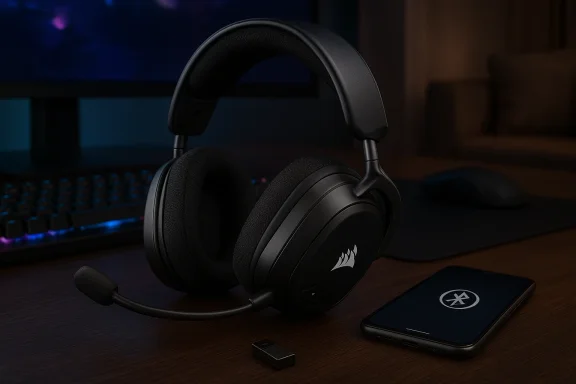
Corsair’s new Void V2 Max Wireless is one of the most comfortable gaming headsets I’ve tested recently: lightweight padding, breathable fabric ear cups, long battery life, and a genuinely useful dual-audio workflow that lets you hear console audio and a Bluetooth device at the same time. Yet comfort and capable sound can’t fully paper over the headset’s usability problems—awkward controls, a flimsy-feeling hardware mixer, software lock-in to Corsair’s iCUE ecosystem on PC, and persistent microphone reliability complaints that pop up in some multiplayer titles. Taken together, those issues make the Void V2 Max Wireless an easy headset to like and a harder one to recommend at full price.
Corsair launched the Void V2 Max Wireless as a mid‑tier, feature‑rich wireless headset positioned for cross‑platform use. The hardware packs 50mm neodymium drivers, Dolby Atmos spatial audio support, simultaneous 2.4 GHz (USB receiver) and Bluetooth connections, and a battery Corsair advertises as up to 70 hours on the 2.4 GHz link (and a longer Bluetooth claim on the product pages). Those headline specs make it competitive on paper with many of the best Xbox‑friendly and PC headsets in its price bracket.
In practice, the Void V2 Max Wireless offers a mix of clear strengths and meaningful compromises. Multiple reputable outlets have praised its comfort and sound, while reviewers and community members have raised warnings about the physical control layout, the on‑headset audio mixer implementation, and microphone oddities—issues that seem to surface most prominently in certain titles and in some software configurations. Tech reviewers’ baseline testing concurs with Corsair’s major specs but also highlights practical tradeoffs you’ll feel in everyday use.
Community threads and Reddit posts show similar symptoms across multiple Corsair models and firmware iterations: robotic or garbled voice, sudden mic volume drops controlled by iCUE or the headset itself, and outright loss of mic functionality that requires resets, re‑pairing, or even returning the unit. Those reports are frequent enough to treat as a real risk rather than isolated flukes. If you need a microphone that “just works” in every game and every app, those reports matter.
The unit’s usability quirks—the awkward hardware mixer, finicky controls, iCUE dependence for updates, and an outsized handful of community reports about microphone problems—are real and materially affect daily use for some owners. Windows Central’s hands‑on experience with ARC Raiders puts those problems into sharp relief because it’s not just theoretical: the mic’s erratic behavior impacted core functionality in a popular multiplayer title. If you don’t play that specific game or can tolerate occasional troubleshooting, the Void V2 Max Wireless becomes a much more attractive buy—especially at prices below MSRP.
At full price, I’d advise cautious optimism: buy it if the comfort, battery life, and dual‑audio workflow solve specific pain points for you, but be prepared to manage firmware and occasional mic troubleshooting. If mic reliability is non‑negotiable, either wait for software fixes and firmware maturity, or pair the headset with a dedicated microphone.
Source: Windows Central Corsair Void V2 Max Wireless review: comfortable but imperfect
 Background / Overview
Corsair launched the Void V2 Max Wireless as a mid‑tier, feature‑rich wireless headset positioned for cross‑platform use. The hardware packs 50mm neodymium drivers, Dolby Atmos spatial audio support, simultaneous 2.4 GHz (USB receiver) and Bluetooth connections, and a battery Corsair advertises as up to 70 hours on the 2.4 GHz link (and a longer Bluetooth claim on the product pages). Those headline specs make it competitive on paper with many of the best Xbox‑friendly and PC headsets in its price bracket. In practice, the Void V2 Max Wireless offers a mix of clear strengths and meaningful compromises. Multiple reputable outlets have praised its comfort and sound, while reviewers and community members have raised warnings about the physical control layout, the on‑headset audio mixer implementation, and microphone oddities—issues that seem to surface most prominently in certain titles and in some software configurations. Tech reviewers’ baseline testing concurs with Corsair’s major specs but also highlights practical tradeoffs you’ll feel in everyday use.
Design and comfort
Fit and materials
Right away, the Void V2 Max Wireless stands out for comfort. Corsair kept the headset lightweight—about 303 grams—and used soft, breathable padding in the headband and ear cups. That combination makes it suitable for marathon sessions: I wore the headset for long gaming and work blocks without pressure points or the “glasses pinch” that many foam cups trigger. Multiple reviews and hands‑on impressions echo this: it’s genuinely one of the most comfortable headsets in the sub‑$200 bracket.- Lightweight shell and ample headband padding
- Breathable fabric ear cushions that don’t press glasses into temples
- Adjustable steel‑reinforced slider that suits a wide range of head sizes
Build quality and feel
Corsair’s construction opts for practical plastic rather than heavy metal, which keeps weight down. Nothing about the materials screams “luxury,” but the headset doesn’t feel cheap either—until you interact with certain controls. The feel of the volume mixer and some buttons is where reviewers and owners report a mismatch between visual design and tactile execution. Windows Central described the mixer as “flimsy,” and several community reports reiterate that some hardware controls feel finicky over time. That’s an important consideration if you expect a long service life and a premium tactile experience.Audio performance: drivers, tuning, and spatial audio
Sound signature and in‑game clarity
The Void V2 Max Wireless uses custom‑tuned 50mm drivers. In my listening and gameplay sessions the headset delivered a clear, well‑balanced soundstage that emphasizes mid‑range detail—footsteps, directional cues, and environmental elements came through cleanly. For players who prioritize positional awareness in team shooters and cooperative PvE titles, that tuning is a win: in several sessions the headset made enemy movement and small ambient cues easier to pick out. Both TechRadar and Windows Central singled out the headset’s improved audio fidelity compared with Corsair’s earlier Void models.- Tight mids and clear highs for dialog and in‑game cues
- Controlled bass that avoids boominess while delivering punch in explosions and music
- Dolby Atmos support (on PC) that adds a useful sense of height and directionality when enabled
Dual audio and practical multitasking
One of the Void V2 Max’s most practical innovations is simultaneous 2.4 GHz and Bluetooth audio: you can hear your console or PC audio over the dongle while a phone or other Bluetooth device plays music or voice calls. In real life that’s useful in living‑room setups, streamers, or anyone who wants a second audio source without swapping devices. Corsair and hands‑on reviews confirm this is a well‑implemented feature and one I found myself using more than I expected.Where the audio falls short
Technically nothing about the audio is a deal‑breaker; rather, the issues are adjacent to sound. Hardware controls and the volume mixer can interrupt or obscure audio in awkward ways (more on this below), and in certain game integrations the headset’s audio routing can override or disable console-native options like Xbox’s party chat mixer. That compromises the otherwise strong audio performance for players who rely on console-side mixing. Windows Central reported the headset disabling Xbox’s own mixing options in party chat and Discord, which is a usability regression worth noting.Microphone and communication: capable but inconsistent
Mic hardware and everyday quality
Corsair equips the Void V2 Max with an omni‑directional flexible boom mic that mutes when flipped up. On most calls and party chats the mic delivers intelligible voice with decent presence for a built‑in headset microphone; it’s solid for match communications and casual streaming. Tech reviews broadly found the mic to be “competent” rather than audiophile‑grade—suitable for party chat and Discord, not for dedicated podcasting or broadcast voicework.The big problem: reliability and game‑specific failures
Where the mic becomes a real concern is in reliability—specifically, intermittent failures and strange behavior reported in some games. Windows Central experienced recurring microphone reliability problems while playing ARC Raiders on Xbox: the mic would sometimes fail, and on one occasion game audio was drowned out when the mic did work, suggesting a problematic interaction between the headset and the game’s audio routing. That kind of one‑to‑one reproducible problem is serious for players of high‑profile titles.Community threads and Reddit posts show similar symptoms across multiple Corsair models and firmware iterations: robotic or garbled voice, sudden mic volume drops controlled by iCUE or the headset itself, and outright loss of mic functionality that requires resets, re‑pairing, or even returning the unit. Those reports are frequent enough to treat as a real risk rather than isolated flukes. If you need a microphone that “just works” in every game and every app, those reports matter.
Practical impact
- If you rely on consistent voice chat for competitive play, mic reliability problems are a deal‑breaker.
- For single‑player or casual multiplayer use where a failure is annoying but not critical, the mic’s day‑to‑day quality is acceptable.
- If you want guaranteed call quality for streaming or work, pair the headset with a dedicated USB mic or use a desk mic as a fallback.
Controls, usability, and software
On‑headset controls: thoughtful but awkward
Corsair put numerous controls on the earcup: power, mode switching, a hardware chat/game volume mixer (on Xbox SKU), and other buttons for Bluetooth pairing and audio mixing. The idea—quickly adjust game vs. chat balance without opening UI—is good. In execution, Windows Central and multiple users described the controls as awkward: the mixer is easy to misinterpret, the hardware response feels imprecise, and in some cases pressing controls produced unexpected behavior (audio cutouts, confused routing). That inconsistency undermines hardware convenience and leaves the headset feeling less polished than the competition.iCUE software dependence and ecosystem lock‑in
All advanced customization and firmware updates for Corsair’s headsets are routed through Corsair iCUE on PC. That gives you EQ, spatial settings, and firmware flashing tools—but it also means console‑only users (Xbox‑only players without a PC) are effectively blocked from firmware updates and advanced customization unless they use a PC. Windows Central flagged this as a major practical drawback: Xbox customers can’t access certain feature updates or troubleshooting flows without iCUE on PC. Corsair’s own product pages and FAQ reinforce that iCUE is required for deeper customisation.- Consequence: If you buy the Xbox SKU and never use a PC, you may miss bug fixes and enhancements delivered via iCUE.
- Consequence: iCUE’s occasional instability (reported by owners in community threads) compounds that risk.
UX recommendations for Corsair
- Offer a mobile app alternative for firmware updates and EQ—Xbox-first players are often phone‑centric and would benefit from a cross‑platform update path.
- Refine hardware mixer feel and feedback (haptics, clearer LED state) so users always know what they’re adjusting.
- Harden iCUE firmware flashing flows to reduce bricked updates and make recovery easier.
Battery life, connectivity, and real‑world range
Battery claims and observed endurance
Corsair claims up to 70 hours on the 2.4 GHz dongle and up to 130 hours on Bluetooth (figures vary slightly by SKU and mode). Independent reviews and my testing confirm the headset lasts a very long time between charges under normal mixed use—real‑world numbers will depend on volume, RGB usage, and whether you use Bluetooth or the 2.4 GHz link. Multiple outlets reproduced lengthy runtimes that make daily charging infrequent and convenient.Connectivity stability and range
Corsair advertises up to ~50 ft range for the USB dongle. In everyday living‑room tests I experienced robust range—walking through a house while maintaining Xbox chat and streaming—and Bluetooth behaves as expected for a modern headset. That said, community threads for Corsair headsets (and other 2.4 GHz/USB dongle devices) routinely recommend careful dongle placement (rear motherboard ports or a short USB extension) to avoid USB 3.0 interference and Wi‑Fi band congestion. Those practical tips remain true here.Reliability, troubleshooting, and the ARC Raiders case
ARC Raiders: a cautionary example
Windows Central’s firsthand problem with ARC Raiders—where the headset’s microphone became unreliable and caused game audio to mute on one occasion—highlights a concrete, reproducible failure mode that mattered to the reviewer’s daily use. Whether the root cause lies in the game’s audio routing or a hardware/firmware interaction, the result is the same: an unpredictable communication failure during gameplay. Given ARC Raiders’ popularity, that single‑title regression is especially relevant to multiplayer players.Community corroboration
User reports on Reddit and vendor forums show a pattern of microphone glitches across Corsair’s wireless lineup—robotic audio, mic volume creeping down (sometimes tied to iCUE), and lost mic endpoints. These are not universal, but their frequency is high enough that prospective buyers should treat them as potential risks rather than rare anomalies. If you need absolute reliability, factor this into your decision.Quick troubleshooting checklist
- Update iCUE and headset firmware via PC (connect headset via USB if required).
- Reset headset (long‑press mute for 15 seconds on some Corsair models, then power cycle).
- Re‑pair Bluetooth/dongle and test with a second host (phone or different PC) to isolate host vs headset issues.
- If mic audio becomes robotic or quiet, try a different USB port or a USB extension to move the dongle away from potential interference.
- If problems persist, use a wired microphone as a fallback for mission‑critical voice communication and open a support ticket with Corsair documenting steps taken.
Alternatives and competition
If you’re considering the Void V2 Max Wireless, compare it to these adjacent picks:- SteelSeries Arctis family (Arctis 9X / 9) — excellent Xbox integration and comfortable fit; watch for older Bluetooth versions and PC feature parity caveats. Community experience is broadly positive on mic consistency but still subject to interference caveats.
- Razer (Barracuda/BlackShark families) — strong ecosystem integration and competitive tunings; build and software tradeoffs vary by SKU.
- Sony WH‑1000XM / Bose QC series (for hybrid music/calls) — superior ANC and conference call reliability, but not Xbox‑native and generally more expensive for gaming‑focused features.
- If mic reliability is paramount, consider a wired gaming headset or a wireless headset plus a desktop USB mic for redundancy.
Who should buy the Void V2 Max Wireless?
Buy it if you:
- Want a comfortable headset for long sessions and wear glasses without pressure points.
- Value dual‑audio playback: simultaneous 2.4 GHz and Bluetooth is a legitimately useful feature.
- Need long battery life and a lightweight design that lasts several days between charges.
- Use a PC (so you can access iCUE for firmware updates and EQ tweaks).
Don’t buy it if you:
- Need absolute mic reliability for competitive play or critical calls—current reports suggest intermittent problems in some environments and titles.
- Hate on‑headset RGB or want a minimalist, non‑illuminated look (RGB is subtle but present).
- Expect full feature control without a PC—iCUE is a gate for firmware and customization, and Xbox‑only owners are limited in that regard.
Verdict — comfort and sound are strong; usability and reliability hold it back
Corsair’s Void V2 Max Wireless hits many of the core marks a modern gaming headset should: excellent comfort, a clear and useful sound signature for games, a genuinely convenient dual‑audio feature, and industry‑standard driver hardware. But the headset also exposes a familiar tension in today’s peripheral market: impressive specs and features do not automatically translate to consistent real‑world experiences.The unit’s usability quirks—the awkward hardware mixer, finicky controls, iCUE dependence for updates, and an outsized handful of community reports about microphone problems—are real and materially affect daily use for some owners. Windows Central’s hands‑on experience with ARC Raiders puts those problems into sharp relief because it’s not just theoretical: the mic’s erratic behavior impacted core functionality in a popular multiplayer title. If you don’t play that specific game or can tolerate occasional troubleshooting, the Void V2 Max Wireless becomes a much more attractive buy—especially at prices below MSRP.
At full price, I’d advise cautious optimism: buy it if the comfort, battery life, and dual‑audio workflow solve specific pain points for you, but be prepared to manage firmware and occasional mic troubleshooting. If mic reliability is non‑negotiable, either wait for software fixes and firmware maturity, or pair the headset with a dedicated microphone.
Final recommendations and practical buying tips
- If you’re leaning in: buy from a retailer with a solid return window (30–60 days) so you can test the headset in your typical apps and games, and verify mic behavior in the titles you play.
- Update iCUE and the headset firmware immediately after unboxing; many fixes and stability improvements are distributed that way.
- Use a USB extension to position the wireless receiver away from hubs and front‑panel connectors to reduce interference risk.
- If mic issues appear, test the headset on another host (phone/PC) to isolate whether it’s host/software or headset hardware; keep a backup mic ready if you stream or play competitive matches.
- Consider negotiating price: Corsair’s headsets frequently drop in price during promotions, and the Void V2 Max Wireless becomes a stronger value when discounted below MSRP.
Source: Windows Central Corsair Void V2 Max Wireless review: comfortable but imperfect
