

If you want to walk into a cloud engineer interview and leave the room with confidence, you must be able to do three things at once: explain core concepts crisply, demonstrate practical troubleshooting and migration experience, and show you understand security and trade‑offs at an architectural level. The short how‑to guide provided in the candidate brief breaks these requirements down into concrete, interview‑ready answers—and with some critical context and examples, you can turn those answers into persuasive stories that win hiring managers over.
Cloud engineering interviews typically test a mix of foundational knowledge and applied experience. Recruiters will ask targeted theory questions—What’s the difference between IaaS, PaaS and SaaS?—but they’ll also push into system design, debugging, migration strategy and security. The guidance in the candidate primer covers these bases: it frames service models, offers a structured troubleshooting method, outlines migration strategies (the “6 R’s”), and lists practical security controls to discuss in interviews. Use these building blocks, then fold in your own project stories and measurable outcomes.
Below I expand that primer into a full interview playbook: precise technical explanations you can recite, sample answers you can adapt, diagnostic frameworks for troubleshooting questions, a migration decision-making framework, and a security checklist interviewers expect to see. For balance, I also highlight weaknesses in the standard advice and the real risks hiring teams want to know you understand.
Always end answers with a short lessons‑learned or trade‑off statement: it demonstrates your ability to reflect and adapt.
Source: thedetroitbureau.com Cloud Engineer Interview Q&A: Ace Your Interview!
 Background / Overview
Cloud engineering interviews typically test a mix of foundational knowledge and applied experience. Recruiters will ask targeted theory questions—What’s the difference between IaaS, PaaS and SaaS?—but they’ll also push into system design, debugging, migration strategy and security. The guidance in the candidate primer covers these bases: it frames service models, offers a structured troubleshooting method, outlines migration strategies (the “6 R’s”), and lists practical security controls to discuss in interviews. Use these building blocks, then fold in your own project stories and measurable outcomes.Below I expand that primer into a full interview playbook: precise technical explanations you can recite, sample answers you can adapt, diagnostic frameworks for troubleshooting questions, a migration decision-making framework, and a security checklist interviewers expect to see. For balance, I also highlight weaknesses in the standard advice and the real risks hiring teams want to know you understand.
Understanding Cloud Service Models: IaaS, PaaS, SaaS — say it clearly, then apply it
Core explanation (short and interview‑ready)
- IaaS (Infrastructure as a Service): You get virtualized compute, storage and networking—think virtual machines, block/object storage and raw network primitives. The operator is responsible for OS, middleware, runtime and application. Use IaaS when you need maximum control: custom OS tuning, legacy apps, or special licensing.
- PaaS (Platform as a Service): The provider manages the OS and runtime; you deploy code or containers. PaaS reduces operational overhead and accelerates development but constrains low‑level control. Ideal for web apps, APIs, and rapid iteration.
- SaaS (Software as a Service): A complete application delivered over the internet. You consume functionality, not infrastructure. Best for common business functions where customization is limited and time‑to‑value matters.
How to add value to your answer (practical examples)
Give two short, concrete scenarios:- IaaS: “We moved a legacy Windows‑based billing app into IaaS because it required kernel‑level drivers and custom patching.”
- PaaS: “For our new microservices front end, we used a managed platform to reduce deployment overhead and standardize CI/CD across teams.”
- SaaS: “We replaced a custom CRM with a SaaS product when integration needs were standard and the business prioritized speed and UX.”
Troubleshooting Cloud Deployment Issues — structure beats guessing
A clear four‑step troubleshooting approach
Interviewers want to know how you think. Use a repeatable, structured method:- Identify and scope: Reproduce the symptom, document exact error messages, timestamps and affected components.
- Gather data: Collect logs, metrics, tracing spans and recent configuration changes from monitoring and observability tools.
- Hypothesize and test: Propose likely causes and validate them with targeted tests (roll back config, restart services, run network traces).
- Fix, verify, document: Apply the fix in a controlled rollout, verify functional and performance recovery, and document the incident and corrective actions.
Tools and concrete examples to name in interviews
Be ready to name the observability stack and diagnostic commands you’ve used:- Cloud provider monitors (CloudWatch, Azure Monitor, Google Cloud Logging), APM/tracing (OpenTelemetry, Jaeger, Datadog), and logging tools.
- Network diagnostics: traceroute, tcpdump, curl with verbose output, security group / ACL checks.
- Resource checks: CPU/memory/disk I/O metrics, autoscaling event logs, quota limits.
- “When an app failed to respond, I first checked the provider’s logs and application traces, found a connection timeout to the managed database, verified security group rules, and uncovered a rotated certificate that had not been deployed to all nodes. Rolling out the new certificate in a canary release resolved the issue.” Keep this story short, specific and measurable (downtime avoided, MTTD/MTR improved).
Cloud Migration Strategies — the 6 R’s and how to talk about trade-offs
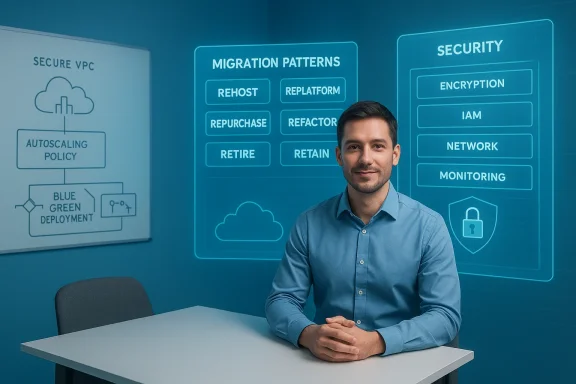
The six patterns and when to use each
- Rehost (Lift and Shift): Fastest, least intrusive. Good for time‑constrained moves, but misses cloud cost and scalability optimizations.
- Replatform: Small changes to use managed services (e.g., migrate a DB to a managed service). Balances speed and modernization.
- Repurchase (SaaS): Replace with commercial cloud software. Good when vendor functionality covers need and total cost of ownership is favorable.
- Refactor (Re‑architect): Highest effort, largest payoff—cloud‑native redesign for scalability and reliability.
- Retire: Decommission unused apps to reduce surface area and costs.
- Retain (Revisit): Keep on‑prem for specific compliance or latency reasons; revisit later.
Practical steps interviewers expect to hear
- Inventory and dependency mapping (discovery tools, application dependency mapping).
- Risk assessment and migration wave planning (pilot, batch migration, cutover windows).
- Automation and IaC (Terraform/ARM/CloudFormation) to make the cutover repeatable.
- Validation and rollback strategies (smoke tests, data validation, blue/green or canary).
- Post‑migration optimization (rightsizing, managed services, tagging/FinOps).
Ensuring Data Security in the Cloud — show layered thinking
The multi‑layered security checklist to discuss
- Encryption: At rest (provider KMS or customer‑managed keys) and in transit (TLS). Demonstrate familiarity with provider KMS services and key lifecycle.
- Identity & Access Management (IAM): Least‑privilege roles, privileged access management, and identity federation. Mention service principals, managed identities, or service accounts depending on platform.
- Network controls: VPC design, subnets, firewall rules, security groups, and private connectivity (VPN/Direct Connect/ExpressRoute).
- Monitoring and detection: SIEM integration, centralized logging, alerting thresholds, and runbooks.
- Compliance & audit: How you enforce policies and collect audit trails for HIPAA, PCI, GDPR, or internal governance.
What hiring panels will probe further
- KMS details (who controls keys? customer-managed vs. provider-managed).
- How you handle secrets (vaults, environment variables, secret scanning).
- Incident response: detection time, escalation path, and an example IR runbook.
Interview‑Ready Answers: Examples you can adapt
Q: “Explain IaaS vs PaaS vs SaaS.”
Answer succinctly (control/responsibility axis), then give a short example for each and a one‑line decision rule.Q: “How do you troubleshoot a service that’s intermittently failing?”
Answer with the four‑step method above, then add a short story: what you checked, what the root cause was, and what you changed to prevent recurrence.Q: “Which migration strategy would you pick for X?”
State your decision criteria, pick one of the 6 R’s, and justify it with business constraints (cost, time, compliance). Show you considered alternatives.Q: “How do you secure cloud data?”
Recite the layered checklist and close with an operational control (e.g., automated IAM scans, scheduled key rotation) and a monitoring example.Always end answers with a short lessons‑learned or trade‑off statement: it demonstrates your ability to reflect and adapt.
What the standard primer misses (and how to answer those gaps)
1) Vendor lock‑in tradeoffs — be explicit
The primer explains architectures and models, but interviewers will expect you to address vendor lock‑in explicitly. Don’t pretend vendor lock‑in is purely negative—explain trade‑offs:- Using managed services speeds delivery and reduces ops overhead but can increase coupling to a vendor API.
- Use abstraction (well‑designed interfaces, IaC, and containerized workloads) where long‑term portability matters, and accept managed services where time‑to‑market and operational efficiency are higher priorities.
2) Cost and FinOps discipline
Many candidates neglect cost controls. Discuss tagging, budgets, alerts, rightsizing and reserved/committed use when relevant. Being able to talk FinOps shows you can run cloud responsibly.3) Observability beyond logs
Don’t only mention logs—bring up distributed tracing, synthetic monitoring and SLOs. Saying you set SLOs and used tracing to reduce tail latency demonstrates maturity.4) Data gravity and latency constraints
Some apps cannot move to cloud due to data gravity, latency, or regulatory constraints. Show you can evaluate these constraints and propose hybrid solutions (edge, local caching, or retention of sensitive data on‑prem).Mock Answers with STAR structure (short scripts you can memorize)
- Situation: “We had a legacy billing app that needed migration.”
- Task: “Move to cloud with zero customer impact and cut ETA from weeks to days.”
- Action: “We inventoryed dependencies, rehosted web tier, replatformed DB to managed instance, automated deploys with Terraform, plus blue/green switchovers.”
- Result: “Migration completed with zero customer‑facing downtime; operational cost dropped 22% after rightsizing.”
Red flags and traps to avoid in interview answers
- Overly broad claims: don’t say “I migrated everything to the cloud” without specifics. Interviewers will quickly call for details.
- Tool name dropping without context: name tools only when you can say what you did with them.
- Ignoring trade‑offs: every cloud decision has trade‑offs. If you present only the positives, you’ll sound inexperienced.
- Skipping post‑migration work: landing in the cloud is step one—FinOps and operational maturity matter. Candidates who ignore this fail to signal full lifecycle thinking.
How to rehearse and prepare in the final 72 hours
- Rehearse 6–8 STAR stories that cover migration, troubleshooting, cost optimization, security incident handling, automation, and a cloud‑native design.
- Run short whiteboard exercises: sketch an N‑tier app migration, a secure VPC design, or an autoscaling policy. Practice speaking to the diagram.
- Prepare concrete numbers: how many VMs, cost savings, how you reduced mean time to recovery. Recruiters love measurable impact.
- Brush up on the provider(s) the job uses (AWS/Azure/GCP)—know the comparable services and one or two implementation details (managed DB options, IAM concepts, KMS). If you can’t learn everything, prioritize foundational primitives: IAM, storage/DB options, networking and serverless constructs. Forum discussions and platform comparisons from recent community threads are useful preparatory reading.
Critical analysis: strengths of the common primer and where to be cautious
Strengths
- The primer gives a clear, structured set of answers for common questions—excellent for candidates who need a place to start. It covers the right topics (service models, troubleshooting, migration, security and continuous learning).
- It encourages practical frameworks (e.g., scientific/problem‑solving approach to troubleshooting) rather than just rote memorization.
Risks and missing nuance
- The primer is light on operational details that differentiate junior from senior candidates: FinOps, SLO/SLA design and long‑term maintenance planning. Strong candidates must add these topics.
- It recommends sensible default tools and approaches but doesn’t always stress when to avoid managed services due to compliance, latency or vendor limitations. Candidates should show they can make that judgement.
- The primer does not emphasize multi‑cloud and hybrid complexity sufficiently; modern enterprises often need cross‑cloud strategy, which brings extra design and security considerations (policy as code, centralized identity).
Final checklist you can memorize (short and scannable)
- Explain IaaS/PaaS/SaaS in one sentence, then give one short real example.
- Walk through a troubleshooting framework: scope → gather → hypothesize → test → fix → document.
- Know the 6 R’s of migration and have one sample migration story.
- Recite a layered security checklist (encryption, IAM, network, monitoring, compliance).
- Be ready to discuss cost control: tagging, budgets, rightsizing, reserved capacity.
- Have 6 STAR stories with numbers.
- Be honest about trade‑offs and vendor lock‑in; propose mitigation strategies.
Conclusion
Cloud engineering interviews reward candidates who can combine crisp technical definitions with operational experience and honest trade‑off analysis. The candidate primer gives a reliable, compact set of answers—use it as a skeleton. To stand out, layer in quantifiable results, operational controls (FinOps, SLOs, incident response), and explicit trade‑off reasoning (vendor lock‑in, latency, compliance). Practice short, measurable STAR stories and rehearse whiteboard designs for the platforms the job uses. Do that and you won’t just answer questions—you’ll tell stories that prove you can design, operate and secure production systems in the cloud.Source: thedetroitbureau.com Cloud Engineer Interview Q&A: Ace Your Interview!
