

Pearl Abyss has published the PC system requirements for Crimson Desert ahead of its March 19, 2026 launch, and the numbers are striking in two ways: the minimum spec is unusually approachable for a modern AAA open‑world title, while the recommended tier still expects mid‑range hardware from the last few GPU generations. The studio’s official materials and storefront pages list Windows 10 64‑bit, 16 GB of RAM across the board, and an SSD requirement with a large install size — but there are small inconsistencies between outlets that are worth flagging before you click pre‑order. (crimson-desert.com)
Crimson Desert is Pearl Abyss’s next major release, built on the studio’s proprietary BlackSpace engine and positioned as a single‑player open‑world action‑adventure. The game’s release date is firm: March 19, 2026, for PC (Steam), PlayStation 5 and Xbox Series X|S. Marketing and platform pages emphasise next‑generation visuals, a wide open world, and cinematic single‑player storytelling. (crimson-desert.com)
Pearl Abyss has framed the title as visually ambitious but — crucially for PC players — optimized for a range of systems. The company notes the published requirements may be updated as launch approaches and once more testing data is available, so consider the numbers a snapshot rather than an immutable target. (crimson-desert.com)
The recommended tier (RTX 2080 / RX 6700 XT) is considerably stronger and corresponds to comfortable 1440p play or higher quality 1080p with graphical bells turned up. Those cards also sit at the threshold where modern upscalers and ray‑tracing features (if enabled) become viable.
Crimson Desert’s announced specs make it more approachable than many recent open‑world blockbusters while still rewarding higher‑tier hardware. If you own a machine near the recommended line, you should be able to enjoy the game in good fidelity; if you’re on minimum hardware, prepare to tweak settings and make the most of modern upscalers. Above all, leave extra SSD space and watch for updates — the coming weeks will reveal how well Pearl Abyss’s optimizations and engine tech translate into consistent performance across the wide variety of PCs in the market.
Source: IXBT.games Crimson Desert PC System Requirements Announced. Can Your Computer Handle It?
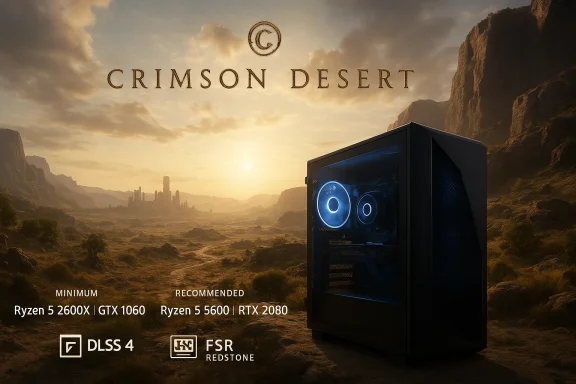 Background / Overview
Crimson Desert is Pearl Abyss’s next major release, built on the studio’s proprietary BlackSpace engine and positioned as a single‑player open‑world action‑adventure. The game’s release date is firm: March 19, 2026, for PC (Steam), PlayStation 5 and Xbox Series X|S. Marketing and platform pages emphasise next‑generation visuals, a wide open world, and cinematic single‑player storytelling. (crimson-desert.com)Pearl Abyss has framed the title as visually ambitious but — crucially for PC players — optimized for a range of systems. The company notes the published requirements may be updated as launch approaches and once more testing data is available, so consider the numbers a snapshot rather than an immutable target. (crimson-desert.com)
Official system requirements: the numbers
The most important facts are short and concrete. Steam’s store page and the developer’s official site list near‑identical CPU, GPU and RAM requirements; the only notable real‑world variance among storefronts concerns the stated storage footprint (some listings quote 100 GB; Steam and the official page show 135 GB). Below are the commonly published figures.Minimum (Windows, PC)
- OS: Windows 10 64‑bit.
- CPU: AMD Ryzen 5 2600X or Intel Core i5‑8500.
- RAM: 16 GB.
- GPU: AMD Radeon RX 6500 XT or NVIDIA GeForce GTX 1060.
- DirectX: 12.
- Storage: SSD required; commonly listed as 135 GB available (some retailers list 100 GB).
- Sound: Windows compatible audio device.
Recommended (Windows, PC)
- OS: Windows 10 64‑bit.
- CPU: AMD Ryzen 5 5600 or Intel Core i5‑11600K.
- RAM: 16 GB.
- GPU: AMD Radeon RX 6700 XT or NVIDIA GeForce RTX 2080.
- DirectX: 12.
- Storage: SSD with ~135 GB free is shown on the official storefront.
Why these specs matter: a practical breakdown
The published numbers tell a clear story about how Pearl Abyss expects Crimson Desert to run and the audience they want to reach.CPU: mid‑range, modern cores
The minimum CPUs (Ryzen 5 2600X / i5‑8500) are 6‑core parts from the desktop‑era that were mainstream several generations ago. They represent a reasonable lower bound for an open‑world title with background streaming and AI work, implying:- Single‑thread headroom isn’t expected to be extreme; modern 6‑core chips should manage CPU work if settings are tuned.
- If you own a Ryzen 5 3600 / 2600X / Intel 8th Gen i5 or better, you are likely to meet CPU requirements; owners of quad‑core laptops or older dual‑core systems will struggle.
GPU: realistic minimum, capable recommended
The minimum GPUs (GTX 1060 / RX 6500 XT) are entry‑to‑lower‑mid cards by modern standards. These are still widely used in 1080p gaming, so the minimum spec signals playable 1080p performance at conservative settings is the baseline target.The recommended tier (RTX 2080 / RX 6700 XT) is considerably stronger and corresponds to comfortable 1440p play or higher quality 1080p with graphical bells turned up. Those cards also sit at the threshold where modern upscalers and ray‑tracing features (if enabled) become viable.
RAM: 16 GB across the board
Pearl Abyss lists 16 GB of RAM for both minimum and recommended. That mirrors many modern AAA games’ memory floors and reflects the demands of open‑world streaming (texture pools, shaders, and system overhead). If you’re on 8 GB, plan to upgrade; 16 GB is the realistic entry point for a stable experience.Storage: SSD required, large footprint
Pearl Abyss mandates an SSD and lists about 135 GB in the Steam store and official guidance. A minority of retailer pages quote 100 GB — this mismatch is likely due to differences between early internal builds and the final day‑one package, but it underscores the need to leave breathing room on your drive for patches, shader caches, and swap. Expect the install to consume well over 100 GB once post‑launch updates arrive.DirectX and other platform notes
The game requires DirectX 12, which is standard for modern engines using advanced rendering techniques. Pearl Abyss also intends to ship native macOS builds with Apple Silicon support, which is unusual for AAA open‑world titles and broadens the platform base.Performance expectations: what these specs likely mean in practice
Use these shorthand expectations when evaluating whether your rig will be "good enough."- If you meet the minimum spec (GTX 1060 / RX 6500 XT + Ryzen 5 2600X / i5‑8500 + 16 GB): expect 1080p gameplay at medium or low‑medium settings with stable framerates in non‑dense scenes; heavy draw‑distance or populated city areas will push CPU/GPU and may require additional tuning.
- If you meet the recommended spec (RX 6700 XT / RTX 2080 + Ryzen 5 5600 / i5‑11600K): expect solid 1440p performance at higher settings, or 1080p at very high/ultra settings with headroom for temporal upscaling and post‑process effects.
- For 4K play, modern upper‑mid and high‑end GPUs (RTX 3080/4080, Radeon 7900 series) will be the practical target. Pearl Abyss has confirmed support for modern upscalers (see below), but the company emphasises native resolution as the baseline optimisation target.
Upscaling, ray tracing and the engine: BlackSpace, DLSS 4, and FSR Redstone
Pearl Abyss’s BlackSpace engine is being touted as a key reason the team can scale visuals across hardware tiers. Independent coverage indicates the studio will ship support for both AMD’s new FSR Redstone and NVIDIA’s DLSS 4 — the latter offers frame generation and motion‑aware upscaling that can substantially raise perceived frame rates and resolution fidelity. Pearl Abyss has framed these tools as optional performance helpers rather than hard requirements; early hands‑ons showcased solid native resolution targets on high‑end hardware, suggesting the engine performs well before upscaling is applied.- DLSS 4 & frame generation: If enabled, DLSS 4 can provide meaningful FPS uplift and improved temporal antialiasing quality on NVIDIA Ada or later hardware. This is useful for RTX owners who want to enable ray tracing.
- FSR Redstone & Ray Regeneration: AMD’s FSR Redstone aims to improve ray‑tracing quality on RDNA 4 cards; its inclusion signals that the developer expects some players to enable ray tracing and rely on vendor upscalers to keep performance acceptable.
Cross‑checking the facts: why some outlets report slightly different numbers
Across storefronts and coverage, you may see small differences:- Steam and the developer’s official site show 135 GB for required SSD space.
- Some retailer pages and early reports have quoted 100 GB, likely from earlier internal builds or truncated storefront entries. This discrepancy is the most important one to watch, because storage is a non‑trivial constraint on many laptops and prebuilt systems. If you only have a 256 GB drive, remember that OS + other games + swap/caches can quickly eat your free space.
Should you upgrade? Practical guidance and recommended targets
If you’re thinking about whether to upgrade, follow this pragmatic ladder:- Confirm your current components and free SSD capacity. Use tools like GPU‑Z / HWiNFO to list GPU/VRAM, core counts and clocks, and Windows’ Disk Management to view drive free space. (These are generic utility recommendations; Pearl Abyss’s storefront is the final arbiter of requirements.)
- If you have 8 GB RAM: upgrade to 16 GB. This is the single most cost‑effective change.
- If you have an HDD: move to a NVMe or SATA SSD — the game requires an SSD. Loading, streaming and texture stutter will be significantly better on an SSD.
- GPU decisions:
- If you own a GTX 1060 / RX 6500 XT: you meet minimum; expect to play at 1080p with tuned settings.
- If you own a RTX 2060 / RX 6600 / equivalent: you’ll likely be close to recommended performance at 1080p high; 1440p may require compromises.
- If you target consistent 1440p high or 4K: aim for RTX 3070/3080, RTX 40‑series or Radeon 7000 series class hardware.
Optimization tips and settings to try at launch
When Crimson Desert debuts, use a methodical approach to settings:- Start with the in‑game presets to find the slider range; then fine‑tune individual controls (shadow resolution, foliage draw distance, crowd density) which commonly impact open‑world performance most.
- If you have NVIDIA hardware, test DLSS 4 (or the highest available DLSS mode) to increase framerate while preserving clarity. On AMD, test FSR Redstone if available. According to previews, Pearl Abyss considers upscalers supplemental to native performance, so you should get tangible gains without sacrificing core visuals.
- Keep texture streaming budgets and anisotropic filtering in mind: these settings affect VRAM. If you see stutter when entering dense zones, lower texture quality rather than shadows first on GPU‑limited systems.
- Ensure your GPU drivers are up to date on day‑one; both AMD and NVIDIA typically ship game‑specific driver optimizations that materially improve performance. The first week after launch will likely be the time when drivers and game patches intersect to produce the best results.
Risks, caveats and what to watch for
No launch is risk‑free. Here are the primary caveats and how to approach them.- Requirements might change. Pearl Abyss says requirements may be updated; Steam and the official site are authoritative but keep an eye on patch notes and store updates. (crimson-desert.com)
- Install size volatility. The exact SSD space requirement differs across listings; allocate extra free space (aim for at least 200 GB free) to avoid surprises during day‑one patches.
- Ray tracing and frame generation show variance by GPU generation. If you plan to enable ray tracing or frame generation, understand that performance gains from DLSS/FSR depend on your card’s architecture; older cards will get less benefit.
- Open‑world CPU load. Big, streaming environments can produce CPU bottlenecks in tightly CPU‑bound scenes — having a modern 6+ core CPU helps. If your CPU matches minimum but is older, expect to adjust draw distance or NPC densities for stable framerates.
Upgrade pathways by budget
- Budget (< $200): 16 GB RAM kit (if on 8 GB) and a cheap NVMe SSD or larger SATA SSD. These two changes will yield the biggest gameplay quality uplift for the lowest cost.
- Mid‑range ($300–$600): Upgrade GPU to an RTX 3070 / RX 6750 XT equivalent or better used/new if prices allow. Paired with a 6‑core CPU, this will handle 1440p comfortably.
- High‑end ($700+): Target RTX 4080 / 4070 Ti / Radeon 7900 XT class cards for stable 4K or high‑frame 1440p with ray tracing and upscalers enabled. Add an NVMe SSD with headroom for future titles.
Preparing your PC step‑by‑step (quick checklist)
- Verify Windows 10 64‑bit is installed and updated.
- Check free SSD space; target at least 200 GB free to be safe.
- Confirm 16 GB RAM (dual‑channel) — upgrade if you’re on 8 GB.
- Update GPU drivers the day before launch and again after the first driver revision post‑launch.
- Back up critical files before large installs and free up space to avoid install failures.
- Test in‑game presets on first run and use the incremental tuning approach described above.
Final verdict: can your PC handle Crimson Desert?
- If your system matches the published minimum (Ryzen 5 2600X / i5‑8500 + GTX 1060 / RX 6500 XT + 16 GB RAM + SSD): yes — you should be able to play at 1080p with moderate settings, though busy city areas or maximum draw distances will require tuning.
- If you meet the recommended spec (Ryzen 5 5600 / i5‑11600K + RX 6700 XT / RTX 2080): expect a good 1440p experience or high‑quality 1080p with headroom for upscalers.
- If you’re running older quad‑core CPUs, 8 GB RAM, an HDD, or a GPU older than GTX 1060: plan to upgrade before launch for a comfortable experience.
Crimson Desert’s announced specs make it more approachable than many recent open‑world blockbusters while still rewarding higher‑tier hardware. If you own a machine near the recommended line, you should be able to enjoy the game in good fidelity; if you’re on minimum hardware, prepare to tweak settings and make the most of modern upscalers. Above all, leave extra SSD space and watch for updates — the coming weeks will reveal how well Pearl Abyss’s optimizations and engine tech translate into consistent performance across the wide variety of PCs in the market.
Source: IXBT.games Crimson Desert PC System Requirements Announced. Can Your Computer Handle It?
