

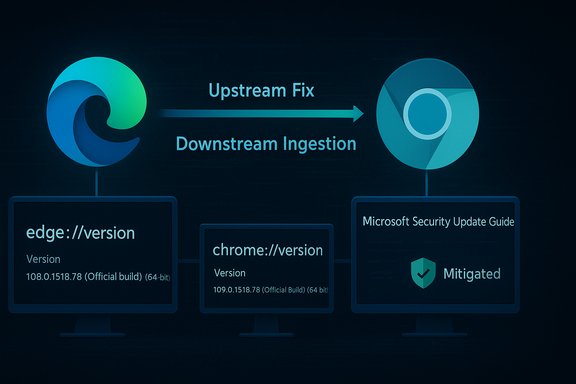
Chromium’s V8 vulnerability CVE‑2025‑12433 — described upstream as an “inappropriate implementation in V8” — is being tracked in Microsoft’s Security Update Guide so Edge administrators and users can confidently know when Microsoft Edge (Chromium‑based) has ingested the upstream Chromium fix and is therefore no longer vulnerable.
Background / Overview
Chromium is an open‑source browser engine that supplies the Blink renderer, V8 JavaScript engine, and other core components to a broad ecosystem of browsers and embedded runtimes. When a security bug is discovered in Chromium (including V8), Google publishes fixes in Chrome releases; downstream vendors such as Microsoft then ingest those fixes, run their own validation and testing, and finally ship patched builds of Microsoft Edge. Microsoft’s Security Update Guide (SUG) is used to document those upstream CVEs as they relate to Microsoft products and to indicate the ingestion/mitigation status for Edge customers.This arrangement creates two separate but related operational facts:
- The CVE originates upstream in Chromium’s OSS (so Google/Chromium is the origin point).
- Microsoft must still publish the downstream status for Edge users so they can validate their own fleet’s exposure.
Why a Chromium CVE shows up in Microsoft’s Security Update Guide
Shared codebase, shared responsibility
Microsoft Edge (Chromium‑based) consumes the Chromium engine; that means a vulnerability in Chromium’s V8 affects Edge until Microsoft ships an Edge build that includes the upstream correction. Microsoft uses the Security Update Guide to:- Track upstream Chromium CVEs that affect Edge.
- Announce when a specific Edge build has ingested the upstream fix.
- Give administrators a single, authoritative place to determine whether Edge in their environment is vulnerable or not.
Why the “inappropriate implementation” label matters
Chromium uses terse labels in its public CVE summaries. The phrase “inappropriate implementation” typically points to logic, validation, or protocol implementation errors rather than raw memory corruption. In V8’s case the label signals a flaw in how the JavaScript engine implements or validates certain operations — errors that can, depending on the details, be leveraged for information disclosure, bypasses, or even memory corruption chains when combined with other engine weaknesses.Because V8 executes untrusted JavaScript and WebAssembly from web pages, even logical mistakes can escalate into high‑impact outcomes. Historically, V8 bugs have been used to obtain arbitrary read/write primitives and, with additional chaining, can result in code execution. For high‑risk V8 defects, vendors often withhold deep technical details until a majority of users have updated to reduce the chance of easy weaponization. That practice explains why some SUG or upstream descriptions may appear short on exploit detail.
How to check your browser version (individuals and administrators)
Quick GUI checks (recommended for most users)
- Microsoft Edge (desktop): Open Edge → Menu (three dots) → Help and feedback → About Microsoft Edge. This navigates to edge://settings/help, which both displays the installed Edge version and triggers an update check.
- Google Chrome (desktop): Open Chrome → Menu → Help → About Google Chrome (chrome://settings/help). Chrome displays the full version string and checks for updates.
- Mobile: In Edge or Chrome mobile apps, go to Settings → About (or About this app) to view the installed version string; mobile builds often show less granular Chromium revision detail than desktop.
Exact internal pages and version details
- edge://version — shows the full Microsoft Edge version string plus the underlying Chromium revision and command line. This page is the most reliable way to see precisely which Chromium backend a given Edge build is using.
- edge://settings/help — the About page that both displays version and triggers update behavior; use this to force-check for a newer Edge build.
- For Chrome, chrome://version performs the same role. These internal pages are the canonical, machine-readable version source you should use when mapping to vendor advisories.
Mapping Chromium (Chrome) fixes to Microsoft Edge builds
Two-step timetable: upstream fix → downstream ingestion
- Google/Chromium identifies and fixes a bug, publishes a Chrome/Chromium release containing the fix.
- Downstream vendors, including Microsoft, ingest the Chromium change, run compatibility tests and telemetry checks, and then release patched Edge builds that embed the corrected Chromium code.
Practical example (pattern, not a promise)
When Google patched V8 type‑confusion zero‑days in previous incidents, the Chrome stable builds were enumerated explicitly (for example, Chrome 140.0.7339.185/.186 for some platforms). Independent reporting and vendor advisories then identified which Edge builds later contained the ingestion. Use those concrete version numbers to compare to your installations. Independent news reporting confirmed the Chrome 140.0.7339.185 family as the remediation boundary in a prior V8 incident.Step‑by‑step: verify Edge is no longer vulnerable to CVE‑2025‑12433
- Open Microsoft Edge on the target machine.
- Type edge://version in the address bar and press Enter. Note the full Edge version string and the Chromium revision reported on this page.
- Visit Microsoft’s Security Update Guide entry for CVE‑2025‑12433 and read the Mitigated or Remediated notice that lists which Edge build contains the fix. (The SUG entry is the authoritative downstream statement.
- Compare the Edge version from step 2 against the SUG‑listed build: if the local Edge version is equal to or newer than the SUG‑listed build, the browser is no longer vulnerable; if it is older, update and redeploy.
- If you manage large fleets, automate this verification by querying the version field returned by the edge://version page (via endpoint management tools, scripts, or your patch-management dashboard) and compare it to the SUG entry programmatically.
If you find an older version: how to update and enforce patches
- Individual users: About page → allow it to download → relaunch Edge. Edge will install updates as part of its normal auto‑update cadence unless disabled by policy.
- Enterprise admins:
- Use your usual patch-distribution channels (WSUS, Microsoft Update Catalog, Intune, ConfigMgr, or your third‑party EDR / patch tool).
- If auto-updates are disabled for compatibility reasons, treat a high‑severity V8 bug as an emergency: test quickly in a small pilot, then push full rollout or apply compensating controls (network isolation, web allowlists) until patches can be deployed.
Practical mitigations while waiting for patched Edge builds
- Reduce exposure: restrict internet browsing on high‑value machines and admin consoles; use web filtering, URL allowlisting, or a secure web gateway.
- Enforce network segmentation: isolate endpoints that cannot be immediately patched.
- Harden browsing: run browsers with strict policies (disable unnecessary extensions, use site isolation, enable sandbox hardening flags where appropriate).
- Monitor telemetry: tune EDR detections for anomalous browser child processes, unusual crashes, or post‑exploit behavior.
- Consider temporary browser substitution: in extreme cases, using a non‑Chromium browser (e.g., Firefox) for sensitive tasks until the patch is deployed reduces immediate risk.
Security implications and risk assessment
Why V8 problems are often high‑impact
V8 executes JavaScript and WebAssembly and uses aggressive JIT and optimization strategies. Type‑confusion or other logical errors can yield arbitrary read/write primitives that attackers can turn into arbitrary code execution — often through carefully crafted web content requiring only a page visit. This remote, low‑interaction attack surface makes V8 defects particularly attractive to attackers. Prior incidents with V8 have been used in the wild and led to critical remediation campaigns.Why downstream ingestion matters operationally
Edge is only safe once Microsoft ships the ingestion build. Enterprises must not assume Chrome’s upstream patch immediately protects Edge endpoints. The SUG entry and Edge release notes are the downstream truth that administrators should use for their compliance reporting and patch‑management decisions.Verification, cross‑checks, and the limits of public disclosure
- Cross‑reference practice: always verify the remediation boundary using at least two independent sources: (A) the upstream Chrome/Chromium release or Chrome Releases notes and (B) Microsoft’s Security Update Guide or Edge release notes that list the ingestion. Independent security reporting (major outlets, vendor advisories) are useful secondary confirmations. Prior incidents show consistent alignment between Chrome release notes and independent security reporting.
- What is not always public: vendors sometimes omit low‑level exploit mechanics and PoCs until a large majority of users are patched, to reduce the risk of widespread weaponization. Where such details are absent, treat technical exploit descriptions as provisional and base operational decisions on vendor patch guidance and observed exploit telemetry.
- Flagging unverifiable claims: if a claim about active exploitation specific to Edge or a public proof‑of‑concept appears without corroborating vendor telemetry or incident reports, label it as unverified until such evidence is published by trusted entities. Always prefer vendor confirmations (Google, Microsoft) and trusted incident response reports for claims of active exploitation.
How to automate checks and reporting (for teams)
- Inventory: enumerate all endpoints and embedded Chromium runtimes (browsers, Electron apps, kiosks).
- Query versions: gather the Edge version field output via endpoint management tools or scripts that read the registry (Windows) / package manager (Linux) or query the browser via automation.
- Compare to SUG: store the SUG‑listed remediation version for the CVE in your patch tracker and automatically flag any endpoints with older versions.
- Remediate: trigger update workflows for flagged endpoints, or apply compensating controls (isolation, allowlists) until patched.
- Report: produce compliance evidence that shows the Edge build numbers before and after patching to satisfy audit or regulatory requirements.
What to expect from vendors and public trackers
- Chrome release notes and the official Chrome Releases blog will show upstream patch builds and usually list patched version numbers. Independent outlets generally echo those remediation boundaries within hours.
- Microsoft will update the Security Update Guide entry and Edge release notes once ingestion and Edge release are complete; those postings are the downstream signal that Edge is remediated. Always rely on the SUG entry to determine Edge status rather than inferring from Chrome release times.
Clear takeaways and checklist
- Why the CVE is in Microsoft’s Security Update Guide: to announce whether Microsoft Edge (Chromium‑based) has ingested the upstream Chromium fix and is no longer vulnerable — not because Microsoft authored the problem.
- How to check your browser version: use edge://version or edge://settings/help in Microsoft Edge, and chrome://version or About Google Chrome for Chrome. Compare those strings with SUG or Chrome release notes.
- Immediate action: update any browsers with version strings older than the patched build listed by Chrome/Microsoft. If you manage many devices, run the automated inventory and remediation steps described above.
- If technical details are sparse: prioritize patching and mitigations; vendor withholding of exploit mechanics is a defensive disclosure practice, not an indication the issue is low risk.
Conclusion
CVE‑2025‑12433’s listing in Microsoft’s Security Update Guide is a normal and necessary outcome of how Chromium OSS and downstream vendors interact: the entry tells Edge users and administrators whether Microsoft’s downstream build includes the upstream fix. The operational burden falls on administrators to read the Edge version string (edge://version or About page), compare it to the SUG or Edge release‑note ingestion mapping, and deploy patches or compensating controls where necessary. Because V8 vulnerabilities frequently carry high exploit potential and because vendors sometimes delay detailed technical disclosures to limit further exploitation, the safest posture is rapid verification and patching rather than waiting for in‑depth public analysis.Source: MSRC Security Update Guide - Microsoft Security Response Center
