

CISA’s placement of a Chromium V8 bug—tracked as CVE-2025-13223—into the Known Exploited Vulnerabilities (KEV) Catalog elevates an already urgent browser security issue into a federal remediation priority and forces IT teams to treat every Chromium-based runtime in their environment as a potential attack surface.
The Cybersecurity and Infrastructure Security Agency (CISA) maintains the KEV Catalog under Binding Operational Directive (BOD) 22‑01 to highlight vulnerabilities with evidence of exploitation in the wild and to set mandated remediation timelines for Federal Civilian Executive Branch (FCEB) agencies. Being added to KEV converts a vulnerability from “important to patch” into an operational deadline for federal organizations and a practical, de‑facto priority for enterprise defenders. Recent forum and community tracking shows the catalog continues to grow with browser engine flaws among the entries.
Google released a stable Chrome update on November 17, 2025, that addresses two V8 type‑confusion issues; one of those is CVE‑2025‑13223, and Google explicitly noted that an exploit for CVE‑2025‑13223 exists in the wild. The fixed stable builds are 142.0.7444.175/.176 (Windows), 142.0.7444.176 (macOS), and 142.0.7444.175 (Linux). The National Vulnerability Database (NVD) records CVE‑2025‑13223 as a type confusion flaw in Google’s V8 JavaScript engine that could allow heap corruption when a user visits a crafted page, and it lists the affected versions as Chrome prior to 142.0.7444.175.
Note: attempts to fetch the official CISA alert page for this specific KEV addition returned access restrictions during reporting, so organizations should confirm CISA’s catalog directly and watch for the KEV entry’s official due date when planning compliance work. Community tracking and forum reports show continued catalog updates that often include Chromium/V8 items.
Source: CISA CISA Adds One Known Exploited Vulnerability to Catalog | CISA
 Background / Overview
The Cybersecurity and Infrastructure Security Agency (CISA) maintains the KEV Catalog under Binding Operational Directive (BOD) 22‑01 to highlight vulnerabilities with evidence of exploitation in the wild and to set mandated remediation timelines for Federal Civilian Executive Branch (FCEB) agencies. Being added to KEV converts a vulnerability from “important to patch” into an operational deadline for federal organizations and a practical, de‑facto priority for enterprise defenders. Recent forum and community tracking shows the catalog continues to grow with browser engine flaws among the entries.Google released a stable Chrome update on November 17, 2025, that addresses two V8 type‑confusion issues; one of those is CVE‑2025‑13223, and Google explicitly noted that an exploit for CVE‑2025‑13223 exists in the wild. The fixed stable builds are 142.0.7444.175/.176 (Windows), 142.0.7444.176 (macOS), and 142.0.7444.175 (Linux). The National Vulnerability Database (NVD) records CVE‑2025‑13223 as a type confusion flaw in Google’s V8 JavaScript engine that could allow heap corruption when a user visits a crafted page, and it lists the affected versions as Chrome prior to 142.0.7444.175.
What CVE‑2025‑13223 actually is
Technical summary
- Vulnerability class: Type confusion (CWE‑843) in the V8 JavaScript engine.
- Impact: Heap corruption that can be triggered remotely by a crafted HTML page; such corruption can lead to arbitrary code execution in the context of the browser process.
- Affected products and versions: Google Chrome builds before 142.0.7444.175 (stable channel) and other products that embed the same V8 release until they ingest the upstream fix.
Reported exploitation
Google’s release note explicitly states that an exploit for CVE‑2025‑13223 exists in the wild. When the vendor confirms active exploitation and the NVD records the CVE, risk escalates from theoretical to immediate operational work for defenders.Why this matters beyond Chrome users
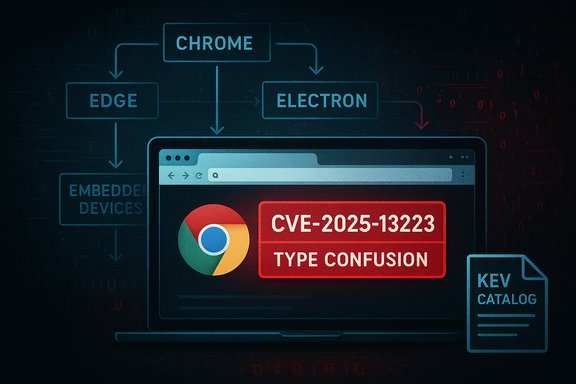
Modern enterprise software and cloud tooling embed Chromium components and V8 in many places beyond the end‑user browser:- Chromium‑based browsers (all vendors who follow upstream Chromium): Microsoft Edge, Brave, Opera, Vivaldi and many smaller or embedded browsers.
- Electron apps: Popular desktop apps (including productivity, messaging, and development tools) often bundle a particular Chromium/V8 runtime; they are vulnerable until upstream fixes are rolled into their packaged builds.
- WebView runtimes: Mobile and desktop applications using WebView or WebView2 on Windows can inherit the vulnerability until updated.
- Embedded devices and appliances: Admin consoles or device UIs that ship with embedded Chromium engines may be vulnerable.
Operational risk and exploitation scenarios
A remote attacker can weaponize a V8 type‑confusion bug simply by getting a target to load a specially crafted web page or malicious content delivered via an embedded browser control. Practical attack vectors include:- Drive‑by compromises via phishing links or third‑party sites that have been compromised.
- Malicious ad content or malvertising that reaches many users at scale.
- Weaponized content delivered inside Electron‑based collaboration or productivity apps.
- Attacks that begin in a browser tab and attempt to break out of sandboxing to pivot to the host.
Immediate remediation checklist (for security teams)
- Update browsers now
- Apply the Chrome stable updates to reach 142.0.7444.175+ (or later) on Windows, macOS, and Linux as applicable. Google’s stable release notes identify these builds.
- Inventory Chromium runtimes
- Identify all instances of Chromium and V8 across endpoints and servers: desktop browsers, Electron apps, embedded WebViews, kiosk/IoT appliances, and Docker images.
- Track downstream vendor updates
- For Microsoft Edge, Electron apps, and other Chromium consumers, monitor vendor bulletins and update policies—do not assume the Chrome update automatically protects other Chromium clients. Downstream ingestion is required.
- Apply mitigations where immediate patching isn’t possible
- Restrict web access to high‑risk user groups, disable automatic rendering of untrusted HTML in internal apps, implement URL filtering, and block known‑bad hosts at the proxy.
- Harden endpoints and EDR detection
- Ensure EDR/EDR‑like tooling is current and tuned to detect exploitation attempts and anomalous JavaScript engine behavior. Deploy memory‑integrity and exploit mitigation features where supported.
- Communicate with users and operations
- Schedule forced browser restarts where necessary and provide clear guidance to users about the urgency of installing updates.
Windows‑specific actions for IT administrators
- For desktops managed with Group Policy or enterprise management tools:
- Configure and enforce auto‑updates for Chrome and Edge; push approved builds centrally.
- Use endpoint configuration tools to detect embedded runtime versions inside Electron apps and schedule accelerated upgrades.
- For server or virtual desktop environments:
- If servers host web‑rendering functions (e.g., server‑side headless browsers), isolate these systems, apply vendor patches immediately, and monitor network egress.
- For Microsoft Edge environments:
- Confirm the Edge build used by your estate has ingested the Chromium security fix before declaring the environment remediated. The downstream vendor’s update guidance is your authoritative operational signal.
Detection, hunting, and forensic recommendations
- Hunt for suspicious child processes spawned by browser processes and for abnormal memory corruption exceptions reported by system telemetry.
- Query EDR logs for indicators such as:
- Unexpected render process crashes around browser process restarts.
- Observed in‑memory injection attempts, unusual JIT behavior, or exploitation chains that culminate in new service creation or persistence mechanisms.
- Search proxy and web gateway logs for increased hits to newly registered domains or patterns matching known exploit kit indicators.
- Deploy or query for generic heuristics: frequent tab crashes, sudden increases in outbound TLS sessions shortly after visiting certain domains, or anomalous renderer process activity.
- Maintain evidence preservation procedures: in the case of suspected exploitation, collect memory images and browser process dumps for analysis.
Compliance and remediation timelines under BOD 22‑01
When CISA places a CVE into the KEV Catalog, the next steps and timelines are governed by BOD 22‑01: federal agencies receive a remediation due date tied to the KEV entry. Although the directive is mandated for FCEB agencies, industry practices track the KEV list as a prioritized triage list for all organizations.Note: attempts to fetch the official CISA alert page for this specific KEV addition returned access restrictions during reporting, so organizations should confirm CISA’s catalog directly and watch for the KEV entry’s official due date when planning compliance work. Community tracking and forum reports show continued catalog updates that often include Chromium/V8 items.
Cross‑checking the facts (what we verified)
- Google’s stable channel update notes for November 17, 2025, list CVE‑2025‑13223 as a High severity V8 type‑confusion bug and explicitly state that an exploit exists in the wild. The release also lists the patched stable builds.
- The NVD entry for CVE‑2025‑13223 describes the flaw as type confusion in V8 and records the affected Chrome versions (prior to 142.0.7444.175). That aligns with Google’s release notes.
- Public community and forum trackers mirror CISA’s operational practice of adding exploited CVEs to the KEV Catalog and flagging them to operators; community posts show KEV catalog additions that include Chromium‑engine flaws and mirror the urgency implied by BOD 22‑01. These community resources document the operational impact and typical remediation windows.
Risk analysis and long‑term considerations
Strengths of the current defensive posture
- Chromium project’s rapid disclosure and patch cadence is effective: Google published fixes promptly and documented that an exploit was observed, giving operators actionable information.
- The KEV Catalog and BOD 22‑01 provide an operationally useful prioritization mechanism, forcing high‑impact CVEs into short remediation windows for federal systems. This drives organizational action and reduces exposure time when exploited CVEs appear.
Persistent weaknesses and risk drivers
- The supply‑chain lag between upstream patching (Chrome) and downstream adoption (Edge, Electron apps, embedded device vendors) is the core operational risk. Attackers exploit that gap.
- Many enterprises do not inventory embedded runtimes well enough; Electron apps and admin consoles can remain vulnerable long after desktop browsers are patched.
- Exploit code tends to be quickly weaponized for mass campaigns and integrated into commodity exploit kits once public proof‑of‑concepts or working exploits circulate.
Strategic recommendations
- Maintain an accurate, up‑to‑date inventory of Chromium/V8 runtime consumers and enforce a vendor‑tracking and accelerated‑ingestion policy for downstream fixes.
- Bake swift, tested rollback and deployment procedures into change control so that emergency security builds can be rolled as high‑priority changes without violating release governance.
- Invest in runtime hardening: enable OS‑level exploit mitigations such as CFG, ASLR, hardware‑assisted control‑flow integrity features, and memory safety monitors where possible.
- Consider network segmentation and microsegmentation to contain potential browser‑borne compromises and reduce the blast radius.
Practical checklist for the next 72 hours
- 0–6 hours: Confirm Chrome patch availability on managed images and begin inbox notifications to operations and helpdesk teams requesting immediate installs and restarts.
- 6–24 hours: Run a company-wide inventory scan for Chromium-based runtimes (desktop, server, containers) and list all products that must be updated or have vendor advisories tracked.
- 24–48 hours: Apply vendor updates wherever available and apply temporary mitigation controls (web filtering, blocking risky domains, disabling auto‑render in internal web views).
- 48–72 hours: Validate remediation via telemetry and vulnerability scanners; hunt for indicators of compromise and review browser crash logs and EDR alerts for signs of exploitation.
Conclusion
CVE‑2025‑13223 is not theoretical: it is a V8 type‑confusion vulnerability with evidence of exploitation and an upstream fix already released by Google. The real operational challenge is not the fix itself but the speed and completeness of its propagation across the Chromium ecosystem and the enterprise attack surface that depends on that ecosystem. Federal agencies will treat KEV additions as remediation deadlines; private sector organizations should follow suit and treat this CVE as an immediate, high‑priority remediation item across browsers, embedded runtimes, and Electron apps. The most effective response is rapid patching, broad runtime inventorying, and targeted detection/hunting to discover any exploitation that may have occurred before updates were applied.Source: CISA CISA Adds One Known Exploited Vulnerability to Catalog | CISA
