
Microsoft’s advisory for CVE-2025-62200 labels the defect as a “Microsoft Excel Remote Code Execution Vulnerability,” even though the published CVSS vector explicitly records the attack vector as Local (AV:L); this is not a contradiction but a difference in what each label is describing — the advisory is naming the possible outcome (code execution on the victim machine), while the CVSS Attack Vector documents how the vulnerable code must be triggered (a local parsing/execution event).
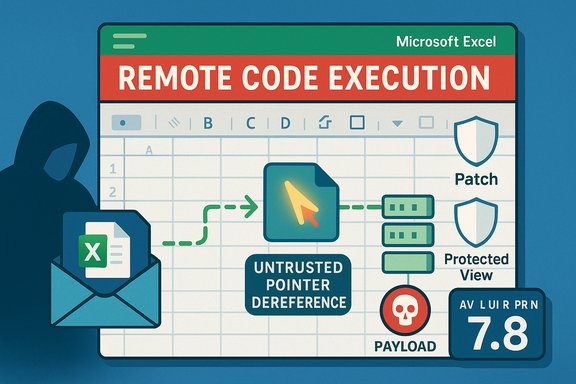
Microsoft disclosed CVE-2025-62200 on November 11, 2025. The vulnerability is described as an untrusted pointer dereference in Microsoft Excel that could allow an attacker to execute code on the affected system when a user opens a specially crafted Excel file. The published CVSS v3.1 vector is CVSS:3.1/AV:L/AC:L/PR:N/UI:R/S:U/C:H/I:H/A:H, which yields a base score of 7.8 (High). This combination — high impact with an AV:L and UI:R — is a common pattern for Office document parsing flaws: the attacker’s payload is delivered remotely (for example by email or a link), but the vulnerable code path executes locally inside the Office process when the victim opens the file. The Common Vulnerability Scoring System explicitly instructs scorers to treat such document-parsing flaws as Local because the vulnerable component itself is not a network service; the attack requires local parsing/execution on the victim’s host.
Source: MSRC Security Update Guide - Microsoft Security Response Center
 Background
Microsoft disclosed CVE-2025-62200 on November 11, 2025. The vulnerability is described as an untrusted pointer dereference in Microsoft Excel that could allow an attacker to execute code on the affected system when a user opens a specially crafted Excel file. The published CVSS v3.1 vector is CVSS:3.1/AV:L/AC:L/PR:N/UI:R/S:U/C:H/I:H/A:H, which yields a base score of 7.8 (High). This combination — high impact with an AV:L and UI:R — is a common pattern for Office document parsing flaws: the attacker’s payload is delivered remotely (for example by email or a link), but the vulnerable code path executes locally inside the Office process when the victim opens the file. The Common Vulnerability Scoring System explicitly instructs scorers to treat such document-parsing flaws as Local because the vulnerable component itself is not a network service; the attack requires local parsing/execution on the victim’s host. What “Remote Code Execution” means in vendor advisories
Two different questions: outcome vs. exploit path
Vendor advisories, including Microsoft’s, use concise, operational language to tell defenders what an attacker can achieve — in this case, the ability to cause arbitrary code to execute on a targeted machine. That is why the headline uses the phrase Remote Code Execution (RCE): an attacker located remotely (off the victim’s host) can cause code to run on the target if they can get the victim to open a malicious file. By contrast, CVSS metrics — and particularly the Attack Vector metric — are focused on the technical mechanics of exploitation: where the vulnerable code is executed and what access or presence is required to trigger it. This is why the same security advisory can reasonably say “Remote Code Execution” while the CVSS Attack Vector is Local.Vendor FAQ language and Microsoft’s phrasing
Microsoft explicitly addresses this wording in its advisory-style FAQ: “The word Remote in the title refers to the location of the attacker. This type of exploit is sometimes referred to as Arbitrary Code Execution (ACE). The attack itself is carried out locally.” That phrasing is repeated across multiple MSRC advisories when the underlying technical vector is “local” but the attacker does not need physical proximity to be the origin of the malicious file. The FAQ clarifies the distinction between remote delivery and local execution.Technical anatomy of CVE-2025-62200
The root cause: untrusted pointer dereference (CWE-822)
CVE-2025-62200 is mapped to CWE-822 — Untrusted Pointer Dereference. In plain terms, this class of weakness occurs when software accepts a value from an untrusted input, converts that value into a pointer, and then dereferences it without sufficient validation. If the pointer value is attacker-controlled, the code can read from or write to unexpected memory locations, crash the process, or, in the worst case, allow execution of attacker-supplied code. MITRE’s CWE entry documents multiple variants and consequences of this pattern, including arbitrary code execution when a write-through dereference or an unexpected function pointer invocation occurs.Exploitation model for document-parsing bugs
For Excel parsing vulnerabilities like CVE-2025-62200, the typical exploitation chain follows a clear pattern:- Attacker crafts a malicious Excel spreadsheet that embeds data causing the vulnerable code path to dereference an attacker-controlled pointer.
- Attacker distributes the malicious file remotely — via email attachment, cloud share, file transfer, or download link.
- Victim receives the file and opens it (user interaction is required per CVSS: UI:R). The local Excel process parses the malicious content and triggers the vulnerability.
- If exploitation succeeds, the attacker-controlled payload runs in the context of the Excel process and the logged-in user. From there the attacker can drop additional malware, exfiltrate data, or move laterally within the environment.
Important CVSS fields for CVE-2025-62200
- Attack Vector (AV:L) — exploitation of the vulnerable component occurs on the local host (document parsing inside Excel).
- User Interaction (UI:R) — a victim must open the crafted file for the exploit to trigger (social engineering is the usual delivery mechanism).
- Privileges Required (PR:N) — the attacker does not need prior privileges on the machine other than getting the user to open the file; the payload runs under the user’s context.
- Base Score (7.8 / High) — the combination of no privileges required and potential high impact (C:H/I:H/A:H) yields a high-severity rating that should be prioritized for patching.
Real-world risk and exploitability
Why AV:L Office bugs are still high-risk
A Local Attack Vector does not mean “hard to exploit in practice.” Excel and other Office components are installed on millions of endpoints, and the attack delivery vectors (email, cloud links, file shares) are low-friction and widely used. Attackers routinely use targeted phishing (spear-phishing) campaigns or commodity spam to send weaponized documents at scale. When a vulnerability requires only that a user open a file, the operational risk is significant even though the CVSS AV is Local. The CVSS User Guide explicitly notes that document parsing flaws are typically scored as Local even when the malicious document is distributed over the network.Attack surface factors that increase likelihood
- Ubiquity of Excel — Excel files are commonly exchanged inside and outside organizations, increasing the odds a victim will see a malicious file.
- Social engineering success — attackers can craft plausible delivery contexts (invoices, shared spreadsheets, HR forms) that increase the chance a recipient will open the file.
- Delayed patch adoption — gaps between patch release and deployment create windows where opportunistic attackers can exploit known vulnerabilities. Public reporting and advisories emphasize prompt update cycles.
Is there evidence of active exploitation?
At the time of disclosure for CVE-2025-62200 there were no confirmed public proof-of-concept exploits or reports of active exploitation. However, the nature of the flaw (pointer dereference leading to arbitrary code execution) and the low bar for user interaction make it a candidate for rapid weaponization if a reliable exploit is developed. Organizations should treat high-impact Office RCE advisories as urgent even when initial exploitation reports are absent.Mitigations and tactical controls
Immediate actions every administrator should take
- Apply Microsoft’s security updates immediately — this is the primary and recommended remediation path. Microsoft has released updates for affected Office/Excel versions; install the appropriate KBs via Microsoft Update or your patch management tooling.
- Harden email gateways and file filtering — block or quarantine suspicious attachments and enforce attachment type policies for external mail. This reduces the chance a malicious file reaches an inbox.
- Enforce Protected View and Application Guard for Office — ensure Office is configured to open files from untrusted sources in Protected View or use Microsoft’s Application Guard features where available. These features limit the privileges and capabilities available to parsing processes.
- Disable macros or restrict macro execution — many attack chains include macro-based follow-on stages; limit macros to signed and trusted sources, and disable “enable all macros” policies.
Longer-term and compensating controls
- Endpoint detection and response (EDR) — deploy and tune EDR solutions to detect suspicious child processes, lateral movement, and anomalous post-exploitation activity.
- Least-privilege user models — minimize the impact of successful document-based exploits by ensuring users run with non-administrative accounts and that privilege elevation is not trivial.
- User education and phishing-resistant authentication — train users on identifying hostile document cues, and invest in phishing-resistant MFA to limit account takeover risk after initial compromise.
Operational guidance: triage and communications
How to interpret the advisory headline in a patch bulletin
When the security bulletin says “Remote Code Execution,” treat it as an indication of impact — an attacker can, from an off-host location, cause code to run on your systems if the exploitation chain completes. When the CVSS vector is AV:L, incorporate that into your operational triage: the exploit requires user interaction or local action to succeed, so focus mitigation efforts on the user-facing controls (email, file-sharing, protected view) and rapid patch deployment. Combining the advisory’s impact signal with the CVSS exploitation mechanics gives security teams the nuanced picture necessary for correct prioritization.Communicating to non-technical stakeholders
Use plain language: explain that an attacker can cause a targeted workstation to run malicious code if a user opens a crafted Excel file. Emphasize that the attacker can operate from anywhere, but the exploit only triggers when a user opens the document — that explains both the term “remote” (attacker’s location) and the CVSS designation “Local” (the vulnerable action happens on the endpoint). Provide concrete mitigations (patch, block attachments, enable Protected View) and timelines for patch rollout.Why the distinction matters for defenders
Avoiding dangerous misunderstandings
A naive reading — “Local = low risk” — is dangerously wrong. AV:L simply documents the technical requirement that the vulnerable code be triggered locally, not the ease with which an attacker can deliver a malicious payload. Email and collaboration tools are the delivery channels that make these Local-vector RCEs a practical, high-risk problem. Security teams that ignore vendor RCE wording because the CVSS vector says Local risk underestimating real-world attackability.Prioritization: impact + exploitability
Triage should combine two axes:- Impact (what the attacker can do if exploited): RCE with C:H/I:H/A:H is high impact.
- Exploitability (how the vulnerability is triggered): AV:L + UI:R means remediation efforts should focus on user-facing controls and patch deployment speed.
Practical checklist for Windows and Office administrators
- Confirm affected versions in your estate (check Excel and Microsoft 365 Apps build numbers) and map them to the vendor KBs.
- Schedule and deploy the Microsoft security updates pushed for CVE-2025-62200 via Microsoft Update or your systems management tool.
- Enforce Protected View for files from the internet and restrict macro execution policies.
- Update email gateway rules to quarantine unknown attachments and scan for known malicious indicators.
- Validate endpoint telemetry and EDR detections for anomalous process activity that may indicate a weaponized document was opened.
Conclusion
CVE-2025-62200 is a high-impact Excel vulnerability that demonstrates a recurring theme in modern advisories: the headline label (“Remote Code Execution”) describes the attacker’s ability to cause code to run on a target from an off-host location, while CVSS Attack Vector (AV:L) reports the execution context required to trigger the bug locally inside the application. That semantic gap is expected and intentional: one statement communicates the end-state risk to defenders, the other documents technical exploit mechanics for triage and scoring. The practical implication for defenders is clear — treat such Office RCE advisories as urgent, prioritize patching, and harden user-facing controls (email filtering, Protected View, macro restrictions) to reduce the chance a malicious file will be opened in the first place.Source: MSRC Security Update Guide - Microsoft Security Response Center
