

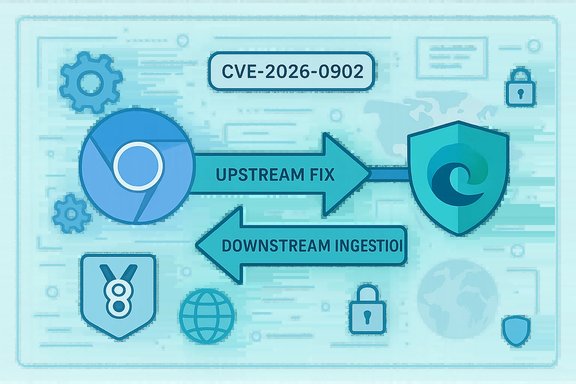
Chromium’s CVE-2026-0902 is appearing in Microsoft’s Security Update Guide because the flaw lives in Chromium’s V8 JavaScript engine, and Microsoft Edge (the Chromium‑based browser) consumes that open‑source code; the Security Update Guide is Microsoft’s downstream signal to administrators and users that Edge builds have or have not yet ingested the upstream Chromium fix. verview
Chromium is an open, shared codebase made up of subsystems such as Blink (rendering), V8 (JavaScript/WebAssembly), ANGLE (graphics translation) and others. Google maintains the upstream Chromium project and publishes Chrome releases that contain security fixes for vulnerabilities discovered in those subsystems. Downstream consumers — Microsoft Edge, Brave, Opera, many Electron apps, kiosks, WebView/WebView2 integrations and embedded runtimes — must ingest those upstream changes, validate them, build vendor‑specific binaries and then ship updated packages to end users. That ingestion process creates a meaningful time window between the upstream fix and the downstream product being protected. The Microsoft Security Update Guide (SUG) documents that downstream status for Microsoft‑shipped products, which is why a Chromium‑origin CVE shows up in the SUG.
The label “Inappropriate implementation in V8” is a ta logic/validation/integration problem in the V8 engine rather than an explicit, named memory‑corruption class (like use‑after‑free). In practice, however, V8’s aggressive JIT optimizations and complex internal representations mean implementation failures can — and historically have — become memory‑safety problems (heap corruption, type confusion, out‑of‑bounds reads/writes) that attackers chain into remote code execution. Vendors treat V8 issues with high urgency because the attack vector is usually network‑reachable (a crafted page) and exploitation can be potent.
Chromium CVEs are therefore dual‑faced: they are an upstream engineering record (Google/Chromiu ge and other consumers). Microsoft’s SUG entry does not mean Microsoft introduced the bug — it exists to tell Edge administrators whether Microsoft has shipped an Edge build that contains the Chromium remediation.
Source: MSRC Security Update Guide - Microsoft Security Response Center
Chromium is an open, shared codebase made up of subsystems such as Blink (rendering), V8 (JavaScript/WebAssembly), ANGLE (graphics translation) and others. Google maintains the upstream Chromium project and publishes Chrome releases that contain security fixes for vulnerabilities discovered in those subsystems. Downstream consumers — Microsoft Edge, Brave, Opera, many Electron apps, kiosks, WebView/WebView2 integrations and embedded runtimes — must ingest those upstream changes, validate them, build vendor‑specific binaries and then ship updated packages to end users. That ingestion process creates a meaningful time window between the upstream fix and the downstream product being protected. The Microsoft Security Update Guide (SUG) documents that downstream status for Microsoft‑shipped products, which is why a Chromium‑origin CVE shows up in the SUG.
The label “Inappropriate implementation in V8” is a ta logic/validation/integration problem in the V8 engine rather than an explicit, named memory‑corruption class (like use‑after‑free). In practice, however, V8’s aggressive JIT optimizations and complex internal representations mean implementation failures can — and historically have — become memory‑safety problems (heap corruption, type confusion, out‑of‑bounds reads/writes) that attackers chain into remote code execution. Vendors treat V8 issues with high urgency because the attack vector is usually network‑reachable (a crafted page) and exploitation can be potent.
Chromium CVEs are therefore dual‑faced: they are an upstream engineering record (Google/Chromiu ge and other consumers). Microsoft’s SUG entry does not mean Microsoft introduced the bug — it exists to tell Edge administrators whether Microsoft has shipped an Edge build that contains the Chromium remediation.
 What the Security Update Guide entry is telling you
What SUG records, in plain terms
- The SUG lists the CVE and indicates wheoduct is affected.
- For Chromium‑origin CVEs, SUG shows the Edge build(s) that include the ingestion of the upstream Chromium fix.
- That “fixed in” Edge build is Microsoft’s authoritative downstream remediation signal for Edge customers; it’s the one administrators should use for patch verification, change control and compliance reporting.
Why Microsoft lists upstream CVEs at all
- Shared upstream code means shared exposure: Edge inherits V8, so a V8 bug applies to Edge until Microsoft ships a- The SUG closes the ambiguity: Chrome may be patched upstream, but Edge is only patched when Microsoft publishes the ingestion in SUG and ships the updated Edge package.
Technical summary of the class of bug (what “inappropriate implementation in V8” can mean)
V8 implements many optimizations that assume strict internal invariants: object s(maps), inline caches and speculative JIT paths. An implementation error can break those assumptions and lead to:- Out‑of‑bounds reads or writes
- Heap corruption and unstable memory state
- Type confusion or JIT miscompilation that yields attacker‑controlled primitives
How to see the version of the browser (step‑by‑step, individual and enterprise)
Knowing the exact browser version is the single fastest and most reliable way to determine whether your installate. The SUG typically references an Edge build number (for example: “Fixed in Edge X.Y.Z”). Compare that SUG build with the version on the target machine.Microsoft Edge — quick GUI method (recommended for most users)
- Open Microsoft Edge.
- Click the three‑dot menu (Settings and more) → Help and feedback → About Microsoft Edge.
- Alternatively, enter edge://settings/help in the address bar and press Enter.
- The About page shows the full Edge version string and will automatically check for updates; if an update is downloaded it prompts you to restart the browser to activate the fix. For additional internals, enter edge://version to see the full version string and the underlying Chromium revision.
Google Chrome — quick GUI method
- Open Chrome → Menu → Help → About Google Chrome (chrome://settings/help). Chrome will display the full version string and check for updates in the same way.
Command line, file and registry checks (fheck the msedge.exe file properties or the file version in program files; compare the file version to the SUG “fixed in” build.
- For large estates, script an inventory of msedge.exe versions or query the BLBeacon registry key for deployed Edge channel information. Use software inventory tools, EDR, SCCM/OEM patch tools or endpoint management solutions to automate detection.
Special note on Chromium revision vs. Edge build numbering
- Upstream Chrome/Chromium build numbers map to V8 revisions and serve as the upstream signal (e.g., Chrome 142.0.7444.x). Downstream vendors generally report a vendor‑specific Edge version. The authoritative claim th Microsoft’s SUG entry that connects the Chromium upstream fix to a particular Edge build; do not assume parity solely from the Chrome number. Use edge://version to see the local Chromium revision if you need to cross‑walk to Chrome release notes.
Where to confirm the fix (and common pitfalls)
- Microsoft’s Security Update Guide is the canonical downstream source for Edge remediation status. Some parts of the MSRC SUG web UI require JavaScript for full rendering; if the interactive page doesn’t display in a script‑limited environment yo in a modern browser or use vendor release notes.
- Google’s Chrome Releases notes and Chromium issue tracker show the upstream remediation boundary (the Chrome builds where the fix landed).
- National databases (NVD, GitHub Advisory Database, OpenCVE and other independent trackers) provide corroborating records such as vulnerability descriptions and severity metrics; use at least two independent sources to cross‑check public claims.
Practical remediation checklist — immediate actions
- Update the browser: open edge://settings/help to force an update and relaunch the browser. If Microsoft’s SUG lists a concrete Edge buiour Edge build is older, update immediately.
- Inventory all Chromium runtimes in your estate:
- Microsoft Edge (desktop and mobile)
- Embedded WebView/WebView2 components inside internal apps
- Electron bundled apps (desktop apps that embed Chromium)
- Kios any appliances that use a bundled Chromium runtime
- Server‑side headless Chromium instances (CI runners, rendering workers)
- If you cannot patch immediately, apply compensating controls:
- Enforce web filtering and block access to untrusted or high‑risk sites.
- Limit web browsing for high‑privilege accounts and internet‑facing systems.
- Use browser isolation or sandboxing solutions where available.
- Harden endpoints and increase runtime telemetry/EDR sensitivity for anomalous browser activity.
- Verify and document: for compliance, record the Edge build versions and the SUG “fixed in” build that confirms remediation. This is essential for audits and change control.
Enterprise verification and automation (recommended workflows)
- Inventory: script a scan that extracts msedge.exe version info and edge://version Chromium revision for all endpoints.
- Map: cross‑walk local Chromium revision numberome releases to see whether the V8 fix is present, and then cross‑check Microsoft’s SUG to confirm Edge ingestion.
- Prioritize: patch internet‑facing systems, administrators’ workstations and machines that process untrusted HTML content (mail previewers, headless renderers).
- Monitor: watch crash telemetry, EDR alerts and web proxy logs for unusual patterns while patching rolls out.
- Report: capture the SUG build ID and the date of ingestion in your patch reporting dashboard to satisfy auditors.
Critical analysis — strengths and risks of the current model
Notable strengths
- Transparency: Microsoft’s SUG gives downstream customers an authoritative, vendor‑specific record of remediation status for Edge. That’s critical for enterprises that retion for compliance and patch evidence.
- Ecosystem signal: Upstream Chromium release notes and public CVE records allow operators to see the root cause and technical class of the bug. Independent trackers and national databases (NVD, OpenCVE) give corroboration. (nvd.nist.gov
- Operational clarity: The model separates who fixed the bug upstream (Chromium/Google) from who shipped the fix downstream (Microsoft Edge), which is practical for real‑world patch management.
Remaining risks and gaps
- Ingestion lag: The time between Google shipping a Chromium fix and Microsoft shipping an Edge build that includes it is non‑zero and sometimes measured in hours to weeks. That window is an exploitable surface, especially fo
- Hidden runtimes: Many enterprise applications embed Chromium (Electron apps, headless services, kiosk appliances). Those runtimes may remain vulnerable even after Edge updates because they require vendor or app‑pack updates. Inventory blind spots are common and dangerous.
-: Vendors often withhold low‑level exploit details and PoC code until the majority of users have updated. This reduces weaponization risk but also leaves defenders without full technical telemetry for detection tuning. Treat unverified “exploit in the wild” claims with cautioeat unverifiable or partially verified claims
- Confirm the CVE identifier and the exact “fixed in” build listed by Micrheck upstream Chrome release notes and at least one independent tracker (NVD, OpenCVE, GitHub Advisory Database, etc. for the technical description and the upstream fixed Chrome build.
- If a specific exploit or proof‑of‑concept is claimed, wait for vendor or national CERT confirmation before treating it as confirmed. Flag such claims as unverified until corroborated.
Final recommendations (practical, actionable)
- Verify your local Edge version now: open edge://settings/help and relaunch if an update is available. Confirm the About page version against Microsoft’s SUG “fixed in” build.
- Run a short inventory sweep for msedge.exe versions aum runtimes; prioritize internet‑facing and high‑privilege hosts.
- If you manage endpoints centrally, publish a short advisory to users: update browsers, restart devices, and avoid risky clicking while patching is underway.
- For et patch immediately, apply compensating controls (web filtering, browser isolation, limit browsing for admins).
- Document remediation evidence nd dates for audit and compliance workflows.
Conclusion
CVE‑2026‑0902 is a Chromium‑origin vulnerability that Microsoft documents in the Security Update Guide to tell Edge users whether Microsoft has shipped a downstream build that includes the upstream Chromium fix. The practical takeaway for users and administrators is straightforward: check the Edge About page (edge://settings/help) orhe exact build, compare that against the SUG “fixed in” build, and update and relaunch the browser immediately if your build predates the remediation. Because the Chromium ecosystem is broadly re‑used across browsers and embedded runtimes, comprehensive inventorying and rapid patching — combined with compensating controls where patching is delayed — are the only reliable defenses against V8‑class vulnerabilities. (If SUG details appear limited in your environment due to the MSRC page’s JavaScript requirements, open the SUG entry in a modern browser to read the “fixed in” Edge build; that vendor statement is the authoritative downstream signal.Source: MSRC Security Update Guide - Microsoft Security Response Center
