

The Chromium CVE labeled CVE-2026-0906 — an “Incorrect security UI” issue — appears in Microsoft’s Security Update Guide because Microsoft Edge (the Chromium-based edition) consumes Chromium’s open-source code, and Microsoft uses the Security Update Guide to announce when Edge has ingested the upstream Chromium fix and is no longer vulnerable.
Chromium is an open-source browser engine that supplies core components — Blink, V8, and associated subsystems — to many mainstream browsers, most notably Google Chrome and Microsoft Edge (Chromium-based). When a security problem is found and assigned a CVE in the Chromium project, Google/Chromium publishes a patch and a Chrome release. Downstream vendors such as Microsoft then ingest the upstream change, test it within their own product stack, and ship vendor-specific builds that include the remediation. Microsoft records those upstream CVEs in the Microsoft Security Update Guide (SUG) to communicate Edge’s downstream remediation status: in short, the SUG entry tells Edge administrators which Edge build contains the ingestion and is therefore no longer vulnerable.
This operational pipeline — upstream fix → downstream ingestion → Edge release → SUG entry — is the reason you will see Chromium-origin CVEs listed in Microsoft’s catalogue even when the original patch was authored by Google. The SUG listing is an authoritative downstream status signal for enterprises and administrators, not a claim that Microsoft authored the vulnerability.
Common manifestations include:
Key points to understand:
The practical defense is straightforward: verify your installed Edge/Chromium version, update to the fixed build Microsoft lists in SUG, and maintain layered protections that reduce the effectiveness of UI-based social-engineering attacks.
Source: MSRC Security Update Guide - Microsoft Security Response Center
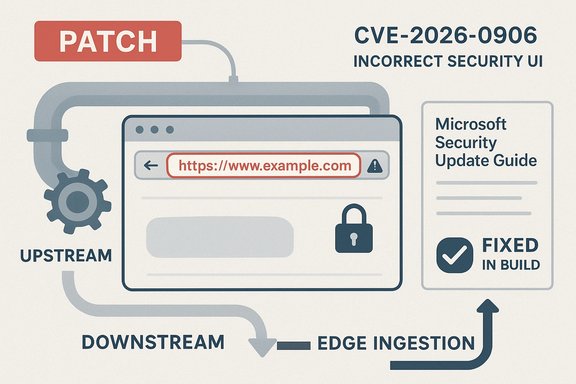 Background
Chromium is an open-source browser engine that supplies core components — Blink, V8, and associated subsystems — to many mainstream browsers, most notably Google Chrome and Microsoft Edge (Chromium-based). When a security problem is found and assigned a CVE in the Chromium project, Google/Chromium publishes a patch and a Chrome release. Downstream vendors such as Microsoft then ingest the upstream change, test it within their own product stack, and ship vendor-specific builds that include the remediation. Microsoft records those upstream CVEs in the Microsoft Security Update Guide (SUG) to communicate Edge’s downstream remediation status: in short, the SUG entry tells Edge administrators which Edge build contains the ingestion and is therefore no longer vulnerable.This operational pipeline — upstream fix → downstream ingestion → Edge release → SUG entry — is the reason you will see Chromium-origin CVEs listed in Microsoft’s catalogue even when the original patch was authored by Google. The SUG listing is an authoritative downstream status signal for enterprises and administrators, not a claim that Microsoft authored the vulnerability.
What “Incorrect security UI” means in practice
The class of vulnerability
An incorrect security UI vulnerability is a UI integrity problem where browser trust signals — the address bar (omnibox) text, padlock icon, permission dialog provenance, or other security chrome — can display incorrect or misleading information in particular UI states or edge-case rendering scenarios. These visual indicators are the primary way users determine whether a site is trustworthy; if they can be spoofed or misrepresented, attackers can more easily mount credential-phishing, permission-abuse, or consent-based attacks.Common manifestations include:
- A pane in a split or snapped view showing the security indicator for a different origin.
- Permission prompts (camera, microphone, geolocation) that appear to belong to a trusted site while originating from a malicious page.
- Omnibox content that is visually decoupled from the actual origin due to compositing or timing issues.
Why SplitView / Fullscreen / Mobile contexts matter
Modern multi-tasking and compact/mobile UIs increase attack surface for UI-spoofing:- SplitView and tiled windows create complex compositing orders that can be manipulated or misrendered.
- Mobile browsers compress or hide chrome (address bar and icons), making it easier to hide provenance cues.
- Dynamic toolbars and gesture-driven UI changes on mobile add timing complexity that attackers may exploit.
Why CVE-2026-0906 appears in Microsoft’s Security Update Guide
Microsoft’s Security Update Guide lists CVE-2026-0906 for the specific operational reason of declaring when the Edge product is no longer vulnerable — that is, which Edge build includes the Chromium patch. The presence of a Chromium CVE in SUG is intended to provide Edge administrators with a reliable mapping between an upstream CVE and a downstream Edge version or build that resolves the issue. This avoids the common mistaken assumption that Chrome’s upstream patch automatically and immediately protects Edge.Key points to understand:
- The CVE originates in Chromium upstream; Google publishes the upstream fix.
- Microsoft ingests, tests, and integrates that fix into Edge builds.
- The SUG entry documents the downstream ingestion and remediation status for Microsoft products.
- Enterprises should consult SUG and Edge release notes to map installed Edge builds against the fixed build listed there.
How to check your browser version — concise, platform-by-platform
Knowing the exact browser version is the single most reliable way to determine whether your browser matches the remediation boundary reported by vendors.Microsoft Edge — desktop (Windows, macOS, Linux)
- Open Microsoft Edge.
- Click the three-dot menu (Settings and more) in the top-right.
- Select Help and feedback → About Microsoft Edge.
- The About page displays the Edge version and triggers an update check. If an update is available, Edge will download and display a Relaunch button. Alternatively, type edge://version or edge://settings/help in the address bar to see the full version string and the underlying Chromium revision.
- Registry key (Windows): HKCU\SOFTWARE\Microsoft\Edge\BLBeacon\version contains the current user’s Edge version.
- File properties: inspect msedge.exe → Details → Product version for the installed build.
Google Chrome — desktop
- Open Chrome.
- Menu → Help → About Google Chrome or enter chrome://settings/help.
- Chrome displays its version and checks for updates. You can also type chrome://version to reveal the full version string and Chromium revision information. Use the full numeric version to compare against upstream Chrome release notes.
Microsoft Edge — mobile (Android, iOS)
- Android: Open the Play Store, find Microsoft Edge, and view the app page for the installed version; or in Edge, go to Settings → About to see the version string.
- iOS: Open Settings → General → iPhone Storage → Microsoft Edge to see the installed version, or open Edge → Settings → About.
At-scale inventory and enterprise checks
For organizations, manual checks are impractical. Recommended methods:- Use management tooling (Intune, SCCM, WSUS, Jamf) to collect installed Edge/Chrome versions across endpoints.
- Query the registry remotely using PowerShell:
- Get-ItemPropertyValue -Path 'HKCU:\SOFTWARE\Microsoft\Edge\BLBeacon' -Name "version"
- Or collect msedge.exe file version via remote inventory scripts.
- For mobile fleets, use MDM reports to enumerate installed app versions.
Practical remediation and short-term mitigations
Applying the vendor-supplied update is the definitive remediation. Where immediate patching is not possible, implement compensating controls:- Enforce phishing-resistant multi-factor authentication (hardware security keys or platform authenticator) for sensitive accounts.
- Restrict access to high-value web applications on endpoints that cannot be immediately patched.
- Apply URL reputation services and secure web gateway policies to block known malicious domains.
- Increase user awareness: instruct users to verify origin before entering credentials or approving permission prompts, and to use bookmarks or typed URLs for sensitive sites rather than following links.
- For organizations with embedded Chromium runtimes (Electron apps, kiosk software), contact vendors for patched builds — embedded runtimes rarely auto-update with the system browser and often remain vulnerable longer.
Risk assessment: how worried should you be?
Severity profile
- UI-spoofing bugs like CVE-2026-0906 generally rate lower in raw technical severity than memory-corruption or sandbox-escape bugs, because they do not directly execute arbitrary code.
- However, they attack human trust, making them powerful in phishing and credential-theft campaigns. High-value targets remain at measurable risk because a well-crafted spoof can yield account takeover or other business-impacting outcomes.
Exploitation and public reporting
- Vendors frequently withhold exploit details until patches are widely deployed to reduce risk of weaponization. Absence of a public proof-of-concept does not imply the vulnerability is innocuous or unexploited in the wild. Treat the SUG entry as the authoritative statement of remediation status and act accordingly. If no further public evidence exists for active exploitation, flag that as unverifiable and prioritize patching rather than threat-hunting for non-obvious indicators.
Practical consequences
- For general consumer users, the immediate likelihood of targeted exploitation is moderate-to-low, but the baseline recommendation remains: update the browser promptly.
- For enterprises, particularly those with privileged or high-profile users, treat UI-spoofing flaws as operationally significant and accelerate patching and compensating controls for those accounts.
Detection, monitoring, and incident response considerations
UI-spoofing flaws are not usually observable via kernel-level indicators or straightforward process telemetry. Detection is largely behavioral and operational:- Monitor authentication logs for unusual sign-ins after suspected phishing windows (geographic anomalies, abrupt simultaneous logins).
- Tune SIEM/EDR to look for suspicious post-auth activity rather than relying on browser crash traces.
- Collect browser telemetry where possible (renderer logs, crash dumps) if exploitation is suspected, but expect limited forensic artifacts.
- If a suspected compromise originates from an unpatched endpoint, isolate it, collect volatile evidence per IR playbook, and rotate credentials for affected accounts.
Vendor handling: strengths, limitations, and operational trade-offs
Strengths
- Microsoft’s practice of recording Chromium CVEs in the Security Update Guide provides a single authoritative downstream signal for Edge administrators, which helps enterprise patch planning and compliance. The SUG mapping reduces guesswork about whether a patched Chrome upstream means Edge is safe.
Limitations and risks
- Ingestion lag: Upstream Chromium/Chrome patches can appear in Chrome sooner than downstream vendors ship their integrated builds. This creates a window of exposure for Edge users until Microsoft ingests and ships the fix.
- Indexing lag across trackers: Third-party CVE databases and aggregators may not immediately show Edge-specific ingestion details, which complicates automated enterprise feeds.
- Embedded runtimes: Many apps embed Chromium and have bespoke update processes; these embedded instances can be forgotten in standard browser update workflows and remain vulnerable longer.
Quick checklist for users and admins
- Individual users:
- Open the browser → About page (edge://settings/help or chrome://settings/help).
- Install any available updates and relaunch the browser.
- Confirm the version string matches or exceeds the fixed build listed in Microsoft’s Security Update Guide for CVE-2026-0906.
- Administrators:
- Inventory Edge/Chrome versions across all endpoints (including embedded Chromium runtimes).
- Map installed builds to the SUG/Edge release-notes “fixed in” build for CVE-2026-0906.
- Prioritize deployment to high-value users and internet-facing systems.
- If patching is delayed, apply compensating controls: web filtering, phishing-resistant MFA, and temporary access restrictions.
- Validate remediation by checking endpoint version strings post-deployment.
Caveats and unverifiable claims
- The security community often receives terse CVE descriptions for UI issues (for example, “Incorrect security UI in SplitView”), which intentionally withholds implementation detail during the initial disclosure. If a public write-up lacks technical specifics or proof-of-concept code, do not interpret silence as lack of risk — it may reflect a deliberate decision to avoid premature weaponization. Treat the lack of public exploit detail as unverifiable evidence of active exploitation and prioritize patching and controls instead.
- Exact micro build numbers for the fixed Edge build can vary between channels (Stable, Beta, Dev). Always use the Microsoft Security Update Guide entry and Edge release notes as the authoritative downstream mapping, rather than third-party aggregators.
Conclusion
CVE-2026-0906, categorized as an “Incorrect security UI” in Chromium, is reflected in Microsoft’s Security Update Guide to inform Microsoft Edge users and administrators about Edge’s downstream remediation status. The SUG listing is a normal and intentional operational practice: it tells you whether Microsoft has ingested the Chromium fix and which Edge build you must run to be considered patched. Confirm your browser’s version using the About or version pages (edge://version, edge://settings/help, chrome://version), map those numbers against Microsoft’s SUG “fixed in” build, and apply updates across consumer and managed fleets without delay. Where immediate patching is impossible, use compensating controls such as phishing-resistant MFA and strict web filtering, and prioritize high-value accounts for rapid remediation.The practical defense is straightforward: verify your installed Edge/Chromium version, update to the fixed build Microsoft lists in SUG, and maintain layered protections that reduce the effectiveness of UI-based social-engineering attacks.
Source: MSRC Security Update Guide - Microsoft Security Response Center
