

The Vulnerability Lives Where the Browser Pretends to Be an App
The affected component, Web Apps, is not an obscure corner of Chrome in the way an old plug-in interface might once have been. It is part of the machinery that lets websites behave more like installed software: pinned icons, app windows, integration with the operating system shell, and a blurrier boundary between the browser and the desktop. That convenience is exactly why the component matters.
A use-after-free bug is a classic memory-safety failure: software releases a chunk of memory and later continues to act as if it still owns it. In the best case, the browser crashes. In the worst case, an attacker manipulates what gets placed into that freed memory and turns a stale pointer into a lever for code execution or privilege movement.
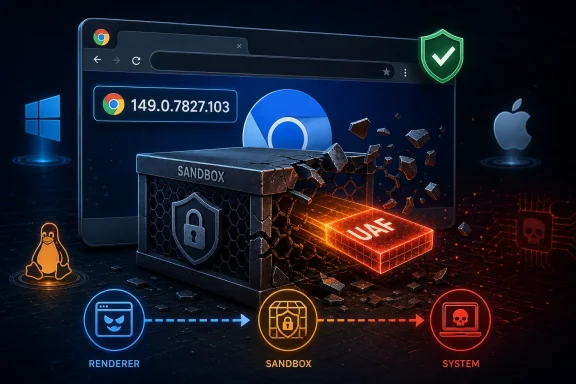
CVE-2026-11642 is especially notable because the published description does not frame it as an initial browser compromise. It says the attacker had already compromised the renderer process and could then use a crafted HTML page to potentially perform a sandbox escape. That phrasing matters because Chrome’s renderer sandbox is supposed to contain the blast radius when hostile web content wins the first round.
The vulnerability therefore sits in the second act of an attack. The first act gets code running inside a renderer, perhaps through another bug or exploit chain. The second act breaks out of the cage. For defenders, that second act is often where “a bad tab” becomes “a bad endpoint.”
The Sandbox Is the Story, Not the Score
CISA’s ADP scoring gives the bug a CVSS 3.1 base score of 8.3, which lands in high territory, while Chromium labels the severity critical. That apparent mismatch is not a contradiction so much as a difference in how severity systems see the world. CVSS tries to describe exploit characteristics in a standardized way; browser vendors have to think in chains.
The vector tells a nuanced story. The attack is network-reachable and requires no privileges, but it does require user interaction and carries high attack complexity. Scope is changed, with high confidentiality, integrity, and availability impact. In plain English: this is not a “spray the internet and instantly own machines” bug, but if an attacker can combine it with the right renderer compromise and get a user to load hostile content, the result can be severe.
That is why sandbox escapes occupy a special place in browser security. A browser sandbox is not meant to prevent every exploit; it is meant to ensure that an exploit against the parsing engine, JavaScript engine, graphics stack, or document renderer does not automatically become operating-system access. When that containment layer fails, the browser’s multi-process architecture loses one of its central defensive promises.
For Windows users, this is not an abstract architectural debate. Chrome, Edge, Brave, Vivaldi, and other Chromium-derived browsers have become front doors to identity systems, password managers, cloud consoles, remote administration portals, corporate SaaS dashboards, and local file workflows. A sandbox escape in that ecosystem deserves urgency even when there is no public exploit proof-of-concept and even when the CVSS score stops short of critical.
NVD’s CPE Entry Says Less Than Administrators Want
The NVD record lists Google Chrome versions before 149.0.7827.103 as vulnerable and associates the affected configuration with Windows, Linux, and macOS. That is useful for vulnerability scanners, but it is not the same as a complete operational answer. CPE data is often blunt; browser deployment reality is not.
The record’s “Are we missing a CPE?” prompt is almost a standing warning about modern software supply chains. Chromium is a project, Chrome is a product, and many other products consume Chromium code on their own schedules. A CPE entry that names Google Chrome tells administrators where the disclosed fix landed first, not necessarily where every downstream exposure begins and ends.
Microsoft Edge deserves particular attention for WindowsForum readers, but with a caveat. Edge is Chromium-based and routinely incorporates Chromium security updates, yet its versioning and release cadence are not identical to Google Chrome’s public advisory language. The right enterprise answer is not to assume Edge is safe or unsafe from the Chrome CVE text alone; it is to verify the installed Edge Stable, Extended Stable, and WebView2 runtime versions against Microsoft’s own Edge security release notes and deployment channels.
That distinction matters for scanners and patch dashboards. A scanner may flag Chrome using a neat CPE rule while missing a bundled Chromium runtime in a third-party application, an Electron app, or a stale WebView2 dependency. Conversely, it may raise noisy findings against systems where Chrome is not installed but a generic platform relationship has been modeled. The job is not merely to “clear the CVE”; it is to identify every Chromium surface that can process untrusted web content.
Web Apps Turn Convenience Into Attack Surface
The phrase “Web Apps” can sound benign, even boring. It is not. Chrome’s web-app layer is where browser-originated content gains desktop-like affordances, and every affordance is a place where policy, lifetime management, permissions, and process boundaries have to be correct.
Progressive web apps and installed web apps have become attractive because they solve real problems. They are easy to deploy, update centrally, and use across operating systems. For enterprises, they offer a middle ground between the chaos of native clients and the limitations of ordinary tabs.
But that middle ground is also complicated. A browser window pretending to be an app must remember state, coordinate icons and launch handlers, manage permissions, and interact with system UI. Each of those paths requires the browser to map web concepts onto operating-system concepts without letting the web side borrow authority it should not have.
A use-after-free in this area suggests the failure was not simply “HTML is dangerous.” It points to object lifetime, component interaction, and the complexity of browser subsystems that have grown far beyond rendering pages. The modern browser is not an application; it is an application platform with a memory allocator, a security broker, a process model, an extension system, a certificate stack, a sync engine, and a quasi-desktop app framework.
That is the uncomfortable trade. Users want websites to feel native. Businesses want web apps to replace native clients. Attackers want any boundary where “web” becomes “local” to be messy enough to exploit. CVE-2026-11642 sits squarely in that pressure zone.
The Renderer Requirement Is Reassuring Only Until It Isn’t
The description’s requirement that the attacker already compromised the renderer process may make the bug sound less urgent. That would be the wrong lesson. Browser exploitation is often modular, and attackers do not need every vulnerability to do everything.
A renderer compromise can come from a different memory corruption bug, a just-in-time compiler issue, a malicious document, a graphics stack flaw, or another browser component. Once code execution is achieved in the renderer, the sandbox is supposed to prevent the attacker from touching the file system, stealing arbitrary local data, injecting into other processes, or persisting on the host. A sandbox escape is the bridge from constrained chaos to system-level consequence.
High attack complexity also should not be mistaken for low risk in targeted environments. Exploit chains used against journalists, dissidents, executives, developers, government staff, and administrators are often complex by design. The difficulty that keeps commodity criminals away does not necessarily deter a well-funded operator targeting a small population.
For ordinary consumers, the practical advice is simple: update and relaunch. For enterprise IT, the renderer prerequisite should instead shape prioritization. This is the sort of bug that belongs in the “patch quickly because it completes chains” category, particularly on machines used by privileged users, help desk staff, developers with signing keys, and administrators who live inside browser-based consoles.
Chrome’s Version Number Is the New Security Boundary
The fixed version line is precise: Chrome before 149.0.7827.103 is affected according to the CVE description, while Google’s desktop stable update used closely related platform-specific builds around the 149.0.7827.102/.103 range. That sort of minor-version distinction is easy to wave away, but it is the difference between being exposed and being able to show auditors that the fix landed.
Chrome’s automatic update system is one of the browser’s great security advantages, but it has an old enemy: the relaunch button. Updates can download silently and still sit dormant until the browser restarts. On heavily used workstations, kiosk systems, shared lab machines, and admin consoles, that restart may lag behind the patch by days.
Administrators should treat browser relaunch compliance as part of patch compliance. It is not enough that Google Update, Microsoft Edge Update, or a software-management tool reports that an update is available or staged. The running browser process has to be the fixed build, and long-lived sessions need to be closed.
This is where Windows management tooling can help, but only if organizations are willing to be slightly unpopular. Scheduled browser restarts, user notifications, deadline-driven update policies, and inventory checks are mundane controls. They are also the controls that turn a vendor patch into an actual risk reduction.
Windows Shops Have More Chromium Than They Think
A Windows estate in 2026 rarely has just one Chromium surface. It may have Chrome for users who prefer it, Edge as the default system browser, WebView2 powering line-of-business apps, Electron-based tools such as chat clients and editors, and embedded browsers inside security products, VPN clients, and device-management consoles. That makes Chromium patching a fleet problem, not a browser preference.
CVE-2026-11642 is formally a Google Chrome CVE, and defenders should avoid overclaiming that every Chromium consumer is automatically affected in the same way. Code sharing does not always mean identical exploitability. Build flags, feature exposure, sandbox configuration, update cadence, and platform integration all matter.
Still, the operational lesson is broad. Any product that embeds a browser engine inherits some of the browser’s security economics: rapid disclosure, fast patch cycles, frequent memory-safety fixes, and vulnerability windows measured in days rather than quarters. If an organization inventories Chrome but ignores embedded Chromium runtimes, it is securing the front door while leaving side entrances undocumented.
WebView2 deserves special mention because it is increasingly part of modern Windows application architecture. Developers like it because it lets them build web-powered Windows apps without shipping an entire browser stack themselves. Administrators should like it too, but only when runtime updating is understood, monitored, and not accidentally frozen by packaging choices.
The Public Bug Tracker Is Quiet by Design
The Chromium issue linked from the CVE is access-restricted, which is normal for serious browser vulnerabilities shortly after disclosure. That frustrates researchers and defenders who want technical detail, but the policy has an obvious purpose. Publishing exploit primitives before a critical mass of users updates would turn a patch into a roadmap.
This creates a familiar asymmetry. Attackers who already found or bought the bug may know exactly how it works. Defenders get a component name, a weakness class, a fixed version, and a severity rating. Everyone else waits.
The right response is not to fill the silence with speculation. There is no public evidence in the CVE text that CVE-2026-11642 was exploited in the wild, and it should not be conflated with other Chrome vulnerabilities from the same update cycle that may have different exploitation status. The bug is serious enough on its own terms without borrowing drama from a neighboring CVE.
This is particularly important for security communications inside organizations. Overstating the evidence can buy short-term urgency but costs long-term trust. The stronger message is also the more accurate one: this is a critical Chromium sandbox-escape-class bug fixed in current Chrome, useful as part of an exploit chain, and worth rapid deployment even without public proof of active exploitation.
Memory Safety Keeps Sending the Same Invoice
CWE-416, use after free, is one of the recurring villains of browser security. It appears so often because browsers are enormous C++ systems built under extreme performance pressure, and because they constantly process hostile, attacker-controlled input. The web is not a document format anymore; it is an adversarial runtime.
Google and the wider Chromium project have spent years layering mitigations onto this reality. Site isolation, sandboxing, control-flow protections, heap hardening, MiraclePtr-style defenses, fuzzing, and process separation all make exploitation harder. But mitigations are not magic. They raise costs; they do not repeal memory corruption.
That is why the industry’s larger shift toward memory-safe languages matters, even if it will not replace Chrome’s existing codebase overnight. Rust adoption in browsers and operating-system components is not fashion. It is an attempt to stop entire classes of bugs from being created in the first place.
CVE-2026-11642 is one more data point in that argument. It is not evidence that browser security is failing; Chrome’s sandbox model and update pipeline remain among the strongest in consumer software. But it is evidence that memory-unsafe complexity continues to produce high-impact bugs in the places where billions of users spend most of their computing lives.
For Attackers, the Browser Is Still the Best Beachhead
The reason browser bugs remain valuable is simple: the browser is where trusted users meet untrusted content. Email links, chat links, search results, ads, help-desk portals, documentation sites, SaaS dashboards, and identity prompts all converge in the same runtime. No amount of user training changes the fact that the browser’s job is to load things from the internet.
A sandbox escape adds particular value because many defensive products and security teams are accustomed to thinking of browser compromise as contained. If the browser can be pushed across the sandbox boundary, the attacker may reach local files, tokens, interprocess communication channels, or other footholds needed for persistence and lateral movement. The exact path depends on the exploit and target, but the strategic value is clear.
Administrators should also remember that browser sessions are identity-rich. A compromised endpoint is bad; a compromised browser used by a domain admin, cloud engineer, or payroll manager is worse. Cookies, OAuth tokens, password managers, and active sessions can turn local compromise into cloud compromise with alarming speed.
That is why endpoint hardening and identity hardening must meet at the browser. Hardware-backed authentication, phishing-resistant MFA, device compliance checks, least-privilege admin workflows, and session controls are not replacements for browser patches. They are the guardrails that keep one browser exploit chain from becoming a full organizational incident.
The Patch Is Simple, the Estate Is Not
For individual users, the fix path is refreshingly boring. Open the browser’s About page, let it check for updates, and relaunch into a fixed version. If Chrome reports a build at or beyond the fixed line, the immediate exposure described by the CVE is addressed for Chrome.
Enterprise environments rarely get to be that simple. Some organizations pin browser versions for compatibility. Some rely on virtual desktops that are patched through golden images. Some have offline or bandwidth-constrained systems. Some have application owners who quietly panic whenever a browser major version changes.
Those constraints are real, but they are not excuses for treating browser updates as ordinary application maintenance. Chrome and Edge are security-sensitive infrastructure. They deserve patch SLAs closer to endpoint protection and identity agents than to optional desktop utilities.
The best Windows shops already know this. They maintain browser update rings, test critical web apps quickly, stage deployment without waiting weeks, and force relaunches when the risk justifies it. CVE-2026-11642 is exactly the kind of vulnerability that rewards that maturity.
Scanner Green Is Not the Same as Browser Safe
Vulnerability management teams will likely see CVE-2026-11642 as another item in a dashboard, with an affected CPE, a fixed version, and a severity number. That is necessary. It is not sufficient.
First, scanners must see the actual installed browser version, not merely the presence of Google Chrome in an inventory database. Second, they need to account for per-user installs, portable copies, developer-installed channels, and systems where users have local admin rights. Third, they should distinguish between a patched package and a still-running vulnerable process.
The harder problem is embedded Chromium. Electron apps and bundled runtimes may not advertise themselves in a way a traditional CPE scan recognizes. In some cases, a vendor must ship an updated application before the embedded engine is fixed. In others, the application uses a shared runtime that can be patched centrally.
This is where asset management becomes security engineering. If a business-critical application renders untrusted web content using Chromium, it belongs in the browser-risk conversation. If nobody can answer which Chromium version it embeds, that is not a documentation gap; it is an exposure.
Microsoft’s Edge Cadence Makes Verification Essential
Windows users naturally ask whether a Chrome CVE affects Edge. The honest answer is often: check Microsoft’s Edge security release notes and the installed Edge version, because Chromium lineage points to possible relevance but does not replace product-specific confirmation. That answer is less satisfying than a yes or no, but it is more useful.
Microsoft typically ships Edge security updates outside the monthly Patch Tuesday rhythm when Chromium fixes require it. That is good, but it also means administrators who think in monthly Windows cumulative updates can miss browser urgency. Edge is part of Windows users’ daily environment, but its security cadence is more like Chrome’s than like Notepad’s.
The same applies to Edge WebView2 Runtime. Many Windows applications now depend on it, and its update channel may be evergreen or fixed depending on how the app was deployed. Evergreen is generally the safer default for security, while fixed-version deployments require the application owner to carry more update responsibility.
This is a cultural adjustment as much as a technical one. Windows patching used to mean operating-system patching first and application patching second. In a Chromium-heavy Windows estate, browser engine patching is one of the operating environment’s central security chores.
The June Browser Patch Should Change the Checklist
CVE-2026-11642 does not require panic, but it does require disciplined follow-through. The bug is serious because it targets containment after a renderer compromise, not because every user who visits a bad page is automatically lost. The difference matters, and so does the response.
- Chrome installations should be updated to a fixed 149.0.7827.103-or-later build where that version line applies, with relaunches enforced rather than merely requested.
- Windows administrators should verify Edge, Edge WebView2 Runtime, and other Chromium-based applications separately instead of assuming the Chrome advisory covers the whole estate.
- Vulnerability teams should treat scanner CPE matches as a starting point and investigate per-user installs, portable browsers, long-running processes, and embedded browser engines.
- Security teams should prioritize browsers used by administrators, developers, finance staff, executives, and anyone with privileged access to cloud or identity systems.
- Communications should avoid claiming active exploitation of CVE-2026-11642 unless new evidence appears, while still explaining that sandbox-escape bugs are high-value pieces of exploit chains.
- Developers shipping Chromium-powered desktop apps should be able to say which engine version they use, how it updates, and who owns emergency patch delivery.
The browser security story has become less about any single bug and more about the speed with which the ecosystem absorbs the fix. CVE-2026-11642 is another reminder that the web’s most important runtime is also one of Windows’ most important attack surfaces, and the organizations that fare best will be the ones that treat Chromium updates not as browser housekeeping, but as core endpoint defense.