
Google disclosed CVE-2026-11655 on June 8, 2026, as a high-severity integer overflow in Chrome’s Media component on macOS before version 149.0.7827.103, where an attacker who had already compromised the renderer could potentially escape the browser sandbox using a crafted HTML page. That phrasing sounds narrow, almost conditional, and easy to file under “patch when convenient.” It is not. In modern browser security, a sandbox escape is the hinge between a bad tab and a bad machine.
The first temptation is to treat CVE-2026-11655 as a platform-specific footnote. The NVD description names Google Chrome on Mac, the fixed version is 149.0.7827.103, and the exploit condition requires a compromised renderer process before the sandbox escape becomes relevant. For a Windows-heavy shop, that can sound like somebody else’s incident queue.
That would be the wrong read. Chrome’s security model is built around layering, and this bug targets one of the layers that is supposed to contain the damage after a renderer compromise. Even when the first step is not supplied by CVE-2026-11655 itself, browser attackers commonly chain bugs: one flaw to get code running in a renderer, another to break out of the sandbox, and sometimes a third to elevate privileges or persist.
The important detail is not simply “integer overflow.” It is “integer overflow in Media” paired with “sandbox escape.” Media parsing is one of the browser’s historically dangerous neighborhoods because it handles complex, attacker-delivered data formats at web speed. If that code path can be reached through a crafted HTML page, the browser’s ordinary promise — that a malicious page stays trapped inside a constrained process — becomes much less reassuring.
For WindowsForum readers, the Mac label should not make this irrelevant. Mixed fleets are normal now, especially in developer, design, executive, and bring-your-own-device environments. A vulnerability that bypasses Chrome’s sandbox on macOS can still become part of the same enterprise risk story as a Windows browser zero-day: unmanaged endpoints, stale update rings, exposed SSO sessions, and the assumption that browser auto-update has silently solved the problem.
That is how browser exploitation often works in practice. A renderer compromise may be achieved through a JavaScript engine bug, a DOM flaw, a WebAssembly issue, a font or image decoder bug, or another memory safety problem. Once the attacker has that foothold, the sandbox is supposed to limit what the attacker can see and touch. CVE-2026-11655 matters because it points at the escape hatch.
Chrome’s sandbox has been one of the major reasons web compromise is less catastrophic than it used to be. It splits risky web content away from more privileged browser and operating system functions. That design has forced attackers to chain vulnerabilities rather than rely on a single bug. But a chain is only as strong as its hardest link, and sandbox escapes are the links exploit developers prize.
There is also a practical lesson in the CVSS vector contributed by CISA’s ADP enrichment. The attack is network-adjacent in the everyday sense — the user can be reached through the web — but it requires user interaction and carries high confidentiality, integrity, and availability impact once the chain lands. That is the profile of a vulnerability that may not generate mass panic on its own but deserves fast patching in any environment where browsers are used for privileged work.
An integer overflow is the kind of bug that sounds less dramatic than “use-after-free” or “type confusion,” but it can be just as serious. At its simplest, it happens when a calculation produces a value too large for the storage type that holds it, wrapping or truncating into something smaller or otherwise unexpected. In security terms, the result can be a buffer that is too small, a bounds check that passes when it should fail, or a memory operation that trusts a number the attacker has effectively distorted.
The NVD entry’s assignment of CWE-472, “External Control of Assumed-Immutable Web Parameter,” is curious in this context because it is not the weakness label many engineers would instinctively expect for a plain integer overflow. That does not make the vulnerability fictional or less important, but it does remind us that vulnerability metadata is often an evolving approximation. The vendor description is the load-bearing part: an integer overflow in Chrome Media on macOS allowed a potential sandbox escape after renderer compromise.
For defenders, the exact internal code path may remain restricted for weeks or longer. Google commonly limits access to bug details until most users have received fixes, and that is especially true when a bug affects security boundaries. That temporary opacity is not a reason to wait. It is a reason to treat the vendor’s fixed version number as the operational fact that matters.
For individual users, the mechanics are familiar. Open Chrome, go to the browser’s About page, let it check for updates, and relaunch when prompted. Chrome’s auto-update machinery is good, but it is not magic; pending relaunches are one of the most reliable ways users remain exposed after a patch is technically downloaded.
For IT teams, the relaunch problem is where the real work begins. Enterprise browser management is no longer just about choosing defaults and blocking extensions. It is about being able to answer a deceptively simple question: which endpoints are running the vulnerable build right now?
That answer can be harder than it should be. Macs may be managed through MDM, Jamf, Kandji, Intune, Munki, or a patch platform that reports application inventory at different intervals. Developers may run multiple Chrome channels. Some users may have Chrome installed outside the expected path. Others may live in “I’ll restart later” limbo for days.
The mature response is not to send an update email and hope. It is to verify installed versions, enforce update policies where possible, require relaunch after a grace period, and treat browser drift as an exposure metric. In a world where identity, email, SaaS administration, source control, and cloud consoles all flow through the browser, Chrome version compliance is security infrastructure.
Attackers do not read patch notes the way defenders do. Defenders see a list of CVEs, severity ratings, platforms, and components. Attackers see a diff map, a timing window, and a population of users who will update slowly. Once a release ships, the race begins between patch adoption and exploit reconstruction.
That is why “not known exploited” should not become “not urgent.” Browser vulnerability details tend to get clearer after the patch is out, not before. Researchers, exploit brokers, nation-state teams, and criminal operators all understand that release notes can provide enough information to focus reverse-engineering work even when the bug tracker remains restricted.
The presence of a nearby in-the-wild V8 bug also reinforces the chain-risk model. A renderer compromise bug and a sandbox escape bug are complementary pieces of an exploit strategy. Even if CVE-2026-11655 was not used with CVE-2026-11645, defenders should think in chains rather than isolated CVE cards.
The user-facing question — “Are we missing a CPE here?” — is more than a database housekeeping prompt. It reflects the uncomfortable truth that the vulnerability ecosystem still relies on imperfect translation between vendor advisories, product versions, operating systems, package names, and scanner logic. A Chrome bug may be fixed by a browser update, but its operational detection depends on whether asset systems understand which product, channel, version, and OS combination matters.
For administrators, the practical move is to avoid outsourcing judgment entirely to CPE matching. If your fleet has macOS endpoints running Chrome, query the browser version directly. If your scanner does not flag CVE-2026-11655 but inventory shows Chrome below 149.0.7827.103 on Mac, believe the version data.
This is especially important in mixed-device organizations. Windows security teams are often fluent in KB numbers, cumulative updates, and Defender telemetry, but application-level browser updates cut across OS boundaries. Chrome’s update cadence does not wait for Patch Tuesday, and neither do browser exploit chains.
That makes sandbox escapes strategically valuable. A renderer compromise may let an attacker tamper with a web session or read data inside a malicious tab’s constraints. A sandbox escape can widen the blast radius toward local files, interprocess communication, operating system services, and other browser-held material depending on the exploit chain and platform defenses.
On macOS, the attack surface is shaped by Apple’s own sandboxing, privacy controls, hardened runtime features, and permission prompts. But those protections are not a force field. Chrome’s sandbox is part of the defense stack, and a vulnerability described as a potential sandbox escape is explicitly about weakening that stack.
The browser also compresses the time between exposure and consequence. Users do not need to install a suspicious executable. They may only need to load a page, preview content, follow a link from email, or visit a compromised site. That is why browser bugs continue to attract serious attention even when the exploit conditions sound technical.
For consumers and enthusiasts, that means checking the version and relaunching Chrome. For administrators, it means confirming that macOS devices are actually receiving the 149.0.7827.103 build or later. For security teams, it means looking for the pattern that always follows browser security releases: delayed restarts, unmanaged endpoints, and false confidence from dashboards that count “update available” as “update installed.”
The more interesting question is whether organizations have learned to compress browser patch windows. A monthly patch rhythm is too slow for Chrome-class vulnerabilities, especially when a release contains an in-the-wild bug elsewhere in the same bundle. Browser updates need a faster operational lane than traditional desktop maintenance.
That does not mean every Chrome CVE should trigger a war room. It means the organization should already know what happens when a high-severity browser sandbox escape ships: which systems are in scope, which policy enforces the update, how long users can defer relaunch, and what report proves completion.
Administrators should resist the lazy equivalence that every Chromium bug automatically affects every Chromium-based product in the same way. Platform code, feature flags, component versions, build timing, and sandbox architecture all matter. But they should also resist the opposite error: assuming a Chrome advisory has no relevance because the organization’s “standard browser” is Edge.
Modern fleets are messy. Users install Chrome because a vendor portal recommends it. Developers use Canary or Beta builds for testing. Marketing teams keep multiple browsers for analytics workflows. Executives carry Macs that sit partly outside Windows-centric tooling. The browser monoculture is not one product; it is a common attack surface distributed through many products.
For Microsoft shops, the right posture is comparative visibility. Know Chrome versions. Know Edge versions. Know where WebView2 runtime versions sit. Know which macOS endpoints are managed with the same seriousness as Windows laptops. The security boundary that matters is not the procurement standard; it is the software actually executing untrusted web content.
This is where severity language should be read carefully. “High” in Chromium’s taxonomy does not mean “background noise.” It often means the bug can produce serious security impact under plausible conditions but may require chaining, user interaction, or a specific process state. A sandbox escape after renderer compromise fits that profile.
The CVSS 3.1 score of 8.3 from CISA’s ADP enrichment similarly tells a story of friction plus consequence. Attack complexity is high, and user interaction is required, but the scope changes and the impact ratings are high. That is the kind of vulnerability that may not be sprayed indiscriminately at every home user but could be highly valuable in targeted exploitation.
Targeted exploitation is exactly where Mac browser bugs deserve attention. High-value users in many organizations — developers, executives, finance staff, legal teams, journalists, researchers — are often on macOS. They also tend to hold access that is disproportionate to their number in the asset inventory. A Mac-only Chrome sandbox escape may affect fewer machines, but not necessarily less important ones.
That control has three parts. First, identify macOS endpoints with Chrome installed. Second, determine whether the active Chrome version is earlier than 149.0.7827.103. Third, force or strongly enforce a relaunch after update so the patched binary is actually running.
The “active” part matters because browsers are long-lived processes. A user can have an updated application bundle on disk while still running an older process in memory. If the browser has not restarted, the vulnerability may still be present in the session that matters.
This is also a good moment to review Chrome update policies. Enterprise administrators can configure update behavior, relaunch notifications, and deadlines. Those settings should be treated as security policy, not user-experience trivia. A polite notification that can be ignored forever is not patch management.
The best response is measured urgency. Do not overstate the bug as a confirmed in-the-wild Mac compromise if the public record does not say that. Do not understate it as an academic issue because it requires a renderer compromise. In browser security, “requires another bug” often means “belongs in a chain,” not “can be ignored.”
For home users, updating Chrome is enough. For enterprise teams, the task is broader: validate fleet exposure, close relaunch gaps, watch for scanner blind spots, and make sure macOS devices are not second-class citizens in vulnerability management. The organizations that handle this well will not be the ones with the most dramatic incident response language. They will be the ones with the shortest time from advisory to verified patched state.
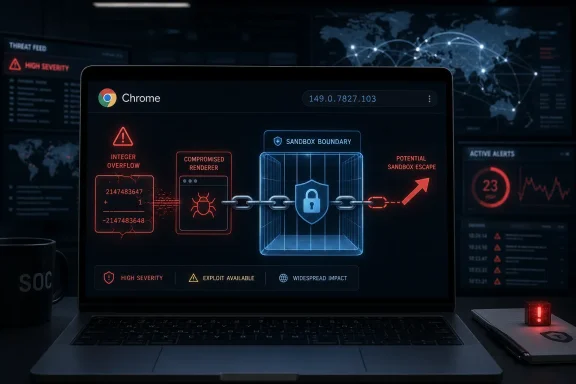 A Mac-Only Chrome Bug Still Belongs on Every Admin’s Radar
The first temptation is to treat CVE-2026-11655 as a platform-specific footnote. The NVD description names Google Chrome on Mac, the fixed version is 149.0.7827.103, and the exploit condition requires a compromised renderer process before the sandbox escape becomes relevant. For a Windows-heavy shop, that can sound like somebody else’s incident queue.That would be the wrong read. Chrome’s security model is built around layering, and this bug targets one of the layers that is supposed to contain the damage after a renderer compromise. Even when the first step is not supplied by CVE-2026-11655 itself, browser attackers commonly chain bugs: one flaw to get code running in a renderer, another to break out of the sandbox, and sometimes a third to elevate privileges or persist.
The important detail is not simply “integer overflow.” It is “integer overflow in Media” paired with “sandbox escape.” Media parsing is one of the browser’s historically dangerous neighborhoods because it handles complex, attacker-delivered data formats at web speed. If that code path can be reached through a crafted HTML page, the browser’s ordinary promise — that a malicious page stays trapped inside a constrained process — becomes much less reassuring.
For WindowsForum readers, the Mac label should not make this irrelevant. Mixed fleets are normal now, especially in developer, design, executive, and bring-your-own-device environments. A vulnerability that bypasses Chrome’s sandbox on macOS can still become part of the same enterprise risk story as a Windows browser zero-day: unmanaged endpoints, stale update rings, exposed SSO sessions, and the assumption that browser auto-update has silently solved the problem.
The Renderer Requirement Is a Warning, Not a Comfort Blanket
The phrase “attacker who had compromised the renderer process” is doing a lot of work here. It means CVE-2026-11655 is not described as a one-click, standalone compromise from a cold start. It also means the vulnerability becomes dangerous precisely after the first line of browser defense has already failed.That is how browser exploitation often works in practice. A renderer compromise may be achieved through a JavaScript engine bug, a DOM flaw, a WebAssembly issue, a font or image decoder bug, or another memory safety problem. Once the attacker has that foothold, the sandbox is supposed to limit what the attacker can see and touch. CVE-2026-11655 matters because it points at the escape hatch.
Chrome’s sandbox has been one of the major reasons web compromise is less catastrophic than it used to be. It splits risky web content away from more privileged browser and operating system functions. That design has forced attackers to chain vulnerabilities rather than rely on a single bug. But a chain is only as strong as its hardest link, and sandbox escapes are the links exploit developers prize.
There is also a practical lesson in the CVSS vector contributed by CISA’s ADP enrichment. The attack is network-adjacent in the everyday sense — the user can be reached through the web — but it requires user interaction and carries high confidentiality, integrity, and availability impact once the chain lands. That is the profile of a vulnerability that may not generate mass panic on its own but deserves fast patching in any environment where browsers are used for privileged work.
Chrome’s Media Stack Is Once Again Where Complexity Meets Trust
The “Media” component is not a decorative subsystem. It is where Chrome handles playback, codecs, streams, buffers, timing, device interaction, and a long list of web-exposed behaviors that users experience as ordinary video or audio. Under the hood, that means parsing untrusted inputs and coordinating memory-intensive operations without giving malicious content room to bend arithmetic into memory corruption.An integer overflow is the kind of bug that sounds less dramatic than “use-after-free” or “type confusion,” but it can be just as serious. At its simplest, it happens when a calculation produces a value too large for the storage type that holds it, wrapping or truncating into something smaller or otherwise unexpected. In security terms, the result can be a buffer that is too small, a bounds check that passes when it should fail, or a memory operation that trusts a number the attacker has effectively distorted.
The NVD entry’s assignment of CWE-472, “External Control of Assumed-Immutable Web Parameter,” is curious in this context because it is not the weakness label many engineers would instinctively expect for a plain integer overflow. That does not make the vulnerability fictional or less important, but it does remind us that vulnerability metadata is often an evolving approximation. The vendor description is the load-bearing part: an integer overflow in Chrome Media on macOS allowed a potential sandbox escape after renderer compromise.
For defenders, the exact internal code path may remain restricted for weeks or longer. Google commonly limits access to bug details until most users have received fixes, and that is especially true when a bug affects security boundaries. That temporary opacity is not a reason to wait. It is a reason to treat the vendor’s fixed version number as the operational fact that matters.
The Patch Is Simple; Proving It Landed Is the Hard Part
The fix target is straightforward: Chrome on macOS should be at 149.0.7827.103 or later. Google’s same desktop update line also included Windows and Linux builds, with 149.0.7827.102 appearing for those platforms in the broader release. The vulnerability at issue here is described as Mac-specific, but the update itself belongs to a larger Chrome security release that administrators should not split into a casual “Mac only” mental bucket.For individual users, the mechanics are familiar. Open Chrome, go to the browser’s About page, let it check for updates, and relaunch when prompted. Chrome’s auto-update machinery is good, but it is not magic; pending relaunches are one of the most reliable ways users remain exposed after a patch is technically downloaded.
For IT teams, the relaunch problem is where the real work begins. Enterprise browser management is no longer just about choosing defaults and blocking extensions. It is about being able to answer a deceptively simple question: which endpoints are running the vulnerable build right now?
That answer can be harder than it should be. Macs may be managed through MDM, Jamf, Kandji, Intune, Munki, or a patch platform that reports application inventory at different intervals. Developers may run multiple Chrome channels. Some users may have Chrome installed outside the expected path. Others may live in “I’ll restart later” limbo for days.
The mature response is not to send an update email and hope. It is to verify installed versions, enforce update policies where possible, require relaunch after a grace period, and treat browser drift as an exposure metric. In a world where identity, email, SaaS administration, source control, and cloud consoles all flow through the browser, Chrome version compliance is security infrastructure.
The Zero-Day Next Door Raises the Temperature
CVE-2026-11655 arrived in the same general Chrome security moment as CVE-2026-11645, a V8 flaw Google said had an exploit in the wild. That distinction matters: CVE-2026-11655 is not described in the supplied data as known exploited in the wild. But it was patched alongside a broader release that included a publicly acknowledged actively exploited Chrome issue, and that changes the urgency around the whole update.Attackers do not read patch notes the way defenders do. Defenders see a list of CVEs, severity ratings, platforms, and components. Attackers see a diff map, a timing window, and a population of users who will update slowly. Once a release ships, the race begins between patch adoption and exploit reconstruction.
That is why “not known exploited” should not become “not urgent.” Browser vulnerability details tend to get clearer after the patch is out, not before. Researchers, exploit brokers, nation-state teams, and criminal operators all understand that release notes can provide enough information to focus reverse-engineering work even when the bug tracker remains restricted.
The presence of a nearby in-the-wild V8 bug also reinforces the chain-risk model. A renderer compromise bug and a sandbox escape bug are complementary pieces of an exploit strategy. Even if CVE-2026-11655 was not used with CVE-2026-11645, defenders should think in chains rather than isolated CVE cards.
NVD’s CPE Entry Tells a Small but Useful Truth About Platform Risk
The NVD change history added a vulnerable software configuration that combines Chrome versions before 149.0.7827.103 with Apple macOS. That is a small piece of metadata, but it is exactly the kind of small piece that matters in vulnerability management. Without accurate CPE mapping, scanners may miss affected systems, misclassify risk, or generate noise for platforms that do not match the vulnerable condition.The user-facing question — “Are we missing a CPE here?” — is more than a database housekeeping prompt. It reflects the uncomfortable truth that the vulnerability ecosystem still relies on imperfect translation between vendor advisories, product versions, operating systems, package names, and scanner logic. A Chrome bug may be fixed by a browser update, but its operational detection depends on whether asset systems understand which product, channel, version, and OS combination matters.
For administrators, the practical move is to avoid outsourcing judgment entirely to CPE matching. If your fleet has macOS endpoints running Chrome, query the browser version directly. If your scanner does not flag CVE-2026-11655 but inventory shows Chrome below 149.0.7827.103 on Mac, believe the version data.
This is especially important in mixed-device organizations. Windows security teams are often fluent in KB numbers, cumulative updates, and Defender telemetry, but application-level browser updates cut across OS boundaries. Chrome’s update cadence does not wait for Patch Tuesday, and neither do browser exploit chains.
The Browser Has Become the New Endpoint Perimeter
A decade ago, a browser sandbox escape was mostly discussed in specialist exploit circles. Today, it belongs in ordinary enterprise risk conversations. The browser is where employees authenticate, approve MFA prompts, open documents, join meetings, administer cloud infrastructure, and copy secrets they probably should not be copying.That makes sandbox escapes strategically valuable. A renderer compromise may let an attacker tamper with a web session or read data inside a malicious tab’s constraints. A sandbox escape can widen the blast radius toward local files, interprocess communication, operating system services, and other browser-held material depending on the exploit chain and platform defenses.
On macOS, the attack surface is shaped by Apple’s own sandboxing, privacy controls, hardened runtime features, and permission prompts. But those protections are not a force field. Chrome’s sandbox is part of the defense stack, and a vulnerability described as a potential sandbox escape is explicitly about weakening that stack.
The browser also compresses the time between exposure and consequence. Users do not need to install a suspicious executable. They may only need to load a page, preview content, follow a link from email, or visit a compromised site. That is why browser bugs continue to attract serious attention even when the exploit conditions sound technical.
The Correct Response Is Boring, Which Is Why It Often Fails
There is no glamorous mitigation story here. Disable the web? Stop playing media? Tell executives not to browse? None of that survives contact with real work. The answer is patching, relaunch enforcement, inventory, and a willingness to treat browsers as tier-one managed software.For consumers and enthusiasts, that means checking the version and relaunching Chrome. For administrators, it means confirming that macOS devices are actually receiving the 149.0.7827.103 build or later. For security teams, it means looking for the pattern that always follows browser security releases: delayed restarts, unmanaged endpoints, and false confidence from dashboards that count “update available” as “update installed.”
The more interesting question is whether organizations have learned to compress browser patch windows. A monthly patch rhythm is too slow for Chrome-class vulnerabilities, especially when a release contains an in-the-wild bug elsewhere in the same bundle. Browser updates need a faster operational lane than traditional desktop maintenance.
That does not mean every Chrome CVE should trigger a war room. It means the organization should already know what happens when a high-severity browser sandbox escape ships: which systems are in scope, which policy enforces the update, how long users can defer relaunch, and what report proves completion.
Microsoft Shops Cannot Pretend This Is a Google-Only Problem
WindowsForum readers live in an ecosystem where Edge, Chrome, WebView2, Electron apps, and Chromium-derived components blur the old browser boundaries. CVE-2026-11655 is specifically described for Google Chrome on macOS, not Microsoft Edge or Windows. Still, the larger lesson lands squarely in Microsoft-centered environments because Chromium is now a shared foundation across an enormous amount of desktop work.Administrators should resist the lazy equivalence that every Chromium bug automatically affects every Chromium-based product in the same way. Platform code, feature flags, component versions, build timing, and sandbox architecture all matter. But they should also resist the opposite error: assuming a Chrome advisory has no relevance because the organization’s “standard browser” is Edge.
Modern fleets are messy. Users install Chrome because a vendor portal recommends it. Developers use Canary or Beta builds for testing. Marketing teams keep multiple browsers for analytics workflows. Executives carry Macs that sit partly outside Windows-centric tooling. The browser monoculture is not one product; it is a common attack surface distributed through many products.
For Microsoft shops, the right posture is comparative visibility. Know Chrome versions. Know Edge versions. Know where WebView2 runtime versions sit. Know which macOS endpoints are managed with the same seriousness as Windows laptops. The security boundary that matters is not the procurement standard; it is the software actually executing untrusted web content.
The Patch Note Is Short Because the Security Story Is Not
The public description of CVE-2026-11655 is barely a paragraph, and the Chromium issue tracker entry is access-restricted. That brevity is normal, but it creates a recurring problem: defenders must act before they can fully explain the bug internally. Security teams often want exploit mechanics, proof-of-concept code, affected functions, or telemetry indicators before escalating. Browser patching rarely grants that luxury.This is where severity language should be read carefully. “High” in Chromium’s taxonomy does not mean “background noise.” It often means the bug can produce serious security impact under plausible conditions but may require chaining, user interaction, or a specific process state. A sandbox escape after renderer compromise fits that profile.
The CVSS 3.1 score of 8.3 from CISA’s ADP enrichment similarly tells a story of friction plus consequence. Attack complexity is high, and user interaction is required, but the scope changes and the impact ratings are high. That is the kind of vulnerability that may not be sprayed indiscriminately at every home user but could be highly valuable in targeted exploitation.
Targeted exploitation is exactly where Mac browser bugs deserve attention. High-value users in many organizations — developers, executives, finance staff, legal teams, journalists, researchers — are often on macOS. They also tend to hold access that is disproportionate to their number in the asset inventory. A Mac-only Chrome sandbox escape may affect fewer machines, but not necessarily less important ones.
The Version Number Is the Control
The cleanest operational fact in this advisory is the fixed Mac version: 149.0.7827.103. Everything else — exploitability, chaining, internal root cause, scanner coverage — is secondary to whether that version or a later one is installed and active. Security teams should turn that into a control objective.That control has three parts. First, identify macOS endpoints with Chrome installed. Second, determine whether the active Chrome version is earlier than 149.0.7827.103. Third, force or strongly enforce a relaunch after update so the patched binary is actually running.
The “active” part matters because browsers are long-lived processes. A user can have an updated application bundle on disk while still running an older process in memory. If the browser has not restarted, the vulnerability may still be present in the session that matters.
This is also a good moment to review Chrome update policies. Enterprise administrators can configure update behavior, relaunch notifications, and deadlines. Those settings should be treated as security policy, not user-experience trivia. A polite notification that can be ignored forever is not patch management.
The Real Lesson Is Smaller Patch Windows, Not Bigger Panic
CVE-2026-11655 is not the loudest browser vulnerability of the year, and it may never become a household-name CVE. Its importance lies in what it reveals about the state of browser defense: serious bugs are still found in complex media code, sandbox escapes remain valuable, and patch timing is the difference between theoretical exposure and practical resilience.The best response is measured urgency. Do not overstate the bug as a confirmed in-the-wild Mac compromise if the public record does not say that. Do not understate it as an academic issue because it requires a renderer compromise. In browser security, “requires another bug” often means “belongs in a chain,” not “can be ignored.”
For home users, updating Chrome is enough. For enterprise teams, the task is broader: validate fleet exposure, close relaunch gaps, watch for scanner blind spots, and make sure macOS devices are not second-class citizens in vulnerability management. The organizations that handle this well will not be the ones with the most dramatic incident response language. They will be the ones with the shortest time from advisory to verified patched state.
The June Chrome Drop Leaves a Few Hard Facts Behind
This vulnerability is a reminder that the browser patch cycle is now part of the operating rhythm of endpoint security. The concrete actions are not complicated, but they are easy to postpone when the advisory is terse and the affected platform looks narrow.- Chrome for macOS should be updated to version 149.0.7827.103 or later to address CVE-2026-11655.
- The vulnerability is described as an integer overflow in Chrome’s Media component that could allow a sandbox escape after renderer compromise.
- The public record does not say CVE-2026-11655 is being exploited in the wild, but it was patched in a broader Chrome release that also addressed an actively exploited V8 issue.
- Administrators should verify installed and running Chrome versions rather than relying only on scanner CPE matching.
- Managed fleets should enforce browser relaunch deadlines because a downloaded update does not protect a still-running vulnerable process.
- Windows-centric teams should still track this issue if they manage macOS endpoints or mixed browser environments.
References
- Primary source: NVD / Chromium
Published: 2026-06-15T19:14:07-07:00
NVD - CVE-2026-11655
 nvd.nist.gov
- Security advisory: MSRC
Published: 2026-06-15T19:14:07-07:00
Original feed URL
Security Update Guide - Microsoft Security Response Center
 msrc.microsoft.com
