

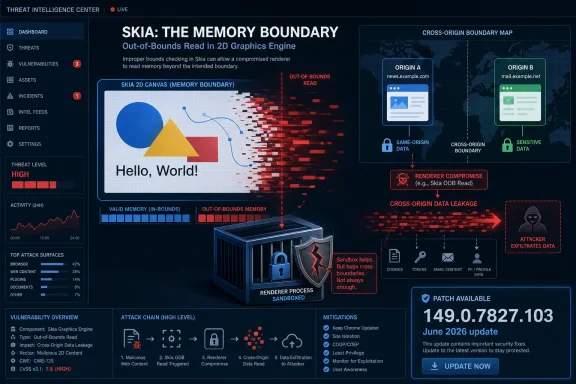
Skia Turns a Graphics Bug Into a Browser Boundary Problem
Skia is not a household name outside developer and browser circles, but it is one of the load-bearing pieces of the modern Chromium stack. It is the 2D graphics library responsible for drawing a great deal of what users see: text, shapes, images, canvases, and interface elements that pass through Chrome’s rendering machinery. When Skia misreads memory, the bug is not just a paint glitch; it can become a data exposure problem inside one of the most security-sensitive applications on any desktop.
CVE-2026-11675 is described as an out-of-bounds read, which means code can read memory outside the intended bounds of an object or buffer. In practical terms, that class of bug is often less dramatic than a write primitive that immediately suggests code execution, but it can be devastating when the exposed memory contains data the attacker should not see. In a browser, “should not see” often means cross-origin content: data belonging to another site, another session, or another authentication context.
The key condition in the CVE text is that the attacker must already have compromised the renderer process. That phrase matters. Chrome’s renderer is the relatively contained process that handles web content, and Chrome’s security model assumes renderers are hostile enough that they need to be sandboxed and isolated. CVE-2026-11675 is therefore not best understood as the front door of an attack chain. It is closer to a side passage that may become useful after another bug has already forced open the first door.
That distinction explains the mismatch between Chromium’s “High” security severity and CISA-ADP’s low CVSS 3.1 score of 3.1. CVSS tries to compress exploitation conditions, impact, and prerequisites into a numeric score. Chromium’s own severity label weighs the flaw in the context of a browser threat model where renderer compromise is not hypothetical enough to ignore.
The Low Score Does Not Mean Low Consequence
The published CVSS vector tells a story that should be familiar to defenders: network attack vector, high attack complexity, no privileges required, user interaction required, unchanged scope, low confidentiality impact, and no integrity or availability impact. On paper, that looks modest. In a risk register, it is the sort of entry that can get pushed behind remote code execution, privilege escalation, and VPN appliance flaws.
But browsers do not live on paper. They live in chained exploitation, ad delivery networks, malicious redirects, compromised sites, phishing lures, and the daily traffic of users who are paid to click links. A crafted HTML page is not a rare delivery mechanism; it is the native language of the web. The mitigating factor is not the delivery channel but the need for prior renderer compromise.
That prerequisite is meaningful, and it should prevent panic. There is no public indication from the supplied NVD data that CVE-2026-11675 itself is being exploited in the wild. The more urgent zero-day in the same June Chrome update cycle appears to be CVE-2026-11645, a V8 issue that Google reportedly acknowledged as having an exploit in the wild. CVE-2026-11675 sits in that same security neighborhood but should not be casually merged with it.
Still, the flaw is not academic. Once an attacker is in a renderer, cross-origin leakage can be the difference between a contained compromise and a useful one. The browser’s same-origin policy is one of the central promises of the web: one site should not casually read another site’s data. Bugs that weaken that promise are valuable because they turn a foothold into information.
For administrators, the right lesson is not “this is a 3.1, so wait.” It is “this is a 3.1 only if you evaluate it alone.” Browser security updates are cumulative defenses against chains, and attackers rarely care whether the chain maps neatly onto one impressive CVE or three unglamorous ones.
Chrome 149 Shows the Patch Train Has Become the Security Boundary
The fix line is Chrome 149.0.7827.103, with the stable desktop update landing in early June 2026. As usual, the exact build numbering varies by platform, with Windows and Linux builds in the 149.0.7827.102 range and macOS listed at 149.0.7827.103 in some advisories. The operational answer is simpler than the version arithmetic: if Chrome says it is current after visiting the About Chrome page, the user is on the intended patched channel.
This is where browser security has become both better and more brittle. Chrome’s rapid update mechanism means most consumer systems will patch without drama, often after a restart the user barely notices. Enterprise systems, by contrast, may intentionally slow updates through management policy, staged rings, validation windows, or third-party packaging tools.
That delay can be reasonable. Browser updates have occasionally broken workflows, extensions, authentication plugins, line-of-business apps, and fragile web portals that should have been retired years ago. But the delay is also a wager. With Chrome, Edge, Brave, Vivaldi, and other Chromium-based browsers sharing major components, a flaw in Skia or V8 is rarely just “a Google problem.”
Administrators should resist the temptation to treat the NVD CPE list as the whole affected universe. The NVD entry identifies Google Chrome on Windows, Linux, and macOS. That is useful for vulnerability scanners, but it is not a complete threat model for every Chromium-derived product. Downstream browsers and embedded Chromium components often need their own vendor patches, even when the vulnerable code originated upstream.
The uncomfortable reality is that the browser has become the new operating system boundary for much of daily computing. Email, identity, documents, admin consoles, SaaS dashboards, ticketing systems, financial portals, and remote management tools all converge there. A graphics-library read bug may sound narrow, but it runs inside the application that mediates almost everything else.
Renderer Compromise Is the Clause That Changes the Story
The phrase “who had compromised the renderer process” should slow everyone down. It means CVE-2026-11675 is not advertised as a one-click full compromise by itself. The attacker needs an earlier step, such as a separate renderer bug or another way to force malicious code into a renderer context.
That makes the vulnerability more useful as part of a chain than as a standalone exploit. A renderer exploit might provide code execution inside Chrome’s sandbox, but sandboxing and site isolation are designed to keep that compromise from immediately becoming a data breach or operating-system compromise. A Skia out-of-bounds read that leaks cross-origin data can help an attacker extract value without necessarily escaping the sandbox.
This is the modern browser attack pattern. The goal is not always to “own the box” in the old desktop-malware sense. Sometimes the goal is to steal session material, read protected content, map sensitive pages, or defeat the isolation that keeps one origin from spying on another. In cloud-first organizations, that can be enough.
This is also why Chrome’s own severity labels deserve attention even when third-party scoring looks mild. Chromium’s security team sees these bugs as parts of a living exploit ecosystem. A flaw that only matters after renderer compromise may still matter a great deal if renderer compromise is a recurring reality in the browser’s threat model.
The average home user does not need to parse that nuance. They need to restart the browser. IT teams, however, should parse it carefully because it changes how they prioritize detection, response, and patch validation. A renderer-dependent data leak is not the same thing as a remote code execution zero-day, but it is also not harmless.
The Skia Angle Should Worry More Than Just Chrome Users
Skia is widely used beyond Chrome, including in other browsers, frameworks, and graphics-heavy software stacks. That does not automatically mean every Skia-consuming product is vulnerable to CVE-2026-11675. Vulnerability impact depends on the exact code path, version, build configuration, sandboxing model, and exposure to untrusted web content.
But shared libraries create shared questions. If a bug exists in a common component, defenders need to ask not only “Is Chrome patched?” but also “Where else does this code run?” The answer may include Chromium-based browsers, Electron applications, embedded web views, or vendor products that quietly bundle browser technology.
This is where public CVE entries often lag operational reality. NVD enrichment gives scanners a starting point, but CPE coverage is frequently imperfect, delayed, or too narrow for software supply-chain thinking. The user’s note asking whether a CPE is missing is exactly the kind of question administrators should ask, especially for Chromium-derived applications that may not advertise their internals.
For Windows environments, Microsoft Edge deserves particular attention because it is Chromium-based and widely deployed by default. A Chrome CVE does not automatically equal an Edge CVE at the same moment, but Edge inherits a large amount of Chromium code and normally receives corresponding security updates through Microsoft’s channel. Enterprises should verify Edge’s patched build status separately rather than assuming Chrome remediation covers the browser estate.
The same logic applies to managed app platforms that embed Chromium. A patched Chrome binary does nothing for an Electron app shipping an older Chromium runtime. This is not an argument for panic; it is an argument for inventory. If an application renders untrusted web content using a Chromium-derived engine, it belongs in the conversation.
NVD’s CPE Model Is Useful, but It Is Not an Asset Inventory
The NVD change history for CVE-2026-11675 shows CPE configuration being added for Google Chrome across Windows, Linux, and macOS. That is the conventional way to express the affected product and operating environments. It helps scanners identify vulnerable installations and gives procurement and compliance teams a machine-readable handle.
But CPEs are an imperfect fit for the componentized software world. A vulnerability in Skia is not the same thing as a vulnerability in every product that uses Skia, and it is also not limited in practical concern to the named browser binary if the same vulnerable code ships elsewhere. The CPE model is product-centric; modern exploit chains are component-centric.
That gap leads to two opposite mistakes. Some teams over-include and panic about every product that mentions Skia. Others under-include and patch only the exact CPE match while ignoring embedded Chromium runtimes. The correct middle ground is to use CPEs as a trigger for investigation, not as the final answer.
The absence of a CPE is not proof of safety. It may simply mean no one has mapped the vulnerability to that product yet, or the vendor has not published its own advisory, or the database has not caught up. Conversely, a broad CPE entry may not mean every deployment is exposed in the same way.
For WindowsForum readers, this is familiar territory. Windows Update can be fully green while third-party browsers, portable apps, developer tools, conferencing clients, and bundled web runtimes remain stale. The OS patch level matters, but the browser patch level and embedded runtime patch level increasingly matter just as much.
The Real Enterprise Risk Is Patch Latency, Not User Ignorance
Consumer advice for Chrome vulnerabilities is refreshingly short: open Chrome, go to Settings, check About Chrome, install the update, and relaunch. Enterprise advice is longer because enterprise risk is rarely caused by a single unpatched browser on a single laptop. It is caused by exceptions, deferrals, kiosk systems, VDI images, stale golden images, and unmanaged machines that still authenticate to company services.
Chrome’s automatic update model is strong, but it relies on restart behavior. Users can leave browsers open for days or weeks, especially on workstations that sleep instead of shutting down. The update may be downloaded, staged, and waiting, but the vulnerable code remains in memory until the browser restarts.
Managed environments should therefore measure both installed version and active version. A system can report a patched package while users are still running old processes. That distinction matters during active exploitation windows, and it matters even more when a browser update contains one known exploited flaw and dozens of additional memory-safety fixes.
The same applies to non-Chrome Chromium browsers. Microsoft Edge has its own update mechanism and enterprise controls. Brave, Vivaldi, Opera, and others have their own release cadences. If an organization standardizes on “Chromium” rather than one browser, patch governance becomes a matrix instead of a line item.
Security teams should also be realistic about user interaction. CVSS marks user interaction as required, but in browser land that means “the user visits a page.” That is not a strong barrier. It is normal behavior.
Cross-Origin Leakage Is Quiet, Which Makes It Dangerous
Remote code execution gets headlines because it is easy to visualize: an attacker runs code. Data leakage bugs are quieter. They do not always crash the browser, trigger endpoint alarms, or leave obvious forensic artifacts. If successful, they may simply return information the attacker was not supposed to have.
Cross-origin data leakage is especially sensitive because web security is built around origin boundaries. Your bank, your webmail, your admin console, your CRM, and your intranet portal all rely on the browser enforcing those boundaries. When a bug weakens that enforcement after renderer compromise, the attacker’s prize may be content that the browser can access because the user is already authenticated.
That does not mean CVE-2026-11675 lets any random page read any random site on its own. The published description is more constrained than that. But the direction of travel matters: it is a browser isolation weakness tied to a low-level graphics component, reachable through crafted HTML once the renderer condition is met.
For defenders, the detection challenge is severe. You may not see malware dropped to disk. You may not see a privilege escalation event. You may only see a user visiting a page, followed by suspicious authenticated activity elsewhere. That is why browser patching remains one of the least glamorous but most important controls in endpoint security.
This also explains why Google and Chromium often restrict bug details until most users have updated. Full technical detail can help defenders and researchers, but it can also help attackers turn a vague memory-read advisory into a working exploit chain. The temporary opacity is frustrating, but it is part of the browser security bargain.
The June Chrome Update Was Not a One-CVE Event
CVE-2026-11675 landed in a larger Chrome security update that included many fixes, including the separately tracked CVE-2026-11645 V8 issue reportedly exploited in the wild. That context matters because users and admins do not install CVEs one at a time. They install browser builds.
The practical risk of delaying this update is therefore not limited to Skia. A browser build that predates 149.0.7827.103 may carry multiple vulnerabilities across rendering, JavaScript, networking, UI, GPU, and other components. Even if CVE-2026-11675 alone looks conditional, the surrounding update set may include bugs with very different exploitation profiles.
This is one reason vulnerability management programs can struggle with browsers. Traditional prioritization often sorts by CVSS, exploit status, asset criticality, and exposure. Browser updates collapse those categories into a fast-moving stream where a single release can contain low-scored information leaks, high-severity memory corruption, and actively exploited zero-days.
The better operational approach is to treat stable-channel browser security updates as a near-continuous maintenance function. Do not wait for every CVE to be individually triaged unless you are managing an exceptional environment where compatibility risk is unusually high. For most organizations, the compatibility risk of a Chrome point release is lower than the security risk of slow deployment.
That does not mean “patch blindly.” It means test quickly, stage intelligently, and push hard. The web is too exposed, and the browser is too central, for leisurely patch cycles borrowed from server maintenance.
The CPE Question Points to a Bigger Supply-Chain Blind Spot
The NVD entry’s “Are we missing a CPE?” prompt is boilerplate, but in this case it gestures at a real problem. Chrome is the named affected product, but Skia is a component. Security teams increasingly need to think in both vocabularies at once.
A product-centric scanner may tell you whether Google Chrome is below 149.0.7827.103. A component-aware software inventory may tell you where Skia or Chromium appears inside applications. Neither view is sufficient alone. The former is actionable but narrow; the latter is broader but often noisy.
The best answer is not to demand perfect CPE coverage before acting. It is to patch the obvious affected products immediately, then use the component clue to hunt for dependent software. That hunt should be proportionate: prioritize applications that render untrusted web content, accept arbitrary HTML, or expose browser surfaces to external input.
This is particularly important for developer workstations. Developers often run multiple browsers, preview channels, Electron-based tools, local web apps, test harnesses, and old portable binaries. They are also more likely to have access to source repositories, secrets, cloud consoles, and production diagnostics. A browser-class data leak on a developer machine can carry outsized consequences.
Home users have a simpler version of the same issue. Chrome may auto-update, but a second browser used only occasionally may lag. A portable Chromium build forgotten in a downloads folder may not update at all. The browser you use once a month can still be the browser that opens a malicious link.
Microsoft’s Role Is Indirect but Unavoidable
Although CVE-2026-11675 is a Chrome CVE, Windows users should not mentally file it outside the Microsoft ecosystem. Windows is the dominant desktop platform for Chrome, and Microsoft Edge is Chromium-based. The security posture of a Windows endpoint now depends heavily on how quickly Chromium fixes move through both Google’s and Microsoft’s channels.
For Microsoft-managed environments, Edge updates can be controlled through policies, update services, and enterprise deployment tooling. That is a strength when used well and a liability when it creates avoidable lag. Admins should verify Edge’s security release notes and installed versions separately, especially when a Chromium security update contains fixes for shared components.
The broader Microsoft angle is identity. Many Windows environments route users through Entra ID, Microsoft 365, SharePoint, Teams web surfaces, Azure portals, Defender consoles, and other browser-mediated services. If an attacker can use a browser exploit chain to read cross-origin data or session-adjacent content, the target may not be the endpoint so much as the cloud session riding on top of it.
That is why browser hardening belongs in Windows security discussions. Credential Guard, BitLocker, Defender, and Windows Update remain essential, but they do not eliminate the need for fast browser patching, extension governance, phishing-resistant authentication, and session monitoring. The browser is where the user’s identity becomes live ammunition.
Windows administrators should also watch for stale base images. A fully patched monthly Windows image can still ship with an outdated third-party browser if the image build process treats browsers as applications rather than security-critical components. In 2026, that distinction is obsolete.
What Defenders Should Do Before the Next Skia Bug Arrives
The immediate response is straightforward: ensure Chrome is at or beyond the fixed build, restart the browser, and validate that managed fleets are not merely staged for update but actually running patched processes. For unmanaged users, the About Chrome page remains the most reliable self-service check. For enterprises, endpoint management telemetry should be used to confirm version, channel, and restart completion.
The second response is to widen the aperture. Check other Chromium-based browsers. Check Edge separately. Check whether business-critical Electron or embedded-browser applications have issued updates. If vendors are silent, ask them whether their product includes affected Chromium or Skia code paths.
The third response is to refine prioritization. Do not let a low CVSS score bury a browser bug that weakens isolation after renderer compromise. Do not inflate it into a standalone catastrophe either. The correct classification is “important in chains,” which is exactly the sort of vulnerability modern browser attackers know how to use.
The fourth response is cultural. Browser restarts should not be treated as user inconvenience trivia. They are the moment when downloaded security updates become active protection. Organizations that can enforce restart deadlines for operating-system patches should apply comparable discipline to browsers, especially after high-profile Chrome updates.
The Lesson Hidden Inside Chrome 149.0.7827.103
This CVE is not the biggest Chrome bug of the month, and that is precisely why it is useful. It shows how much modern security work happens in the middle ground between catastrophic zero-days and forgettable scanner noise. The concrete takeaways are narrow enough to act on and broad enough to shape policy.
- Chrome versions before 149.0.7827.103 should be treated as exposed to CVE-2026-11675 and other June 2026 security fixes until updated and restarted.
- CVE-2026-11675 requires a compromised renderer process, which lowers standalone exploitability but increases its usefulness in multi-stage browser attacks.
- The vulnerability’s low CVSS 3.1 score should not override Chromium’s high severity rating when prioritizing browser patch deployment.
- Security teams should verify Microsoft Edge and other Chromium-based browsers separately rather than assuming a Chrome update covers the entire endpoint.
- CPE data should be used as a starting point for asset discovery, not as proof that embedded Chromium or Skia-based applications are unaffected.
- Browser update compliance should measure running processes and restart completion, not just downloaded or installed package versions.
CVE-2026-11675 is a reminder that browser security is no longer a sequence of isolated emergencies; it is a continuous negotiation between shared code, fast patch trains, and attackers who understand that the useful bug is often the one that makes another bug more valuable. The organizations that handle this well will not be the ones that memorize every Skia flaw, but the ones that can turn a Chrome point release into verified protection across browsers, runtimes, and the Windows desktops where the web now does most of its work.