

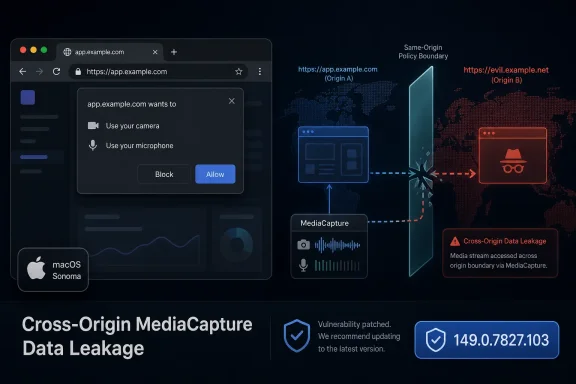
The Browser Patch That Looks Narrow Until You Follow the Boundary
The first trap in reading CVE-2026-11685 is to treat it as small because the NVD entry points to Chrome on Mac. That is true as far as the known affected configuration goes: Chrome before 149.0.7827.103 on macOS is the vulnerable target, and the described impact is cross-origin data leakage through MediaCapture. But the class of bug is broader than the platform tag suggests.
Modern browsers are not just document viewers. They are hardware brokers, identity containers, file viewers, conferencing clients, password surfaces, extension hosts, and increasingly the front end for enterprise applications. A vulnerability in MediaCapture therefore does not live in a quaint corner of the browser; it touches one of the most sensitive trust negotiations Chrome performs on behalf of the user.
The phrase “cross-origin data” is also doing a lot of work. The same-origin policy is one of the web’s basic safety rails: a page from one site should not be able to read protected data from another site merely because both are open in the same browser. When a crafted page can pierce that separation, the bug is not merely about media. It is about whether the browser can still keep one web property from becoming an observation post against another.
The reported attack path requires user interaction, according to the CVSS vector provided by CISA’s enrichment. That matters, but it should not comfort anyone too much. In browser security, “user interaction required” often means the victim must visit or be lured to a page, not that they must approve a suspicious installer or disable a warning in a dark alley of system settings.
Google’s June Update Was a Crowd, and This Flaw Was Easy to Miss
Google’s June 8 Stable Channel update moved desktop Chrome to 149.0.7827.102/.103 on Windows and Mac and 149.0.7827.102 on Linux, with the usual staged rollout over the following days and weeks. The update included 74 security fixes, a volume large enough to turn any single CVE into a line item unless it has active exploitation attached to it. That is why CVE-2026-11685 risks being buried.
The headline flaw in that release was CVE-2026-11645, a high-severity V8 out-of-bounds memory access issue that Google said had an exploit in the wild. That is the kind of disclosure that rightly grabs attention. V8 bugs are familiar territory for exploit chains, and “in the wild” changes a patch from routine hygiene to urgent incident prevention.
CVE-2026-11685 had no public indication of active exploitation in Google’s advisory. Its bug tracker entry was restricted, as Chrome security bugs commonly are until enough users have received the fix. The lack of public exploit detail is not exoneration; it is the normal opacity of browser security response, where defenders are asked to patch first and read the autopsy later.
That opacity creates an editorial problem for security teams and a practical problem for administrators. If every Chrome advisory contains dozens of bugs, and only one is visibly burning, it becomes tempting to rank the rest as background noise. CVE-2026-11685 is a useful case study in why that instinct is dangerous: a confidentiality-only bug can still be a serious enterprise exposure if it crosses origin boundaries in the right context.
“Medium” Math Does Not Cancel “High” Browser Severity
One of the confusing aspects of this CVE is the mismatch between severity labels. Chromium rates the issue High. CISA’s ADP enrichment gives it a CVSS 3.1 base score of 4.3, Medium, with network attack vector, low attack complexity, no privileges required, user interaction required, unchanged scope, low confidentiality impact, and no integrity or availability impact. NVD had not supplied its own CVSS score in the material provided.
That split is not unusual, but it matters. CVSS is a useful common language for vulnerability management, yet it can flatten browser realities into a score that looks less alarming than the operational situation deserves. A browser bug that leaks a small amount of sensitive cross-origin information may score modestly, while still being highly valuable in a targeted attack chain.
Chromium’s severity model tends to account for how a bug behaves inside the browser’s threat model. If a flaw undermines an important web security invariant, the project may rate it high even when the immediate CVSS impact is limited to confidentiality. That is not vendor alarmism so much as domain-specific judgment.
Administrators should resist the urge to settle the disagreement by choosing the lower label. The better reading is that CVE-2026-11685 is not a remote-code-execution panic button, but it is also not a shrug. It is a browser boundary bug in a sensitive API surface, fixed in a release that should already be moving through every managed fleet.
MediaCapture Is Where Permission Prompts Meet Web Isolation
MediaCapture exists because users expect web apps to do real work. Video meetings, browser-based recording tools, telehealth portals, customer support workflows, online classrooms, and identity verification systems all depend on APIs that can reach cameras, microphones, screens, or related media streams. That power is supposed to be fenced by permissions, user gestures, device indicators, and origin checks.
The vulnerability description points to insufficient data validation or inappropriate implementation in MediaCapture. Those are broad terms, but the described outcome is specific: a remote attacker could leak cross-origin data using a crafted HTML page. In browser terms, that means the attacker’s page may have been able to cause Chrome to mishandle data that should have belonged to another origin.
This is why the bug’s location matters. Media APIs often sit at the intersection of asynchronous device access, frame embedding, permissions state, and site identity. They must answer deceptively simple questions under messy conditions: which origin asked for access, which frame owns the stream, what data can be exposed to script, and how should the browser behave when pages are nested, redirected, backgrounded, or racing against permission state changes.
The old browser security model was easier to explain: do not let site A read site B. The modern model is more complicated: site A may embed site B, ask the user for a device, hand streams to workers, communicate with iframes, and coordinate with extensions or system services. Every one of those seams is a place where “insufficient validation” can become a real data leak.
For users, this is why a camera or microphone prompt is not a magic shield. A permission decision is only one layer. The browser still has to bind that decision to the correct origin and enforce the boundary consistently across the API’s full lifecycle.
The Mac-Only Tag Is a Fact, Not a Strategy
The NVD configuration added for CVE-2026-11685 ties vulnerable Google Chrome versions before 149.0.7827.103 to macOS. That should guide prioritization for asset owners: Chrome on Mac is the directly named exposure. If your fleet includes MacBooks in engineering, design, executive, legal, sales, or BYOD programs, those systems need to be checked against the fixed version.
But platform-specific does not mean strategically irrelevant to Windows shops. Most mixed environments manage Chrome with similar policy assumptions across Windows and macOS, and many organizations are worse at inventorying Macs than Windows endpoints. The very machines most likely to sit outside traditional Windows patch rings are also the machines that may carry high-value browser sessions into SaaS tools.
There is another reason Windows administrators should care. Chrome’s desktop security releases often land as a family: Windows, macOS, and Linux move together, even when individual CVEs have platform-specific conditions. The same June update that fixed CVE-2026-11685 for Mac also fixed dozens of other issues across desktop Chrome, including a V8 zero-day with active exploitation noted by Google.
In other words, “Mac prior to 149.0.7827.103” is not an invitation for Windows admins to ignore the release. It is a prompt to ask whether browser patching is genuinely cross-platform in your organization, or whether your update process is still built around the operating system you know best.
Edge, Chromium, and the Shared-Risk Era
The user-submitted material concerns Google Chrome, not Microsoft Edge. That distinction matters, and there is no basis in the provided CVE text to declare Edge affected by CVE-2026-11685. Still, any Chromium flaw naturally raises the question WindowsForum readers always ask: what about the Chromium-based browsers we actually deploy?
The honest answer is that Chromium is a shared codebase, but product exposure depends on whether the vulnerable code path exists, how it is integrated, whether platform-specific conditions apply, and when downstream vendors ship the fix. Microsoft Edge, Brave, Vivaldi, Opera, and Electron-based applications may share large parts of Chromium, but that does not automatically make every Chrome CVE equally exploitable in every derivative.
For enterprise IT, the practical lesson is not to speculate wildly. It is to track vendor advisories for every Chromium-based browser and runtime in the estate. Edge has its own update channel and security release process; Chrome has another. Electron apps may lag in ways users never see because they do not identify themselves as browsers at all.
This is where asset inventory becomes more than procurement paperwork. A Windows environment can have Chrome installed for compatibility, Edge as the default, WebView2 embedded in line-of-business applications, Electron clients for chat and productivity, and unmanaged Chromium derivatives installed by power users. The browser monoculture problem is no longer one executable; it is a family of web runtimes scattered across the desktop.
The Real Attack Surface Is the User’s Authenticated Browser State
CVE-2026-11685 is described as a data-leak vulnerability, not code execution. That distinction is important. A leak does not automatically hand the attacker a shell, install persistence, or bypass endpoint protection. But it may still expose information from a browser session where the user is already authenticated to valuable services.
That is the recurring problem with web security bugs. The browser is where modern work happens after identity has already succeeded. By the time a user visits a malicious page, they may also be signed in to webmail, collaboration suites, admin dashboards, ticketing systems, HR portals, CRM platforms, cloud consoles, and internal apps reachable through identity-aware proxies.
Cross-origin protections exist precisely because the browser is expected to hold many mutually distrustful sessions at once. A personal blog, a banking tab, a corporate SSO portal, and a malicious landing page can coexist in one process tree or profile without being allowed to read one another. If a bug lets that separation bend, the attacker may not need code execution to extract something useful.
The CVSS vector’s confidentiality impact is marked low, which suggests limited data exposure as assessed by CISA’s enrichment. But “low” is contextual. A small token, a fragment of a URL, a meeting identifier, a user attribute, a captured response, or a permission-state leak can matter if it helps an attacker refine a second stage.
Security teams often think in terms of catastrophic compromise because those are the incidents that justify overtime. Browser attackers think in chains. A modest leak can become a reconnaissance primitive, a bypass helper, or a way to de-anonymize and target a victim more precisely.
Patch Velocity Beats Perfect Understanding
Google’s restricted bug details are frustrating, but they are also rational. Publishing exploit mechanics before most users are updated would help attackers more than defenders. The bargain is that users and administrators must patch on trust, based on severity, component, impact, and release timing.
That bargain is not new, but it is becoming harder to maintain. Browser updates arrive constantly, the CVE counts are high, and vulnerability management teams are drowning in alerts that compete with operating system patches, VPN advisories, firewall hotfixes, identity provider changes, and application updates. In that environment, a Mac-only Chrome confidentiality bug can fall below the waterline.
The better operational stance is to stop treating Chrome updates as discretionary software maintenance. Chrome is an internet-facing application with an enormous attack surface and an unusually fast patch cadence. If it is installed, it belongs in the same urgency tier as other exposed client software that parses untrusted content.
For unmanaged users, the fix is simple: open Chrome’s About page, let it update, and restart the browser. For managed environments, the answer is less romantic and more important: verify update policy, measure installed versions, enforce relaunch windows, and make sure macOS devices are not drifting because they sit outside the Windows-first tooling path.
Chrome’s staged rollout can also mislead administrators. “Rolling out over days/weeks” is not a patch plan. It is a vendor distribution statement. Enterprises need their own confidence signal that the vulnerable version is gone from the devices that matter.
NVD’s CPE Entry Answers the Inventory Question, Awkwardly
The user asked whether a CPE is missing. Based on the change history provided, NIST added a configuration using an AND relationship: vulnerable Google Chrome versions up to but excluding 149.0.7827.103, together with an Apple macOS operating-system CPE marked as the platform context. That is consistent with a Mac-only Chrome vulnerability.
The awkwardness is that the macOS CPE appears as cpe:2.3:o:apple:macos:-:*:*:*:*:*:*:*, which describes the operating-system platform generically rather than enumerating macOS versions. In NVD configurations, this kind of entry often functions as a platform constraint: Chrome is the vulnerable application, macOS is the environment in which the vulnerability applies.
So, if the question is “is there no Chrome CPE?” the answer is no — the Chrome application CPE is present in the described NVD change history. If the question is “should there be a more specific macOS version CPE?” the public description does not provide enough information to demand one. The vulnerability text says Chrome on Mac prior to a fixed Chrome build, not macOS versions X through Y.
This distinction matters for scanners. A vulnerability management tool that keys only on the Chrome CPE without interpreting the platform condition may over-report against non-Mac systems. A tool that ignores the application version and looks only at macOS may under-report or generate nonsense. Correct handling requires both pieces: Chrome version and platform.
The “Are we missing a CPE?” prompt on NVD pages is a standing invitation for correction, not proof that the configuration is incomplete. In this case, the visible configuration appears to express the known scope: Google Chrome before 149.0.7827.103 on macOS.
The Version Number Is the Control, Not the CVE Description
For defenders, the decisive question is not whether every database has harmonized its labels. It is whether Chrome is at or beyond the fixed build. On macOS, the version named in the CVE is 149.0.7827.103. Google’s desktop advisory also listed Windows and Mac as 149.0.7827.102/.103 and Linux as 149.0.7827.102 for the broader release.
That split can cause confusion in dashboards. Some systems may show 149.0.7827.102 as current for Windows, while Mac systems require 149.0.7827.103 to satisfy this particular CVE’s wording. Version normalization is not glamorous, but it is exactly where patch reporting goes wrong.
Administrators should also remember that the visible Chrome version is only part of the story. A browser update may be downloaded but not active until relaunch. Users who keep dozens of tabs open for weeks can remain exposed after the update is staged. Managed relaunch policies exist because “installed” and “running fixed code” are not always the same state.
For home users, the practical message is less bureaucratic: update Chrome and restart it. If you use Chrome on a Mac for work, do not assume automatic updates have already landed. Check the About page and make sure the browser reports the fixed version or later.
The Web’s Security Model Keeps Moving Toward Hardware
A decade ago, many browser bugs were easiest to explain as memory corruption in parsers, scripting engines, or graphics stacks. Those bugs still matter; the June release’s V8 zero-day is proof enough. But the modern browser also mediates access to hardware and operating-system capabilities that used to belong mostly to native apps.
MediaCapture is part of that shift. The web won the application platform war by becoming capable, and capability always expands the attack surface. Every time browsers make a device feature available to a website, they must recreate the security expectations users have for native apps while preserving the web’s stricter origin model.
This is difficult engineering. Web APIs must be compatible enough for developers, private enough for users, and secure enough for hostile content. They operate across tabs, frames, permissions prompts, profiles, enterprise policies, sandboxed processes, and OS privacy controls. A small validation mistake can turn into a boundary failure.
The security industry sometimes talks about “the browser sandbox” as if it were a single wall. In reality, it is a set of layered compartments. Same-origin policy, site isolation, process sandboxing, permission prompts, storage partitioning, and OS controls all do different jobs. CVE-2026-11685 appears to be a reminder that a leak can happen even without smashing the outermost wall.
Where Windows Shops Should Spend Their Attention
The most immediate action is obvious: make sure Chrome on macOS is updated to 149.0.7827.103 or later. But the more useful WindowsForum conversation is about process. If a Mac-only Chrome CVE forces your team to discover which Macs have Chrome installed, the vulnerability is exposing an asset-management weakness as much as a browser weakness.
Mixed fleets are now normal. Developers often use Macs, finance teams may use Windows, executives may carry whatever device procurement approved last cycle, and contractors may fall into a gray zone. Browser risk crosses those boundaries because SaaS access crosses them too.
For Windows-heavy organizations, Microsoft Intune, configuration profiles, Chrome Browser Cloud Management, Jamf, Munki, Kandji, and other management paths may all be part of the real estate. The hard part is not finding a tool; it is making sure the browser update policy is enforced consistently enough that a CVE like this does not become a scavenger hunt.
Security teams should also look beyond Chrome itself. If the organization permits multiple Chromium-based browsers, each needs an update story. If business-critical Electron apps embed old Chromium versions, the owner of that application needs to know that browser-engine vulnerabilities are not someone else’s problem.
The best patch programs are boring because they make this routine. A Chrome security release lands, telemetry confirms exposure, policy accelerates updates, relaunches are enforced where needed, and exceptions are visible. Anything more artisanal will eventually fail on volume.
The Lesson Hidden in a Mac-Only Chrome Leak
CVE-2026-11685 will probably not be remembered as the defining Chrome bug of June 2026. It had to share a release with an actively exploited V8 issue, a long list of critical and high-severity fixes, and the usual fog that surrounds restricted Chromium bug details. But that is why it is worth pausing over.
The security story of the modern browser is not just spectacular zero-days. It is the accumulation of boundary assumptions: one site cannot read another, one frame cannot inherit the wrong permission, one media stream cannot expose the wrong data, one platform-specific implementation cannot drift from the security model. CVE-2026-11685 sits in that quieter but essential category.
For users, the answer is straightforward. Chrome should be updated, relaunched, and left on automatic updates. The fact that the known scope is macOS does not make delay sensible for anyone running the affected build.
For administrators, the answer is more demanding. Treat browser versions as live security state, not as software inventory trivia. The difference between “we deploy Chrome” and “we know every Chrome instance is past the fixed version” is the difference between policy and control.
The Patch Note Says More Than Its One Line
A short operational read of this release is enough to separate the real work from the noise.
- Chrome on macOS before 149.0.7827.103 is the specifically described exposure for CVE-2026-11685.
- The vulnerability is a MediaCapture data-validation flaw that could allow cross-origin data leakage through a crafted HTML page.
- CISA’s CVSS enrichment rates the flaw as Medium at 4.3, while Chromium classifies it as High, a mismatch that should be interpreted as context rather than contradiction.
- The NVD configuration described in the change history includes both the Google Chrome application CPE and a macOS platform condition, so the visible CPE data does not appear obviously missing for the stated scope.
- The broader June 8 Chrome desktop update also fixed many other security issues, including a separate V8 flaw that Google said was exploited in the wild.
- Managed environments should verify installed and running Chrome versions, especially on Macs that may sit outside Windows-centered patch reporting.
The web keeps becoming more capable, which means the browser keeps becoming more like an operating system with tabs. CVE-2026-11685 is not the biggest Chrome warning of the month, but it is a clean illustration of where the risk is going: away from simple notions of “did malware execute?” and toward subtler questions about which origin, which permission, which device surface, and which authenticated session the browser is really protecting. The organizations that handle this well will not be the ones that memorize every CVE; they will be the ones that make browser patching fast, cross-platform, and boring before the next restricted bug becomes the next public exploit.