

The Passwords Bug Is Really a Browser Isolation Story
The label attached to CVE-2026-11689 is deceptively mundane: “Passwords.” In a consumer browser, that word suggests saved credentials, autofill prompts, and the long-running debate over whether a browser should also be a password manager. In the Chrome security model, though, a bug in that neighborhood can matter for a different reason: password-related features sit close to origin boundaries, forms, frames, credentials, and site identity.
The vulnerability description says an attacker needed a compromised renderer process before the bypass became useful. That is an important constraint, but it is not a comfort blanket. Modern browser exploitation often chains bugs, with one flaw getting code execution inside a renderer and another flaw helping the attacker escape, pivot, or read across boundaries the first bug was not supposed to cross.
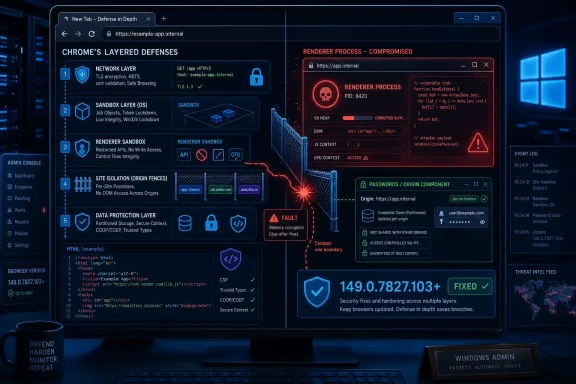
Site isolation exists precisely because the renderer is no longer treated as a sacred, fully trusted domain. Chrome’s architecture assumes that hostile web content will eventually find bugs in complex parsing, JavaScript, media, GPU, and document-handling code. The browser’s job is to make that initial compromise less catastrophic by separating sites into different processes and enforcing boundaries around what a compromised renderer can see or influence.
CVE-2026-11689 therefore lands in the part of browser security that administrators rarely see but constantly depend on. If site isolation is the seatbelt, this is a report that one of the latches could be tricked under specific conditions. That does not mean every user was moments away from credential theft; it does mean the bug belongs in the class of issues where patch latency matters.
The CPE Entry Looks Awkward Because Chrome Is Not the Operating System
The NVD configuration shown for CVE-2026-11689 is likely to raise eyebrows: the vulnerable application CPE for Google Chrome is listed alongside operating-system CPEs for Windows, Linux, and macOS. That does not mean Windows, Linux, or macOS are themselves vulnerable to the bug. It means the affected Chrome desktop product is being modeled in relation to the platforms on which that product runs.
This distinction matters because CPEs are not prose. They are machine-readable vulnerability inventory hints, and they often compress messy product reality into a rigid grammar. A Chrome desktop vulnerability has to be represented as an application vulnerability, but the vulnerable package exists in platform-specific builds, update channels, and version numbers. The result can look odd to a human reader, especially when the NVD page uses nested AND/OR logic that makes the operating-system CPEs appear more central than they are.
So, are we missing a CPE? Probably not in the narrow sense if the entry already names the Chrome application CPE and the major desktop operating systems. The more useful critique is that the CPE model is incomplete for how Chromium actually reaches users. Google Chrome is only one member of a large Chromium ecosystem, and the CVE entry for Chrome does not automatically enumerate every downstream browser, embedded runtime, managed package, or enterprise repackaging pipeline that may need attention.
That is where defenders can get tripped up. A vulnerability scanner may correctly flag Chrome, miss a Chromium-based browser, ignore a portable install, or fail to account for an app embedding Chromium through a framework. The CPE is a starting point for asset matching, not a complete map of exposure.
Version Numbers Tell the Real Patch Story
For CVE-2026-11689, the boundary is clear enough: Chrome versions before 149.0.7827.103 are described as affected. Google’s stable-channel release around this fix shipped desktop updates in the 149.0.7827.102/.103 range, with platform-specific numbering that can make compliance dashboards look noisier than they should. The practical test is not whether an endpoint has memorized the advisory syntax; it is whether the installed browser is at or beyond the fixed build for its platform.
That is easy for a single enthusiast to check and harder for a fleet. Chrome’s built-in updater can move quickly on unmanaged machines, but enterprise reality includes frozen images, VDI pools, application-control policies, offline devices, and users who leave browsers open for days. Chrome can download an update and still require a restart before the patched binary is actually in use.
On Windows, the urgency is amplified by how many applications quietly depend on web content. Users may think of Chrome as “the browser,” but a workday may involve Chrome, Edge, Electron apps, embedded sign-in panes, single sign-on portals, helpdesk dashboards, and SaaS admin consoles. Not all of those are fixed by updating Google Chrome, but the pattern is the same: Chromium moves fast because the attack surface moves fast.
The version number also helps separate CVE-2026-11689 from the louder zero-day noise around the same stable-channel update. Reporting around that release focused heavily on another Chrome flaw, CVE-2026-11645, because Google acknowledged exploitation in the wild for that V8 issue. CVE-2026-11689 is not described in the same way from the material available here. Treating both bugs as identical would be sloppy; treating the quieter one as harmless would be worse.
Renderer Compromise Is a Precondition, Not a Reassurance
The phrase “who had compromised the renderer process” can sound like a legal escape hatch. If the attacker already compromised something, why should this second vulnerability matter? In browser security, that reasoning misses the point.
Chrome is designed around containment. The renderer is where untrusted web content does much of its work, which makes it one of the most exposed parts of the browser. A renderer compromise is serious, but it is not supposed to grant arbitrary access to data from other sites or privileged browser services. Site isolation, sandboxing, broker processes, and permission checks are all supposed to narrow the blast radius.
A flaw that allows bypassing site isolation after a renderer compromise can turn one successful exploit into a more valuable operation. The attacker still needs user interaction according to the CVSS vector supplied by CISA’s enrichment: a victim must visit or interact with crafted web content. But that is the normal operating condition of the web, not a high bar. Browsers exist to load other people’s code all day.
This is why chained browser exploits remain prized. A memory corruption bug may provide a foothold, but policy enforcement bugs decide what that foothold can reach. A password-component validation issue that crosses site boundaries is not merely a bug in form handling; it is a potential failure in the assumptions that let users keep banking, admin portals, webmail, and internal dashboards open in the same browser session.
The CVSS Score Captures Impact, But Not Operational Texture
CISA’s ADP enrichment assigns CVE-2026-11689 a CVSS 3.1 base score of 8.1, high severity, with network attack vector, low attack complexity, no privileges required, user interaction required, unchanged scope, and high confidentiality and integrity impact. That is a strong score, but the shape of the vector is more revealing than the number.
User interaction required means the exploit path is likely web-driven rather than worm-like. Low attack complexity means defenders should not assume the bug is too finicky to matter. High confidentiality and integrity impact means the security boundary being bypassed is meaningful. The absence of availability impact suggests this is not primarily a crash-or-denial-of-service concern.
The score does not tell administrators whether exploit code exists publicly, whether a specific industry is being targeted, or whether a given Chromium fork is affected in exactly the same way. It also does not convey the subtle difference between a bug that gives code execution and a bug that weakens the containment around code execution. CVSS is a useful triage tool, but it is a poor substitute for understanding the exploit chain.
That distinction matters for patch prioritization. If a fleet is already under pressure from a known exploited Chrome zero-day in the same release train, CVE-2026-11689 becomes part of the same operational push: update now, restart browsers, verify the version, and check the long tail. The quieter bug rides along with the urgent one.
NVD’s “No Assessment Yet” Is Not a Reason to Wait
The NVD entry shows NIST had not provided its own CVSS assessment at the time captured in the supplied detail, while CISA’s ADP enrichment supplied a CVSS vector and high score. This is normal enough in the modern CVE pipeline. Vulnerability data now arrives through multiple streams, and NVD enrichment can lag vendor disclosure or third-party scoring.
That lag should not be mistaken for uncertainty about whether the vulnerability exists. Chrome, as the CVE source, published the description and the fixed version. CISA’s enrichment added a severity view. NIST added initial analysis data, including CPE configuration and a placeholder weakness entry before fuller classification. The machinery is asynchronous, not necessarily contradictory.
The weakness classification tells a similar story. Chrome maps the issue to CWE-20, improper input validation, while NVD initially shows insufficient information. That does not mean the bug lacks a weakness class; it means the national database has not fully harmonized its own enrichment. In practical terms, the Chrome-side CWE is more useful for understanding the flavor of the bug: untrusted input reached a policy decision point without enough validation.
For defenders, the operational lesson is familiar. Do not wait for every database field to be perfectly populated before patching a browser. Browser advisories are among the fastest-moving parts of the vulnerability ecosystem, and polished metadata often arrives after the safest maintenance window has already passed.
The Real Missing Inventory Is Downstream Chromium
The CPE question becomes more interesting once we leave the narrow NVD page. Google Chrome has a CPE. Microsoft Edge has its own update channel. Brave, Vivaldi, Opera, Chromium packages in Linux distributions, Electron applications, embedded WebViews, and enterprise-managed browser variants all complicate the question of “affected software.”
CVE entries tend to begin with the product that disclosed the bug. That makes sense legally and procedurally, but it does not fully match how code reuse works. A vulnerability in a Chromium component may or may not affect every Chromium-based product, depending on whether the vulnerable code is present, enabled, patched, or modified. The safe assumption for IT is not that every Chromium product is vulnerable; it is that every Chromium product deserves a version check when Chrome ships a high-severity security update.
Microsoft Edge is particularly relevant for WindowsForum readers because it is built into the Windows admin landscape. Edge updates through Microsoft’s channels rather than Google’s, and enterprise policy may control it separately from Chrome. A shop that patches Chrome but leaves Edge pinned, or updates Edge but forgets Chrome in developer workstations, has not actually closed the browser risk.
The downstream problem also includes tools that do not present themselves as browsers. Electron-based desktop apps can lag Chromium security fixes, and embedded browser runtimes can persist inside business applications long after Chrome itself has moved on. CVE-2026-11689 may be catalogued as a Chrome issue, but the defensive mindset has to follow Chromium code paths, not just product names.
Password Features Have Become Security Boundary Machinery
The Passwords component is an uncomfortable place for a site isolation bug because password managers are now part of the browser’s identity layer. They do not merely store strings. They reason about origins, forms, phishing resistance, autofill eligibility, passkeys, credential prompts, and synchronization boundaries. That makes them security-sensitive even when the bug is not a direct leak of saved passwords.
The modern browser has absorbed tasks that once belonged to separate software. It stores credentials, brokers authentication, warns about reused passwords, mediates passkeys, syncs state across devices, and tries to determine whether a form belongs to the site it appears to belong to. Every one of those features needs careful policy enforcement because the web is deliberately adversarial.
Insufficient validation of untrusted input in such a component is therefore not a cosmetic defect. The browser must decide which renderer gets to ask for which credential-related behavior, and under which origin constraints. If a crafted page can confuse those decisions after gaining renderer control, the resulting problem is about trust boundaries, not simply bad input hygiene.
This is also why browser vendors keep bug details restricted until users have updated. The most interesting part of a bug like this is often not the single line of code that changed, but the policy assumption it violated. Once attackers understand that assumption, they can look for neighboring flaws or build exploit chains around similar confusion.
Windows Admins Should Treat Browser Restarts as Patch Completion
In Windows environments, the browser update conversation often ends too early. A management console may report that Chrome has received an update, while users continue running old browser processes until they restart. For actively exploited browser bugs, that gap can matter. For a containment bypass like CVE-2026-11689, it still matters because the vulnerable code remains resident until the old process dies.
Chrome has improved update signaling, and enterprise policies can force relaunch prompts or deadlines. But those controls are only useful if they are configured deliberately. A permissive policy that allows users to postpone restarts indefinitely is a patching policy with a large asterisk.
Administrators should also watch for profile and channel sprawl. Stable, Beta, Dev, Canary, system-level installs, user-level installs, portable copies, and remote-session images can coexist in ways that make asset inventory messy. Developers and power users are especially likely to have multiple Chromium builds installed, and those are the users most likely to browse arbitrary test pages, extension documentation, and issue trackers.
The correct response is not panic; it is boring discipline. Force or strongly nudge relaunches after browser security updates. Query installed versions directly. Validate both Chrome and Edge. Check Linux and macOS endpoints that may not be governed by the same Windows-centric tooling. Browser patching is no longer a helpdesk hygiene task; it is perimeter maintenance for the SaaS era.
The NVD Record Is Useful, But It Is Not the Whole Threat Model
The NVD entry gives defenders an ID, dates, a description, a severity enrichment, a CWE hint, a CPE configuration, and references to Chrome release material and a restricted Chromium issue. That is enough to build a patching ticket. It is not enough to build a complete understanding of exploitability, campaign activity, or downstream product exposure.
That limitation is not unique to this CVE. Public vulnerability records are designed to standardize disclosure, not to replace vendor advisories, exploit analysis, telemetry, or asset intelligence. When the Chromium issue is access-restricted, the public record necessarily remains sparse. That is frustrating for defenders who want technical depth, but it is also part of how vendors reduce copycat exploitation while updates propagate.
The better reading of the record is pragmatic. The bug is high severity. It affects Chrome before the fixed version. It involves Passwords, input validation or policy enforcement, and site isolation bypass after renderer compromise. It requires a crafted HTML page and user interaction. Those facts are enough to justify rapid deployment even without a public proof of concept.
The CPE oddity should be corrected if it creates scanner blind spots, but it should not become the main story. Vulnerability management teams sometimes spend so much time debating metadata precision that they lose sight of the exposed binaries. In this case, the binary is the browser users keep open all day.
The Patch Window Is Where Browser Security Is Won or Lost
Chrome’s security model assumes velocity. Google ships quickly, researchers report constantly, and attackers mine patch diffs and advisory language for clues. The gap between release and restart is where many organizations quietly accept risk without formally acknowledging it.
CVE-2026-11689 is a good example because it is not the flashiest bug in its release neighborhood. A known exploited V8 zero-day will get the headlines; a Passwords site isolation bypass may be relegated to the spreadsheet. But attackers do not care which CVE made the banner. They care which machines remain vulnerable and which exploit chains give them the most reliable path to data.
For home users, the advice is almost insultingly simple: update Chrome and restart it. For enterprise IT, the work is broader. Browser governance now requires version enforcement, extension control, update-channel policy, restart deadlines, and visibility into Chromium-derived applications. The browser has become both the workstation’s most-used application and one of its most exposed execution environments.
Security teams should also resist the temptation to treat “no evidence of exploitation” as a synonym for “low priority.” The public material for CVE-2026-11689 does not establish active exploitation of this specific bug. It does establish a high-severity boundary bypass in a component tied to credentials and origin policy. In a browser release that also included a known exploited flaw, delaying the full update set would be a strange economy.
The Practical Read on This Chrome Passwords Flaw
CVE-2026-11689 is not a standalone apocalypse, but it is exactly the kind of browser weakness that rewards fast, comprehensive patching. The important thing is to connect the database entry to the real systems where Chromium runs, and not to let imperfect metadata become an excuse for slow remediation.
- Chrome installations older than 149.0.7827.103 should be treated as vulnerable for this issue and moved to a fixed build promptly.
- The operating-system CPEs in the NVD configuration do not mean Windows, Linux, or macOS are independently vulnerable; they describe the desktop platforms for the affected Chrome application.
- The attacker still needs a renderer compromise and user interaction, but that fits the normal pattern of chained browser exploitation rather than ruling out practical risk.
- The most likely inventory gap is not a missing Chrome CPE, but unmanaged Chromium-based browsers and embedded Chromium runtimes outside the main patch workflow.
- Browser updates should not be considered complete until the running process has restarted and the installed version has been verified.
- Edge, Chrome, Linux Chromium packages, macOS deployments, VDI images, and developer workstations all deserve separate checks because they often follow different update paths.
The lesson from CVE-2026-11689 is that browser security is now a game of enforced assumptions: which process may see which site, which component may trust which input, and which update actually replaced the code users are running. The NVD record may still look a little ungainly, and the restricted Chromium issue may leave researchers wanting more detail, but the direction of travel is plain. Chrome’s defenses are strongest when the fleet is current, the restarts are real, and administrators treat Chromium not as a single browser icon but as a widely deployed platform that has to be inventoried, patched, and verified with the same seriousness as the operating system beneath it.