

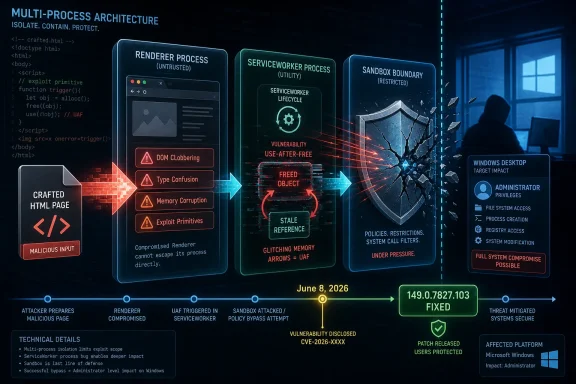
For Windows users and administrators, CVE-2026-11694 is a reminder that modern browser security is less a wall than a sequence of compartments. Chrome’s sandbox, renderer isolation, ServiceWorkers, and site process model are meant to limit damage when hostile web content gets a foothold. A bug like this matters because it lives in the messy middle: not the first stage of an attack, not necessarily the final escape to Windows, but a privilege-expanding step inside the browser’s own defensive architecture.
The Vulnerability Sits Where the Modern Web Never Sleeps
ServiceWorkers are one of those web platform features that users rarely know by name but rely on constantly. They sit between a web application and the network, enabling offline behavior, push notifications, background sync, caching, and the app-like feel of sites that continue to function after a tab is closed. That makes them powerful, persistent, and security-sensitive.
CVE-2026-11694 is described as a use-after-free vulnerability, a memory safety bug in which software continues to use an object after it has been released. In browser exploitation, that category has a long and ugly pedigree. If an attacker can shape memory at the right moment, stale references can be turned from a crash into controlled behavior.
The important constraint is that Google’s description says the attacker must already have compromised the renderer process. Chrome’s renderer is where untrusted web content is supposed to run, isolated from the rest of the browser and from the operating system. That prerequisite lowers the standalone severity compared with a bug that directly compromises Chrome from a clean page load.
But it does not make the flaw harmless. In a realistic exploit chain, attackers often combine multiple bugs: one to gain code execution in a renderer, another to move laterally inside browser internals, and another to escape the sandbox or reach sensitive data. CVE-2026-11694 belongs to that chain-building world.
“Inside a Sandbox” Is Not the Comforting Phrase It Sounds Like
The most tempting misread of this CVE is to stop at the words “inside a sandbox” and conclude that the damage is contained. That is only partly true. Sandboxes are meant to contain attacker code, but containment is not the same as safety if the attacker can gain capabilities the sandbox did not intend to grant.
Chrome’s multi-process model exists because the browser assumes that rendering arbitrary web content is dangerous. JavaScript engines, media parsers, GPU code paths, font handling, extension APIs, and web platform features all present attack surfaces. The renderer sandbox is the place where Chrome tries to make compromise survivable.
A post-renderer bug in a component like ServiceWorker threatens that survival model. ServiceWorkers are not decorative browser furniture; they are a programmable layer with durable relationships to origins, caches, requests, and application state. If a renderer compromise can be made more useful through a ServiceWorker memory corruption issue, defenders should treat the bug as an escalation point rather than an isolated crash condition.
This distinction matters for enterprise risk scoring. A vulnerability that requires a prior renderer compromise may not top a patch queue on paper. In practice, if it ships in the same release window as other high-impact Chrome memory bugs, defenders should assume attackers will study how the pieces fit together.
Google’s Sparse Advisory Is Part of the Security Model
Google’s public language for Chrome security updates is famously terse. The company typically withholds detailed bug information until enough users have updated, especially when a flaw is exploitable or the underlying component is shared across projects. That policy frustrates administrators who want precise technical detail, but it is not secrecy for secrecy’s sake.
Browser bugs are unusually reproducible once a patch is available. Skilled attackers can compare source changes, infer the bug, and build proof-of-concept exploits before slower-moving fleets have finished updating. In that environment, a detailed advisory can become an attacker’s implementation guide.
CVE-2026-11694 arrived with the basic facts defenders need: affected product, fixed version threshold, vulnerability class, affected component, attacker position, and impact. The NVD entry initially lacked a NIST CVSS score, while CISA’s ADP enrichment assigned a CVSS 3.1 score of 7.5, rated high, with network attack vector, high attack complexity, no privileges required, user interaction required, and high impacts to confidentiality, integrity, and availability.
That vector tells a more nuanced story than the word “high” alone. User interaction is required because the attack is delivered through crafted web content. Attack complexity is high because the attacker needs a renderer compromise first. The impact ratings are high because once that condition is met, the bug can support arbitrary code execution inside the browser sandbox.
Version Numbers Are Doing More Work Than Usual
The fixed-version line deserves careful reading. The NVD language says Google Chrome prior to 149.0.7827.103 is affected, while Google’s stable desktop update moved Chrome to 149.0.7827.102 or 149.0.7827.103 depending on platform. That kind of split is normal in Chrome releases, but it can confuse vulnerability scanners and administrators who rely on a single “greater than or equal to” check.
For Windows fleets, the practical task is not to memorize every platform-specific build suffix. It is to verify that Chrome has received the June 2026 stable-channel security update that contains the fix. On unmanaged machines, that means opening Chrome’s help page and forcing the browser to check for updates. In managed environments, it means validating telemetry from Chrome Browser Cloud Management, endpoint management suites, EDR inventory, or whatever patch compliance tooling is actually trusted.
The NVD change history also shows CPE configuration work that ties the Chrome application to operating-system platforms, including Windows, Linux, and macOS. CPE entries are useful for scanners, but they are imperfect translations of real-world exposure. A Windows CPE appearing in the configuration does not mean Windows itself contains the flaw; it means vulnerable Chrome builds on Windows are in scope.
That distinction matters because Windows administrators already live under a constant hailstorm of Patch Tuesday bulletins, driver advisories, firmware updates, and third-party application CVEs. Browser CVEs can get mentally filed under “Chrome will update itself.” In enterprise reality, Chrome sometimes cannot update itself because users do not restart it, update services are blocked, VDI images lag, app control tools pin versions, or maintenance windows treat browsers as less critical than operating-system patches.
The Renderer Prerequisite Separates Noise From Signal
The phrase “remote attacker who had compromised the renderer process” is doing two things at once. It narrows the exploitability of CVE-2026-11694 as a single bug, and it widens its relevance as part of a chain. That is why security teams should resist both panic and dismissal.
As a standalone issue, CVE-2026-11694 is not described as a drive-by bug that begins from a normal browsing session and immediately grants full browser control. The attacker first needs a way to compromise the renderer. That could come from another Chrome vulnerability, a malicious extension pathway, a vulnerable embedded browser context, or some other renderer-level foothold.
As a chain component, however, it is precisely the kind of bug attackers prize. Browser exploit chains are assembled around small changes in privilege and reach. One bug gets code running where web content should not. Another exposes browser state or lets the attacker cross an internal boundary. A third reaches the broker process, filesystem, credentials, or operating system.
Security programs that evaluate CVEs only as isolated entries miss that combinatorial risk. Attackers do not care whether a vulnerability looks moderate in isolation if it completes the chain they already have. Defenders should therefore weigh CVE-2026-11694 alongside the broader Chrome 149 security update, not as a lonely line item.
ServiceWorkers Make Persistence a Browser Problem, Not Just a Malware Problem
ServiceWorkers changed the web by letting sites behave more like installed applications. That is good for users who expect mail clients, chat tools, productivity suites, and business portals to remain responsive. It is also good for attackers when the implementation contains memory safety flaws, because the feature sits close to persistent browser state.
A compromised renderer is often transient. Close the tab, kill the process, restart the browser, and some attacker footholds disappear. ServiceWorkers complicate that mental model because they are designed to outlive the page lifecycle. They can be registered by a site and later invoked to handle fetch events, push events, and background tasks under browser rules.
That does not mean CVE-2026-11694 automatically grants durable persistence. The public description does not support that leap. But the affected component is one that defenders should care about precisely because it touches the boundary between page execution and longer-lived web application behavior.
For incident responders, this means browser artifacts deserve attention after suspected exploitation. Site data, ServiceWorker registrations, cache storage, extension state, and profile-level persistence mechanisms can matter. The browser profile has become a working environment full of tokens, cached data, synchronization state, and application logic; treating it as a disposable viewer for web pages is outdated.
Windows Shops Cannot Outsource Chromium Risk to Google
On WindowsForum.com, the obvious question is how much this Chrome CVE matters if an organization standardizes on Microsoft Edge. The answer is uncomfortable: Chromium risk is ecosystem risk. Edge, Chrome, Brave, Opera, Vivaldi, Electron apps, WebView2-based applications, and embedded Chromium runtimes do not all patch at the same time or expose the same features in the same way, but they share enough code lineage that security teams cannot think in single-browser terms.
Microsoft usually incorporates Chromium security updates into Edge on its own release cadence. That cadence is fast, but it is still a separate vendor pipeline with its own version numbers, release notes, enterprise policies, and rollback risks. A Chrome advisory is therefore an early warning for Windows administrators even when Chrome is not the default browser.
WebView2 adds another layer. Many Windows applications use Microsoft’s embedded web runtime to display content, authenticate users, render dashboards, or host hybrid interfaces. WebView2 generally benefits from Microsoft’s evergreen runtime model, but pinned or fixed-version deployments exist. The browser engine is no longer confined to the browser icon on the taskbar.
Electron is the messier cousin in this story. Collaboration clients, developer tools, note apps, password managers, and internal utilities may carry their own Chromium versions. Some update promptly; others lag behind. A Chrome CVE like this should trigger not only a browser update check but also a review of high-risk desktop applications that bundle Chromium under the hood.
The Patch Is Easy; Proving the Patch Is the Hard Part
For consumers, the advice is refreshingly direct: update Chrome, restart it, and confirm the version. The browser’s auto-update mechanism is one of the better pieces of mass-market security engineering in the software industry. It quietly moves billions of users forward without asking them to understand CVSS vectors or memory corruption.
Enterprises do not get to stop there. A browser sitting open for weeks can download an update but fail to apply it until restart. Kiosks, call-center workstations, shared devices, lab machines, and virtual desktops are especially prone to version drift. The same is true for servers that should not be browsing the web at all but somehow have Chrome installed for administrative consoles.
The right control is not merely “deploy update.” It is “deploy update, force restart where policy permits, measure version compliance, and investigate exceptions.” Administrators should know how many endpoints remain below the fixed build after 24 hours, 72 hours, and one week. That number is usually more revealing than the patching policy on paper.
There is also a human factor. Browser restarts interrupt work because the browser is now the workspace. Users keep dozens of tabs open for line-of-business apps, ticket queues, dashboards, admin portals, chats, and documentation. If IT wants timely browser restarts, it must treat them as operational events, not nag screens.
CVSS Captures Severity, But Not the Shape of the Threat
The CISA ADP CVSS score of 7.5 is a useful marker, but it cannot tell the whole story. CVSS is designed to standardize severity across many vulnerability types. Browser exploit chains punish that standardization because the importance of a bug depends heavily on what other bugs attackers can pair with it.
The high attack complexity score should not lull defenders. High complexity often means exploit development is difficult, timing-sensitive, or dependent on heap manipulation and environmental details. That is comforting against opportunistic attackers and less comforting against well-resourced groups that specialize in browser exploitation.
The user interaction requirement also deserves context. A crafted HTML page is not a high bar in the modern web. Users click links in email, chat, search results, social media, documentation, SaaS dashboards, and support portals all day. Attackers do not need to persuade a victim to run an executable if the browser itself is the target.
The absence of a NIST score at initial publication is not a sign that the vulnerability is unimportant. NVD enrichment often trails vendor disclosure. In fast-moving patch windows, vendor advisories, CISA enrichment, operating-system distributor notes, and scanner detections may all arrive before the database entry is fully settled.
The CPE Question Is a Symptom of Scanner Anxiety
The user-provided NVD text asks whether a CPE is missing, and that small line reveals a larger pain point. Vulnerability management depends on machine-readable product mappings, yet modern software distribution increasingly resists clean mapping. Chrome exists as a Google application, a Linux distribution package, a managed enterprise browser, a portable install in some environments, and a codebase embedded in other products.
CPEs were built to describe products and versions, but they do not always model ecosystem exposure. A vulnerable Chrome application on Windows is easy enough. Chromium packaged by a Linux distribution is different. Edge carrying a Chromium patch is different again. Electron applications are often outside the CVE’s primary CPE scope even when the vulnerable code lineage is relevant.
This is where vulnerability management teams earn their keep. A scanner finding “Google Chrome before 149.0.7827.103” is a starting point, not the entire asset story. The better question is which user populations and business workflows depend on vulnerable browser engines, and how quickly those engines can be moved forward without breaking the business.
For Windows environments, the CPE note should prompt a sanity check rather than a philosophical debate. Confirm Chrome. Confirm Edge. Confirm WebView2 runtime currency. Identify Chromium-bundled applications that matter. Then decide whether scanner coverage is good enough or whether supplemental inventory is needed.
The Real Risk Is the Browser Monoculture We Chose
Chromium’s dominance has security benefits. A vulnerability found and fixed in Chromium can improve security across a huge swath of the web ecosystem. Google’s engineering investment, fuzzing infrastructure, sandboxing work, and rapid release cadence have raised the baseline for everyone.
The same dominance also creates synchronized risk. When a serious class of bug appears in Chromium, the blast radius is not limited to Google Chrome. It reaches alternative browsers, embedded runtimes, enterprise applications, and developer tooling. The industry gets the upside of shared hardening and the downside of shared exposure.
CVE-2026-11694 is not the most dramatic expression of that monoculture problem. It is not publicly described as exploited in the wild, unlike some other Chrome vulnerabilities disclosed in the same general period. But it is a clean example of how a single component-level memory safety flaw can matter far beyond the tab where a user clicked a link.
Windows users see this most clearly because the platform has become a host for many browser-shaped applications. The old distinction between “web app” and “desktop app” has blurred into a stack of Chromium, WebView2, identity tokens, cloud APIs, and local filesystem integrations. Browser security is now Windows application security by another route.
The June Chrome Fix Is a Test of Browser Hygiene
The practical response to CVE-2026-11694 is not exotic. There is no special mitigation that beats patching. Disabling JavaScript globally is not a serious enterprise strategy, and trying to block ServiceWorkers across the modern web will break useful applications unless done with careful policy and narrow scope.
What organizations can do is reduce the chance that a renderer compromise becomes useful. Site isolation, extension control, least-privilege browsing, attack surface reduction rules, endpoint detection, and rapid browser restarts all matter. None of these controls makes the CVE disappear, but each changes the attacker’s working conditions.
Extensions deserve special mention. Browser extensions can expand the attack surface and blur trust boundaries, especially when granted broad host permissions. A disciplined extension allowlist is one of the few browser-hardening measures that scales well in enterprise settings. It also reduces the number of unknown actors living inside the browser profile.
Administrators should also think about identity exposure. If a browser compromise can reach session cookies, OAuth tokens, synchronized data, or cloud admin portals, the incident is no longer “just” endpoint malware. Conditional access, phishing-resistant authentication, session controls, and admin workstation separation become part of the browser security conversation.
What Windows Administrators Should Do Before This Becomes Just Another CVE
The immediate lesson of CVE-2026-11694 is narrower than “the web is dangerous” and broader than “update Chrome.” It is that browser patching has to be measured as rigorously as operating-system patching, because the browser is now the front door to both user data and enterprise control planes.
- Confirm that Google Chrome on Windows endpoints has been updated past the vulnerable 149.0.7827.103 threshold or to the platform-specific fixed build delivered in the June 2026 stable-channel update.
- Verify that users have restarted the browser after update installation, because downloaded browser updates do not fully protect a still-running vulnerable process.
- Check Microsoft Edge, WebView2 runtimes, and Chromium-based desktop applications separately instead of assuming Chrome compliance equals Chromium compliance.
- Treat renderer-compromise prerequisites as exploit-chain constraints, not as reasons to ignore the vulnerability.
- Review browser extension policy, especially extensions with broad site access or unclear ownership.
- Use scanner CPE results as inventory prompts, then validate the actual deployed browser engines that users and applications run.
The broader conclusion is that CVE-2026-11694 is not a five-alarm browser catastrophe on its own, but it is exactly the kind of high-severity component flaw that separates mature patch operations from checkbox compliance. Chrome’s security model assumes compromise will happen somewhere and tries to contain it; attackers build chains to prove containment is temporary. The defenders who fare best will be the ones who patch quickly, measure honestly, and stop pretending the browser is just another application.