

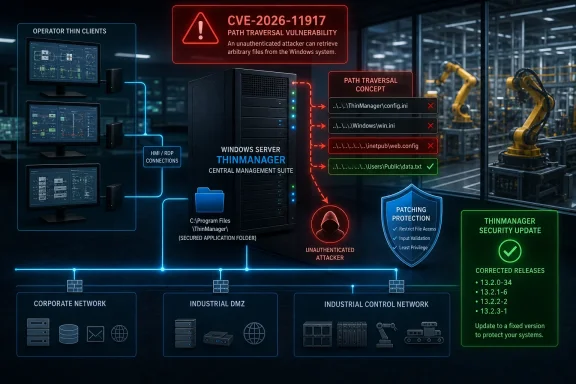
The issue affects multiple supported ThinManager release branches, including versions in the 13.0, 13.1, 13.2, and 14.0 families. Rockwell Automation released corrected builds for every affected branch, while the U.S. Cybersecurity and Infrastructure Security Agency republished the advisory on July 21 after Rockwell Automation’s initial publication on July 14. As of the latest advisory information, no known public exploitation specifically targeting this vulnerability has been reported.
That lack of confirmed exploitation should not be confused with a low operational risk. ThinManager is designed to centralize access to industrial applications and visual sources. In practice, that can place a ThinManager server close to a high-value intersection of Windows administration, operator workstations, remote access services, identity systems, and production operations. A file-write vulnerability in that environment deserves a deliberate response rather than a routine, deferred update.
Overview of CVE-2026-11917
CVE-2026-11917 is classified as CWE-22, formally known as Improper Limitation of a Pathname to a Restricted Directory, or more commonly, path traversal. The flaw exists in ThinManager’s API file-save handling, where insufficient validation can allow a file-save operation to target a path outside the directory the application intended to use.
The vulnerability is not described as an unauthenticated internet-facing compromise. Instead, exploitation requires an attacker to possess valid authentication to the affected ThinManager environment. That requirement matters, but it does not remove the threat. In industrial networks, credentials can be exposed through phishing, password reuse, unmanaged administrative accounts, overly broad permissions, inherited access, remote-support tooling, or compromise of another trusted system.
The disclosed impact is precise and important: a successful attacker could write arbitrary files to restricted system directories outside the application’s expected directory. The advisory does not state that the bug independently provides arbitrary code execution, credential disclosure, or privilege escalation. Those outcomes should therefore not be assumed.
However, arbitrary file write is a powerful primitive. Depending on the privileges of the affected ThinManager service, the target directory, Windows controls, and the surrounding system configuration, file placement could be used to disrupt services, overwrite operationally important content, stage follow-on activity, or create conditions that enable a separate attack path. The actual impact will vary substantially by deployment.
Severity at a glance
The advisory assigns the vulnerability the following severity metrics:
- CVSS v3.1: 8.1 High
- CVSS v4.0: 7.2 High
- Attack vector: Network
- Attack complexity: Low
- Privileges required: Low
- User interaction: None
- Primary affected security properties: Integrity and availability
- Confidentiality impact: None listed in the published vector
The CVSS v3.1 vector is:
CVSS:3.1/AV:N/AC:L/PR:L/UI:N/S:U/C:N/I:H/A:H
This is a useful summary, not a substitute for local risk analysis. The score reflects a network-reachable issue that is relatively straightforward to exploit once an attacker has appropriate access, does not require the victim to click or approve anything, and can significantly affect the integrity and availability of the affected system.
Affected ThinManager Versions and Fixed Releases
Rockwell Automation has identified four affected version ranges. Organizations should inventory ThinManager servers, not merely thin clients or operator endpoints, because the vulnerable behavior is associated with the software’s API file-save operations.
| Affected ThinManager versions | Corrected version |
|---|---|
| 13.0.0 through 13.0.7 | 13.0.8 |
| 13.1.0 through 13.1.5 | 13.1.6 |
| 13.2.0 through 13.2.4 | 13.2.5 |
| 14.0.0 through 14.0.2 | 14.0.3 |
The distinction between a maintenance release and a major upgrade is significant for industrial operators. Rockwell Automation’s remediation keeps customers within their existing feature branch, which is generally a more manageable path than forcing a platform-wide move to an entirely new release. A ThinManager 13.2 deployment, for example, can move to 13.2.5 rather than take on the operational and validation overhead of migrating to 14.x solely to address this issue.
That is a major strength of the vendor response. It gives security teams a clear, branch-specific remediation path and permits plant operators to preserve established application compatibility while resolving the disclosed defect.
Why version identification deserves care
ThinManager deployments can be more difficult to inventory than conventional desktop software. Industrial organizations often have:
- Separate production, test, engineering, and training environments.
- Primary and secondary server arrangements.
- Systems maintained by different operational technology and IT teams.
- Remote sites with intermittent connectivity or strict maintenance windows.
- Legacy documentation that refers to an older product name, server name, or application bundle.
- ThinManager-related components present on systems that are not obvious from endpoint inventory alone.
A central asset-management database is valuable, but it should be validated against the actual ThinManager administrative environment and installed software versions. In industrial environments, an assumption that every server is represented accurately in an enterprise patch tool can produce blind spots.
Why Path Traversal Matters on Windows-Based Industrial Systems
Path traversal flaws are often casually associated with web applications, especially attacks involving manipulated directory strings. That association is incomplete. The core issue is broader: an application accepts a file path or filename-related input and fails to ensure that the resulting destination remains inside an approved directory boundary.
For a Windows-based ThinManager server, that boundary may separate ordinary application data from operating-system folders, program directories, shared paths, service-related content, or other sensitive locations. If path validation fails, an authenticated request could potentially escape the application’s expected storage location.
Arbitrary file write is not automatically code execution
It is important to avoid overstating the advisory. The disclosed vulnerability allows file writing outside intended directories. It does not, on its own, prove that an attacker can execute code as an administrator or take full control of the Windows server.
Several conditions influence the real-world outcome:
- The identity and privileges under which ThinManager or its associated services run.
- Whether a target file can be overwritten, or only a new file can be created.
- Whether the destination location is writable by the service context.
- Whether the attacker can control both the destination name and file content.
- Whether Windows Defender, application control, EDR, file-integrity monitoring, and other protections intervene.
- Whether a follow-on mechanism exists that will load, process, or execute the written file.
- Whether the server has local administrators, shared service accounts, or adjacent management interfaces that could turn file placement into a broader compromise.
This distinction should guide incident response and patch prioritization. The vulnerability is serious enough to address promptly, but security teams should remain factual: the confirmed issue is unauthorized file placement beyond an intended directory, with potentially high integrity and availability consequences.
Integrity and availability are especially sensitive in OT
The advisory’s CVSS scoring indicates no direct confidentiality impact, but high impact to integrity and availability. In a conventional office environment, that could mean a damaged application, altered configuration, or service outage. In an industrial environment, the downstream effect may be broader.
ThinManager commonly supports visualization and access workflows. A disruption can affect operator awareness, application availability, maintenance operations, alarm response, remote support, or terminal access. The degree of consequence depends on plant architecture and safety design, but the operational importance of a centralized management system makes service reliability an essential security concern.
A successful file-write attack could plausibly contribute to:
- Corruption of ThinManager-related configuration or operational data.
- Failure of a dependent service to start correctly.
- Disruption of terminal or application delivery workflows.
- Unauthorized modification of files that affect administrative behavior.
- A staging point for additional activity if other weaknesses are present.
- Longer recovery times during an incident because an affected server must be validated before returning it to production.
The point is not that every affected installation will experience these outcomes. It is that central OT management services should be assessed based on the business process they support, not merely the CVSS number attached to a single CVE.
The Authentication Requirement Changes the Defense Strategy
The requirement for authentication is one of the most important details in this disclosure. It reduces exposure compared with an unauthenticated vulnerability, but it makes identity hygiene central to risk reduction.
An attacker with a legitimate account may not look immediately suspicious. They may use a compromised operator credential, an overprivileged support account, a shared account that was never rotated, or access inherited from a connected Windows environment. Defenders therefore need to treat patching and access control as complementary measures.
Prioritize the accounts that can reach ThinManager
Organizations should review which identities can authenticate to ThinManager and its relevant management interfaces. The goal is to ensure that access follows least privilege and that no unnecessary account can reach the vulnerable functionality.
Key review areas include:
- Named user accounts versus shared operational accounts.
- Former employees, contractors, and vendor accounts.
- Accounts with administrative roles that are broader than operational requirements.
- Service accounts reused across multiple applications.
- Remote support accounts enabled permanently rather than just in approved support windows.
- Credentials that do not enforce multifactor authentication where it is technically feasible.
- Accounts synchronized from Active Directory groups that have accumulated excessive membership over time.
- Emergency or break-glass accounts without strong monitoring and regular credential rotation.
Where ThinManager is integrated into a larger Windows environment, teams should also examine the relationship between ThinManager roles and Windows permissions. A low-privilege account in one console can sometimes possess greater influence through connected systems, shared folders, remote desktop access, or administrative group memberships elsewhere.
Network reachability still matters
The CVSS vector identifies the issue as network reachable. That does not mean ThinManager should be reachable from every internal network, much less exposed to the public internet.
A defensible architecture places industrial management servers in appropriate zones, tightly controls communication paths, and permits only necessary ports and sources. For ThinManager environments, the practical objective is not merely “put it behind a firewall.” It is to ensure that only the devices, administrator workstations, application servers, and approved support channels that genuinely require access can communicate with the relevant services.
This approach limits the number of systems from which a compromised account can attempt exploitation. It also improves monitoring because unusual connections and administrative traffic are easier to identify when the permitted baseline is narrow.
A Practical Windows and OT Remediation Plan
The vendor’s corrected releases are the primary remediation. For environments that can patch promptly, the most direct action is to upgrade to the fixed maintenance release corresponding to the installed branch.
Industrial software updates, however, should not be handled like a consumer application patch. A proper rollout must protect production continuity while eliminating the security exposure.
1. Confirm installed versions and deployment topology
Start with a reliable inventory of all ThinManager servers and supporting nodes. Identify whether each system is production, standby, lab, engineering, or disaster recovery, and determine whether it participates in a high-availability or redundancy design.
Capture:
- ThinManager version and build information.
- Windows Server version and patch state.
- Server hostnames, IP addresses, and business role.
- Connected terminals, applications, visual sources, and remote-access dependencies.
- Authentication sources and privileged groups.
- Relevant backup locations and restoration procedures.
- Maintenance-window limitations and required production approvals.
Do not assume a single central deployment represents the entire organization. Separate plants, business units, acquired facilities, and OEM-built systems may maintain independent ThinManager instances.
2. Map each deployment to the correct fixed release
Use the affected-version matrix carefully:
- ThinManager 13.0.0–13.0.7 should move to 13.0.8.
- ThinManager 13.1.0–13.1.5 should move to 13.1.6.
- ThinManager 13.2.0–13.2.4 should move to 13.2.5.
- ThinManager 14.0.0–14.0.2 should move to 14.0.3.
Do not treat “latest available” as automatically equivalent to “best operational choice.” A move within the same release family may reduce compatibility risk and simplify validation, while a broader upgrade should follow the organization’s normal change-management process.
3. Back up and document before change
Before applying the ThinManager security update, take verified backups consistent with site policy. For a critical industrial management server, that often means more than a basic file copy.
A resilient pre-change package may include:
- A tested system backup or virtual-machine snapshot where operational policy permits it.
- ThinManager configuration and project backups.
- Documentation of terminal assignments and relevant display/application settings.
- Network configuration details.
- Exported role and account settings where supported.
- Current service status and event-log baselines.
- A documented rollback plan that is realistic for the production environment.
A backup that has never been tested is only a theory. Recovery confidence improves when the team knows how to restore services, validate terminal connections, and return to a stable known-good state without improvisation.
4. Validate in a representative environment
Where a test environment is available, validate the update against the components that matter most:
- ThinManager client connectivity.
- Terminal sessions and thin-client behavior.
- Application launching and display delivery.
- Active Directory or other identity integration.
- Failover behavior, if applicable.
- Historian, HMI, remote desktop, or visualization dependencies.
- Existing endpoint security and application-control policies.
- Windows services, scheduled tasks, and backup agents.
Testing should include normal operator workflows, not just confirmation that the server starts. The central value of ThinManager is the delivery of production-facing access, so post-update validation needs to reflect actual operational paths.
5. Deploy during an approved maintenance window
Production deployment should be coordinated among OT operations, engineering, Windows administration, cybersecurity, and any applicable vendor support teams. Establish clear success criteria, ownership, recovery authority, and a communication plan before beginning.
During the maintenance window:
- Apply the approved ThinManager update.
- Confirm the installed version matches the corrected target release.
- Verify services start and remain stable.
- Validate expected connections from authorized terminals and administrator workstations.
- Monitor Windows event logs and ThinManager-related operational logs.
- Confirm that security tooling remains healthy and does not block a required component unexpectedly.
- Record the completed change, observed behavior, and final version state.
6. Reassess exposure after patching
Patching resolves the disclosed defect in the corrected software versions, but it should also trigger a short architecture review. A high-severity API flaw is a useful prompt to evaluate whether the ThinManager service is more exposed than operationally necessary.
Review:
- Firewall rules and industrial network segmentation.
- Remote-access pathways.
- Administrative group membership.
- Shared accounts and privileged credentials.
- Logging coverage for ThinManager authentication and administrative actions.
- EDR coverage on the Windows server.
- Application allowlisting and service-account permissions.
- Backup integrity and ransomware recovery readiness.
This final stage turns an urgent patch into a broader reduction in attack surface.
Mitigations When Immediate Upgrading Is Not Possible
Rockwell Automation advises customers that cannot immediately upgrade to apply its security best practices. That is sensible, but it should be understood correctly: best practices are compensating controls, not a permanent replacement for the vendor fix.
Some industrial systems may face legitimate patching delays because of qualification requirements, outage restrictions, vendor-managed application stacks, regulatory validation, or a lack of a safe test environment. In those cases, the organization should formally document the exception, set a deadline for remediation, and reduce exposure until the fix can be installed.
Recommended compensating controls
A practical interim strategy includes the following measures:
- Restrict network access to ThinManager services to only approved terminals, management workstations, and required servers.
- Remove direct internet exposure and verify that no unintended port forwarding, remote-management gateway, or VPN rule expands the reachable attack surface.
- Require secure remote access, using managed VPN or equivalent protected access paths with current software and strong authentication.
- Reduce privileged account access and disable dormant accounts.
- Eliminate shared credentials wherever feasible, especially for administration and remote support.
- Use multifactor authentication for remote administrative access when supported by the surrounding identity architecture.
- Monitor authentication activity for unusual logins, source addresses, time-of-day patterns, and changes in account behavior.
- Monitor sensitive file and directory changes on the Windows server, particularly in locations outside expected ThinManager data paths.
- Maintain endpoint protection and ensure exclusions are limited to what is operationally necessary.
- Apply application control where feasible to reduce the chance that an attacker can execute unapproved binaries or scripts after writing a file.
- Separate IT and OT networks with tightly defined conduits rather than broad internal reachability.
These controls can materially reduce the probability or consequences of exploitation. They cannot guarantee safety while vulnerable software remains in service, especially if an attacker acquires valid credentials.
Detection and Incident-Response Considerations
Because the issue is an authenticated arbitrary file-write vulnerability, detection should focus on the combination of unexpected identity use, unusual API activity, and abnormal file operations.
A security operations team may not have a ready-made detection rule labeled “ThinManager path traversal.” Instead, defenders should establish baselines and alert on deviations that are relevant to the host and service.
Useful signals to investigate
Potential indicators include:
- Unexpected ThinManager administrative logins.
- Access from unrecognized IP addresses or management workstations.
- Authentication outside approved maintenance or support windows.
- Sudden changes in role membership, service settings, or application configuration.
- New or modified files in Windows directories that ThinManager would not normally use.
- Failed service starts, configuration parse errors, or unusual application crashes after administrative activity.
- Security alerts involving script, executable, DLL, task, or configuration-file creation on the ThinManager host.
- Unexpected outbound connections from the server.
- Changes to local groups, scheduled tasks, startup locations, or service definitions.
- Unusual activity from accounts that normally only perform routine terminal or operator functions.
No single signal proves exploitation. Industrial environments often produce unusual-looking behavior during maintenance, vendor support, or configuration changes. The objective is to correlate identity events, network activity, file changes, and operational context.
If compromise is suspected
A suspected compromise of a ThinManager server should be handled as an OT-sensitive incident. Rapid containment matters, but so does preserving safe plant operations.
Initial actions should generally include:
- Engage the appropriate incident-response, OT operations, engineering, and site safety stakeholders.
- Preserve relevant logs, volatile information, and system-state evidence according to organizational procedures.
- Determine whether unauthorized accounts or unexpected API access occurred.
- Assess file modifications outside expected ThinManager directories.
- Identify affected terminals, application sources, and connected systems.
- Contain access in a way that does not create an unsafe operational condition.
- Restore from known-good, validated backups if integrity cannot be established.
- Apply the corrected ThinManager version before returning the environment to normal service.
- Rotate potentially exposed credentials and review adjacent administrative pathways.
- Document findings so similar deployments can be checked across the enterprise.
In industrial settings, isolation should not be automatic or blind. Disconnecting a management server may have consequences for visualization, remote support, operational coordination, or recovery capability. The containment decision should be guided by a site-specific impact assessment.
Strengths and Limits of the Vendor Response
Rockwell Automation’s disclosure provides several elements that administrators need to act decisively. The advisory identifies a single CVE, clearly states the vulnerability class, describes the authentication requirement, lists affected version ranges, and supplies specific corrected releases for every affected branch.
The decision to provide fixed versions across four release lines is particularly helpful. It reduces the tendency to leave older supported deployments exposed simply because a security fix requires a disruptive modernization project. The advisory also states that the issue was identified internally during routine testing, which suggests a product-security process capable of surfacing and remediating defects before public exploitation is known.
There are also limits to the available public detail. The advisory does not provide a detailed technical explanation of the affected API endpoint, the precise authorization level required, the Windows service context, possible target-file constraints, or whether an attacker can overwrite existing files versus create new ones. Those omissions are understandable from a defensive disclosure perspective, but they mean organizations must avoid assumptions about whether their deployment is “safe enough” based on a narrow interpretation of the published summary.
The vendor’s guidance for organizations unable to upgrade is also necessarily high level. Security best practices are valuable, but every plant needs to translate them into concrete rules: approved source networks, account owners, administrative workstations, monitoring thresholds, change windows, and deadlines for applying the permanent fix.
The Bigger Lesson for ThinManager Administrators
This advisory is part of a wider operational reality: centralized industrial access platforms are valuable because they simplify management, improve consistency, and reduce endpoint overhead. Those same qualities concentrate operational importance in the management layer.
ThinManager can provide a practical way to centralize applications and visualization across thin clients and other devices. But centralization does not eliminate security work; it changes where that work is concentrated. The server, its API, its authentication model, its Windows hardening, its network placement, and its recovery process all become high-priority controls.
Organizations should use CVE-2026-11917 as a reason to strengthen a few durable practices:
- Treat OT management servers as critical assets with explicit owners.
- Maintain accurate software-version inventories.
- Keep supported maintenance branches current.
- Limit access by identity, device, and network location.
- Separate standard operations from administrative functions.
- Test restoration procedures before an emergency.
- Monitor sensitive server changes, not just malware detections.
- Ensure patch exceptions are tracked, risk accepted formally, and retired quickly.
These measures create resilience beyond this one path traversal issue. They also help organizations respond more efficiently when future security advisories affect industrial software that cannot be updated instantly.
Conclusion
CVE-2026-11917 is a high-severity ThinManager vulnerability that gives an authenticated attacker a path to write files outside the application’s intended directory structure. The flaw affects ThinManager versions 13.0.0 through 13.0.7, 13.1.0 through 13.1.5, 13.2.0 through 13.2.4, and 14.0.0 through 14.0.2. The corrected versions are 13.0.8, 13.1.6, 13.2.5, and 14.0.3, respectively.
For Windows and industrial administrators, the immediate priority is straightforward: identify every ThinManager deployment, confirm its installed version, test the matching maintenance release, and deploy the vendor fix under approved operational controls. Where immediate patching is not possible, restrict network access, reduce account privileges, harden remote administration, monitor sensitive file activity, and establish a firm remediation schedule.
The advisory does not report known public exploitation, and the authentication requirement limits casual opportunistic attacks. Even so, the combination of low attack complexity, network reachability, arbitrary file-write potential, and ThinManager’s role in industrial access workflows makes this a vulnerability that should move quickly through OT change-management and Windows server security processes.