

Edge Is a Microsoft Product Built on Someone Else’s Security Clock
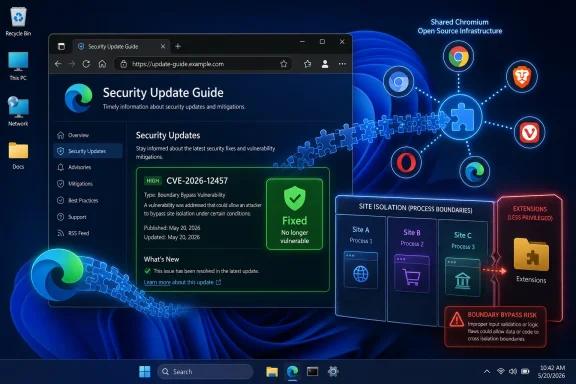
The modern Microsoft Edge is not the old EdgeHTML browser wearing a new icon. Since Microsoft’s Chromium pivot, Edge has lived downstream of the same open-source browser engine that powers Google Chrome and a sprawling family of Chromium-derived browsers. That architecture gives Microsoft faster standards compatibility and a massive upstream security pipeline, but it also means Edge inherits much of Chromium’s defect surface.
CVE-2026-12457 is described as insufficient data validation in Chromium’s Extensions component. Google’s Chrome stable-channel update on June 16, 2026, fixed it as part of a broader batch of security repairs, and the issue affected Chrome before version 149.0.7827.155. Microsoft’s Security Update Guide entry exists because Edge consumes the affected Chromium code path and must tell its own customers when Edge has taken the fix.
This is where the naming misleads casual readers. “Chrome CVE” often gets used as shorthand for “a vulnerability disclosed through the Chrome project,” not necessarily “a vulnerability that only Google Chrome can expose.” When the vulnerable code is in Chromium OSS, every browser shipping that code has to decide whether it is affected, whether it has shipped the patched code, and how to communicate that to admins.
Microsoft’s answer is bureaucratically dry but technically important: the CVE is in Chromium OSS, Edge is Chromium-based, and the Security Update Guide records that the latest Edge build is no longer vulnerable. In other words, Microsoft is not claiming ownership of the bug. It is claiming responsibility for the version of Edge installed on Windows desktops, enterprise images, kiosks, servers, and developer workstations.
The Security Update Guide Is Becoming a Browser Supply-Chain Ledger
The Security Update Guide used to be read mostly as a Patch Tuesday map: Windows kernel, Office, Exchange, .NET, SQL Server, and the usual long tail of Microsoft products. Chromium changed the rhythm. Browser vulnerabilities now arrive on Google’s cadence, Chromium’s cadence, Microsoft Edge’s cadence, and occasionally emergency out-of-band cadences when exploitation is active.
That makes the guide less like a monthly bulletin and more like a supply-chain ledger. It tells security teams not only which Microsoft-authored components are flawed, but also which third-party or open-source components inside Microsoft products required servicing. For Edge, that distinction matters because the browser’s security posture depends on how quickly Microsoft integrates Chromium fixes and ships them through Edge’s update system.
The practical result is a split identity. Edge is a Microsoft product for inventory, policy, compliance, support, and user experience. But large parts of its vulnerability feed are Chromium vulnerabilities, often first disclosed by Google’s Chrome release notes and then echoed by Microsoft for Edge consumers. Admins who treat Edge as “just part of Windows” miss this tempo shift.
That shift is especially important in managed environments where Windows Update, Microsoft Edge Update, Intune, Configuration Manager, proxy controls, and change windows may all intersect. The browser is often the most exposed application on the endpoint, and it does not politely wait for the second Tuesday of the month to become interesting. A Chromium CVE in the Security Update Guide is Microsoft telling enterprises: do not wait for the familiar Windows patch ritual if Edge itself needs to move.
Extensions Remain the Browser’s Most Awkward Trust Boundary
CVE-2026-12457 sits in Extensions, which is not an incidental corner of the browser. Extensions are where users, vendors, SaaS platforms, password managers, security tools, PDF handlers, ad blockers, meeting tools, identity plug-ins, and questionable productivity add-ons all attempt to coexist inside a security model that was never meant to feel simple.
The browser extension model grants code a privileged relationship with web content. That relationship can be narrow and well-scoped, or broad enough to terrify anyone who has read an extension permission prompt carefully. Even when an individual flaw is not a remote-code-execution apocalypse, an extension bug can matter because it touches the boundary between web pages, browser internals, user data, and cross-site protections.
The public description of CVE-2026-12457 says it involved insufficient data validation in Extensions and could allow a remote attacker who had already compromised the renderer process to bypass site isolation via a crafted HTML page. That is not the same as a drive-by attack against a fully patched browser from a cold start. It implies a chain: the attacker first needs a renderer compromise, then uses this flaw to weaken a boundary that is supposed to limit what a compromised renderer can reach.
That chained nature is why severity labels can be confusing. Chromium labeled the issue high, while other scoring systems may reflect exploit prerequisites such as user interaction, attack complexity, or the need for a prior renderer compromise. For defenders, the useful takeaway is not to argue over adjectives. It is to understand that browser isolation bugs often become powerful when combined with other bugs.
Site Isolation Is the Wall Attackers Try to Step Around
Site isolation is one of the modern browser’s major post-Spectre-era defenses. Its purpose is to reduce the damage when one renderer process is compromised by keeping content from different sites separated across process and security boundaries. It is not glamorous, but it is one of the reasons browser exploitation has become more expensive than it was in the plug-in-riddled web of a decade ago.
A bypass of site isolation does not automatically mean total system compromise. It does mean a browser security boundary may fail under specific conditions, potentially allowing an attacker to reach data or contexts that should have remained isolated. In a world where browser tabs routinely hold corporate email, identity portals, cloud consoles, CRM systems, patient records, source repositories, and financial dashboards, that boundary is not theoretical.
The detail that an attacker must already have compromised the renderer process should not be dismissed. Renderer bugs are common pieces in exploit chains, and browser vendors spend enormous effort limiting what a compromised renderer can do. If a second vulnerability lets the attacker escape or weaken those limits, the combined chain becomes more consequential than either bug looks in isolation.
This is why Microsoft documents Chromium vulnerabilities even when they do not sound like “Microsoft bugs.” Edge’s job is to enforce those same boundaries for Edge users. If the underlying Chromium code gets patched, Edge needs the patched code. If Edge ships the patched code, Microsoft needs to say so in the security channel its customers already monitor.
The Browser Version Is the Control, Not the CVE Entry
For most users, the answer to “How can I see the version of the browser?” is straightforward: open Microsoft Edge, choose the three-dot menu, go to Help and feedback, and select About Microsoft Edge. The same page is reachable by typing edge://settings/help into the address bar. That screen shows the installed Edge version and normally triggers an update check.
That version screen is more than trivia. In this case, the relevant comparison is whether the installed Edge build contains the Chromium fixes that closed CVE-2026-12457. Microsoft’s Security Update Guide tells you that the latest Edge release is no longer vulnerable; the About page tells you whether the browser in front of you has actually reached that state.
On unmanaged consumer PCs, the act of opening the About page often starts or confirms the update. Edge may download an update and ask for a restart. Until the browser restarts, the user may still be running the older executable in active sessions, which is why “updated” and “restarted into the update” should not be treated as the same event.
On managed systems, the story can be messier. Enterprises may control Edge updates through policy, staged deployment rings, proxy allowances, maintenance windows, or endpoint-management tooling. The About page may show that updates are disabled by the organization, or it may show an older build because the update service cannot reach Microsoft’s update endpoints. In that case, the CVE entry is not the fix; it is the alarm bell that tells IT to check its deployment path.
Microsoft’s Documentation Is Doing Two Jobs at Once
Microsoft’s CVE page is answering a narrow support question and a wider compliance question. The narrow question is why a Chrome-origin vulnerability appears in Microsoft’s Security Update Guide. The wider question is how organizations prove that Edge has consumed the upstream fix.
That second job matters in audits. Security teams do not inventory “Chromium OSS” as a standalone application on endpoints; they inventory Microsoft Edge. Vulnerability scanners, asset platforms, and compliance dashboards need a Microsoft-facing advisory trail so that an Edge installation can be mapped to a fixed version. Without that, every Chromium bug would become an attribution maze.
There is also a communication problem. Google’s Chrome release notes are written for Chrome’s release channel. Microsoft’s Security Update Guide is written for customers who have standardized on Microsoft servicing language. If Microsoft skipped Chromium CVEs because “Google already said it,” Edge customers would have to correlate upstream project advisories manually.
That is not realistic at enterprise scale. A fleet may contain Edge Stable, Edge Extended Stable, WebView2 Runtime, Chrome, Brave, Electron apps, embedded browsers, and vendor software that packages Chromium. The cleanest thing Microsoft can do for its own product is document the CVE in the Microsoft system of record and state whether the current Edge release is vulnerable.
The Open-Source Win Comes With an Accountability Cost
Microsoft’s move to Chromium solved many problems. Web compatibility improved. Developers no longer had to test against a Microsoft-only rendering engine with an uncertain future. Edge could benefit from Chromium’s security work, fuzzing infrastructure, and rapid repair culture.
But that bargain has an accountability cost. When a vulnerability appears in Chromium, Microsoft does not get to say “not our code, not our problem” if Edge ships it. Open-source consumption is not outsourcing responsibility; it is a supply-chain relationship. The vendor that packages and distributes the product owns the customer-facing patch story.
This is the part of browser security that ordinary users rarely see. A browser is less a monolith than a fast-moving assembly of engines, codecs, sandbox layers, UI components, update services, certificate logic, JavaScript runtimes, extension APIs, and platform integrations. Some are written by the browser vendor, some by the upstream project, and some by third parties.
For Windows admins, that means vulnerability management has to follow the product as shipped, not the repository where the bug was born. CVE-2026-12457 may have a Chromium origin story, but an outdated Edge installation is still an outdated Edge installation. The brand on the taskbar is the brand users and auditors will ask about.
Version Numbers Are Necessary but Not Sufficient
Checking the Edge version is the right first move, but it should not be the last move in a managed estate. A single workstation showing a fixed build proves only that one workstation updated. The larger question is whether the update mechanism is healthy across the fleet.
Edge updates can be deceptively easy on personal machines and surprisingly complicated in enterprise environments. Update policies may be intentionally restrictive. Network egress rules may block updater traffic. VDI images may be refreshed less often than expected. Kiosk systems may run for long periods without browser restarts. Server jump boxes may be treated as static tools even though administrators use them to access highly sensitive web consoles.
That last category deserves more attention than it usually gets. Admin workstations and jump hosts are often where browser vulnerabilities have the highest payoff, because successful exploitation can put an attacker near privileged cloud portals, identity systems, or internal dashboards. If those systems run Edge, the Edge version matters as much as the Windows cumulative update level.
Security teams should also remember WebView2, because Chromium-derived runtime components increasingly sit behind desktop applications that are not obviously “the browser.” A user may never open Edge directly and still depend on Microsoft’s Chromium servicing chain through embedded web content in apps. The Chromium supply chain has become broader than the browser icon.
The False Comfort of “Chrome-Only” Thinking
The most dangerous reading of CVE-2026-12457 is the casual one: “We do not use Chrome, so this is not ours.” In a Chromium world, that sentence is often wrong. If your organization uses Edge, it uses a Microsoft product built on Chromium. If it uses Electron applications, embedded web runtimes, or other Chromium-based browsers, the same upstream vulnerability may have additional downstream implications.
That does not mean every Chromium CVE affects every Chromium-derived product in exactly the same way. Vendors may disable features, alter code paths, ship patches at different times, or apply mitigations that change exposure. But the burden is on the vendor and the defender to verify that distinction. The name “Chrome” is not enough to rule Edge in or out.
Microsoft’s Security Update Guide entry is therefore a useful corrective. It translates an upstream Chromium security event into Microsoft’s product language. It is a reminder that security ownership follows consumption, not authorship.
For WindowsForum readers, this is the key operational point. If Edge is present, Edge must be patched. If Edge is the corporate standard, its update cadence should be monitored like any other critical internet-facing application. If Edge is not the standard but remains installed, it still needs care, because users and system components may invoke it anyway.
The About Page Is the User-Friendly Face of a Bigger Patch Pipeline
The About Microsoft Edge page is simple by design. It gives users a version number, an update status, and usually a path to restart. That simplicity hides the machinery behind it: update services, release channels, staged rollouts, enterprise policies, and Microsoft’s ingestion of Chromium security fixes.
For a home user, the advice is almost boring: open Edge, go to About Microsoft Edge, let it update, and restart the browser. If the version is current, move on. If the update fails, reinstalling Edge from Microsoft’s official channel or checking Windows Update may be necessary, but most users will never need to think that hard.
For administrators, the About page is a diagnostic symptom, not a deployment strategy. Fleet reporting should come from management tools, inventory scans, update compliance dashboards, or scripted checks. The version number should be collected at scale, compared against Microsoft’s fixed builds, and tied to service-level expectations for browser security updates.
The uncomfortable truth is that browsers are now patched like operating systems but attacked like exposed services. They parse hostile content all day, carry identity sessions, run complex code, and mediate access to nearly every cloud application users touch. Treating the version screen as a casual support detail undersells what it represents.
Microsoft’s Edge Obligation Will Keep Expanding
The inclusion of CVE-2026-12457 in the Security Update Guide is not unusual anymore, and that is precisely the point. Microsoft Edge will continue to absorb Chromium security fixes, and Microsoft will continue to document many of them because Edge is now part of the Chromium security ecosystem. The more Windows relies on browser-mediated workflows, the more those entries matter.
This also complicates the old distinction between operating-system security and application security. Edge ships with Windows, integrates with Windows, and is managed by Microsoft tooling, but it updates on a browser schedule. That hybrid identity can be useful when updates flow smoothly and maddening when enterprise controls slow them down.
The industry trend is toward faster browser release cycles, faster exploit development, and less patience for long validation windows. That does not mean administrators should blindly deploy every update without testing, but it does mean browser updates deserve a different risk model than a line-of-business application upgrade. A browser security patch is usually closing a door that attackers can reach from the public web.
Microsoft’s Security Update Guide is adapting to that reality. It is not just a list of Microsoft programming mistakes. It is a map of what Microsoft products contain, inherit, and have patched.
The Edge Entry Tells Windows Admins Where to Look First
The immediate response to CVE-2026-12457 should be practical, not theatrical. This is a Chromium-origin Edge exposure, documented by Microsoft so that Edge customers can verify they are on a fixed build. The right question is not whether the CVE “belongs” to Chrome or Microsoft. The right question is whether your Edge installations have received the update and restarted into it.
- Open Microsoft Edge and use Help and feedback, then About Microsoft Edge, or go directly to
edge://settings/helpto see the installed version and update status. - Treat the Security Update Guide entry as Microsoft’s confirmation that Edge consumed the relevant Chromium fix, not as evidence that the flaw was authored by Microsoft.
- Do not assume a Chrome-labeled CVE is irrelevant if your environment uses Edge, because Chromium OSS vulnerabilities can affect downstream Chromium-based browsers.
- In managed environments, verify fleet-wide Edge versions rather than relying on a single test machine or a user’s About page screenshot.
- Make sure update policies, network rules, and restart behavior are not leaving Edge installed but effectively frozen below the fixed release.
CVE-2026-12457 is a small case study in the new browser reality: the code is shared, the patches race across vendor boundaries, and the responsibility lands with whoever ships the browser to users. For Microsoft, that means Edge has to be visible in the Security Update Guide even when the original disclosure wears a Chrome badge. For Windows users and administrators, it means the humble version number in edge://settings/help is now one of the clearest signals of whether the browser has kept pace with the web’s threat model.