
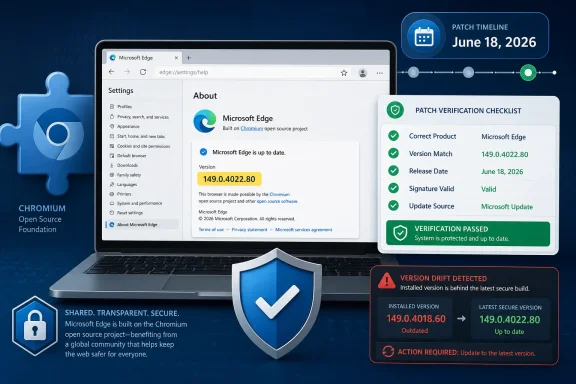
Microsoft includes CVE-2026-12468 in the Security Update Guide because the flaw is in Chromium open-source code consumed by Microsoft Edge, and the June 18, 2026 Edge Stable release, version 149.0.4022.80, is Microsoft’s notice that Edge has incorporated the upstream security fix. That is the short answer, but it understates the policy choice. The entry is less about Google Chrome as a product than about Chromium as shared infrastructure. For Windows admins, the important question is not “Why is a Chrome bug in Microsoft’s database?” but “Which Edge builds are still exposed, and how do I prove they are patched?”
The modern Microsoft Edge is not the old EdgeHTML browser with a Microsoft-only engine. It is a Chromium-based browser, which means large parts of its rendering, JavaScript, networking, media, sandboxing, and browser-adjacent plumbing come from the same open-source project that feeds Google Chrome and other Chromium browsers.
That shared codebase is the reason Microsoft’s Security Update Guide routinely carries Chromium-origin CVEs. Microsoft is not claiming the bug was authored by Microsoft, discovered in Edge first, or unique to Windows. It is documenting that a component shipped inside a Microsoft product was affected until Microsoft shipped an Edge build containing the relevant Chromium fix.
CVE-2026-12468 is described as an inappropriate implementation issue in the Updater. Public vulnerability metadata describes it as a race condition in Google Chrome on Mac before Chrome 149.0.7827.155, potentially allowing a renderer-compromising attacker to pursue a sandbox escape through a crafted HTML page. That is a narrower fact pattern than “all Edge users on every platform are equally exposed,” but it is still exactly the kind of upstream browser issue Microsoft has to track.
The Security Update Guide is Microsoft’s customer-facing ledger for that tracking. Chrome’s release note tells Chrome users what Google patched. Microsoft’s entry tells Edge users and enterprise administrators when Microsoft’s Chromium-based browser is no longer vulnerable.
Microsoft’s wording on entries like this is deliberately procedural. The vulnerability is in Chromium OSS. Chromium is consumed by Microsoft Edge. The Security Update Guide documents the Edge status once Microsoft has shipped a version that is no longer vulnerable. The purpose is not to relitigate which company “owns” the bug; it is to give Microsoft customers a Microsoft-maintained security record.
That distinction matters in regulated environments. A security team closing a finding does not usually want a browser blog post, a third-party CVE aggregator, and a guess. It wants an authoritative vendor statement that the product deployed in its fleet has received the fix. For Edge, that vendor is Microsoft, even when the patch originated upstream in Chromium.
This is why the entry belongs in the guide. The Security Update Guide is not merely a Patch Tuesday catalog for Windows kernel bugs and Office fixes. It is also the place where Microsoft records vulnerability impact across products it ships, including products that incorporate major open-source components.
But vulnerability names are often component hints, not complete product-impact explanations. “Inappropriate implementation in Updater” does not automatically mean “irrelevant to Edge,” just as “V8,” “Skia,” “ANGLE,” or “Dawn” does not automatically mean “Chrome only.” The impact question is whether the vulnerable Chromium code or relevant behavior is present in the downstream browser and whether Microsoft’s shipped build contained the fix.
Microsoft’s answer is that Edge consumed the relevant Chromium code and that the latest Edge release is no longer vulnerable. That is the operative sentence. Everything else is context for vulnerability managers trying to reconcile a Google-origin CVE with a Microsoft product row.
There is also a platform nuance here. Public CVE descriptions for this issue point to Chrome on Mac before a specific Chrome version. Microsoft’s Security Update Guide, however, exists to communicate Microsoft product status, not to reproduce every upstream platform boundary in the most expansive prose possible. Admins should still read the affected-product table and Edge release notes carefully, especially if they manage mixed Windows, macOS, Linux, Android, and iOS browser estates.
The version number will not match Chrome’s version number. Chrome’s affected/fixed version line and Edge’s fixed version line are related by Chromium lineage, not by identical branding or package numbering. Administrators should resist the temptation to compare Chrome and Edge versions as though they are interchangeable artifacts.
This is one of the practical annoyances of the Chromium ecosystem. Upstream fixes flow quickly, but each downstream vendor still has to package, test, sign, distribute, and document its own browser. For most users that delay is invisible. For enterprise IT, it is a measurable gap between “Chromium fixed” and “our managed Edge deployment is fixed.”
That gap is why the Security Update Guide entry exists. It collapses a complicated upstream/downstream relationship into an auditable statement: Microsoft has shipped an Edge build that includes the fix.
For CVE-2026-12468, the version to look for on the Stable channel is 149.0.4022.80 or later, based on Microsoft’s June 18, 2026 Edge security release. If the browser reports an older 149.0.4022.x build, it may not yet include the relevant security update. If it reports a later build, it should include that fix unless the machine is pinned to a special channel or policy state that changes normal assumptions.
Users should also restart the browser after an update is downloaded. Chromium browsers often stage updates while the browser remains open, and the protection is not fully in place until the new binary is running. In a personal setup, that means closing every Edge window and reopening it. In a managed environment, that may mean enforcing restart behavior or monitoring pending browser relaunch states.
For admins, the same idea scales through inventory. Endpoint management tools should report Edge channel, version, install path, and update status. If your vulnerability scanner flags CVE-2026-12468 after Edge has supposedly updated, the first troubleshooting step is to confirm whether the scanner is seeing the actual running version or stale file/package evidence.
Many organizations still think of browsers as “just applications” until the browser becomes the most exposed application on the desktop. It renders untrusted code all day, brokers identity sessions, handles documents, stores tokens, talks to extensions, and increasingly acts as the front end for internal line-of-business apps. A sandbox escape in a browser is not an academic concern.
The practical risk is not that Microsoft documents a Chrome CVE. The practical risk is that an organization’s Edge update policy, network egress rules, virtual desktop image, kiosk configuration, or extended validation process prevents the fixed build from reaching endpoints quickly. In that case, the Security Update Guide entry is not noise. It is a warning that the organization has a browser patching problem.
This is especially relevant for machines that do not behave like normal user laptops. Shared workstations, persistent VDI images, lab systems, offline networks, servers with browsers installed “temporarily,” and tightly controlled macOS fleets can all lag behind. Browser auto-update is reliable only when policy, connectivity, and restart behavior allow it to be reliable.
The cost is inherited exposure. When Chromium has a serious bug, Edge may inherit it. When a component buried deep in the stack needs a security fix, Microsoft must ingest it, ship it, and explain it to customers. That is not a failure of Chromium so much as the predictable consequence of consolidating so much of the web around one browser engine family.
There is a broader industry concern here. Browser diversity used to mean genuinely different engines and security architectures. Today, many browsers compete on user experience, privacy posture, synchronization, enterprise controls, and bundled services while sharing large amounts of Chromium code. That makes upstream patch speed more important than ever.
Microsoft’s Security Update Guide entry is therefore a small artifact of a larger dependency chain. It says, in effect, that the web’s shared engine has been patched and Microsoft’s browser has caught up. For administrators, that is useful. For the industry, it is another reminder that monoculture risk does not disappear because the code is open source.
It is worth being precise here because vague advice like “update Edge” is not enough in a fleet. Security teams need a version threshold. Help desks need a simple check. Compliance teams need evidence. Users need to know whether the number on their About page is good enough.
There is a difference between “Edge will update automatically” and “Edge has updated.” The first is a product promise. The second is an observed state. CVE handling lives in the second category.
That is also why Microsoft’s documentation should not be dismissed as duplication of Google’s Chrome release. Google can tell the world what Chrome fixed. Microsoft has to tell its customers what Edge fixed. The overlap is not redundancy; it is accountability.
That narrower reading is still security-relevant. Browser sandbox escapes are high-value primitives, especially when chained with renderer compromise. The public description for CVE-2026-12468 involves an attacker who has already compromised the renderer process and then potentially uses the flaw to escape the sandbox. In modern browser exploitation, that kind of chain is exactly what defenders want to break quickly.
For ordinary Edge users, the response is mundane: check the version, let the update complete, and restart. For administrators, the response is more procedural: verify deployment rings, confirm reporting, watch for update deferrals, and make sure macOS and non-Windows Edge populations are not hidden from the same process.
The CVE’s appearance in Microsoft’s database is therefore not a clerical oddity. It is a signal that shared code has produced shared patch obligations.
That gives WindowsForum readers a concrete way to translate a confusing advisory into action:
 A Chrome CVE Becomes an Edge Problem the Moment Chromium Ships Inside Edge
The modern Microsoft Edge is not the old EdgeHTML browser with a Microsoft-only engine. It is a Chromium-based browser, which means large parts of its rendering, JavaScript, networking, media, sandboxing, and browser-adjacent plumbing come from the same open-source project that feeds Google Chrome and other Chromium browsers.That shared codebase is the reason Microsoft’s Security Update Guide routinely carries Chromium-origin CVEs. Microsoft is not claiming the bug was authored by Microsoft, discovered in Edge first, or unique to Windows. It is documenting that a component shipped inside a Microsoft product was affected until Microsoft shipped an Edge build containing the relevant Chromium fix.
CVE-2026-12468 is described as an inappropriate implementation issue in the Updater. Public vulnerability metadata describes it as a race condition in Google Chrome on Mac before Chrome 149.0.7827.155, potentially allowing a renderer-compromising attacker to pursue a sandbox escape through a crafted HTML page. That is a narrower fact pattern than “all Edge users on every platform are equally exposed,” but it is still exactly the kind of upstream browser issue Microsoft has to track.
The Security Update Guide is Microsoft’s customer-facing ledger for that tracking. Chrome’s release note tells Chrome users what Google patched. Microsoft’s entry tells Edge users and enterprise administrators when Microsoft’s Chromium-based browser is no longer vulnerable.
The Security Update Guide Is a Downstream Status Board, Not a Blame Sheet
There is a persistent confusion around CVE ownership in multi-vendor software. A CVE can be assigned to a vulnerability in a project maintained primarily by one vendor and still matter to every downstream product that embeds the affected code. That is how open source works at scale: one bug, many products, many patch trains.Microsoft’s wording on entries like this is deliberately procedural. The vulnerability is in Chromium OSS. Chromium is consumed by Microsoft Edge. The Security Update Guide documents the Edge status once Microsoft has shipped a version that is no longer vulnerable. The purpose is not to relitigate which company “owns” the bug; it is to give Microsoft customers a Microsoft-maintained security record.
That distinction matters in regulated environments. A security team closing a finding does not usually want a browser blog post, a third-party CVE aggregator, and a guess. It wants an authoritative vendor statement that the product deployed in its fleet has received the fix. For Edge, that vendor is Microsoft, even when the patch originated upstream in Chromium.
This is why the entry belongs in the guide. The Security Update Guide is not merely a Patch Tuesday catalog for Windows kernel bugs and Office fixes. It is also the place where Microsoft records vulnerability impact across products it ships, including products that incorporate major open-source components.
The Updater Label Makes This One Easy to Misread
The word “Updater” can make CVE-2026-12468 look like it should only concern Google Chrome’s own update mechanism. That is a reasonable first reaction, especially for administrators used to treating Edge Update, Chrome Update, and browser binaries as separate moving parts.But vulnerability names are often component hints, not complete product-impact explanations. “Inappropriate implementation in Updater” does not automatically mean “irrelevant to Edge,” just as “V8,” “Skia,” “ANGLE,” or “Dawn” does not automatically mean “Chrome only.” The impact question is whether the vulnerable Chromium code or relevant behavior is present in the downstream browser and whether Microsoft’s shipped build contained the fix.
Microsoft’s answer is that Edge consumed the relevant Chromium code and that the latest Edge release is no longer vulnerable. That is the operative sentence. Everything else is context for vulnerability managers trying to reconcile a Google-origin CVE with a Microsoft product row.
There is also a platform nuance here. Public CVE descriptions for this issue point to Chrome on Mac before a specific Chrome version. Microsoft’s Security Update Guide, however, exists to communicate Microsoft product status, not to reproduce every upstream platform boundary in the most expansive prose possible. Admins should still read the affected-product table and Edge release notes carefully, especially if they manage mixed Windows, macOS, Linux, Android, and iOS browser estates.
Edge’s Patch Train Runs Close to Chromium, but It Is Still Microsoft’s Train
Microsoft’s Edge release notes show the rhythm clearly. On June 18, 2026, Microsoft released Edge Stable version 149.0.4022.80 and stated that it incorporates the latest security updates from the Chromium project. That is the Edge-side event that matters for CVE-2026-12468.The version number will not match Chrome’s version number. Chrome’s affected/fixed version line and Edge’s fixed version line are related by Chromium lineage, not by identical branding or package numbering. Administrators should resist the temptation to compare Chrome and Edge versions as though they are interchangeable artifacts.
This is one of the practical annoyances of the Chromium ecosystem. Upstream fixes flow quickly, but each downstream vendor still has to package, test, sign, distribute, and document its own browser. For most users that delay is invisible. For enterprise IT, it is a measurable gap between “Chromium fixed” and “our managed Edge deployment is fixed.”
That gap is why the Security Update Guide entry exists. It collapses a complicated upstream/downstream relationship into an auditable statement: Microsoft has shipped an Edge build that includes the fix.
Checking the Browser Version Is the Control, Not the Footnote
The user-facing way to check Edge is simple: open Edge, select the three-dot menu, go to Help and feedback, then About Microsoft Edge. You can also typeedge://settings/help into the address bar. That page shows the installed version and normally triggers an update check.For CVE-2026-12468, the version to look for on the Stable channel is 149.0.4022.80 or later, based on Microsoft’s June 18, 2026 Edge security release. If the browser reports an older 149.0.4022.x build, it may not yet include the relevant security update. If it reports a later build, it should include that fix unless the machine is pinned to a special channel or policy state that changes normal assumptions.
Users should also restart the browser after an update is downloaded. Chromium browsers often stage updates while the browser remains open, and the protection is not fully in place until the new binary is running. In a personal setup, that means closing every Edge window and reopening it. In a managed environment, that may mean enforcing restart behavior or monitoring pending browser relaunch states.
For admins, the same idea scales through inventory. Endpoint management tools should report Edge channel, version, install path, and update status. If your vulnerability scanner flags CVE-2026-12468 after Edge has supposedly updated, the first troubleshooting step is to confirm whether the scanner is seeing the actual running version or stale file/package evidence.
The Enterprise Risk Is Version Drift, Not the Existence of Another Chromium CVE
CVE-2026-12468 is another reminder that browser security is not a monthly exercise. Edge updates outside the traditional Windows cumulative update cadence, and Chromium-origin fixes may arrive whenever the upstream project ships them. That is good for security, but it complicates change control.Many organizations still think of browsers as “just applications” until the browser becomes the most exposed application on the desktop. It renders untrusted code all day, brokers identity sessions, handles documents, stores tokens, talks to extensions, and increasingly acts as the front end for internal line-of-business apps. A sandbox escape in a browser is not an academic concern.
The practical risk is not that Microsoft documents a Chrome CVE. The practical risk is that an organization’s Edge update policy, network egress rules, virtual desktop image, kiosk configuration, or extended validation process prevents the fixed build from reaching endpoints quickly. In that case, the Security Update Guide entry is not noise. It is a warning that the organization has a browser patching problem.
This is especially relevant for machines that do not behave like normal user laptops. Shared workstations, persistent VDI images, lab systems, offline networks, servers with browsers installed “temporarily,” and tightly controlled macOS fleets can all lag behind. Browser auto-update is reliable only when policy, connectivity, and restart behavior allow it to be reliable.
The Shared-Code Bargain Cuts Both Ways
Microsoft’s move to Chromium gave Edge compatibility benefits that the old browser never fully achieved. Sites test against Chromium. Developers understand Chromium behavior. Enterprises get a browser that looks and behaves more like the dominant web platform while still integrating with Microsoft management, identity, and security tooling.The cost is inherited exposure. When Chromium has a serious bug, Edge may inherit it. When a component buried deep in the stack needs a security fix, Microsoft must ingest it, ship it, and explain it to customers. That is not a failure of Chromium so much as the predictable consequence of consolidating so much of the web around one browser engine family.
There is a broader industry concern here. Browser diversity used to mean genuinely different engines and security architectures. Today, many browsers compete on user experience, privacy posture, synchronization, enterprise controls, and bundled services while sharing large amounts of Chromium code. That makes upstream patch speed more important than ever.
Microsoft’s Security Update Guide entry is therefore a small artifact of a larger dependency chain. It says, in effect, that the web’s shared engine has been patched and Microsoft’s browser has caught up. For administrators, that is useful. For the industry, it is another reminder that monoculture risk does not disappear because the code is open source.
The June 18 Edge Build Is the Line Administrators Should Draw
The clean operational line for this advisory is Edge Stable version 149.0.4022.80, released June 18, 2026. That is the build Microsoft identifies as incorporating the latest Chromium security updates at the time. Treat that version as the minimum Stable-channel target unless Microsoft later publishes a more specific affected-products table or follow-up note that narrows the requirement.It is worth being precise here because vague advice like “update Edge” is not enough in a fleet. Security teams need a version threshold. Help desks need a simple check. Compliance teams need evidence. Users need to know whether the number on their About page is good enough.
There is a difference between “Edge will update automatically” and “Edge has updated.” The first is a product promise. The second is an observed state. CVE handling lives in the second category.
That is also why Microsoft’s documentation should not be dismissed as duplication of Google’s Chrome release. Google can tell the world what Chrome fixed. Microsoft has to tell its customers what Edge fixed. The overlap is not redundancy; it is accountability.
The Practical Reading of CVE-2026-12468 Is Narrow but Urgent
No one should turn this into panic over every Chromium-based browser on every platform without reading the affected-product details. The public description points to a Mac-specific Chrome issue before Chrome 149.0.7827.155. Microsoft’s Edge guidance, meanwhile, exists because Edge consumes Chromium OSS and because Microsoft has issued a patched Edge build.That narrower reading is still security-relevant. Browser sandbox escapes are high-value primitives, especially when chained with renderer compromise. The public description for CVE-2026-12468 involves an attacker who has already compromised the renderer process and then potentially uses the flaw to escape the sandbox. In modern browser exploitation, that kind of chain is exactly what defenders want to break quickly.
For ordinary Edge users, the response is mundane: check the version, let the update complete, and restart. For administrators, the response is more procedural: verify deployment rings, confirm reporting, watch for update deferrals, and make sure macOS and non-Windows Edge populations are not hidden from the same process.
The CVE’s appearance in Microsoft’s database is therefore not a clerical oddity. It is a signal that shared code has produced shared patch obligations.
The Small Version Number That Settles the Argument
The controversy around this entry mostly vanishes once the browser version is checked. If Edge is at version 149.0.4022.80 or later on the Stable channel, Microsoft’s published release history says it has incorporated the relevant Chromium security updates. If it is below that level, the machine should be treated as needing an Edge update.That gives WindowsForum readers a concrete way to translate a confusing advisory into action:
- Microsoft lists CVE-2026-12468 because Edge is Chromium-based and inherits some Chromium vulnerabilities until Microsoft ships a fixed Edge build.
- The Security Update Guide entry is a Microsoft product-status notice, not a claim that the bug was unique to Microsoft code.
- Edge Stable version 149.0.4022.80, released June 18, 2026, is the key fixed build to verify for this advisory.
- Users can check Edge by opening the About Microsoft Edge page from the Help and feedback menu or by entering
edge://settings/helpin the address bar. - Enterprises should confirm the installed and running Edge version through endpoint inventory rather than assuming auto-update has completed.
- A browser restart remains part of the patching process, because a downloaded update does not fully protect the session until the new build is running.
References
- Primary source: MSRC
Published: 2026-06-19T13:52:52-07:00
Security Update Guide - Microsoft Security Response Center
 msrc.microsoft.com
- Official source: learn.microsoft.com
Release notes for Microsoft Edge Security Updates | Microsoft Learn
Release notes for Microsoft Edge Security Updateslearn.microsoft.com - Related coverage: windowsforum.com
Why Microsoft Ties Chromium CVEs to Edge Builds in the Security Update Guide | Windows Forum
Microsoft’s Security Update Guide (SUG) lists CVE-2026-0908 — a use-after-free in ANGLE inside Chromium — not because Microsoft created the bug, but because...windowsforum.com - Related coverage: vulnerability.circl.lu
Vulnerability-Lookup
Vulnerability-Lookup - Fast vulnerability lookup correlation from different sources.vulnerability.circl.lu - Official source: microsoft.com
Security Update Guide FAQs
Frequently asked questions on the Security Update Guidewww.microsoft.com
- Related coverage: tomsguide.com
Google issues critical Chrome update to patch zero-day vulnerability | Tom's Guide
A brand new Chrome vulnerability has been patched by Google, which means its time to update your browser again.www.tomsguide.com
- Related coverage: www2.gov.bc.ca
- Related coverage: aha.org
h isac tlp white microsoft edge addresses exploited zero day vulnerability cve 2024 7971 8 23 2024
PDF documentwww.aha.org
