

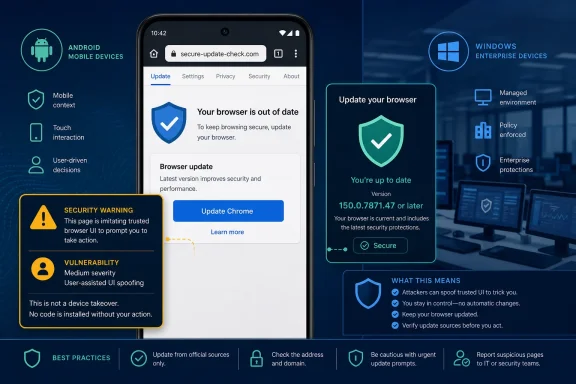
CVE-2026-13987 is a Google Chrome vulnerability affecting Chrome on Android before version 150.0.7871.47. According to the Chrome-originated description, a remote attacker can use a crafted HTML page to perform security-interface spoofing after obtaining required user interaction.Direct answer
Affected product: Google Chrome on Android versions earlier than 150.0.7871.47.
Required action: Update the Chrome application itself to 150.0.7871.47 or later, then verify the installed version in Chrome.
Scope: The supplied record does not document CVE-2026-13987 as a Chrome-on-Windows vulnerability or as a standalone Android operating-system vulnerability.
The flaw is not documented as silent code execution, data theft, sandbox escape, or device takeover. Its stated impact is narrower: hostile web content can interfere with the trustworthiness of security-relevant interface information presented to the user.
The practical response is correspondingly direct. Identify Android devices running Chrome earlier than 150.0.7871.47, update Chrome through Google Play, reopen the browser, and verify the complete installed version. The National Vulnerability Database configuration documents versions earlier than 150.0.7871.47 as affected; it does not list 150.0.7871.47 itself as affected.
The Most Important Scope Distinction for Windows-First Organizations
Windows-centered security teams should separate three different patch populations:
- Chrome installed on Windows computers.
- The Android operating system and its security patch level.
- Chrome installed as an application on Android devices.
The supplied record places CVE-2026-13987 in the third category. It identifies Chrome on Android before 150.0.7871.47 as affected. It does not establish that Chrome on Windows contains the same vulnerability, and it does not describe an Android operating-system flaw that can be remediated solely through a general Android system update.
That distinction should appear in scanner tickets, help-desk instructions, compliance reports, and executive summaries. A generic product-name match for “Google Chrome” is not enough to classify a Windows endpoint as affected. A valid finding under the supplied configuration requires both of the following:
- The device runs Android.
- Its installed Google Chrome version is earlier than 150.0.7871.47.
Likewise, an Android device should not be marked remediated merely because it has received an operating-system security update. The Chrome application version is the relevant measurement for this CVE.
This is the WindowsForum-specific operational lesson: an organization may have excellent Windows browser inventory while still lacking equivalent visibility into Chrome running on Android phones. Mobile Chrome therefore needs a separate inventory and verification path rather than being folded into Windows Chrome patching or Android OS maintenance.
That does not mean CVE-2026-13987 directly compromises Windows infrastructure. The public record does not support such a claim. It means Windows-first organizations should route the finding to the mobile-device or application owner instead of dismissing it as irrelevant or mistakenly assigning it to desktop teams.
What the Public Record Establishes
The National Vulnerability Database describes CVE-2026-13987 as an incorrect security-interface issue in Chrome’s mobile implementation. The Chrome-originated description says crafted HTML could allow a remote attacker to perform UI spoofing, with user interaction required.
The associated Chromium issue is permission-restricted. Consequently, the public material does not establish the precise visual component, triggering sequence, page layout, reproduction procedure, or implementation detail involved.
It would be speculative to claim that the affected element was specifically an address-bar indicator, permission dialog, browser menu, origin display, warning page, or another particular control. The defensible description is simply that the flaw involved security-relevant mobile browser UI.
Browsers depend on a boundary between attacker-controlled web content and interface information supplied by the browser itself. A webpage can imitate familiar colors, icons, prompts, and layouts, but the browser is expected to preserve trustworthy information about security context. UI spoofing matters when a vulnerability weakens the reliability of that distinction.
CVE-2026-13987 should therefore not be reduced to an ordinary deceptive webpage. The vulnerability record attributes the spoofing capability to Chrome’s handling or presentation of security-relevant interface state. At the same time, the restricted technical details do not justify constructing a more elaborate attack narrative.
The public record does not establish:
- Arbitrary code execution.
- A sandbox escape.
- Browser or Android device takeover.
- Direct theft of credentials, tokens, or browsing data.
- A specific spoofed control, prompt, origin, or workflow.
- A known delivery method.
- A public exploit payload or reproduction sequence.
- A known campaign using the vulnerability.
- A reliable CVE-specific network, browser, or endpoint indicator.
Those limitations should remain visible in downstream reporting. Security teams can act on the affected-product and version boundary without filling the gaps with unsupported mechanics.
How to Read the 4.3 CVSS Assessment
CISA-ADP supplied a CVSS 3.1 base score of 4.3 Medium with the vector:
CVSS:3.1/AV:N/AC:L/PR:N/UI:R/S:U/C:N/I:L/A:N
At a high level, the vector records a network attack vector, low attack complexity, no required attacker privileges, required user interaction, unchanged scope, no scored confidentiality impact, low integrity impact, and no scored availability impact.
The vector should not be stretched beyond what it says. For example, it does not by itself prove how the malicious page reaches a user, what exact interaction is required, what interface is spoofed, or what a victim might do afterward. It also does not establish that every encounter with crafted content leads to successful deception.
A reasonable interpretation is that the assessed technical impact centers on the integrity or trustworthiness of information presented to the user rather than direct confidentiality loss or service disruption. That interpretation fits the UI-spoofing description, but it should not be turned into a claim about a specific phishing workflow or downstream compromise.
The user-interaction metric is an important constraint. Success requires participation by the user rather than being credited solely to receipt or automatic parsing of the page. The public record, however, does not disclose the exact gesture, decision, or sequence of actions involved.
Similarly, network accessibility means the attack does not require the attacker to have physical possession of the phone under the scored model. It does not identify email, messaging, advertising, QR codes, search results, or compromised websites as documented delivery channels for this CVE.
CVSS measures the disclosed vulnerability characteristics. It does not measure every hypothetical consequence of a larger social-engineering chain. A hostile operator might attempt to combine misleading interface information with additional content, but any such scenario goes beyond the direct claims in the supplied record.
The correct risk statement is therefore measured: CVE-2026-13987 is a remotely reachable, user-assisted UI-spoofing vulnerability with a CISA-ADP CVSS 3.1 score of 4.3 and a scored low integrity impact. It is not documented as an automatic device compromise.
The Version Boundary Is the Main Remediation Evidence
The affected configuration identifies Chrome on Android versions earlier than 150.0.7871.47.
| Chrome on Android state | Version comparison | Documented CVE treatment | Required action |
|---|---|---|---|
| Older installation | Earlier than 150.0.7871.47 | Listed as affected | Update Chrome and verify the installed version |
| Threshold installation | Exactly 150.0.7871.47 | Not listed as affected | Record the verified version |
| Later installation | Later than 150.0.7871.47 | Not included in the documented affected range | Record the verified version |
| Unknown or incomplete result | Version unavailable, stale, or truncated | Exposure cannot be determined | Obtain current, complete version evidence |
This wording matters. The NVD configuration documents versions earlier than 150.0.7871.47 as affected; it does not list 150.0.7871.47 itself as affected. That supports using the version as the operational threshold without making broader claims about how Google characterized the remediation internally.
Administrators should compare the complete version number rather than relying on the major release alone. “Chrome 150” is not sufficiently precise because a build earlier than 150.0.7871.47 could still fall within the documented affected range.
An update notification, deployment command, Play Store status, or policy assignment is also not the same as installed-version evidence. Remediation should end with a current observation of the Chrome version running on the Android device.
Android User Procedure: Update and Verify Chrome
Users should update Chrome through Google Play rather than relying on an update or security prompt displayed by a webpage.
- Open the Google Play Store.
- Select the profile icon.
- Open Manage apps & device.
- Open Updates available.
- Find Chrome.
- Select Update.
- After installation, reopen Chrome.
- In Chrome, select ⋮.
- Open Settings.
- Open About Chrome.
- Verify that the installed version is 150.0.7871.47 or later.
Menu wording, placement, and screen layout can vary by device manufacturer and Google Play Store version. Some devices may display an application details page or use slightly different labels for the available-updates list. The objective remains the same: update Google Chrome through the supported application store and then inspect the version reported by Chrome itself.
If Chrome does not appear under Updates available, the user should still open Chrome > ⋮ > Settings > About Chrome and check the installed version. The absence of an Update button does not by itself prove that the required version is installed.
If Chrome continues to report a version earlier than 150.0.7871.47, the user should retry the update through the device’s supported application source. On an organization-controlled device, the user should contact the mobile-management or help-desk owner rather than installing Chrome from an unapproved source.
Public Detail Remains Limited
The restricted Chromium issue prevents independent public confirmation of the triggering HTML, precise interface state, vulnerable code path, exploit reliability, or corrected implementation.
That does not prevent remediation. The public record provides enough information to define the affected population and the version comparison:
- Product: Google Chrome.
- Platform: Android.
- Affected range: versions earlier than 150.0.7871.47.
- Attack content: crafted HTML.
- Required condition: user interaction.
- Documented effect: security-interface spoofing.
- Scored technical impact: low integrity impact.
- Scored confidentiality and availability impacts: none.
The absence of a public proof of concept should not be described as proof that exploitation is impossible. Conversely, restricted details should not be filled with comparisons to unrelated Chromium interface vulnerabilities.
Reports should also preserve metric provenance. The displayed 4.3 score is the CISA-ADP CVSS 3.1 assessment, not an independently authored NIST score merely because it appears on an NVD page.
The same discipline applies to exploitation status. The supplied CISA-ADP assessment records exploitation as none, automatable as no, and technical impact as partial. “Exploitation: none” is a point-in-time assessment in the supplied record, not a permanent guarantee about future activity.
Record Timeline
The supplied material supports a contribution sequence, but not the previously stated exact calendar dates and timestamps with sufficient confidence. Those unsupported dates have therefore been removed.
Chrome-originated disclosure stage: Chrome supplied the core vulnerability description, including the Android product scope, crafted-HTML condition, required user interaction, UI-spoofing effect, and affected-version boundary.
CISA-ADP enrichment stage: CISA-ADP supplied the CVSS 3.1 vector and 4.3 score, the weakness mapping, and the SSVC values presented in the record.
NVD product-analysis stage: NVD presented the platform-specific affected configuration connecting the vulnerable Chrome application range with Android.
Operational remediation stage: Administrators and users can apply the documented version comparison by updating Chrome and verifying that the device reports 150.0.7871.47 or later.
This timeline reflects enrichment rather than a demonstrated escalation in severity. A record modification can add scoring, classification, or product data without establishing a new exploitation method or expanded affected range. Vulnerability-management systems should evaluate the substance and contributor of each field instead of treating every metadata change as a new emergency.
Windows Shops Still Need a Separate Android Chrome Workflow
The management workstation or vulnerability console does not determine the affected platform. The endpoint record does.
A Windows administrator may receive a ticket because the organization’s security program is operated from Windows, because a scanner normalizes products under the general Chrome name, or because the same team owns both desktop and mobile compliance. None of those circumstances broadens the CVE to Chrome on Windows.
The correct routing decision is:
- Keep confirmed Android Chrome findings in scope.
- Compare the complete installed Chrome version with 150.0.7871.47.
- Route remediation to the mobile-device, application-management, or user-support owner.
- Exclude Windows Chrome matches created solely from generic product-name matching.
- Keep Android OS patch compliance separate from Chrome application compliance.
- Do not automatically include Android WebView, Microsoft Edge, or another Chromium-based browser without affected-product evidence for that product.
Organizations should use reliable application-version inventory where it is available, but they should not imply that every device-management platform provides the same collection or enforcement features. Product capabilities depend on the organization’s tools, enrollment model, configuration, and privacy boundaries.
Where central version data is unavailable, the organization can provide the Android user procedure and request manual confirmation. Personally owned or partially managed devices may require a user-supported verification workflow rather than a claim of universal centralized visibility.
Action checklist for administrators
Scope
- Identify Android devices that run Google Chrome.
- Collect the complete installed Chrome version where reliable inventory is available.
- Flag every version earlier than 150.0.7871.47.
- Treat missing, shortened, conflicting, or stale version results as unresolved.
- Exclude Chrome on Windows from this CVE-specific remediation group unless authoritative information expands the documented scope.
- Do not classify the Android operating system itself as the vulnerable application.
Remediate
- Direct affected users to update Chrome through Google Play.
- Use the organization’s approved application-update process for managed devices.
- Ask users to reopen Chrome after installation.
- Escalate devices that remain below the threshold or cannot obtain a supported Chrome release.
- Avoid recommending installation from an unapproved source.
Verify
- Confirm the endpoint is an Android device.
- Confirm that Chrome reports version 150.0.7871.47 or later.
- Refresh stale inventory before closing the finding.
- Keep unknown or unverifiable versions open as unresolved rather than assuming compliance.
- Record the device identifier, platform, complete Chrome version, observation time, and remediation disposition where those fields are available.
- Document why a Windows result was excluded if it originated from an overly broad product match.
Communicate
- Describe the issue as Chrome-on-Android security-interface spoofing.
- State that crafted HTML and user interaction are required.
- Identify 4.3 as the CISA-ADP CVSS 3.1 score.
- Avoid calling the issue browser takeover, code execution, credential theft, authentication bypass, or an Android OS vulnerability.
- Avoid naming a specific spoofed interface element without additional authoritative detail.
- Tell users to update Chrome itself and verify the installed version.
Conditional Incident Handling
If a user reports a suspicious prompt
The public record does not provide a verified exploit signature, known campaign pattern, or CVE-specific indicator of compromise. Incident handling should therefore be described conditionally rather than as a detection procedure for CVE-2026-13987.
If a user reports a suspicious browser prompt, preserve:
- The URL or destination involved.
- The delivery context, such as the message or workflow that preceded the page.
- The approximate date and time.
- The Chrome version installed at the time, if it can be established.
- Screenshots or user-provided descriptions that already exist.
- Any action the user recalls taking after seeing the prompt.
Responders can then evaluate related authentication events, account changes, or other activity under the organization’s normal incident-response process. Such review may help determine whether a broader security event occurred, but the CVE record itself does not establish what artifacts exploitation would create.
A reported deceptive page is not automatically proof that CVE-2026-13987 was used. Ordinary webpage imitation can occur without this browser vulnerability. Conversely, the absence of a distinctive alert or log entry does not prove that no suspicious interaction occurred.
Security teams should not promise a universal hostname, payload signature, browser warning, crash pattern, or endpoint event for this CVE. No such indicator is established in the supplied material.
Version-Based Prevention Is Stronger Than Speculative Detection
The supplied record gives defenders a clear affected-version test but not a documented exploit-detection package. That makes version verification the strongest available administrative control.
The basic workflow is straightforward:
- Confirm the device is Android.
- Obtain the complete installed Google Chrome version.
- Compare it with 150.0.7871.47.
- Mark lower versions as affected.
- Treat unknown or stale results as unresolved.
- Update Chrome through the supported application source.
- Collect a fresh version result.
- Close the finding only after verifying 150.0.7871.47 or later.
This approach avoids two common errors. The first is false closure based only on an update command or storefront status. The second is false expansion based on a generic Chrome product match that creates unsupported Windows tickets.
The CISA-ADP record’s lack of identified exploitation should inform proportional prioritization, but it should not become an excuse to leave a documented affected version installed. Updating Chrome is a concrete response with a measurable completion condition.
At the same time, the issue should not be inflated into a mobile-device takeover emergency. The public evidence supports a user-assisted UI-spoofing vulnerability with low scored integrity impact. It does not support claims of code execution, token theft, password-store compromise, or automatic account takeover.
The defensible conclusion is therefore narrow and operational: inventory Chrome on Android separately from Chrome on Windows and from Android OS patching, update installations earlier than 150.0.7871.47, and verify the complete resulting version. If a user reports a suspicious prompt, preserve the URL, delivery context, time, and Chrome version, then investigate under the organization’s normal incident process without assuming a known CVE-specific campaign or indicator.
Future authoritative updates may disclose additional mechanics, revise the affected range, or change the exploitation assessment. Until then, administrators should keep the scope clean, the claims evidence-bound, and the remediation measurable: update Chrome itself on Android and verify version 150.0.7871.47 or later.