

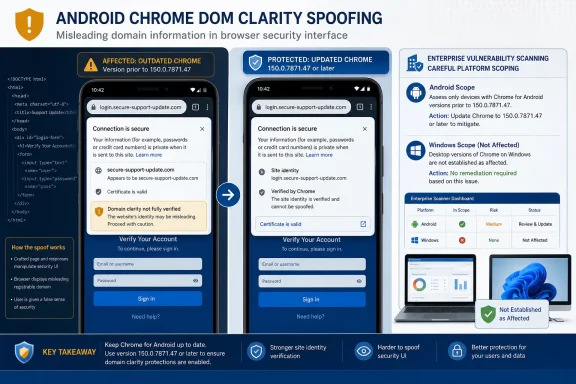
Google Chrome on Android versions earlier than 150.0.7871.47 contain CVE-2026-14126, a security-interface flaw that can allow a remote attacker to use a crafted HTML page to spoof a domain when user interaction is involved. Chromium rates the issue Low, while CISA-ADP assigns it a 4.3 Medium CVSS 3.1 score and records no known exploitation in its SSVC contribution.Who is affected / What to do
- Affected: Google Chrome on Android versions earlier than 150.0.7871.47.
- Required action: Update or enforce Chrome 150.0.7871.47 or later, then verify the complete installed version.
- Scoping check: Validate that vulnerability-scanner matches are specific to Chrome on Android. The supplied record does not establish that Chrome on Windows is affected by this CVE.
- Exploitation status: The cited CISA-ADP SSVC record lists exploitation as none and automation as no. That is not a guarantee that exploitation cannot occur or that the status will never change.
This is not documented as a code-execution vulnerability, sandbox escape, Android takeover, or no-click compromise. The confirmed result is narrower: security-relevant information in Chrome’s interface can misrepresent a domain. That makes the update important because it affects a signal users may rely on when deciding whether a page is legitimate.
Chrome Patched a Security Signal, Not the Web Page
CVE-2026-14126 carries the awkward description “Incorrect security UI in UI,” but its reported effect is straightforward. A remote attacker can construct an HTML page that causes an affected Chrome-on-Android installation to spoof a domain, provided the user interacts with the page.
The public record does not claim that the attacker can execute native code, escape Chrome’s sandbox, read arbitrary browser data, install software, crash the device, or obtain operating-system privileges. The issue concerns the integrity of browser-controlled security information.
That distinction matters. A normal webpage can imitate a company logo, reproduce a sign-in form, and display deceptive text inside its own content area. Browser-controlled identity information is supposed to help users distinguish that content from the actual origin of the page. CVE-2026-14126 indicates that Chrome on Android did not preserve that distinction correctly under the affected conditions.
The NVD record associates the vulnerability with CWE-451, “User Interface (UI) Misrepresentation of Critical Information.” The classification describes the reported weakness without expanding it into an unsupported exploit chain: critical identity information can be presented incorrectly through the user interface.
A deceptive page could therefore gain credibility from misleading domain information. The attacker still needs the user to encounter or interact with the crafted page, and the available material does not establish what the user must do beyond that general requirement. The record supports describing the flaw as a possible aid to deception, but not claiming that it automatically captures credentials or defeats multifactor authentication.
Confirmed Facts and WindowsForum Operational Guidance
The response is clearer when the vulnerability record is separated from recommendations developed for WindowsForum readers.
Confirmed by the supplied record
- The affected product is Google Chrome on Android.
- Versions earlier than 150.0.7871.47 are within the affected range.
- The documented attack uses a crafted HTML page.
- The reported consequence is domain spoofing caused by incorrect security UI.
- User interaction is required.
- Chromium rates the issue Low.
- CISA-ADP contributes a 4.3 Medium CVSS 3.1 score.
- The CISA-ADP SSVC entry records exploitation as none, automation as no, and technical impact as partial.
- The associated Chromium issue is marked Permissions Required, so the public material does not expose the complete technical mechanism.
- The supplied affected configuration does not establish that Chrome on Windows is vulnerable to this CVE.
WindowsForum operational guidance
- Inventory Chrome versions on Android devices that access organizational services.
- Use the complete four-part Chrome version when determining compliance.
- Set 150.0.7871.47 or later as the remediation threshold for this CVE.
- Use the organization’s supported application-distribution or mobile-management process to update affected devices.
- Verify the resulting installed version rather than treating an update assignment or deployment status as proof of remediation.
- Validate scanner findings before assigning them to Windows desktop teams.
- Keep missing, stale, truncated, or conflicting version data open as unresolved.
- Continue normal phishing-response and account-protection procedures without presenting them as Google or NVD directives for this CVE.
These recommendations are operational measures derived from the affected product and version boundary. They should not be described as instructions issued by Google, NVD, NIST, or CISA unless a separate authoritative source explicitly provides them.
The Low Label and Medium Score Describe Different Views
Chromium’s severity rating is Low. CISA-ADP’s CVSS 3.1 calculation is 4.3 Medium, using the vector CVSS:3.1/AV:N/AC:L/PR:N/UI:R/S:U/C:N/I:L/A:N. The supplied record does not include a separate NVD- or NIST-authored CVSS assessment.
These assessments are not necessarily contradictory. Chromium’s label is the vendor’s classification of the vulnerability in Chrome’s security context. CVSS represents attack conditions and technical effects through a standardized scoring model.
| Assessment source | Rating or status | Practical reading |
|---|---|---|
| Chromium | Low | Vendor severity classification for the Chrome flaw |
| CISA-ADP CVSS 3.1 | 4.3 Medium | Network-reachable, low-complexity condition requiring user interaction, with limited integrity impact |
| CISA-ADP SSVC | Exploitation: none | No known exploitation is identified in the cited contribution |
| CISA-ADP SSVC | Automatable: no | The record does not categorize the vulnerability as automatable |
| CISA-ADP SSVC | Technical impact: partial | The assessed technical effect is bounded rather than a complete device compromise |
| NVD/NIST CVSS | No separate score in the supplied material | The displayed 4.3 score should remain attributed to CISA-ADP |
The CVSS vector describes a network attack vector, low attack complexity, no required privileges, and required user interaction. Scope remains unchanged. Confidentiality and availability impacts are recorded as none, while integrity impact is low.
That aligns with the short public description. The flaw affects how security-relevant identity information is presented; it is not documented as exposing stored information, disabling the device, or crossing into a different security authority.
The score should not be used to invent consequences. In particular, “low attack complexity” does not establish how easily a reliable exploit can be developed, while “network” does not mean the issue is a no-click remote compromise. The separate UI:R value confirms that user participation is part of the documented condition.
Similarly, the SSVC value “automatable: no” must remain a narrowly attributed fact. A reasonable interpretation is that the record does not describe a fully self-directed attack process, but it does not prove that malicious-page distribution, victim targeting, or other stages could never be automated. It should not be presented as definitive evidence about exploit scale.
Restricted Technical Detail Limits the Claims Defenders Can Make
The public material identifies the beginning and result of the reported condition:
- A remote attacker prepares crafted HTML.
- A user encounters or interacts with that content in an affected Chrome-on-Android version.
- Chrome’s incorrect security UI can produce domain spoofing.
The exact mechanism between those points remains unavailable in the supplied material. The Chromium issue is permission-restricted, and the record does not identify the precise interface component, navigation state, display mode, gesture sequence, timing condition, or rendering transition involved.
Those gaps should remain gaps. It would be speculative to claim that the vulnerability:
- Works against every domain or page.
- Persists through every Chrome interface state.
- Hides every origin indicator.
- Targets a particular login provider or authentication flow.
- Requires a specific tap, swipe, redirect, overlay, or transition.
- Captures credentials directly.
- Defeats multifactor authentication.
- Affects Android WebView or every Chromium-derived browser.
- Produces operating-system or device compromise.
The restricted issue also prevents defenders from creating a reliable CVE-specific behavioral detection based on the public material alone. A security team cannot confidently write a signature for an interface sequence that has not been publicly described.
The reliable remediation test is therefore version-based. If Chrome on Android is earlier than 150.0.7871.47, it is within the published affected range. If it is 150.0.7871.47 or later, it meets the stated threshold.
The WindowsForum Angle Is Correct Scoping and Clear Ownership
The supplied affected-product configuration is specific to Google Chrome running on Android. That platform boundary matters in a Windows-focused environment because the Chrome product name may appear in scanners, vulnerability dashboards, release references, and remediation tickets without an immediately visible operating-system condition.
The presence of an associated Chrome advisory reference does not, by itself, prove that Chrome on Windows is vulnerable. The supplied excerpt does not establish the advisory’s complete contents, its promoted desktop version, its platform list, or whether it independently lists this CVE. Those claims should not be added without a source that actually reproduces and supports them.
For Windows administrators, the immediate task is to prevent two errors.
The first is incorrect desktop scoping. A finding should not be assigned automatically to every Windows computer that has Chrome installed merely because the record contains the Chrome product name. Scanner logic should be checked to determine whether it preserves the Android platform condition.
The second is lost Android ownership. A Windows-oriented IT organization may still manage identity, email, collaboration, authentication, and web access used from Android devices. If one team owns desktop browsers and another owns mobile applications, CVE-2026-14126 can fall between queues unless responsibility is explicit.
That creates a narrow but important administrative question: who can identify Chrome installations on Android, determine their complete versions, and move affected devices to the required threshold?
The article should not broaden the CVE to create urgency. Shared Chromium code does not prove that Chrome on Windows, Microsoft Edge, Android WebView, or another Chromium-based product is affected. Each product requires its own authoritative affected-version evidence.
The same restraint applies in the opposite direction. The lack of a Windows match does not make the vulnerability irrelevant to a Windows-focused organization. An Android browser may still be used to access the organization’s Microsoft accounts, web portals, email, cloud services, and other resources. The mobile application remains the remediation target even when the consequences of a deceptive interaction later appear in a Windows account or support queue.
Version 150.0.7871.47 Is the Operational Boundary
The complete version number is essential. Reporting only “Chrome 150” does not establish whether an Android device is below or at the corrected threshold.
| Reported Chrome version | CVE status | Administrative response |
|---|---|---|
| Earlier than 150.0.7871.47 | Within the affected range | Update and verify again |
| Exactly 150.0.7871.47 | Meets the stated threshold | Record the verified result |
| Later than 150.0.7871.47 | Outside the published affected range | Record the verified result |
| “Chrome 150” without the full build | Insufficient evidence | Collect the complete version |
| Missing, stale, or conflicting data | Unresolved | Keep the finding open and assign an owner |
| Chrome on Windows | Not established as affected by this record | Validate or correct scanner scope |
| Another Chromium-derived browser | Not established by this Chrome record | Consult that product’s vendor information |
Version components should be compared numerically and in order: 150, then 0, then 7871, then 47. The version is not a decimal value, and a major-version match alone is not sufficient compliance evidence.
An update being approved, offered, or assigned is not the same as a corrected version being observed. Organizations may use mobile-device management, application inventory, user reporting, or another trustworthy source, but the closing evidence should establish that the installed Chrome version is 150.0.7871.47 or later.
The supplied vulnerability information does not prescribe a particular management product, rollout policy, installation procedure, or in-app navigation path. Administrators should use their established support channels and current platform documentation rather than attributing an unsourced sequence of screen taps to Google or NVD.
Record Development Without Unsupported Dates
The useful history of CVE-2026-14126 can be preserved without attaching unsupported calendar dates or exact timestamps to each event.
Timeline
Chrome-originated CVE information — The core record identified incorrect security UI, crafted HTML, domain spoofing, Chrome on Android, and the affected-version boundary below 150.0.7871.47.
CISA-ADP enrichment — CISA-ADP contributed the 4.3 Medium CVSS 3.1 assessment, the CWE-451 classification, and SSVC selections recording exploitation as none, automation as no, and technical impact as partial.
NVD and NIST presentation — The vulnerability database presented the affected Chrome-on-Android configuration and associated references. The supplied material does not contain a separate NVD- or NIST-authored CVSS score.
Restricted Chromium issue — The issue reference remained marked Permissions Required, limiting the technical conclusions that can be drawn from publicly accessible information.
Remediation threshold — Chrome on Android version 150.0.7871.47 defines the boundary outside the published affected range.
This sequence explains why vulnerability tools may show different summaries. One may emphasize Chromium’s Low label, another may surface the CISA-ADP 4.3 Medium score, and a third may show that NVD has not supplied a separate assessment.
Those displays do not represent different vulnerabilities. They reflect information contributed by different organizations. Internal tickets should preserve that provenance instead of collapsing every field into “NVD says.”
Action Checklist for Administrators
The following is WindowsForum operational guidance, not a claim that the CVE record mandates a particular enterprise process.
- Inventory Google Chrome installations on Android devices that access organizational services.
- Collect the complete four-part installed version.
- Flag every Chrome-on-Android version earlier than 150.0.7871.47.
- Set 150.0.7871.47 or later as the minimum acceptable version for this CVE.
- Update affected installations through the organization’s supported application-distribution process.
- Verify the installed version after remediation.
- Treat missing, stale, truncated, or conflicting version data as unresolved.
- Assign an owner and next action to devices whose corrected version cannot be verified.
- Validate scanner findings so that the Android platform condition is not dropped.
- Do not assign this CVE automatically to Chrome on Windows, Edge, Android WebView, or other Chromium-based browsers.
- Record the source of severity fields: Chromium supplies the Low rating, while CISA-ADP contributes the 4.3 Medium CVSS score.
- Describe exploitation accurately as “none in the cited CISA-ADP SSVC record,” not as proof that exploitation is impossible.
- Continue ordinary phishing investigation and account-protection procedures when users report suspicious pages.
- Monitor authoritative vulnerability information for changes in affected scope, technical detail, or exploitation status.
A useful remediation record can include the device identifier, operating system, complete Chrome version, time of observation, remediation action, verified post-update version, and owner of any exception. That is an evidence-management recommendation, not a claim that every mobile-management platform automatically collects those fields.
Response Guidance for Suspicious Domain Reports
A report involving a suspicious page on an affected Android device should be investigated without assuming either that the CVE was exploited or that the user simply overlooked an obvious fraudulent address.
Security and support teams can establish several facts:
- Was the device running Chrome on Android?
- What was the complete Chrome version at the relevant time?
- Was that version earlier than 150.0.7871.47?
- What page, message, QR code, notification, or application led to the destination?
- Did the user submit credentials, approve an authentication request, authorize a transaction, or download content?
- Are there identity-provider, email, proxy, DNS, or application logs that clarify what occurred?
- Has the browser since been moved to the corrected version?
These questions are normal incident-response guidance. They are not a CVE-specific exploit-detection procedure, because the restricted technical details do not provide one.
Organizations should also avoid treating CVE-2026-14126 as a universal explanation for every deceptive mobile page. The record does not report known exploitation, and a device at or above the fixed threshold is outside the published vulnerable range. Evidence is still required to connect any individual event to this vulnerability.
Where a user may have entered credentials or approved an unexpected request, normal identity-security procedures remain appropriate. Those measures address possible consequences of deceptive content; they do not replace the browser update.
What Security Teams Should Carry Forward
CVE-2026-14126 has a limited documented technical effect but a clear operational answer. It affects Google Chrome on Android before version 150.0.7871.47 and can allow crafted HTML to produce domain spoofing through incorrect security UI when user interaction is involved.
The record does not support describing it as a zero-day campaign, code-execution flaw, sandbox escape, full Android compromise, or Windows desktop Chrome vulnerability. It also does not provide enough public technical detail to identify a specific exploit sequence or reliable behavioral signature.
The correct response is measurable:
- Find Chrome on Android.
- Collect the complete installed version.
- Update versions below 150.0.7871.47.
- Enforce or verify 150.0.7871.47 or later.
- Correct scanner findings that lose the Android platform condition.
- Keep severity and exploitation statements attributed to their actual sources.
- Continue monitoring for changes without inventing unsupported urgency.
The enduring lesson is not that browser identity information should be ignored. It is that security advice depends on the software presenting that information correctly. For this CVE, the best way to restore that assurance is not another warning telling users to look harder. It is to remove the affected Chrome-on-Android versions from use, verify the corrected build, and keep Windows desktop findings out of scope unless separate authoritative evidence establishes otherwise.