

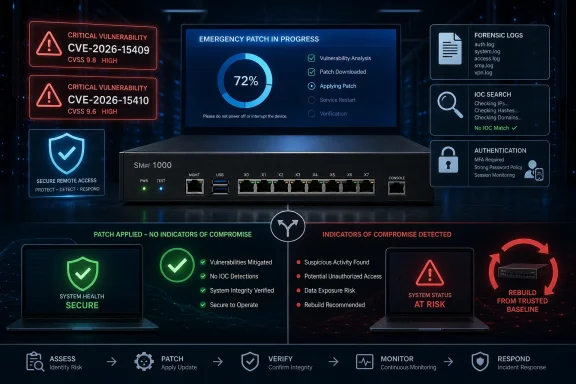
Decision rule: Patch + documented clean IOC review = retain and monitor; any vendor IOC hit = re-image/redeploy and rotate passwords/TOTP; material evidence gap = incident-response escalation, with WindowsForum recommending the same conservative rebuild-and-rotate path.
For US federal civilian executive branch agencies covered by CISA’s directive, the remediation-or-discontinue-use deadline is July 17, 2026. That is a federal-agency deadline, not a universal legal deadline for every organization. Non-federal organizations should nevertheless treat the active exploitation and short federal remediation window as evidence that this requires emergency handling rather than routine maintenance.
WindowsForum previously reported that CISA added four actively exploited vulnerabilities affecting SonicWall SMA1000 appliances, Microsoft Active Directory Federation Services, and Microsoft SharePoint Server to the Known Exploited Vulnerabilities catalog. The practical lesson from that report—and from WindowsForum’s coverage of urgent Microsoft zero-day updates—is narrow but important: once exploitation is confirmed, installing the fix and investigating prior exposure are separate required decisions.
What should SMA1000 administrators do first?
Use this exact order:
- Identify every SMA1000 appliance, including physical, virtual, standby, disaster-recovery, laboratory, and temporarily offline instances.
- Record each appliance’s model, deployment type, complete installed build, management role, and internet exposure.
- Confirm whether it is on the affected 12.4 or 12.5 branch using the applicable SonicWall advisory.
- Preserve relevant appliance, authentication, identity-provider, firewall, endpoint, and centralized security logs.
- Obtain the package matching the confirmed model and branch through SonicWall’s authenticated support channel.
- Update an affected 12.4 appliance to 12.4.3-03453 or later, or an affected 12.5 appliance to 12.5.0-02835 or later, as applicable.
- Verify the complete build reported by every appliance after installation.
- Review available evidence using SonicWall’s indicators for CVE-2026-15409 and CVE-2026-15410.
- Classify the result as clean, positive, or materially inconclusive.
- Apply this decision table.
| IOC-review result | Required operational decision |
|---|---|
| Clean, with documented and adequate evidence | Retain the fixed appliance and monitor it |
| One or more vendor IOC hits | Follow SonicWall’s direction: re-image the physical appliance or redeploy the virtual appliance, change associated user and administrator passwords, and reset TOTP |
| Material evidence gap or result that cannot be validated | Escalate to incident response; WindowsForum recommends the same conservative rebuild-and-rotate path when integrity cannot be established |
SonicWall’s recovery direction applies when compromise indicators are found; it is not limited to cases that an organization has separately labeled a “confirmed compromise.” WindowsForum’s recommendation for a materially inconclusive review is broader and deliberately conservative, but it should not be misattributed to SonicWall.
Preserve evidence before destructive recovery when possible. If evidence preservation conflicts with immediately closing an exploitable condition, involve the incident-response lead and SonicWall Support rather than leaving the appliance exposed while the team improvises.
Why patching alone is not enough
The fixed build closes the disclosed vulnerability. It does not determine whether either vulnerability was exploited before the update, and it does not establish that the appliance’s existing state is trustworthy.
That creates two separate questions:
- Remediation: Is the appliance now running a fixed build?
- Integrity: Does the available evidence show any SonicWall-published compromise indicator?
A successful installation answers only the first question. The IOC review informs the second.
WindowsForum’s report on the CISA KEV additions gives this service guide its operational starting point: the SonicWall issues were not merely theoretical weaknesses. SonicWall said both CVE-2026-15409 and CVE-2026-15410 were under active exploitation as of July 14, 2026. Administrators therefore need to account for the period before the fixed build was installed.
Other WindowsForum reports have covered Microsoft warnings about severe zero-days, urgent updates, and a Windows flaw for which a patch was released. Another community post noted a zero-day while a fix was still being prepared. Those reports provide relevant context about urgent vulnerability response, but they do not change the SonicWall-specific procedure: use SonicWall’s fixed builds, SonicWall’s indicators, and SonicWall’s prescribed recovery actions when an indicator is found.
Patch-and-verify checklist
The available evidence does not establish one universal Appliance Management Console click path, upload sequence, restart order, or failover workflow for every SMA1000 model and deployment. This article therefore cannot safely provide an exact AMC menu path.
Use the applicable advisory and package instructions obtained through SonicWall’s support channel. Administrators can begin with the SonicWall Product Security Incident Response Team vulnerability list to locate the applicable SMA1000 advisory, then use the documentation supplied with the correct package for the actual installation procedure.
Follow this checklist:
- Confirm inventory. Match the physical or virtual appliance to its recorded model, deployment type, installed branch, and complete build.
- Confirm the target. For an affected 12.4 branch, the concrete fixed build is 12.4.3-03453 or later. For an affected 12.5 branch, it is 12.5.0-02835 or later. Confirm applicability before installation.
- Preserve evidence. Collect or protect the logs and telemetry needed for the IOC review before retention limits, restarts, or recovery actions remove them.
- Create an operational backup. Use a supported configuration backup for recovery from an ordinary update failure. Do not treat that backup as proof that the saved state is clean.
- Read the package instructions. Check prerequisites, branch restrictions, expected restart behavior, and any model-specific requirements.
- Install through the supported workflow. Do not substitute a package for another branch or model, and do not interrupt the process unless SonicWall’s instructions or Support direct it.
- Reconnect and verify. Record the complete build displayed after installation. Package acceptance or a completed progress screen is not sufficient verification.
- Check essential service. Confirm administrative access and the organization’s essential remote-access workflow.
- Verify every node. Repeat the build check for active, standby, disaster-recovery, and offline systems before they return to service.
- Document the change. Record the previous build, fixed build, package used, appliance identity, installation time, administrator, and verification result.
- Complete the IOC review. Do not close the security response merely because installation succeeded.
- Apply the decision rule. Retain only after a documented clean review; recover as SonicWall directs after any vendor IOC hit.
CISA’s Known Exploited Vulnerabilities Catalog identifies known exploitation and the deadline applicable to covered federal agencies. It does not replace SonicWall’s product-specific advisory, package instructions, fixed-build requirements, or indicators.
IOC-evidence standard
Use the indicator material applicable to CVE-2026-15409 and CVE-2026-15410. The exact filenames, paths, hashes, addresses, account names, commands, or log patterns must come from SonicWall’s material; this guide does not generalize or invent them.
A defensible review should meet this standard:
- Record the SonicWall advisory and IOC-document revision used, including the retrieval date and time.
- Preserve the original material used by the analysts.
- Determine the potentially exposed period, including the time before the fixed build was installed.
- Translate each vendor indicator into a search suitable for the available evidence source.
- Search the appliance logs and artifacts identified by SonicWall.
- Search centralized logs where appliance retention does not cover the full period.
- Search relevant firewall, proxy, DNS, network-detection, identity-provider, directory, multifactor-authentication, endpoint, and management telemetry when a published indicator applies to those sources.
- Preserve every match with its timestamp, time zone, source, query, and surrounding context.
- Have a second analyst validate positive results and material coverage gaps.
- Classify the outcome as clean, positive, or materially inconclusive.
A zero-result query is not automatically a clean review. A clean finding requires evidence that:
- The relevant sources were searched.
- The evidence covers the required period.
- Time zones and timestamps were handled correctly.
- The query matches the format of the vendor indicator.
- Retention gaps and unavailable sources were documented.
- No vendor IOC was found.
Missing evidence does not itself prove exploitation. It does, however, limit the organization’s ability to establish integrity. If the missing period or source is material, classify the review as inconclusive and escalate it rather than recording it as clean.
Unusual logins, configuration changes, or administrative activity may warrant investigation, but they should not be labeled SonicWall IOCs unless they match SonicWall’s published indicators. Record them as contextual findings and use them to guide the broader incident investigation.
Recovery sequence when an IOC is found
When compromise indicators are found, SonicWall prescribes re-imaging or redeployment, password changes, and TOTP resets. The trigger is the presence of compromise indicators, not only a later declaration that compromise has been conclusively proven through a completed investigation.
Use this recovery sequence:
- Preserve the evidence required by the incident-response team.
- Restrict or discontinue use of the affected appliance.
- Open a SonicWall Support case when product-specific recovery assistance is needed.
- Re-image a physical appliance or redeploy a virtual appliance.
- Install the applicable fixed release on the rebuilt or redeployed system.
- Review configuration before restoring service; do not assume a backup taken from the affected system is trustworthy.
- Change associated administrator passwords.
- Change associated user passwords.
- Reset associated TOTP enrollment.
- Complete security and service-acceptance testing before reopening access.
- Monitor the rebuilt environment for recurrence of the indicators and related suspicious activity.
- Confirm that standby, disaster-recovery, and offline copies cannot reintroduce an affected build or questionable state.
Re-imaging or redeployment, password changes, and TOTP resets are SonicWall’s prescribed actions when indicators are found. Evidence handling, configuration review, acceptance testing, and post-recovery monitoring are WindowsForum’s operational guidance.
Coordinate credential changes with directory, identity, application, and support-desk owners. Identify which accounts administered or authenticated through the appliance. An appliance-local password change does not necessarily rotate credentials held in an external identity system, and resetting one TOTP enrollment does not automatically address every associated account.
Troubleshooting
The package is rejected
Stop and compare the package with the exact appliance model, installed branch, and package documentation. Do not repeatedly upload the same file or try a package intended for another platform. Escalate to SonicWall Support if the mismatch is not apparent.
The appliance does not report the fixed build
Record the complete displayed build. Recheck branch-specific prerequisites and the package result. Do not close the change until the appliance reports 12.4.3-03453 or later, or 12.5.0-02835 or later, as applicable to the confirmed branch.
The appliance is unavailable after maintenance
Use the recovery access prepared before installation. Preserve console output, messages, and timestamps. Avoid repeated uncontrolled recovery attempts, and use SonicWall’s package documentation or Support for product-specific recovery.
Searches return no matches, but important logs are missing
Do not call the review clean. Document the missing source and period, identify alternative telemetry, and escalate the assurance decision to incident response. WindowsForum recommends rebuilding or redeploying and rotating passwords and TOTP when the evidence remains materially inconclusive.
A possible IOC is found
Preserve the original record and query. Validate the match against the applicable SonicWall indicator, including formatting, timestamp, source, and context. If it is a vendor IOC hit, begin the recovery sequence; do not wait for a broader investigation to be labeled “confirmed compromise.”
The IOC material changes during the investigation
Record both revisions and search newly added indicators against the same evidence period. Update the incident record so it clearly identifies which revision supports the final conclusion.
The update cannot be installed immediately
Escalate through security and change management, preserve evidence, reduce exposure where operationally possible, and consider discontinuing use until the appliance can be updated or replaced. Monitoring and access restrictions are not equivalent to installing the fixed build.
Covered federal agencies must meet CISA’s July 17, 2026 remediation-or-discontinue-use deadline. Other organizations should establish their own emergency deadline based on the active exploitation, exposure, business impact, and ability to verify integrity.
Frequently Asked Questions
Does installing the fixed update remove an existing compromise?
No. The update closes the addressed vulnerability but does not prove that exploitation did not occur beforehand or remove unauthorized changes already present.
What are the concrete fixed builds?
After confirming the model and affected branch, update to 12.4.3-03453 or later for the applicable 12.4 branch, or 12.5.0-02835 or later for the applicable 12.5 branch.
When were the vulnerabilities reported as actively exploited?
SonicWall said CVE-2026-15409 and CVE-2026-15410 were actively exploited as of July 14, 2026.
Does the July 17 deadline apply to every organization?
No. July 17, 2026 is CISA’s remediation-or-discontinue-use deadline for covered federal agencies. Non-federal organizations are not automatically subject to that federal directive, but should respond urgently because the vulnerabilities are actively exploited.
Is a clean IOC search enough to retain the appliance?
Only if it is documented and adequately evidenced. The review must use the applicable SonicWall indicators, cover the relevant period and sources, account for limitations, and produce no vendor IOC hits.
What happens if a SonicWall IOC is found?
Follow SonicWall’s prescribed recovery actions: re-image a physical appliance or redeploy a virtual appliance, change associated user and administrator passwords, and reset TOTP.
Must compromise be independently confirmed before recovery begins?
No. SonicWall’s recovery direction applies when compromise indicators are found. Administrators should not narrow that trigger to only cases that have completed a separate “confirmed compromise” determination.
What if the IOC review is inconclusive?
Document the evidence gap and escalate to incident response. Missing evidence does not prove exploitation, but WindowsForum recommends the conservative rebuild-and-rotate path when appliance integrity cannot be established.
Can a configuration backup or virtual-machine copy be considered clean?
Not automatically. A copy may preserve the same unauthorized state as the source. It can support ordinary operational recovery, but it does not establish integrity after a vendor IOC hit.
Why does this guide not provide an exact AMC click path?
The provided evidence does not establish a universal AMC workflow for every SMA1000 model, branch, package, and deployment architecture. Use the applicable SonicWall advisory and the instructions supplied with the authenticated package rather than a generic menu sequence.
What is the final decision rule?
Patch + documented clean IOC review = retain and monitor; any vendor IOC hit = re-image/redeploy and rotate passwords/TOTP; material evidence gap = incident-response escalation, with WindowsForum recommending the same conservative rebuild-and-rotate path.