

Microsoft patched CVE-2026-20841, a high-severity Windows 11 Notepad remote code execution vulnerability, in the February 2026 Patch Tuesday cycle, after researchers found that Markdown links could make the modern Notepad app launch unsafe protocol handlers and execute remote files under the current user’s permissions. That is the plain answer, but it is not the whole story. The uncomfortable part is that this was not some exotic kernel edge case hiding in a dusty subsystem. It was Notepad — the Windows utility whose entire cultural purpose was to be too simple to surprise anyone.
For decades, Notepad’s security model was easy to understand because Notepad barely had a feature model. It opened text, saved text, and got out of the way. Its power came from absence: no macros, no layout engine, no scripting layer, no cloud identity, no document automation framework, and no expectation that a plain-text file would behave like an application surface.
That bargain has changed. Microsoft has spent the Windows 11 era turning Notepad from a barebones text box into a modern app: tabs, session restore, dark mode, improved search, autosave-like behavior, spell check, and Markdown-oriented conveniences. Most of those changes are useful, and some are overdue. But each new affordance also teaches users that Notepad is no longer merely a dumb viewer for inert characters.
CVE-2026-20841 sits exactly at that seam. Markdown is not inherently dangerous; it is a lightweight way to structure text. The danger arrives when the editor interprets Markdown links as something actionable and then hands those links off to Windows in a way that crosses from display into execution.
That is why this vulnerability feels larger than its CVSS score. It is not just a bug in Notepad. It is a warning about what happens when Microsoft modernizes trusted, low-friction Windows tools without preserving the security expectations that made those tools trustworthy in the first place.
That means the exploit was not a “just open the file and you are owned” scenario in the purest sense. It required interaction. But dismissing it on that basis misunderstands how Windows attacks actually work in offices, schools, help desks, developer teams, and home environments.
Modern phishing rarely depends on one perfect exploit. It depends on a chain of believable nudges: open this readme, review this support note, check this config snippet, click the link to reproduce the issue. Markdown files are especially plausible in developer and IT workflows because they are commonly used for documentation, GitHub projects, internal runbooks, release notes, and setup instructions.
The key failure was not that Notepad displayed a link. The key failure was that a trusted, built-in Windows app could act as a bridge between a plain-text document and a protocol handler with more dangerous consequences than the user likely understood. In security terms, the boring text editor became a launcher.
That is why Microsoft’s fix reportedly centers on warnings for nonstandard protocols rather than a total retreat from Markdown. If the link is a normal web URL, users expect a browser handoff. If it is something else — a file path, an application installer protocol, or another handler that can pull executable content into the system — the operating system needs to interrupt the flow.
That nuance matters because both underreaction and overreaction are possible. A home user might hear “Notepad RCE” and assume every text file is radioactive. A sysadmin might hear “requires a click” and push the patch into the next leisurely maintenance window. Neither response is ideal.
The practical risk lands somewhere in the middle. The vulnerability was serious because the target was a default Windows app, the file format is normal enough not to scare people, and the result could run code with the same rights as the user. It was limited because exploitation required social engineering and a click, and because the attacker did not automatically gain administrative privileges unless the victim already had them.
That last point is one of the oldest lessons in Windows security and still one of the least internalized. If a user runs day to day as a local administrator, “same permissions as the user” can be an enormous gift to an attacker. If the user is standard, protected by application control, and operating in a managed environment, the blast radius is smaller.
This is where the Notepad bug becomes a diagnostic tool for your Windows posture. The question is not only whether the patch is installed. The question is what would have happened if it had not been.
Still, a warning dialog is a patch, not a philosophy. Microsoft has not rolled back the broader transformation of Notepad. The app remains part of a larger Windows strategy in which old utilities are being refreshed, Store-updated, and given features that make them behave less like static system components and more like modern client applications.
There are advantages to that model. Store-delivered app updates can arrive independently of full OS upgrades. Old utilities can finally gain quality-of-life improvements without waiting for a monolithic Windows release. Security fixes for app-layer problems can, in theory, move faster.
But the model also complicates the old mental map administrators used to rely on. “Windows is patched” and “the inbox app is patched” are related but not always identical operational statements. A fully updated OS image can still raise questions about Store app versions, provisioning state, offline devices, blocked consumer services, and enterprise policies that disable or restrict app updates.
That tension is especially relevant for Notepad because it sits in a strange category. It feels like a system component to users, but modern Windows treats it more like an app. When that app grows a Markdown feature and then ships a security fix, administrators have to care about both Windows Update and the Microsoft Store plumbing that keeps inbox apps current.
For managed environments, the advice is less simple but more important. IT teams should verify that affected Notepad versions are not lingering on machines that defer Store app updates, run in kiosk-like configurations, or sit outside normal endpoint management. Devices used by developers and support teams deserve particular attention because Markdown files are more likely to appear in their daily workflow.
The vulnerability also highlights why patch management cannot be reduced to counting operating system cumulative updates. Windows is now an ecosystem of components with different update channels: the OS, Microsoft Defender, Edge, WebView2, Store apps, Office, Teams, drivers, firmware, and management agents. Attackers do not care which channel you forgot.
That complexity is not unique to Microsoft. Apple, Google, and Linux desktop distributions all wrestle with the security implications of modular updates. But Windows has an unusually large installed base of business machines, legacy workflows, and users trained over decades to trust built-in tools. When Notepad changes, the security assumptions of a very large population change with it.
That familiarity can be weaponized. A Markdown file named “deployment-notes.md” or “invoice-readme.md” or “VPN-fix.md” does not feel like malware. In many organizations, it feels like work. If the content inside instructs the user to Ctrl-click a link to continue, test, install, authenticate, or fetch a required component, a nontrivial number of people will do it.
Security training often tells users not to open strange attachments, but it rarely teaches them to distrust protocol handlers. That is understandable; most people do not know what a protocol handler is. They know what a link is, and they have been trained by every productivity app on Earth to click links.
This is why the warning matters. A good security prompt does not merely say “danger.” It translates an invisible boundary crossing into a visible decision. In this case, the boundary is the jump from reading a document to invoking a handler that could execute something outside the document.
Windows has been here before in different forms. Office macros, shortcut files, HTML applications, ISO-mounted payloads, LNK abuse, and application protocol tricks all live in the same neighborhood. The Notepad bug is another reminder that the most dangerous path is often not a dramatic exploit chain but a normal user action routed through a component that does more than the user thinks it does.
The issue is not that Notepad learned to understand Markdown. The issue is that rendering or assisting with Markdown changes the responsibilities of the application. The moment an editor treats a link as an actionable object, it must decide what kinds of actions are safe, which ones require confirmation, and which ones should be blocked outright.
A plain-text editor can be permissive because it does not interpret much. A Markdown-aware editor cannot hide behind the innocence of text. It becomes part renderer, part launcher, and part policy enforcement point.
That distinction is easy to miss because modern software design often blurs it intentionally. Users like convenience. Vendors like engagement. Product teams like features that make old apps feel alive again. But security engineering is often the discipline of saying that a convenience is actually a trust boundary wearing a friendly UI.
Microsoft’s challenge is not to freeze Notepad in amber. The old Notepad was beloved partly because it was limited, but it was also outdated in ways that annoyed real users. The challenge is to make the new Notepad useful without letting it inherit the risk profile of a browser, document processor, or package installer.
The second order of business is user rights. This vulnerability’s impact is tied directly to the security context of the user who clicks the malicious link. Least privilege is not a slogan here; it is the difference between a compromised user profile and a compromised workstation with administrative reach.
The third concern is application control. Microsoft Defender SmartScreen, attack surface reduction rules, Windows Defender Application Control, AppLocker, and similar controls can change the outcome of a link-to-execution attack path. None should be treated as a substitute for patching, but each can turn a successful click into a failed payload.
Email and collaboration platforms also matter. Markdown attachments may not be as common as PDFs or Office documents in some businesses, but they are common enough in technical teams. Filtering policy should reflect actual workflows rather than assuming that only traditional document formats carry risk.
The harder problem is education. Telling users “do not click suspicious links” has become background noise. A better message is narrower: links inside local files can launch apps or system handlers, and a warning about an unsafe protocol is not a cosmetic dialog. If Windows interrupts a link from a document, users should treat that interruption as meaningful.
That is good for usability. It is also a larger maintenance surface. When Microsoft updates these apps through the Store or app packages, enterprise controls must keep pace. Otherwise, organizations end up with a false sense of compliance: the OS build looks current, but the user-facing app stack is uneven.
This is not merely a Microsoft problem, but Microsoft’s history makes it more sensitive. Windows users have long divided the world into “system files” and “applications.” The modern Windows experience collapses that distinction. System experiences are apps, apps are serviced like system components, and both can become security-relevant.
Notepad’s vulnerability is therefore symbolic. The safest Windows component was never the one with the fewest lines of code; it was the one whose behavior users could predict. As Notepad becomes more capable, predictability has to be rebuilt through prompts, policies, and sensible defaults.
That is a harder task than adding Markdown support. It requires Microsoft to ask not just whether a feature works, but whether it preserves the implied contract of the tool carrying it. A link in a browser is expected to be active. A link in Notepad is a different social signal.
Feature creep is not automatically bad. A frozen operating system is not a secure operating system, and nostalgia is a poor patching strategy. But every added feature has a security bill, and vendors too often charge that bill to users after the fact.
The Notepad bug is a neat example because the feature that introduced risk was not frivolous in isolation. Markdown support is genuinely useful. Many Windows users open Markdown files regularly. The failure was not that Microsoft tried to improve the app; it was that the improvement crossed into OS-level action without sufficient guardrails.
This is the same pattern that has made document readers, chat clients, browsers, and note-taking apps recurring security targets. The moment software moves from displaying information to interpreting it, fetching remote resources, launching handlers, syncing state, or automating user intent, it becomes more attractive to attackers.
For WindowsForum readers, the lesson is not “Microsoft ruined Notepad.” That is satisfying, but too shallow. The lesson is that any “simple” app can stop being simple when its input formats become richer and its integrations become deeper.
That will be enough for most people. The vulnerability has been patched, and the observed fix reportedly adds the warning that should have been there from the start. Users should still avoid clicking strange links in Markdown files, especially files received through email, chat, downloads, or unsolicited support instructions.
Enterprises, however, should resist the temptation to file this away as a one-off. The broader issue is whether their endpoint management model sees inbox apps clearly. If the asset inventory stops at Windows build numbers, it is incomplete.
There is also a policy question around protocol handlers. Many organizations have accumulated custom handlers from collaboration tools, remote support utilities, installers, VPN clients, developer tools, and line-of-business apps. Each handler may be legitimate. Together, they form a landscape of possible handoffs from a document or browser into local execution paths.
Notepad exposed one weak handoff. It will not be the last. The correct response is not paranoia; it is mapping and reducing the number of surprising transitions from content to code.
Those are exactly the systems where a Notepad-class vulnerability can linger. No one opens a change ticket titled “verify the text editor.” No one wants to explain that a Markdown link in a built-in utility deserves urgency. But attackers benefit from that embarrassment gap.
The upside is that this is a manageable problem. The patch exists. The exploit path is understandable. The mitigations are familiar: update, restrict privileges, control execution, watch protocol handlers, and train users to respect warnings.
The more interesting question is whether Microsoft treats this as a bug fixed or a design lesson absorbed. Windows 11’s direction suggests more inbox apps will become smarter, more connected, and more web-adjacent. If so, Microsoft needs a consistent security posture for every place where local content can trigger external behavior.
Notepad should be the easy case. If Microsoft cannot keep the trust boundary clear in a text editor, users have reason to worry about richer apps with larger parsers and more integrations.
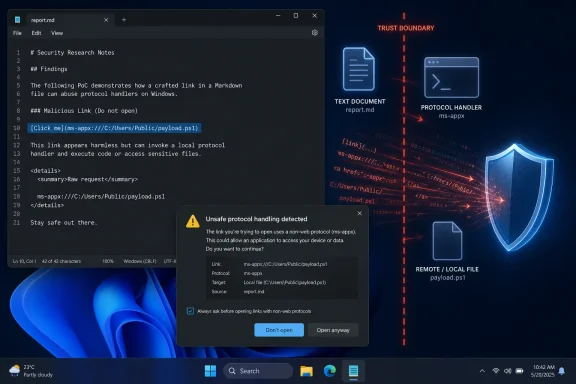 Notepad Became Interesting, and That Was the Problem
For decades, Notepad’s security model was easy to understand because Notepad barely had a feature model. It opened text, saved text, and got out of the way. Its power came from absence: no macros, no layout engine, no scripting layer, no cloud identity, no document automation framework, and no expectation that a plain-text file would behave like an application surface.That bargain has changed. Microsoft has spent the Windows 11 era turning Notepad from a barebones text box into a modern app: tabs, session restore, dark mode, improved search, autosave-like behavior, spell check, and Markdown-oriented conveniences. Most of those changes are useful, and some are overdue. But each new affordance also teaches users that Notepad is no longer merely a dumb viewer for inert characters.
CVE-2026-20841 sits exactly at that seam. Markdown is not inherently dangerous; it is a lightweight way to structure text. The danger arrives when the editor interprets Markdown links as something actionable and then hands those links off to Windows in a way that crosses from display into execution.
That is why this vulnerability feels larger than its CVSS score. It is not just a bug in Notepad. It is a warning about what happens when Microsoft modernizes trusted, low-friction Windows tools without preserving the security expectations that made those tools trustworthy in the first place.
The Exploit Was Not Magic; It Was a Trust Boundary Failure
The reported attack path was almost insultingly ordinary. An attacker would craft a Markdown file containing a malicious link, convince a user to open it in Notepad, and rely on the user clicking that link. The vulnerable behavior allowed Notepad to launch unverified protocols that could load and execute remote files.That means the exploit was not a “just open the file and you are owned” scenario in the purest sense. It required interaction. But dismissing it on that basis misunderstands how Windows attacks actually work in offices, schools, help desks, developer teams, and home environments.
Modern phishing rarely depends on one perfect exploit. It depends on a chain of believable nudges: open this readme, review this support note, check this config snippet, click the link to reproduce the issue. Markdown files are especially plausible in developer and IT workflows because they are commonly used for documentation, GitHub projects, internal runbooks, release notes, and setup instructions.
The key failure was not that Notepad displayed a link. The key failure was that a trusted, built-in Windows app could act as a bridge between a plain-text document and a protocol handler with more dangerous consequences than the user likely understood. In security terms, the boring text editor became a launcher.
That is why Microsoft’s fix reportedly centers on warnings for nonstandard protocols rather than a total retreat from Markdown. If the link is a normal web URL, users expect a browser handoff. If it is something else — a file path, an application installer protocol, or another handler that can pull executable content into the system — the operating system needs to interrupt the flow.
The Word “Remote” Is Doing More Work Than Users Think
“Remote code execution” sounds like an attacker reaching across the internet and taking over a PC without warning. Sometimes it means that. In this case, the phrase is more nuanced: the attacker’s payload could be remote, and execution could occur after user interaction with a malicious Markdown link.That nuance matters because both underreaction and overreaction are possible. A home user might hear “Notepad RCE” and assume every text file is radioactive. A sysadmin might hear “requires a click” and push the patch into the next leisurely maintenance window. Neither response is ideal.
The practical risk lands somewhere in the middle. The vulnerability was serious because the target was a default Windows app, the file format is normal enough not to scare people, and the result could run code with the same rights as the user. It was limited because exploitation required social engineering and a click, and because the attacker did not automatically gain administrative privileges unless the victim already had them.
That last point is one of the oldest lessons in Windows security and still one of the least internalized. If a user runs day to day as a local administrator, “same permissions as the user” can be an enormous gift to an attacker. If the user is standard, protected by application control, and operating in a managed environment, the blast radius is smaller.
This is where the Notepad bug becomes a diagnostic tool for your Windows posture. The question is not only whether the patch is installed. The question is what would have happened if it had not been.
Microsoft’s Fix Is Necessary, but It Does Not Restore the Old Notepad
The reported post-patch behavior is straightforward: Notepad now warns before opening potentially unsafe non-web links. That is the right kind of friction. Users are not blocked from working, but the operating system no longer silently converts a Markdown link into a more dangerous action.Still, a warning dialog is a patch, not a philosophy. Microsoft has not rolled back the broader transformation of Notepad. The app remains part of a larger Windows strategy in which old utilities are being refreshed, Store-updated, and given features that make them behave less like static system components and more like modern client applications.
There are advantages to that model. Store-delivered app updates can arrive independently of full OS upgrades. Old utilities can finally gain quality-of-life improvements without waiting for a monolithic Windows release. Security fixes for app-layer problems can, in theory, move faster.
But the model also complicates the old mental map administrators used to rely on. “Windows is patched” and “the inbox app is patched” are related but not always identical operational statements. A fully updated OS image can still raise questions about Store app versions, provisioning state, offline devices, blocked consumer services, and enterprise policies that disable or restrict app updates.
That tension is especially relevant for Notepad because it sits in a strange category. It feels like a system component to users, but modern Windows treats it more like an app. When that app grows a Markdown feature and then ships a security fix, administrators have to care about both Windows Update and the Microsoft Store plumbing that keeps inbox apps current.
The Patch Tuesday Habit Still Matters
For consumers, the practical advice is simple: run Windows Update, restart when asked, and open the Microsoft Store to update apps if automatic app updates have been disabled. The fix should have reached normal Windows 11 systems through the usual servicing path, but “should have” is not a security control.For managed environments, the advice is less simple but more important. IT teams should verify that affected Notepad versions are not lingering on machines that defer Store app updates, run in kiosk-like configurations, or sit outside normal endpoint management. Devices used by developers and support teams deserve particular attention because Markdown files are more likely to appear in their daily workflow.
The vulnerability also highlights why patch management cannot be reduced to counting operating system cumulative updates. Windows is now an ecosystem of components with different update channels: the OS, Microsoft Defender, Edge, WebView2, Store apps, Office, Teams, drivers, firmware, and management agents. Attackers do not care which channel you forgot.
That complexity is not unique to Microsoft. Apple, Google, and Linux desktop distributions all wrestle with the security implications of modular updates. But Windows has an unusually large installed base of business machines, legacy workflows, and users trained over decades to trust built-in tools. When Notepad changes, the security assumptions of a very large population change with it.
The Real Attack Surface Is Familiarity
The easiest way to underrate this bug is to focus only on Notepad. The more useful way to understand it is to focus on familiarity as an attack surface. Users are wary of unknown executables. They are less wary of text files. They are especially less wary of text files opened in the plainest editor Windows has ever shipped.That familiarity can be weaponized. A Markdown file named “deployment-notes.md” or “invoice-readme.md” or “VPN-fix.md” does not feel like malware. In many organizations, it feels like work. If the content inside instructs the user to Ctrl-click a link to continue, test, install, authenticate, or fetch a required component, a nontrivial number of people will do it.
Security training often tells users not to open strange attachments, but it rarely teaches them to distrust protocol handlers. That is understandable; most people do not know what a protocol handler is. They know what a link is, and they have been trained by every productivity app on Earth to click links.
This is why the warning matters. A good security prompt does not merely say “danger.” It translates an invisible boundary crossing into a visible decision. In this case, the boundary is the jump from reading a document to invoking a handler that could execute something outside the document.
Windows has been here before in different forms. Office macros, shortcut files, HTML applications, ISO-mounted payloads, LNK abuse, and application protocol tricks all live in the same neighborhood. The Notepad bug is another reminder that the most dangerous path is often not a dramatic exploit chain but a normal user action routed through a component that does more than the user thinks it does.
Markdown Was the Messenger, Not the Villain
It would be tempting to blame Markdown, but that would be the wrong lesson. Markdown is popular precisely because it is legible in raw form and portable across tools. Developers use it, writers use it, administrators use it, and open-source projects depend on it.The issue is not that Notepad learned to understand Markdown. The issue is that rendering or assisting with Markdown changes the responsibilities of the application. The moment an editor treats a link as an actionable object, it must decide what kinds of actions are safe, which ones require confirmation, and which ones should be blocked outright.
A plain-text editor can be permissive because it does not interpret much. A Markdown-aware editor cannot hide behind the innocence of text. It becomes part renderer, part launcher, and part policy enforcement point.
That distinction is easy to miss because modern software design often blurs it intentionally. Users like convenience. Vendors like engagement. Product teams like features that make old apps feel alive again. But security engineering is often the discipline of saying that a convenience is actually a trust boundary wearing a friendly UI.
Microsoft’s challenge is not to freeze Notepad in amber. The old Notepad was beloved partly because it was limited, but it was also outdated in ways that annoyed real users. The challenge is to make the new Notepad useful without letting it inherit the risk profile of a browser, document processor, or package installer.
Where Administrators Should Look First
The first order of business is version verification. If an environment manages Windows 11 endpoints but does not actively inventory inbox app versions, this is a good excuse to fix that gap. Security teams should be able to answer which Notepad version is deployed, how it updates, and whether policy blocks Store app maintenance.The second order of business is user rights. This vulnerability’s impact is tied directly to the security context of the user who clicks the malicious link. Least privilege is not a slogan here; it is the difference between a compromised user profile and a compromised workstation with administrative reach.
The third concern is application control. Microsoft Defender SmartScreen, attack surface reduction rules, Windows Defender Application Control, AppLocker, and similar controls can change the outcome of a link-to-execution attack path. None should be treated as a substitute for patching, but each can turn a successful click into a failed payload.
Email and collaboration platforms also matter. Markdown attachments may not be as common as PDFs or Office documents in some businesses, but they are common enough in technical teams. Filtering policy should reflect actual workflows rather than assuming that only traditional document formats carry risk.
The harder problem is education. Telling users “do not click suspicious links” has become background noise. A better message is narrower: links inside local files can launch apps or system handlers, and a warning about an unsafe protocol is not a cosmetic dialog. If Windows interrupts a link from a document, users should treat that interruption as meaningful.
The Modern Windows Inbox Is No Longer Boring
One quiet lesson from this episode is that Windows’ inbox applications deserve more attention than they receive. Notepad, Snipping Tool, Paint, Photos, Terminal, Media Player, Clipchamp, Outlook for Windows, and other bundled or Microsoft-supplied apps are no longer static accessories. They are living software products.That is good for usability. It is also a larger maintenance surface. When Microsoft updates these apps through the Store or app packages, enterprise controls must keep pace. Otherwise, organizations end up with a false sense of compliance: the OS build looks current, but the user-facing app stack is uneven.
This is not merely a Microsoft problem, but Microsoft’s history makes it more sensitive. Windows users have long divided the world into “system files” and “applications.” The modern Windows experience collapses that distinction. System experiences are apps, apps are serviced like system components, and both can become security-relevant.
Notepad’s vulnerability is therefore symbolic. The safest Windows component was never the one with the fewest lines of code; it was the one whose behavior users could predict. As Notepad becomes more capable, predictability has to be rebuilt through prompts, policies, and sensible defaults.
That is a harder task than adding Markdown support. It requires Microsoft to ask not just whether a feature works, but whether it preserves the implied contract of the tool carrying it. A link in a browser is expected to be active. A link in Notepad is a different social signal.
Microsoft’s Feature Creep Has a Security Bill
Microsoft’s Windows 11 strategy has often been to make familiar surfaces more modern without asking users to relearn the whole operating system. Sometimes that works. Sometimes it produces the odd spectacle of a beloved minimalist utility acquiring enough intelligence to become vulnerable in ways the old version could not have been.Feature creep is not automatically bad. A frozen operating system is not a secure operating system, and nostalgia is a poor patching strategy. But every added feature has a security bill, and vendors too often charge that bill to users after the fact.
The Notepad bug is a neat example because the feature that introduced risk was not frivolous in isolation. Markdown support is genuinely useful. Many Windows users open Markdown files regularly. The failure was not that Microsoft tried to improve the app; it was that the improvement crossed into OS-level action without sufficient guardrails.
This is the same pattern that has made document readers, chat clients, browsers, and note-taking apps recurring security targets. The moment software moves from displaying information to interpreting it, fetching remote resources, launching handlers, syncing state, or automating user intent, it becomes more attractive to attackers.
For WindowsForum readers, the lesson is not “Microsoft ruined Notepad.” That is satisfying, but too shallow. The lesson is that any “simple” app can stop being simple when its input formats become richer and its integrations become deeper.
The Consumer Fix Is Easy; the Enterprise Lesson Is Not
For a typical Windows 11 user, the action item is refreshingly mundane. Open Settings, go to Windows Update, check for updates, install what is offered, and restart. Then open the Microsoft Store, check Library updates, and make sure Notepad is current if app updates are not automatic.That will be enough for most people. The vulnerability has been patched, and the observed fix reportedly adds the warning that should have been there from the start. Users should still avoid clicking strange links in Markdown files, especially files received through email, chat, downloads, or unsolicited support instructions.
Enterprises, however, should resist the temptation to file this away as a one-off. The broader issue is whether their endpoint management model sees inbox apps clearly. If the asset inventory stops at Windows build numbers, it is incomplete.
There is also a policy question around protocol handlers. Many organizations have accumulated custom handlers from collaboration tools, remote support utilities, installers, VPN clients, developer tools, and line-of-business apps. Each handler may be legitimate. Together, they form a landscape of possible handoffs from a document or browser into local execution paths.
Notepad exposed one weak handoff. It will not be the last. The correct response is not paranoia; it is mapping and reducing the number of surprising transitions from content to code.
The Patch Is a Reminder to Check the Boring Machines
The most exposed machines are not always the flashy ones. They are the laptops that have not rebooted, the spare desktops in conference rooms, the lab systems held back for compatibility, the developer workstations with relaxed policies, and the home PCs whose owners assume Windows Update has handled everything.Those are exactly the systems where a Notepad-class vulnerability can linger. No one opens a change ticket titled “verify the text editor.” No one wants to explain that a Markdown link in a built-in utility deserves urgency. But attackers benefit from that embarrassment gap.
The upside is that this is a manageable problem. The patch exists. The exploit path is understandable. The mitigations are familiar: update, restrict privileges, control execution, watch protocol handlers, and train users to respect warnings.
The more interesting question is whether Microsoft treats this as a bug fixed or a design lesson absorbed. Windows 11’s direction suggests more inbox apps will become smarter, more connected, and more web-adjacent. If so, Microsoft needs a consistent security posture for every place where local content can trigger external behavior.
Notepad should be the easy case. If Microsoft cannot keep the trust boundary clear in a text editor, users have reason to worry about richer apps with larger parsers and more integrations.
The Notepad Patch Belongs on This Week’s Maintenance Checklist
This is not the sort of vulnerability that calls for panic, but it is exactly the sort that rewards boring operational discipline. It sits at the intersection of a default app, a common file format, user interaction, and Windows’ deep habit of turning links into actions.- Windows 11 users should confirm that February 2026 or later security updates are installed and that Notepad has received its current app update.
- Administrators should inventory Notepad versions rather than assuming OS patch status automatically proves inbox app patch status.
- Users should treat Markdown files from email, chat, downloads, and support tickets as potentially active content when they contain clickable links.
- Organizations should review protocol handlers because unsafe handoffs from documents to local apps are a recurring Windows attack pattern.
- Least-privilege accounts and application control reduce the damage if a user clicks the wrong link before a patch is applied.
- Microsoft’s fix appears to add the missing warning prompt, but warnings work only when users understand that they signal a real boundary crossing.
References
- Primary source: Mashable
Published: 2026-05-18T18:10:09.738979
Check for Windows 11 updates. Microsoft patched a big vulnerability. | Mashable
Microsoft fixed a vulnerability in Notepad. Make sure you're updated.mashable.com - Related coverage: windowslatest.com
Microsoft confirms Windows 11 no longer triggers BitLocker recovery screen after monthly updates
Microsoft confirmed that it was investigating Windows 11 BitLocker alert, and it's now patched with May 2026 Update. www.windowslatest.com
- Related coverage: bleepingcomputer.com
Windows 11 Notepad flaw let files execute silently via Markdown links
Microsoft has fixed awww.bleepingcomputer.com
- Related coverage: windowscentral.com
Microsoft patches Notepad's severe Markdown security flaw | Windows Central
Notepad just picked up Markdown support last year, much to the chagrin of many longtime users. Microsoft has now provided details of a severe vulnerability.www.windowscentral.com - Related coverage: pcworld.com
Microsoft's May updates patch 120 security flaws in Windows and Office | PCWorld
This month's Patch Tuesday addressed 120 vulnerabilities across Windows, Office, and cloud services, including critical issues in Word.www.pcworld.com - Related coverage: winbuzzer.com
Microsoft Patches High-Severity Notepad Remote Code Execution Flaw
Microsoft has patched the Windows Notepad remote code execution vulnerability CVE-2026-20841, warning users to install February 2026 updates to block exploits. winbuzzer.com
- Related coverage: gigazine.net
Windows Notepad vulnerable - GIGAZINE
The news blog specialized in Japanese culture, odd news, gadgets and all other funny stuffs. Updated everyday.gigazine.net - Related coverage: threatlandscape.io
CVE-2026-20841: Critical RCE Vulnerability in Windows Notepad - Threat Landscape Blog
Discover the details of CVE-2026-20841, a remote code execution flaw in Notepad's Markdown handling, and learn how to protect your systems.threatlandscape.io
- Related coverage: scworld.com
Microsoft patches critical Notepad vulnerability allowing code execution | brief | SC Media
This flaw allowed attackers to trick users into clicking specially crafted Markdown links, leading to the execution of local or remote programs without triggering standard Windows security warnings.www.scworld.com - Related coverage: pcguide.com
Microsoft confirms worrying Remote Code Execution security flaw in Notepad and is rolling out a fix - PC Guide
Microsoft is rolling out an update to Windows 11 to address a serious vulnerability in its Notepad app after the introduction of Markdown.www.pcguide.com - Related coverage: threatintelreport.com
- Related coverage: tech.yahoo.com
Microsoft Fixes Windows 11 Bug That Let Attackers Run Remote Code in Notepad
The issue comes from the way Markdown hyperlinks are handled in the new Notepad app.tech.yahoo.com - Related coverage: techradar.com
Microsoft patches concerning Windows 11 Notepad security flaw - Markdown issues could have let hackers slip in malware without warning | TechRadar
High-severity flaw fixed in Windows 11 Notepadwww.techradar.com - Related coverage: pcgamer.com
Thanks to Microsoft adding all those extra features to Notepad, it now unfortunately sports one more: An exploitation vulnerability with a high security rating | PC Gamer
At least it's easy enough to avoid, until Notepad gets patched to fix the problem.www.pcgamer.com - Related coverage: redpacketsecurity.com
CVE Alert: CVE-2026-20841 - Microsoft - Windows Notepad - RedPacket Security
Improper neutralization of special elements used in a command ('command injection') in Windows Notepad App allows an unauthorized attacker to execute codewww.redpacketsecurity.com - Related coverage: datacomm.com
CVE-2026-20841 Windows Notepad App Remote Code Execution Vulnerability - DataComm Networks Incorporated
Added FAQ information. This is an informational change only.www.datacomm.com - Related coverage: der-windows-papst.de
CVE-2026-20841: Kritische RCE-Schwachstelle im Windows Notepad - Der Windows Papst - IT Blog Walter
CVE-2026-20841: Kritische RCE-Schwachstelle im Windows Notepadwww.der-windows-papst.de - Related coverage: techrepublic.com
Microsoft: Critical Security Issue Found in Windows Notepad - TechRepublic
Microsoft patches CVE-2026-20841, a high-severity Windows Notepad flaw that could allow code execution via malicious Markdown files.www.techrepublic.com
- Related coverage: thezdi.com
Zero Day Initiative — CVE-2026-20841: Arbitrary Code Execution in the Windows Notepad
In this excerpt of a TrendAI Research Services vulnerability report, Nikolai Skliarenko and Yazhi Wang of the TrendAI Research team detail a recently patched command injection vulnerability in the Windows Notepad application. This bug was originally discovered by Cristian Papa and Alasdair Gorniakwww.thezdi.com
- Related coverage: helpnetsecurity.com
Windows Notepad Markdown feature opens door to RCE (CVE-2026-20841) - Help Net Security
CVE-2026-20841 is a command injection flaw in Notepad that could be exploited by attackers to achieve RCE on targets' Windows system.www.helpnetsecurity.com - Related coverage: as.com
Microsoft detecta y corrige una peligrosa vulnerabilidad en el lugar más inesperado de Windows: el Bloc de Notas - Meristation
La peligrosa vulnerabilidad CVE-2026-20841 del Bloc de Notas de Windows 11 vuelve a demostrar que las aplicaciones básicas no necesitan funciones avanzadas.as.com
