

Microsoft’s Security Update Guide lists CVE-2026-20937 as an information-disclosure vulnerability in Windows File Explorer; the vendor record confirms the issue exists but provides only terse public detail, leaving defenders to balance urgent mitigations with careful validation of KB mappings before broad deployment.
Windows File Explorer is more than a file manager: it hosts icon extraction, thumbnail generation, preview handlers and third‑party shell extensions inside the single process explorer.exe. That design improves responsiveness and user experience, but it also concentrates parsing logic and network‑resolution behavior into one privileged, high‑frequency component. Over the past two years the security community repeatedly observed that Explorer’s in‑process handlers and metadata parsers can resolve remote resources (UNC/SMB, file://, HTTP(S) automatically, and that those automatic resolutions can cause negotiable authentication material or parse outputs to be exposed to attacker‑controlled hosts. CVE‑2026‑20937 sits squarely in this historical pattern.
Microsoft’s Update Guide entry for CVE‑2026‑20937 is the canonical vendor record that establishes the vulnerability’s existence and affected component. The public entry is concise: it classifies the fault as information disclosure and identifies File Explorer as the affected surface. The Update Guide’s metadata also includes a confidence indicator — a vendor‑side metric that signals how complete and authoritative the technical details are. That metric matters operationally because it helps defenders decide whether to treat the listing as an identifier‑only note, a corroborated researcher finding, or a vendor‑validated patch mapping.
High‑value telemetry signals:
Any specific technical claim that pins CVE‑2026‑20937 to a particular exploit artifact (for example, a named preview handler, a specific uninitialized memory read, or a particular NTLM blob form) must be treated as unverified until Microsoft publishes KB diffs or independent researcher write‑ups provide reproducible detail. Until then, the recommended course is inventory → mitigations → patch validation → telemetry‑driven verification.
Source: MSRC Security Update Guide - Microsoft Security Response Center
 Background / Overview
Windows File Explorer is more than a file manager: it hosts icon extraction, thumbnail generation, preview handlers and third‑party shell extensions inside the single process explorer.exe. That design improves responsiveness and user experience, but it also concentrates parsing logic and network‑resolution behavior into one privileged, high‑frequency component. Over the past two years the security community repeatedly observed that Explorer’s in‑process handlers and metadata parsers can resolve remote resources (UNC/SMB, file://, HTTP(S) automatically, and that those automatic resolutions can cause negotiable authentication material or parse outputs to be exposed to attacker‑controlled hosts. CVE‑2026‑20937 sits squarely in this historical pattern.Microsoft’s Update Guide entry for CVE‑2026‑20937 is the canonical vendor record that establishes the vulnerability’s existence and affected component. The public entry is concise: it classifies the fault as information disclosure and identifies File Explorer as the affected surface. The Update Guide’s metadata also includes a confidence indicator — a vendor‑side metric that signals how complete and authoritative the technical details are. That metric matters operationally because it helps defenders decide whether to treat the listing as an identifier‑only note, a corroborated researcher finding, or a vendor‑validated patch mapping.
What the public record actually confirms
- Existence: Microsoft has recorded CVE‑2026‑20937 in the Security Update Guide and identifies File Explorer as the affected component. This is the authoritative confirmation that the CVE exists.
- Impact class: The CVE is classified as information disclosure — not a remote unauthenticated RCE — which means the primary risk is exposure of data (NTLM negotiation blobs, metadata, or memory artifacts) that can materially assist follow‑on attacks.
- Vendor detail level: The Update Guide entry is terse and does not publish low‑level exploit mechanics, call stacks, or PoC code. This deliberate brevity is consistent with Microsoft’s usual disclosure practice for UI and Shell‑adjacent faults while fixes are staged.
Why the vendor “confidence” metric matters
Microsoft’s Update Guide includes a confidence/technical‑detail indicator that essentially signals how much the vendor is willing to publish about a vulnerability at the time of listing. In operational terms this breaks down to three practical states:- Identifier‑only / low confidence: The vendor confirms the CVE exists but publishes minimal detail and no KB mappings. Action: apply conservative mitigations, monitor for KB publication, and prioritize high‑value hosts for testing.
- Corroborated / medium confidence: Independent researchers or vendors have published technical analysis or PoCs that corroborate exploitation patterns. Action: accelerate mitigations and prepare for fast patching; treat PoC releases as serious escalation events.
- Vendor‑validated / high confidence: Microsoft maps the CVE to per‑SKU KB updates and publishes release notes. Action: prioritize immediate patching following normal pilot‑then‑rollout procedures.
Technical context: how Explorer information leaks typically work
Although Microsoft’s entry for CVE‑2026‑20937 is terse, the broader corpus of Explorer‑class advisories and community research establishes a reliable exploitation model. These are evidence‑based hypotheses grounded in repeated, independently confirmed incidents:- Automatic resolution of embedded remote resources: files (LNKs, icons, documents with embedded links) can contain UNC or HTTP references. Explorer or in‑process preview handlers may attempt to fetch those resources for thumbnails or previews; if the target host requires SMB/NTLM authentication, Windows can attempt authentication and leak negotiable NTLM blobs to a server controlled by an attacker.
- Preview handler and thumbnail parsing: Preview handlers (PDF, Office, image, HTML container handlers) run inside explorer.exe to deliver inline previews. Some formats permit external resource references (images, fonts, CSS) and handlers may follow those references automatically, causing network I/O that leaks metadata or negotiation artifacts.
- Memory‑safety and TOCTOU patterns: Explorer’s complex interactions with UI compositors and shared buffers can expose uninitialized memory or enable time‑of‑check/time‑of‑use substitution that returns attacker‑controlled content in privileged contexts — both are powerful reconnaissance primitives.
Realistic attacker model and who is at most risk
- Attacker prerequisites: Typically low — many exploitation chains require only that an adversary get a crafted file into a target’s view (download, email attachment, archive extraction, or placing a file on a share). In some cases a local foothold or social engineering step is used to position the malicious file.
- User interaction needed: Often minimal — merely making a file visible or selecting it in Explorer, or allowing the Preview pane to render the file, can be sufficient. That low interaction cost is what elevates risk.
- Highest‑value targets:
- Administrative workstations and jump boxes (credentials and tokens matter most).
- Multi‑user hosts: RDS/VDI pools and terminal servers (one malicious file can affect many sessions).
- Server‑side ingestion/rendering hosts (mail gateways, thumbnailing services) that process untrusted uploads. These amplify a single crafted file into a broad exposure.
Immediate, practical mitigations (0–24 hours)
Apply these prioritized, operational steps across endpoints, servers and patch pipelines while you obtain and validate Microsoft’s KB package mappings.- Confirm vendor status:
- Query Microsoft’s Security Update Guide for CVE‑2026‑20937 and extract per‑SKU KB identifiers; use the Microsoft Update Catalog or your enterprise patch tooling to obtain packages. Do not rely solely on third‑party CVE→KB mappings.
- Short‑term host hardening:
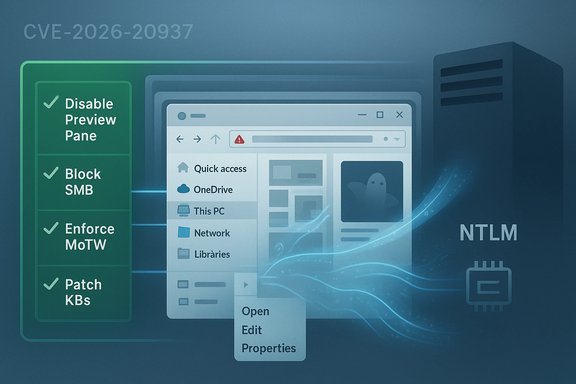
- Disable Explorer Preview pane and thumbnail generation on high‑value hosts (admin workstations, jump boxes, VDI hosts). This reduces the in‑process parsing surface.
- Enforce Mark‑of‑the‑Web (MoTW) behavior: treat Internet‑zoned files as untrusted and avoid passing them to preview handlers. Microsoft previously used this behavior change as an effective mitigation for similar leaks.
- Block outbound SMB (TCP 445/139) at egress for endpoints to untrusted networks; restrict SMB flows with network controls and logging.
- Harden NTLM posture: enforce SMB signing, prefer Kerberos and, where feasible, disable NTLM authentication entirely.
- Application and policy controls:
- Remove unnecessary local admin privileges on users who don’t need them.
- Temporarily disable or remove untrusted third‑party shell extensions and preview handlers (PDF, Office) from high‑value endpoints.
Patching playbook (24–72 hours)
- Inventory: enumerate OS builds and SKUs; identify endpoints that run desktop shell components (VDI images, admin hosts).
- Extract KB mapping: use the MSRC Update Guide and Microsoft Update Catalog to find exact KB IDs and packages that remediate CVE‑2026‑20937 for each build. Validate these against your WSUS/ConfigMgr/Intune catalogs.
- Pilot: deploy to a small pilot ring that includes representative admin workstations, a VDI image and a server that processes files. Validate for regressions (shell extensions, context menu handlers, and third‑party preview components are common sources of issues).
- Staged rollout: after pilot validation, roll out to high‑value hosts, then to general endpoints.
- Verification: confirm the patch presence in update history, and validate that explorer.exe and related DLLs (TWINUI, preview handlers) reflect the updated versions.
Detection, telemetry and incident response
Because vendor advisories often omit exploit mechanics, defenders should focus on generalized behavioral telemetry and hunts that surface Explorer‑class abuse.High‑value telemetry signals:
- Explorer‑initiated outbound SMB/UNC connections to unusual endpoints, especially immediately after file open/preview events.
- Sudden clusters of Windows Error Reporting (WER) events or explorer.exe / twinui.dll crashes after file operations.
- Explorer spawning unusual child processes (powershell.exe, cmd.exe) in contexts that don’t match normal user activity.
- Anomalous NTLM authentication sequences or unexpected NTLM negotiation blobs logged by network devices or servers.
- ProcessCreation events with ParentProcessName == "explorer.exe" and NewProcessName in {powershell.exe, cmd.exe} — flag for investigation.
- WER crashes for twinui.dll or explorer.exe clustered across endpoints in short windows.
- Network events showing SMB negotiation to previously unseen IPs from desktop endpoints immediately after file access.
- Isolate the host from the network; preserve volatile data and collect memory/WER dumps.
- Perform full EDR/forensic triage for token duplication, service creation, or unexpected persistence artifacts.
- Rebuild from clean images after eradication, applying the validated patch during redeployment.
Strengths and limitations of Microsoft’s current posture
Strengths:- Microsoft’s Update Guide is the authoritative source for CVE listings and per‑SKU KB mappings once they are published. Using it reduces ambiguity for patch managers.
- Historically, Microsoft pairs behavior hardenings (for example, blocking previews on Internet‑zoned files) with targeted code fixes to reduce near‑term risk quickly while working toward narrower fixes. That pragmatic approach has proven effective against the class of NTLM/external‑resource leaks.
- The Update Guide entries are often deliberately terse early in the disclosure lifecycle; low‑level exploit mechanics and PoCs may not be published until after patches are widely distributed. This reduces short‑term weaponization risk but leaves defenders relying on behavior hunts and mitigations rather than concrete IOCs.
- Automated scanners and third‑party CVE feeds sometimes mis‑map CVE → KB relationships. Enterprises must confirm KB IDs directly with Microsoft before mass deployment to avoid erroneous patching.
- Blunt mitigations (disabling Preview pane, removing shell extensions) have productivity costs. Teams that depend on Explorer previews for triage should be prepared for temporary workflow changes and provide controlled exception processes.
Critical analysis and risk assessment
Notable strengths in the public record:- The presence of CVE‑2026‑20937 in Microsoft’s Update Guide is a definitive, vendor‑level confirmation of the vulnerability. That alone mandates action in enterprise settings.
- Community playbooks and prior CVEs provide mature, repeatable mitigations that can be applied immediately to reduce exposure (disable Preview pane, block outbound SMB, enforce MoTW handling). These mitigations are conservative but effective.
- The Update Guide’s brevity means the exact artifact set (e.g., whether the leak exposes NTLMv2 blobs, memory pointers, or specific metadata) is not publicly verified. Any operational claim beyond the broad class (information disclosure in File Explorer) should be flagged as a plausible inference rather than a vendor‑confirmed detail.
- If organizations delay patching or fail to apply compensating controls, private exploit code (if it exists) could materially increase the damage potential by enabling credential relay or easing local privilege escalation. Historically, PoCs have sometimes surfaced shortly after patches, accelerating weaponization.
- The absence of a published CVSS numeric score or NVD enrichment at time of listing increases operational uncertainty about how to prioritize against other ongoing patch efforts. Treat that absence as an indicator of an early disclosure state, not a signal of low risk.
Recommended action checklist (concise)
- Immediately confirm CVE → KB mappings in Microsoft’s Update Guide and Microsoft Update Catalog.
- Prioritize patch testing and deployment for:
- Administrative workstations and jump boxes.
- VDI/RDS pools and multi‑user hosts.
- Mail gateways, document‑processing servers and upload/thumbnail services.
- While patches are staged:
- Disable Explorer Preview pane and thumbnailing on high‑value hosts.
- Block outbound SMB to untrusted networks and enforce SMB signing / Kerberos.
- Remove or disable untrusted third‑party shell/preview handlers on critical endpoints.
- Tune EDR/SIEM hunts for explorer.exe network activity, sudden explorer crashes, and unusual parent→child process lineages.
Closing assessment
CVE‑2026‑20937 is an authoritative vendor‑recorded information‑disclosure in Windows File Explorer; Microsoft’s listing establishes its existence and the affected surface, but the advisory’s brevity leaves low‑level mechanics intentionally opaque for now. That combination — confirmed vulnerability class plus limited published detail — elevates operational urgency: defenders should assume the flaw is actionable for determined local adversaries and apply the proven mitigations described above while confirming KB mappings and performing staged patch rollouts. The most effective short‑term posture is pragmatic: inventory, harden exploratory surfaces (previewing and outbound SMB), stage and validate Microsoft’s updates on representative pilot hosts, and tune telemetry to detect the broad behavioral signals that typically accompany Explorer‑class exploitation.Any specific technical claim that pins CVE‑2026‑20937 to a particular exploit artifact (for example, a named preview handler, a specific uninitialized memory read, or a particular NTLM blob form) must be treated as unverified until Microsoft publishes KB diffs or independent researcher write‑ups provide reproducible detail. Until then, the recommended course is inventory → mitigations → patch validation → telemetry‑driven verification.
Source: MSRC Security Update Guide - Microsoft Security Response Center
