

Chromium’s recently cataloged vulnerability CVE-2026-2314 — a heap buffer overflow in the Codecs component — is an urgent but patchable reminder that media-processing paths remain a high-value attack surface for browsers and for downstream products built on Chromium, and administrators should confirm their Chrome and Chromium‑based Microsoft Edge installations have been updated to the fixed build before browsing untrusted content.
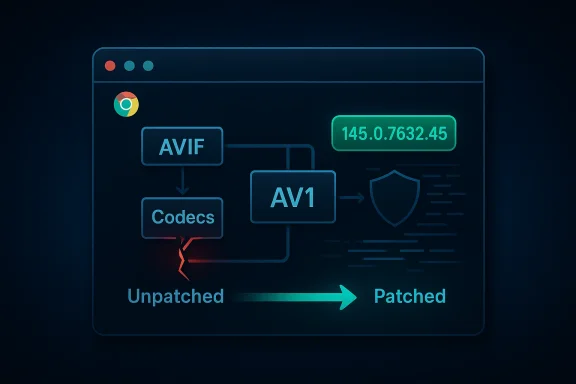
Chromium’s Codecs subsystem handles image and video decoding and is routinely exercised by webpages, embedded media, and WebRTC streams. A heap buffer overflow in that code can allow a crafted HTML page containing malformed media data to cause memory corruption that, in the worst case, can be turned into arbitrary code execution inside the renderer process. The vulnerability description published through vendor and national vulnerability feeds identifies affected Chrome builds as versions prior to 145.0.7632.45 and lists the fixed release as Chrome 145.0.7632.45 (and later).
Why Microsoft documents this Chromium CVE in its Security Update Guide is simple but important for defensive operations: Microsoft Edge (the modern Chromium-based Edge) consumes upstream Chromium code, so Microsoft must record upstream Chromium CVEs to track ingestion of the patch into Edge builds and to signal to customers the point at which Edge itself is no longer vulnerable. The Security Update Guide entry serves as Microsoft’s official indicator that a downstream Edge build has ingested the upstream Chromium fix.
This article explains the technical scope of CVE‑2026‑2314, verifies the factual claims around affected and fixed versions, assesses the exploitation and operational risk, and — most practically for administrators and end users — provides clear, step-by-step instructions for checking browser versions (Chrome and Edge), confirming protection, and prioritizing remediation across individual and managed fleets.
Memory-corruption bugs in media pipelines are dangerous for three core reasons:
Security scanners and enterprise vulnerability tools flagged the issue as “High” for Linux Chromium packaging (Nessus/Tenable plugins), and distribution trackers show active coordination to release updated packages. The general posture from vendors and security teams is: treat this like any other memory-corruption browser bug — patch immediately, prioritize high‑exposure endpoints, and monitor for exploitation indicators.
Fast remediation, prioritized patch deployment, and monitoring for related crash/exploit activity remain the best defense against this class of memory‑corruption vulnerabilities.
Source: MSRC Security Update Guide - Microsoft Security Response Center
 Background / Overview
Chromium’s Codecs subsystem handles image and video decoding and is routinely exercised by webpages, embedded media, and WebRTC streams. A heap buffer overflow in that code can allow a crafted HTML page containing malformed media data to cause memory corruption that, in the worst case, can be turned into arbitrary code execution inside the renderer process. The vulnerability description published through vendor and national vulnerability feeds identifies affected Chrome builds as versions prior to 145.0.7632.45 and lists the fixed release as Chrome 145.0.7632.45 (and later).Why Microsoft documents this Chromium CVE in its Security Update Guide is simple but important for defensive operations: Microsoft Edge (the modern Chromium-based Edge) consumes upstream Chromium code, so Microsoft must record upstream Chromium CVEs to track ingestion of the patch into Edge builds and to signal to customers the point at which Edge itself is no longer vulnerable. The Security Update Guide entry serves as Microsoft’s official indicator that a downstream Edge build has ingested the upstream Chromium fix.
This article explains the technical scope of CVE‑2026‑2314, verifies the factual claims around affected and fixed versions, assesses the exploitation and operational risk, and — most practically for administrators and end users — provides clear, step-by-step instructions for checking browser versions (Chrome and Edge), confirming protection, and prioritizing remediation across individual and managed fleets.
What the vulnerability actually is (technical summary)
Root cause in the Codecs path
Public analyses and vendor advisories describe CVE‑2026‑2314 as a heap-based buffer overflow inside Chromium’s Codecs component — specifically a plane-allocation logic flaw discovered in a bundled AVIF/AV1 handling subcomponent (sometimes described as the “CrabbyAvif” path in source comments). The bug occurs when a crafted AVIF payload triggers an allocation pattern where the alpha plane is allocated after color planes in a manner that allows out‑of‑bounds writes on the heap. That out‑of‑bounds write yields CWE‑122 style heap corruption that is weaponizable by skilled attackers.Memory-corruption bugs in media pipelines are dangerous for three core reasons:
- They accept attacker-controlled binary data (images/video) from remote sources.
- They run inside the renderer process, which is reachable simply by loading a webpage or following a link.
- They can often be chained with other primitives (e.g., information leaks) to bypass mitigations and achieve reliable code execution.
Affected and fixed versions — verification
Vendor release notes and independent trackers align on the key version boundary:- Affected: Google Chrome builds prior to 145.0.7632.45.
- Fixed: Google Chrome 145.0.7632.45 and later (this build appears in the early-stable updates and the stable rollouts noted by the Chrome release team).
Why the entry appears in Microsoft’s Security Update Guide (operational clarity)
Microsoft’s Security Update Guide (SUG) is used to record Microsoft product vulnerabilities and — importantly — the presence of upstream OSS CVEs that affect Microsoft products that incorporate those projects. For Chromium CVEs like CVE‑2026‑2314, Microsoft uses the SUG entry to:- State that the CVE was assigned to upstream Chromium/Chrome.
- Document whether Microsoft Edge (Chromium-based) has ingested the upstream fix and which Edge build contains the remediation.
- Give administrators a single place to verify whether their deployed Edge builds are protected.
Exploitation status and real-world risk
At the time of the advisories, public trackers and security agencies reported no confirmed active exploitation in the wild for CVE‑2026‑2314. Several national CERTs and Linux distribution trackers list the issue and its remediation status without asserting active exploitation. That said, the vulnerability’s characteristics (network-exploitable via user interaction, low attack complexity, potential for arbitrary code execution) make it a high-priority patch for defenders. If a proof-of-concept appears, the risk would escalate quickly because the initial attack vector is simply visiting a webpage or opening a crafted resource.Security scanners and enterprise vulnerability tools flagged the issue as “High” for Linux Chromium packaging (Nessus/Tenable plugins), and distribution trackers show active coordination to release updated packages. The general posture from vendors and security teams is: treat this like any other memory-corruption browser bug — patch immediately, prioritize high‑exposure endpoints, and monitor for exploitation indicators.
What you should do now — prioritized actions
For individual users (quick checklist)
- Update your browser now. If you use Google Chrome, update to 145.0.7632.45 or later; a browser restart will typically finish the update. Chrome’s stable channel includes the fix.
- If you use Microsoft Edge (Chromium-based), confirm your Edge build contains the Chromium fix (see version-check steps below). Microsoft’s Security Update Guide will indicate when Edge builds are no longer vulnerable; update Edge as soon as Microsoft releases the ingesting build.
- Avoid untrusted content in the short window between disclosure and patching — do not open unknown attachments or visit untrusted sites. This is temporary risk reduction, not a permanent fix.
For system administrators and SOC teams
- Patch priority: Treat browser updates that address memory-corruption bugs as high-priority. Deploy Chrome 145.0.7632.45+ to user endpoints as soon as compatibility testing is complete. For Edge, follow Microsoft’s SUG entries to know precisely which Edge build contains the Chromium ingestion and schedule the Edge update accordingly.
- Endpoint detection: Configure EDR to watch for unusual renderer process behavior, heap-corruption crash signatures, or post‑exploit indicators like suspicious child processes spawned from browser processes. Log and investigate renderer crashes that occur while users are browsing external content.
- Network defenses: Use web-proxy filtering to block or detonate unknown AVIF/AV1/AVif-like content and suspicious media payloads, particularly from untrusted domains. Where feasible, use content-disarm-and-reconstruction or inline sandboxing for high-risk inbound content channels.
- Vulnerability management: Update asset inventories to capture browsers and packaged Chromium builds on Linux. Match installed package versions to the fixed upstream version; distribution-specific packages may lag, so coordinate with distro maintainers and accept vendor advisories as authoritative for package remediation timelines.
How to confirm your browser is or is not vulnerable (step‑by‑step)
One of the clearest ways to confirm protection is to check your browser’s version and compare it to the fixed upstream build. The following steps work for both end users and administrators.Google Chrome (desktop: Windows, macOS, Linux)
- Open Chrome.
- Click the three-dot menu (Customize and control) → Help → About Google Chrome.
Or type the address bar entry: chrome://settings/help and press Enter. - The page will show your current version and will trigger an automatic check for updates. If your version is 145.0.7632.45 or later, Chrome is fixed for CVE‑2026‑2314.
Microsoft Edge (desktop: Windows, macOS)
- Open Microsoft Edge.
- Menu (three dots) → Help and feedback → About Microsoft Edge.
Or enter edge://settings/help in the address bar. - This will display the Edge version and perform an update check. If Microsoft has released an Edge build that ingests Chromium 145.0.7632.45 (the SUG entry will indicate ingestion), updating to that Edge build removes the vulnerability from Edge. The Security Update Guide entry is the canonical place to confirm ingestion for Microsoft Edge customers.
Chromium packages on Linux distributions
- Use your package manager (apt, dnf, pacman, etc.) and query the installed chromium/chrome package version.
- Cross-reference your package version with your distribution security tracker (Debian/Ubuntu/Gentoo/SUSE trackers) to confirm whether the distribution has backported the upstream fix. Distributions may carry different package versioning schemes; always consult the distribution advisory rather than assuming parity with Google Chrome’s public stable build.
Mobile (Android / iOS)
- Mobile users should update their browser via Google Play / App Store. Chrome on Android receives platform updates; check the app store page and installed version. On iOS, Chrome is a wrapper around Apple WebKit and may not be affected in the same way; consult vendor advisories for platform‑specific guidance.
Detection and monitoring recommendations
- Monitor for sudden increases in renderer crashes originating from the Codecs paths or from plugin/decoder modules. Unusual crash spikes on endpoints should be triaged quickly.
- Configure SIEM and EDR to alert on:
- Child processes spawned from browser renderer processes.
- Unusual network connections initiated by browser processes immediately after a crash or memory‑corruption event.
- Attempts to download or open AVIF/AV1 media from untrusted sources if allowed by policy.
- Use vulnerability scanners to pick up out-of-date Chrome or Chromium packages; ensure rules are tuned to detect both Chrome stable channel versions and packaged Chromium versions used by Linux distributions. Some scanners will report the CVE directly and flag unpatched package versions.
Are there workarounds if you cannot patch immediately?
Vendor advisories and CERT guidance consistently emphasize that there is no practical vendor-supplied workaround for Codecs memory-corruption bugs other than applying the patch. Short-term operational mitigations include:- Avoid opening untrusted pages and disable automatic rendering of remote media in high-risk environments.
- Use network content filters to block or sandbox untrusted media files.
- In highly constrained environments, consider temporarily restricting access to untrusted websites using web-proxy rules or allowlists.
How Microsoft Edge users interpret the Security Update Guide entry
Because Edge is a downstream consumer of Chromium, the SUG entry performs a key communication function: it tells Edge administrators whether Microsoft’s Edge build includes the upstream Chromium fix. The practical sequence for an Edge admin is:- Check the SUG entry for the CVE ID (for example, the MSRC/SUG page you were directed to). The page will state the upstream origin and whether the Microsoft product is vulnerable or not.
- If the SUG entry indicates Edge is still vulnerable, update Edge to the suggested build once Microsoft ships it. If the SUG entry indicates Edge is no longer vulnerable, confirm by checking your Edge build’s version as shown in edge://settings/help or edge://version.
Assessing the risk over time — what to watch for next
- Proof-of-concept exploit code: if PoCs are published, exploitation attempts in the wild typically increase rapidly. Watch vendor advisories, national CERTs, and telemetry from your EDR for exploit patterns.
- Distribution packaging lag: for Linux admins, upstream patches may not appear in distro packages immediately. Track your distribution’s security tracker and apply package updates as they become available.
- Downstream ingestion: Microsoft, other browser vendors, and embedded Chromium consumers (Electron apps, embedded browsers in third-party software) may require time to ingest and ship upstream fixes. Confirm each product’s status individually — don’t assume parity with Google Chrome.
Conclusion
CVE‑2026‑2314 is a high‑severity heap buffer overflow in Chromium’s Codecs path that can be triggered by crafted media content. The fix is available upstream in Google Chrome 145.0.7632.45 and later; administrators and users should update Chrome immediately, and Microsoft Edge users should rely on the Security Update Guide entry as their signal that Edge builds have ingested the fix before declaring endpoints protected. Confirm protection by checking your browser’s About/version page (chrome://settings/help or edge://settings/help and chrome://version or edge://version for deeper details) and by tracking your distribution and vendor advisories for packaged builds.Fast remediation, prioritized patch deployment, and monitoring for related crash/exploit activity remain the best defense against this class of memory‑corruption vulnerabilities.
Source: MSRC Security Update Guide - Microsoft Security Response Center
