

Microsoft's March 2026 advisory for CVE-2026-26112 calls the flaw a “Microsoft Excel Remote Code Execution Vulnerability”, and that short label has left many defenders scratching their heads because the published CVSS v3.1 vector for the same entry records Attack Vector = Local (AV:L). This article explains why those two statements are not contradictory, breaks down the CVSS metrics, walks through realistic attack scenarios, and gives practical mitigation, detection, and risk-management guidance for administrators and security teams.
Microsoft disclosed CVE-2026-26112 on March 10, 2026, as one of several Excel-related memory-safety flaws patched in that cycle. The vendor description states the underlying problem is an untrusted pointer dereference in Microsoft Office Excel that “allows an unauthorized attacker to execute code locally.” The CVSS v3.1 vector published for the vulnerability is CVSS:3.1/AV:L/AC:L/PR:N/UI:R/S:U/C:H/I:H/A:H, producing a base score of 7.8 (High). Microsoft’s KB and update notes list the issue as an Excel “remote code execution” vulnerability even while the numerical vector encodes Local as the attack vector. Multiple industry trackers and analysts repeat the same two-part phrasing: impact as “Remote Code Execution (RCE)” and exploitation mechanics as local execution after local file processing.
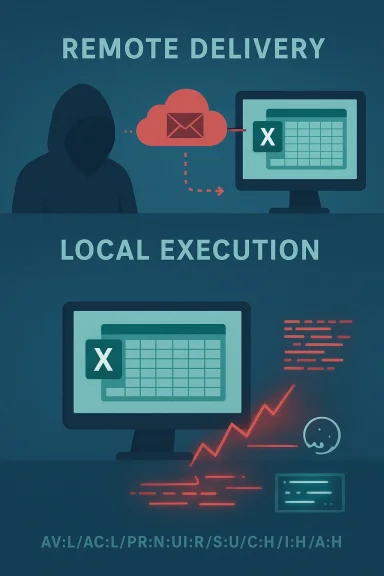
This apparent mismatch — “remote” in the advisory title, but “local” in CVSS — is common for document-parsing vulnerabilities in Office-era products and stems from two different communication goals: one aimed at high-level impact and attacker origin, the other at scoring the precise technical conditions required to trigger the vulnerable code path.
In CVE-2026-26112’s case, the vulnerable code path lives inside Excel and is invoked when the application parses a workbook on the host. The CVSS vector therefore accurately captures that the mechanics of exploitation require that the victim’s Excel process run the problematic code locally. The vector’s other elements (Privileges Required = None; User Interaction = Required) reinforce the scenario: no elevated privileges are needed, but the user must open or preview the malicious file.
Short-term (apply now)
Hunt signals
Caveat: technical details in vendor advisories and third-party trackers may be brief at initial disclosure. If you build automated policies (blocklists, CVE-based rules), consider mapping both the advisory headline and the CVSS vector into your triage workflow so you don’t deprioritize a high-impact RCE simply because its AV is Local.
Source: MSRC Security Update Guide - Microsoft Security Response Center
 Background / Overview
Microsoft disclosed CVE-2026-26112 on March 10, 2026, as one of several Excel-related memory-safety flaws patched in that cycle. The vendor description states the underlying problem is an untrusted pointer dereference in Microsoft Office Excel that “allows an unauthorized attacker to execute code locally.” The CVSS v3.1 vector published for the vulnerability is CVSS:3.1/AV:L/AC:L/PR:N/UI:R/S:U/C:H/I:H/A:H, producing a base score of 7.8 (High). Microsoft’s KB and update notes list the issue as an Excel “remote code execution” vulnerability even while the numerical vector encodes Local as the attack vector. Multiple industry trackers and analysts repeat the same two-part phrasing: impact as “Remote Code Execution (RCE)” and exploitation mechanics as local execution after local file processing.This apparent mismatch — “remote” in the advisory title, but “local” in CVSS — is common for document-parsing vulnerabilities in Office-era products and stems from two different communication goals: one aimed at high-level impact and attacker origin, the other at scoring the precise technical conditions required to trigger the vulnerable code path.
What Microsoft means by “Remote Code Execution” in CVE titles
High-level intent vs. technical mechanics
When Microsoft (and many other vendors) labels an Office bug as “Remote Code Execution,” the shorthand emphasizes the real-world risk: an attacker who is not physically at the target system can cause code of the attacker’s choosing to run on that system. In plain English, the attack can be initiated from “remote” — by sending or placing a malicious file where the victim will open or preview it — and the result is that attacker-controlled instructions execute on the victim host. This is the primary message vendorsinistrators and end users because it directly relates to impact and prioritization. Several Microsoft advisory summaries adopt that voice to ensure non-technical stakeholders appreciate the urgency.Why “remote” refers to attacker location, not runtime locality
In document-based attacks, the exploit chain normally proceeds like this:- A remote adversary crafts a malicious Office document (Excel workbook, Word doc, etc.).
- The adversary delivers that file to the victim (email attachment, shared drive, cloud storage link, etc.).
- The victim’s Office application parses the file locally (often when opening or previewing it).
- A memory-safety defect in the local parser is triggered, which can hand control to attacker-supplied code — executed in the context of the local process.
CVSS Attack Vector explained: what AV:L (Local) actually means
The Common Vulnerability Scoring System (CVSS) defines the Attack Vector (AV) metric to describe where the vulnerable component must be in order for an exploit to succeed. Under CVSS v3.1, the four possible values are Network (N), Adjacent (A), Local (L), and Physical (P). An AV of Local (L) signifies that exploitation requires the attacker to have local access to the vulnerable component (for example, a local account) or that the vulnerable functionality only processes local files. The CVSS user guide explicitly uses examples where a library embedded in a local application that processes only files should be scored AV:L even if those files are received remotely and then opened locally.In CVE-2026-26112’s case, the vulnerable code path lives inside Excel and is invoked when the application parses a workbook on the host. The CVSS vector therefore accurately captures that the mechanics of exploitation require that the victim’s Excel process run the problematic code locally. The vector’s other elements (Privileges Required = None; User Interaction = Required) reinforce the scenario: no elevated privileges are needed, but the user must open or preview the malicious file.
Bringing the pieces together: Why both labels are correct
- Vendor headline (“Remote Code Execution”): Communicates attacker origin and impact. A remote adversary can get code running on a target machine by delivering a malicious Excel file.
- CVSS Attack Vector (AV:L): Communicates how the vulnerable code is actually invoked — it executes in a local process on the victim machine when the user opens or pre statements are accurate and answer different operational questions: “Who can cause the damage?” (remote attacker) and “Where does the exploitable code run?” (local process). Treating them as contradictory is a category error; the headline and the CVSS vector are complementary components of a complete vulnerability profile. This same explanation has appeared repeatedly in vendor and community analyses of Office document vulnerabilities.
Dissecting CVE-2026-26112: the observable facts
- Microsoft description: Untrusted pointer dereference in Microsoft Office Excel allows an unauthorized attacker to execute code locally.
- CVSS v3.1 vector: CVSS:3.1/AV:L/AC:L/PR:N/UI:R/S:U/C:H/I:H/A:H, base score 7.8 (High). This encodes:
- AV:L — Attack Vector: Local (vulnerable code runs on host after file processed).
- PR:N — Privileges Required: None (no elevated rights needed).
- UI:R — User Interaction: Required (user must open/preview the malicious file).
- High impact on Confidentiality, Integrity, Availability.
- Exploitation note: Microsoft and several analysts note there was no public proof-of-concept at disclosure time, but the class of bug (memory-corruption / untrusted pointer dereference) is a well-known path to reliable code execution if weaponized.
Realistic attack vectors and why this matters to defenders
This class of vulnerability is dangerous because it converts remote content delivery into local code execution. Common, realistic delivery methods include:- Email attachments (malicio user).
- Preview panes in mail clients or file managers (file preview triggers Excel’s parser).
- Shared network drives or cloud storage links (user opens workbook from a share).
- Malicious macro-less documents crafted to exploit parser bugs.
Practical mitigations: immediate and medium-term actions
For IT teams and security operations, prioritize both short-term mitigation and longer-term hardening.Short-term (apply now)
- Apply Microsoft’s security updates for all affected Excel/Office builds as soon as possible. Microsoft’s KB and update notes list the March 2026 fixes covering CVE-2026-26112. Patch deployment is the straightforward remedy.
- Reduce the attack surface by disabling or restricting file previews in mail clients and file-manager previews where feasible (Preview Pane in Outlook is a recurring attack vector).
- Educate users — treat unexpected Excel attachments from unknown senders as high-risk; do not open or preview attachments in untrusted messages.
- Enforce attachment and file-scanning at mail gateways and cloud storage brokers with up-to-date signatures and behavior detection.
- Apply application control (AppLocker, WDAC) to limit which binaries can be executed by user sessions.
- Harden Office by setting macros to disabled by default, enabling Protected View for files originating from the Internet zone, and configuring Attack Surface Reduction (ASR) rules where available.
- Ensure Endpoint Detection and Response (EDR) telemetry is enabled and central logging is functioning; memory-safety exploit attempts often leave telltale indicators (process crashes, anomalous module loads, suspicious network callbacks).
Detection and hunting playbook
Detecting exploitation attempts for parser-based RCEs requires both proactive telemetry and reactive triage.Hunt signals
- Unexpected Excel process crashes (WER entries) tied to user sessions that recently opened or previewed files.
- Child-process creation from Excel (cmd, powershell, rundll32, etc.) — particularly where the parent is the Excel process.
- New persistence or lateral-movement activity immediately following an Excel process crash or anomalous Excel behavior.
- Network callbacks to suspicious domains shortly after a user opens an attachment.
- Search for Excel process (excel.exe) crashes correlated with user logons and recent email receipt events.
- Query for excel.exe spawning cmd.exe, powershell.exe, or regsvr32.exe over the last 7 days and pivot by user and file hash.
- Hunt for Office documents received from external senders opened within the enterprise in the same session as a process crash.
Risk assessment: how dangerous is CVE-2026-26112 in practice?
From a technical and operational perspective, this vulnerability is high risk for several reasons:- The underlying class (untrusted pointer dereference / memory corruption) is exploit-friendly — it frequently leads to reliable code execution when weaponized properly.
- Privileges Required = None makes the attack viable for any logged-on user.
- User Interaction = Required lowers the bar for attackers because social engineering is a well-proven delivery vector.
- The CVSS base score of 7.8 reflects high impact across confidentiality, integrity, anloitation succeeds.
Communication guidance for security teams and execs
When briefing non-technical stakeholders, use the vendor headline (“Remote Code Execution”) to explain the businal attacker can cause code to run on a corporate workstation. For engineering and vulnerability management, attach the CVSS vector to explain why the exploit requires user action and runs locally — this helps shape remediation steps (e.g., focus on email controls, preview-pane configuration, and patching endpoints rather than perimeter firewall changes). Combining both messages gives leadership both the urgency and the operational plan.What defenders commonly misunderstand (and how to avoid mistakes)
- Mistake: Treating AV:L as “not remotely exploitable.” Reality: AV:L means the vulnerable code runs locally; it does not mean that a remote attacker cannot cause that local execution by delivering a file.
- Mistake: Delaying patches because “CVSS says local.” Reality: The attacker model includes remote delivery via email/cloud; delay increases window of opportunity for phishing-driven exploitation.
- Mistake: Relying solely on signature-based detection. Memory-safety exploits often use novel encodings and obfuscated payloads; behavior-based EDR and network monitoring are crucial.
Technical nuance: “Arbitrary Code Execution” vs “Remote Code Execution” vs what CVE titles mean
Security literature uses a range of overlapping terms:- Arbitrary Code Execution (ACE): A general class meaning an attacker can execute attacker-controlled code in a target process or host. ACE includes both local and remote variants. The term emphasizes what the attacker can do.
- Remote Code Execution (RCE): Often used to mean an attacker with network/remote delivery capability can cause code to execute on the target. RCE is typically the high-level impact label used in advisories and headlines.
- CVSS Attack Vector (AV): A precise metric that indicates where the vulnerable component must be executed (Network / Adjacent / Local / Physical).
Recommended checklist for administrators (actionable steps)
- Patch: Deploy Microsoft’s March 2026 Office/Excel updates that address CVE-2026-26112 immediately across all endpoints and servers where Excel is present.
- Harden Office settings: Enable Protected View for files from the Internet, dist, and restrict COM automations where possible.
- Disable preview panes for high-risk mailboxes or temporarily disable them organization-wide until patches are deployed.
- Update gateway scanners: Ensure mail gateways and cloud storage protections are updated and tuned to block or sandbox suspicious Office documents.
- Hunt-and-respond: Run the detection queries outlined above and isolate endpoints showing Excel crashes or suspicious child processes.
- User awareness: Issue targeted guidance reminding users not to open unexpected Excel attachments and to report suspicious messages to security.
- Post-incident: If a compromise is suspected, preserve the suspicious file, collect memory and EDR logs, and perform forensic containment.
Final analysis and cautionary notes
The “Remote Code Execution” label in CVE-2026-26112’s advisory is intended to communicate impact and attacker capability: a remote adversary can cause code to execute on a victim host. The CVSS metric AV:L accurately and usefully documents that the vulnerable code path executes on the local host — meaning the vulnerability is triggered by local parsing of a file — and that user interaction is required. Both statements are correct and together provide a complete operational picture for prioritization and mitigation. This pattern — remote delivery, local execution — is a recurrent theme in Office document vulnerabilities and is the reason defenders must treat seemingly “local” CVSS vectors as urgent when the vendor RCE label is present.Caveat: technical details in vendor advisories and third-party trackers may be brief at initial disclosure. If you build automated policies (blocklists, CVE-based rules), consider mapping both the advisory headline and the CVSS vector into your triage workflow so you don’t deprioritize a high-impact RCE simply because its AV is Local.
Conclusion
CVE-2026-26112 exemplifies a frequent tension in vulnerability communications: vendors emphasize impact and attacker origin in short advisories, while scoring systems like CVSS encode precise exploit mechanics. Understanding both perspectives is essential. For security teams the takeaway is straightforward: treat Microsoft’s RCE label as a signal to act quickly, and use the CVSS details to guide which mitigation levers (patching, preview-pane settings, user controls, EDR hunts) will most effectively reduce exposure. Apply the March 2026 updates immediately, harden Office settings, and run targeted hunts for suspicious Excel activity — that combined approach closes the window of opportunity that makes these “remote delivery, local execution” flaws dangerous in the wild.Source: MSRC Security Update Guide - Microsoft Security Response Center
