

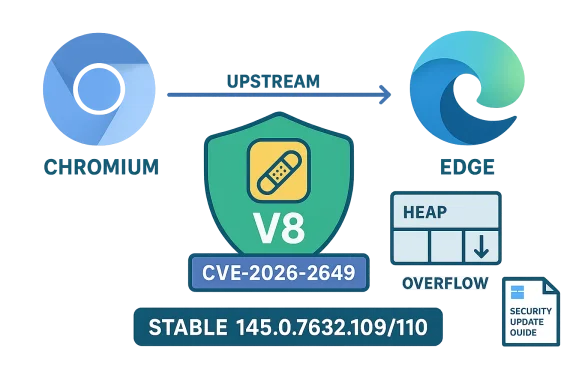
Chrome’s V8 JavaScript engine was patched this week for a high‑severity integer overflow (CVE‑2026‑2649) that Google fixed in the Stable channel, and Microsoft recorded the same Chromium‑assigned CVE in its Security Update Guide to tell Edge customers when their downstream builds are no longer vulnerable.
Chromium is the open‑source engine that underpins Google Chrome and is consumed by a wide range of downstream browsers and runtimes, including Microsoft Edge (Chromium‑based), many Linux distribution packages, Electron applications, and other Chromium forks. When the Chromium project or Google’s Chrome team discovers and fixes a security flaw, the upstream fix appears first in Chrome/Chromium. Downstream consumers — Microsoft Edge among them — must then ingest that upstream change, perform integration and testing, and ship a downstream build that includes the patch. Microsoft’s Security Update Guide (SUG) lists Chromium‑origin CVEs to provide an authoritative downstream status: it tells administrators and users whether Microsoft Edge builds have incorporated the upstream correction.
This article explains what CVE‑2026‑2649 is, why Microsoft lists it in the Security Update Guide, how you can confirm whether your browser is vulnerable, and practical steps for both consumers and enterprise administrators to verify and remediate exposure.
Longer explanation:
CVE‑2026‑2649 underscores two recurring realities of modern browser security: first, the open‑source Chromium codebase delivers rapid fixes and broad impact; second, downstream consumers such as Microsoft must validate and ship the ingest of those fixes — and they do so publicly through channels like the Security Update Guide to give operators a clear, authoritative remediation boundary. If you run Chromium‑based browsers, treat the appearance of a high‑severity V8 bug like this one as a priority for immediate version checks and updates.
Source: MSRC Security Update Guide - Microsoft Security Response Center
 Background / Overview
Chromium is the open‑source engine that underpins Google Chrome and is consumed by a wide range of downstream browsers and runtimes, including Microsoft Edge (Chromium‑based), many Linux distribution packages, Electron applications, and other Chromium forks. When the Chromium project or Google’s Chrome team discovers and fixes a security flaw, the upstream fix appears first in Chrome/Chromium. Downstream consumers — Microsoft Edge among them — must then ingest that upstream change, perform integration and testing, and ship a downstream build that includes the patch. Microsoft’s Security Update Guide (SUG) lists Chromium‑origin CVEs to provide an authoritative downstream status: it tells administrators and users whether Microsoft Edge builds have incorporated the upstream correction.This article explains what CVE‑2026‑2649 is, why Microsoft lists it in the Security Update Guide, how you can confirm whether your browser is vulnerable, and practical steps for both consumers and enterprise administrators to verify and remediate exposure.
What CVE‑2026‑2649 actually is
The technical summary
- Vulnerability type: Integer overflow in the V8 JavaScript engine.
- Impact: Heap corruption that could be weaponized to achieve code execution or other memory‑corruption outcomes when a user loads a crafted HTML page.
- Patched in Chrome: Fixed in Chrome Stable channel build 145.0.7632.109/110 (Windows/macOS) and corresponding Linux builds; Google released the fix in the Stable channel on February 18, 2026.
What we know about exploitation and disclosure
At the time of publication there are no authoritative public reports that CVE‑2026‑2649 is being exploited in the wild. Public advisories and vendors have released a restricted disclosure in line with common practice: release the patch quickly, with details limited until a majority of users receive the update. That minimizes risk while the ecosystem updates. If the exploitation status changes, vendors and national CERTs will publish updates; watch vendor advisories and major vulnerability databases for those signals.Why Microsoft includes Chromium CVEs in the Security Update Guide
Short answer: Microsoft lists Chromium CVEs so Edge customers know the downstream remediation status — when Edge builds have ingested the upstream Chromium fix and are therefore no longer vulnerable.Longer explanation:
- Microsoft Edge (Chromium‑based) is a downstream consumer of Chromium. The CVE may be assigned by the Chromium/Chrome teams, but the downstream responsibility for shipping a fixed Edge binary lies with Microsoft. The Security Update Guide is Microsoft’s canonical record showing when Microsoft‑shipped products — including Edge — include those upstream fixes.
- For enterprises and compliance teams, that downstream signal is important. Many organizations track the Microsoft SUG as their authoritative bulletin; listing the Chromium CVE in SUG removes ambiguity during the “ingestion lag” between Google’s Chrome fix and Microsoft’s Edge release. It enables clear patching and reporting workflows.
- Practically, a Chrome release that fixes CVE‑2026‑2649 does not automatically make all Chromium forks safe. The SUG entry confirms whether Microsoft has integrated and shipped the upstream fix in Edge — and it identifies the specific Edge build(s) that are considered remediated. Use that downstream build number as the remediation boundary in your environment.
How to see the browser version (step‑by‑step, with examples)
If you want to confirm whether your installation is protected, the most reliable method is to read the full browser version string and compare it against the published fixed build number(s). Below are platform‑specific steps for the most common scenarios.Google Chrome (desktop — Windows, macOS, Linux)
- Open Chrome.
- Click the three‑dot menu (upper‑right) → Help → About Google Chrome. Chrome will display the full version string and automatically check for updates. If an update is available, Chrome will download it and prompt you to relaunch.
- Alternatively, type chrome://version in the address bar to see a single page with full version information, including the underlying Chromium revision. Use the exact numeric version — e.g., 145.0.7632.109 — when comparing to vendor advisories.
Microsoft Edge (desktop — Windows, macOS)
- Open Microsoft Edge.
- Click the three dots → Help and feedback → About Microsoft Edge. Edge will show the full version string and check for updates.
- You can also type edge://version in the address bar to view the underlying Chromium version and other build metadata. Edge’s “About” page provides the downstream Edge version; the SUG or Edge release notes identify which Edge version includes the Chromium patch. Compare those values to the fixed build numbers in the Chrome advisory or the Security Update Guide.
Mobile (Android / iOS)
- Android: Open the Play Store, find Chrome (or Edge), and view the installed version on the app page; or open the browser and go to chrome://version (Android). Many Android vendors roll out updates via Play Store, and Chrome/Edge on Android will also check for updates.
- iOS/iPadOS: Open the App Store → tap your profile → Scroll to the app updates list to see installed versions and pending updates.
Command‑line and enterprise checks
- Windows administrators can inventory browser versions through standard software inventory tools (SCCM/ConfigMgr, Intune/Microsoft Endpoint Manager, third‑party EDR/MAM solutions). Those tools read the installed application version and can be used to determine which endpoints need update.
- For Linux, package managers (apt/dnf/etc.) and distribution security trackers (Debian Security Tracker, Red Hat Errata) provide package versions and fixed release numbers. The Debian security tracker and many distro trackers list the fixed Chromium package version corresponding to the upstream Chrome fix.
Mapping Chrome’s fixed build to Edge builds — how to interpret the numbers
- Chrome’s advisory lists the exact Chrome/Chromium build that contains the fix (for CVE‑2026‑2649: Chrome builds prior to 145.0.7632.109 were vulnerable; the Stable update is 145.0.7632.109/110).
- Microsoft Edge uses its own version numbering but includes the Chromium base inside the build. The Edge “About”/edge://version page often shows the underlying Chromium revision or a user agent string with the Chromium version. Use that underlying Chromium number to determine whether Edge contains the equivalent Chromium fix — or check Microsoft’s Edge release notes and the Security Update Guide to find the specific Edge version that lists the CVE as addressed.
- For enterprises: don’t guess. Use Microsoft’s Security Update Guide and Edge release notes to identify the exact Edge build that Microsoft lists as remediated. The SUG provides the downstream, authoritative remediation boundary for Microsoft‑shipped Edge builds.
Practical verification checklist — consumer and admin versions
Follow these steps to verify and remediate quickly.- Identify which browser(s) you run (Chrome, Edge, other Chromium forks).
- For each endpoint, collect the browser version string (chrome://version or edge://version, or About page).
- Compare the collected version against:
- Google’s Chrome release notes (the upstream fixed build).
- Microsoft’s Security Update Guide and Edge release notes for the corresponding downstream fixed build.
- If the installed version is older than the fixed build, update immediately and restart the browser to complete the installation.
- For enterprise fleets: schedule a coordinated rollout using Intune/ConfigMgr/WSUS or your chosen management tool and report compliance against the Edge builds Microsoft lists as fixed.
Mitigations and practical risk reduction
- Update immediately. The single most effective mitigation is to install the patched browser build and restart the browser. Vendors restrict exploit details until a majority of users are patched, which reinforces updating as the primary response.
- Prefer automated updates. Enable automatic updates where possible so endpoints don’t lag behind.
- Network‑level protective measures: use web content filtering, proxy sandboxes, or network perimeters that block access to untrusted or suspicious sites if you cannot update immediately.
- EDR / Runtime protections: endpoint detection and response tools and modern exploit mitigation stacks (DEP, ASLR, CFI where available) can raise the bar for exploitation but are not substitutes for patching.
- Application isolation: consider running risky workloads in VMs or sandboxed browsers if you must access untrusted content and cannot patch instantly.
- Least privilege and monitoring: limit process privileges and increase logging/monitoring for anomalous behavior on endpoints until patching is complete.
Enterprise considerations: how to use Microsoft’s Security Update Guide effectively
- Treat the Security Update Guide as the authoritative downstream signal for Microsoft Edge patch status. Microsoft lists Chromium‑assigned CVEs in SUG to announce when Edge builds are no longer vulnerable; enterprises should use the SUG’s fixed‑build metadata as the compliance baseline.
- Use software distribution and inventory tools to collect Edge/Chrome version strings at scale, then compare host inventory against the fixed builds named in the SUG and Chrome release notes.
- For air‑gapped or heavily controlled environments, coordinate a maintenance window that incorporates the required testing of the updated Edge build; verify application compatibility before mass deployment.
- For Linux desktops and servers that ship Chromium from distro packages, monitor distribution security advisories (Debian tracker, Ubuntu, Red Hat) that map upstream fixes to distro package versions. Those trackers are the correct authority for packaged builds.
Risk analysis and timeline — what to expect
- CVE‑2026‑2649 was published and patched upstream in Chrome’s Stable channel on February 18, 2026. Multiple vendors and security researchers classified the issue as High severity due to the potential for heap corruption and exploitation primitives in V8.
- The time between upstream disclosure and downstream ingestion varies: some downstream builds appear within hours or days (Edge often incorporates Chromium updates rapidly), while packaged Linux distributions and embedded runtimes can lag weeks. That ingestion lag is the practical reason SUG entries exist: they tell you when Microsoft’s tested and shipped Edge build is fixed.
- Because exploit details are restricted early in the disclosure cycle, prioritizing updates is the safest operational posture. If public exploit code emerges later, attackers will often target unpatched, internet‑exposed endpoints first.
What to look for in vendor advisories and trackers (and what not to assume)
- Look for explicit fixed‑build numbers in vendor advisories (Chrome release notes give the upstream fixed build; Microsoft SUG / Edge release notes give the downstream fixed Edge build). Do not assume an automatic one‑to‑one mapping between the Chrome major version and the Edge major version — verify the actual Chromium revision or the SUG entry.
- Avoid unverified third‑party claims about active exploitation unless they cite authoritative telemetry (vendor signals, CISA, national CERTs). If an exploit is confirmed in the wild, major vendors and national CERTs will publish advisories; otherwise, treat exploit reports cautiously.
Quick reference — short checklist you can follow right now
- Consumers:
- Open Chrome or Edge → About page → verify you are at or above the patched build numbers. If not, update and restart.
- Administrators:
- Query fleet inventory for Chrome/Edge versions.
- Compare against Chrome’s fixed build (Chrome 145.0.7632.109/110) and Microsoft’s SUG / Edge release notes showing the corresponding Edge build that lists CVE‑2026‑2649 as addressed.
- Schedule update rollout and confirm restarts. Track compliance and report using the fixed build numbers as the baseline.
- Linux packagers: consult your distro security tracker for the patched chromium package and the package version you must deploy.
Strengths and limits of current signals (critical analysis)
- Strength — centralized downstream signaling: Microsoft’s SUG solves a real operational problem by giving organizations a single authoritative downstream signal for Edge; it removes guesswork between Chrome’s upstream fix and Edge’s integrated rebuild. That reduces mis‑triage and improves compliance reporting.
- Strength — immediate upstream disclosure and rapid patching: The Chromium and Chrome release process provides fast distribution of fixes to billions of users; Chrome’s auto‑update model is effective for consumers who keep their browser open or restart regularly.
- Risk — ingestion lag across the ecosystem: The practical risk window is the ingestion lag: even after Chrome publishes a patch, some downstream consumers and packaged distributions will need time. That gap is where unpatched endpoints remain exposed. Enterprise patch managers must track multiple authoritative sources (Chrome release notes, Microsoft SUG, distribution trackers) to close that gap promptly.
- Risk — restricted disclosure complicates risk perception: Vendors often withhold full technical details until patch adoption is widespread; this is a deliberate tradeoff to limit weaponization. For defenders, that means prioritization decisions must often be made on limited technical detail, relying on severity signals and the vendor’s public guidance.
- Operational friction for heterogeneous environments: Organizations that run a mix of Chrome, Edge, packaged Chromium, and embedded Chromium runtimes face a mapping challenge. The practical mitigation is to use authoritative vendor and distribution trackers and to keep inventory that captures the underlying Chromium revision, not just the user‑facing product name.
Final recommendations (what to do next, right now)
- Update desktop browsers immediately to the patched build and restart.
- For Microsoft Edge users, consult the Security Update Guide and the Edge release notes to confirm Microsoft’s downstream status and the Edge build you should expect to see as remediated. Use those Edge build numbers in your compliance reports.
- For enterprises, run a quick inventory query for browser versions and compare to the Chrome fixed build (145.0.7632.109) and the Edge SUG entry. Prioritize and schedule emergency update windows where needed.
- If you cannot patch immediately, apply compensating controls (web filtering, stricter browser policies, EDR hardening) and increase monitoring for suspected exploit attempts.
- Maintain awareness: subscribe to or monitor vendor advisories (Chrome Releases, Microsoft Edge release notes, SUG) and national CERTs for any change in exploitation status or technical details.
CVE‑2026‑2649 underscores two recurring realities of modern browser security: first, the open‑source Chromium codebase delivers rapid fixes and broad impact; second, downstream consumers such as Microsoft must validate and ship the ingest of those fixes — and they do so publicly through channels like the Security Update Guide to give operators a clear, authoritative remediation boundary. If you run Chromium‑based browsers, treat the appearance of a high‑severity V8 bug like this one as a priority for immediate version checks and updates.
Source: MSRC Security Update Guide - Microsoft Security Response Center
