

The Chromium-assigned vulnerability tracked as CVE-2026-2650 is included in Microsoft’s Security Update Guide because Microsoft Edge (the Chromium‑based browser) consumes Chromium’s open‑source engine; the Security Update Guide is Microsoft’s operational signal that a downstream Edge build has ingested an upstream Chromium fix and is therefore no longer vulnerable. / Overview
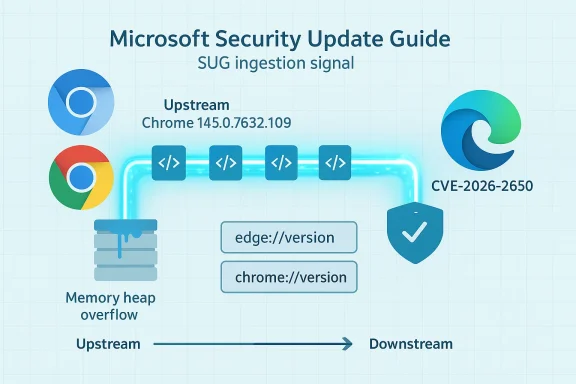
Chromium is the open‑source browser engine that powers Google Chrome and provides the codebase many vendors — including Microsoft — build on to create their own browsers. When a security defect is discovered and fixed upstream in Chromium, the upstream fix appears first in Chrome/Chromium release notes. Downstream vendors then ingest that fix into their own product builds, test the integration, and ship updated versions. Microsoft records those upstream Chromium CVEs in the Microsoft Security Update Guide (SUG) to show Edge customers whether Microsoft has ingested the fix and which Edge build includes it. This is the reason a Chrome‑origin CVE like CVE‑2026‑2650 shows up in Microsoft’s SUG: it is a downstream tracking and remediation signal, not a claim that Microsoft authored the bug.
On February 18, 2026, the Chromium/Cupdate advanced to builds that include security fixes for three issues; the Chrome release notes list CVE‑2026‑2650 — described as a heap buffer overflow in the Media component — and identify the remediation boundary at Google Chrome 145.0.7632.109 (Windows/macOS) and corresponding Linux builds. Administrators and users should treat Chrome builds earlier than that upstream boundary as vulnerable until patched.
Practical steps:
Conclusion
Memory safety bugs in media stacks remain a persistent threat. The coordinated upstream release by Chromium and downstream tracking by Microsoft give defenders the tools to respond — but those tools only help if they are used correctly: check full version strings, confirm vendor ingestion in SUG or release notes, and update every Chromium‑embedded component in your environment. Prompt patching, precise verification, and an inventory that covers embedded Chromium instances are the practical defenses that eliminate exposure to CVE‑2026‑2650.
Source: MSRC Security Update Guide - Microsoft Security Response Center
Chromium is the open‑source browser engine that powers Google Chrome and provides the codebase many vendors — including Microsoft — build on to create their own browsers. When a security defect is discovered and fixed upstream in Chromium, the upstream fix appears first in Chrome/Chromium release notes. Downstream vendors then ingest that fix into their own product builds, test the integration, and ship updated versions. Microsoft records those upstream Chromium CVEs in the Microsoft Security Update Guide (SUG) to show Edge customers whether Microsoft has ingested the fix and which Edge build includes it. This is the reason a Chrome‑origin CVE like CVE‑2026‑2650 shows up in Microsoft’s SUG: it is a downstream tracking and remediation signal, not a claim that Microsoft authored the bug.
On February 18, 2026, the Chromium/Cupdate advanced to builds that include security fixes for three issues; the Chrome release notes list CVE‑2026‑2650 — described as a heap buffer overflow in the Media component — and identify the remediation boundary at Google Chrome 145.0.7632.109 (Windows/macOS) and corresponding Linux builds. Administrators and users should treat Chrome builds earlier than that upstream boundary as vulnerable until patched.
 What exactly is CVE‑2026‑2650?
The technical nature of the defect
CVE‑2026‑2650 is classified as a heap buffer overflow in Chromium’s Media subsystem. A heap buffer overflow occurs when code writes more data into a memory buffer allocated on the heap than the buffer can safely hold. That out‑of‑bounds write can corrupt adjacent heap memory and, under certain circumstances, allow an attacker to alter control flow or execute arbitrary code. In this case the vector requires a user to interact with crafted web content; the Chromium team assigned the underlying severity as Medium but many third‑party scoring systems note a high CVSS score because memory corruption in a browser media path can have severe consequences.Attack scenario and real‑world risk
The canonical attack scenario is simple: an attacker crafts a web page or media payload that exercises the vulnerable Media code path and entices a target to visit it. If the payload triggers the heap overflow and the exploit chain is complete, the attacker may achieve arbitrary code execution in the browser process or otherwise compromise confidentiality, integrity, and availability on the client. At the time of publication there is no public indication that widespread exploitation of CVE‑2026‑2650 is occurring in the wild, and vendors have not reported active exploitation tied to this specific CVE. Nevertheless, memory‑corruption bugs in media parsing/processing paths are high‑value targets for attackers, so the conservative posture is to patch promptly.Why the Microsoft Security Update Guide (SUG) lists a Chromium CVE
- Microsoft Edge is a Chromium‑based browser; Edge’s rendering, JavaScript, and many secondary subsystems are derived from Chromium.
- When Chromium issues a security fix, Microsoft ingests the upstream commit, integrates it into Edge, and performs additional verification and testing for platform and enterprise features.
- The Microsoft Security Update Guide provides a downstream record of those upstream CVEs and — crucially — records which Microsoft product build includes the ingestion. Once Microsoft publishes the Edge build that contains the fix, the SUG entry becomes the authoritative Microsoft signal that Edge is no longer vulnerable to that CVE.
How to see the version of your browser (and why that matters)
The only reliable way to know whether your browser is patched is to read the full version string reported by the browser and compare it to the fixed version published by the vendor (upstream Chrome) or listed in Microsoft’s SUG (downstream Edge). The About/Version pages also usually trigger an update check.Practical steps:
- Microsoft Edge (Windows / macOS)
- Open Edge and navigate to Settings and more → Help and feedback → About Microsoft Edge, or type edge://settings/help in the address bar. This will show the Edge product version and trigger an update check.
- For a more detailed breakdown, visit edge://version; the page lists the full Product version and the Chromium base version that Edge was built on, which is useful to map the upstream fix.
- Google Chrome (Windows / macOS / Linux)
- Open About Google Chrome via the menu or navigate to chrome://settings/help. This page shows the Chrome product version and prompts an update check.
- For the detailed build string and underlying Chromium revision, open chrome://version.
- Linux distributions and packaged Chromium
- Packaged versions (Debian, Ubuntu, Fedora) may lag upstream Chrome and use distribution‑specific package versions. On Linux, use your package manager (apt, dnf, pacman) to determine the installed chromium package version and whether it corresponds to the upstream Chromium release that contains the fix. Debian and other distro advisories frequently publish the package version that includes the upstream security release.
Mapping upstream Chrome fixes to Edge builds — the ingestion window and what to expect
The timeline between an upstream Chrome release and a downstream Edge update is driven by vendor integration, platform testing, and enterprise compatibility checks. Typical flow:- Google publishes a Chrome stable update that includes the fix (e.g., Chrome 145.0.7632.109).
- Microsoft engineers identify the upstream commit(s), merge them into the Edge Chromium fork, perform integration testing across Windows/macOS/enterprise features, and then ship an Edge update that incorporates the ingestion.
- Microsoft then records the CVE and the Edge build in the SUG. The SUG entry is the downstream operational signal that the Edge build is no longer vulnerable. If SUG lists the ingestion, administrators can mark endpoints as remediated; until SUG shows the Edge ingestion, treat Edge instances as potentially vulnerable even if Chrome is patched.
Step‑by‑step: Verify, remediate, and document for individuals and administrators
For individual users (quick checklist)
- Open your browser’s About page (Edge: edge://settings/help; Chrome: chrome://settings/help). Allow the browser to check for updates and install any available update.
- Note the full version string after restart. If it is the same as or newer than Chrome 145.0.7632.109 (or the Edge build listed in SUG), you are patched against CVE‑2026‑2650 at that product levgoogleblog.com]
- If no update is available and SUG shows Edge has not yet ingested the fix, consider:
- Using Chrome (if Chrome already has the patch) for potentially risky browsing sessions, or
- Avoiding untrusted media content until Edge is updated.
For IT administrators and security teams (recommended process)
- Inventory: enumerate all endpoints and embedded Chromium instances (Edge, Chrome, Electron apps, kiosks). Embedded Chromium can be overlooked and may not auto‑update.
- Map versions: collect edge://version and chrome://version outputs and map the reported Chromium base to vendor advisories. Use SUG to identify the Edge build that contains the ingestion.
- Prioritize by risk: pilot updates on a small set of high‑value endpoints, then accelerate rollout using managed update tooling (Intune, WSUS, SCCM, Jamf, apt/yum for Linux).
- Temporary mitigations: for systems that cupdated (kiosks, locked images), isolate them from risky networks, restrict browsing to trusted sites, or temporarily disable media features where feasible and supported.
- Document: record the SUG entry and the targeted Edge build for compliance and audits, and annotate your change control tickets accordingly.
Detection, telemetry, and forensics
- Endpoint telemetry: Look for indicators of compromise consistent with browser exploitation — unusual child processes spawned by the browser, abnormal network connections immediately following a browser session, or crashes in the Media or renderer processes. These are noisy but relevant signals.
- Crash dumps: When the browser crashes due to heap corruption, modern browsers will create crash reports that can be uploaded (with user consent) to vendor crash aggregation services. Those dumps are helpful for vendor triage and for forensic analysis.
- Network detection: There are no stable network IOCs for this class of vulnerability beyond the crafted content itself; detection is primarily behavioral and host‑based.
- Vulnerability scanners: Update vulnerability scoring and asset records only after you have confirmed ingestion into the specific vendor build (via SUG for Edge or Chrome release notes for Chrome). Relying solely on upstream advisories without confirming downstream ingestion risks misreporting.
Why media subsystems are frequent targets
Media parsing and playback components routinely process complex, feature‑rich, and often third‑party formatted content (audio, video containers, codec streams). That complexity creates a broad attack surface:- Code paths are performance‑tuned and frequently written in C/C++, where memory‑safe abstractions are not guaranteed.
- Media formats are numerous and parsers must handle malformed or maliciously crafted inputs gracefully; imperfect validation can lead to overflows or use‑after‑free conditions.
- Media code often runs in processes with rich platform privileges (e.g., access to GPU, audio, file buffers), increasing the impact of successful exploits.
Communication and coordination: what vendors and defenders should expect
- Upstream transparency: Google publishes Chrome release notes and links the security issues addressed in a given build. Those release notes are the authoritative upstream record for Chromium fixes.
- Downstream signaling: Microsoft’s SUG and Edge release notes document the downstream ingestion and are the authority for Edge customers. Use SUG as your operational source to decide whether an Edge fleet is remediated.
- Timelines: There can be a short ingestion lag as downstream vendors test and integrate fixes. Plan for that ingestion window in your patching SLA and communicate it to stakeholders; do not assume immediate parity between Chrome and Edge.
Mitigations and hardening beyond patching
While patching is the primary and correct response, consider these supplementary mitigations where updating is delayed:- Isolation: Run browsers in constrained user profiles or sandboxed environments. Modern browsers already use process isolation; ensuring sandboxing is not disabled is important.
- Content restrictions: Apply web filtering to reduce exposure to risky or unknown sites for systems that cannot be updated quickly.
- Disable unused features: If your environment does not require specific media codecs or features, consider disabling them (where supported) to reduce attack surface.
- Application allowlisting: For kiosk systems, use application control to restrict installed software and prevent unauthorized modification.
- Monitoring: Increase crash and behavior monitoring for endpoints during the remediation window. Capture crash reports and correlate them with update status.
Assessing urgency: how worried should you be?
- Patch quickly: Memory corruption in a browser media path is a high‑impact class of vulnerability; patch systems promptly when vendor releases are available.
- Exploitation status: As of the last vendor advisories and public vulnerability trackers, there is no confirmed in‑the‑wild exploitation specifically attributable to CVE‑2026‑2650. That lowers immediate panic but does not reduce the need to patch quickly.
- Threat modeling: If your environment handles high‑value targets or is exposed to untrusted web content (guest Wi‑Fi, public kiosks, research labs), accelerate remediation and consider stricter mitigations. For locked or offline environments, consider out‑of‑band patching or deploying whitelisting controls.
Practical examples and commands
- Check Edge version and Chromium base:
- In the address bar type: edge://version
- Look for the Product version and the “Chromium” line which shows the underlying Chromium base; confirm that the Chromium base corresponds to a build that includes the upstream fix or that your Edge product version is equal to or newer than the Edge build listed in SUG.
- Check Chrome version:
- In the address bar type: chrome://version
- Confirm the product version equals or exceeds 145.0.7632.109 (or the specific fixed build indicated by Chrome release notes).
What we verified and how
To prepare this guidance we cross‑checked:- The Chromium/Chrome release notes announcing the stable update and enumerating security fixes, including the remediation boundary at Chrome 145.0.7632.109.
- Public vulnerability databases and trackers (NVD, CVE aggregator pages) that summarize the technical impact and affected upstream builds.
- Distribution and packagiptance and FreeBSD vuXML) confirming that packaged Chromium was updated to the secure upstream build.
- Microsoft guidance and community explanations describing why Chromium CVEs are logged in the Microsoft Security Update Guide and how to confirm migration/ingestion — the SUG entry is the downstream signal for Edge remediation.
Notable strengths and potentnalysis
Strengths:- The Chromium project maintains rapid transparency: security fixes are published alongside controlled details, enabling vendors and administrators to respond quickly. The Chrome release notes provide the canonical upstream remediation boundary.
- Microsoft’s use of the Security Update Guide to track upstream Chromium CVEs is operationally useful for Edge customers: it provides a single downstream point of truth for remediation statcompliance reporting and patch validation workflows.
- Ingestion lag: there is an unavoidable time window between upstream fixes and downstream vendor delivery. Organizations that treat the Chrome release as sufficient evidence of fleet remediation may be mistaken if Edge ingestion has not yet occurred. This mismatch can falsely reduce perceived exposure.
- Embedded Chromium instances: Electron apps, kiosks, and packaged Chromium in Linux distributions may lag or not receive the upstream fix automatically. These instances are frequently overlooked in inventories and can remain vulnerable even after mainstream browsers are patched.
- Attribution and communication: Because Microsoft’s SUG lists upstream Chromium CVEs, some readers misinterpret the entry as a Microsoft‑origin bug. Clear communication is necessary to prevent confusion — SUG is a remediation tracker for Microsoft products, not an originator of Chromium CVEs.
Bottom line and recommended next steps
- Treat CVE‑2026‑2650 as a high‑impact memory‑corruption vulnerability in a browser media path and patch promptly.
- Check the Chrome release notes and confirm your Chrome build is at or newer than 145.0.7632.109 if you use Chrome.
- For Microsoft Edge, use the Microsoft Security Update Guide and Edge release notes to confirm whether Microsoft has ingested the Chromium fix into the Edge build deployed in your environment; only then mark Edge endpoints as remediated.
- Update all endpoints, including packaged Chromium instances and Electron apps, and prioritize systems with high exposure.
- If immediate updates are not possible, apply temporary mitigations (isolation, content filtering, feature restriction) and increase monitoring and crash reporting for anomalous browser behavior.
Conclusion
Memory safety bugs in media stacks remain a persistent threat. The coordinated upstream release by Chromium and downstream tracking by Microsoft give defenders the tools to respond — but those tools only help if they are used correctly: check full version strings, confirm vendor ingestion in SUG or release notes, and update every Chromium‑embedded component in your environment. Prompt patching, precise verification, and an inventory that covers embedded Chromium instances are the practical defenses that eliminate exposure to CVE‑2026‑2650.
Source: MSRC Security Update Guide - Microsoft Security Response Center
