

Microsoft disclosed CVE-2026-34335, a Windows Ancillary Function Driver for WinSock elevation-of-privilege vulnerability, in its Security Update Guide as a locally exploitable Windows flaw affecting the kernel networking path, with the advisory framed around confirmed vulnerability confidence rather than public exploit detail. The important part is not that AFD.sys has appeared again in a Patch Tuesday list. The important part is that Microsoft’s scoring language tells administrators how much certainty exists, while saying very little about the bug mechanics attackers would need to weaponize it.
That distinction matters because Windows privilege-escalation bugs live in the gray space between “not remotely exploitable” and “dangerous in the hands of anyone who already has code execution.” A local elevation-of-privilege flaw is rarely the first step in an intrusion, but it is often the step that turns a nuisance foothold into a machine takeover. CVE-2026-34335 is a reminder that defenders should read Microsoft’s vulnerability metadata as an operational signal, not as a complete technical narrative.
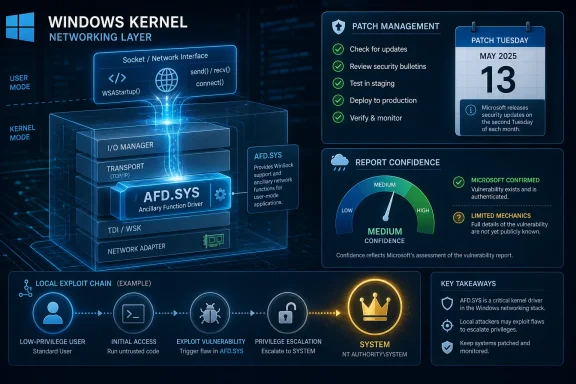
The Windows Ancillary Function Driver for WinSock, better known to administrators and reverse engineers as AFD.sys, is not a flashy component. It is the kernel-mode driver sitting beneath the Windows Sockets API, helping user-mode applications talk to the network stack. That location gives it a dangerous combination of reach and privilege: lots of code can interact with it, and the driver itself operates in kernel context.
Microsoft’s advisory title puts CVE-2026-34335 in the familiar category of elevation of privilege. In plain language, that means an attacker does not merely crash something or read a small piece of data; the successful outcome is a higher level of control on the affected system. For Windows endpoints, “higher” often means the boundary between a normal user and SYSTEM, or between a constrained process and a much broader security context.
The user-supplied MSRC language focuses on a CVSS metric that measures confidence in the vulnerability’s existence and the credibility of the known technical details. That is the Report Confidence idea in action: a vulnerability can be rumored, partially understood, externally researched, or fully acknowledged by the vendor. Microsoft’s publication of an advisory pushes CVE-2026-34335 toward the confirmed end of that spectrum, even if the company withholds the root-cause detail that exploit developers would prefer.
This is where many patch programs misread the signal. Sparse public detail does not mean low risk. It means the vendor is confirming enough for defenders to act, while intentionally limiting the technical breadcrumb trail.
An attacker who lands through a malicious document, stolen credentials, exposed remote access tool, or compromised helpdesk workflow may begin with ordinary user rights. That foothold is noisy, fragile, and often constrained by endpoint security controls. A kernel-level elevation bug changes the attacker’s economics by making persistence, credential dumping, tampering, and lateral movement much easier.
AFD.sys bugs are particularly uncomfortable because the component is old, central, and deeply embedded in normal Windows behavior. Administrators cannot simply disable WinSock plumbing across a fleet and declare victory. The exposed surface is part of the operating system’s basic contract with applications.
That does not make every AFD.sys CVE equally urgent. It does mean that “local” should not be treated as a synonym for “safe.” If an attacker already has the ability to run code locally, CVE-2026-34335 may be the kind of vulnerability that determines whether the incident remains contained.
At one end of the spectrum, a vulnerability may be alleged with limited details. At the other, the vendor has acknowledged it, assigned a CVE, issued update guidance, and described enough scope for defenders to map exposure. CVE-2026-34335 belongs to that second operational category because it appears in Microsoft’s Security Update Guide as a named Windows vulnerability.
The nuance is that confidence in existence is not the same as exploit availability. A confirmed vulnerability can have no public proof-of-concept. A public proof-of-concept can exist before broad exploitation. A bug can also remain quiet for weeks, only to become interesting after researchers diff the patch and reconstruct the vulnerable code path.
That is why the confidence metric should not be read as a panic button or a comfort blanket. It is closer to a weather report for the vulnerability-management team. The storm is real; the forecast does not necessarily tell you exactly where the first tree will fall.
That pattern should not be surprising. Kernel interfaces that accept requests from user mode are inherently delicate. They must validate buffers, handles, object lifetimes, permissions, and state transitions across a boundary where attackers are allowed to supply weird inputs. The ordinary job of a driver is to make legitimate software fast and compatible; the security job is to survive hostile software that behaves like a fuzzer with intent.
AFD.sys is especially attractive because networking is everywhere. Browsers, agents, updaters, remote management tools, local services, developer runtimes, games, VPN clients, and enterprise security products all live near the socket layer. Even if the vulnerable path is narrow, the component’s centrality gives researchers and attackers a reason to keep looking.
The recurring nature of AFD.sys advisories also creates a patch-diffing incentive. Once Microsoft ships an update, skilled researchers can compare old and new binaries to identify what changed. That is legitimate defensive research, but it also narrows the search space for would-be exploit authors.
But sparse disclosure is part of Microsoft’s balancing act. Too much detail can accelerate exploit development before customers patch. Too little detail can leave defenders unable to prioritize. The Security Update Guide is designed to sit between those extremes, giving enough information for risk-based patching while withholding the technical path to exploitation.
CVE-2026-34335 illustrates the uncomfortable middle ground. The advisory tells us that the vulnerability exists, that it affects Windows, and that it concerns AFD.sys privilege escalation. The confidence framing tells us Microsoft is not merely amplifying speculation. What it does not tell us is whether the bug is a memory-safety issue, an authorization mistake, a race, a reference-counting problem, or some other class of kernel defect.
For administrators, that absence should shape the response. Do not invent a root cause to make the ticket feel complete. Treat the confirmed advisory as sufficient justification to patch, then watch for subsequent public analysis that may sharpen detection and prioritization.
This is particularly relevant for kernel drivers. A small change in argument validation, object lifetime handling, locking, or access checks can reveal the vulnerable path. Once that path is understood, the question becomes whether exploitation is reliable across supported Windows builds and whether mitigations such as kernel pool hardening complicate the attack.
That timeline matters for enterprise patching. The day an advisory appears, a vulnerability may be known mainly to Microsoft, the reporting researcher, and a small number of internal teams. A week or two later, the patch itself may have taught the broader research community enough to reproduce the issue. The public exploit window is often shaped less by the advisory text than by how easy the binary diff is to interpret.
CVE-2026-34335’s limited public detail therefore should not invite delay. It should create a short, practical deadline: patch before the vulnerability becomes better understood outside the vendor channel.
The real compensating controls are identity hygiene, endpoint protection, application control, least privilege, and rapid update deployment. A well-managed Windows fleet limits who can log on locally, what can execute, which scripts can run, how credentials are cached, and whether tampering with security tools is possible. Those controls do not erase CVE-2026-34335, but they can keep it from becoming the easy middle step in an intrusion chain.
For servers, the calculus is slightly different. A local privilege escalation on a server is often paired with a service compromise, web shell, SQL injection, misconfigured scheduled task, or stolen admin-adjacent credential. Once the attacker has a low-privilege shell, kernel escalation can turn a service-account incident into full host compromise.
That is why vulnerability management should not treat workstations and servers as separate universes. The same bug can play different roles across the fleet, but the escalation outcome is valuable in both.
A supported Windows system can receive the relevant security update through the normal servicing channels. An unsupported or poorly inventoried system becomes a question mark. If it is still domain-joined, still used for line-of-business work, or still holding cached credentials, that question mark is a real risk.
The same problem appears in embedded, medical, industrial, and kiosk-style Windows deployments. These machines often run quietly for years, missed by endpoint management or excluded from standard reboot windows. A local privilege-escalation flaw may not sound dramatic until the “local” user is a vendor maintenance account, a compromised application service, or an operator console with broader network access than anyone remembers.
CVE-2026-34335 is therefore also an asset-management story. If you cannot say which Windows builds are exposed and which have received the fix, you do not have a vulnerability problem; you have an inventory problem expressing itself as a vulnerability problem.
A high-scoring local privilege-escalation bug on a locked-down kiosk may be less urgent than the same bug on a developer workstation full of credentials, signing keys, VPN profiles, and cloud tooling. A server that hosts an internal application with a history of low-privilege web-shell exposure may deserve faster treatment than a lightly used lab box. The base score cannot know that.
The Report Confidence metric adds another layer to this interpretation. It helps distinguish between uncertain claims and vendor-confirmed issues, but it still cannot tell you whether your EDR blocks a known exploit chain, whether your helpdesk tools run with dangerous permissions, or whether your developers routinely run unsigned binaries. Those are local facts.
The strongest patch programs use CVSS as input, not instruction. They combine vendor severity, exploitability assessment, exposure, asset criticality, threat intelligence, and operational constraints into a patch order that makes sense for their environment.
Administrators should also pay attention to reboot completion. Kernel-driver updates are especially prone to the classic enterprise failure mode: the patch is staged, the dashboard looks greenish, but the vulnerable binary remains active until restart. AFD.sys is not a browser extension that can be casually hot-swapped in every scenario.
Security teams should then look for signs that the vulnerability has moved from advisory to exploitation discourse. Public proof-of-concept code, exploit framework modules, threat-intelligence mentions, or sudden scanning chatter can change urgency. Even without those signals, a confirmed kernel elevation flaw should not be left to linger.
The better long-term response is to reduce the blast radius of the next local bug. Enforce least privilege. Remove stale local administrator rights. Harden remote management tools. Protect credentials. Use application control where feasible. Monitor for suspicious child processes, driver interactions, token manipulation, and post-exploitation behavior rather than expecting one CVE-specific detection rule to save the day.
A confirmed AFD.sys elevation-of-privilege flaw gives attackers a potential bridge from initial access to control. Its kernel location increases the consequence of successful exploitation. Its sparse advisory detail does not reduce the need to patch; if anything, it compresses the time available before independent analysis fills in the blanks.
The correct operational posture is neither panic nor complacency. Treat it as a credible, vendor-confirmed local escalation issue in a sensitive Windows component. Put it behind actively exploited internet-facing bugs if those exist in your environment, but ahead of cosmetic or low-impact issues that do not change an attacker’s privileges.
For home users, the answer is simpler. Let Windows Update do its job, restart when prompted, and do not postpone security updates indefinitely because nothing seems broken. Most people do not need to know what AFD.sys does; they only need to understand that a kernel networking component is not where they want known privilege bugs hanging around.
This is the uncomfortable bargain of a mature OS. Compatibility keeps old interfaces alive. Performance keeps complex code in the kernel. Security engineering keeps raising the cost of exploitation, but it does not make entire classes of bugs disappear overnight. Windows is safer than it used to be, and still full of components whose failure modes matter.
Microsoft’s advisory process reflects that reality. It publishes enough to tell defenders what to fix, not enough to satisfy curiosity, and sometimes not enough to settle prioritization debates. That leaves administrators with the hard part: translating a terse CVE entry into action across messy fleets.
CVE-2026-34335 should be read as one more vote for faster kernel patch deployment, better reboot discipline, and less tolerance for unmanaged Windows machines. The fact pattern is familiar. The operational consequence is still real.
That distinction matters because Windows privilege-escalation bugs live in the gray space between “not remotely exploitable” and “dangerous in the hands of anyone who already has code execution.” A local elevation-of-privilege flaw is rarely the first step in an intrusion, but it is often the step that turns a nuisance foothold into a machine takeover. CVE-2026-34335 is a reminder that defenders should read Microsoft’s vulnerability metadata as an operational signal, not as a complete technical narrative.
 Microsoft’s Quiet AFD.sys Advisory Says More Than It Appears To
The Windows Ancillary Function Driver for WinSock, better known to administrators and reverse engineers as AFD.sys, is not a flashy component. It is the kernel-mode driver sitting beneath the Windows Sockets API, helping user-mode applications talk to the network stack. That location gives it a dangerous combination of reach and privilege: lots of code can interact with it, and the driver itself operates in kernel context.Microsoft’s advisory title puts CVE-2026-34335 in the familiar category of elevation of privilege. In plain language, that means an attacker does not merely crash something or read a small piece of data; the successful outcome is a higher level of control on the affected system. For Windows endpoints, “higher” often means the boundary between a normal user and SYSTEM, or between a constrained process and a much broader security context.
The user-supplied MSRC language focuses on a CVSS metric that measures confidence in the vulnerability’s existence and the credibility of the known technical details. That is the Report Confidence idea in action: a vulnerability can be rumored, partially understood, externally researched, or fully acknowledged by the vendor. Microsoft’s publication of an advisory pushes CVE-2026-34335 toward the confirmed end of that spectrum, even if the company withholds the root-cause detail that exploit developers would prefer.
This is where many patch programs misread the signal. Sparse public detail does not mean low risk. It means the vendor is confirming enough for defenders to act, while intentionally limiting the technical breadcrumb trail.
Local Bugs Are Not Low-Stakes Bugs
The old enterprise instinct is to rank remote code execution first, browser bugs second, and local privilege escalation somewhere down the queue. That hierarchy made more sense when desktops were less exposed to phishing payloads, identity abuse, unmanaged software, and bring-your-own-device sprawl. In 2026, local privilege escalation is not a side story; it is frequently the second act.An attacker who lands through a malicious document, stolen credentials, exposed remote access tool, or compromised helpdesk workflow may begin with ordinary user rights. That foothold is noisy, fragile, and often constrained by endpoint security controls. A kernel-level elevation bug changes the attacker’s economics by making persistence, credential dumping, tampering, and lateral movement much easier.
AFD.sys bugs are particularly uncomfortable because the component is old, central, and deeply embedded in normal Windows behavior. Administrators cannot simply disable WinSock plumbing across a fleet and declare victory. The exposed surface is part of the operating system’s basic contract with applications.
That does not make every AFD.sys CVE equally urgent. It does mean that “local” should not be treated as a synonym for “safe.” If an attacker already has the ability to run code locally, CVE-2026-34335 may be the kind of vulnerability that determines whether the incident remains contained.
The Confidence Metric Is a Defender’s Weather Report
The quoted metric description is easy to skim past because it sounds like standards committee prose. But it is one of the more useful pieces of vulnerability metadata when the public advisory is thin. It asks a practical question: how sure are we that this bug is real, and how much reliable technical knowledge exists outside the vendor?At one end of the spectrum, a vulnerability may be alleged with limited details. At the other, the vendor has acknowledged it, assigned a CVE, issued update guidance, and described enough scope for defenders to map exposure. CVE-2026-34335 belongs to that second operational category because it appears in Microsoft’s Security Update Guide as a named Windows vulnerability.
The nuance is that confidence in existence is not the same as exploit availability. A confirmed vulnerability can have no public proof-of-concept. A public proof-of-concept can exist before broad exploitation. A bug can also remain quiet for weeks, only to become interesting after researchers diff the patch and reconstruct the vulnerable code path.
That is why the confidence metric should not be read as a panic button or a comfort blanket. It is closer to a weather report for the vulnerability-management team. The storm is real; the forecast does not necessarily tell you exactly where the first tree will fall.
AFD.sys Has Become a Recurring Patch Tuesday Character
CVE-2026-34335 does not arrive in isolation. The Windows Ancillary Function Driver has appeared repeatedly in Microsoft security advisories over the years, including several recent elevation-of-privilege entries. Some have involved improper access control, others use-after-free behavior, race conditions, or related kernel-memory hazards.That pattern should not be surprising. Kernel interfaces that accept requests from user mode are inherently delicate. They must validate buffers, handles, object lifetimes, permissions, and state transitions across a boundary where attackers are allowed to supply weird inputs. The ordinary job of a driver is to make legitimate software fast and compatible; the security job is to survive hostile software that behaves like a fuzzer with intent.
AFD.sys is especially attractive because networking is everywhere. Browsers, agents, updaters, remote management tools, local services, developer runtimes, games, VPN clients, and enterprise security products all live near the socket layer. Even if the vulnerable path is narrow, the component’s centrality gives researchers and attackers a reason to keep looking.
The recurring nature of AFD.sys advisories also creates a patch-diffing incentive. Once Microsoft ships an update, skilled researchers can compare old and new binaries to identify what changed. That is legitimate defensive research, but it also narrows the search space for would-be exploit authors.
Microsoft’s Sparse Disclosure Is a Tradeoff, Not an Accident
Security teams often complain that Microsoft advisories do not say enough. They are not wrong. A title, affected products, severity, CVSS vector, exploitability assessment, and mitigation notes rarely satisfy anyone trying to understand root cause.But sparse disclosure is part of Microsoft’s balancing act. Too much detail can accelerate exploit development before customers patch. Too little detail can leave defenders unable to prioritize. The Security Update Guide is designed to sit between those extremes, giving enough information for risk-based patching while withholding the technical path to exploitation.
CVE-2026-34335 illustrates the uncomfortable middle ground. The advisory tells us that the vulnerability exists, that it affects Windows, and that it concerns AFD.sys privilege escalation. The confidence framing tells us Microsoft is not merely amplifying speculation. What it does not tell us is whether the bug is a memory-safety issue, an authorization mistake, a race, a reference-counting problem, or some other class of kernel defect.
For administrators, that absence should shape the response. Do not invent a root cause to make the ticket feel complete. Treat the confirmed advisory as sufficient justification to patch, then watch for subsequent public analysis that may sharpen detection and prioritization.
Patch Diffing Turns Silence Into a Countdown
The modern vulnerability lifecycle does not end when Microsoft publishes an advisory. In many cases, that is when the public technical race begins. Researchers download the update, extract the changed binaries, compare them against prior versions, and work backward from the fix.This is particularly relevant for kernel drivers. A small change in argument validation, object lifetime handling, locking, or access checks can reveal the vulnerable path. Once that path is understood, the question becomes whether exploitation is reliable across supported Windows builds and whether mitigations such as kernel pool hardening complicate the attack.
That timeline matters for enterprise patching. The day an advisory appears, a vulnerability may be known mainly to Microsoft, the reporting researcher, and a small number of internal teams. A week or two later, the patch itself may have taught the broader research community enough to reproduce the issue. The public exploit window is often shaped less by the advisory text than by how easy the binary diff is to interpret.
CVE-2026-34335’s limited public detail therefore should not invite delay. It should create a short, practical deadline: patch before the vulnerability becomes better understood outside the vendor channel.
The Practical Risk Starts With Footholds, Not Firewalls
No firewall rule can fully solve a local privilege-escalation bug in a kernel networking driver. That is the wrong layer of control. If the attacker has reached the point of running code on the endpoint, network perimeter logic has already failed or been bypassed.The real compensating controls are identity hygiene, endpoint protection, application control, least privilege, and rapid update deployment. A well-managed Windows fleet limits who can log on locally, what can execute, which scripts can run, how credentials are cached, and whether tampering with security tools is possible. Those controls do not erase CVE-2026-34335, but they can keep it from becoming the easy middle step in an intrusion chain.
For servers, the calculus is slightly different. A local privilege escalation on a server is often paired with a service compromise, web shell, SQL injection, misconfigured scheduled task, or stolen admin-adjacent credential. Once the attacker has a low-privilege shell, kernel escalation can turn a service-account incident into full host compromise.
That is why vulnerability management should not treat workstations and servers as separate universes. The same bug can play different roles across the fleet, but the escalation outcome is valuable in both.
Windows 10’s Long Goodbye Raises the Stakes
By 2026, many organizations are still dealing with the operational aftermath of Windows 10’s end-of-support transition. Extended security update arrangements, hardware refresh cycles, application compatibility exceptions, and budget delays have created a messy endpoint landscape. That matters for vulnerabilities like CVE-2026-34335 because kernel fixes are not something administrators can safely hand-wave away.A supported Windows system can receive the relevant security update through the normal servicing channels. An unsupported or poorly inventoried system becomes a question mark. If it is still domain-joined, still used for line-of-business work, or still holding cached credentials, that question mark is a real risk.
The same problem appears in embedded, medical, industrial, and kiosk-style Windows deployments. These machines often run quietly for years, missed by endpoint management or excluded from standard reboot windows. A local privilege-escalation flaw may not sound dramatic until the “local” user is a vendor maintenance account, a compromised application service, or an operator console with broader network access than anyone remembers.
CVE-2026-34335 is therefore also an asset-management story. If you cannot say which Windows builds are exposed and which have received the fix, you do not have a vulnerability problem; you have an inventory problem expressing itself as a vulnerability problem.
The CVSS Score Is a Starting Gun, Not a Finish Line
CVSS is useful because it gives teams a common language. Attack vector, attack complexity, privileges required, user interaction, scope, confidentiality, integrity, and availability impact are better than vibes. But CVSS is not a substitute for local context.A high-scoring local privilege-escalation bug on a locked-down kiosk may be less urgent than the same bug on a developer workstation full of credentials, signing keys, VPN profiles, and cloud tooling. A server that hosts an internal application with a history of low-privilege web-shell exposure may deserve faster treatment than a lightly used lab box. The base score cannot know that.
The Report Confidence metric adds another layer to this interpretation. It helps distinguish between uncertain claims and vendor-confirmed issues, but it still cannot tell you whether your EDR blocks a known exploit chain, whether your helpdesk tools run with dangerous permissions, or whether your developers routinely run unsigned binaries. Those are local facts.
The strongest patch programs use CVSS as input, not instruction. They combine vendor severity, exploitability assessment, exposure, asset criticality, threat intelligence, and operational constraints into a patch order that makes sense for their environment.
The Right Response Is Boring, Which Is Why It Works
There is no clever workaround that should outrank installing the security update. For CVE-2026-34335, the sane first move is to identify affected Windows systems, deploy Microsoft’s fix through normal servicing channels, and verify compliance. Everything else is secondary.Administrators should also pay attention to reboot completion. Kernel-driver updates are especially prone to the classic enterprise failure mode: the patch is staged, the dashboard looks greenish, but the vulnerable binary remains active until restart. AFD.sys is not a browser extension that can be casually hot-swapped in every scenario.
Security teams should then look for signs that the vulnerability has moved from advisory to exploitation discourse. Public proof-of-concept code, exploit framework modules, threat-intelligence mentions, or sudden scanning chatter can change urgency. Even without those signals, a confirmed kernel elevation flaw should not be left to linger.
The better long-term response is to reduce the blast radius of the next local bug. Enforce least privilege. Remove stale local administrator rights. Harden remote management tools. Protect credentials. Use application control where feasible. Monitor for suspicious child processes, driver interactions, token manipulation, and post-exploitation behavior rather than expecting one CVE-specific detection rule to save the day.
Why This One Belongs Near the Front of the Queue
CVE-2026-34335 is not the kind of vulnerability that will dominate mainstream headlines. It does not offer the clean fear narrative of a wormable remote exploit or a catastrophic cloud outage. But for Windows administrators, it sits in a category that repeatedly matters during real intrusions.A confirmed AFD.sys elevation-of-privilege flaw gives attackers a potential bridge from initial access to control. Its kernel location increases the consequence of successful exploitation. Its sparse advisory detail does not reduce the need to patch; if anything, it compresses the time available before independent analysis fills in the blanks.
The correct operational posture is neither panic nor complacency. Treat it as a credible, vendor-confirmed local escalation issue in a sensitive Windows component. Put it behind actively exploited internet-facing bugs if those exist in your environment, but ahead of cosmetic or low-impact issues that do not change an attacker’s privileges.
For home users, the answer is simpler. Let Windows Update do its job, restart when prompted, and do not postpone security updates indefinitely because nothing seems broken. Most people do not need to know what AFD.sys does; they only need to understand that a kernel networking component is not where they want known privilege bugs hanging around.
The AFD.sys Lesson Microsoft Keeps Teaching
The recurring appearance of AFD.sys in Windows advisories points to a larger truth about operating-system security. The most important attack surfaces are not always the most visible ones. A driver that almost nobody thinks about can become a recurring focus because it is privileged, reachable, and essential.This is the uncomfortable bargain of a mature OS. Compatibility keeps old interfaces alive. Performance keeps complex code in the kernel. Security engineering keeps raising the cost of exploitation, but it does not make entire classes of bugs disappear overnight. Windows is safer than it used to be, and still full of components whose failure modes matter.
Microsoft’s advisory process reflects that reality. It publishes enough to tell defenders what to fix, not enough to satisfy curiosity, and sometimes not enough to settle prioritization debates. That leaves administrators with the hard part: translating a terse CVE entry into action across messy fleets.
CVE-2026-34335 should be read as one more vote for faster kernel patch deployment, better reboot discipline, and less tolerance for unmanaged Windows machines. The fact pattern is familiar. The operational consequence is still real.
The Patch Queue Should Not Wait for a Better Story
The most concrete lessons from CVE-2026-34335 are not exotic. They are the ordinary disciplines that separate mature Windows operations from wishful thinking.- CVE-2026-34335 is a Microsoft-confirmed Windows elevation-of-privilege vulnerability in the Ancillary Function Driver for WinSock, so defenders should treat it as real even if public technical detail remains limited.
- A local attack vector does not make the bug harmless, because local privilege escalation is often the step that turns initial code execution into durable system-level control.
- The confidence metric is useful because it separates vendor-acknowledged vulnerabilities from thinner public claims, but it does not prove whether exploit code is already circulating.
- AFD.sys is a sensitive component because it sits in the kernel networking path and is reachable through normal Windows socket-related behavior.
- Patch deployment should include reboot verification, since kernel-driver fixes may not fully protect a system until the updated driver is actually loaded.
- Organizations should prioritize exposed, credential-rich, and hard-to-rebuild Windows assets first, especially servers, developer workstations, remote-access hosts, and systems with weak local privilege controls.
References
- Primary source: MSRC
Published: 2026-06-09T07:00:00-07:00
Security Update Guide - Microsoft Security Response Center
 msrc.microsoft.com
- Related coverage: datacomm.com
- Related coverage: rapid7.com

Rapid7
Rapid7's VulnDB is curated repository of vetted computer software exploits and exploitable vulnerabilities.www.rapid7.com - Related coverage: netservicesgroup.com

CVE-2026-24293 Windows Ancillary Function Driver for WinSock Elevation of Privilege Vulnerability - Network Services Group
Acknowledgement added. This is an informational change only.www.netservicesgroup.com - Related coverage: nccgroup.com
- Related coverage: mindray.com
- Related coverage: aha.org
- Related coverage: absolute.com
- Official source: microsoft.com
MSRC - Microsoft Security Response Center
The Microsoft Security Response Center is part of the defender community and on the front line of security response evolution. For over twenty years, we have been engaged with security researchers working to protect customers and the broader ecosystem.www.microsoft.com - Official source: learn.microsoft.com

Security Advisories and Bulletins
learn.microsoft.com - Related coverage: sra.io
- Related coverage: windowsforum.com

CVE-2026-25176 AFD.sys Kernel Elevation: Patch Windows WinSock Now
Microsoft today confirmed a high‑severity elevation‑of‑privilege flaw in the Windows Ancillary Function Driver for WinSock (AFD.sys) tracked as CVE‑2026‑25176, a kernel‑level improper access control defect that — if left unpatched — allows a locally authorized, low‑privileged user to elevate to... windowsforum.com
- Related coverage: fox-it.com
