

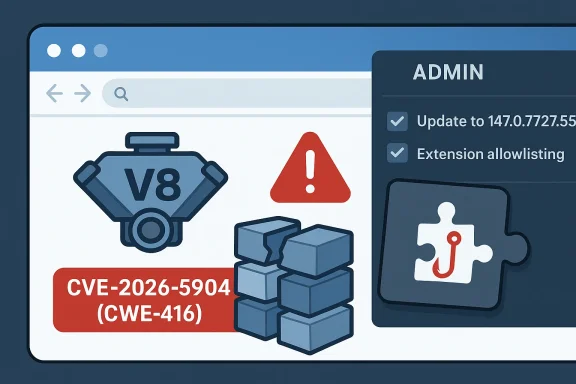
Chromium’s CVE-2026-5904 is a reminder that even “low-severity” browser bugs can become meaningful security issues when they sit inside a component as central as V8 and are reachable through a malicious extension. Google says the flaw is a use-after-free in Chrome versions prior to 147.0.7727.55, and the public record ties it to heap corruption via a crafted Chrome extension. Microsoft’s Security Update Guide has now surfaced the issue for enterprise administrators, underscoring how a browser bug in the consumer stack can quickly become an endpoint-management concern.
The practical takeaway is straightforward: this is not the kind of Chrome flaw that depends on a drive-by webpage alone. Instead, it requires a user to be persuaded to install a rogue extension, which reduces the attack surface but does not eliminate the risk. In a world where extensions routinely request broad permissions, the line between “browser feature” and “execution environment” is thinner than many users realize.
Google published the fix in its Stable Channel Update for Desktop on April 7, 2026, identifying Chrome 147.0.7727.55 as the first safe desktop build for Windows, Mac, and Linux. The accompanying release note lists multiple security fixes and points readers to the Chromium issue tracker for further details. That timing matters, because Chrome 147 is the branch that also carried a cluster of other V8 and memory-safety fixes, suggesting that the JavaScript engine remained a high-pressure target throughout the March-to-April release cycle. (chromereleases.googleblog.com)
The vulnerability record itself was published on April 8, 2026, and the NVD entry was populated the same day. The wording is unusually specific: an attacker must convince a user to install a malicious extension, after which the bug may be used to exploit heap corruption through a crafted Chrome Extension. That is a narrower scenario than the average browser zero-day, but it is still highly relevant because browser extensions are often granted deep access to pages, sessions, and local data.
The fact that the issue is labeled Chromium security severity: Low should not be read as “harmless.” Google’s severity scale is a product-centric judgment that weighs exploitability, reach, and expected impact in the context of Chrome’s defenses. A low-severity label can still cover memory corruption, and memory corruption in a JIT-heavy engine like V8 is never trivial to investigate, triage, or contain.
Microsoft’s inclusion of the CVE in the Security Update Guide reflects a broader change in how platform vendors handle cross-product dependencies. Microsoft has emphasized the Security Update Guide as a centralized source for security events and notes that it is designed to surface both CVEs and related advisory content for customer visibility. That does not mean Microsoft is the affected vendor here; it means defenders in Microsoft-managed environments increasingly need to track browser CVEs as part of their patch governance.
Historically, Chrome’s V8 engine has been one of the most frequently patched areas in the browser. The reason is simple: V8 sits at the crossroads of performance and risk, and its optimizations create the kind of memory-safety edge cases that attackers love to hunt. In that sense, CVE-2026-5904 is less an outlier than another entry in a long-running pattern: complex runtime code, fast release cadence, and attackers who look for the narrowest path to code execution or corruption. (chromereleases.googleblog.com)
The public description says an attacker could potentially exploit heap corruption through a crafted extension. That detail is especially important because heap corruption is often the “bridge” bug class, not the final goal. Attackers typically chain it with sandbox escapes, logic bypasses, or permission abuse, turning a technical flaw into a user-impacting compromise.
A useful way to think about UAF bugs is that the program still “remembers” something that the allocator has already repurposed. If the freed region is recycled for another object, the stale pointer may point into a different data structure altogether. That creates the possibility of controlled confusion, not just random failure.
The result is a hybrid attack model. The exploit is not purely technical, because it needs a victim to accept installation. Yet it is also not merely phishing, because the extension then becomes an in-browser execution vehicle with access to sensitive contexts. That combination is exactly why extension governance has become such a major security topic in enterprise Chrome management.
The enterprise problem is not only whether a bug exists, but whether the organization can tell which extensions are installed and which are permitted. If the answer is “not easily,” then a bug like CVE-2026-5904 becomes a policy enforcement issue as much as a vulnerability issue. That is why browser control is increasingly handled like endpoint control, not user preference.
This matters because Chrome’s update model has become one of its strongest defenses. Google can push fixes quickly, but only if organizations allow auto-update behavior to work as intended. In practice, some enterprises delay browser updates because of compatibility testing, line-of-business web apps, or internal change windows. Those delays are understandable, but they extend the exposure period. (chromereleases.googleblog.com)
A second complication is that browser versioning is not always uniform across platforms. Google’s notes show desktop, Android, iOS, and ChromeOS moving on different schedules and branches. That means inventory teams need platform-aware patch verification, not a single “Chrome is updated” checkbox. (chromereleases.googleblog.com)
Memory-safety flaws in V8 are not just “engine bugs.” They are reminders that the modern web is executed by a native runtime that must be both fast and secure under adversarial inputs. Every optimization that makes JavaScript faster can, under the wrong conditions, create a new opportunity for an attacker to steer control flow or memory layout. (chromereleases.googleblog.com)
In this case, the presence of the malicious-extension requirement likely reduced the score in Google’s assessment. But if an organization permits broad extension installation, or if users routinely install helper add-ons without scrutiny, that risk becomes much less theoretical. Low severity does not mean low business impact when the victim base is large enough.
Microsoft has made a point of positioning the Security Update Guide as a centralized, authoritative source for public vulnerability information. That includes integrating advisory content and broader security event visibility into the guide, which helps enterprises track third-party software alongside Microsoft patches. In practical terms, this acknowledges the reality that modern Windows environments are software ecosystems, not siloed product stacks.
That visibility is valuable, but it can also create complacency if teams assume “it’s in the guide, therefore it’s handled.” A CVE is only managed when the affected build is replaced, verified, and broadly deployed. Anything short of that is just a tracking entry.
The next few weeks will show whether organizations treat this as a routine browser patch or as a prompt to harden extension policy more aggressively. The latter would be the wiser response, because the exploit path here is as much about governance as it is about code. If defenders only patch and move on, the next extension-based memory bug will arrive in an environment that still makes it easy to install the wrong thing.
Source: NVD / Chromium Security Update Guide - Microsoft Security Response Center
The practical takeaway is straightforward: this is not the kind of Chrome flaw that depends on a drive-by webpage alone. Instead, it requires a user to be persuaded to install a rogue extension, which reduces the attack surface but does not eliminate the risk. In a world where extensions routinely request broad permissions, the line between “browser feature” and “execution environment” is thinner than many users realize.
 Background
Google published the fix in its Stable Channel Update for Desktop on April 7, 2026, identifying Chrome 147.0.7727.55 as the first safe desktop build for Windows, Mac, and Linux. The accompanying release note lists multiple security fixes and points readers to the Chromium issue tracker for further details. That timing matters, because Chrome 147 is the branch that also carried a cluster of other V8 and memory-safety fixes, suggesting that the JavaScript engine remained a high-pressure target throughout the March-to-April release cycle. (chromereleases.googleblog.com)The vulnerability record itself was published on April 8, 2026, and the NVD entry was populated the same day. The wording is unusually specific: an attacker must convince a user to install a malicious extension, after which the bug may be used to exploit heap corruption through a crafted Chrome Extension. That is a narrower scenario than the average browser zero-day, but it is still highly relevant because browser extensions are often granted deep access to pages, sessions, and local data.
The fact that the issue is labeled Chromium security severity: Low should not be read as “harmless.” Google’s severity scale is a product-centric judgment that weighs exploitability, reach, and expected impact in the context of Chrome’s defenses. A low-severity label can still cover memory corruption, and memory corruption in a JIT-heavy engine like V8 is never trivial to investigate, triage, or contain.
Microsoft’s inclusion of the CVE in the Security Update Guide reflects a broader change in how platform vendors handle cross-product dependencies. Microsoft has emphasized the Security Update Guide as a centralized source for security events and notes that it is designed to surface both CVEs and related advisory content for customer visibility. That does not mean Microsoft is the affected vendor here; it means defenders in Microsoft-managed environments increasingly need to track browser CVEs as part of their patch governance.
Historically, Chrome’s V8 engine has been one of the most frequently patched areas in the browser. The reason is simple: V8 sits at the crossroads of performance and risk, and its optimizations create the kind of memory-safety edge cases that attackers love to hunt. In that sense, CVE-2026-5904 is less an outlier than another entry in a long-running pattern: complex runtime code, fast release cadence, and attackers who look for the narrowest path to code execution or corruption. (chromereleases.googleblog.com)
Why this matters for Windows users
On Windows endpoints, Chrome is often treated as commodity software, but it has become one of the most operationally important applications in the fleet. Enterprise identity, SaaS access, collaboration tools, and admin portals all run through the browser. When a browser security update lands, it is rarely “just a browser update”; it is a change to the control plane of daily work.- Chrome 147.0.7727.55 is the important patched desktop build. (chromereleases.googleblog.com)
- The issue centers on V8, Chrome’s JavaScript engine.
- The attack scenario depends on a malicious extension rather than a bare webpage.
- The memory-safety class is use-after-free, mapped to CWE-416.
What Google Actually Fixed
The core issue is a use-after-free condition in V8, which means code attempted to reference memory after it had already been released back to the allocator. In managed systems, that can lead to crashes. In native code, and particularly in performance-sensitive browser internals, it can lead to controlled corruption, process instability, and occasionally a path toward code execution.The public description says an attacker could potentially exploit heap corruption through a crafted extension. That detail is especially important because heap corruption is often the “bridge” bug class, not the final goal. Attackers typically chain it with sandbox escapes, logic bypasses, or permission abuse, turning a technical flaw into a user-impacting compromise.
Why use-after-free bugs are so persistent
Use-after-free bugs are difficult because memory lifetimes in optimized software are complicated. V8 is not a simple interpreter; it is a highly tuned engine with just-in-time compilation, garbage-collection semantics, and complex object lifecycles. Those features are part of why Chrome is fast, but they also widen the surface area where lifetime mistakes can appear. (chromereleases.googleblog.com)A useful way to think about UAF bugs is that the program still “remembers” something that the allocator has already repurposed. If the freed region is recycled for another object, the stale pointer may point into a different data structure altogether. That creates the possibility of controlled confusion, not just random failure.
- Memory lifetime bugs are often exploitable only when layout and timing align.
- Heap grooming can make corruption more predictable.
- Extensions increase complexity because they expand trust boundaries.
- JIT engines tend to be rich sources of edge cases.
- Browser process isolation reduces impact but does not erase it.
The Extension Angle Changes the Threat Model
Most users think of browser extensions as add-ons that improve productivity, but security teams know they are also persistent, privileged code running beside web content. The CVE description specifically says the attacker had to convince a user to install a malicious extension, which means social engineering is part of the exploit chain. That dramatically changes the defenses that matter most.The result is a hybrid attack model. The exploit is not purely technical, because it needs a victim to accept installation. Yet it is also not merely phishing, because the extension then becomes an in-browser execution vehicle with access to sensitive contexts. That combination is exactly why extension governance has become such a major security topic in enterprise Chrome management.
Enterprise versus consumer exposure
For consumers, the biggest risk is reputation and account compromise. A rogue extension can read pages, alter content, intercept authentication flows, and harvest session data. For enterprises, the stakes are higher because unmanaged extensions can collide with SSO, admin portals, internal SaaS apps, and policy-sensitive workflows.The enterprise problem is not only whether a bug exists, but whether the organization can tell which extensions are installed and which are permitted. If the answer is “not easily,” then a bug like CVE-2026-5904 becomes a policy enforcement issue as much as a vulnerability issue. That is why browser control is increasingly handled like endpoint control, not user preference.
- Malicious extensions can be distributed through phishing, fake productivity sites, or impersonated vendor portals.
- Users often over-trust the browser’s permission UI.
- Enterprise policy can limit extension installation, but only if it is actively enforced.
- Security teams need inventory visibility, not just patch visibility.
What the Chrome Release Cadence Tells Us
Chrome’s April 2026 release train shows how rapidly the browser ecosystem is moving. Just days before the CVE became public, Google was already pushing 147.0.7727.55 to stable desktop users and corresponding builds to Android, while early stable and beta channels were advancing toward 148. That cadence leaves little room for hesitation once a security fix is identified. (chromereleases.googleblog.com)This matters because Chrome’s update model has become one of its strongest defenses. Google can push fixes quickly, but only if organizations allow auto-update behavior to work as intended. In practice, some enterprises delay browser updates because of compatibility testing, line-of-business web apps, or internal change windows. Those delays are understandable, but they extend the exposure period. (chromereleases.googleblog.com)
Why version pinning can cut both ways
Version pinning is useful in regulated environments, and there are legitimate reasons to slow rollout. Yet security teams should be honest about the tradeoff: every extra day on an old browser build is another day a public CVE remains usable. That is especially true when the fix is already in a stable build and the affected component is a core runtime like V8. (chromereleases.googleblog.com)A second complication is that browser versioning is not always uniform across platforms. Google’s notes show desktop, Android, iOS, and ChromeOS moving on different schedules and branches. That means inventory teams need platform-aware patch verification, not a single “Chrome is updated” checkbox. (chromereleases.googleblog.com)
- Auto-update is the best protection when it is enabled and unobstructed.
- Testing rings should be short for browser security releases.
- Extended Stable can help with compatibility, but it is not a security exemption.
- Mobile and desktop release timing can diverge.
- Policy enforcement matters more than user awareness in large fleets.
How This Fits a Broader Pattern in V8 Security
V8 has been a recurring hotspot because browser engines are among the most aggressively optimized pieces of software in modern computing. Google’s own release notes around this period include multiple V8 issues, including use-after-free, type confusion, and out-of-bounds memory problems. That concentration is not surprising; it is a reflection of where the complexity lives. (chromereleases.googleblog.com)Memory-safety flaws in V8 are not just “engine bugs.” They are reminders that the modern web is executed by a native runtime that must be both fast and secure under adversarial inputs. Every optimization that makes JavaScript faster can, under the wrong conditions, create a new opportunity for an attacker to steer control flow or memory layout. (chromereleases.googleblog.com)
The security significance of “low” in Google’s taxonomy
Google’s Low severity label can sound reassuring, but it should be interpreted carefully. The company’s labels are about relative urgency and exposure, not whether a bug belongs on a patch list. For defenders, the actionable question is not “low or high?” but “what is the reachable attack surface, and do we control it?”In this case, the presence of the malicious-extension requirement likely reduced the score in Google’s assessment. But if an organization permits broad extension installation, or if users routinely install helper add-ons without scrutiny, that risk becomes much less theoretical. Low severity does not mean low business impact when the victim base is large enough.
- V8 bugs often cluster around memory lifetime and type safety.
- Browser hardening reduces, but does not eliminate, exploitability.
- Attackers frequently chain browser bugs with social engineering.
- Enterprise policy choices can make a “low” bug much more important.
Microsoft’s Role Is About Visibility, Not Ownership
It is worth being precise about Microsoft’s involvement. Microsoft is not the vendor fixing CVE-2026-5904; Google is. Microsoft’s Security Update Guide is simply reflecting the CVE so that customers using Microsoft-centric asset and patch workflows can see the issue in one place. That may seem like a small distinction, but it matters for how organizations route responsibility.Microsoft has made a point of positioning the Security Update Guide as a centralized, authoritative source for public vulnerability information. That includes integrating advisory content and broader security event visibility into the guide, which helps enterprises track third-party software alongside Microsoft patches. In practical terms, this acknowledges the reality that modern Windows environments are software ecosystems, not siloed product stacks.
Why this matters for patch management
Most enterprises do not patch Chrome by hand on every endpoint. They use device management, software distribution, or browser policy frameworks to stage updates. When a browser CVE appears in Microsoft’s guide, it can be easier for Windows-focused teams to route it into existing compliance dashboards and remediation workflows.That visibility is valuable, but it can also create complacency if teams assume “it’s in the guide, therefore it’s handled.” A CVE is only managed when the affected build is replaced, verified, and broadly deployed. Anything short of that is just a tracking entry.
- Microsoft’s guide helps surface third-party browser risk.
- It does not replace Chrome release notes or Google’s advisory cadence.
- Security teams still need local inventory and compliance checks.
- Browser updates should be tracked like any other endpoint security control.
Strengths and Opportunities
The good news is that this vulnerability was fixed quickly, it has a narrow delivery mechanism, and Chrome’s automatic update model gives defenders a fast path to risk reduction. Just as importantly, the public disclosure is specific enough that security teams can focus policy on extension governance rather than treating every browser session as equally exposed. That gives organizations a chance to improve both patching and browser control at the same time.- The patch is already available in Chrome 147.0.7727.55. (chromereleases.googleblog.com)
- The attack requires user interaction, which lowers opportunistic exposure.
- Enterprises can use the event to tighten extension allowlisting.
- The issue reinforces the value of browser auto-update.
- Security teams can improve asset inventory and version verification.
- The CVE creates a concrete opportunity to review least-privilege browser policy.
- It also supports a broader move toward centralized vulnerability visibility in Microsoft-managed environments.
Risks and Concerns
The biggest concern is not that CVE-2026-5904 is broadly exploitable in the wild today, but that it fits a class of bugs that attackers understand well. If organizations tolerate loose extension policies, the “malicious extension” prerequisite becomes much easier to satisfy than it sounds on paper. The other concern is update lag: even a narrow exploit window can matter when fleets take days or weeks to converge on a new browser build.- Extension abuse can bypass user assumptions about browser trust.
- Heap corruption bugs are historically attractive to exploit developers.
- Delayed patching leaves stale builds exposed longer than necessary.
- Users may ignore browser updates because they seem low priority.
- Enterprises may underestimate the business impact of a “low” severity label.
- Mixed version states across desktop, mobile, and ChromeOS complicate response.
- Visibility without enforcement can create a false sense of safety.
Looking Ahead
The real story of CVE-2026-5904 is not just the bug itself, but what it says about the browser as a security boundary in 2026. Chrome remains fast, heavily defended, and unusually responsive to disclosure, yet it still depends on a large memory-unsafe codebase that will continue to produce exploitable edge cases. That is the uncomfortable bargain of modern performance software.The next few weeks will show whether organizations treat this as a routine browser patch or as a prompt to harden extension policy more aggressively. The latter would be the wiser response, because the exploit path here is as much about governance as it is about code. If defenders only patch and move on, the next extension-based memory bug will arrive in an environment that still makes it easy to install the wrong thing.
Key items to watch
- Whether enterprises accelerate rollout to 147.0.7727.55 and later stable builds. (chromereleases.googleblog.com)
- Whether security teams use the CVE to tighten extension installation policy.
- Whether Google provides additional technical detail through the Chromium issue tracker.
- Whether downstream security vendors re-score the issue as more telemetry emerges.
- Whether similar V8 bugs appear in subsequent Chrome 147 and 148 release notes. (chromereleases.googleblog.com)
Source: NVD / Chromium Security Update Guide - Microsoft Security Response Center
