

Google disclosed CVE-2026-7356 on April 28, 2026, as a high-severity use-after-free flaw in Chrome’s Navigation component, fixed in Chrome 147.0.7727.138 and later, with Microsoft tracking the Chromium issue for Edge through its Security Update Guide. The bug is not the loudest entry in the week’s browser patch pile, but it is the sort that should make desktop administrators uneasy. It sits in the machinery that decides where a browser is going next, and it can reportedly be reached with a crafted HTML page. That combination turns a routine browser update into a reminder that the web browser is still the most exposed application in the Windows estate.
The phrase “use after free in Navigation” sounds almost antiseptic, as if the problem were tucked away in a corner of the browser used only when a tab changes pages. In practice, navigation is one of the browser’s great traffic-control systems. It handles document transitions, cross-origin boundaries, redirects, process handoffs, history state, and the uneasy choreography between user intent and hostile web content.
A use-after-free vulnerability is old-school memory corruption: software keeps using a chunk of memory after it has been released. If an attacker can influence what lands in that freed space before the browser reaches back for it, a crash can become code execution. That does not mean every such bug is trivial to weaponize, but it does mean the failure mode is not merely cosmetic.
CVE-2026-7356 is described as allowing a remote attacker to execute arbitrary code via a crafted HTML page in Chrome versions before 147.0.7727.138. The attack path still requires user interaction in the ordinary web sense: someone must land on, or be driven toward, malicious content. In 2026, that is not much of a barrier. Advertising chains, compromised WordPress sites, poisoned search results, and targeted links have spent two decades proving that browsers are reachable.
The more important point is architectural. Chrome and Edge are heavily sandboxed, and a renderer compromise is not automatically a full-machine compromise. But attackers do not need every individual bug to be the whole chain. A reliable browser memory corruption primitive can be paired with a sandbox escape, credential theft, extension abuse, session hijacking, or simple data exfiltration from the browser context itself.
That matters because defenders often triage browser updates by asking whether this CVE is known exploited. There is no public indication in the advisory text that CVE-2026-7356 itself was under active exploitation at disclosure. But the patch did not arrive in a quiet month, and it did not arrive alone. A browser release with multiple critical and high-severity memory-safety fixes should not be treated as optional merely because one CVE lacks the “exploited in the wild” label.
Google’s own disclosure pattern is also familiar. Bug details are commonly restricted until a majority of users have updated, which is prudent but frustrating. Administrators want exploitability details, proof-of-concept status, and affected code paths. Vendors want to avoid handing attackers a diff-to-exploit roadmap while the population is still exposed.
That tension is not going away. In fact, the Chromium ecosystem has made it worse by concentrating enormous desktop-market share around a shared engine. A single Chromium flaw ripples through Chrome, Edge, Brave, Vivaldi, Opera, Electron-based apps, and countless embedded web views, even if each downstream vendor ships on a slightly different calendar.
That mismatch is a perennial source of confusion. An admin looking for Chrome 147.0.7727.138 on an Edge fleet will not find it, because Edge has its own versioning scheme layered over Chromium. The question is not whether the numbers match; it is whether the Edge security release that includes the Chromium fixes has landed and actually deployed.
This is where browser security becomes less about CVSS and more about plumbing. Edge updates through Microsoft Edge Update, Chrome through Google Update or enterprise-managed channels, and third-party Chromium browsers through their own mechanisms. On a home PC, “relaunch to update” is an annoyance. In a managed estate, it is an availability, compliance, and user-behavior problem.
The browser can download the fix and still remain vulnerable until restart. That small operational detail has haunted browser patching for years. A laptop that sleeps instead of reboots, a kiosk session that never closes, a call-center desktop with pinned web apps, or a developer workstation running multiple profiles can sit on the wrong side of the patch line long after the update package is technically present.
The missing NVD score at initial publication is less interesting than the shape of the vector. A remote attacker, a crafted page, no prior account on the target system, and high impact is exactly the model that has driven browser emergency patches for years. User interaction is the one moderating factor, and the modern web is essentially an industrial system for generating user interaction.
The severity also cannot be read in isolation from the rest of the April 28 update. CVE-2026-7356 is high, not critical, but it shipped next to critical use-after-free flaws in Canvas, Accessibility, Views, and iOS-related code. For defenders, the release is the unit of action. You do not patch one CVE; you move the browser to a build that closes the batch.
The uncomfortable truth is that CVSS has always been a clumsy fit for browsers. The browser is both an application and a platform, both a document viewer and an identity hub, both a sandboxed renderer and the front door to SaaS. A code-execution bug in a browser does not need to own the kernel to do damage. It may only need to read the right token, intercept the right session, or stage the next exploit.
Chromium has invested heavily in mitigations, fuzzing, sanitizers, site isolation, process sandboxing, and hardening. Those investments matter. They turn many bugs into crashes, force exploit writers to chain vulnerabilities, and raise the cost of reliable compromise. But they do not erase the root class.
The industry’s answer is increasingly memory-safe languages and safer subsystems, but browsers are too large and too performance-sensitive to be rewritten by manifesto. Chromium will continue to be a hybrid machine: hardened legacy C++, newer safer components where possible, and a permanent security engineering race against the next dangling pointer. That is not failure; it is the reality of maintaining one of the most complex applications ever shipped to consumers.
For Windows administrators, the lesson is not “Chromium is unsafe” in some simplistic sense. The lesson is that browser patch cadence is security architecture. You cannot compensate for slow browser updates with endpoint detection alone, because a browser exploit can live in the narrow gap between disclosure, patch availability, restart, and detection telemetry.
The user-facing question “Are we missing a CPE here?” is almost comic in this context. Of course the software ecosystem is missing clean mapping. The web platform has escaped the neat boundaries of “one product, one vendor, one version.” Chromium is a shared substrate, and the security world’s naming systems still prefer boxes.
This matters for scanners. A vulnerability-management platform may correctly flag Chrome and miss an embedded Chromium runtime. It may flag Edge based on Chromium lineage before Microsoft has shipped its corresponding build. It may mark Linux Chromium packages “not affected” because the distribution delivers the browser through a different packaging path. Every one of those outcomes is defensible from a database perspective and potentially misleading from an operational one.
The better inventory question is not “Which CPEs match CVE-2026-7356?” It is “Which browsers and Chromium-derived runtimes can render untrusted web content in my environment, and are they on a build that includes the April 28 Chromium security fixes?” That is harder to automate, but it is the question attackers effectively ask.
That is not inherently bad. Microsoft gets the benefits of Chromium’s engineering scale, and Windows admins get a browser with Group Policy, Intune controls, SmartScreen, update policies, and deep enterprise integration. But it also means that a Chrome security bulletin is often an Edge planning document.
Microsoft’s April 30 Edge update illustrates the normal rhythm. Google ships Chromium security fixes; Microsoft incorporates them into Edge stable; admins then need to verify that Edge actually moved. In healthy environments, that gap is brief. In brittle environments, it becomes a standing exposure.
The WebView2 runtime deserves particular attention. Many Windows desktop applications now rely on it to render web content. That is often better than every vendor embedding its own stale browser engine, but it also makes the runtime part of the security surface. If WebView2 is centrally updated, good. If an application ships or pins a runtime in a way that lags, the estate inherits a browser problem without a browser icon.
A crafted HTML page is a delivery mechanism, not a product boundary. The same hostile content might be opened in a user’s default browser, previewed inside a collaboration app, displayed in an embedded help pane, or rendered by a thick client that quietly depends on Chromium. A vulnerability in navigation logic is especially uncomfortable because navigation is part of how browsers enforce site boundaries and lifecycle transitions.
This does not mean CVE-2026-7356 automatically affects every Chromium-adjacent application. Version, configuration, platform, sandboxing, and code inclusion all matter. But the defensive habit should be broad first and precise second. Start with the assumption that browser-class vulnerabilities can appear in more places than the browser inventory dashboard suggests, then narrow with evidence.
That posture is especially important in Windows-heavy enterprises that have spent the last five years webifying internal applications. The browser is no longer just where users go to the internet. It is where they approve invoices, administer cloud tenants, open HR documents, access privileged admin portals, and authenticate into SaaS sprawl. The value behind the browser has gone up even as the browser has become more hardened.
Google’s habit of restricting bug details buys time, but it cannot stop reverse engineering. Attackers can compare patched and unpatched Chromium code, study crash behavior, and build candidate triggers. The more severe the bug class, the more attractive that work becomes. A high-severity use-after-free in a browser navigation component is not the kind of entry serious exploit developers ignore.
For consumer users, the answer remains blunt: update and restart. For enterprises, the answer is less satisfying because it runs through change windows, user disruption, compatibility testing, and telemetry. But browser patches are not monthly operating-system updates. They are high-frequency security releases for an application that ingests hostile input all day.
Administrators should also resist the temptation to wait for proof of exploitation. By the time a browser CVE is confirmed as exploited in the wild, the defensive advantage has often been spent. The better standard is whether the vendor has shipped a stable security build for a memory-corruption flaw reachable from web content. On that standard, CVE-2026-7356 clears the bar.
That is why version compliance remains the primary control. Chrome must be at or beyond 147.0.7727.138 on platforms where that build applies. Edge must be at a Microsoft build that incorporates the April 28 Chromium security fixes, such as the April 30 stable release line. Other Chromium-based browsers need their own vendor-confirmed patched releases.
Managed environments should verify both installed version and running version. Those are not always the same. A browser can stage an update while old processes remain alive. Multi-session hosts, VDI pools, persistent kiosks, and shared desktops are particularly prone to this gap because relaunching the browser can be operationally expensive.
There is also a policy trap. Some organizations pin browser versions for compatibility with fragile internal apps. That practice is understandable, but it has become harder to defend. If an application only works on an older Chromium build, the application is now creating security debt on a two-week clock. That debt needs an owner, an exception record, and a deadline, not a shrug.
This is also a good moment to revisit browser update policies. Silent updates are only useful if they complete. Relaunch notifications are only useful if they eventually become mandatory. Extended stable channels are only useful if the organization understands what “extended” means for security uptake and feature cadence.
For Edge specifically, Microsoft’s enterprise controls can be a strength if they are actually configured. Update policies, relaunch behavior, and channel selection should not be left to local drift. For Chrome, Google’s enterprise templates and cloud management can provide equivalent discipline. In mixed-browser shops, parity matters more than preference.
The broader lesson is that browser patching should be measured in hours or days, not in the next monthly maintenance cycle. CVE-2026-7356 may not be the bug that becomes tomorrow’s headline exploit. But the organization that can move quickly on this one is better positioned for the next one that does.
Source: NVD / Chromium Security Update Guide - Microsoft Security Response Center
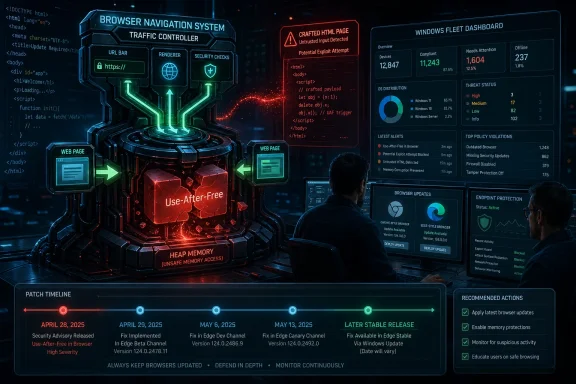 A Navigation Bug Is Never Just About Navigation
The phrase “use after free in Navigation” sounds almost antiseptic, as if the problem were tucked away in a corner of the browser used only when a tab changes pages. In practice, navigation is one of the browser’s great traffic-control systems. It handles document transitions, cross-origin boundaries, redirects, process handoffs, history state, and the uneasy choreography between user intent and hostile web content.A use-after-free vulnerability is old-school memory corruption: software keeps using a chunk of memory after it has been released. If an attacker can influence what lands in that freed space before the browser reaches back for it, a crash can become code execution. That does not mean every such bug is trivial to weaponize, but it does mean the failure mode is not merely cosmetic.
CVE-2026-7356 is described as allowing a remote attacker to execute arbitrary code via a crafted HTML page in Chrome versions before 147.0.7727.138. The attack path still requires user interaction in the ordinary web sense: someone must land on, or be driven toward, malicious content. In 2026, that is not much of a barrier. Advertising chains, compromised WordPress sites, poisoned search results, and targeted links have spent two decades proving that browsers are reachable.
The more important point is architectural. Chrome and Edge are heavily sandboxed, and a renderer compromise is not automatically a full-machine compromise. But attackers do not need every individual bug to be the whole chain. A reliable browser memory corruption primitive can be paired with a sandbox escape, credential theft, extension abuse, session hijacking, or simple data exfiltration from the browser context itself.
Chrome’s April 28 Patch Was a Crowd, Not a Cameo
Google’s April 28 stable-channel update was not a one-CVE hotfix. It shipped as Chrome 147.0.7727.137/138 for Windows and macOS and 147.0.7727.137 for Linux, with 30 security fixes in the release. CVE-2026-7356 was one high-severity entry among a crowded field that also included several critical use-after-free vulnerabilities.That matters because defenders often triage browser updates by asking whether this CVE is known exploited. There is no public indication in the advisory text that CVE-2026-7356 itself was under active exploitation at disclosure. But the patch did not arrive in a quiet month, and it did not arrive alone. A browser release with multiple critical and high-severity memory-safety fixes should not be treated as optional merely because one CVE lacks the “exploited in the wild” label.
Google’s own disclosure pattern is also familiar. Bug details are commonly restricted until a majority of users have updated, which is prudent but frustrating. Administrators want exploitability details, proof-of-concept status, and affected code paths. Vendors want to avoid handing attackers a diff-to-exploit roadmap while the population is still exposed.
That tension is not going away. In fact, the Chromium ecosystem has made it worse by concentrating enormous desktop-market share around a shared engine. A single Chromium flaw ripples through Chrome, Edge, Brave, Vivaldi, Opera, Electron-based apps, and countless embedded web views, even if each downstream vendor ships on a slightly different calendar.
Microsoft’s Edge Lag Is Usually Measured in Days, but Days Count
For WindowsForum readers, the Microsoft angle is the practical one. Microsoft tracks Chromium vulnerabilities in MSRC because Edge is Chromium-based, but Edge version numbers do not match Chrome’s. Google fixed the Chrome side in the 147.0.7727.x line; Microsoft’s April 30 Edge stable security release was version 147.0.3912.98 and incorporated the latest Chromium security updates.That mismatch is a perennial source of confusion. An admin looking for Chrome 147.0.7727.138 on an Edge fleet will not find it, because Edge has its own versioning scheme layered over Chromium. The question is not whether the numbers match; it is whether the Edge security release that includes the Chromium fixes has landed and actually deployed.
This is where browser security becomes less about CVSS and more about plumbing. Edge updates through Microsoft Edge Update, Chrome through Google Update or enterprise-managed channels, and third-party Chromium browsers through their own mechanisms. On a home PC, “relaunch to update” is an annoyance. In a managed estate, it is an availability, compliance, and user-behavior problem.
The browser can download the fix and still remain vulnerable until restart. That small operational detail has haunted browser patching for years. A laptop that sleeps instead of reboots, a kiosk session that never closes, a call-center desktop with pinned web apps, or a developer workstation running multiple profiles can sit on the wrong side of the patch line long after the update package is technically present.
The CVSS Score Says High; the Browser Says Hurry
CISA’s ADP enrichment lists CVE-2026-7356 at CVSS 3.1 score 8.8, with network attack vector, low attack complexity, no privileges required, user interaction required, and high impact to confidentiality, integrity, and availability. That is the standard shape of a serious browser remote-code-execution issue. It is not a worm, but it is not a shrug.The missing NVD score at initial publication is less interesting than the shape of the vector. A remote attacker, a crafted page, no prior account on the target system, and high impact is exactly the model that has driven browser emergency patches for years. User interaction is the one moderating factor, and the modern web is essentially an industrial system for generating user interaction.
The severity also cannot be read in isolation from the rest of the April 28 update. CVE-2026-7356 is high, not critical, but it shipped next to critical use-after-free flaws in Canvas, Accessibility, Views, and iOS-related code. For defenders, the release is the unit of action. You do not patch one CVE; you move the browser to a build that closes the batch.
The uncomfortable truth is that CVSS has always been a clumsy fit for browsers. The browser is both an application and a platform, both a document viewer and an identity hub, both a sandboxed renderer and the front door to SaaS. A code-execution bug in a browser does not need to own the kernel to do damage. It may only need to read the right token, intercept the right session, or stage the next exploit.
Memory Safety Remains Chromium’s Unpaid Technical Debt
If the April 28 list feels repetitive, that is because it is. Use-after-free in Canvas. Use-after-free in Accessibility. Use-after-free in Views. Use-after-free in GPU. Use-after-free in ANGLE. Use-after-free in Animation. Use-after-free in Navigation. The repetition is not a clerical accident; it is the long tail of a massive C++ codebase exposed to adversarial input.Chromium has invested heavily in mitigations, fuzzing, sanitizers, site isolation, process sandboxing, and hardening. Those investments matter. They turn many bugs into crashes, force exploit writers to chain vulnerabilities, and raise the cost of reliable compromise. But they do not erase the root class.
The industry’s answer is increasingly memory-safe languages and safer subsystems, but browsers are too large and too performance-sensitive to be rewritten by manifesto. Chromium will continue to be a hybrid machine: hardened legacy C++, newer safer components where possible, and a permanent security engineering race against the next dangling pointer. That is not failure; it is the reality of maintaining one of the most complex applications ever shipped to consumers.
For Windows administrators, the lesson is not “Chromium is unsafe” in some simplistic sense. The lesson is that browser patch cadence is security architecture. You cannot compensate for slow browser updates with endpoint detection alone, because a browser exploit can live in the narrow gap between disclosure, patch availability, restart, and detection telemetry.
The CPE Confusion Is a Symptom of a Bigger Inventory Problem
The NVD entry’s CPE configuration points to Google Chrome versions before 147.0.7727.138 across Windows, Linux, and macOS. That is useful as a vulnerability-database abstraction, but it is not the same thing as knowing what is actually installed. Chrome stable, Chrome enterprise, Chrome for Testing, Chromium packages, Snap-distributed Chromium, Edge stable, Edge extended stable, WebView2 runtime, and Electron apps all complicate the question.The user-facing question “Are we missing a CPE here?” is almost comic in this context. Of course the software ecosystem is missing clean mapping. The web platform has escaped the neat boundaries of “one product, one vendor, one version.” Chromium is a shared substrate, and the security world’s naming systems still prefer boxes.
This matters for scanners. A vulnerability-management platform may correctly flag Chrome and miss an embedded Chromium runtime. It may flag Edge based on Chromium lineage before Microsoft has shipped its corresponding build. It may mark Linux Chromium packages “not affected” because the distribution delivers the browser through a different packaging path. Every one of those outcomes is defensible from a database perspective and potentially misleading from an operational one.
The better inventory question is not “Which CPEs match CVE-2026-7356?” It is “Which browsers and Chromium-derived runtimes can render untrusted web content in my environment, and are they on a build that includes the April 28 Chromium security fixes?” That is harder to automate, but it is the question attackers effectively ask.
Edge Is No Longer a Separate Browser Problem
There was a time when Windows browser risk could be split into neat camps: Internet Explorer for legacy intranet pain, Chrome for users who installed it anyway, Firefox for holdouts, and Edge as Microsoft’s new front end. Chromium collapsed much of that distinction. Edge is now a Microsoft product with a Google-derived engine, Microsoft enterprise controls, Microsoft identity hooks, and Chromium’s vulnerability stream.That is not inherently bad. Microsoft gets the benefits of Chromium’s engineering scale, and Windows admins get a browser with Group Policy, Intune controls, SmartScreen, update policies, and deep enterprise integration. But it also means that a Chrome security bulletin is often an Edge planning document.
Microsoft’s April 30 Edge update illustrates the normal rhythm. Google ships Chromium security fixes; Microsoft incorporates them into Edge stable; admins then need to verify that Edge actually moved. In healthy environments, that gap is brief. In brittle environments, it becomes a standing exposure.
The WebView2 runtime deserves particular attention. Many Windows desktop applications now rely on it to render web content. That is often better than every vendor embedding its own stale browser engine, but it also makes the runtime part of the security surface. If WebView2 is centrally updated, good. If an application ships or pins a runtime in a way that lags, the estate inherits a browser problem without a browser icon.
Exploit Chains Do Not Care About Your Patch Taxonomy
Security teams like categories because categories make work assignable. Browser team handles Chrome. Desktop team handles Edge. App packaging handles Electron. Server team handles Linux Chromium packages. Vulnerability management handles CVE tickets. Attackers do not care.A crafted HTML page is a delivery mechanism, not a product boundary. The same hostile content might be opened in a user’s default browser, previewed inside a collaboration app, displayed in an embedded help pane, or rendered by a thick client that quietly depends on Chromium. A vulnerability in navigation logic is especially uncomfortable because navigation is part of how browsers enforce site boundaries and lifecycle transitions.
This does not mean CVE-2026-7356 automatically affects every Chromium-adjacent application. Version, configuration, platform, sandboxing, and code inclusion all matter. But the defensive habit should be broad first and precise second. Start with the assumption that browser-class vulnerabilities can appear in more places than the browser inventory dashboard suggests, then narrow with evidence.
That posture is especially important in Windows-heavy enterprises that have spent the last five years webifying internal applications. The browser is no longer just where users go to the internet. It is where they approve invoices, administer cloud tenants, open HR documents, access privileged admin portals, and authenticate into SaaS sprawl. The value behind the browser has gone up even as the browser has become more hardened.
The Patch Window Is Where the Real Risk Lives
Once a Chrome or Edge fix exists, the risk does not vanish; it changes shape. Before disclosure, defenders are blind. After disclosure, attackers and defenders both know the class, the component, the fixed build, and often enough surrounding metadata to begin diffing. The race then shifts to deployment speed.Google’s habit of restricting bug details buys time, but it cannot stop reverse engineering. Attackers can compare patched and unpatched Chromium code, study crash behavior, and build candidate triggers. The more severe the bug class, the more attractive that work becomes. A high-severity use-after-free in a browser navigation component is not the kind of entry serious exploit developers ignore.
For consumer users, the answer remains blunt: update and restart. For enterprises, the answer is less satisfying because it runs through change windows, user disruption, compatibility testing, and telemetry. But browser patches are not monthly operating-system updates. They are high-frequency security releases for an application that ingests hostile input all day.
Administrators should also resist the temptation to wait for proof of exploitation. By the time a browser CVE is confirmed as exploited in the wild, the defensive advantage has often been spent. The better standard is whether the vendor has shipped a stable security build for a memory-corruption flaw reachable from web content. On that standard, CVE-2026-7356 clears the bar.
Detection Is Useful, but Version Control Wins This Round
Endpoint detection can catch exploit aftermath, suspicious child processes, credential theft, abnormal browser behavior, or known payloads. It is far less reliable at proving that a complex browser memory corruption bug did not run. The browser is a noisy process by design, with JIT compilation, renderer churn, GPU interaction, extension activity, and network-heavy behavior.That is why version compliance remains the primary control. Chrome must be at or beyond 147.0.7727.138 on platforms where that build applies. Edge must be at a Microsoft build that incorporates the April 28 Chromium security fixes, such as the April 30 stable release line. Other Chromium-based browsers need their own vendor-confirmed patched releases.
Managed environments should verify both installed version and running version. Those are not always the same. A browser can stage an update while old processes remain alive. Multi-session hosts, VDI pools, persistent kiosks, and shared desktops are particularly prone to this gap because relaunching the browser can be operationally expensive.
There is also a policy trap. Some organizations pin browser versions for compatibility with fragile internal apps. That practice is understandable, but it has become harder to defend. If an application only works on an older Chromium build, the application is now creating security debt on a two-week clock. That debt needs an owner, an exception record, and a deadline, not a shrug.
The Small Details That Decide Whether This Becomes a Breach
The concrete remediation story is not glamorous, but it is where incidents are prevented. Security teams should confirm Chrome, Edge, and other Chromium-derived browsers have updated. Desktop teams should force relaunch where policy allows. Application owners should identify embedded runtimes. Help desks should be ready for the predictable complaints from users who had 87 tabs and a month-old session.This is also a good moment to revisit browser update policies. Silent updates are only useful if they complete. Relaunch notifications are only useful if they eventually become mandatory. Extended stable channels are only useful if the organization understands what “extended” means for security uptake and feature cadence.
For Edge specifically, Microsoft’s enterprise controls can be a strength if they are actually configured. Update policies, relaunch behavior, and channel selection should not be left to local drift. For Chrome, Google’s enterprise templates and cloud management can provide equivalent discipline. In mixed-browser shops, parity matters more than preference.
The broader lesson is that browser patching should be measured in hours or days, not in the next monthly maintenance cycle. CVE-2026-7356 may not be the bug that becomes tomorrow’s headline exploit. But the organization that can move quickly on this one is better positioned for the next one that does.
The April 28 Chromium Fix Leaves a Short Checklist Behind
The operational message is simple: treat this as a browser-platform update, not as a single Chrome advisory. The following are the checks that should survive the noise around version numbering and CVE enrichment delays.- Confirm that Google Chrome on Windows and macOS is updated to 147.0.7727.138 or later, and that Linux systems have received the corresponding patched stable build for their channel.
- Confirm that Microsoft Edge stable has reached the April 30, 2026 security release line or later, rather than trying to match Chrome’s version number.
- Require browser relaunches where possible, because a downloaded update does not fully protect users who continue running old browser processes.
- Inventory Chromium-derived browsers and WebView2-dependent applications that can render untrusted content, especially on managed Windows endpoints.
- Do not wait for public exploit confirmation before deploying this class of browser memory-corruption fix.
- Treat version pinning for browser compatibility as a formal security exception with an expiration date.
Source: NVD / Chromium Security Update Guide - Microsoft Security Response Center
