

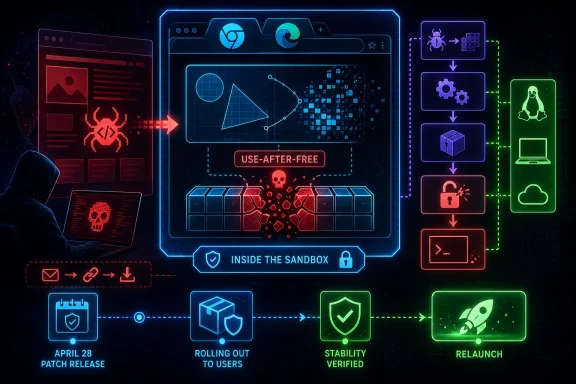
Google and Microsoft disclosed CVE-2026-7363 on April 28, 2026, a critical Chromium use-after-free flaw in Canvas affecting Google Chrome on Linux and ChromeOS before 147.0.7727.138 and tracked by Microsoft because Chromium-based Edge inherits the same upstream security surface. The bug is not just another entry in the browser-patching treadmill; it is a reminder that the modern browser’s graphics stack is now one of the most attractive places to attack the desktop. A crafted HTML page, user interaction, and a memory-safety mistake are enough to turn web content into code running inside the browser sandbox. That last phrase—inside a sandbox—is meant to reassure, but in enterprise risk terms it should mostly sharpen the question: what else is in the chain?
CVE-2026-7363 lands in a part of Chromium that most users never think about but every modern web app leans on: Canvas. It is the browser feature that lets sites draw, animate, manipulate pixels, render charts, process images, and do the sort of rich client-side work that used to require plug-ins or native applications. In other words, it sits directly on the line between untrusted web content and complex rendering code.
The vulnerability is described as a use-after-free in Canvas. That class of flaw appears when software continues to reference memory after it has been released, creating an opening for crashes, corruption, or, under the right conditions, controlled execution. In Chromium’s own severity language, this one is critical; in CISA’s CVSS 3.1 assessment, it scores 8.8 high, with network attack vector, low complexity, no privileges required, and user interaction required.
The “user interaction” part matters, but it should not be over-comforting. In browser security, user interaction often means convincing someone to visit or render a malicious page. That is not a high bar in a world of phishing emails, poisoned search results, compromised ad networks, and collaboration platforms full of links.
The April 28 Chrome stable update fixed 30 security issues, including several critical use-after-free bugs in different subsystems. CVE-2026-7363 was the Canvas entry, reported by a researcher using the handle heapracer on March 19 and rewarded at $7,000. Google’s update moved the stable desktop channel to the 147.0.7727.137/138 range for Windows and macOS and 147.0.7727.137 for Linux, while the CVE wording calls out Linux and ChromeOS before 147.0.7727.138.
That version-number wrinkle is exactly the sort of thing that makes browser vulnerability management annoying. Security teams do not patch prose; they patch products, channels, and build numbers. If your inventory tool keys off one advisory, your endpoint agent keys off another, and your browser updater reports a platform-specific version, you can end up arguing about compliance while the real issue remains simple: get Chromium-family browsers onto the fixed train immediately.
That expansion has a security cost. The browser must accept hostile input at internet scale, process it quickly, and hand it through layers of graphics, compositing, memory management, GPU acceleration, and platform integration. A bug in that machinery is not an obscure corner case; it is a bug in a highly reachable attack surface.
Use-after-free vulnerabilities are especially stubborn because they are not usually failures of intent. The code may be logically well designed, but object lifetimes become difficult to reason about when asynchronous rendering, GPU processes, callbacks, garbage collection, and cross-thread interactions enter the picture. The browser is a cathedral of moving parts, and memory safety bugs exploit the places where one component believes an object still exists after another has already swept it away.
The crafted HTML page language is also worth pausing on. This is not a local attacker loading a weird file format into a niche tool. It is the ordinary act of browsing the web, with the malicious payload wrapped in something the browser is designed to consume all day. For defenders, that makes exposure broad by default.
Chrome’s sandbox still matters. It is one of the major reasons browser exploitation is harder than it was in the plug-in era. But a sandbox-contained arbitrary code execution bug is not harmless; it is often the first stage in a chain, and attackers who have one reliable renderer bug will go looking for a second bug that escapes confinement or steals something valuable inside the browser’s reach.
This is one of the quiet realities of the post-EdgeHTML era. Microsoft gained compatibility and speed by joining Chromium, and Windows users gained a browser that generally keeps pace with the dominant web engine. The trade-off is that security events in Chromium become security events for much of the browser ecosystem.
That does not make Edge uniquely unsafe. If anything, the broader Chromium project benefits from scale, dedicated security engineering, fuzzing infrastructure, and a large researcher community. But scale also means a single upstream bug can ripple through Chrome, Edge, Brave, Vivaldi, Electron-based apps, embedded webviews, and managed kiosk environments with very different update cadences.
For WindowsForum readers, the Edge angle is practical. A Windows fleet may have Chrome installed for user preference, Edge installed as the platform default, WebView2 powering line-of-business applications, and third-party apps carrying their own Chromium runtimes. Patching the browser icon on the taskbar is necessary, but it may not be sufficient.
This is where vulnerability management often loses the plot. The CVE name says Chromium; the user sees Chrome; the admin console sees Edge; the asset scanner sees CPE strings; the help desk sees “my browser restarted.” The attacker sees a rendering engine.
That is not a contradiction so much as a taxonomy collision. Vendor severity is often product-aware: Google knows how reachable the code is, how plausible exploitation may be, what mitigations apply, and where similar bugs have landed historically. CVSS, by contrast, is a standardized scoring model that has to compress exploitability and impact into a vector that can be compared across very different products.
The vector here tells a familiar browser story. It is remote and low-complexity, requires no prior privileges, does require user interaction, and has high impact on confidentiality, integrity, and availability. That is bad enough for emergency prioritization in most environments, even if the numerical bucket stops short of “critical.”
Security teams should resist the temptation to let the label debate delay action. Whether your dashboard paints this red or orange, it is a remotely triggerable memory corruption flaw in a dominant browser engine. The right operational response is not philosophical; it is to update, verify, and hunt for stragglers.
The NVD enrichment timeline also illustrates a common lag. A CVE can be issued, vendor details can be live, CISA can add a score, and NVD’s own assessment can still be pending or evolving. If your process waits for every field to settle before raising priority, your process is optimized for tidy records rather than real exposure.
This is the kind of detail that generates scanner tickets, Slack threads, and false confidence in equal measure. CPEs are useful for machine-readable matching, but they are imperfect representations of real-world software. Browser builds, platform-specific version numbers, vendor advisories, and downstream repackaging all strain a model originally designed to identify products cleanly.
The right way to read a CPE entry is not as scripture but as a starting point for validation. If the vendor advisory says a fixed Chrome stable build is available and the CVE describes a pre-fixed version range, administrators should focus on actual installed browser versions and update channels. If Microsoft tracks the CVE for Edge, Edge should be checked through Microsoft’s own update mechanisms rather than inferred solely from a Google Chrome CPE.
ChromeOS adds another wrinkle. On ChromeOS, the browser and operating system are tightly coupled in a way that differs from Chrome on a general-purpose Linux distribution. On Linux desktops, Chrome may be installed through Google’s repository, a distribution package, a managed enterprise channel, or not at all. Chromium packages in distributions and snaps may have their own servicing story.
Windows administrators face their own version sprawl. Chrome may update through Google Update, Edge through Microsoft Edge Update, WebView2 through evergreen runtime servicing, and packaged Chromium runtimes through whatever update system the application vendor remembered to build. The CVE record is the headline; the inventory is the work.
But the sandbox is not a magic force field. A successful renderer compromise can still be valuable. It may allow an attacker to read or manipulate content available to that renderer process, interfere with browser state, stage further exploitation, or pair with a separate sandbox escape. Browser exploit chains often look like exactly that: first gain code execution in a constrained process, then break outward.
For enterprise defenders, the practical lesson is to treat renderer RCE as serious even when no sandbox escape is disclosed. Attackers do not need every victim to yield full system compromise for a campaign to be worthwhile. Credential theft, session abuse, token exposure, browser data access, and targeted follow-on exploitation can all turn a “sandboxed” foothold into a meaningful incident.
The absence of public evidence of exploitation is also not proof of safety. Google’s advisory for this update does not describe CVE-2026-7363 as exploited in the wild. That distinction matters; known exploited vulnerabilities deserve immediate crisis handling. But critical browser bugs often become more dangerous after patches land, because fixes can be diffed, clues can be extracted, and proof-of-concept work can accelerate.
This is the paradox of responsible disclosure. The patch is the remedy, but the patch also starts the clock for reverse engineers. Organizations that wait a week because “rollout over days/weeks” sounds leisurely are effectively volunteering to be in the long tail.
That list reads less like a single bad subsystem and more like a map of Chromium’s breadth. Graphics, media, accessibility, remote access, JavaScript, input validation, and webview plumbing all show up in the same release. The browser is not an application anymore; it is an application platform with a faster release cadence than most operating systems.
The recurring use-after-free pattern is particularly telling. Chromium’s engineers deploy fuzzers, sanitizers, control-flow protections, and a mature bug bounty program, yet memory lifetime mistakes keep surfacing. That is not an indictment of negligence; it is evidence of how difficult it is to maintain a massive C++ codebase that parses adversarial input at global scale.
This is also why the industry keeps circling back to memory-safe languages and hardened architectures. Rust will not magically rewrite Chromium overnight, and C++ will remain central to browser engines for years. But every major browser security release strengthens the case that memory safety is not an academic preference; it is a cost center, an incident driver, and a strategic engineering problem.
For IT teams, the release cluster changes prioritization. If CVE-2026-7363 were the only bug, it would still deserve urgency. In a release with 30 fixes and multiple criticals, the update becomes less about one CVE and more about refusing to run an obsolete browser build in a threat environment that actively studies these deltas.
This is where many organizations are still immature. Endpoint tools usually know the major browsers. They may not know that a niche vendor shipped an old Chromium runtime inside an application directory, or that a VDI image has a frozen browser version, or that a kiosk profile blocks restarts so effectively that updates download but never apply.
The modern browser update story is better than it used to be. Silent updates, component updates, evergreen WebView2, and managed browser policies have removed much of the old friction. But “better” is not “complete,” especially in environments where change windows, application compatibility testing, offline systems, and user session persistence delay restarts.
Admins should look for signs of version drift rather than simply trusting auto-update. The browser’s reported version, the updater service health, the channel, the last successful update time, and whether a restart is pending all matter. In managed fleets, the endpoint that “has the update” but has not relaunched is still exposed in the way users actually browse.
Windows shops should also check policy decisions made for convenience. Deferring browser updates, disabling background update services, pinning versions for compatibility, or letting users postpone relaunches indefinitely may have seemed reasonable during a troublesome feature rollout. During a critical browser security release, those same decisions become exposure multipliers.
A browser can download an update in the background and still keep the vulnerable renderer code alive until relaunch. A user can leave dozens of tabs open for days. A VDI session can persist. A kiosk can stay signed in. A server used for admin consoles can become the one place nobody wants to restart because the wrong person is logged in.
This is why “patched” needs a stricter definition. In a browser incident, patched should mean the fixed version is installed, the running process has restarted, and policy prevents easy rollback or indefinite deferral. Anything less is a hope dressed up as a status.
The same applies to incident response triage. If an organization identifies systems that were running vulnerable builds after April 28, the question is not merely whether they eventually updated. The question is whether high-risk users browsed untrusted sites, opened suspicious links, or encountered suspicious crashes during the exposure window. Browser crashes are often noisy but under-investigated telemetry.
There is no public indication in the disclosed material that CVE-2026-7363 was exploited in the wild at disclosure time. That should shape response proportionally. This is a rapid patch and verification event, not necessarily a breach assumption. But the window is narrow enough that mature teams should still preserve relevant browser, proxy, DNS, EDR, and crash telemetry where available.
The assurance work is more complex. Security teams need to know which devices are still behind, which users are able to defer relaunch, which managed policies might slow updates, and which third-party Chromium runtimes are outside normal browser reporting. That is a governance problem masquerading as a browser bug.
For consumers, the right move is to open the browser’s About page, let it check for updates, and relaunch. For IT pros, the right move is to query fleet versions, force update where policy allows, and set a deadline for relaunch. For high-risk roles—administrators, finance staff, executives, developers with production access—the deadline should be measured in hours, not days.
There is also a messaging lesson. Users are now accustomed to browser restarts as interruptions rather than security events. If the enterprise wants fast compliance, it should say plainly that a critical browser security fix requires relaunch and that delaying it leaves web browsing exposed. Vague “updates are available” banners are not enough.
Security awareness often focuses on not clicking bad links. That advice remains useful, but it is incomplete. A fully patched browser is the control that assumes someone eventually will click, preview, open, paste, or render something hostile. CVE-2026-7363 is exactly the kind of flaw that punishes organizations whose defenses depend on perfect user behavior.
Source: NVD / Chromium Security Update Guide - Microsoft Security Response Center
 The Browser Patch Is the Perimeter Patch Now
CVE-2026-7363 lands in a part of Chromium that most users never think about but every modern web app leans on: Canvas. It is the browser feature that lets sites draw, animate, manipulate pixels, render charts, process images, and do the sort of rich client-side work that used to require plug-ins or native applications. In other words, it sits directly on the line between untrusted web content and complex rendering code.The vulnerability is described as a use-after-free in Canvas. That class of flaw appears when software continues to reference memory after it has been released, creating an opening for crashes, corruption, or, under the right conditions, controlled execution. In Chromium’s own severity language, this one is critical; in CISA’s CVSS 3.1 assessment, it scores 8.8 high, with network attack vector, low complexity, no privileges required, and user interaction required.
The “user interaction” part matters, but it should not be over-comforting. In browser security, user interaction often means convincing someone to visit or render a malicious page. That is not a high bar in a world of phishing emails, poisoned search results, compromised ad networks, and collaboration platforms full of links.
The April 28 Chrome stable update fixed 30 security issues, including several critical use-after-free bugs in different subsystems. CVE-2026-7363 was the Canvas entry, reported by a researcher using the handle heapracer on March 19 and rewarded at $7,000. Google’s update moved the stable desktop channel to the 147.0.7727.137/138 range for Windows and macOS and 147.0.7727.137 for Linux, while the CVE wording calls out Linux and ChromeOS before 147.0.7727.138.
That version-number wrinkle is exactly the sort of thing that makes browser vulnerability management annoying. Security teams do not patch prose; they patch products, channels, and build numbers. If your inventory tool keys off one advisory, your endpoint agent keys off another, and your browser updater reports a platform-specific version, you can end up arguing about compliance while the real issue remains simple: get Chromium-family browsers onto the fixed train immediately.
Canvas Is No Longer Just a Drawing Surface
The web platform keeps absorbing work that once belonged to desktop software. Canvas is part of that shift. It enables games, design tools, data visualizations, remote desktops, video effects, image editors, mapping interfaces, machine-learning demos, and all the visual conveniences that make web apps feel less like documents and more like operating environments.That expansion has a security cost. The browser must accept hostile input at internet scale, process it quickly, and hand it through layers of graphics, compositing, memory management, GPU acceleration, and platform integration. A bug in that machinery is not an obscure corner case; it is a bug in a highly reachable attack surface.
Use-after-free vulnerabilities are especially stubborn because they are not usually failures of intent. The code may be logically well designed, but object lifetimes become difficult to reason about when asynchronous rendering, GPU processes, callbacks, garbage collection, and cross-thread interactions enter the picture. The browser is a cathedral of moving parts, and memory safety bugs exploit the places where one component believes an object still exists after another has already swept it away.
The crafted HTML page language is also worth pausing on. This is not a local attacker loading a weird file format into a niche tool. It is the ordinary act of browsing the web, with the malicious payload wrapped in something the browser is designed to consume all day. For defenders, that makes exposure broad by default.
Chrome’s sandbox still matters. It is one of the major reasons browser exploitation is harder than it was in the plug-in era. But a sandbox-contained arbitrary code execution bug is not harmless; it is often the first stage in a chain, and attackers who have one reliable renderer bug will go looking for a second bug that escapes confinement or steals something valuable inside the browser’s reach.
Microsoft’s Role Is a Supply-Chain Reminder, Not a Footnote
The source provided through Microsoft’s Security Update Guide is a useful reminder that Chromium vulnerabilities are not only Google Chrome vulnerabilities. Microsoft Edge is Chromium-based, and Microsoft tracks upstream Chromium CVEs because Edge users and Windows administrators need the same risk translated into Microsoft’s servicing world. The browser may carry a Microsoft icon, policies, update channels, and enterprise controls, but much of the underlying engine risk is shared.This is one of the quiet realities of the post-EdgeHTML era. Microsoft gained compatibility and speed by joining Chromium, and Windows users gained a browser that generally keeps pace with the dominant web engine. The trade-off is that security events in Chromium become security events for much of the browser ecosystem.
That does not make Edge uniquely unsafe. If anything, the broader Chromium project benefits from scale, dedicated security engineering, fuzzing infrastructure, and a large researcher community. But scale also means a single upstream bug can ripple through Chrome, Edge, Brave, Vivaldi, Electron-based apps, embedded webviews, and managed kiosk environments with very different update cadences.
For WindowsForum readers, the Edge angle is practical. A Windows fleet may have Chrome installed for user preference, Edge installed as the platform default, WebView2 powering line-of-business applications, and third-party apps carrying their own Chromium runtimes. Patching the browser icon on the taskbar is necessary, but it may not be sufficient.
This is where vulnerability management often loses the plot. The CVE name says Chromium; the user sees Chrome; the admin console sees Edge; the asset scanner sees CPE strings; the help desk sees “my browser restarted.” The attacker sees a rendering engine.
The Severity Label Is Doing Two Different Jobs
There is an apparent mismatch in the way this vulnerability is framed. Chromium calls the bug critical. CISA’s ADP CVSS 3.1 score is 8.8, which maps to high, not critical. NVD, at the time reflected in the user-supplied details, had not yet provided its own CVSS score.That is not a contradiction so much as a taxonomy collision. Vendor severity is often product-aware: Google knows how reachable the code is, how plausible exploitation may be, what mitigations apply, and where similar bugs have landed historically. CVSS, by contrast, is a standardized scoring model that has to compress exploitability and impact into a vector that can be compared across very different products.
The vector here tells a familiar browser story. It is remote and low-complexity, requires no prior privileges, does require user interaction, and has high impact on confidentiality, integrity, and availability. That is bad enough for emergency prioritization in most environments, even if the numerical bucket stops short of “critical.”
Security teams should resist the temptation to let the label debate delay action. Whether your dashboard paints this red or orange, it is a remotely triggerable memory corruption flaw in a dominant browser engine. The right operational response is not philosophical; it is to update, verify, and hunt for stragglers.
The NVD enrichment timeline also illustrates a common lag. A CVE can be issued, vendor details can be live, CISA can add a score, and NVD’s own assessment can still be pending or evolving. If your process waits for every field to settle before raising priority, your process is optimized for tidy records rather than real exposure.
The CPE Confusion Is a Symptom of a Bigger Inventory Problem
The user-supplied NVD change history shows a CPE configuration that combines Google Chrome versions up to but excluding 147.0.7727.138 with operating-system CPEs for Windows, Linux kernel, and macOS. That kind of entry can be confusing because the CVE description specifically mentions Google Chrome on Linux and ChromeOS, while the CPE history shown includes multiple desktop operating systems.This is the kind of detail that generates scanner tickets, Slack threads, and false confidence in equal measure. CPEs are useful for machine-readable matching, but they are imperfect representations of real-world software. Browser builds, platform-specific version numbers, vendor advisories, and downstream repackaging all strain a model originally designed to identify products cleanly.
The right way to read a CPE entry is not as scripture but as a starting point for validation. If the vendor advisory says a fixed Chrome stable build is available and the CVE describes a pre-fixed version range, administrators should focus on actual installed browser versions and update channels. If Microsoft tracks the CVE for Edge, Edge should be checked through Microsoft’s own update mechanisms rather than inferred solely from a Google Chrome CPE.
ChromeOS adds another wrinkle. On ChromeOS, the browser and operating system are tightly coupled in a way that differs from Chrome on a general-purpose Linux distribution. On Linux desktops, Chrome may be installed through Google’s repository, a distribution package, a managed enterprise channel, or not at all. Chromium packages in distributions and snaps may have their own servicing story.
Windows administrators face their own version sprawl. Chrome may update through Google Update, Edge through Microsoft Edge Update, WebView2 through evergreen runtime servicing, and packaged Chromium runtimes through whatever update system the application vendor remembered to build. The CVE record is the headline; the inventory is the work.
The Sandbox Narrows the Blast Radius, but It Does Not End the Attack
The description says arbitrary code execution occurs inside a sandbox. That is an important qualifier, and it is one of the reasons modern browser exploitation is harder than classic drive-by download attacks of the 2000s. Renderer sandboxing limits what compromised web content can do directly to the operating system.But the sandbox is not a magic force field. A successful renderer compromise can still be valuable. It may allow an attacker to read or manipulate content available to that renderer process, interfere with browser state, stage further exploitation, or pair with a separate sandbox escape. Browser exploit chains often look like exactly that: first gain code execution in a constrained process, then break outward.
For enterprise defenders, the practical lesson is to treat renderer RCE as serious even when no sandbox escape is disclosed. Attackers do not need every victim to yield full system compromise for a campaign to be worthwhile. Credential theft, session abuse, token exposure, browser data access, and targeted follow-on exploitation can all turn a “sandboxed” foothold into a meaningful incident.
The absence of public evidence of exploitation is also not proof of safety. Google’s advisory for this update does not describe CVE-2026-7363 as exploited in the wild. That distinction matters; known exploited vulnerabilities deserve immediate crisis handling. But critical browser bugs often become more dangerous after patches land, because fixes can be diffed, clues can be extracted, and proof-of-concept work can accelerate.
This is the paradox of responsible disclosure. The patch is the remedy, but the patch also starts the clock for reverse engineers. Organizations that wait a week because “rollout over days/weeks” sounds leisurely are effectively volunteering to be in the long tail.
The April 28 Release Was a Cluster, Not a One-Off
CVE-2026-7363 did not arrive alone. Google’s April 28 stable desktop update included 30 security fixes, with multiple critical use-after-free flaws across Canvas, iOS, Accessibility, and Views, plus a long list of high-severity bugs in GPU, ANGLE, Animation, Navigation, Skia, Media, MHTML, WebMIDI, Cast, Codecs, WebRTC, V8, Chromoting, Tint, Feedback, and WebView.That list reads less like a single bad subsystem and more like a map of Chromium’s breadth. Graphics, media, accessibility, remote access, JavaScript, input validation, and webview plumbing all show up in the same release. The browser is not an application anymore; it is an application platform with a faster release cadence than most operating systems.
The recurring use-after-free pattern is particularly telling. Chromium’s engineers deploy fuzzers, sanitizers, control-flow protections, and a mature bug bounty program, yet memory lifetime mistakes keep surfacing. That is not an indictment of negligence; it is evidence of how difficult it is to maintain a massive C++ codebase that parses adversarial input at global scale.
This is also why the industry keeps circling back to memory-safe languages and hardened architectures. Rust will not magically rewrite Chromium overnight, and C++ will remain central to browser engines for years. But every major browser security release strengthens the case that memory safety is not an academic preference; it is a cost center, an incident driver, and a strategic engineering problem.
For IT teams, the release cluster changes prioritization. If CVE-2026-7363 were the only bug, it would still deserve urgency. In a release with 30 fixes and multiple criticals, the update becomes less about one CVE and more about refusing to run an obsolete browser build in a threat environment that actively studies these deltas.
Patch Management Has to Catch the Apps That Hide Chromium
The obvious remediation is to update Chrome and Edge. The less obvious remediation is to identify where Chromium exists without calling itself Chrome or Edge. Electron apps, embedded browsers, kiosk shells, helpdesk tools, chat clients, launchers, and enterprise software can all carry Chromium components with update behavior that varies wildly.This is where many organizations are still immature. Endpoint tools usually know the major browsers. They may not know that a niche vendor shipped an old Chromium runtime inside an application directory, or that a VDI image has a frozen browser version, or that a kiosk profile blocks restarts so effectively that updates download but never apply.
The modern browser update story is better than it used to be. Silent updates, component updates, evergreen WebView2, and managed browser policies have removed much of the old friction. But “better” is not “complete,” especially in environments where change windows, application compatibility testing, offline systems, and user session persistence delay restarts.
Admins should look for signs of version drift rather than simply trusting auto-update. The browser’s reported version, the updater service health, the channel, the last successful update time, and whether a restart is pending all matter. In managed fleets, the endpoint that “has the update” but has not relaunched is still exposed in the way users actually browse.
Windows shops should also check policy decisions made for convenience. Deferring browser updates, disabling background update services, pinning versions for compatibility, or letting users postpone relaunches indefinitely may have seemed reasonable during a troublesome feature rollout. During a critical browser security release, those same decisions become exposure multipliers.
The Real Risk Is the Time Between Disclosure and Restart
Browser vendors have made installation fast. They have not eliminated the human and operational delay between patch availability and the fixed code actually running. That delay is where CVE-2026-7363 matters most.A browser can download an update in the background and still keep the vulnerable renderer code alive until relaunch. A user can leave dozens of tabs open for days. A VDI session can persist. A kiosk can stay signed in. A server used for admin consoles can become the one place nobody wants to restart because the wrong person is logged in.
This is why “patched” needs a stricter definition. In a browser incident, patched should mean the fixed version is installed, the running process has restarted, and policy prevents easy rollback or indefinite deferral. Anything less is a hope dressed up as a status.
The same applies to incident response triage. If an organization identifies systems that were running vulnerable builds after April 28, the question is not merely whether they eventually updated. The question is whether high-risk users browsed untrusted sites, opened suspicious links, or encountered suspicious crashes during the exposure window. Browser crashes are often noisy but under-investigated telemetry.
There is no public indication in the disclosed material that CVE-2026-7363 was exploited in the wild at disclosure time. That should shape response proportionally. This is a rapid patch and verification event, not necessarily a breach assumption. But the window is narrow enough that mature teams should still preserve relevant browser, proxy, DNS, EDR, and crash telemetry where available.
The Fix Is Simple; The Assurance Is Not
The user-facing instruction is almost boring: update Chrome, update Edge, and restart the browser. On Chrome, that means moving to the fixed stable release train for the relevant platform. On Edge, it means relying on Microsoft’s Chromium-based Edge servicing path and confirming the installed build is current.The assurance work is more complex. Security teams need to know which devices are still behind, which users are able to defer relaunch, which managed policies might slow updates, and which third-party Chromium runtimes are outside normal browser reporting. That is a governance problem masquerading as a browser bug.
For consumers, the right move is to open the browser’s About page, let it check for updates, and relaunch. For IT pros, the right move is to query fleet versions, force update where policy allows, and set a deadline for relaunch. For high-risk roles—administrators, finance staff, executives, developers with production access—the deadline should be measured in hours, not days.
There is also a messaging lesson. Users are now accustomed to browser restarts as interruptions rather than security events. If the enterprise wants fast compliance, it should say plainly that a critical browser security fix requires relaunch and that delaying it leaves web browsing exposed. Vague “updates are available” banners are not enough.
Security awareness often focuses on not clicking bad links. That advice remains useful, but it is incomplete. A fully patched browser is the control that assumes someone eventually will click, preview, open, paste, or render something hostile. CVE-2026-7363 is exactly the kind of flaw that punishes organizations whose defenses depend on perfect user behavior.
The April Canvas Bug Leaves a Short Checklist for Windows Shops
The practical lesson from CVE-2026-7363 is that browser patching must be treated as endpoint security, not user convenience. The fix is available, the attack surface is reachable, and the operational failure mode is familiar: a supposedly automatic update that never becomes a restarted, running, fixed browser.- Organizations should verify Chrome and Chromium-based Edge versions across managed Windows, Linux, macOS, and ChromeOS devices rather than assuming background updates completed.
- Administrators should force or strongly deadline browser relaunches because downloaded updates do not protect users who continue running old processes.
- Security teams should review policies that defer, pin, or disable browser updates, especially on kiosks, VDI images, shared workstations, and privileged admin systems.
- Asset inventories should include WebView2, Electron applications, and vendor-bundled Chromium runtimes where those components are exposed to untrusted content.
- Incident responders should preserve browser crash, proxy, DNS, and EDR telemetry for systems that remained on vulnerable builds after the April 28 disclosure window.
Source: NVD / Chromium Security Update Guide - Microsoft Security Response Center
