

Google and Microsoft documented CVE-2026-7980 on May 6–7, 2026, as a Chromium WebAudio use-after-free flaw fixed in Chrome before version 148.0.7778.96 and in current Microsoft Edge builds that ingest the patched Chromium code. The bug is officially “medium” in Chromium’s own severity language, but the scoring attached by CISA’s ADP process lands much higher, at 8.8 under CVSS 3.1. That mismatch is the story: modern browser risk is no longer explained by a single severity label. For Windows admins, the practical answer is simpler than the taxonomy — get Chromium-family browsers to the 148.0.7778 line or later, then verify that policy-controlled endpoints actually followed.
CVE-2026-7980 is not the loudest vulnerability in the Chrome 148 stable release, and that is precisely why it deserves attention. The headline writers will naturally gravitate toward critical bugs, zero-day language, and giant patch counts. A medium-severity WebAudio memory safety issue sounds, at first glance, like one more item in the endless churn of browser maintenance.
But browsers are not ordinary desktop applications anymore. Chrome, Edge, Brave, Vivaldi, Opera, and dozens of embedded Chromium consumers now sit between users and nearly every business process that matters. A flaw that requires a crafted HTML page and user interaction may sound constrained, yet the modern web is a delivery system built almost entirely out of crafted HTML pages and user interaction.
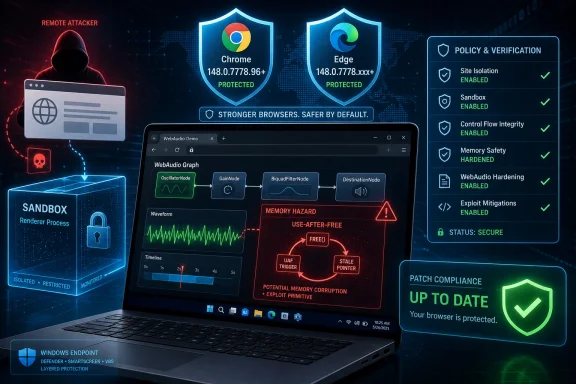
The official description says the vulnerability allowed a remote attacker to execute arbitrary code inside a sandbox via a crafted HTML page. That caveat — inside a sandbox — matters, but it should not lull anyone into treating the issue as decorative. Browser exploitation often arrives as a chain, and a sandboxed code-execution primitive can become far more serious when paired with a renderer escape, privilege escalation, or a logic bug elsewhere in the stack.
That is the uneasy bargain of Chromium security in 2026. Google’s architecture has made remote compromise harder, noisier, and more segmented than it was in the old browser-monoculture days. But it has also turned vulnerability triage into a layered exercise where an individual CVE may look manageable while still serving as a useful link in an attacker’s chain.
That combination makes it an attractive place for memory safety bugs. Audio engines are full of object lifetimes, callbacks, graph changes, worker-like execution patterns, and performance-sensitive code paths. When a component has to be fast, flexible, and exposed to untrusted input, the gap between elegant API design and exploit-friendly implementation detail can get uncomfortably narrow.
A use-after-free flaw means code may continue using memory after the object that owned it has been released. In safe prose, that sounds like bookkeeping. In exploit engineering, it is one of the classic routes to shaping memory, confusing program state, and potentially steering execution.
The key detail in CVE-2026-7980 is that the attacker’s entry point is a crafted HTML page. That places the exploit surface exactly where users live: mail links, chats, compromised sites, malvertising, ticketing systems, shared documents, and internal portals. Even if successful exploitation remains bounded by the browser sandbox, the initial step does not require local access, valid credentials, or a complicated enterprise foothold.
Chromium’s medium label probably reflects the sandbox constraint and the conditions required to trigger the bug. CISA’s 8.8 CVSS vector, by contrast, reflects a network-reachable attack with low complexity, no privileges required, user interaction required, unchanged scope, and high impact across confidentiality, integrity, and availability. Neither framing is necessarily wrong. They are answering different questions.
CVE-2026-7980 shows why that habit is failing browser security. Chromium calls it medium. CISA’s ADP scoring calls it high. Microsoft lists it in the Security Update Guide because Edge consumes Chromium and the patched Edge build is no longer vulnerable. NVD, at the time of publication, had not provided its own CVSS assessment, while its enrichment records still associated affected Chrome versions before 148.0.7778.96 across Windows, Linux, and macOS configurations.
That is a messy set of signals for anyone trying to run a disciplined patch program. The bug is not known from the provided records to be exploited in the wild. It is not described as a sandbox escape. It is not even one of the critical vulnerabilities in Chrome 148’s broader security wave. Yet it still carries the phrase “execute arbitrary code,” and that phrase has a way of rearranging priorities.
The better question for IT is not whether the label says medium or high. The better question is whether untrusted web content can reach the vulnerable code path on machines that handle sensitive work. For most desktops in most organizations, the answer is yes.
That does not mean every Chrome update is a fire drill. It means browser patching should be treated as a standing operational process, not a monthly act of improvisation. The organizations that struggle with this class of bug are rarely the ones that do not know a patch exists. They are the ones that cannot prove, quickly and confidently, where the patch landed.
The MSRC entry for CVE-2026-7980 states that the CVE was assigned by Chrome and that Microsoft Edge, being Chromium-based, ingests Chromium code that addresses the vulnerability. The affected product row lists Microsoft Edge with a fixed build number in the 148.0.7778.xxx range and marks customer action as required. In plain English, Edge admins should not wait for Patch Tuesday rituals to do the thinking for them.
That distinction matters because many Windows shops still mentally separate Windows Update from browser update hygiene. Edge is now deeply integrated into Windows experiences, Microsoft 365 workflows, identity flows, admin portals, and line-of-business web apps. But its security cadence is closer to Chrome’s than to the traditional Windows cumulative-update calendar.
Microsoft has made Edge updating relatively painless for unmanaged and normally managed devices. The problem is the edge cases, which in enterprise IT are never actually edge cases. Kiosks, VDI images, offline machines, golden images, shared workstations, lab systems, regulated desktops, and devices with frozen update policies all have a way of drifting away from the happy path.
For WindowsForum readers, this is where the story becomes local. If Edge is the default browser in your environment, you are still exposed to Chromium’s underlying bug classes, even when the product name on the taskbar is Microsoft’s. Edge’s value is not that it escapes Chromium risk; it is that Microsoft can package, document, and distribute the fix through channels that Windows admins already understand.
That is a reminder of how Chrome releases now operate. A major version number may contain visible product changes, developer-platform changes, compatibility changes, and a security payload big enough to justify immediate attention all by itself. Users see a version bump. Admins see regression risk. Attackers see a diff.
The lag between release publication, automatic rollout, third-party browser ingestion, enterprise testing, and fleetwide deployment is where risk accumulates. Google can ship a fix. Microsoft can ship an Edge update. Security vendors can publish detections. None of that guarantees the browser used by the person opening a malicious link in accounting has actually crossed the fixed build threshold.
There is also a subtle documentation challenge. Chrome’s security advisories often restrict bug details until most users are updated. That is a sensible defensive practice, but it leaves defenders with partial information during the exact window when they are being asked to prioritize. The result is an odd kind of operational fog: enough detail to know a bug matters, not enough detail to model exploitation precisely.
CVE-2026-7980 sits squarely in that fog. We know the component, the weakness class, the affected version boundary, the broad attack shape, and the sandbox limitation. We do not have public exploit details from the restricted Chromium issue tracker. That is normal, but normal does not mean comfortable.
But a sandbox is not a moral victory. It is a containment boundary. It reduces the blast radius of a first-stage exploit, and that reduction is enormously important, but attackers do not stop reading exploit chains at the first boundary.
A sandboxed exploit can still be valuable. It may allow access to content available inside the renderer process, enable further probing, stage a second exploit, or combine with a separate vulnerability that moves execution outside the sandbox. In targeted attacks, the first foothold is often only the opening move.
This is why risk language around browser bugs can feel contradictory. “Remote code execution inside a sandbox” is both less severe than full host compromise and still much more serious than a cosmetic spoofing issue. A well-run security team has to hold both ideas in mind without flattening one into the other.
For home users, the message remains simple: update the browser. For enterprises, the message is slightly more demanding: update the browser, validate the version, and treat the browser as a high-frequency security boundary rather than a static productivity app.
So is a CPE missing? Maybe, depending on what one expects the CPE record to represent. If the question is narrowly about Chrome as the Chrome-assigned CVE’s affected software, the Chrome CPE boundary is the obvious anchor. If the question is about every Chromium-derived product that may have incorporated the vulnerable WebAudio code before consuming the fix, then a single Chrome CPE is not the whole ecosystem story.
This is a recurring problem with Chromium vulnerabilities. The vulnerability lives in shared upstream code, but the products exposed to users are downstream packages with their own branding, release timing, and version semantics. Chrome is the reference point because Google ships Chrome and leads Chromium security response. Edge appears separately through Microsoft’s advisory machinery. Other Chromium-based browsers may publish their own advisories or silently roll the fix into their next build.
CPEs are useful for scanners, inventories, compliance dashboards, and procurement bureaucracy. They are less useful as a map of shared-code inheritance. A vulnerability can be “in Chromium” without every Chromium-based product being affected in exactly the same way, at the same time, or under the same product identifier.
That is why the better asset-management question is not only “which CPE is present?” It is “which products on my endpoints contain Chromium code, which channel are they on, and which fixed upstream Chromium build have they consumed?” That is a harder question, but it is the one that actually finds risk.
That does not mean Chromium monoculture is inherently bad. The old world of incompatible browser engines, abandoned plugins, and ActiveX-shaped security nightmares was not a golden age. Chromium’s engineering, fuzzing, sandboxing, site isolation, and rapid update model have raised the baseline. But concentration changes the failure mode.
When a WebAudio bug lands in Chromium, it is not just a Chrome problem. It is potentially an Edge problem, a Brave problem, an embedded component problem, and a scanner visibility problem. The affectedness of each product depends on code use, build timing, configuration, and whether the vendor has already ingested the upstream fix.
Windows environments add another twist. Edge is installed broadly, Chrome is commonly installed anyway, WebView2 may be present for application runtimes, and third-party Chromium browsers often sneak in through developer workflows or user preference. A machine can be “fully patched” by Windows Update and still have a vulnerable browser sitting outside the admin’s field of view.
This is where browser management becomes less about emergency reaction and more about architecture. Enterprises need inventory that sees browser versions, policies that prevent users from freezing updates indefinitely, and deployment rings that move security updates quickly without turning every release into a compatibility gamble.
For a bug like CVE-2026-7980, the patch boundary is explicit: Chrome prior to 148.0.7778.96 is vulnerable. That gives defenders a crisp target, but it gives attackers one too. Every machine that remains below the fixed version after the release window becomes easier to classify as stale.
This is especially true in organizations that rely on slow rings or broad deferrals without exception handling for security updates. A deferral policy built to prevent disruptive feature changes can accidentally extend exposure to memory safety fixes. The more centralized and cautious the update process, the more important it is to have a fast lane for browser security.
The common counterargument is that not every CVE becomes an exploit. That is true. It is also beside the point. Patch programs are not built around knowing which vulnerability will be weaponized next; they are built around reducing the number of plausible footholds before attackers make that decision for you.
Browser patches also suffer from a human-factor problem. Users often assume the browser updates itself, and most of the time that is a reasonable assumption. But the final step may require a restart, a browser relaunch, or a managed update service that is actually functioning. “Update available” is not the same as “fixed.”
A mature program should not need a committee to decide whether a remotely triggerable browser memory-safety bug deserves prompt patching. The browser is exposed to hostile content by design. The affected component is reachable through web content. The consequence described is arbitrary code execution, even if sandboxed. The fix is available.
That does not mean emergency maintenance windows for every endpoint at midnight. It means the organization should already have a browser-update service-level objective that is tighter than the generic desktop software process. For many environments, 48 to 72 hours for mainstream browsers is a reasonable target, with shorter timelines for known exploitation and longer controlled windows only where application validation is genuinely required.
The trick is to separate rollout speed from recklessness. A staged deployment can still be fast. Canary groups, IT pilot rings, and compatibility smoke tests should be measured in hours for browser security updates, not weeks. If the test plan for a browser patch takes longer than the exploit-development window it is trying to beat, the process is out of proportion.
The best Windows shops already know this. They treat Chrome and Edge like continuously serviced security infrastructure, not like optional user apps. CVE-2026-7980 is another reminder that this is the right instinct.
Chrome should be at 148.0.7778.96 or later on Linux and at the corresponding 148.0.7778.96/97 line or later on Windows and macOS. Edge should be in the fixed 148.0.7778.xxx family or later, according to Microsoft’s advisory record. The exact Edge build exposed to a given tenant or channel may vary, which is why version reporting matters more than assuming the update service did its job.
Administrators should pay particular attention to devices that do not behave like normal laptops. Persistent VDI images, non-persistent VDI pools, shared lab systems, point-of-sale terminals, healthcare workstations, manufacturing consoles, and classroom fleets tend to accumulate browser drift. They also tend to be exactly the devices where downtime politics make emergency updates harder.
The same scrutiny belongs on systems using non-default Chromium browsers. If users are allowed to install alternate browsers, those browsers need inventory and policy coverage. Otherwise, the organization has not reduced risk; it has merely moved it outside the dashboard.
For consumers and small offices, the version check remains straightforward: open the browser’s About page, let the updater run, and restart the browser. For larger Windows estates, the test is whether that simple action is unnecessary because telemetry, policy, and update enforcement already provide the answer.
The next Chromium memory-safety flaw will arrive with a different component name, a different CVE number, and another argument over whether the severity label sounds urgent enough. The organizations that fare best will not be the ones that debate the adjective most cleverly. They will be the ones that can see every Chromium consumer they run, move it quickly to a fixed build, and prove the browser users actually opened after lunch is not the one attackers were reading about over breakfast.
Source: NVD / Chromium Security Update Guide - Microsoft Security Response Center
 The Browser Bug That Looks Smaller Than It Is
CVE-2026-7980 is not the loudest vulnerability in the Chrome 148 stable release, and that is precisely why it deserves attention. The headline writers will naturally gravitate toward critical bugs, zero-day language, and giant patch counts. A medium-severity WebAudio memory safety issue sounds, at first glance, like one more item in the endless churn of browser maintenance.But browsers are not ordinary desktop applications anymore. Chrome, Edge, Brave, Vivaldi, Opera, and dozens of embedded Chromium consumers now sit between users and nearly every business process that matters. A flaw that requires a crafted HTML page and user interaction may sound constrained, yet the modern web is a delivery system built almost entirely out of crafted HTML pages and user interaction.
The official description says the vulnerability allowed a remote attacker to execute arbitrary code inside a sandbox via a crafted HTML page. That caveat — inside a sandbox — matters, but it should not lull anyone into treating the issue as decorative. Browser exploitation often arrives as a chain, and a sandboxed code-execution primitive can become far more serious when paired with a renderer escape, privilege escalation, or a logic bug elsewhere in the stack.
That is the uneasy bargain of Chromium security in 2026. Google’s architecture has made remote compromise harder, noisier, and more segmented than it was in the old browser-monoculture days. But it has also turned vulnerability triage into a layered exercise where an individual CVE may look manageable while still serving as a useful link in an attacker’s chain.
WebAudio Is Not Just a Toy for Browser Demos
The word “WebAudio” still carries a faint smell of developer conference demos: oscillators, visualizers, synthesizers, browser games, and clever experiments that made noise in a tab long before anyone wanted them to. That image is outdated. WebAudio is a serious browser subsystem that processes media streams, timing-sensitive graphs, buffers, and real-time audio operations in a hostile environment: arbitrary web content.That combination makes it an attractive place for memory safety bugs. Audio engines are full of object lifetimes, callbacks, graph changes, worker-like execution patterns, and performance-sensitive code paths. When a component has to be fast, flexible, and exposed to untrusted input, the gap between elegant API design and exploit-friendly implementation detail can get uncomfortably narrow.
A use-after-free flaw means code may continue using memory after the object that owned it has been released. In safe prose, that sounds like bookkeeping. In exploit engineering, it is one of the classic routes to shaping memory, confusing program state, and potentially steering execution.
The key detail in CVE-2026-7980 is that the attacker’s entry point is a crafted HTML page. That places the exploit surface exactly where users live: mail links, chats, compromised sites, malvertising, ticketing systems, shared documents, and internal portals. Even if successful exploitation remains bounded by the browser sandbox, the initial step does not require local access, valid credentials, or a complicated enterprise foothold.
Chromium’s medium label probably reflects the sandbox constraint and the conditions required to trigger the bug. CISA’s 8.8 CVSS vector, by contrast, reflects a network-reachable attack with low complexity, no privileges required, user interaction required, unchanged scope, and high impact across confidentiality, integrity, and availability. Neither framing is necessarily wrong. They are answering different questions.
Severity Labels Are Becoming Less Useful Than Attack Stories
The software industry still loves a severity label because it collapses ambiguity into a traffic light. Critical means panic. High means schedule a change. Medium means maybe next cycle. Low means someone adds it to a spreadsheet and hopes no auditor asks about it later.CVE-2026-7980 shows why that habit is failing browser security. Chromium calls it medium. CISA’s ADP scoring calls it high. Microsoft lists it in the Security Update Guide because Edge consumes Chromium and the patched Edge build is no longer vulnerable. NVD, at the time of publication, had not provided its own CVSS assessment, while its enrichment records still associated affected Chrome versions before 148.0.7778.96 across Windows, Linux, and macOS configurations.
That is a messy set of signals for anyone trying to run a disciplined patch program. The bug is not known from the provided records to be exploited in the wild. It is not described as a sandbox escape. It is not even one of the critical vulnerabilities in Chrome 148’s broader security wave. Yet it still carries the phrase “execute arbitrary code,” and that phrase has a way of rearranging priorities.
The better question for IT is not whether the label says medium or high. The better question is whether untrusted web content can reach the vulnerable code path on machines that handle sensitive work. For most desktops in most organizations, the answer is yes.
That does not mean every Chrome update is a fire drill. It means browser patching should be treated as a standing operational process, not a monthly act of improvisation. The organizations that struggle with this class of bug are rarely the ones that do not know a patch exists. They are the ones that cannot prove, quickly and confidently, where the patch landed.
Microsoft Edge Inherits the Fix and the Responsibility
Microsoft’s handling of CVE-2026-7980 is a reminder of what Edge really is in the enterprise: a Microsoft-managed browser built on a Google-led engine. That arrangement has been a net win for compatibility and web standards, but it also means Microsoft customers inherit Chromium’s security calendar.The MSRC entry for CVE-2026-7980 states that the CVE was assigned by Chrome and that Microsoft Edge, being Chromium-based, ingests Chromium code that addresses the vulnerability. The affected product row lists Microsoft Edge with a fixed build number in the 148.0.7778.xxx range and marks customer action as required. In plain English, Edge admins should not wait for Patch Tuesday rituals to do the thinking for them.
That distinction matters because many Windows shops still mentally separate Windows Update from browser update hygiene. Edge is now deeply integrated into Windows experiences, Microsoft 365 workflows, identity flows, admin portals, and line-of-business web apps. But its security cadence is closer to Chrome’s than to the traditional Windows cumulative-update calendar.
Microsoft has made Edge updating relatively painless for unmanaged and normally managed devices. The problem is the edge cases, which in enterprise IT are never actually edge cases. Kiosks, VDI images, offline machines, golden images, shared workstations, lab systems, regulated desktops, and devices with frozen update policies all have a way of drifting away from the happy path.
For WindowsForum readers, this is where the story becomes local. If Edge is the default browser in your environment, you are still exposed to Chromium’s underlying bug classes, even when the product name on the taskbar is Microsoft’s. Edge’s value is not that it escapes Chromium risk; it is that Microsoft can package, document, and distribute the fix through channels that Windows admins already understand.
Chrome 148 Is a Security Release Wearing a Feature Release’s Jacket
Chrome 148’s stable promotion for Windows, macOS, and Linux brought versions 148.0.7778.96 for Linux and 148.0.7778.96 or 148.0.7778.97 for Windows and Mac. Google’s release language was characteristically calm: the update contains fixes and improvements, with rollout over the coming days and weeks. Security reporting around the release, however, points to a much larger maintenance event, with more than 100 security fixes addressed in the 148 cycle.That is a reminder of how Chrome releases now operate. A major version number may contain visible product changes, developer-platform changes, compatibility changes, and a security payload big enough to justify immediate attention all by itself. Users see a version bump. Admins see regression risk. Attackers see a diff.
The lag between release publication, automatic rollout, third-party browser ingestion, enterprise testing, and fleetwide deployment is where risk accumulates. Google can ship a fix. Microsoft can ship an Edge update. Security vendors can publish detections. None of that guarantees the browser used by the person opening a malicious link in accounting has actually crossed the fixed build threshold.
There is also a subtle documentation challenge. Chrome’s security advisories often restrict bug details until most users are updated. That is a sensible defensive practice, but it leaves defenders with partial information during the exact window when they are being asked to prioritize. The result is an odd kind of operational fog: enough detail to know a bug matters, not enough detail to model exploitation precisely.
CVE-2026-7980 sits squarely in that fog. We know the component, the weakness class, the affected version boundary, the broad attack shape, and the sandbox limitation. We do not have public exploit details from the restricted Chromium issue tracker. That is normal, but normal does not mean comfortable.
The Sandbox Is a Seatbelt, Not a Force Field
The phrase “inside a sandbox” is doing a lot of work in the CVE description. It tells us the immediate code execution is constrained by Chromium’s sandbox model, which is designed to prevent compromised renderer or content processes from freely touching the host system. That is a major mitigation, and it is one reason browser compromise today is harder than it was in the era of monolithic plugins and casual memory corruption.But a sandbox is not a moral victory. It is a containment boundary. It reduces the blast radius of a first-stage exploit, and that reduction is enormously important, but attackers do not stop reading exploit chains at the first boundary.
A sandboxed exploit can still be valuable. It may allow access to content available inside the renderer process, enable further probing, stage a second exploit, or combine with a separate vulnerability that moves execution outside the sandbox. In targeted attacks, the first foothold is often only the opening move.
This is why risk language around browser bugs can feel contradictory. “Remote code execution inside a sandbox” is both less severe than full host compromise and still much more serious than a cosmetic spoofing issue. A well-run security team has to hold both ideas in mind without flattening one into the other.
For home users, the message remains simple: update the browser. For enterprises, the message is slightly more demanding: update the browser, validate the version, and treat the browser as a high-frequency security boundary rather than a static productivity app.
The CPE Footnote Tells Its Own Story
The user-facing question attached to this CVE — whether a CPE is missing — is more interesting than it first appears. NVD’s enrichment record added a Chrome CPE with versions up to, but excluding, 148.0.7778.96, and tied that to operating-system configurations for Windows, Linux, and macOS. Microsoft’s MSRC page, meanwhile, documents Microsoft Edge because Edge consumes Chromium and is fixed in the 148.0.7778.xxx line.So is a CPE missing? Maybe, depending on what one expects the CPE record to represent. If the question is narrowly about Chrome as the Chrome-assigned CVE’s affected software, the Chrome CPE boundary is the obvious anchor. If the question is about every Chromium-derived product that may have incorporated the vulnerable WebAudio code before consuming the fix, then a single Chrome CPE is not the whole ecosystem story.
This is a recurring problem with Chromium vulnerabilities. The vulnerability lives in shared upstream code, but the products exposed to users are downstream packages with their own branding, release timing, and version semantics. Chrome is the reference point because Google ships Chrome and leads Chromium security response. Edge appears separately through Microsoft’s advisory machinery. Other Chromium-based browsers may publish their own advisories or silently roll the fix into their next build.
CPEs are useful for scanners, inventories, compliance dashboards, and procurement bureaucracy. They are less useful as a map of shared-code inheritance. A vulnerability can be “in Chromium” without every Chromium-based product being affected in exactly the same way, at the same time, or under the same product identifier.
That is why the better asset-management question is not only “which CPE is present?” It is “which products on my endpoints contain Chromium code, which channel are they on, and which fixed upstream Chromium build have they consumed?” That is a harder question, but it is the one that actually finds risk.
Windows Admins Should Treat Chromium as Shared Infrastructure
There was a time when browser standardization made the web easier to support. Today it also concentrates risk. Chromium is not merely a browser engine; it is shared infrastructure for enterprise computing. It renders Microsoft 365, admin consoles, SaaS platforms, identity pages, password managers, Electron apps, embedded webviews, and a long tail of business tooling that nobody remembers approving.That does not mean Chromium monoculture is inherently bad. The old world of incompatible browser engines, abandoned plugins, and ActiveX-shaped security nightmares was not a golden age. Chromium’s engineering, fuzzing, sandboxing, site isolation, and rapid update model have raised the baseline. But concentration changes the failure mode.
When a WebAudio bug lands in Chromium, it is not just a Chrome problem. It is potentially an Edge problem, a Brave problem, an embedded component problem, and a scanner visibility problem. The affectedness of each product depends on code use, build timing, configuration, and whether the vendor has already ingested the upstream fix.
Windows environments add another twist. Edge is installed broadly, Chrome is commonly installed anyway, WebView2 may be present for application runtimes, and third-party Chromium browsers often sneak in through developer workflows or user preference. A machine can be “fully patched” by Windows Update and still have a vulnerable browser sitting outside the admin’s field of view.
This is where browser management becomes less about emergency reaction and more about architecture. Enterprises need inventory that sees browser versions, policies that prevent users from freezing updates indefinitely, and deployment rings that move security updates quickly without turning every release into a compatibility gamble.
The Real Risk Window Opens After the Advisory
A security advisory is not the end of a vulnerability’s life. It is often the beginning of its most dangerous public phase. Once a patch ships, attackers can study changes, compare builds, and look for the bug that was fixed. Restricted issue trackers slow that process, but they do not eliminate it.For a bug like CVE-2026-7980, the patch boundary is explicit: Chrome prior to 148.0.7778.96 is vulnerable. That gives defenders a crisp target, but it gives attackers one too. Every machine that remains below the fixed version after the release window becomes easier to classify as stale.
This is especially true in organizations that rely on slow rings or broad deferrals without exception handling for security updates. A deferral policy built to prevent disruptive feature changes can accidentally extend exposure to memory safety fixes. The more centralized and cautious the update process, the more important it is to have a fast lane for browser security.
The common counterargument is that not every CVE becomes an exploit. That is true. It is also beside the point. Patch programs are not built around knowing which vulnerability will be weaponized next; they are built around reducing the number of plausible footholds before attackers make that decision for you.
Browser patches also suffer from a human-factor problem. Users often assume the browser updates itself, and most of the time that is a reasonable assumption. But the final step may require a restart, a browser relaunch, or a managed update service that is actually functioning. “Update available” is not the same as “fixed.”
The Medium Label Should Not Survive Contact With Your Threat Model
Security teams love consistency, but consistency can become a trap. If the policy says medium vulnerabilities get 30 days, high vulnerabilities get 14 days, and critical vulnerabilities get seven, CVE-2026-7980 can fall into an argument about which label counts. Chromium says medium. CISA’s CVSS vector says high. NVD had not yet supplied its own score at the time reflected in the provided record.A mature program should not need a committee to decide whether a remotely triggerable browser memory-safety bug deserves prompt patching. The browser is exposed to hostile content by design. The affected component is reachable through web content. The consequence described is arbitrary code execution, even if sandboxed. The fix is available.
That does not mean emergency maintenance windows for every endpoint at midnight. It means the organization should already have a browser-update service-level objective that is tighter than the generic desktop software process. For many environments, 48 to 72 hours for mainstream browsers is a reasonable target, with shorter timelines for known exploitation and longer controlled windows only where application validation is genuinely required.
The trick is to separate rollout speed from recklessness. A staged deployment can still be fast. Canary groups, IT pilot rings, and compatibility smoke tests should be measured in hours for browser security updates, not weeks. If the test plan for a browser patch takes longer than the exploit-development window it is trying to beat, the process is out of proportion.
The best Windows shops already know this. They treat Chrome and Edge like continuously serviced security infrastructure, not like optional user apps. CVE-2026-7980 is another reminder that this is the right instinct.
Patch Verification Is the Part Everyone Pretends Is Automatic
It is tempting to end the story at “update Chrome” and “update Edge,” but that is only the consumer version of the advice. In managed environments, the work begins with proving the update happened. This is where many patch programs discover the difference between deployment intent and endpoint reality.Chrome should be at 148.0.7778.96 or later on Linux and at the corresponding 148.0.7778.96/97 line or later on Windows and macOS. Edge should be in the fixed 148.0.7778.xxx family or later, according to Microsoft’s advisory record. The exact Edge build exposed to a given tenant or channel may vary, which is why version reporting matters more than assuming the update service did its job.
Administrators should pay particular attention to devices that do not behave like normal laptops. Persistent VDI images, non-persistent VDI pools, shared lab systems, point-of-sale terminals, healthcare workstations, manufacturing consoles, and classroom fleets tend to accumulate browser drift. They also tend to be exactly the devices where downtime politics make emergency updates harder.
The same scrutiny belongs on systems using non-default Chromium browsers. If users are allowed to install alternate browsers, those browsers need inventory and policy coverage. Otherwise, the organization has not reduced risk; it has merely moved it outside the dashboard.
For consumers and small offices, the version check remains straightforward: open the browser’s About page, let the updater run, and restart the browser. For larger Windows estates, the test is whether that simple action is unnecessary because telemetry, policy, and update enforcement already provide the answer.
The Signal Hidden in This WebAudio Patch
The concrete facts around CVE-2026-7980 are narrow, but the operational lesson is broad. A browser component exposed to web content had a memory-safety flaw, the fix landed in Chrome 148 and Edge’s corresponding Chromium-based update path, and the severity signals are split enough to punish anyone who triages by label alone.- Organizations should treat Chrome versions before 148.0.7778.96 as vulnerable to CVE-2026-7980 and should move desktop Chrome installations to the fixed 148.0.7778 line or later.
- Microsoft Edge administrators should verify that Edge has consumed the patched Chromium build and is reporting a fixed 148.0.7778.xxx version or later.
- The Chromium “medium” severity label should not be used as a reason to delay browser patching when the vulnerability is remotely reachable through crafted web content.
- Asset inventory should identify all Chromium-based browsers and runtimes, not only Google Chrome, because shared upstream code can create shared downstream exposure.
- Patch compliance should be measured by observed browser version after restart, not by update policy assignment or assumed automatic rollout.
The next Chromium memory-safety flaw will arrive with a different component name, a different CVE number, and another argument over whether the severity label sounds urgent enough. The organizations that fare best will not be the ones that debate the adjective most cleverly. They will be the ones that can see every Chromium consumer they run, move it quickly to a fixed build, and prove the browser users actually opened after lunch is not the one attackers were reading about over breakfast.
Source: NVD / Chromium Security Update Guide - Microsoft Security Response Center
