

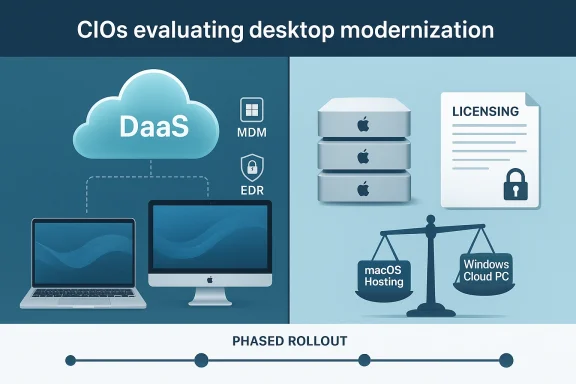
When CIOs treat desktop modernization as a neutral, architecture-first exercise, they often miss a decisive constraint that arrives far earlier than anticipated: the mix of endpoint hardware, particularly the presence of Macs, can legally and economically harden desktop choices in ways that are effectively irreversible.
Desktop as a Service (DaaS) and virtual desktop strategies promise a powerful premise: decouple the operating system and workspace from client hardware, centralize management, and scale compute and licensing on demand. For Windows-centric fleets, that promise largely holds. Virtual Windows desktops (session hosts, Cloud PC offerings, or traditional VDI) let IT teams pool images, enforce consistent security baselines, and treat hardware replacement as a separate procurement cadence. That separation is why many CIOs view DaaS as the default path for endpoint modernization. ces into that equation and the calculus changes rapidly. While Macs can consume Windows-based virtual desktops with mature, supported clients, delivering macOS as a centrally hosted, multi-tenant desktop—what many organizations imagine when they say “DaaS for macOS”—is blocked not by performance or cloud maturity but by licensing and ecosystem policy. That distinction is the hinge on which early architectural choices swing.
That logic breaks down quickly when macOSfirst-class, hosted desktop option. Unlike Windows, macOS is explicitly tied to Apple-branded hardware in its license, and Apple has historically enforced that constraint—legal precedent and corporate policy both matter. When macOS must remain local to Apple devices, the core DaaS levers—pooling, reuse, and elastic cost-shifting—no longer operate the same way. The practical effect: procurement, licensing, and architecture decisions need to be made earlier in the modernization lifecycle than many CIOs expect.
History reinforces the present-day constraint. Commercial attempts to ship macOS on commodity hardware—most famously the Psystar case—ended with legal action that affirmed Apple’s right to control distribution and to guard the boundary between its hardware and software ecosystems. Those precedents matter for enterprise DaaS because they expose a straightforward truth: hosting macOS for multi-tenant or provider-style DaaS on non‑Apple servers is not merely “hard”; it’s a licensing and legal non-starter for mainstream enterprise deployments.
Key considerations for architects:
The practical takeaway for CIOs is clear: treat endpoint composition as a strategic, early decision. Resolve licensing, run conservative pilots, and be prepared for a hybrid future where Macs remain user devices while Windows workloads are centralized—unless your organization is willing to pay the premium and complexity of Apple-hosted macOS at scale. Making that call early, with licensing and cost evidence in hand, prevents the painful retrofit of architecture that many teams experience when desktop decisions harden later in a migration program.
Source: TechTarget Desktop decisions harden earlier than CIOs expect | TechTarget
 Background
Desktop as a Service (DaaS) and virtual desktop strategies promise a powerful premise: decouple the operating system and workspace from client hardware, centralize management, and scale compute and licensing on demand. For Windows-centric fleets, that promise largely holds. Virtual Windows desktops (session hosts, Cloud PC offerings, or traditional VDI) let IT teams pool images, enforce consistent security baselines, and treat hardware replacement as a separate procurement cadence. That separation is why many CIOs view DaaS as the default path for endpoint modernization. ces into that equation and the calculus changes rapidly. While Macs can consume Windows-based virtual desktops with mature, supported clients, delivering macOS as a centrally hosted, multi-tenant desktop—what many organizations imagine when they say “DaaS for macOS”—is blocked not by performance or cloud maturity but by licensing and ecosystem policy. That distinction is the hinge on which early architectural choices swing.Why endpointthan you think
The mental model most CIOs bring
Many IT leaders assume the endpoint is a largely interchangeable rendering surface: choose the OS later, choose the management approach now. That mental model is defensible in a mostly Windows world because Windows virtualization licensing and ecosystem tooling were built with server-hosted, multi-session, and cloud-hosted models in mind. In practice, Windows virtualization can be pooled, multitenanted, and priced to support the economics of DaaS—density, reuse, and centralized image hygiene.That logic breaks down quickly when macOSfirst-class, hosted desktop option. Unlike Windows, macOS is explicitly tied to Apple-branded hardware in its license, and Apple has historically enforced that constraint—legal precedent and corporate policy both matter. When macOS must remain local to Apple devices, the core DaaS levers—pooling, reuse, and elastic cost-shifting—no longer operate the same way. The practical effect: procurement, licensing, and architecture decisions need to be made earlier in the modernization lifecycle than many CIOs expect.
The operational consequences
- Centralization loses its primary cost lever: you cannot lawfully collapse many macOS endpoints into a shared pool running on commodity servers in the public cloud.
- Vendor lock‑in changes from a question of device brand preference to a contractual and legal reality that constrains how you can deliver desktops as a service.
- Early procurement commitments—choosing to standardize on MacBook Air for knowledge workers or a mixed fleet—impose architectural constraints on whether a DaaS-firstible for that cohort.
The licensing reality: macOS is legally tied to Apple hardware
The single most important technical-legal fact for desktop architects is simple and non-negotiable in current practice: Apple’s macOS license limits installation and authorized use to Apple-branded hardware. That language appears directly in Apple’s licensing terms and is the contractual basis for decades of enforcement and litigation against commercial attempts to resell macOS on non‑Apple servers or consumer hardware.History reinforces the present-day constraint. Commercial attempts to ship macOS on commodity hardware—most famously the Psystar case—ended with legal action that affirmed Apple’s right to control distribution and to guard the boundary between its hardware and software ecosystems. Those precedents matter for enterprise DaaS because they expose a straightforward truth: hosting macOS for multi-tenant or provider-style DaaS on non‑Apple servers is not merely “hard”; it’s a licensing and legal non-starter for mainstream enterprise deployments.
What that means in practice
- You can run macOS virtual machines on Apple hardware (e.g., a Mac Mini or Mac Pro used as a host) and vendors like Parallels and VMware provide supported hypervisors for macOS hosts. But that hosting model substantially narrows provider choice and economics compared with typical Cloud PC or multi-tenant VDI approaches.
- Commercial DaaS providers that rely on commodity x86 racks and multi-tenant server farms cannot lawfully offer macOS as a pooled, shared desktop for enterprise customers without Apple’s explicit licensing and commercial arrangements.
- Workarounds—custom images, hacked hosts, or “Hackintosh”-style solutions—introduce legal, support, and audit risks that enterprises should treat as unacceptable for regulated, insured, or auditable environments.
Technical routes organizations take — and their limits
1) Consume Windows desktops from Mac endpoints
For many Mac-using employees, the practical path is to deliver Windows via virtualization inside the Mac or via remote sessions to Windows session hosts. Tools and approaches here include:- Local virtualization (Parallels Desktop, VMware Fusion) running Windows 11 on the Mac host. Microsoft has clarified and, in some contexts, blessed certain Parallels scenarios for Windows on Apple Silicon, removing some previous ambiguity for corporate deployment models. Still, those setups carry their own licensing and feature limitations, especialy features, and Windows ARM vs. x86 differences. ([arstechnica.com](Microsoft officially blesses Parallels as a way to run Windows on M1, M2 Macs=: macOS devices act as endpoints for Windows Cloud PCs or Azure Virtual Desktop sessions—this is the most common enterprise approach because it preserves centralized management of the Windows estate while allowing Macs to remain the user device.
2) Host macOS on Apple hardware (on-prem or colocated)
A more constrained but lawful approach is to host macOS VMs on Apple-branded servers. This can be done in two primary patterns:- On-prem Mac server farms (Mac minis or Mac Studio racks) that run macOS guests for remote users.
- Colocated Apple hardware in provider data centers offering a physically segregated macOS hosting service (rare, expensive, and operationally complex).
3) Use virtualization compatibility layers, emulation, or translation
Parallels, VMware, and other vendors continue to advance emulation and translation technologies—particularly as Apple Silicon becomes dominant. These tools can run Windows guests on Mac hosts and even emulate x86 on ARM in some controlled scenarios, but they do not solve the macOS hosting license problem (they assume macOS runs on Apple hardware) and they introduce performance, peripheral, and driver limits. For GPU-heavy use cases, real-time control systems, or hardware-backed DRM, emulation is rarely acceptable.Licensing interplay: Windows in the cloud and mixed fleets
It’s not only Apple’s license that matters. Windows licensing in cloud and virtualized scenarios carries its own nuance—particularly when you mix BYOD, BYOL, device-attached licenses, and Cloud PC models. Microsoft’s product terms and enterprise licensing documents define what types of Windows images and access patterns are permitted under which SKUs and contracts. Misinterpreting those rules can lead to audit liabilities or unexpected costs.Key considerations for architects:
- Confirm which Windows SKUs (for example, Windows Enterprise, VDA, or Cloud PC entitlements) are required for hosted access from macOS endpoints, and whether your Microsoft licensing agreement covers those access types.
- Account for differences between Windows on ARM (used for Apple Silicon virtualization) and x86 Windows licensing, activation, and feature parity.
- Model the total cost of ownership honestly: Cloud compute, GPU-backed sessions, storage IOPS (for profile containers like FSLogix), and networking often dominate the bill—especially if you aim for persistent desktops or GPU-capable instances.
Practical guidance: how to plan desktop modernization when Macs are in scope
The right program is empirical, staged, and licensing-aware. Below is a concise, repeatable runway CIOs can use to avoid late-stage surprises.Phase 0 — Inventory and dependency mapping (non-negotiable)
- Run a full application and peripheral inventory, flagging Windows-only LOB apps and hardware-bound drivers.
- Identify user personas by dependency: knowledge worker, power user, GPU-intense, lab/device-bound.
- Classify each user into a migration bucket: can move to macOS + remote Windows; must remain Windows local; candidate for hosted macOS (rare).
Phase 1 — Licensing & legal validation
- Engage licensing specialists early (Microsoft licensing, Apple legal if you plan macOS hosting) and document which SKUs and entitlements are required.
- Negotiate contractual assurances if you plan to use a third-party provider for Apple-hosted macOS sessions (expect premium pricing and careful contractual language).
Phase 2 — Pilot with measurable KPIs
- Start with a small pilot: mix of Mac devices that access Windows via Cloud PC and a control group that uses local virtualization.
- Measure support tickets, login times, app performance, peripheral compatibility, and user satisfaction.
- Validate security posture: EDR/MDM reporting, encryption, and conditional access behavior for remote sessions.
Phase 3 — TCO and risk modeling
- Model three scenarios for each persona: full refresh to Windows, DaaS/Cloud PC, and hybrid (macOS endpoints + hosted or local Windows).
- Include downstream costs: virtualization licenses (Parallels/VMware), profile management, additional EDR/MDM tooling for macOS, and potential vendor fees for managed macOS h— Decide and execute with governance
- For knowledge workers with web and Microsoft 365–centric workflows, favor Macs + remote Windows sessions where license and TCO align.
- For Windows-only LOB and GPU-bound users, maintain Windows endpoints or migrate those workloads to compliant cloud/GPU providers.
- Document rollback plans, compliance evidence, and SLA clauses that explicitly define where data, logs, and administrative access live.
Strengths and risks of the macOS-in-mixed-fleet pattern
Strengths
- Macs deliver high satisfaction for many knowledge workers and often lower help-desk churn in smaller IT shops.
- Parallels/VMware and Cloud PC patterns allow organizations to centralize Win enabling macOS as the user experience. Microsoft has taken steps to support Windows on Mac virtualization, reducing prior licensing ambiguity in some scenarios.
- Where macOS-hosted desktops are required and Apple hardware is acceptable, hosting macOS on Apple servers preserves compliance while enabling centralized management—at materiath stronger legal certainty.
Risks
- Licensing fragility: assuming macOS can be pooled like Windows will lead to procurement and legal risk. Enterprises that rely on hacky or unsupported macOS hosting methodsaudits, lack of vendor support, and potential copyright liability. (alibaba.com)
- Economic erosion: Apple‑hosted macOS in data centers is expensive per seat compared with commodity server-based DaaS. The density and scaling benefits of DaaS evaporate quickly.
- Operational complexity: mixed fleets increase tooling, training, and policy scope—MDM/EDR must be cross-platform, and help desks must support virtualization stacks, remote desktop flows, and macOS local issues.
- Unverified vendor claims: treat headline performance metrics (NPUs, TOPS) and vendor promises about “work anywhere” as directional; validate with workload-specific pilots.
What vendors and CIOs should be watching next
- Apple’s enterprise licensing posture: any shift toward more permissive cloud licensing for macOS would be transformational. Until that happens, assume the license is device-bound.
- Parallels andtories for Apple Silicon: improvements in emulation, device passthrough, and security integrations will raise the comfort level for mixed deployments but will not alter licensing constraints.
- Microsoft Cloud PC and Windows Cloud licensing evolution: clearer entitlements for accessing Windows from non-Windows endpoints will reduce ambiguity for mixed-fleet deployments. Keep licensing counsel engaged.
- Emergence of niche providers offering compliant Apple-hosted macOe, audited offerings targeted at regulated customers and creative studios; evaluate those only when their SLA and contract terms match your regulatory needs.
Executive checklist: decisions that should not wait
- Stop assuming endpoint choice is downstream of cloud architecture. If Macs are in scope, resolve licensing and procurement strategy before you standardize on a DaaS provider.
- Run the inventory, then run legal and licensing checks in parallel with pilots. Don’t sign on to a DaaS contract assuming macOS pooling is possible later.
- Model TCO including the hidden cost of macOS hosting (hardware, management, and compliance), not just device procurement. Use conservative resale and lifecycle assumptions.
- Treat ESU or temporary bridges as time-boxed: use them to buy runway for pilots and legal work, not as a permanent fix.
Conclusion
DaaS remains a compelling path for desktop modernization—but only under the conditions its economics and licensing assumptions require. In Windows-dominant fleets, those assumptions typically hold: virtual desktops can be pooled, managed, and scaled without early, irrevocable platform commitments. Once Macs become part of the mix, those assumptions fracture. Apple’s macOS licensing binds the operating system to Apple hardware, and while vendors and cloud options enable Windows delivery to Mac endpoints, delivering macOS itself as a typical provider-style DaaS offering is constrained, costly, and operationally niche.The practical takeaway for CIOs is clear: treat endpoint composition as a strategic, early decision. Resolve licensing, run conservative pilots, and be prepared for a hybrid future where Macs remain user devices while Windows workloads are centralized—unless your organization is willing to pay the premium and complexity of Apple-hosted macOS at scale. Making that call early, with licensing and cost evidence in hand, prevents the painful retrofit of architecture that many teams experience when desktop decisions harden later in a migration program.
Source: TechTarget Desktop decisions harden earlier than CIOs expect | TechTarget
