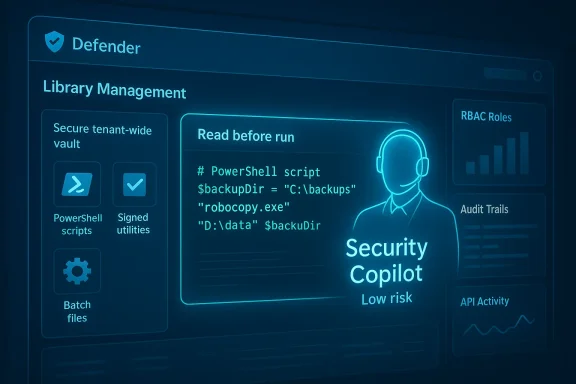
Microsoft has added a long-awaited, practical capability to Microsoft Defender’s Live Response workflow: a centralized Library Management experience that lets security teams upload, manage, and pre-stage investigation artifacts—scripts, batch files, and utilities—directly inside the Defender portal, with built-in visibility and AI-assisted context to speed triage and reduce friction during live investigations.
Security operations teams have used ad hoc collections of scripts, custom tools, and one-off utilities for years. These assets live in disparate places—Git repos, shared drives, ticket attachments, or individual analysts’ machines—and moving them into an active investigation is often slow, error-prone, and poorly audited. Live Response features in modern EDR/XDR consoles have provided a way to run investigative commands remotely, but executing that last-mile automation still required uploading or pasting scripts during live sessions, or keeping privileged tools on analysts’ laptops.
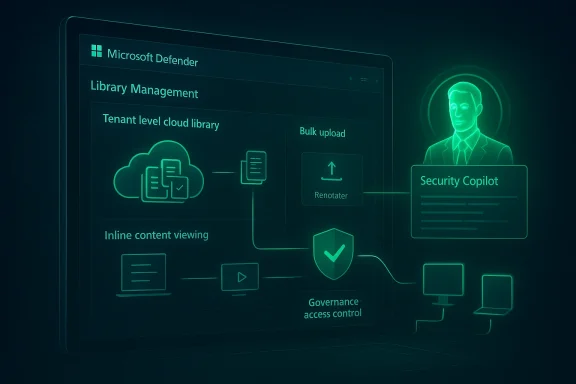
Microsoft’s Library Management for Defender aims to change that by making the investigative asset repository a first-class tenant-level capability in the Live Response workflow. The feature surfaces in the Live Response page of the Defender portal and is designed to let teams pre-stage and manage the exact scripts and binaries they rely on so they are instantly available during an active session. Early reporting and product notes indicate that the new experience includes bulk upload and cleanup, inline content viewing, and Security Copilot integration for contextual summaries and risk assessments—functionality that short-circuits many of the manual steps SOCs historically endure.
Mitigations:
Mitigations:
Mitigations:
Mitigations:
Mitigations:
That said, the net benefit hinges entirely on governance and operational discipline. Poor RBAC, unsigned artifacts, lax scanning, or overtrust in AI summaries can convert convenience into a danger. Use Library Management to accelerate trusted playbooks, not to shortcut risk controls.
Security teams should adopt Library Management deliberately: pilot it with low-risk read-only scripts, bake in CI signing and secret scanning, enforce approvals for high-impact items, and retain human oversight over AI recommendations. With those guardrails in place, Library Management can be a real productivity multiplier—and a step toward faster, safer incident response across Defender-powered environments.
Source: Neowin Microsoft announces powerful tool for security teams using Defender
 Background
Security operations teams have used ad hoc collections of scripts, custom tools, and one-off utilities for years. These assets live in disparate places—Git repos, shared drives, ticket attachments, or individual analysts’ machines—and moving them into an active investigation is often slow, error-prone, and poorly audited. Live Response features in modern EDR/XDR consoles have provided a way to run investigative commands remotely, but executing that last-mile automation still required uploading or pasting scripts during live sessions, or keeping privileged tools on analysts’ laptops.Microsoft’s Library Management for Defender aims to change that by making the investigative asset repository a first-class tenant-level capability in the Live Response workflow. The feature surfaces in the Live Response page of the Defender portal and is designed to let teams pre-stage and manage the exact scripts and binaries they rely on so they are instantly available during an active session. Early reporting and product notes indicate that the new experience includes bulk upload and cleanup, inline content viewing, and Security Copilot integration for contextual summaries and risk assessments—functionality that short-circuits many of the manual steps SOCs historically endure.
What Library Management brings to defenders
A centralized, tenant-level library of investigative assets
Library Management stores files at the tenant level rather than per-user, so any authorized analyst joining a Live Response session can access the same curated repository. This eliminates version confusion and prevents teams from repeatedly re-uploading identical scripts during separate investigations. The benefit is immediate: a consistent, auditable place to keep validated tools and playbook artifacts.- Pre-stage critical scripts for incident types you see most often (forensic collectors, network enumeration, persistence checks).
- Store signed scripts and signed binaries, reducing the risks of running unsigned content.
- Apply bulk operations for onboarding or cleaning up hundreds of helper files at once.
Inline content visibility and quick access
A practical pain point for analysts is needing to download a script to inspect or edit it before running. The new experience reportedly provides direct viewing of script content in the portal, removing the need for separate tooling just to glance at logic or parameters. That reduces friction in urgent sessions and lowers the temptation to copy scripts to local workstations—a security win when done right.Bulk upload and cleanup workflows
Operational hygiene matters: scripts proliferate, go stale, and accumulate unused items. Library Management includes bulk upload and cleanup tools that help teams onboard a large corpus of tools in one operation and later retire obsolete assets. For enterprise SOCs, this is a meaningful time-saver that also supports compliance and auditing requirements.Security Copilot integration for context and triage
Microsoft has been embedding Security Copilot across security workflows to provide summarization, guidance, and context. The Library Management experience is reported to feed assets into Security Copilot so analysts can get:- Summarized behavior descriptions of what a script does
- Security-relevant insights such as suspicious API calls or risky commands
- Execution risk context that highlights potential consequences of running a script on production systems
How this changes SOC workflows — and why it matters
Faster, more reliable live investigations
Pre-staging scripts and tools removes the time and cognitive load associated with locating, transferring, and validating ad hoc utilities during an active incident. Analysts can start running validated, tenant-curated scripts immediately, which shortens the window from detection to containment.Better governance and auditability
Because the library is managed at the tenant level and supported by Defender’s action logging and the Live Response API, every upload and execution can be captured in machine actions and audit trails. This improves accountability and helps with post-incident reviews and compliance reporting.Consistency and reuse
SOCs often reinvent the same investigation steps. A managed library promotes reuse, reduces duplication, and makes playbooks more deterministic. Teams can standardize naming, metadata, and versioning for every asset in the library.Easier cross-team collaboration
When Tier 1, Tier 2, and incident response teams all draw from the same trusted library, cross-shift continuity improves. Analysts joining a session later can immediately see which script was run, its exact content, and any AI-provided notes on behavior or risk.The security and governance trade-offs (risks you must manage)
Library Management is powerful, but any capability that makes it easier to execute code remotely must be governed carefully. Below are concrete risks and mitigation strategies every team should consider.1) Privilege misuse and escalation
Live Response already allows powerful remote operations. If library uploads and execution aren’t tightly controlled, a bad actor—or simply an overzealous analyst—could run privileged scripts that change accounts, create backdoors, or otherwise elevate rights. Community analysis has shown how Live Response features can be abused to escalate privileges when combined with poorly governed RBAC and unsupervised scripts.Mitigations:
- Use strict role-based access controls. Distinguish roles for basic vs. advanced Live Response operations.
- Require multi-person approval for high-risk scripts or executions that touch control-plane assets.
- Maintain separate administrative accounts and Privileged Access Workstations (PAWs) for execution of critical remediation scripts.
2) Script provenance and integrity
Scripts from internal contributors or vendors can be manipulated. Running unsigned or unaudited scripts increases risk.Mitigations:
- Enforce script signing or require an internal code review before a script is uploaded.
- Implement a signing-and-verification workflow (CI pipeline that signs artifacts when repository tests pass).
- Display and surface signing metadata in the library UI and in the Security Copilot summary.
3) Information leakage
Investigative scripts may contain hardcoded credentials, API tokens, or environment-specific secrets. Storing those in a central library creates a sensitive repository.Mitigations:
- Scan all uploads for secrets and disallow files containing sensitive strings or keys.
- Treat the library as a sensitive store: apply strict access controls, encryption at rest, and RBAC auditing.
- Provide secure parameterization patterns so scripts accept runtime secrets from a protected vault rather than embedding them.
4) Overreliance on AI summaries
Security Copilot can accelerate triage by summarizing a script’s behavior, but AI models can be wrong or miss nuanced side effects. Overreliance may lead teams to execute scripts without adequate human review.Mitigations:
- Use AI summaries as assistive signals, not as authoritative approval.
- Require a human reviewer or a second analyst to validate Security Copilot assessments for high-risk scripts.
- Train analysts on known AI failure modes—e.g., missing obfuscated logic or incorrectly inferring side effects.
5) API exposure and automation risk
Library management capabilities are reflected in API permissions (e.g., Library.Manage, Machine.LiveResponse). Compromised service principals with broad API rights could upload and run malicious scripts at scale.Mitigations:
- Limit app registrations and service principals that have Library.Manage permissions.
- Monitor and alert on abnormal usage of Live Response APIs, including bulk uploads or unusual execution patterns.
- Use conditional access and just-in-time permissions for automation accounts.
Practical implementation roadmap: how to adopt Library Management safely
Below is a step-by-step plan security teams can follow to adopt Library Management in a controlled way.- Pilot with a small, trusted group
- Select a narrow set of scripts (forensics collectors, read-only enumerations) and onboard them to the library.
- Evaluate the UI workflows and API logs during real incident drills.
- Define governance and RBAC
- Specify who can upload, approve, and run scripts.
- Create policies that require code review and signing for any script that can modify system state.
- Integrate code review and CI
- Keep the canonical source for scripts in a version-controlled repo.
- Automate tests and static analysis; sign artifacts on successful builds before bulk upload to the library.
- Harden access to the library and APIs
- Restrict Library.Manage and Machine.LiveResponse API permissions to specific service principals and admin roles.
- Require conditional access and MFA for accounts that can perform library operations.
- Implement scanning and AI-assist guardrails
- Use secret scanning and static analysis to block risky uploads.
- Use Security Copilot’s summarization for triage, but pair it with human approval for high-risk actions.
- Monitor, review, and rotate
- Regularly review library contents for staleness.
- Rotate any credentials referenced by scripts and retire scripts that are no longer relevant.
- Build playbooks and operational runbooks
- Map library assets to incident playbooks so analysts know which script to run for which scenario.
- Train teams on emergency rollback steps if a script causes unintended impact.
Integrating Library Management with existing SOC tooling
Library Management should not be a silo. Consider these integration points:- SIEM and SOAR: Ensure that library uploads and executions are forwarded to your SIEM for correlation and to your SOAR for automated approvals or remediation playbook triggers.
- Version control systems: Treat the Defender library as a curated, deployed set of artifacts and keep canonical copies in source control for reviews, diffs, and history.
- Secret vaults and parameterization: Use vault-backed runtime parameters so scripts never need embedded secrets.
- EDR telemetry: Correlate script execution outputs with endpoint telemetry (process trees, parent-child relationships) to detect suspicious side effects.
What to watch for: product maturity and operational realities
While Library Management promises meaningful improvements, teams should evaluate features and constraints carefully:- Permissions granularity: Confirm the portal and API provide sufficiently granular RBAC (upload-only, run-only, approve-only) for your organizational model.
- Audit completeness: Validate that all uploads, downloads, and executions are recorded comprehensively in tenant audit logs and are queryable for forensics.
- File size limits and supported types: Understand the limits for uploads and the sanctioned executable/script types (PowerShell, batch, signed binaries).
- Retention and lifecycle: Check whether library items support versioning, metadata tagging (owner, playbook, expiration), and automated retirement policies.
- AI accuracy and privacy: Determine what Security Copilot sees and whether library contents are used to train models or retained for prompt context—then adjust governance accordingly.
Strengths and potential impact
- Speed: Curated, tenant-level tooling reduces the time to run validated investigations.
- Consistency: Shared assets reduce drift between analysts and shifts.
- Governance-ready: Centralized storage and API-backed access make auditing and compliance easier when configured correctly.
- AI-assisted triage: Security Copilot integration can surface risky behaviors and speed decision-making during high-pressure incidents.
Final verdict: powerful—but not a silver bullet
Library Management in Microsoft Defender is a useful, pragmatic evolution for security teams. It addresses long-standing operational frictions in Live Response workflows and elevates investigative artifacts from informal fileshares into a governed, auditable, and AI-annotated tenant capability. When combined with the broader Security Copilot and Defender roadmap, the feature promises a smoother, more consistent incident-handling experience that scales across large organizations.That said, the net benefit hinges entirely on governance and operational discipline. Poor RBAC, unsigned artifacts, lax scanning, or overtrust in AI summaries can convert convenience into a danger. Use Library Management to accelerate trusted playbooks, not to shortcut risk controls.
Security teams should adopt Library Management deliberately: pilot it with low-risk read-only scripts, bake in CI signing and secret scanning, enforce approvals for high-impact items, and retain human oversight over AI recommendations. With those guardrails in place, Library Management can be a real productivity multiplier—and a step toward faster, safer incident response across Defender-powered environments.
Source: Neowin Microsoft announces powerful tool for security teams using Defender