

It’s an understandable temptation: with Windows 10 now past its support life, shoppers are hunting aggressively for inexpensive, Copilot‑ready Windows 11 machines — and Dell’s new Inspiron Copilot 14 is surfacing in conversations as a value‑focused option that bridges modern AI features with a mainstream price point.
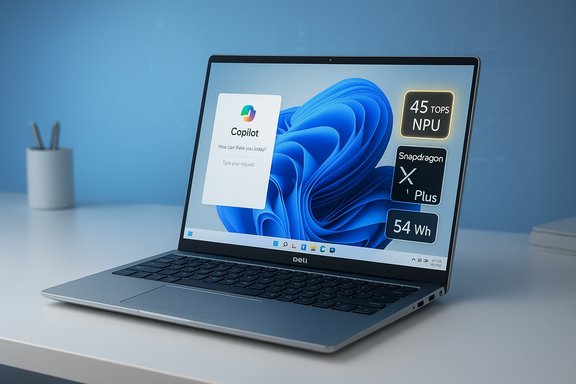
Microsoft ended mainstream support for Windows 10 on October 14, 2025, creating a clear push for many users to move to Windows 11 or to purchase extended security updates while they plan an upgrade. This change accelerated demand for Copilot+ PCs — machines that can run Microsoft’s on‑device AI features locally rather than relying exclusively on cloud services. Microsoft and industry coverage set a higher hardware bar for that Copilot+ experience: a high‑performance Neural Processing Unit (NPU) around 40+ TOPS, 16 GB of fast LPDDR5/LPDDR5X memory, and at least 256 GB of fast local storage are now treated as the baseline for a true on‑device AI experience. Against that backdrop Dell’s Inspiron Copilot 14 (model family 5441) arrives as a mainstream, aluminum‑chassis 14‑inch laptop offered in multiple Snapdragon X‑series configurations. Dell’s official pages list configurations that use the Snapdragon X (X1‑26‑100) and variants of Snapdragon X Plus (X1P‑42/64‑100) with an NPU rated up to 45 TOPS, 16 GB LPDDR5X memory soldered on board, and an M.2 NVMe SSD.
Upgrading from Windows 10 is now a pressing security decision for many users. The Dell Inspiron Copilot 14 gives an affordable entry point to the Copilot+ era of locally accelerated AI on Windows 11, but buyers must be pragmatic: confirm the exact hardware configuration, understand soldered RAM limitations, discount battery marketing, and verify genuine retail pricing before treating any single Black Friday‑era headline as definitive. The Inspiron is an attractive compromise for productivity‑first buyers who want modern connectivity, Copilot readiness and a lightweight aluminum chassis — provided they buy the right SKU at the right price and accept the platform’s current software transition state.
Source: Windows Central https://www.windowscentral.com/hard...ired-this-is-your-perfect-windows-11-upgrade/
 Background / Overview
Microsoft ended mainstream support for Windows 10 on October 14, 2025, creating a clear push for many users to move to Windows 11 or to purchase extended security updates while they plan an upgrade. This change accelerated demand for Copilot+ PCs — machines that can run Microsoft’s on‑device AI features locally rather than relying exclusively on cloud services. Microsoft and industry coverage set a higher hardware bar for that Copilot+ experience: a high‑performance Neural Processing Unit (NPU) around 40+ TOPS, 16 GB of fast LPDDR5/LPDDR5X memory, and at least 256 GB of fast local storage are now treated as the baseline for a true on‑device AI experience. Against that backdrop Dell’s Inspiron Copilot 14 (model family 5441) arrives as a mainstream, aluminum‑chassis 14‑inch laptop offered in multiple Snapdragon X‑series configurations. Dell’s official pages list configurations that use the Snapdragon X (X1‑26‑100) and variants of Snapdragon X Plus (X1P‑42/64‑100) with an NPU rated up to 45 TOPS, 16 GB LPDDR5X memory soldered on board, and an M.2 NVMe SSD. What the Dell Inspiron Copilot 14 actually ships with
Core hardware and the Copilot story
- Processor: Qualcomm Snapdragon X (X1‑26‑100) or Snapdragon X Plus (X1P‑42/64‑100) depending on SKU. Dell lists the X1‑26‑100 on Inspiron listings and the X Plus on alternate configurations; both families provide an integrated Adreno GPU and a Hexagon NPU rated up to 45 TOPS, putting them squarely in Copilot+ territory on paper.
- Memory: 16 GB LPDDR5X onboard/soldered. Dell’s owner’s manual explicitly shows memory as “onboard” (no DIMM slots). That means RAM is not user‑upgradeable in the field — a permanent constraint to factor into buying decisions.
- Storage: 512 GB M.2 PCIe NVMe SSD (some retailer SKUs list 256 GB or 1 TB options). Crucially, Dell’s specifications and service documentation show an M.2 slot for the SSD, which means storage is physically replaceable/upgradeable by a service technician or an experienced user; it is not permanently fused to the board. This contradicts some early third‑party writeups that implied the SSD was non‑replaceable.
- Display & chassis: 14.0‑inch FHD+ (1920×1200), 16:10 IPS, ~300 nits on many SKUs, in a mostly aluminum chassis that clocks in around 1.5–1.6 kg depending on configuration.
- Battery: Dell lists a 54 Wh integrated battery with marketing copy in places claiming “up to 28 hours” on conservative workloads — a common manufacturer marketing figure — but independent tests and reviews show more modest real‑world runtimes depending on workload and brightness.
- Connectivity: Wi‑Fi 7 (FastConnect 7800) and Bluetooth 5.4 on many configurations, plus multiple USB‑C‑type ports that support DisplayPort and Power Delivery.
On‑device AI readiness
Dell’s Copilot‑branded Inspiron models pair a strong NPU rating with Microsoft’s Copilot+ messaging. Because the CPU families used meet Microsoft’s 40+ TOPS NPU guidance and the machines ship with 16 GB of RAM and a fast SSD, they are marketed as capable of running on‑device Copilot features like Recall, Studio Effects, and local accelerations for image/video tasks. Remember: TOPS is a supplier metric that indicates theoretical NPU throughput; real application performance depends on drivers, software integration, and thermal/firmware tuning.Price, deals and availability — separating the sale hype from facts
Retail pricing for Copilot+ laptops is volatile during the holiday season. Dell’s own storefront lists Inspiron 14 configurations starting in the mid‑to‑high hundreds (customizable SKUs), while major retailers show a range of prices:- Dell’s site lists the Inspiron 14 with Snapdragon X/X Plus starting at prices around $599–$749 depending on the configuration at the time of publishing; individual configurations and promotions shift those figures often.
- Big retailers (Costco, Best Buy, Walmart, Target) have carried Inspiron Copilot 14 SKUs at different price points and packaging (some are open‑box or bundled variants). Best Buy has listed new Inspiron 14 Plus Copilot+ models at north of $999 for higher‑res QHD touch variants while open‑box units have appeared near the $499–$539 range. Target and other marketplaces have shown promotional reductions to the $600 range.
- The early Black Friday claims of a $449.99 “44% off” Best Buy price seen in some roundups are not consistently verifiable on Best Buy’s public new‑product listings and appear to reflect either limited open‑box stock, third‑party seller markdowns on secondary marketplaces, or time‑limited promotions that quickly expired. Buyers considering a $449 price should verify the SKU, condition (new vs. open‑box), and seller before purchase.
What reviewers and independent tests say about performance and battery life
Marketing figures are one thing; independent tests are another. Reviewers who’ve tested Snapdragon X/X Plus Inspiron variants find:- Copilot+/Snapdragon X silicon gives excellent battery efficiency in some scenarios, but real‑world runtimes vary widely by task. Where Dell marketing mentions “up to 28 hours,” independent web‑surf and video playback measurements tend to show far lower numbers — commonly between 8 and ~17 hours depending on the test and brightness settings. Reviewers have pointed out that the 54 Wh battery and 14‑inch IPS panel don’t guarantee a full day of heavy mixed use.
- System performance for productivity tasks (Office, web, collaboration) is strong and responsive on the Snapdragon X family, with NPU acceleration providing tangible benefits for camera/mic processing and some AI‑assisted tasks. However, highly multithreaded desktop workloads and heavy native x64 applications will still favor high‑power x86 chips or discrete GPUs.
- Emulation improvements in Windows 11 (Prism) mean many x64 apps run acceptably on Arm‑based Copilot+ systems, but compatibility and worst‑case performance can still be an issue for certain legacy apps and games. The platform is much better than Windows on Arm a few years ago, but the ecosystem is still transitioning.
Strengths: why this Inspiron could make sense as a Windows 11 upgrade
- Value proposition when discounted: when you find a legitimate new unit or a certified open‑box model at a steep discount, the Inspiron Copilot 14 offers Copilot+ hardware at a price point far below many premium Copilot+ machines. That’s compelling for mainstream users who want local AI features without paying flagship prices.
- Copilot+ readiness: the combination of NPU rated to 45 TOPS, 16 GB LPDDR5X, and NVMe SSD storage fulfills the baseline Microsoft and industry guidance for Copilot+ experiences, enabling low‑latency local AI features in many day‑to‑day scenarios.
- Portability and design: the aluminum chassis, compact 14‑inch footprint and modern connectivity (Wi‑Fi 7, USB‑C with DP/PD) make it an effective commuter/work‑from‑home laptop with the build quality expected of current Inspiron designs.
- Repairability note (storage): unlike some ultra‑thin devices that fully solder storage, Dell documents an M.2 slot — meaning storage capacity can be expanded or swapped with an M.2 NVMe module if needed. That gives owners a path to extend usable life without swapping the whole system.
Risks and trade‑offs you must understand before buying
- Soldered RAM is a hard limit. The Inspiron’s 16 GB is onboard and not user‑replaceable; that 16 GB is the ceiling for the model unless you buy a higher‑RAM SKU at purchase. If your workflow will grow (large VMs, heavy image/video editing with big models), you may need a laptop with upgradeable RAM or a heavier spec.
- Battery claims are marketing; real life varies. “Up to 28 hours” is a vendor figure typically based on very low‑power playback or microbenchmarks. Independent reviews show significantly lower results for mixed use and web browsing, so plan expectations accordingly.
- Software ecosystem and compatibility caveats. Windows on Arm has matured, but not every desktop application is fully native. While many major apps (Edge, Chrome, Office, Photoshop) now have Arm‑native builds, others still rely on emulation — and that can show performance or compatibility quirks. If you have specialized or legacy software, confirm compatibility first.
- SKU fragmentation & confusing retail listings. The Inspiron family ships in many variants (Snapdragon X vs. X Plus, different display panels, touch vs. non‑touch). Promotions can mix SKUs across retailers. Always check the exact model number against Dell’s product documentation before buying. A $449 price might be a different SKU, an open‑box or reseller listing, or a time‑limited one‑store clearance.
- TOPS is not a complete performance indicator. While a 45 TOPS NPU signals strong AI throughput potential, practical on‑device AI experience depends on software support, driver maturity, thermal management and ecosystem optimizations. Don’t treat TOPS alone as the single metric of performance.
Buyer checklist — exactly what to confirm before you pull the trigger
- Verify the precise SKU and model number (e.g., Inspiron 5441 i5441‑SXxxxx) and confirm processor variant (X vs. X Plus), RAM, and SSD capacity. Retail pictures and headlines can mask SKU differences.
- Confirm condition: new vs. open‑box vs. refurbished. Deep discounts are often limited to open‑box units and may carry different return/warranty terms.
- If you need long‑term flexibility: check the service manual (Dell publishes owner and service docs) to confirm whether the SSD is an M.2 slot you can replace and whether any other components are field‑serviceable. (For this Inspiron, memory is onboard but the SSD sits in an M.2 slot.
- Test the ergonomics and display: a 16:10 FHD+ panel is great for productivity, but confirm brightness and color accuracy if you do visual‑work. Many Inspiron panels are 300 nits and IPS — good for office use but not for color‑critical creative work.
- Confirm application compatibility: check whether your essential apps have Arm64 native builds or test them under Windows 11’s improved emulation (Prism). If you rely on legacy x86/x64 apps that are poorly supported under emulation, consider an x86‑based laptop instead.
Verdict: who should buy the Inspiron Copilot 14?
- Buy if you are a mainstream user who wants a modern Windows 11 laptop that is Copilot+ capable without moving into premium price territory. It’s a strong option for heavy web users, students, and office workers who will benefit from on‑device AI features (local background tasks, improved webcam/mic effects, fast AI searches) and appreciate long standby and efficient battery use under light loads.
- Don’t buy if you need a machine with upgradable RAM or you run specialized legacy applications that are known to struggle on Arm emulation. Content creators who require the very best in sustained CPU/GPU throughput for heavy video rendering or gaming will still be better served by high‑power x86 machines with discrete GPUs.
Final takeaways and practical buying advice
- The Dell Inspiron Copilot 14 aligns well with Microsoft’s Copilot+ hardware requirements and offers a legitimate, lower‑cost path into on‑device Windows 11 AI features. Its 45 TOPS NPU, 16 GB LPDDR5X, and fast NVMe storage check the important boxes.
- Treat mark‑down claims with caution. The $449.99 price referenced in some roundup copy could be a limited open‑box deal or resold listing; confirm model and condition before buying. Retail listings vary widely and major outlets are still selling new units at higher prices.
- Accept the permanent limitations of soldered memory. If you suspect you’ll need more than 16 GB for future workloads, choose a different SKU with more RAM at purchase or look for a device with user‑upgradeable memory.
- Expect an evolving software story: native Arm64 app adoption is growing and Windows 11’s emulation has improved considerably, but buyers should test their key apps or confirm vendor support if they rely on specialized software.
- If the goal is a clean, secure Windows 11 upgrade for day‑to‑day productivity with occasional AI acceleration — and you find a legitimate discounted Inspiron Copilot 14 — it is one of the most cost‑effective ways to stay current with Microsoft’s Copilot+ vision without paying flagship prices. Just validate SKU, warranty terms, and the fine print before checking out.
Upgrading from Windows 10 is now a pressing security decision for many users. The Dell Inspiron Copilot 14 gives an affordable entry point to the Copilot+ era of locally accelerated AI on Windows 11, but buyers must be pragmatic: confirm the exact hardware configuration, understand soldered RAM limitations, discount battery marketing, and verify genuine retail pricing before treating any single Black Friday‑era headline as definitive. The Inspiron is an attractive compromise for productivity‑first buyers who want modern connectivity, Copilot readiness and a lightweight aluminum chassis — provided they buy the right SKU at the right price and accept the platform’s current software transition state.
Source: Windows Central https://www.windowscentral.com/hard...ired-this-is-your-perfect-windows-11-upgrade/
