

A Dell OptiPlex 7050 micro/mini motherboard — listed as model D24M8 / 0D24M8 and advertised as “tested” for £44.78 on Alessandria24 — is a tempting buy for tinkerers, refurbishers, and anyone trying to repair or rebuild a compact OptiPlex, but the listing raises several important questions about compatibility, warranty, and the real-world value of buying motherboard-only parts from secondary marketplaces.
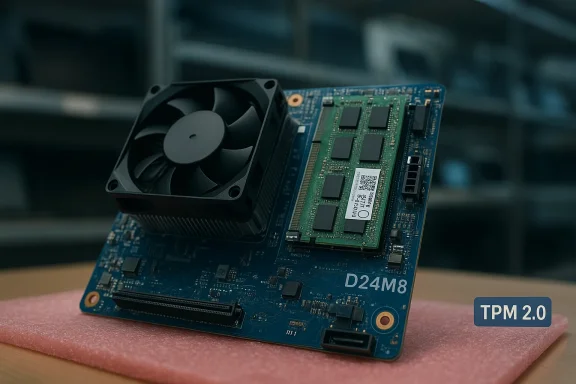
The D24M8 (also shown in some tools and benchmark dumps as 0D24M8) is the system board used in Dell’s OptiPlex 7050 Micro and closely related MFF (micro form factor) variants. Documentation and independent listings show the board is an LGA1151-based design that supports 7th‑generation Intel Core processors (Kaby Lake family), DDR4 SO‑DIMM memory, and modern M.2 storage connectors — exactly what you’d expect inside a compact business micro PC produced in the Kaby Lake era. Dell’s own product documentation and owner’s manual list the OptiPlex 7050’s platform as Kaby Lake‑class and show the platform’s storage and memory options.
Independently, marketplace and parts listings — including multiple eBay sellers and specialist parts resellers — consistently identify the D24M8 / 0D24M8 part number as the OptiPlex 7050 micro motherboard and list the same socket and connectivity characteristics. Benchmark entries (Geekbench) also associate the 0D24M8 motherboard ID with OptiPlex 7050 test results, which is a practical cross‑check that the board ID used in tools matches the marketed part number.
That combination — official manual + marketplace confirmations + tooling traces — makes the D24M8 identification straightforward and verifiable. Yet the headline “Windows 11 7050 Micro/mini Motherboard” in the listing deservWindows 11 compatibility is not solely a function of the motherboard label or seller claim. It depends on CPU generation, TPM support, UEFI/Secure Boot setup, and whether the seller provides the required firmware and activation details. Community buying guides repeatedly advise buyers to verify SKU details and warranty terms before purchase.
Why prices are low:
Buying used server or PC motherboards — including the Dell OptiPlex 7050 D24M8 / 0D24M8 — can be a smart and economical move for the right buyer. The part is well‑documented, identifiable across Dell manuals and marketplace listings, and available widely at low prices. But those low prices hide conditional value: missing CPU/DRAM, firmware/TPM limitations and limited return windows can quickly turn a low headline price into a costlier rebuild project. Verify the Service Tag, get BIOS/TPM proof, confirm the seller’s return policy, and compare the total cost against a complete refurbished unit before you click buy. For buyers comfortable with parts sourcing and hardware testing, the D24M8 is a useful, inexpensive way to resurrect or expand an OptiPlex micro fleet; for buyers who need official Windows 11 support and warranty peace of mind, it’s a riskier path that usually isn’t worth the savings.
Source: Alessandria24.com https://www.alessandria24.com/mall/product/mini-Motherboard-D24M8-0D24M8-tested-44/633491/
 Background / Overview
The D24M8 (also shown in some tools and benchmark dumps as 0D24M8) is the system board used in Dell’s OptiPlex 7050 Micro and closely related MFF (micro form factor) variants. Documentation and independent listings show the board is an LGA1151-based design that supports 7th‑generation Intel Core processors (Kaby Lake family), DDR4 SO‑DIMM memory, and modern M.2 storage connectors — exactly what you’d expect inside a compact business micro PC produced in the Kaby Lake era. Dell’s own product documentation and owner’s manual list the OptiPlex 7050’s platform as Kaby Lake‑class and show the platform’s storage and memory options. Independently, marketplace and parts listings — including multiple eBay sellers and specialist parts resellers — consistently identify the D24M8 / 0D24M8 part number as the OptiPlex 7050 micro motherboard and list the same socket and connectivity characteristics. Benchmark entries (Geekbench) also associate the 0D24M8 motherboard ID with OptiPlex 7050 test results, which is a practical cross‑check that the board ID used in tools matches the marketed part number.
That combination — official manual + marketplace confirmations + tooling traces — makes the D24M8 identification straightforward and verifiable. Yet the headline “Windows 11 7050 Micro/mini Motherboard” in the listing deservWindows 11 compatibility is not solely a function of the motherboard label or seller claim. It depends on CPU generation, TPM support, UEFI/Secure Boot setup, and whether the seller provides the required firmware and activation details. Community buying guides repeatedly advise buyers to verify SKU details and warranty terms before purchase.
What the D24M8 / 0D24M8 board actually is
Core hardware characteristics
- CPU socket: LGA 1151 (Socket H4), typical of Kaby Lake systems. This means the board accepts many 6th/7th‑generation Intel desktop/mobile‑class processors used in OptiPlex 7050 builds.
- Memory: DDR4 SO‑DIMM (micro form factor uses SODIMM modules), commonly listed with support up to 32GB across two slots in micro/MFF variants or higher in other chassis. Marketplace listings and Dell documentation align on DDR4 SODIMM support.
- Storage & expansion: M.2 slot(s) for NVMe/SATA SSDs and internal connectors for 2.5" drives in some micro chassis; some MFF boards include M.2 Wi‑Fi slots. Dell’s specs and owner’s manual describe M.2 form factors and supported storage interfaces.
- I/O: DisplayPort and/or HDMI outputs via the system I/O backplate on assembled systems; USB 3.x, Gigabit Ethernet and internal headers vary by chassis and SKU. Marketplace photos of the board and Dell’s SFF/micro spec sheets show that exact I/O mix.
Evidence from benchmarks and listings
Benchmark metadata and parts listings both reinforce the part mapping: multiple Geekbench entries show the motherboard identifier 0D24M8 associated with the OptiPlex 7050 platform and BIOS versions typical of the product family. Independent parts sellers repeatedly list the D24M8 as the OptiPlex 7050 micro board, often advertising them as “tested” and sold without CPU, RAM, or storage — precisely the state described in the Alessandria24 listing.The Windows 11 claim — what it means and what to verify
A listing that uses “Windows 11” in the title or description can be misleading for parts-only sales. Windows 11 compatibility rests on multiple hardware requirements from Microsoft:- TPM 2.0 and a functioning firmware (UEFI) with Secure Boot ability are mandatory components of Windows 11’s minimum hardware baseline. Microsoft’s hardware requirements page is explicit on that point.
- Processor support: Microsoft’s supported-processor lists are conservative; broadly speaking, Windows 11 is intended for Intel 8th‑generation (and later) processors, with many 7th‑gen chips not on the “official support” list. An OptiPlex 7050 fitted with Kaby Lake (7th gen) CPUs will often be officially unsupported even if it technically can run Windows 11 via workarounds. Check the processor model rather than assume “OptiPlex 7050 = Windows 11.”
- Ask for a screenshot of Windows’ “Device security” / TPM details (run tpm.msc or Windows Security → Device security) showing Specification version: 2.0. If they can’t supply that, the board/host may only have TPM 1.2 or none.
- Ask which CPU was installed when the seller validated Windows 11. If the seller only sold the board and removed CPU/RAM, confirm the CPU family/model and cross‑check against Microsoft’s supported CPU lists.
- Request BIOS screenshots that show UEFI mode and Secure Boot settings accessible in the firmware menu; many OptiPlex systems allow enabling TPM and Secure Boot but some require BIOS updates.
Marketplace context and price reality
The asking price quoted for the Alessandria24 listing — roughly £44.78 — sits squarely in the range we see for used D24M8 boards on international marketplaces. Multiple sellers regularly list these boards for low‑to‑mid two‑digit USD/EUR/GBP sums, either as “tested” pull‑parts or as components in salvage bundles. See examples from eBay and specialized parts resellers.Why prices are low:
- These are used parts from business fleet retirements; micro boards are low‑value but high‑volume.
- Sellers frequently remove higher‑value items (CPU, RAM, SSD) before listing boards, so the buyer must supply those parts.
- Warranty and return windows are often limited (30 days or less) for third‑party sellers; Dell’s outlet and certified refurbishers usually command higher prices because they attad warranties.
- Factor in the cost of a compatible CPU (LGA1151 7th‑gen Kaby Lake parts are still obtainable used).
- Budget for RAM (SODIMM DDR4), an M.2 SSD (or 2.5" drive plus cable), and any shipping/customs charges.
- If the board requires service or the buyer lacks testing gear, allow for a small test overhead or return shipping costs.
Risks, red flags, and how to protect yourself
Buying motherboards off secondary sites is routine, but it has unique pitfalls. Key risks and mitigations:- Missing parts: Many listings explicitly exclude CPU, RAM, and storage. Confirm what is included in the sale. If the board ships in the bottom half of a case or attached to a heatsink assembly (common practice), ask for clear photos.
- Non‑working or cosmetically damaged units: “Tested” is a relative term. Ask the seller what test they ran (POST? boot to OS? power‑on only?). If possible, request a short video showing the board posting to BIOS or booting an OS im provide minimal proof are higher risk.
- SKU and firmware mismatch: OptiPlex model names can hide multiple SKUs and different firmware revisions; capacity and slot count vary between micro, SFF and tower form factors. Community advice repeatedly urges buyers to confirm SKU specifics and the Service Tag to avoid surprises.
- Windows 11 claims: As explained, “Windows 11” written in a title does not guarantee official support. If the board won’t be used with the exact CPU and TPM state shown in the seller’s test, buyer beware. Use the checklist in the previous section.
- Seller reputation and return policy: Marketplace seller ratings can be helpful but read recent reviews, not just the overall percentage. A 4.9/5 with 20 ratings (as in the Alessandria24 snippet) is fine, but if those ratings are for different product categories or the seller’s profile looks thin, ask more questions before buying. Capture all seller replies in writing in case you need to escalate a transaction dispute.
- Firmware / BIOS updates: Some micro boards require firmware updates to fix known quirks (displayport problems, fan control issues, memory slot detection). If you buy a board that’s several years old, plan to update the BIOS from Dell’s support using the Service Tag if you can obtain it. Community threads detail a mix of success and edge-case headaches around BIOS and thermal behavior in compact OptiPlex units.
Practical pre-purchase checklist — ask the seller for:
- The exact part number shown on the board (D24M8 / 0D24M8) and clear photos of the silkscreen/label.
- A photo of the board’s serial/Service Tag sticker and BIOS screen (showing BIOS version). Sellers who pulled a board from a working machine can usually provide those easily.
- Confirmation of what’s not included: CPU, RAM, heatsink, fan, I/O shield, screws. The Alessandria24 listing explicitly excluded CPU and RAM — treat that as standard for many parts-only listings.
- A short video showing the board powering on, posting to BIOS, or booting a live USB (strong proof of functionality).
- The stated warranty/return policy window (30 days is common but confirm who pays return shipping).
If you buy: testing and setup steps
- Unpack carefully and visually inspect for bent pins, blown capacitors, scorch marks, and connector damage. Don’t power a board that shows obvious damage.
- Assemble minimally to test: CPU + one stick of known working SODIMM + PSU + display cable to a monitor. Attempt to reach BIOS; note whether POST codes or beep codes appear.
- Check TPM presence: run tpm.msc in Windows (if you boot a test OS) or confirm via BIOS “Security” menus that the TPM / PTT (Intel Platform Trust Technology) is present and enabled. Some Dell boards expose the TPM option as discrete or via Intel PTT.
- Update BIOS only if necessary: get the latest BIOS from Dell’s support site and apply the update in UEFI according to Dell’s instructions. Use the board’s Service Tag where possible.
- Run an extended stability check if you plan to keep the board: at least one hour of normal use and a short CPU/memory stress test to uncover any latent errors.
Alternatives and value-for-money considerations
If your goal is to run Windows 11 with full vendor support, a D24M8 board paired with a Kaby Lake CPU is not the best route — you’ll likely face the Microsoft CPU‑support limitation and potentially be forced onto unsupported Windows 11 installs or stay on Windows 10 for longer. For official Windows 11 compatibility consider:- Buying a complete, tested OptiPlex unit with confirmed CPU and TPM 2.0 enabled (often more expensive but lower risk).
- Choosing a later generation OptiPlex (8th gen or newer platforms) or a small-form-factor system that explicitly lists Windows 11 compatibility.
- If you only need a compact Windows 10 / general‑use machine, a D24M8 board + used Kaby Lake CPU + DDR4 SODIMM can be a very low-cost, sensible rebuild path.
Final assessment — who should buy the D24M8 board at ~£45?
- Buy if:
- You’re a hobbyist, system builder, or refurbisher who can source a compatible CPU and RAM cheaply.
- You want to salvage a micro chassis or repair a broken OptiPlex 7050 for parts reuse.
- You don’t require official Windows 11 support and are comfortable running Windows 10 or an unsupported Windows 11 install.
- Avoid if:
- You need guaranteed, vendor‑supported Windows 11 updates and security support out of the box.
- You cannot test hardware yourself or rely on short marketplace warranties.
- You need a turnkey system with warranty and predictable behavior for business deployments.
Short, practical buying checklist (one page)
- Ask seller for Service Tag photos and a BIOS screenshot.
- Confirm exactly what’s included (CPU, RAM, heatsink? usually not).
- Request TPM/Windows 11 proof if that is a buying criterion; otherwise assume 7th‑gen CPU may not be officially supported.
- Compare the total price (board + CPU + RAM + shipping + time) to a complete refurbished OptiPlex micro or SFF offering.
- If you proceed, test promptly and keep original packaging if you need to return the item.
Buying used server or PC motherboards — including the Dell OptiPlex 7050 D24M8 / 0D24M8 — can be a smart and economical move for the right buyer. The part is well‑documented, identifiable across Dell manuals and marketplace listings, and available widely at low prices. But those low prices hide conditional value: missing CPU/DRAM, firmware/TPM limitations and limited return windows can quickly turn a low headline price into a costlier rebuild project. Verify the Service Tag, get BIOS/TPM proof, confirm the seller’s return policy, and compare the total cost against a complete refurbished unit before you click buy. For buyers comfortable with parts sourcing and hardware testing, the D24M8 is a useful, inexpensive way to resurrect or expand an OptiPlex micro fleet; for buyers who need official Windows 11 support and warranty peace of mind, it’s a riskier path that usually isn’t worth the savings.
Source: Alessandria24.com https://www.alessandria24.com/mall/product/mini-Motherboard-D24M8-0D24M8-tested-44/633491/
