Discord quietly confirmed a controversial experiment this week: its Windows desktop client will — under tight safeguards — automatically restart itself when memory use climbs above 4 GB as a stopgap while engineers hunt down persistent leaks and inefficiencies.
Discord’s desktop client is built on Electron, the same foundation used by dozens of cross‑platform apps. Electron wraps a Chromium renderer with a Node.js runtime, which gives developers web‑style productivity at the cost of browser‑like memory and process behavior. That architecture makes it easy for a single application to spawn many renderer threads and hold large in‑memory caches for each open conversation, embedded media, and extension—behaviors that manifest as growing RAM footprints over long sessions. The company says typical memory footprint for most Windows users is “around 1 GB,” but that some edge cases push the entire app into multi‑gigabyte territory, sometimes above 4 GB. To reduce user disruption and gather telemetry to diagnose hard‑to‑reproduce leaks, Discord has started an experiment that will restart the client only when a few conditions are met: the process exceeds 4 GB of RAM, the user has been idle for at least 30 minutes (AFK), the app has been running at least one hour, the user is not in a voice/video call, and restarts are limited to once per 24‑hour period. According to the company, drafts and open channels are preserved across the restart.
Alternatives and hybrid approaches include:
The broader lesson for Windows app developers is plain: web‑stack convenience can be bought, but it has costs for long‑lived desktop experiences. Mitigations like modularizing call stacks or offloading volatile components to separate processes are useful intermediate strategies (as Microsoft is doing for Teams), but durable solutions will require either careful native integrations or disciplined heap and lifecycle management inside the web runtime.
Users should welcome the transparency and fixes, but also demand clear opt‑outs and robust safeguards. Developers should treat the restart as a diagnostic tool and commit to longer‑term architecture and memory ownership so desktop apps deliver both the features we love and the stability we expect.
Source: Windows Latest Discord admits its Windows 11 app is a resource hog, tests auto-restart when RAM usage exceeds 4GB
 Background
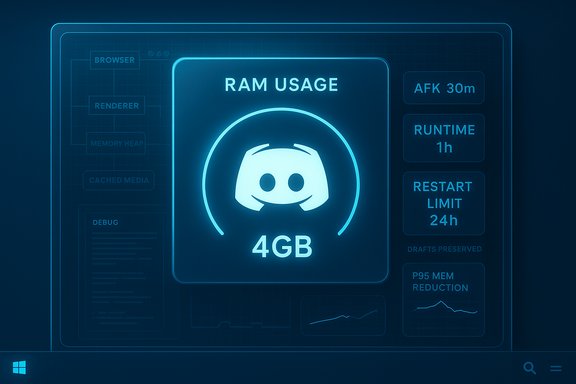
Discord’s desktop client is built on Electron, the same foundation used by dozens of cross‑platform apps. Electron wraps a Chromium renderer with a Node.js runtime, which gives developers web‑style productivity at the cost of browser‑like memory and process behavior. That architecture makes it easy for a single application to spawn many renderer threads and hold large in‑memory caches for each open conversation, embedded media, and extension—behaviors that manifest as growing RAM footprints over long sessions. The company says typical memory footprint for most Windows users is “around 1 GB,” but that some edge cases push the entire app into multi‑gigabyte territory, sometimes above 4 GB. To reduce user disruption and gather telemetry to diagnose hard‑to‑reproduce leaks, Discord has started an experiment that will restart the client only when a few conditions are met: the process exceeds 4 GB of RAM, the user has been idle for at least 30 minutes (AFK), the app has been running at least one hour, the user is not in a voice/video call, and restarts are limited to once per 24‑hour period. According to the company, drafts and open channels are preserved across the restart. Why this matters: real‑world consequences for Windows users
Even when a desktop app’s idle footprint seems modest, runaway growth can cause real system pain on modern Windows machines:- Multitasking friction. When one process consumes many gigabytes, the OS must page other working sets to disk, producing stutters in games, editors, and streaming apps.
- Battery and thermals. Long, heavy memory allocations often co‑occur with increased background CPU activity and GPU involvement (for rich media), which drains battery and raises system temperatures.
- User trust and data loss risk. Any automatic restart — even with safeguards and draft preservation — carries a risk of losing unsaved state or confusing users who expect the client to be persistent.
What Discord says it has fixed so far
Discord’s public messaging with the community emphasizes that the restart is temporary and part of a broader memory initiative launched in October 2025. The engineering update lists a series of practical improvements:- Fixed "9+" distinct memory issues (leaks, deadlocks, buffer overflows).
- Added telemetry and memory profiling tools to gather better evidence.
- Observed early wins: a reported 5% reduction in p95 memory usage for the cohort being tracked so far.
- Identified upstream causes at the OS/driver/hardware layer and worked with partners to produce stand‑alone repros and fixes.
Technical diagnosis: why Electron and WebView‑based apps behave this way
The architecture problem in plain terms
- Electron apps are effectively Chromium instances with additional bridging to native APIs. Chromium uses a multi‑process model: one browser/host process and multiple renderer and utility processes.
- Each renderer keeps a JS heap, DOM state, and often caches images and decoded media frames. Over thousands of channels and messages, that in‑memory state multiplies.
- Native features (hardware acceleration, codecs, screen capture, device drivers) introduce glue code that can leak or hold onto large buffers if not rigorously bounded.
Examples from the field
Community and independent developers pointed at sloppy uses of system libraries in Discord’s stack (for example, calling heavy PowerShell WMI queries via a systeminformation library instead of native Windows APIs), which can create unexpected overhead and slow telemetry. Those issues have been reportedly cleaned up, but they reveal how cross‑stack shortcuts accumulate into real performance regressions over time.How Discord’s restart experiment works — and where it can go wrong
The safeguards
Discord’s published conditions are designed to limit user disruption:- App must be running for at least one hour.
- User must be AFK for >= 30 minutes.
- User must not be in a voice or video call.
- Restart triggers no more than once per 24 hours.
- Message drafts and open channels are preserved (company claim).
Potential failure modes
- False positives and UX surprises. If the “idle” detection is imperfect (e.g., user watching a movie while not moving mouse), restarts could interrupt passive activities.
- State loss edge cases. The claim that drafts and open channels are preserved should be tested broadly; corner cases exist where unsaved streaming settings, live captures, or ephemeral plugin state may be lost.
- Telemetry creep and privacy concerns. The experiment collects additional crash and memory data. Users should be informed clearly what telemetry is collected and how it’s stored; opt‑out interfaces matter for trust.
- Interaction with antivirus and enterprise policies. Automated restarts and self‑updating behaviors can be flagged by endpoint protection or break patterns relied upon by enterprise IT. Discord says admins or AV should not mistakenly block the mechanism, but real deployments often surprise.
Comparing Discord’s approach to Microsoft’s Teams work
Discord isn’t alone in wrestling with web‑stack bloat on Windows. Microsoft Teams also ran into high memory complaints; Microsoft’s response has been to split the calling stack into a dedicated process (ms‑teams_modulehost.exe) so calling components can initialize and recover independently from the main UI. That change targets call reliability and perceived startup speed rather than reducing the baseline WebView/WebEngine footprint, which remains the source of much of the memory use. Important differences:- Microsoft’s route: architectural isolation (separate process for calling) to limit blast radius and improve UX for meetings.
- Discord’s route: full process restart as a mitigation while fixing root causes.
What users can do now (practical mitigation tips)
If you’re running Windows and want to reduce the chance Discord (or other WebView/Electron apps) will tax your system, try the following steps:- Disable hardware acceleration in the app settings. This can avoid GPU driver pathologies that sometimes convert an app glitch into a whole‑system freeze.
- Clear the app cache periodically (%appdata%/discord or equivalent) to free up disk‑backed caches that keep state alive across restarts.
- Keep the desktop client updated and prefer official stable builds — many fixes are iterative.
- Limit the number of large servers with lots of embedded media open at once; treat each open server/channel as a “tab” that consumes renderer resources.
- Consider lighter alternatives for basic chat (web client in a dedicated browser profile, or third‑party native clients where supported) if you’re on constrained hardware.
- Report reproducible patterns (what triggers growth: streaming, certain servers, long sessions) to Discord with logs — detailed repros help triage.
Long‑term options: is Electron the right choice for Windows?
Electron delivers developer velocity and cross‑platform reach. For many companies, the tradeoff is acceptable: write once, ship everywhere, iterate quickly. But the cost is real for long‑running desktop experiences that interact with native media stacks and keep vast in‑memory histories.Alternatives and hybrid approaches include:
- Rewriting performance‑critical parts in a native shell (WinUI/Win32 on Windows) and embedding a light web view for flexible elements.
- Using a slimmer runtime like WebView2 where appropriate (careful: WebView2 inherits Chromium’s memory traits).
- Architecting state eviction policies so old, unseen content is serialised to disk and lazy‑loaded on demand.
- Investing in rigorous native integrations (replace PowerShell WMI calls with proper Windows APIs) to avoid high overhead system queries.
Critical assessment: strengths, risks, and what to watch next
Notable strengths of Discord’s effort
- Transparency. Publishing the experiment parameters and engineering milestones demonstrates accountability to users and the community.
- Targeted telemetry. Adding profiling and instrumentation accelerates diagnosis for rare edge cases.
- Short‑term relief. A well‑timed restart can prevent system‑level failures for users who otherwise face freezes or very long restarts.
Key risks and unknowns
- User trust. Automated restarts, even when well‑protected, will be perceived as “band‑aid” if core issues remain for months.
- Edge case data loss. Applications often have obscure state that’s tricky to persist across restarts — camera streams, temporary screen shares, or plugin state might not be preserved.
- Enterprise friction. Endpoint protection, corporate allow‑lists, and managed environments may flag or block automated behaviors; communication to IT teams is essential.
- Architecture lock‑in. If the company relies on restarts instead of long‑term architectural changes, the same problem can recur and erode platform reputation.
What to watch
- Will Discord publish more granular telemetry outcomes (memory histograms, top causes) beyond the reported p95 change?
- Will the restarts be rolled out as opt‑in toggles for desktop power users and enterprise customers?
- Will Discord invest in partial native refactors (media stacks, memory critical paths) rather than just bug fixes?
- How will other major Electron/WebView2 customers (Spotify, Teams, WhatsApp) evolve their Windows strategies in 2026?
Conclusion
Discord’s decision to test automatic restarts at a 4 GB memory threshold is a pragmatic and narrowly scoped response to a real engineering problem: a long‑running web‑stack desktop client that accumulates state and occasionally tips into multi‑gigabyte memory use. The experiment is public, guarded by sensible conditions, and paired with an engineering initiative that has already fixed several leaks and improved telemetry. That said, restarts are a temporary defensive measure, not a cure.The broader lesson for Windows app developers is plain: web‑stack convenience can be bought, but it has costs for long‑lived desktop experiences. Mitigations like modularizing call stacks or offloading volatile components to separate processes are useful intermediate strategies (as Microsoft is doing for Teams), but durable solutions will require either careful native integrations or disciplined heap and lifecycle management inside the web runtime.
Users should welcome the transparency and fixes, but also demand clear opt‑outs and robust safeguards. Developers should treat the restart as a diagnostic tool and commit to longer‑term architecture and memory ownership so desktop apps deliver both the features we love and the stability we expect.
Source: Windows Latest Discord admits its Windows 11 app is a resource hog, tests auto-restart when RAM usage exceeds 4GB