

Discovery Trust’s modest pilot of Microsoft 365 Copilot has been framed as a watershed moment for classroom practice and staff wellbeing — a real-world example of how generative AI can shift time from admin back into teaching, and potentially transform assessment, differentiation, and support for students with additional needs.
Background
Discovery Trust operates across England’s East Midlands, serving roughly 6,500 pupils across 20 schools (15 primary, four special, one secondary). The trust already had a foundation in Microsoft technologies through its Microsoft Showcase School work, and in late-stage 2024 and into 2025 it began a strategic, staged rollout of Microsoft 365 Copilot focused first on senior leaders and central staff. The stated aim was simple but strategic: prove impact at the leadership layer, embed strong governance, then scale to classrooms with robust professional development and measurement.The trust reports that with an initial allocation of just 59 Copilot licenses they reached 100% adoption, reclaimed over 4,500 hours previously spent on manual tasks, and estimate annual savings of more than £130,000 (≈ $172,000). Teachers and leaders quoted in the trust’s account describe dramatic time savings, real-time classroom support, richer differentiated materials, and faster, more consistent assessment workflows that returned weekends to staff.
These figures and first-hand classroom examples make for a compelling narrative — but they also raise practical and ethical questions that school leaders, IT managers, and policy-makers must examine before making equivalent commitments at scale.
What Discovery Trust implemented and why it matters
A staged, leader-first approach
Discovery Trust’s deployment strategy followed three clear phases:- Year One focused on head educators, central staff, and deputies to embed understanding and responsible use.
- Subsequent phases planned to extend Copilot to SENCOs, office managers, and all teaching staff.
- The trust paired rollout with ongoing, deep professional development rather than one-off sessions.
Real classroom use-cases
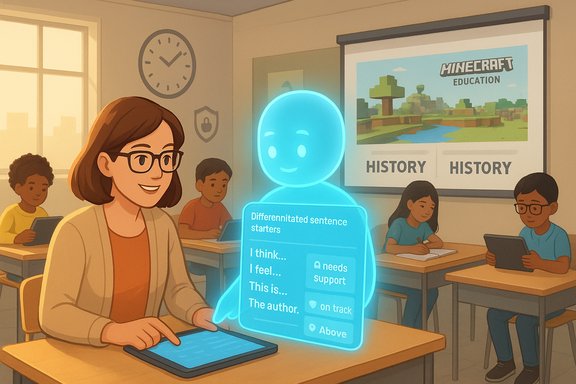
Classroom leaders reported using Copilot in multiple practical ways that go beyond simple automation:- Turning student-generated vocabulary (after a stimulus like a World War II soundscape) into differentiated sentence- and paragraph-starters in real time, keeping all learners engaged at their level.
- Creating child-friendly rubrics for self-assessment to support metacognition.
- Using Minecraft Education as a learning environment for history, then leveraging Copilot to translate in-game activity into assessment evidence and feedback formats accessible to different learners.
- Running daily Microsoft Reflect check-ins to surface social–emotional concerns and respond quickly before disruptions spread.
Assessment and marking re-engineered
Perhaps the most headline-grabbing example is a Year Six teacher’s account of photographing 33 pieces of student work and having Copilot assess them against Year 6 standards in roughly 30 minutes — a task that previously took about six hours. That level of throughput transforms how frequently teachers can conduct formative checks, and theoretically increases the cadence of feedback students receive.It’s crucial to treat this as a reported result rather than an independently audited metric: the numbers were provided by the trust and shared in a vendor-hosted case story; their internal methodology for standard alignment and validation against teacher judgement was not externally documented in the public account.
Strengths and concrete benefits
1. Time recovery and teacher wellbeing
- Reclaimed hours allow teachers to focus on lesson planning, targeted small-group instruction, and personal recovery time.
- The trust reports leaders and teachers regained evenings and weekends previously swallowed by administrative tasks and marking.
2. Differentiation at scale, in the moment
- Copilot can reframe classroom inputs (vocabulary lists, student reflections) into scaffolds and prompts tailored to reading level and writing ability.
- This supports inclusion by enabling teachers to deliver multiple entry points to the same core task without prepping multiple separate resources.
3. Better support for special educational needs
- Using child-friendly rubrics and in-class, AI-assisted scaffolding helped some pupils with additional needs to demonstrate learning more effectively.
- Virtual learning environments (e.g., Minecraft Education) combined with AI-produced assessment descriptors allowed different learners to show understanding through multimodal outputs.
4. Administrative efficiency
- Leaders condensed long policy documents into concise summaries for rapid consumption.
- Communications to parents and sensitive replies to casework were drafted faster and with less emotional labor, reducing the time leaders spent agonizing over phrasing.
5. Faster iteration of formative assessment
- Faster marking cycles can increase feedback frequency, which supports learning growth when combined with appropriate teacher moderation and follow-up.
Risks, limitations, and open questions
The Discovery Trust story is persuasive, but responsible reporting requires balancing enthusiasm with sober analysis. The most important caveats:Accuracy and auditability
- Generative AI can produce plausible but incorrect or misleading text. When assessment judgments or curriculum-aligned feedback are generated automatically, there must be systems for teacher verification and audit trails that show how a conclusion was reached.
- The trust’s description did not detail the quality-control steps taken when Copilot produced assessment judgements or aligned feedback — for example, whether multiple teachers moderated outputs or whether Copilot’s criteria were independently validated.
Data privacy and pupil safety
- Copilot sources answers from tenant data in Microsoft Graph, institutional documents, and — depending on configuration and feature set — the web. Schools must have clarity on what pupil data is used, how it’s protected, and the retention and deletion policies for AI interactions.
- Special-provision pupils and sensitive pastoral notes are particularly high-risk if exposed through misconfigured agents or if a third-party integration inadvertently leaks data.
Over-reliance and deskilling
- Tools that automate marking and scaffold planning risk deskilling teachers if used as a crutch rather than a prompt for professional reflection.
- There is a danger of conflating speed with educational quality: faster marking is beneficial only if it is accompanied by high-quality, actionable feedback and teacher engagement with the results.
Equity and access
- The pilot relied on an existing Microsoft ecosystem and Showcase School status. Schools without that foundation may face additional friction (licensing costs, device shortfalls, network capacity).
- Bias in training data for large language models can replicate or amplify inequities in language, cultural framing, and expectations; special attention must be paid to inclusive pedagogy when prompting AI.
Governance complexity
- The trust’s staged rollout and leader-first training is a best-practice approach, but not every trust or district has the capacity to run that kind of implementation governance.
- Licensing economics matter: Microsoft announced educational pricing and new academic offerings for Copilot products in 2025, but those prices and packages vary by region and product tier; schools must budget carefully and model long-term total cost of ownership.
Technical and procurement considerations
Licensing and cost modelling
- Small pilots can demonstrate value, but large-scale licensing can be expensive if not carefully scoped. Discovery Trust expanded plans from 59 to an intended 377 licenses — that jump requires a robust financial plan.
- Microsoft has signaled specific academic offerings and price points for education customers; IT and procurement teams must ensure they select the right bundle (Copilot Chat vs. full Microsoft 365 Copilot vs. specific agent capabilities) for their needs.
Architecture and integrations
- Copilot leverages Microsoft Graph and tenant data: proper tenant configuration, least-privilege access controls, and logging are essential.
- Integration with Learning Management Systems (LMSs), Microsoft Teams, OneNote, and other classroom tools amplifies Copilot’s usefulness — but each integration is also a surface for misconfiguration.
Data governance and the Copilot Control System
- Effective deployments require explicit policies: who may upload pupil work, which categories of data are allowed in prompts, and who has oversight of generated outputs.
- Retention, export, and deletion processes for AI chat artifacts must be documented as part of a school’s data protection impact assessment.
Evidence appetite: what the wider landscape shows
The Discovery Trust account sits alongside a growing number of institutional experiences that broadly report time savings and improved administrative throughput when Copilot is thoughtfully adopted. Large-scale K–12 pilots in other systems have reported average weekly time savings in the range of several hours per educator, particularly for admin and curriculum-mapping tasks.At the same time, independent academic and user studies flag variability in outcomes. Qualitative reviews of Copilot pilots reveal several recurring themes: initial enthusiasm; real time-savings in routine tasks; user frustration when the model fails to understand complex context; and persistent concerns about transparency, bias, and the need for human oversight. Those studies underline the need for careful evaluation frameworks rather than relying solely on productivity headlines.
Practical roadmap for school leaders and IT teams
For schools considering a Copilot pilot, the following sequence condenses Discovery Trust’s approach into actionable steps:- Start small, lead-first
- Deploy to leadership and central staff first to develop governance, policies, and evaluation metrics.
- Establish clear use-cases
- Prioritise tasks that free teacher time without endangering pupil safety (e.g., admin summaries, curriculum mapping, scaffold generation).
- Build comprehensive CPD
- Provide sustained training and coaching, not one-off demos. Focus on prompt literacy and ethical use.
- Set technical guardrails
- Enforce tenant permissions, disable risky connectors, and document data handling and deletion policies.
- Define quality assurance workflows
- Require teacher review of AI-generated assessment and feedback; run periodic moderation sessions.
- Measure both efficiency and learning impact
- Track reclaimed hours, adoption rates, and — crucially — student outcomes and engagement metrics.
- Plan for scale and cost
- Model licensing cost against measured benefits and identify funding pathways if expansion is justified.
Governance checklist for safe rollout
- Formal Data Protection Impact Assessment (DPIA) specific to AI use with pupil data.
- Role-based access to AI features and logging for audits.
- Teacher moderation rules for AI-generated assessment and feedback.
- Pupil and parent communication materials that explain AI use, consent, and opt-outs where appropriate.
- Continuous monitoring for hallucinations, biased outputs, or privacy incidents.
Recommendations for preserving pedagogy and integrity
- Treat Copilot as an augmentation tool that expands teacher capacity — not a substitute for professional judgement.
- Use AI to increase feedback frequency but invest equally in teacher time to interpret and act on that feedback.
- Maintain teacher-led moderation loops: every AI-produced grade, summary, or differentiated resource should be validated by a teacher before it becomes part of an official record.
- Preserve human relationships: tools can expedite administrative exchanges with parents but should not replace empathetic, human-led conversations for sensitive issues.
Conclusion: balancing promise with prudence
Discovery Trust’s experience is an instructive case: it illustrates how targeted use of generative AI can restore teacher time, enable real-time differentiation, and make assessment workflows more sustainable. The staged rollout, leader-first governance, and emphasis on continuous professional development are especially notable and provide a replicable template for other education providers.Yet the story is not a turnkey blueprint. The trust’s reported numbers are compelling but should be treated as organisation-reported results that require local validation. Schools should adopt a cautious pragmatism: pilot with clear evaluation criteria, enforce strong data governance, and insist on teacher oversight at every step. When those conditions are met, Copilot-style assistants can be powerful allies for teachers — as long as they remain exactly that: assistants to informed, reflective professionals dedicated to student learning.
Source: Microsoft Discovery Trust educators reclaim their weekends using Microsoft 365 Copilot | Microsoft Customer Stories
