

Microsoft’s Security Response Center has recorded CVE-2025-62224 as a spoofing vulnerability affecting Microsoft Edge (Chromium-based) for Android, a user‑interface integrity issue that can allow a malicious page to misrepresent browser trust signals and provenance on mobile devices — increasing the risk of phishing and credential theft until a patched Edge build is deployed.
Mobile browsers are compact, gesture-driven environments where the traditional visual cues users rely on — the address bar, padlock icon, and origin text — are smaller, dynamic, and sometimes hidden until a scroll or gesture occurs. That makes UI‑spoofing and address/omnibox spoofing especially dangerous on Android and other mobile OSes. Chromium‑origin issues that affect the rendering or compositing of security chrome (the browser UI that signals origin and connection status) are routinely assigned CVEs upstream, and Microsoft records those Chromium CVEs in its Security Update Guide (SUG) to show Edge’s downstream mitigation status.
Why Microsoft lists Chromium CVEs in the SUG: Edge consumes Chromium code; when Chromium fixes a bug, Microsoft must ingest, test, and ship the upstream changes inside Edge builds. The presence of a CVE in Microsoft’s update guide is an operational signal — it tells administrators which Edge build contains the ingestion and whether their fleet is protected. That pipeline explains why a Chromium CVE can appear in Microsoft’s guide even though Google authored the upstream patch.
MSRC’s page for CVE‑2025‑62224 currently publishes the vulnerability record (the entry requires JavaScript to render in the browser), but public technical detail on the exact exploit mechanics is limited in that vendor record. This is consistent with common practice: high‑level impact and remediation status are posted promptly, while detailed exploitation steps are withheld until most users have been patched.
Key takeaways (quick reference)
Source: MSRC Security Update Guide - Microsoft Security Response Center
 Background / Overview
Mobile browsers are compact, gesture-driven environments where the traditional visual cues users rely on — the address bar, padlock icon, and origin text — are smaller, dynamic, and sometimes hidden until a scroll or gesture occurs. That makes UI‑spoofing and address/omnibox spoofing especially dangerous on Android and other mobile OSes. Chromium‑origin issues that affect the rendering or compositing of security chrome (the browser UI that signals origin and connection status) are routinely assigned CVEs upstream, and Microsoft records those Chromium CVEs in its Security Update Guide (SUG) to show Edge’s downstream mitigation status.Why Microsoft lists Chromium CVEs in the SUG: Edge consumes Chromium code; when Chromium fixes a bug, Microsoft must ingest, test, and ship the upstream changes inside Edge builds. The presence of a CVE in Microsoft’s update guide is an operational signal — it tells administrators which Edge build contains the ingestion and whether their fleet is protected. That pipeline explains why a Chromium CVE can appear in Microsoft’s guide even though Google authored the upstream patch.
MSRC’s page for CVE‑2025‑62224 currently publishes the vulnerability record (the entry requires JavaScript to render in the browser), but public technical detail on the exact exploit mechanics is limited in that vendor record. This is consistent with common practice: high‑level impact and remediation status are posted promptly, while detailed exploitation steps are withheld until most users have been patched.
What CVE‑2025‑62224 likely means (technical summary)
The public MSRC entry classifies CVE‑2025‑62224 as a spoofing vulnerability in Microsoft Edge for Android. While the SUG entry itself may be terse, other Chromium “incorrect security UI” CVEs provide a technical pattern we can safely apply when reasoning about this kind of flaw:- Attack surface: A malicious webpage (or injected content from an extension/content script) that can manipulate layering, timing, window/viewport events, or compositing order. On Android, additional surface exists in WebView-like integrations and in compact or collapsible toolbars.
- Failure mode: The browser’s on‑screen security indicators (address/omnibox text, lock icon, permission prompt origin text, or pop‑up provenance) can be shown inaccurately or overlaid by attacker‑controlled UI, causing the user to believe they’re interacting with a different origin or a trusted prompt.
- Consequence: A successful spoof can trick the user into entering credentials, granting permissions (camera/microphone/screen capture), or approving transactions — effectively lowering the bar for phishing and consent‑based attacks.
Current public status and verification
- Microsoft’s Security Update Guide lists CVE‑2025‑62224 as an entry for Microsoft Edge (Chromium‑based) on Android; the record exists but provides minimal exploit details visible without executing the page’s JavaScript. Administrators should treat the SUG entry as the authoritative downstream status marker for Edge.
- At the time of writing, widely indexed third‑party vulnerability databases have not published a detailed technical write‑up specifically labeled CVE‑2025‑62224 (search results show numerous related Chromium UI spoofing CVEs but not this exact number in major public trackers). That means public technical analysis of CVE‑2025‑62224 may be limited or still propagating through aggregators. This absence does not imply the CVE is low‑risk; it reflects timing and indexing lag across databases.
Impact and exploitation scenarios
Why mobile UI spoofing is effective
Mobile UIs present several distinct advantages to attackers focused on deception:- Compact chrome and collapsible address bars give attackers more room to hide provenance information.
- Gesture‑driven toolbars and dynamic split/snap views create timing and compositing complexity that can be exploited by crafted content.
- Users are often less vigilant on mobile devices, and multi‑tasking contexts (notifications, backgrounded apps) increase the chance of hurried, unverified interactions.
Realistic exploit scenarios
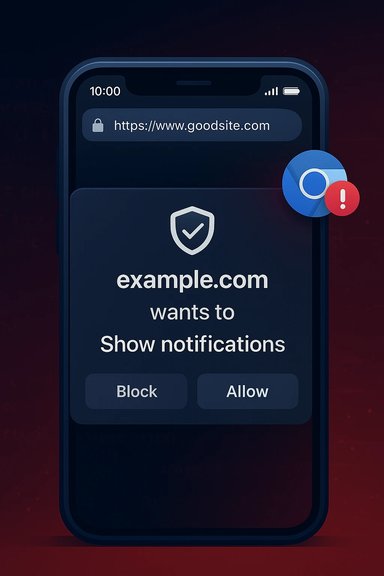
- A malicious site could present a fake permission dialog that visually attributes the request to a trusted domain while the underlying origin is malicious. The victim grants camera/microphone or screen sharing and unknowingly exposes sensitive data.
- An attacker could overlay or replace the omnibox content so that the displayed URL or padlock reads a legitimate banking domain while the page is controlled by the attacker; credentials entered into the spoofed form are captured.
- Spoofing used in combination with phishing lures (spear‑phishing SMS or email links) dramatically increases the success rate of credential capture and account takeover.
Exploitability and severity
- These bugs typically score lower on raw memory‑safety severity but are high‑value to attackers who rely on social engineering. Several similar Chromium “incorrect security UI” CVEs were assigned medium CVSS scores in public trackers because confidentiality/integrity impacts are real in terms of user data exposure even if the exploit doesn't give remote code execution. Always treat UI‑spoofing as operationally significant for organizations that depend on browser‑based authentication.
What to do now — immediate actions for users and admins
Short, prioritized steps that materially reduce risk:- Update Edge on Android immediately. Open the Play Store (or your managed app store) and confirm Microsoft Edge has the latest available update; if an Edge update that references a security fix is available, install and restart the app. If your environment uses managed app deployment, push the vendor’s patched package through your MDM.
- If Edge update is not yet available for your fleet, enforce compensating controls temporarily:
- Restrict access to high‑value web apps from unpatched mobile endpoints.
- Enable network‑level URL filtering and DNS reputation services to block known malicious pages.
- Harden authentication for critical accounts with phishing‑resistant MFA (hardware/security keys).
- Remind users: do not enter credentials or approve permission prompts from sites reached via unsolicited links; instead, open apps or navigate to trusted sites by typing the URL or using bookmarks. User education substantially reduces the effectiveness of UI‑spoofing.
- Inventory mobile Edge versions across managed and BYOD devices; map installed builds against Microsoft’s SUG ingestion mapping for CVE‑2025‑62224. Use MDM reporting to find outliers.
- If your environment uses embedded Chromium runtimes (Electron apps, in‑house WebView wrappers), add those to the inventory — they often lag behind browser releases and can remain vulnerable longer.
- Tune SIEM/EDR to look for suspicious sign‑in patterns indicative of credential theft (sudden spikes in failed logins, geographic anomalies) and for user reports of unexpected prompts or UI anomalies.
Detection, monitoring, and incident response
UI‑spoofing flaws do not leave neat kernel‑level traces; detection is typically behavioral and user‑report driven:- Monitor authentication logs and unusual account activity after relevant patch windows.
- Capture and preserve browser telemetry (crash dumps, renderer logs) if exploitation is suspected.
- If you must investigate a suspected compromise from an unpatched device, isolate it, collect volatile data according to your IR playbook, and perform credential rotation and forced re‑authentication for affected accounts.
Critical analysis — strengths, limitations, and risks
Strengths in vendor handling
- Microsoft’s use of the Security Update Guide to track Chromium CVEs provides an authoritative downstream signal that enterprises can use to make deterministic patching decisions — a useful operational tool for compliance and fleet management.
Limitations and practical risks
- Patch lag window: Chromium upstream fixes and Chrome stable releases often precede Edge’s downstream ingestion. That creates a real window where Edge users remain vulnerable even after Chrome is patched. Enterprises must avoid assuming parity and verify Microsoft’s SUG ingestion mapping.
- Indexing lag across trackers: New CVE entries may appear in vendor pages while third‑party aggregators and NVD take longer to index full details; that complicates automated tooling that relies on multiple feeds. For CVE‑2025‑62224 this effect appears present — the SUG entry exists while deeper public analysis is limited.
- Residual human risk: Even after the patch, UI‑based deception techniques evolve. Patching reduces technical vulnerability but does not eliminate the need for phishing‑resistant authentication, user training, and layered filtering.
Unverifiable or uncertain items to flag
- If a third‑party page claims a specific exploit proof‑of‑concept or gives an exact fixed Edge build string for CVE‑2025‑62224 and that string is not yet present in Microsoft’s SUG or Edge release notes, treat that as unverified until Microsoft’s downstream ingestion mapping is published. Vendor entries are authoritative for the downstream product state.
Practical checklist (what every admin should do, step‑by‑step)
- Open Microsoft Edge on a representative Android test device:
- Edge → Settings → About (or check the app’s Play Store entry).
- Compare the installed Edge build against Microsoft’s Security Update Guide entry for CVE‑2025‑62224 to confirm whether your build is listed as “Fixed.” If the SUG page uses interactive rendering, open it with a JavaScript‑enabled browser to see ingestion metadata.
- If unpatched:
- Schedule and push the Edge update to affected devices via your MDM.
- Temporarily restrict access to sensitive web apps from unpatched devices or require additional verification for critical workflows.
- Increase monitoring for suspicious authentication events and brief helpdesk staff on likely user reports.
- If patched:
- Validate via sample endpoints and user‑acceptance testing that the updated build has completed rollout.
- Reassess compensating controls and return to normal access posture once sufficient patch coverage is confirmed.
Long‑term recommendations for defenders
- Maintain an inventory of all Chromium consumers (Edge, Chrome, embedded Electron apps, WebView instances). These embedded runtimes are often overlooked and can extend attack windows.
- Favor phishing‑resistant authentication (hardware keys, passkeys) for high‑value accounts to blunt the impact of UI spoofing. These defenses reduce attacker ROI even if users are tricked by a spoofed prompt.
- Bake CVE ingestion verification into patch pipelines: don’t assume Chrome’s upstream fix equals Edge protection; require proof of downstream ingestion from Microsoft’s SUG or Edge release notes before declaring remediated status.
Conclusion
CVE‑2025‑62224 is a timely reminder that not all browser security failures manifest as dramatic memory safety exploits; UI integrity remains a crucial and fragile trust boundary. Microsoft’s Security Update Guide records the CVE and is the authoritative downstream signal for Microsoft Edge (Chromium‑based), but public technical details for this specific CVE are limited in community indexes at present, increasing the importance of relying on the vendor record and timely patching. Administrators should prioritize updating Edge on Android, validate ingestion via Microsoft’s guide, harden authentication for high‑value targets, and treat UI‑spoofing as an operational risk that requires both technical fixes and user‑facing defenses.Key takeaways (quick reference)
- Update Microsoft Edge for Android now and confirm the patched build via Microsoft’s Security Update Guide.
- UI‑spoofing vulnerabilities facilitate phishing and consent fraud — treat them as high‑impact for user data and authentication.
- Verify downstream ingestion for Edge rather than assuming Chrome fixes protect all Chromium consumers.
Source: MSRC Security Update Guide - Microsoft Security Response Center
