

Microsoft's latest tweaks turn a once‑cryptic Group Policy failure into a practical early‑warning tool for administrators, adding precise, actionable diagnostic information to Event ID 1096 so you can find out whether a bad registry.pol, an access/IO error, or a SYSVOL replication problem is to blame — and do it without guesswork.
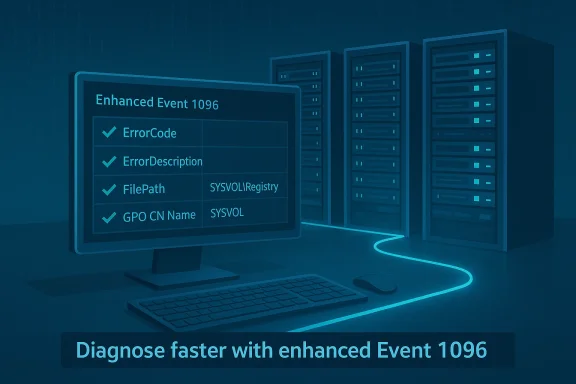
Group Policy remains the central configuration mechanism in Windows networks: Administrative Templates and registry-backed settings are exported to compact policy cache files (registry.pol) and those files are what the client-side Group Policy engine reads and applies during boot, logon, and periodic refreshes. When the Group Policy Registry client-side extension cannot read or apply these files, Windows logs Event ID 1096 — historically a one‑line failure that told you “something failed” but not much more. Microsoft and recent servicing updates have changed that: the 1096 payload now includes richer fields (ErrorCode, ErrorDescription, FilePath, GPO container name, and similar details) that make the root cause immediately visible in many cases.
This article explains what changed, why it matters, how to verify the enhancement in your environment, a practical triage and remediation playbook, ways to automate detection and alerting, and important caveats and risks to watch for before you depend on the new logging as your only tool.
Source: Neowin IT admins will love this Group Policy enhancement now available in Windows 11
 Background / Overview
Group Policy remains the central configuration mechanism in Windows networks: Administrative Templates and registry-backed settings are exported to compact policy cache files (registry.pol) and those files are what the client-side Group Policy engine reads and applies during boot, logon, and periodic refreshes. When the Group Policy Registry client-side extension cannot read or apply these files, Windows logs Event ID 1096 — historically a one‑line failure that told you “something failed” but not much more. Microsoft and recent servicing updates have changed that: the 1096 payload now includes richer fields (ErrorCode, ErrorDescription, FilePath, GPO container name, and similar details) that make the root cause immediately visible in many cases.This article explains what changed, why it matters, how to verify the enhancement in your environment, a practical triage and remediation playbook, ways to automate detection and alerting, and important caveats and risks to watch for before you depend on the new logging as your only tool.
What is registry.pol and why it matters
The small file with big power
- What it is: registry.pol is the compact, binary cache that stores registry‑backed Group Policy settings exported from Administrative Templates (ADMX) and other registry policy sources.
- Where it lives: Local copies: %SystemRoot%\System32\GroupPolicy\Machine\registry.pol and %SystemRoot%\System32\GroupPolicy\User\registry.pol. Domain GPO copies live in SYSVOL under the policy GUID folders (Policies{GPO-GUID}\Machine\registry.pol or \User\registry.pol).
- When it’s applied: Machine registry.pol is processed at system startup; user registry.pol is processed at user logon. After the initial application, Group Policy refreshes sometimes apply registry changes during the scheduled refresh interval (~90–120 minutes) or when gpupdate is run. If registry.pol is missing, corrupted, or unreadable, registry‑based policy settings will not apply — and dependent software or baseline restrictions may silently fail.
The change: Event ID 1096 now carries forensic detail
What changed, in practical terms
Prior to the servicing update, Event ID 1096 effectively meant “registry-based Group Policy failed” and required admins to run a series of manual checks (timestamps, SYSVOL file checks, rename registry.pol and run gpupdate, compare domain controllers) to determine the actual cause. Recent Windows 11 servicing updates enhance the Event ID 1096 payload so the event entry includes:- ErrorCode (numeric failure code)
- ErrorDescription (translated, human‑readable reason such as Access Denied, The data is invalid, I/O error)
- FilePath (the exact registry.pol the client attempted to read)
- GPO container name or GUID (so you can map the failure back to a GPO in GPMC)
Why that matters
- Faster root cause identification. Instead of chasing file timestamps and replication state blindly, you often see the actual failure type immediately (e.g., access denied vs. corrupt data).
- Reduced blast radius. Quickly filter the fleet for the same error string and remediate only affected devices or the specific problematic GPO copy in SYSVOL.
- Lower time to remediation. In many cases you can script the correct remediation (refresh a GPO, restore a clean registry.pol, correct permissions) and run it at scale rather than triage each machine manually.
Real‑world causes of registry.pol failures
Understanding the common failure classes helps you interpret the enhanced 1096 payload:- Manual edits or improper merges: Direct binary edits to registry.pol or poorly coded tools that write malformed values can corrupt the file.
- Third‑party software doing the wrong thing: Agents or installers that write into GroupPolicy folders or modify policy files without using supported APIs can leave malformed content.
- Disk or filesystem I/O errors: Bad sectors or intermittent storage faults may flip bits in the file and make parsing fail.
- Crashes/races in the Group Policy Client service (GPSVC): Service crashes during writes can leave partial or truncated registry.pol files.
- SYSVOL replication problems: A truncated or inaccessible registry.pol copy on one domain controller can propagate inconsistent GPOs to clients that happen to contact that DC.
How to verify the new Event 1096 payload on your systems
Follow this checklist on a representative device (or in a test lab) before you rely on the feature across your fleet:- Confirm the device is running a Windows 11 servicing baseline that includes the recent cumulative/servicing updates. Community reporting ties the enhanced payload to servicing updates made available for Windows 11 24H2 and later channels when February cumulative updates are applied; validate your patch level before assuming the feature is present.
- Open Event Viewer → Windows Logs → System. Filter the log by Source = Microsoft‑Windows‑GroupPolicy and Event ID = 1096.
- Inspect the event details: you should see expanded fields such as ErrorCode, ErrorDescription, FilePath, and GPOCNName (GPO container name). If those fields are present you’re seeing the enhanced payload. If the details remain a short, single‑line message, the device still needs the servicing update.
A practical triage and remediation playbook
This step‑by‑step runbook assumes you’ve found Event ID 1096 with enhanced payload details.1. Read the event — don’t guess
- Note the ErrorCode and ErrorDescription (e.g., Access Denied, The data is invalid).
- Note the FilePath and GPO GUID/GPO name (GPOCNName).
- Record the log timestamp and the device’s last reboot/updatetime for correlation.
2. Map the failure to the right artifact
- If FilePath points to a local registry.pol (C:\Windows\System32\GroupPolicy\Machine\registry.pol), start local remediation.
- If FilePath points to SYSVOL (\<dc>\SYSVOL\…\registry.pol) or the event lists a GPO GUID, identify which domain controller the client contacted (check %LOGONSERVER%) and the SYSVOL copy on that DC.
- Get the logged-on server: $env:LOGONSERVER
- Map GUID to GPO name: Get-GPO -Guid <GUID> (run from a machine with AD RSAT tools).
3. Local fix (for local registry.pol problems)
- From an elevated prompt:
- cd %windir%\System32\GroupPolicy\Machine
- ren registry.pol registry.pol.bak
- gpupdate /force
- Verify the new registry.pol was recreated and Event 1096 does not recur. Many documented fixes report that deleting/renaming the corrupt registry.pol and forcing a refresh causes Windows to recreate a valid copy.
4. SYSVOL / domain GPO fix
- On the DC named in the client’s LOGONSERVER, inspect the GPO folder under SYSVOL\Policies{GPO-GUID}\Machine\registry.pol.
- Check ACLs and NTFS permissions — ensure the computer account or the system can read the file.
- If the file appears truncated or invalid, copy a good version from another healthy DC, or restore the GPO from GPMC backup.
- Force replication and validate the version matches across DCs (use repadmin /showrepl and check GPO version numbers).
- After repair, run gpupdate /force on affected clients or wait for normal refresh.
5. When the error is Access Denied
- Access Denied usually means NTFS or share permissions prevented the client from reading the SYSVOL or local file. Check:
- NTFS permissions on the SYSVOL file.
- SYSVOL share permissions and DFSR/FRS state.
- Local file ACL for %windir%\System32\GroupPolicy\Machine\registry.pol.
- Correct permissions, force replication, and re-run gpupdate.
6. When the error is data invalid or corruption
- Replace the corrupt file from a good DC or from a known good backup.
- Run chkdsk on the affected client if you suspect disk corruption.
- Consider running an anti‑malware or integrity check on the host to rule out software tampering.
Monitoring, automation, and SIEM integration
The enhanced 1096 payload makes it much easier to automate detection and targeted remediation at scale.- Alert rules: Update existing event‑based alerts that watch for Event ID 1096 to extract ErrorDescription and FilePath. A single rule can classify events into “Access Denied” vs “Data invalid” vs “I/O” and automatically assign to the appropriate remediation team.
- Group and correlate: Use the GPO GUID or GPOCNName reported in the event to group incidents — a sudden spike against the same GPO often points to a bad SYSVOL copy or a misbehaving provisioning process.
- Automated playbooks: For common cases (local corrupt registry.pol), a signed automation runbook can rename registry.pol, run gpupdate, and record the result back to your ticketing system.
- Baseline reporting: Track 1096 occurrences over time; fewer events should correlate with improved stability after fixes. Many vendors’ monitoring documentation already treat Event 1096 specifically as “Registry.pol Failure,” so the enhanced payload only improves precision.
Strengths and clear benefits
- Diagnostic precision: Replaces a multi‑step guessing game with direct clues.
- Operational efficiency: Faster MTTR (mean time to repair) and fewer false remediation steps.
- Compatibility with existing monitoring: Microsoft reused Event ID 1096 so you can upgrade detection without redesigning your monitoring logic.
Risks, limitations, and things IT must still watch
The enhanced Event 1096 is a major improvement, but it is not a silver bullet.- It’s diagnostic, not corrective. Event 1096 tells you why the Group Policy client failed to apply registry settings but does not fix broken GPOs, SYSVOL replication problems, or hardware faults. You still must follow remediation steps.
- Rollout/patching dependency. The richer payload appears only after specific servicing updates; devices that have not received these updates will continue to log minimal 1096 entries. Don’t assume all endpoints in your fleet show the enhanced fields — sample multiple update rings.
- Potential for noisy alerts during initial rollout. When you deploy the update across rings, you may see a burst of historical failures surface as devices start logging richer descriptions. Expect and plan for a short‑term spike in alerts while you triage and fix issues.
- False confidence if logs are incomplete. If clients cannot write events (e.g., disk full, event log service errors) you won’t see the enhanced payload even if the OS version supports it.
- Security considerations: The richer event details include file paths and GPO names; ensure event log ingestion and retention policies comply with your data governance controls — especially where logs are forwarded to cloud SIEM or third‑party vendors.
Recommended hardening and operating model changes
- Treat the enhanced Event 1096 as an opportunity to tighten your operating procedures:
- Patch testing: Validate the enhanced 1096 payload in pilot rings before full rollout so your helpdesk knows what the new messages look like.
- Alert tuning: Update SIEM parsers to capture ErrorCode, ErrorDescription and FilePath fields and use them for meaningful routing.
- GPO hygiene: Maintain a backup and recovery plan for GPOs stored in SYSVOL, and regularly test GPO restores from backup to avoid surprises when a DC copy becomes corrupted.
- Runbooks: Codify the rename registry.pol + gpupdate /force path and the SYSVOL boundary checks into clear runbooks and automation playbooks.
- Replication health: Monitor DFSR/FRS replication health as part of your GPO‑integrity checks; an unhealthy DC can propagate broken registry.pol copies.
Example incident — how the new payload saves time (illustrative)
- An endpoint reports Event 1096 with ErrorDescription: “Access denied” and FilePath: \DC1\SYSVOL\…\Machine\registry.pol.
- Instead of renaming the local registry.pol blindly, the admin checks DC1’s SYSVOL copy and finds an incorrect NTFS permission change on that file (perhaps caused by a misapplied backup script).
- Fix the permission, force DFSR replication, then run gpupdate /force on affected clients. The incident is resolved in the time it would previously take to triage a dozen machines manually.
What to tell leadership and stakeholders
- This logging enhancement reduces mean time to detect and repair Group Policy registry failures, which lowers risk of prolonged configuration drift.
- It should reduce helpdesk ticket volume for common Group Policy application failures and shorten resolution times in large fleets.
- However, stress that this is a diagnostic improvement — remediation methods and operational controls still need investment (replication monitoring, GPO backups, automated playbooks).
Final notes, cautions and next steps for IT teams
- Confirm patch levels across your update rings and pilot the new Event 1096 payload on a controlled subset of devices before expanding monitoring and automation.
- Update SIEM parsers and alert rules to extract the new fields for triage and grouping.
- Don’t treat the new Event 1096 as a cure-all; continue to monitor SYSVOL health, DC replication, and endpoint storage reliability.
- If your environment shows recurring 1096 events from the same GPO, treat that as a signal to inspect automation, third‑party tools, or deployment processes that touch policy files.
Source: Neowin IT admins will love this Group Policy enhancement now available in Windows 11
