

Microsoft has quietly given IT administrators a better tool to catch Group Policy problems before they cascade through an environment: Event ID 1096 — long associated with registry-based Group Policy failures — now surfaces far more actionable diagnostic detail in recent Windows 11 servicing updates, turning a cryptic error into a practical early‑warning signal for corrupted or inaccessible policy cache files. m](https://kb.eventtracker.com/evtpass...ndows-GroupPolicy_64406.asp?utm_source=openai))
Group Policy remains the backbone of Windows device configuration in enterprise networks. The mechanism that translates Administrative Templates and other registry-backed policy settings into enforced system state relies on a simple but critical artifact: the registry policy file, typically named Registry.pol. There are separate Registry.pol files for machine and user policy and the Group Policy client-side engine imports their contents into HKLM and HKCU during processing.
When the Group Policy Registry client-side extension cannot read or apply settings from those files, Windows logs events — historically concise and sometimes cryptic — that point to a failure. Event ID 1096 is the canonical System‑log entry for “The processing of Group Policy failed” when registry‑based settings could not be applied. Administrators have used that event for years to detect local or SYSVOL-sourced Registry.pol problems, but the original payload often left investigators guessing about root cause and next steps.
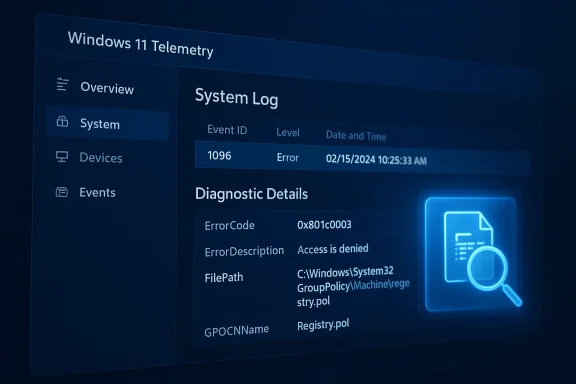
Microsoft’s recent servicing updates ted across servicing channels and highlighted by community coverage) enhance the Event ID 1096 payload so it includes richer error code translation, file path details and more granular failure reasons — effectively converting a one‑line failure message into a forensic clue that speeds diagnosis and remediation.
What you should expect in the upgraded Event 1096 payload (as delivered via recent Windows 11 servicing updates):
This produces a CSV making it easy to triage at scale and to feed into automation for remediation or ticket creation.
For busy operations teams, that means fewer blind escalations to premier support and faster, deterministic remediation. For security teams, it reduces the window where devices are out of policy enforcement because you can identify corruption or permission issues earlier.
This enhancement won’t stop bad actors or eliminate disk faults, but by turning a historically terse error into an actionable diagnostic, Microsoft has given administrators a practical, low‑friction improvement to Group Policy observability. In environments where policy correctness matters — security baselines, application configuration, and compliance — that improved visibility can be the difference between a small incident and a fleet‑wide outage.
Source: Neowin IT admins will love this Group Policy enhancement now available in Windows 11
 Background
Group Policy remains the backbone of Windows device configuration in enterprise networks. The mechanism that translates Administrative Templates and other registry-backed policy settings into enforced system state relies on a simple but critical artifact: the registry policy file, typically named Registry.pol. There are separate Registry.pol files for machine and user policy and the Group Policy client-side engine imports their contents into HKLM and HKCU during processing.When the Group Policy Registry client-side extension cannot read or apply settings from those files, Windows logs events — historically concise and sometimes cryptic — that point to a failure. Event ID 1096 is the canonical System‑log entry for “The processing of Group Policy failed” when registry‑based settings could not be applied. Administrators have used that event for years to detect local or SYSVOL-sourced Registry.pol problems, but the original payload often left investigators guessing about root cause and next steps.
Microsoft’s recent servicing updates ted across servicing channels and highlighted by community coverage) enhance the Event ID 1096 payload so it includes richer error code translation, file path details and more granular failure reasons — effectively converting a one‑line failure message into a forensic clue that speeds diagnosis and remediation.
What the Registry.pol file actually is (and why it matters)
- What it contains: Registry.pol stores registry‑based policy settings exported by the Group Policy management tools; Administrative Templates (ADMX/ADML) and some legacy registry policy settings are persisted here in a compact format that the client-side extension reads and applies.
- Where it lives: Local files are typically under
%SystemRoot%\System32\GroupPolicy\Machine\registry.poland%SystemRoot%\System32\GroupPolicy\User\registry.pol; domain GPO copies live under the policy’s GPT in SYSVOL (\Policies{GPO-GUID}\Machine or \User). - When it’s applied: Machine Registry.pol is processed during system startup and user Registry.pol during logon; thereafter Group Policy refreshes occur on a regular interval (default ~90–120 minutes) or via gpupdate.
The Event ID 1096 enhancement: what changed
Microsoft’s update approach is conservative but practical: rather than inventing a new event ID, the product team expanded the diagnostic fields inside the existing Event ID 1096 message so administrators look in one place for both the high‑level symptom and the richer failure context.What you should expect in the upgraded Event 1096 payload (as delivered via recent Windows 11 servicing updates):
- Expanded ErrorCode/ErrorDescription — numerical error codes are accompanied by translated text so you can quickly identify whether the problem is an access/permission issue, data corruption, or a device I/O problem.
- FilePath / GPO identity — the event now more reliably includes the path to the Registry.pol that failed (local path or SYSVOL path), plus the GPO container name/GUID when applicable. This saves time hunting through multiple GPOs or scanning SYSVOL shares manually.
- Processing metadata — fields such as ProcessingTimeInMilliseconds and ProcessingMode can help distinguish transient delays from deterministic failures, and SupportInfo entries provide internal diagnostic markers that Microsoft support uses.
- No additional Event ID clutter — Microsoft decided to reuse 1096 rather than add a new ID, which keeps event‑based monitoring rules and scripts simpler to maintain.
Why this matters to IT admins (practical scenarios)
Errors in Registry.pol — and the corresponding 1096 symptoms — appear in several common failure patterns:- Manual, incorrect edits to the policy file or improper merges from multiple admin tools.
- Third‑party software that writes malformed entries into the GroupPolicy folder or touches the policy files in a way that breaks the parser.
- Disk errors or low‑level I/O faults that flip data in Registry.pol, producing a read failure.
- Crashes or races in the Group Policy Client service (GPSVC) thatalf‑written.
- SYSVOL replication issues that deliver a truncated or inaccessible Registry.pol to certain domain controllers.
How to verify you have the enhancement and what to look for
- Ensure the target devices are running an updated Windows 11 release. Community reporting ties the behavior to servicing updates available for Windows 11 versions such as 24H2 and 25H2 when February servicing updates are applied. Validate your servicing baseline before relying on the richer diagnostics.
- Open Event Viewer → Windows Logs → System and filter for Source = Microsoft‑Windows‑GroupPolicy and Event ID = 1096.
- Confirm the event details include expanded fields such as ErrorCode, ErrorDescription, FilePath, and GPOCNName (GPO Container Name). If those fields appear you’re seeing the enhanced payload.
Practical triage playbook (step‑by‑step)
When you see Event ID 1096 on a machine, follow this sequence:- Read the event details. Note ErrorCode, ErrorDescription, and FilePath. The new payload should tell you whether the issue is permission (e.g., access denied), data corruption (e.g., data invalid), or I/O/disk related.
- If ErrorDescription indicates access denied:
- Check ACLs on the file and on the containing GroupPolicy folder (both local path and the SYSVOL copy).
- Confirm the machine’s computer account can read the SYSVOL share on domain controllers and that the gpt.ini file permissions mirror Registry.pol.
- If ErrorDescription indicates data invalid or corruption:
- Rename the local Registry.pol to Registry.pol.bak and run gpupdate /force; if group policy re-applies correctly, you’ve isolated local corruption. Many admins have successfully recovered by removing the corrupt local file and allowing normal processing to recreate it.
- If the event points to a SYSVOL path:
- Investigate replication health (DFS‑R or FRS depending on your topology). Use repadmin, dcdiag and SYSVOL health checks to identify controllers with missing or inconsistent files.
- If the error maps to disk I/O:
- Check S.M.A.R.T., run chkdsk, and consider hardware replacement if bad sectors or repeated I/O faults appear.
- After remediation, clear older events and force a policy refresh (gpupdate /force) and verify the next 1096 (if any) contains different/cleared conditions.
Automation and proactive detection
Because the enhanced 1096 payload now contains machine‑readable metadata, it’s straightforward to automate detection and classification:- Use Get-WinEvent/Query‑Logging pipelines to filter for ID 1096 and parse the EventData fields for ErrorCode and FilePath.
- Alert on ErrorCode values that indicate corruption or I/O rather than transient delays; these should trigger immediate remediation workflows.
- Integrate 1096 parsing into your SIEM or log analytics workspace to build dashboards showing:
- Top affected Registry.pol paths
- Most common ErrorCode categories
- Temporal spikes that correlate to patching windows or third‑party deployments
Code:
Get-WinEvent -FilterHashtable @{LogName='System'; ProviderName='Microsoft-Windows-GroupPolicy'; Id=1096; StartTime=(Get-Date).AddDays(-7)} |
  ForEach-Object {
    [xml]$xml = $_.ToXml()
    $data = $xml.Event.EventData.Data
    [PSCustomObject]@{
      TimeCreated = $_.TimeCreated
      Computer = $_.Machin= ($data | Where-Object {$_.Name -eq 'ErrorCode'}).'#text'
      ErrorDesc = ($data | Where-Object {$_.Name -eq 'ErrorDescription'}).'#text'
      FilePath = ($data | Where-Object {$_.Name -eq 'FilePath'}).'#text'
      GPO = ($data | Where-Object me'}).'#text'
    }
} | Export-Csv -Path GroupPolicy-1096-Last7Days.csv -NoTypeInformationRisks, limitations, and caveats
- Not a fix for replication or design flaws: The enhaproves visibility, but it does not repair SYSVOL replication, disk corruption, or third‑party software that modifies policy files. You still need standard remediation steps.
- Doesn’t replace endpoint health monitoring: Event 1096 is a symptom signal. A comprehensive endpoint health posture still requires patch management, disk monitoring, and antivirus/EDR hygiene.
- Potential for over-reliance on a single event: Because Microsoft augmented an existing event, some scripts or health automation that simply look for "1096 present = delete file" may become brittle. Parse the new fields and classify the event before taking destructive action. For example, don’t auto-delete Registry.pol based solely on the presence of 1096 without verifying the ErrorDescription. Community reports show automated scripts that aggressively remove Registry.pol have created follow-on gaps or flapping behavior.
- Version coverage varies: The enhancement is tied to specific servicing updates; older or unpatched clients will not expose the richer payload. Confirm your devices have the requisite quality updates before turning on 1096‑driven automation.
Recommended operational playbook for enterprises
- Patch baseline: Apply the February servicing updates and confirm all Windows 11 24H2/25H2 endpoints are on the same quality update baseline that includes the Event 1096 enhancement. Where possible, stage updates in pilot rings before broad rollout.
- **SIEM coystem logs into your SIEM and parse Event 1096 fields. Build rule sets that escalate only when ErrorCodes indicate corruption or access issues, and suppress known transient scenarios.
- Policy file integrity checks: Add a periodic audit that checks for Registry.pol size, timestamp skew between local and SYSVOL copies, and detects unexpected modifications by non-admin processes.
- Runbooks: Update runbooks to incl fields (ErrorCode, FilePath, GPOCNName) as primary triage data points. That reduces mean time to repair (MTTR).
- Controlled remediation: Avoid scripted deletion of Registry.pol unless the event explicitly indicates local corruption and you have validation steps (file rename to .bak + gpupdate /force + verification).
- DFS‑R/SYSVOL health monitoring: If events point to SYSVOL paths, immediately check DFS‑R replication state; don’t assume the local machine’s file is the single source of truth.
Why this is a welcome change — and what it reveals about Microsoft’s approach
This logging enhancement is small but strategic. Microsoft chose to expand an existing, widely monitored event rather than fragment the telemetry surface with a new ID. That decision reflects a practical understanding of how enterprises run: many monitoring and remediation scripts, patch baselines, and SIEM rules rely on stable event IDs. By improving the diagnostic richness while keeping the canonical event identifier intact, Microsoft reduces the friction for admins who need better troubleshooting signals without a management‑overhead penalty.For busy operations teams, that means fewer blind escalations to premier support and faster, deterministic remediation. For security teams, it reduces the window where devices are out of policy enforcement because you can identify corruption or permission issues earlier.
Final checklist for admins (actionable)
- Confirm Windows 11 devices are updated to the servicing level that includes the 1096 enhancement.
- Update SIEM parsing rules to extract ErrorCode, ErrorDescription, FilePath and GPOCNName from Event 1096.
- Add PowerShell/automation that collects the last 7–14 days of 1096 events and classifies them into access, corruption, I/O, or SYSVOL replication buckets.
- Avoid auto-removal of Registry.pol without safeguards; prefer a rename/backup + gpupdate /force + monitoring approach.
- If 1096 points to SYSVOL, prioritize DFS‑R/repadmin checks and do not assume local file fixes will resolve domain‑level inconsistencies.
This enhancement won’t stop bad actors or eliminate disk faults, but by turning a historically terse error into an actionable diagnostic, Microsoft has given administrators a practical, low‑friction improvement to Group Policy observability. In environments where policy correctness matters — security baselines, application configuration, and compliance — that improved visibility can be the difference between a small incident and a fleet‑wide outage.
Source: Neowin IT admins will love this Group Policy enhancement now available in Windows 11