

Enterprise desktop strategy no longer feels like the exercise of weighing user preference and IT convenience — it reads like damage control around vendor timelines, device eligibility lists, and delivery models that quietly constricted real choice long before procurement or IT had a chance to act. m]
The calendar moment that made this visible was Microsoft’s scheduled end of support for Windows 10 on October 14, 2025. That date turned a long-running migration conversation into a hard deadline for millions of desktops and laptops globally, and it forced decisions about hardware refreshes, licensing, and security posture into board-level planning cycles.
At the same time, the practical constraints of upgrading to Windows 11 — notably the requirement for TPM 2.0, UEFI Secure Boot, and a Microsoft-supported processor list — created a hardware compatibility wall for a sizable installed base. Those technical rules turned what looked like a software rollout into an equipment replacement program for many organizations.
Layer on vendor economics — the Extended Security Updates (ESU) program with year‑over‑year price doubling, and the easy-to-miss operational costs of staged migrations — and the set of “options” available to IT teams collapsed into a far narrower set of feasible paths. In practice, ESU often behaved less like a choice and more like a short-term tax on organizations that could not immediately absorb refresh and migration costs.
This article summarizes those dynamics, adds independent context and data, assesses the strategic implications for EUC programs, and lays out pragmatic decision paths IT leaders should be considering now.
The practical effect: organizations that bought ESU reduced immediate risk but accepted a recurring cost that grows if migration slips. For large fleets, that can add up to millions of dollars — enough to change capital plans, headcount priorities, or other transformation projects.
The upshot for operations: even devices that are functionally sound may be ineligible for an official Windows 11 upgrade. IT teams faced binary decisions — retrofit, replace, or run unsupported OS — and each carries its own cascade of procurement, security, and compliance consequences. Independent analysis and industry reporting through 2025 and into 2026 documented this forced obsolescence effect and the resulting device‑retirement math.
For desktop planning that means:
For EUC strategy, this implies a new prioritization model: modernize the apps that block migration first; isolate the rest behind virtualization or thin‑client models. This triage is the practical path to de-risking desktop choice over the medium term.
That constraint can be freeing. An honest appraisal of personnel roles, app portfolios, identity posture, and telemetry capacity lets IT leaders replace illusion with a deliberate plan. The new baseline for desktop strategy is not a single OS or vendor but a set of controllable choices — identity as the control plane, observability as insurance, and app modernization as the lever that converts constrained choices back into genuine strategic advantage.
Source: TechTarget The illusion of choice in enterprise desktop strategy | TechTarget
 Background / Overview
The calendar moment that made this visible was Microsoft’s scheduled end of support for Windows 10 on October 14, 2025. That date turned a long-running migration conversation into a hard deadline for millions of desktops and laptops globally, and it forced decisions about hardware refreshes, licensing, and security posture into board-level planning cycles.At the same time, the practical constraints of upgrading to Windows 11 — notably the requirement for TPM 2.0, UEFI Secure Boot, and a Microsoft-supported processor list — created a hardware compatibility wall for a sizable installed base. Those technical rules turned what looked like a software rollout into an equipment replacement program for many organizations.
Layer on vendor economics — the Extended Security Updates (ESU) program with year‑over‑year price doubling, and the easy-to-miss operational costs of staged migrations — and the set of “options” available to IT teams collapsed into a far narrower set of feasible paths. In practice, ESU often behaved less like a choice and more like a short-term tax on organizations that could not immediately absorb refresh and migration costs.
This article summarizes those dynamics, adds independent context and data, assesses the strategic implications for EUC programs, and lays out pragmatic decision paths IT leaders should be considering now.
Why the appearance of choice was always misleading
Deadlines become decisions before planning stets an end-of-support date, the operational reality is that many strategic variables lock in before formal planning begins. Procurement windows, budget cycles, and OEM replacement lead times compress timelines; executive-level directional choices (stay, buy ESU, migrate) often precede detailed technical planning. By the time IT is asked to design images and migration waves, the shape of procurement and support contracts is already fixed.
That sequence matters because the most consequential decisions — whether to accept long-term ESU costs, commit to a two‑ to three‑year hardware refresh, or pivot to cloud/virtual desktop models — are not operational; they are strategic and often irreversible without painful cost. In short: deadlines create de facto strategy.ESU: bridge, lifeline, or tax?
Microsoft’s ESU program for Windows 10 was explicitly designed as a limited-duration safety net. The program’s structure — per-device pricing that doubles year to year if you buy successive extensions — was a clear financial signal intended to incentivize migration rather than indefinite delay. For many organizations, especially in cost-constrained sectors, ESU was not a real option but a bridge that postponed an inevitable capital decision.The practical effect: organizations that bought ESU reduced immediate risk but accepted a recurring cost that grows if migration slips. For large fleets, that can add up to millions of dollars — enough to change capital plans, headcount priorities, or other transformation projects.
The hardware wall: technical requirements that forced refresh cycles
Windows 11’s baseline is higher — by design
Microsoft’s published Windows 11 system requirements are explicit: TPM 2.0, UEFI Secure Boot, a compatible 64‑bit processor, 4 GB RAM minimum, and 64 GB storage, among several other checks. Those requirements are more than a checklist; they reset the baseline for security assumptions (hardware-backed attestation, measured boot, device encryption) and thereby change what vendors, auditors, and security programs expect from end-user devices.The upshot for operations: even devices that are functionally sound may be ineligible for an official Windows 11 upgrade. IT teams faced binary decisions — retrofit, replace, or run unsupported OS — and each carries its own cascade of procurement, security, and compliance consequences. Independent analysis and industry reporting through 2025 and into 2026 documented this forced obsolescence effect and the resulting device‑retirement math.
Who really needed replacement?
Not every machine required replacement. OEM telemetry and compatibility tools showed that many devices built after a certain vintage could be upgraded with a firmware or TPM firmware update, but a nontrivial percentage — particularly older corporate desktops, specialized workstations, and embedded devices — lacked the required hardware capabilities. For those, the cost of replacement included not just the device but time to reimage, re-certify, and sometimes revalidate third‑party integrations.Fragmentation: not a single desktop, but multiple tracks
Multiple OS tracks and multiple delivery models
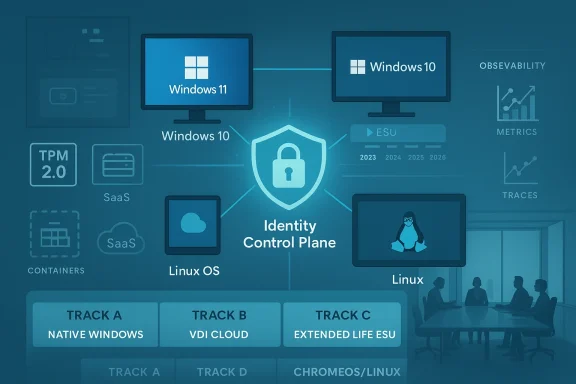
Post‑Windows‑10 end of support, the EUC landscape splintered. Rather than a single Windows‑centric track, organizations are now running parallel strategies that may include:- Traditional on‑prem Windows 11 desktops for knowledge workers with Windows‑native apps.
- Extended‑life Windows 10 devices covered by ESU in constrained or legacy environments.
- Cloud or virtual desktop environments (Windows 365, Azure Virtual Desktop) for ephemeral or contractor access.
- ChromeOS/ChromeOS Flex pilots or full Chromebook rollouts where browser‑first workflows dominate.
- Linux desktop pilots or selective deployments in roles where browser‑delivered SaaS and thin‑client workflows make OS features less critical.
Market share reflects the split
Public telemetry — for example, StatCounter’s monthly dataset of desktop Windows version share — showed Windows 11 overtaking Windows 10 during 2025 and continuing to grow into 2026, but the base of Windows 10 devices remained significant through the transition. That persistence increased the operational friction of trying to standardize on a single desktop OS.Why Linux and alternative OSes appear in the conversation now
Linux isn’t winning on user affinity — it’s winning on context
The renewed mention of Linux as a desktop option in enterprise conversations doesn’t reflect a sudden surge in native Linux desktop affinity among knowledge workers. Instead, it’s a consequence of two linked shifts:- Application delivery moved toward the browser and SaaS — which reduces binary compatibility concerns for many enterprise workflows.
- Vendor timelines and hardware rules narrowed traditional migration paths — making alternative endpoints more attractive where the OS itself is a smaller variable.
Practical use cases for Linux or ChromeOS Flex in enterprise fleets
- Contact centers and kiosks where web apps and VoIP are primary tools.
- Developer seats and engineering workstations where Linux tooling is first‑class.
- Thin‑client refurbs that extend device life and reduce e‑waste.
- Segments with strong appetite for OSS control, cost avoidance, or architectural simplicity.
Identity, observability, and app modernization: from best practice to baseline
Identity is now the control plane
Zero Trust thinking — as embodied in NIST SP 800‑207 and reinforced across industry guidance — places identity at the center of access decisions. That shift means desktop strategy must now be assessed through the lens of identity posture: how devices are enrolled, how identities are federated, and how conditional access and step‑up authentication are implemented. This is not optional security hygiene; it is the primary control mechanism for hybrid and cloud‑delivered work.For desktop planning that means:
- Mandatory inventory of identity sources (on‑prem, cloud IdPs, service accounts).
- Policies enforcing MFA, device posture checks, and least‑privilege access.
- Integration of device telemetry into identity decisions to enable contextual access.
Observability as operational insurance
When applications and desktops span on‑prem and cloud, observability becomes the practical way to maintain situational awareness across heterogeneous endpoints and delivery models. Modern observability platforms — built on logs, metrics, traces, and enriched metadata — turn disparate telemetry into actionable signals for performance, security, and compliance. Organizations without a coherent observability strategy for EUC risk slow incident response and poor experience metrics that undermine adoption.App modernization changes the unit of migration
Where once an OS upgrade meant validating hundreds of Win32 apps, many workplaces have shifted to SaaS-first portfolios and web‑delivered apps. That reduces the friction of OS change for many users, but not all. Application modernization therefore becomes a gating activity: unless vendors and internal teams modernize legacy applications — containerize, replatform, or present via virtualized/VDI layers — whole roles may remain tethered to a Windows‑only path.For EUC strategy, this implies a new prioritization model: modernize the apps that block migration first; isolate the rest behind virtualization or thin‑client models. This triage is the practical path to de-risking desktop choice over the medium term.
Strategic trade-offs and risk map
Strengths of the current market-driven shift
- Security baseline improvement. Windows 11’s hardware requirements force device security features (firmware attestation, TPM‑backed encryption) that materially raise enterprise posture for supported devices.
- Opportunity to rationalize apps. The transition is an inflection point to accelerate app modernization and reduce long-term desktop management overhead through SaaS and cloud-native delivery.
- Device lifecycle optimization. Options like ChromeOS Flex and selective Linux pilots let organizations extend the useful life of certain assets and reduce e‑waste while balancing cost.
Risks and costs to watch
- Economic shock of refresh waves. Large fleets that cannot upgrade will either pay ESU, often at steep multi‑year cost, or buy replacements — both of which hit budgets and can divert funds from other priorities.
- Operational fragmentation. Multiple coexisting endpoints (Win11, Win10+ESU, VDI, ChromeOS, Linux) increase support complexity and obscure telemetry, driving up helpdesk costs and security blind spots.
- Shadow IT and token risk. As identity becomes the control plane, inconsistent identity hygiene, token protection, and session management can amplify risk if not centrally governed. Recent incident reviews show identity misuse and stale privileged accounts as consistent root causes.
- Vendor lock-in vs. sovereignty. Heavy reliance on cloud‑hosted desktops or vendor‑specific virtualization ties resilience and procurement options to third‑party SLAs and regional policy — an important factor for regulated industries.
Practical decision framework for IT leaders
The goal is to convert the illusion of “choice” into a deliberate, reversible (where possible), and risk‑priced plan. The framework below is deliberately pragmatic.- Inventory and categorize (30 days).
- Asset inventory: hardware age, TPM presence, UEFI capability.
- App inventory: Windows‑native, SaaS, browser‑first, legacy.
- Identity inventory: IdPs, external partners, privileged accounts.
- Triage users into delivery tracks (45–90 days).
- Track A — Windows 11 native: knowledge workers on modern hardware.
- Track B — VDI/cloud workspace: contractors, transient access, regulated VDI use.
- Track C — Extended life/ESU: tightly scoped legacy systems where migration cost > risk.
- Track D — Alternative endpoints (ChromeOS/Linux): kiosk, contact center, dev seats, or green/low‑cost cohorts.
- Secure the identity control plane (quarterly sprint).
- Enforce MFA and conditional access for all tracks.
- Integrate device posture checks into access decisions.
- Lock down privileged access with JIT and session monitoring.
- Accelerate app modernization for top blockers (half-year roadmap).
- Move the 20% of apps that block 80% of migrations to modern delivery (SaaS, containers, AVD).
- For impossible migrations, isolate and harden via virtualization + EDR.
- Operationalize observability and incident playbooks (ongoing).
- Instrument endpoints and app stacks with telemetry.
- Build runbooks for cross-track incidents, and test failover between delivery models.
- Price the choices and bake them into procurement (annual cycle).
- Quantify ESU vs. replacement vs. ChromeOS/Linux conversion for each cohort.
- Include observability, identity, and helpdesk costs in total cost of ownership.
What success looks like
- A small set of well-defined delivery tracks mapped to user personas and regulatory requirements.
- Identity and conditional access as the default gate for all endpoints.
- Observability that lets SRE and SecOps rapidly correlate user impact with device and app telemetry.
- A prioritized app modernization backlog that removes migration blockers over 12–24 months.
- A predictable, defensible spend profile that balances refresh capital with incremental operational spend.
Conclusion
The narrative that enterprises faced an abundant menu of desktop choices in 2025–2026 was, for many organizations, a comforting fiction. In truth, vendor timelines, hardware eligibility gates, and pricing levers shaped default outcomes long before companies could decide. What looks like reactive posture in the moment — emergency ESU purchases, last‑minute device replacements, or ad hoc pilots of ChromeOS or Linux — reflects the deeper systemic reality: desktop decisions are now strategic, not merely tactical.That constraint can be freeing. An honest appraisal of personnel roles, app portfolios, identity posture, and telemetry capacity lets IT leaders replace illusion with a deliberate plan. The new baseline for desktop strategy is not a single OS or vendor but a set of controllable choices — identity as the control plane, observability as insurance, and app modernization as the lever that converts constrained choices back into genuine strategic advantage.
Source: TechTarget The illusion of choice in enterprise desktop strategy | TechTarget
