

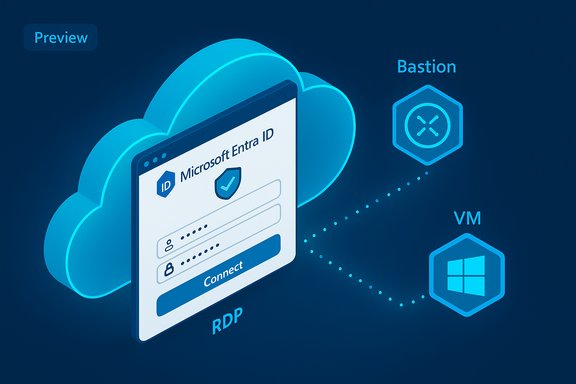
Microsoft’s long‑promised move to make identity the primary gateway for remote server access has taken a concrete step forward: Entra ID authentication for RDP inside the Azure portal is now available as a public preview for Azure Bastion sessions, allowing portal‑based RDP connections to use organizational identities instead of local VM passwords.
For years Azure Bastion has let administrators and helpdesk staff open RDP and SSH sessions to Azure virtual machines from a browser tab, removing the need for public IPs on VMs and simplifying secure remote access. That convenience, however, came with a persistent usability and security trade‑off: the portal‑hosted session still required either a local VM username/password or a password retrieved from Azure Key Vault, preserving credential sprawl and forcing teams to manage and rotate local secrets. Microsoft’s broader strategy has been to move toward identity‑first access across the stack — from SSH and native RDP clients to cloud management surfaces. Entra ID (formerly Azure AD) login for VMs has existed for native RDP flows for a while, but the missing piece was integration with the Azure portal’s embedded Bastion session. That gap is what this preview aims to close by letting users authenticate with their Entra ID account directly in the browser‑based RDP session.
At the same time, the migration highlights the operational responsibilities identity becomes burdened with. When identity is the access key to compute resources, identity availability, policy design, and recovery planning move front and center. The preview’s mixed messaging across documentation and user reports — where some knowledge base pages still describe Bastion portal RDP as not supporting Entra authentication — is a reminder that staged rollouts require measured adoption and careful validation. WindowsForums and enterprise community threads demonstrate the real‑world friction points that will decide how quickly organizations adopt this feature: extension reliability, managed identity prerequisites, Conditional Access nuance, and client compatibility. Teams that prepare for those operational realities will reap the security and usability benefits of identity‑first portal access.
For IT teams, the immediate takeaway is simple: test aggressively in a controlled pilot, harden the prerequisites (managed identity, DNS/endpoint reachability), and prepare policy exceptions and break‑glass plans. For organizations that do this work now, the preview represents a meaningful step toward a cleaner, safer remote access model — one where identity, not a hidden password, unlocks the machine.
Source: Windows Report Entra ID login is finally coming to RDP in the Azure portal
 Background
For years Azure Bastion has let administrators and helpdesk staff open RDP and SSH sessions to Azure virtual machines from a browser tab, removing the need for public IPs on VMs and simplifying secure remote access. That convenience, however, came with a persistent usability and security trade‑off: the portal‑hosted session still required either a local VM username/password or a password retrieved from Azure Key Vault, preserving credential sprawl and forcing teams to manage and rotate local secrets. Microsoft’s broader strategy has been to move toward identity‑first access across the stack — from SSH and native RDP clients to cloud management surfaces. Entra ID (formerly Azure AD) login for VMs has existed for native RDP flows for a while, but the missing piece was integration with the Azure portal’s embedded Bastion session. That gap is what this preview aims to close by letting users authenticate with their Entra ID account directly in the browser‑based RDP session. What’s included in the preview (quick summary)
- Portal‑based RDP via Azure Bastion can present Microsoft Entra ID (Preview) as an authentication type.
- This is currently supported for Windows VMs only when the VM is configured for Entra ID login (the AADLoginForWindows extension must be enabled).
- Users must be assigned the Virtual Machine User Login or Virtual Machine Administrator Login role to sign in using Entra credentials.
How it works (technical overview)
Identity as the primary credential
When you choose Microsoft Entra ID as the authentication type from the VM > Connect > Bastion blade in the Azure portal, the Bastion control‑plane initiates an Entra interactive sign‑in flow. The browser presents the Entra ID sign‑in dialog, the user authenticates (including whatever Conditional Access or MFA controls are required), and Azure issues the appropriate access token that the Bastion service uses to establish the RDP session on the VM without requiring a local password.Required VM configuration
- AADLoginForWindows extension on the VM (installed during VM creation or added afterwards). This extension is responsible for the VM’s Entra‑join and for installing the credential providers needed for token‑based logon.
- System‑assigned managed identity is often required for the extension to complete the join operation reliably; many troubleshooting posts show the extension failing silently if the managed identity is missing.
- Assign either Virtual Machine User Login or Virtual Machine Administrator Login to the Entra user (or the relevant group). These role assignments are enforced by the sign‑in flow.
Operational caveats
- Portal RDP + Entra authentication currently applies only to Windows VMs; SSH in the portal still uses other methods and native client flows differ. The feature’s support by region and SKU can vary during preview.
- Some Azure docs and forum guidance still reflect the earlier limitation (Bastion portal sessions not supporting Entra RDP). That inconsistency underscores the nature of a staged preview rollout: tenants should validate the behavior in their own environment rather than assume global availability.
How to try the preview (practical checklist)
Follow these steps in sequence to test Entra ID sign‑in for portal RDP:- Ensure your VM OS is supported (Windows 10/11 or Windows Server versions supported for Entra sign‑in).
- Enable Login with Microsoft Entra ID on the VM during creation or add the AADLoginForWindows extension to an existing VM. Confirm ProvisioningState: Succeeded.
- Enable a system‑assigned managed identity on the VM if not already present — this avoids common AAD join failures.
- Assign Virtual Machine User Login (for non‑admins) or Virtual Machine Administrator Login to the user or a group in Access control (IAM).
- From the Azure portal, open the VM blade > Connect > Bastion. Select Protocol: RDP and Authentication type: Microsoft Entra ID (Preview), then click Connect.
Why this matters: key benefits
- Reduce credential sprawl. Removing the need to stash or rotate local VM passwords or Key Vault secrets simplifies administration and cuts an obvious attack surface.
- Centralized access control. Role assignments, Conditional Access policies, and Entra conditional policies now apply directly to portal sessions, aligning administrative access with corporate identity controls.
- Single sign‑on and auditability. Sessions authenticated through Entra mean sign‑ins are logged and governed by tenant identity audit trails and Conditional Access signals, improving forensic visibility.
- Streamlined user experience. Helpdesk or engineers no longer need to hunt for local credentials—portal login becomes a one‑click operation when prerequisites are satisfied.
Risks, limitations and real‑world friction
Identity‑first access is powerful, but the shift introduces new operational failure modes and governance requirements.Conditional Access and MFA complexity
Conditional Access and MFA rules can inadvertently block portal‑based Entra sign‑ins, particularly if policies require device compliance or block certain client apps. Administrators must review and potentially exclude the Microsoft Azure Windows Virtual Machine Sign‑in app from policies intended for interactive web apps, or craft targeted policies for VM sign‑in. Several Microsoft Q&A threads show admins troubleshooting sign‑in failures traced to Conditional Access and per‑user MFA settings.Device and client constraints
To RDP with Entra credentials (even through the portal), devices and clients often need to be Entra joined/registered or hybrid‑joined in the same directory. Some client platforms (macOS, older RDP clients) have functional limits; in some cases, native clients are supported while portal flows differ. Expect to test client compatibility across your support matrix.Extension and join fragility
The AADLoginForWindows extension and the VM’s ability to Entra‑join can fail for environmental reasons—DNS configuration, blocked endpoints, missing managed identities, or firewall rules. Community troubleshooting shows that missing managed identity or inaccessible Entra endpoints are recurring root causes. Plan for automation and validation to avoid mass provisioning failures when you roll this out at scale.Operational single point of failure
Centralizing access on Entra means tenant‑level identity problems (or Conditional Access misconfiguration) can impact access to many VMs simultaneously. Maintain emergency break‑glass accounts and local admin credentials in secure vaults with out‑of‑band recovery procedures. WindowsForum discussions emphasize the need for robust recovery playbooks before wide adoption.Feature parity and preview caveats
Some features expected by admins—such as graphical session recording during Bastion RDP—may not be compatible with Entra ID portal auth (Microsoft docs list limitations). As with any preview, capabilities and constraints can change during the rollout. Validate the feature matrix for your target SKUs and regions.Practical rollout recommendations for IT teams
To adopt Entra ID RDP in a controlled, low‑risk way, use the following phased approach:- Pilot (one subscription / small resource group)
- Choose a small set of test VMs and users.
- Enable Login with Entra ID and install AADLoginForWindows.
- Assign roles to a testing group and validate portal sign‑in flows.
- Harden prerequisites
- Confirm managed identity is enabled on VM images or provisioning templates (ARM/Bicep/Terraform).
- Ensure VM networking allows the Entra endpoints (login.microsoftonline.com, enterpriseregistration.windows.net, device.login.microsoftonline.com, etc..
- Update Conditional Access and MFA policies
- Review policies affecting the Microsoft Azure Windows Virtual Machine Sign‑in app; create exceptions or targeted policies to avoid blocking the portal flow. Disable legacy per‑user MFA enforcement for test accounts if it prevents non‑interactive sign‑ins.
- Test failure modes and recovery
- Validate that local admin access or a secure break‑glass path exists if Entra authentication fails.
- Script monitoring alerts for AADLoginForWindows provisioning failures and dsregcmd join state issues.
- Expand with guardrails
- Roll out to production groups once the pilot is stable. Apply least‑privilege Role‑Based Access Control for VM login roles and monitor sign‑in logs and audit trails for anomalous patterns.
Troubleshooting checklist (quick reference)
- Confirm AADLoginForWindows provisioning state = Succeeded.
- Verify the VM has a system‑assigned managed identity if required.
- Run dsregcmd /status inside the VM to confirm AzureAdJoined: YES.
- Check Conditional Access policies and per‑user MFA settings that may block the app.
- Ensure required Entra endpoints are reachable from the VM (DNS/firewall).
- Keep a secure local admin account in vault as a fallback.
The big picture: why identity‑first portal RDP is a meaningful step
This change is more than a convenience feature. It ties remote infrastructure access into the tenant’s identity fabric: the same controls, the same audit trails, and the same governance points that protect SaaS and internal apps. For organizations moving to Zero Trust, that consolidation is both strategic and practical.At the same time, the migration highlights the operational responsibilities identity becomes burdened with. When identity is the access key to compute resources, identity availability, policy design, and recovery planning move front and center. The preview’s mixed messaging across documentation and user reports — where some knowledge base pages still describe Bastion portal RDP as not supporting Entra authentication — is a reminder that staged rollouts require measured adoption and careful validation. WindowsForums and enterprise community threads demonstrate the real‑world friction points that will decide how quickly organizations adopt this feature: extension reliability, managed identity prerequisites, Conditional Access nuance, and client compatibility. Teams that prepare for those operational realities will reap the security and usability benefits of identity‑first portal access.
Conclusion
Microsoft’s public preview of Entra ID authentication for RDP in the Azure portal modernizes Bastion’s browser experience by replacing scattered local credentials with centralized, auditable identity‑based access. The security upside — reduced password sprawl, centralized policy enforcement, and improved auditing — is clear. However, the feature also raises new operational priorities: ensuring the AADLoginForWindows extension and managed identities work reliably at scale, shaping Conditional Access to allow VM sign‑in flows, and building recovery plans for identity outages.For IT teams, the immediate takeaway is simple: test aggressively in a controlled pilot, harden the prerequisites (managed identity, DNS/endpoint reachability), and prepare policy exceptions and break‑glass plans. For organizations that do this work now, the preview represents a meaningful step toward a cleaner, safer remote access model — one where identity, not a hidden password, unlocks the machine.
Source: Windows Report Entra ID login is finally coming to RDP in the Azure portal
