

Microsoft’s April Excel update looks small if you count features the old way. There are only two headline items: a modernized comments experience on iPhone and a larger bundle of Edit with Copilot upgrades across Windows, Mac, and the web. But that tally misses the real story. Excel is moving from “AI can suggest what to do” toward “AI can directly alter the workbook,” and that changes the trust model for the world’s most consequential spreadsheet.
The familiar monthly “what’s new” cadence invites readers to treat Excel like any other app: a few buttons here, a refreshed pane there, a better mobile workflow for good measure. April 2026 is more important than that. Microsoft is not merely adding another Copilot affordance; it is reorganizing the user’s relationship with the grid.
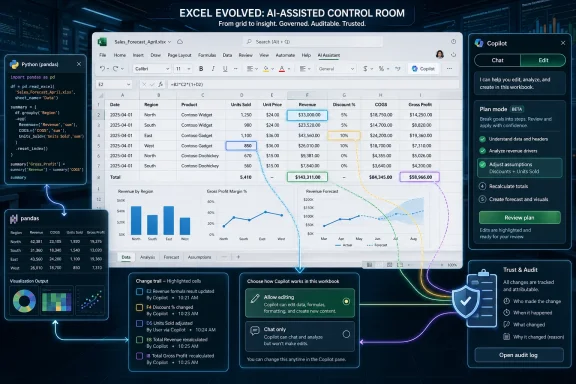
The new Chat/Edit switcher is the giveaway. “Chat only” keeps Copilot in the advisory role that most users now understand: ask a question, get an answer, maybe copy a formula or follow a suggested workflow. “Allow editing” moves Copilot into the workbook itself, where it can create content, apply formatting, build formulas, and make native Excel changes.
That distinction matters because Excel has always been an unusually high-stakes application masquerading as an ordinary productivity tool. A bad paragraph in Word embarrasses you; a bad spreadsheet can misstate revenue, derail a forecast, or quietly poison a decision chain for months. The switcher is Microsoft acknowledging that advice and action are not the same thing.
The more controversial detail is that Microsoft says Allow editing is enabled by default for many eligible users with Copilot access. That may be sensible if the company wants people to actually use the feature, but it also means the safe, familiar Copilot posture is no longer necessarily the default posture. The assistant is being invited closer to the cells.
In theory, this is exactly the right design pattern. If a user asks Excel to “make a dashboard based on this data,” the assistant should not immediately begin throwing charts, PivotTables, conditional formatting, and generated formulas into the file. It should explain what it thinks the data represents, how it intends to structure the analysis, which visualizations it wants to create, and what formulas or transformations may be needed.
That turns Copilot into something closer to a junior analyst who must show its working before touching the production file. The user can approve, adjust, or reject the plan. It is Microsoft’s attempt to make agentic behavior feel less like a black box and more like a supervised workflow.
But this also reveals the direction of travel. Excel is no longer just gaining AI features; it is gaining an AI-mediated execution layer. The worksheet remains the canvas, but Copilot is becoming an operator that can decide which Excel capabilities to assemble on your behalf.
A user needs to know not only what changed, but who or what changed it. If Copilot adds formulas, restructures a table, changes labels, formats a dashboard, or inserts Python-driven analysis, the visible trace of that work is the difference between confidence and suspicion. A spreadsheet is already difficult enough to audit when humans make changes; AI assistance raises the stakes because the user may not know which operations were performed.
The one-turn limitation is worth watching. A transient visual indicator helps during interactive editing, but enterprise users will care about longer-lived reviewability. If Copilot becomes a regular participant in financial models, compliance trackers, inventory projections, and board decks, IT departments will want durable audit trails, policy controls, and clear administrative guidance.
For consumers and small teams, the highlight is probably enough to prevent immediate surprises. For regulated organizations, it is merely the beginning of the governance conversation.
That is a major capability shift because Python in Excel is not just another formula surface. It brings a data-science workflow into the spreadsheet, enabling richer analysis and visualization patterns than many ordinary Excel users could build manually. Microsoft has been integrating Python into Excel for some time, but putting Copilot in front of it changes the audience.
Before, Python in Excel primarily benefited users who knew enough Python to use it. Now, Copilot can become the interpreter between ordinary spreadsheet intent and Python-backed execution. A finance manager does not need to know the pandas syntax for grouping and charting data if Copilot can propose the analysis, generate the code, run it, and present the result inside the workbook.
That is powerful. It is also dangerous in the ordinary way powerful spreadsheet features are dangerous: not because they are malicious, but because they can produce confident-looking output that users may not fully understand. A formula error is sometimes visible; a flawed analysis pipeline can look polished.
This is where Plan mode becomes more than a UX nicety. If Copilot is going to use Python, it needs to explain why Python is being used, what assumptions it is making, and how its output maps back to the workbook. Otherwise, Excel risks turning advanced analytics into a kind of decorative automation: impressive, fast, and not always interrogated.
April’s Excel update is full of these confidence mechanisms. The Chat/Edit switcher defines permission. Plan mode defines intent. Change highlighting defines traceability. Python invocation expands capability while, ideally, remaining wrapped in explanation.
That is the right architecture for AI in productivity software. The worst version of Copilot would be an overeager assistant that edits first and explains later. The better version behaves like a controlled system: it asks for authority, lays out a plan, performs the work, and makes the results inspectable.
Still, the burden shifts to Microsoft to make those controls obvious and reliable. If users do not understand when Copilot is merely chatting versus when it is empowered to edit, the switcher becomes theater. If Plan mode produces vague rationales, it becomes a speed bump. If change indicators are too fleeting, they become decoration rather than accountability.
That dual identity makes AI integration complicated. Microsoft must serve the user who wants a simple dashboard from a messy table, the analyst who wants help finding outliers, the accountant who wants formula suggestions, and the enterprise admin who wants to prevent unmanaged automation from rewriting sensitive workbooks.
The Copilot direction blurs familiar boundaries. Is a Copilot-generated dashboard a user-authored artifact, an AI-authored artifact, or a hybrid? If Python code is generated and executed inside Excel, who owns the validation burden? If a workbook moves between users with different Copilot entitlements, what happens to the AI-created parts?
These are not reasons to reject the feature. They are reasons to treat it as more than a convenience update. Excel’s power has always come from letting users build systems without calling them systems. Copilot accelerates that pattern.
But it fits the broader Microsoft 365 strategy. Excel is no longer a desktop file editor with cloud sync bolted on. It is a collaborative workspace that must remain usable across desktop, web, and mobile contexts, even when the heavy analytical work still happens on a larger screen.
Comments are one of the places where mobile Excel can realistically matter. Few people want to rebuild a workbook on a phone, but many need to review a number, respond to a colleague, clarify an assumption, or approve a change while away from a desk. A cleaner comments experience reduces friction in that review loop.
In that sense, April’s two feature areas are connected. Copilot is making more changes inside workbooks, and comments are part of how teams negotiate, question, and approve changes. The future Excel workflow is not just “AI edits the file”; it is “AI edits, humans review, and collaboration tools carry the accountability.”
That patchwork matters because Microsoft’s demos increasingly show a version of Office that many users do not quite have. A consumer with one Microsoft 365 plan, a commercial user with another, and a managed enterprise employee under strict policy may all open “Excel” and encounter different Copilot behavior. Even within eligible populations, staged rollouts mean the feature set can vary.
This is not new for Microsoft 365, but AI makes it more visible. Users do not merely ask whether Excel has a feature; they ask whether their Copilot can edit, whether it can use Python, whether it can access the file context, whether their admin disabled something, and whether the web, Mac, Windows, or iOS version behaves the same way.
For IT departments, that means communication matters. If Allow editing appears by default for many users, admins should know who is eligible, what controls exist, and how support desks should explain the difference between chat assistance and direct editing. The feature is user-facing, but the rollout is organizational.
A novice can now ask for a dashboard rather than learn every intermediate step first. An intermediate user can use Copilot to draft formulas, clean data, or propose visualizations. An advanced user can treat Copilot as a fast but fallible assistant, useful for scaffolding work but not a substitute for judgment.
The winners will be users who understand enough Excel to evaluate Copilot’s output. The risk is that people who do not understand the underlying logic may accept polished workbooks too quickly. AI narrows the gap between idea and artifact, but it does not eliminate the gap between artifact and correctness.
That is the uncomfortable truth behind the productivity pitch. Copilot can make Excel faster, but faster is not the same as safer. The best users will become reviewers, editors, and system designers; the worst outcomes will come from treating AI-generated spreadsheets as self-validating.
That integration gives Microsoft an advantage over generic AI tools. A chatbot can explain how to build a dashboard; Excel Copilot can potentially build it with native tables, formulas, charts, and formatting. A chatbot can write Python; Excel Copilot can use Python in the context of the workbook and return results where the user is already working.
The same integration also raises expectations. Once Copilot is inside Excel, users will expect it to respect workbook structure, preserve formatting, understand named ranges, avoid breaking formulas, and behave predictably across complex files. The closer AI gets to the production artifact, the less tolerance users have for hand-wavy output.
Microsoft’s challenge is therefore not just model quality. It is application quality. Copilot must behave like Excel, not like a clever outsider describing Excel.
Microsoft has been careful to present Copilot as a user-controlled experience, and the April features reinforce that message. But enterprise trust is built through controls, not slogans. Admins will want to know whether Copilot-edited workbooks can be reviewed at scale, whether sensitive data classifications are respected, and whether Python-backed analysis introduces new compliance considerations.
There is also a support problem. When an AI assistant makes a workbook change that a user approved but did not understand, who troubleshoots the result? The help desk may be asked to explain formulas, charts, Python output, and Copilot behavior in the same ticket. That is not a small operational change.
The likely near-term answer is policy segmentation. Some organizations will embrace Edit with Copilot broadly. Others will allow it only for certain departments or data classes. Still others will keep Copilot in a chat-only posture until audit and governance tooling matures.
That makes Excel a proving ground. If Microsoft can make users comfortable with Copilot planning and executing workbook changes, it can apply the same pattern across Word, PowerPoint, Outlook, Teams, and business applications. The April Excel update is not an isolated productivity tweak; it is part of a broader push to make Copilot a supervised actor inside Microsoft 365.
The sequence is easy to see. First, Copilot answers questions. Then it drafts content. Then it edits files. Then it plans multi-step work. Then it invokes specialized tools like Python. Eventually, the assistant becomes a coordinator of work across documents, messages, meetings, and workflows.
That future may be useful, lucrative, and occasionally unnerving. Microsoft’s job is to make the transition feel controlled rather than imposed. Excel users, perhaps more than anyone, will notice when control is real and when it is merely implied.
The headline count is misleading. Two feature entries can still represent a meaningful shift if one of them changes who is allowed to act inside the workbook. Chat/Edit switching, Plan mode, change highlighting, and Python invocation are not random enhancements; they are the scaffolding for letting AI do work while keeping humans nominally in charge.
The question now is whether that scaffolding holds under real-world pressure. Spreadsheets are messy, business logic is often undocumented, and users routinely ask software to do things that sound simple but depend on context no model can safely infer. Copilot will need to be cautious enough to avoid costly mistakes and useful enough that people do not ignore it.
Excel’s April 2026 update is therefore less about the number of new features than about the direction of authority. Microsoft is teaching Excel to move from advice to action, and the next phase will be defined by whether users, admins, and auditors believe the application can make that leap without turning the world’s favorite business tool into a faster way to be wrong.
Source: Neowin Here are all the new features Microsoft added to Excel in April 2026
 Excel’s Quiet Month Is Really a Control-Plane Release
The familiar monthly “what’s new” cadence invites readers to treat Excel like any other app: a few buttons here, a refreshed pane there, a better mobile workflow for good measure. April 2026 is more important than that. Microsoft is not merely adding another Copilot affordance; it is reorganizing the user’s relationship with the grid.The new Chat/Edit switcher is the giveaway. “Chat only” keeps Copilot in the advisory role that most users now understand: ask a question, get an answer, maybe copy a formula or follow a suggested workflow. “Allow editing” moves Copilot into the workbook itself, where it can create content, apply formatting, build formulas, and make native Excel changes.
That distinction matters because Excel has always been an unusually high-stakes application masquerading as an ordinary productivity tool. A bad paragraph in Word embarrasses you; a bad spreadsheet can misstate revenue, derail a forecast, or quietly poison a decision chain for months. The switcher is Microsoft acknowledging that advice and action are not the same thing.
The more controversial detail is that Microsoft says Allow editing is enabled by default for many eligible users with Copilot access. That may be sensible if the company wants people to actually use the feature, but it also means the safe, familiar Copilot posture is no longer necessarily the default posture. The assistant is being invited closer to the cells.
The Assistant Is Becoming an Operator
The old pitch for Copilot in Excel was that it could help users understand data faster. The newer pitch is that it can execute work. April’s Plan mode pushes the product deeper into that second category by having Copilot generate a multi-step plan before it changes the workbook.In theory, this is exactly the right design pattern. If a user asks Excel to “make a dashboard based on this data,” the assistant should not immediately begin throwing charts, PivotTables, conditional formatting, and generated formulas into the file. It should explain what it thinks the data represents, how it intends to structure the analysis, which visualizations it wants to create, and what formulas or transformations may be needed.
That turns Copilot into something closer to a junior analyst who must show its working before touching the production file. The user can approve, adjust, or reject the plan. It is Microsoft’s attempt to make agentic behavior feel less like a black box and more like a supervised workflow.
But this also reveals the direction of travel. Excel is no longer just gaining AI features; it is gaining an AI-mediated execution layer. The worksheet remains the canvas, but Copilot is becoming an operator that can decide which Excel capabilities to assemble on your behalf.
The Revert Button Is a Trust Feature, Not a Convenience
Microsoft’s decision to visually highlight Copilot-made changes for one turn after a prompt sounds minor. It is not. In an AI-edited workbook, provenance becomes a core feature.A user needs to know not only what changed, but who or what changed it. If Copilot adds formulas, restructures a table, changes labels, formats a dashboard, or inserts Python-driven analysis, the visible trace of that work is the difference between confidence and suspicion. A spreadsheet is already difficult enough to audit when humans make changes; AI assistance raises the stakes because the user may not know which operations were performed.
The one-turn limitation is worth watching. A transient visual indicator helps during interactive editing, but enterprise users will care about longer-lived reviewability. If Copilot becomes a regular participant in financial models, compliance trackers, inventory projections, and board decks, IT departments will want durable audit trails, policy controls, and clear administrative guidance.
For consumers and small teams, the highlight is probably enough to prevent immediate surprises. For regulated organizations, it is merely the beginning of the governance conversation.
Python Gives Copilot a Sharper Knife
The most technically interesting April addition is Copilot’s ability to use Python in Excel. Users can explicitly ask Copilot to use Python for analysis, or Copilot can invoke it when it decides Python is appropriate.That is a major capability shift because Python in Excel is not just another formula surface. It brings a data-science workflow into the spreadsheet, enabling richer analysis and visualization patterns than many ordinary Excel users could build manually. Microsoft has been integrating Python into Excel for some time, but putting Copilot in front of it changes the audience.
Before, Python in Excel primarily benefited users who knew enough Python to use it. Now, Copilot can become the interpreter between ordinary spreadsheet intent and Python-backed execution. A finance manager does not need to know the pandas syntax for grouping and charting data if Copilot can propose the analysis, generate the code, run it, and present the result inside the workbook.
That is powerful. It is also dangerous in the ordinary way powerful spreadsheet features are dangerous: not because they are malicious, but because they can produce confident-looking output that users may not fully understand. A formula error is sometimes visible; a flawed analysis pipeline can look polished.
This is where Plan mode becomes more than a UX nicety. If Copilot is going to use Python, it needs to explain why Python is being used, what assumptions it is making, and how its output maps back to the workbook. Otherwise, Excel risks turning advanced analytics into a kind of decorative automation: impressive, fast, and not always interrogated.
Microsoft Is Selling Confidence as Much as Capability
The phrase “complex agentic tasks” is the kind of Microsoft 365 language that can make normal users’ eyes glaze over. But behind it is a clear product thesis: people will let AI do more if the software gives them enough checkpoints.April’s Excel update is full of these confidence mechanisms. The Chat/Edit switcher defines permission. Plan mode defines intent. Change highlighting defines traceability. Python invocation expands capability while, ideally, remaining wrapped in explanation.
That is the right architecture for AI in productivity software. The worst version of Copilot would be an overeager assistant that edits first and explains later. The better version behaves like a controlled system: it asks for authority, lays out a plan, performs the work, and makes the results inspectable.
Still, the burden shifts to Microsoft to make those controls obvious and reliable. If users do not understand when Copilot is merely chatting versus when it is empowered to edit, the switcher becomes theater. If Plan mode produces vague rationales, it becomes a speed bump. If change indicators are too fleeting, they become decoration rather than accountability.
Excel’s Grid Has Always Been a Programming Environment
Part of the reason this update matters is that Excel has never been just a spreadsheet. It is a programming environment with cells instead of files, formulas instead of functions, and a user base that includes both casual list-makers and people running mission-critical business processes on undocumented workbook logic.That dual identity makes AI integration complicated. Microsoft must serve the user who wants a simple dashboard from a messy table, the analyst who wants help finding outliers, the accountant who wants formula suggestions, and the enterprise admin who wants to prevent unmanaged automation from rewriting sensitive workbooks.
The Copilot direction blurs familiar boundaries. Is a Copilot-generated dashboard a user-authored artifact, an AI-authored artifact, or a hybrid? If Python code is generated and executed inside Excel, who owns the validation burden? If a workbook moves between users with different Copilot entitlements, what happens to the AI-created parts?
These are not reasons to reject the feature. They are reasons to treat it as more than a convenience update. Excel’s power has always come from letting users build systems without calling them systems. Copilot accelerates that pattern.
The Mobile Update Is Small, but It Fits the Larger Strategy
Compared with Edit with Copilot, the modernized comments experience on Excel for iOS is modest. Microsoft says the updated interface is intended to make collaboration easier on an iPhone. That sounds like the sort of mobile refinement most users will appreciate and few will remember.But it fits the broader Microsoft 365 strategy. Excel is no longer a desktop file editor with cloud sync bolted on. It is a collaborative workspace that must remain usable across desktop, web, and mobile contexts, even when the heavy analytical work still happens on a larger screen.
Comments are one of the places where mobile Excel can realistically matter. Few people want to rebuild a workbook on a phone, but many need to review a number, respond to a colleague, clarify an assumption, or approve a change while away from a desk. A cleaner comments experience reduces friction in that review loop.
In that sense, April’s two feature areas are connected. Copilot is making more changes inside workbooks, and comments are part of how teams negotiate, question, and approve changes. The future Excel workflow is not just “AI edits the file”; it is “AI edits, humans review, and collaboration tools carry the accountability.”
The Licensing Story Remains the Friction Point
The practical reality is that not every Excel user will see these capabilities at the same time, or at all. Copilot availability depends on subscription, licensing, platform, rollout status, and sometimes organizational policy. Python in Excel has its own eligibility and platform constraints. Enterprise admins can also shape what users can access.That patchwork matters because Microsoft’s demos increasingly show a version of Office that many users do not quite have. A consumer with one Microsoft 365 plan, a commercial user with another, and a managed enterprise employee under strict policy may all open “Excel” and encounter different Copilot behavior. Even within eligible populations, staged rollouts mean the feature set can vary.
This is not new for Microsoft 365, but AI makes it more visible. Users do not merely ask whether Excel has a feature; they ask whether their Copilot can edit, whether it can use Python, whether it can access the file context, whether their admin disabled something, and whether the web, Mac, Windows, or iOS version behaves the same way.
For IT departments, that means communication matters. If Allow editing appears by default for many users, admins should know who is eligible, what controls exist, and how support desks should explain the difference between chat assistance and direct editing. The feature is user-facing, but the rollout is organizational.
The Old Excel Skill Stack Is Being Rewritten
For decades, Excel proficiency meant knowing formulas, shortcuts, PivotTables, charts, Power Query, VBA, and eventually newer tools like dynamic arrays and Python. Copilot does not erase that stack, but it changes how users climb it.A novice can now ask for a dashboard rather than learn every intermediate step first. An intermediate user can use Copilot to draft formulas, clean data, or propose visualizations. An advanced user can treat Copilot as a fast but fallible assistant, useful for scaffolding work but not a substitute for judgment.
The winners will be users who understand enough Excel to evaluate Copilot’s output. The risk is that people who do not understand the underlying logic may accept polished workbooks too quickly. AI narrows the gap between idea and artifact, but it does not eliminate the gap between artifact and correctness.
That is the uncomfortable truth behind the productivity pitch. Copilot can make Excel faster, but faster is not the same as safer. The best users will become reviewers, editors, and system designers; the worst outcomes will come from treating AI-generated spreadsheets as self-validating.
Microsoft Is Choosing Integration Over Separation
There is a strategic reason Microsoft is putting these features directly into Excel rather than leaving them in a separate AI chat surface. The spreadsheet is where the work already lives. If Copilot remains outside the workbook, it is a consultant. If it can edit inside the workbook, it becomes part of the application.That integration gives Microsoft an advantage over generic AI tools. A chatbot can explain how to build a dashboard; Excel Copilot can potentially build it with native tables, formulas, charts, and formatting. A chatbot can write Python; Excel Copilot can use Python in the context of the workbook and return results where the user is already working.
The same integration also raises expectations. Once Copilot is inside Excel, users will expect it to respect workbook structure, preserve formatting, understand named ranges, avoid breaking formulas, and behave predictably across complex files. The closer AI gets to the production artifact, the less tolerance users have for hand-wavy output.
Microsoft’s challenge is therefore not just model quality. It is application quality. Copilot must behave like Excel, not like a clever outsider describing Excel.
Enterprise IT Will Care Less About Magic Than Boundaries
For WindowsForum’s sysadmin-heavy readership, the April update should trigger a familiar checklist. What is enabled by default? Which users are eligible? What data is being processed? What audit logs exist? Can the organization restrict editing while allowing chat? How does Python execution interact with data governance?Microsoft has been careful to present Copilot as a user-controlled experience, and the April features reinforce that message. But enterprise trust is built through controls, not slogans. Admins will want to know whether Copilot-edited workbooks can be reviewed at scale, whether sensitive data classifications are respected, and whether Python-backed analysis introduces new compliance considerations.
There is also a support problem. When an AI assistant makes a workbook change that a user approved but did not understand, who troubleshoots the result? The help desk may be asked to explain formulas, charts, Python output, and Copilot behavior in the same ticket. That is not a small operational change.
The likely near-term answer is policy segmentation. Some organizations will embrace Edit with Copilot broadly. Others will allow it only for certain departments or data classes. Still others will keep Copilot in a chat-only posture until audit and governance tooling matures.
The April Update Is a Preview of Office’s Agentic Future
Excel is the most revealing place for Microsoft’s agentic ambitions because the stakes are concrete. A spreadsheet is not a blank page where subjective quality can hide behind tone and style. It is a structured artifact full of dependencies, calculations, and implicit business rules.That makes Excel a proving ground. If Microsoft can make users comfortable with Copilot planning and executing workbook changes, it can apply the same pattern across Word, PowerPoint, Outlook, Teams, and business applications. The April Excel update is not an isolated productivity tweak; it is part of a broader push to make Copilot a supervised actor inside Microsoft 365.
The sequence is easy to see. First, Copilot answers questions. Then it drafts content. Then it edits files. Then it plans multi-step work. Then it invokes specialized tools like Python. Eventually, the assistant becomes a coordinator of work across documents, messages, meetings, and workflows.
That future may be useful, lucrative, and occasionally unnerving. Microsoft’s job is to make the transition feel controlled rather than imposed. Excel users, perhaps more than anyone, will notice when control is real and when it is merely implied.
A Small Changelog With a Large Blast Radius
If April’s Excel update had only delivered a refreshed comments interface on iPhone, it would have been a tidy mobile collaboration release. Instead, the Copilot changes make it a marker in Excel’s long evolution from calculator to platform to AI-assisted workbench.The headline count is misleading. Two feature entries can still represent a meaningful shift if one of them changes who is allowed to act inside the workbook. Chat/Edit switching, Plan mode, change highlighting, and Python invocation are not random enhancements; they are the scaffolding for letting AI do work while keeping humans nominally in charge.
The question now is whether that scaffolding holds under real-world pressure. Spreadsheets are messy, business logic is often undocumented, and users routinely ask software to do things that sound simple but depend on context no model can safely infer. Copilot will need to be cautious enough to avoid costly mistakes and useful enough that people do not ignore it.
Excel’s April 2026 update is therefore less about the number of new features than about the direction of authority. Microsoft is teaching Excel to move from advice to action, and the next phase will be defined by whether users, admins, and auditors believe the application can make that leap without turning the world’s favorite business tool into a faster way to be wrong.
Source: Neowin Here are all the new features Microsoft added to Excel in April 2026
